How to CRM Verify Your Data (And Keep It Clean)
Your CRM has a lying problem. 76% of organizations say less than half their CRM data is accurate and complete. Meanwhile, 70.8% of business contacts change within 12 months - new jobs, new emails, new phone numbers. If you don't verify your CRM on a regular schedule, a quarter of your sequences are hitting dead ends before a single reply comes in.
What You Need (Quick Version)
- What to verify: Not just emails. Phone numbers, firmographics, job titles, and duplicates all decay independently - and phones actually rot faster than email.
- How often: Monthly for active outbound lists. Quarterly for your full database. Anything less and you're falling behind the 2.1% monthly decay rate.
What CRM Verification Actually Means
CRM verification isn't a single action. There are six dimensions that make your data usable: Completeness, Uniqueness, Timeliness, Validity, Accuracy, and Consistency. Most teams only think about accuracy - "is this email real?" - and ignore the rest.
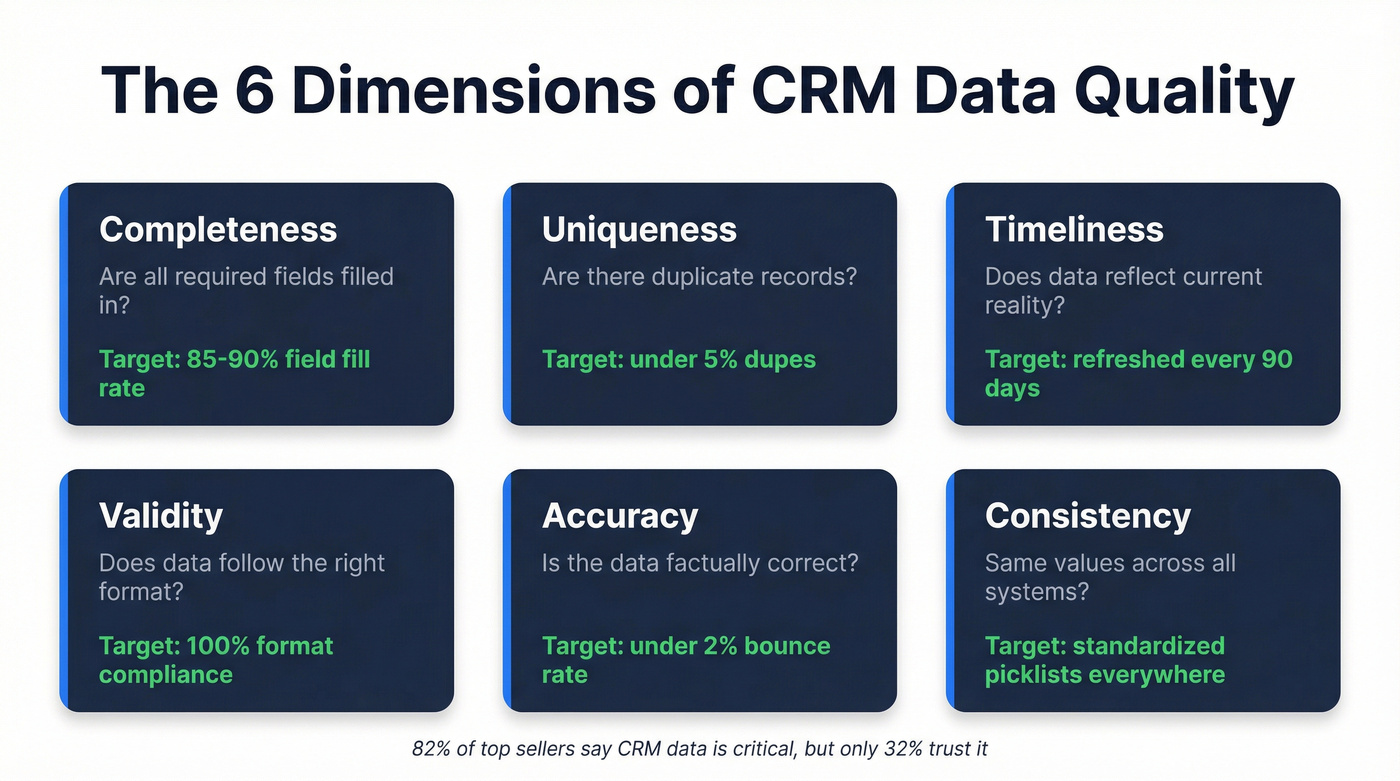
Completeness means your records have the fields filled in. The target is 85-90% field completion across contact and company records. If half your contacts are missing phone numbers or job titles, your routing rules and lead scoring break down before reps ever see the record. Uniqueness catches duplicates before they compound. Timeliness ensures records reflect reality, not last year's org chart. Validity confirms data follows the right format - a phone number that's actually a phone number. Accuracy confirms the data is factually correct. And consistency means "VP Sales" and "Vice President of Sales" resolve to the same value across every system touching your CRM.
Here's the disconnect: 82% of top sellers say CRM data is critical to their performance, yet only 32% highly trust the data they're working with. That gap is the entire reason data validation workflows exist.
Why CRM Data Goes Bad
B2B contact data decays 22.5-70.3% annually, depending on the industry and the data type. That's not a typo - the range is that wide because different fields decay at different rates. Email addresses change 37.3% of the time within a year. Phone numbers are worse at 42.9% And 30% of employees switch jobs annually, which explains why job titles and functions shift 65.8% of the time.
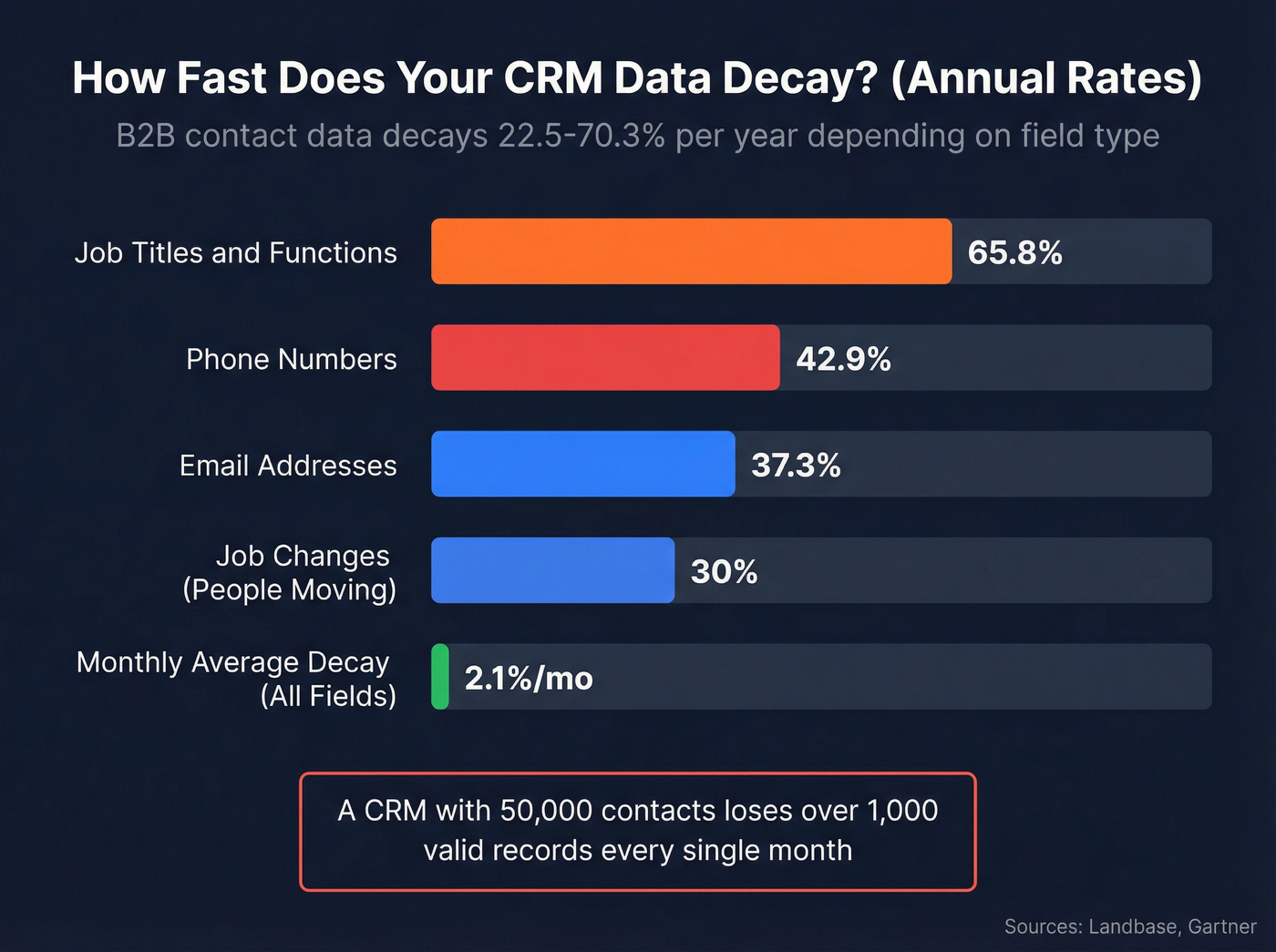
The monthly average sits around 2.1%. Sounds manageable until you do the math: a CRM with 50,000 contacts loses over 1,000 valid records every month if left unchecked.
According to Gartner research, the average business loses $15M per year due to data decay and poor data quality. Sales reps waste 27.3% of their time pursuing bad leads. That's more than a quarter of every rep's week - gone.
It helps to think about decay in four categories. Aging is the natural churn of people changing jobs and companies restructuring. Mechanical decay comes from import errors, sync failures, and field mapping mistakes. External factors include mergers, acquisitions, and market shifts that invalidate firmographic data overnight. Logical decay is subtler - data that was entered correctly but no longer reflects reality because the underlying business changed.
What to Validate in Your CRM
Emails
Email verification goes deeper than "does this address exist." A proper check covers syntax validation, DNS/MX record lookup, SMTP ping, spam trap screening, disposable domain detection, and catch-all identification. Skip any of these layers and you're leaving bounce risk on the table. (If you want a deeper breakdown, start with email verification and work backward from deliverability.)
Phone Numbers
Look, most verification tools only handle email. Phone data decays faster - 42.9% annual change rate - but gets ignored because it's harder to verify at scale. The most common complaint we see in sales communities sounds something like: "My CRM has 10,000 contacts and half the phone numbers are dead." If your outbound motion includes cold calling, phone verification deserves equal priority to email. For the mechanics, see a dedicated phone validator workflow.
Firmographics & Job Data
Company size, revenue, industry codes, and job titles all shift. Someone listed as "Director of Marketing" six months ago might be a VP now - or at a different company entirely. Firmographic freshness matters for lead scoring, routing, and territory assignment. This is where firmographic and technographic data becomes the difference between "good enough" and actually usable.
Duplicates & Field Completeness
Mid-market CRMs typically carry 5-20% duplicate records before any cleanup. Every duplicate inflates your metrics, confuses reps, and creates embarrassing double-touches. Pair dedupe with a completeness audit - records missing critical fields should get flagged for enrichment or removal. This is core CRM hygiene, not a one-off cleanup task.

Your CRM loses 1,000+ valid contacts every month. Prospeo's CRM enrichment returns 50+ data points per contact at a 92% match rate - verified emails, direct dials, fresh firmographics. All on a 7-day refresh cycle, not the 6-week industry average.
Stop sending sequences to dead ends. Verify your CRM data now.
Step-by-Step CRM Verify Workflow
Before jumping into each stage, build a CRM data validation checklist that maps every field you need to verify - emails, phones, firmographics, duplicates, and completeness - so nothing slips through during each cycle. If you're building the operating rhythm, this pairs well with a broader How to Keep CRM Data Clean framework.
Validation Gates (Pre-Entry)
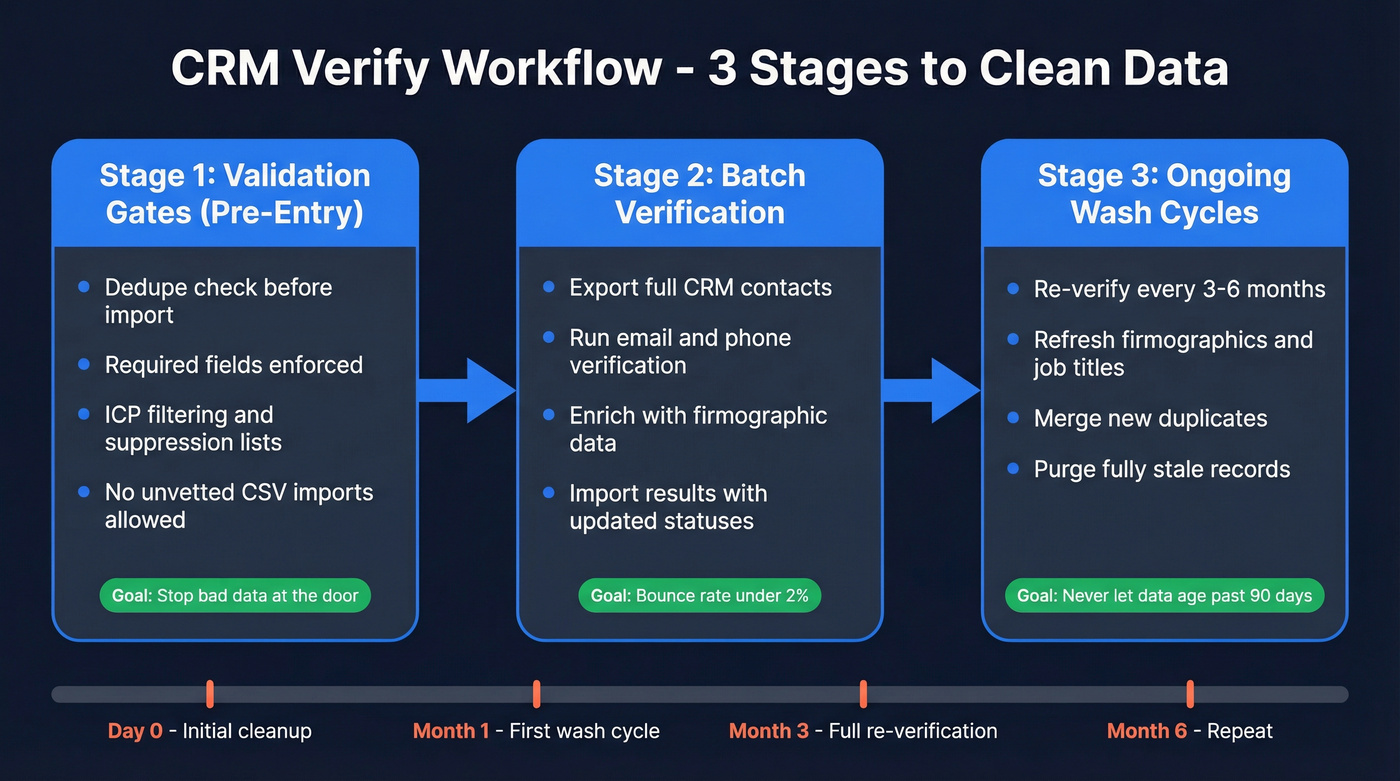
Think of this as a customs checkpoint. Before any contact enters your CRM, it should pass through dedupe checks and completeness requirements. Add ICP filtering and suppression list matching to catch records that don't belong. Lock down import permissions so reps and marketing can't dump unvetted CSVs straight into the database. Enforce required fields and standardized picklists at the point of entry.
RevOps teams consistently cite uncontrolled CSV imports as their top data quality complaint - and they're right. One bad import can poison months of clean data.
HubSpot Operations Hub and Salesforce Validation Rules handle the structural gating. For ICP filtering and enrichment at ingestion, Clay or Openprise can sit in the middleware layer.
Batch Verification
For your existing database, batch verification is the heavy lift. Export your CRM contacts, run them through verification, and import the results back with updated statuses. Connect via API or bulk upload - you'll get verified emails and direct dials back with enrichment data points per contact.
The operational threshold to hit: keep bounces under 2%, and aim closer to 1%. The global average deliverability benchmark sits at 83.1% mailbox placement - you want to be well above that. If you're troubleshooting bounce spikes, start with hard bounce triage.
Ongoing Wash Cycles
A one-time cleanup is a waste of money if you don't maintain it. Schedule wash cycles every 3-6 months: re-verify contacts, refresh firmographics, merge new duplicates, and purge records that have gone fully stale. At 2.1% monthly decay, a "clean" database becomes obsolete within 90 days without ongoing maintenance.
Let's be honest: if your average deal size is under $10k, you probably don't need ZoomInfo-level data infrastructure. A lean stack - one good verification tool, your CRM's native dedupe, and a quarterly wash cycle - will get you 90% of the way there at 10% of the cost.
Understanding Verification Results
Treat verification results as a triage system rather than a binary pass/fail.
| Result | What It Means | What to Do |
|---|---|---|
| Deliverable | Confirmed valid | Keep and send |
| Undeliverable | Confirmed invalid | Remove immediately |
| Risky (Disposable) | Temporary/throwaway | Remove |
| Risky (Accept-All) | Domain accepts everything | Segment, test small batches |
| Unknown | Verification couldn't complete | Retain, retest in 30 days |
The accept-all category is where most teams get tripped up. These domains accept mail for any address - so verification can't confirm whether a specific mailbox exists. Don't blast them at full volume. Segment them into a separate list and send in small test batches to gauge deliverability before scaling.
Unknown results mean the mail server didn't respond during verification. Don't delete them - retain for retesting. Kickbox refunds credits for unknowns after two attempts, so retesting doesn't cost extra.
Common Mistakes to Avoid
Treating cleanup as a one-time project. At 2.1% monthly decay, your freshly cleaned CRM is already degrading the day after you finish. Verification is infrastructure, not a project.
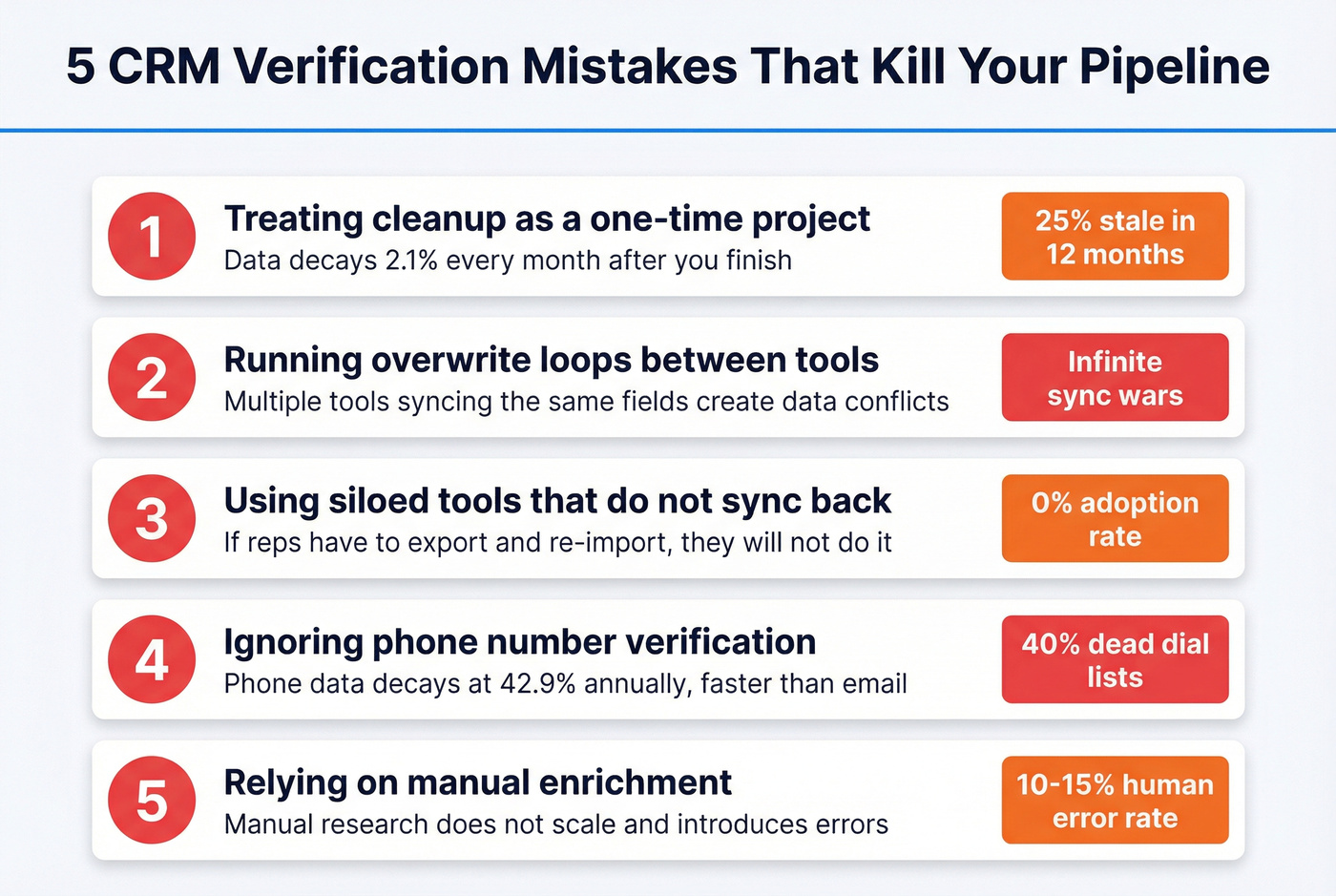
Running overwrite loops. When multiple tools sync the same fields - your enrichment provider, your CRM, your sequencer - you get data conflicts. One system overwrites another, which triggers a sync back, which overwrites again. In our experience, this is the problem that catches teams off guard most often. Establish a single source of truth hierarchy and lock overwrite logic before connecting anything.
Using siloed tools that don't sync back. A verification tool that lives outside your CRM reduces adoption to zero. If reps have to export, verify externally, and re-import, they won't do it. Native integrations aren't optional - they're the difference between a workflow that runs and one that gets abandoned.
Ignoring phone numbers. Email gets all the attention, but phone data decays faster and is harder to replace. We've seen teams spend thousands on email verification while their dial lists are 40% dead numbers. If calling is part of your motion, align this with your outbound calling strategy.
Relying on manual enrichment. Manual research introduces a 10-15% human error rate and doesn't scale. Automate verification at ingestion and on a recurring schedule.
Best Tools to Verify CRM Data at Scale
| Tool | Starting Price | Verification | Integrations | Best For |
|---|---|---|---|---|
| Prospeo | ~$0.01/email | Email (98%) + Phone | SF, HS, Clay, Zapier | Email + phone accuracy |
| Clay | $149/mo | Email (waterfall) | HubSpot, Salesforce | Multi-source waterfall |
| Apollo | $59/user/mo | Email + limited phone | SF, HubSpot | All-in-one outreach |
| Hunter | $34/mo | Email only | HS, SF, Pipedrive | Budget email-only |
| Kickbox | ~$0.01/email | Email only (95% guarantee) | HubSpot, Salesforce | Simple email cleanup |
| ZoomInfo | $14,995/yr | Email + Phone | SF, HubSpot | Enterprise with budget |

Tier 1
The impact is measurable: Snyk's team of 50 AEs went from a 35-40% bounce rate to under 5% after switching, generating 200+ new opportunities per month. CRM and CSV enrichment returns 50+ data points per contact, with an 83% match rate and a 92% API match rate. Native integrations include Salesforce, HubSpot, Smartlead, Instantly, Lemlist, Clay, Zapier, and Make. Pricing starts free with 75 emails and 100 Chrome extension credits per month - no contracts, no sales calls required.
Clay takes a different approach - waterfall enrichment that chains multiple data sources together in sequence. If your first provider doesn't find a match, Clay automatically tries the next one. Starting at $149/month, it's ideal for teams that want to layer verification providers rather than commit to one. No native phone verification, and the credit system can get expensive at scale.
Tier 2
In a benchmark of 3,000 real business emails, Hunter scored 70% accuracy - the highest in that particular test, though the dataset was sourced from Hunter's own activity patterns. What makes Hunter worth considering at $34/month is its simplicity: paste in a list, get results, move on. Email-only, no phone verification, but for teams that just need a quick email scrub on a budget, it does the job.
Apollo gives you the most for free. The free tier includes 60 mobile credits and 120 export credits per month - genuinely useful for a small team testing outbound. Paid plans start at $59/user/month with 210M contacts and 35M companies. The downside: email accuracy lags behind dedicated verification tools, and phone data is limited. Use this if you're already running Apollo for outreach and want verification built into the same workflow. Skip it if accuracy is your primary concern.
Kickbox wins on predictability. The "Guaranteed" export category comes with a 95% delivery guarantee - if a verified email bounces, you get credits back. Their result taxonomy of Deliverable, Risky, and Unknown makes handling edge cases straightforward. 100 free credits on signup, then pay-per-credit at around $0.01/email. Email-only.
Tier 3
ZoomInfo starts at $14,995/year and covers 321M contacts with both email and phone verification. Genuinely powerful, but wildly overpriced if verification is your primary need. NeverBounce operates on a credit model at roughly $0.008/email but scored lower in benchmarks at 63.17% accuracy. Instantly charges 0.25 credits per email verified with plans starting at $37/month - the right pick if you're already running Instantly for cold email.
Phone numbers decay 42.9% annually, yet most tools only verify email. Prospeo gives you 125M+ verified mobile numbers with a 30% pickup rate, plus 98%-accurate emails - for roughly $0.01 per lead. No contracts. No sales calls.
Clean emails and live direct dials in one batch verification workflow.
FAQ
How often should I verify CRM data?
Monthly for active outbound lists, quarterly for your full database. B2B data decays roughly 2.1% per month, so a one-time cleanup becomes obsolete within 90 days. Set a recurring calendar reminder or automate verification on import to stay ahead of the decay curve.
Can I verify phone numbers in my CRM, not just emails?
Most tools only handle email. For phone verification at scale, you need a platform with a dedicated mobile database - Prospeo covers 125M+ verified mobile numbers with a 30% pickup rate. This matters because phone data decays at 42.9% annually, faster than email at 37.3%.
What should I do with "accept-all" verification results?
Segment accept-all addresses into a separate list and send in small test batches of 50-100 contacts to gauge deliverability before scaling. These domains accept mail for any address, so verification can't confirm a specific mailbox exists. Never blast them at full volume - treat them as conditional sends.
What does CRM verify mean?
CRM verify is the process of validating the accuracy, completeness, and freshness of contact and company data inside your CRM. It covers email deliverability checks, phone number validation, duplicate detection, firmographic updates, and field completeness audits - ensuring every record reflects current reality.
Do I need a CRM data validation checklist?
Yes - a solid checklist covers six dimensions: completeness, uniqueness, timeliness, validity, accuracy, and consistency. Run through it before every batch import and during each quarterly wash cycle. Even a simple spreadsheet tracking these six pillars prevents verification steps from getting skipped.