

The Best CRMs with Email Tracking - And Why Half Your Open Rates Are Fake
Your SDR sends 80 cold emails on Monday. By Tuesday, the CRM shows 45 opens. She's feeling good - until you realize half those "opens" are Apple Mail preloading every message before anyone touches their inbox. The engagement data feeding your pipeline is fiction, and most CRMs with email tracking won't tell you that.
Here's the thing: if your team treats opens as "intent," you're optimizing follow-up timing around a metric that's been fundamentally compromised. Your reps are chasing ghosts instead of buyers. We've spent weeks testing nine CRMs to figure out which ones give you real engagement signals and which ones quietly lie to your dashboard.
Our Picks (TL;DR)
| Pick | One-liner |
|---|---|
| Salesflare | Best overall - tracks emails, links, and website visits automatically. $29/user/mo (annual). No hidden limits. |
| Streak | Best free option - email and link tracking free forever in Gmail. CRM features start at $49/user/mo. |
| Prospeo | Pair with any CRM - verify every email so you're tracking real engagement, not bounces. 98% accuracy, free tier available. |
Why Open Tracking Is Broken in 2026
Apple Mail Privacy Protection launched in September 2021 and quietly broke every sales team's open-rate dashboard. When an Apple Mail user receives your email, Apple's servers preload all content - including your invisible tracking pixel - before the recipient ever sees the message. The result is a "read" notification for someone who may have deleted your email without glancing at it.

The scale is staggering. Apple clients accounted for 49.29% of all email opens as of the most recent Litmus data cited by EmailTooltester. That same analysis found Apple MPP inflated newsletter opens by roughly 27%.
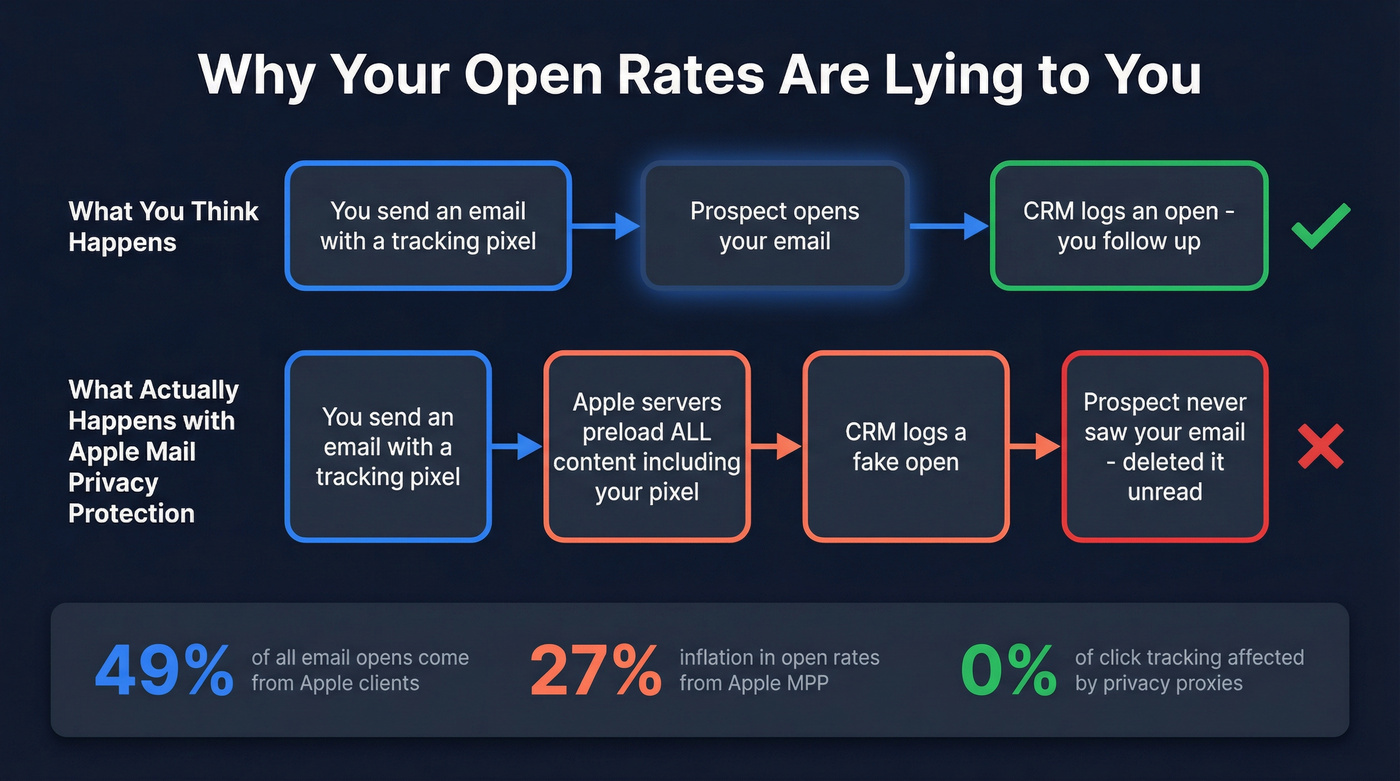
Open rates are now a noisy signal. Treat them as background context, not a trigger.
Click tracking still works because it relies on link redirects, not image loading. Reply detection is obviously reliable. And website visit tracking - which Salesflare does natively - gives you intent signals that can't be faked by a privacy proxy. Prioritize those three.
What to Look for in a Tracking-Capable CRM
Not every CRM handles tracking the same way. Before you commit, check for these capabilities.
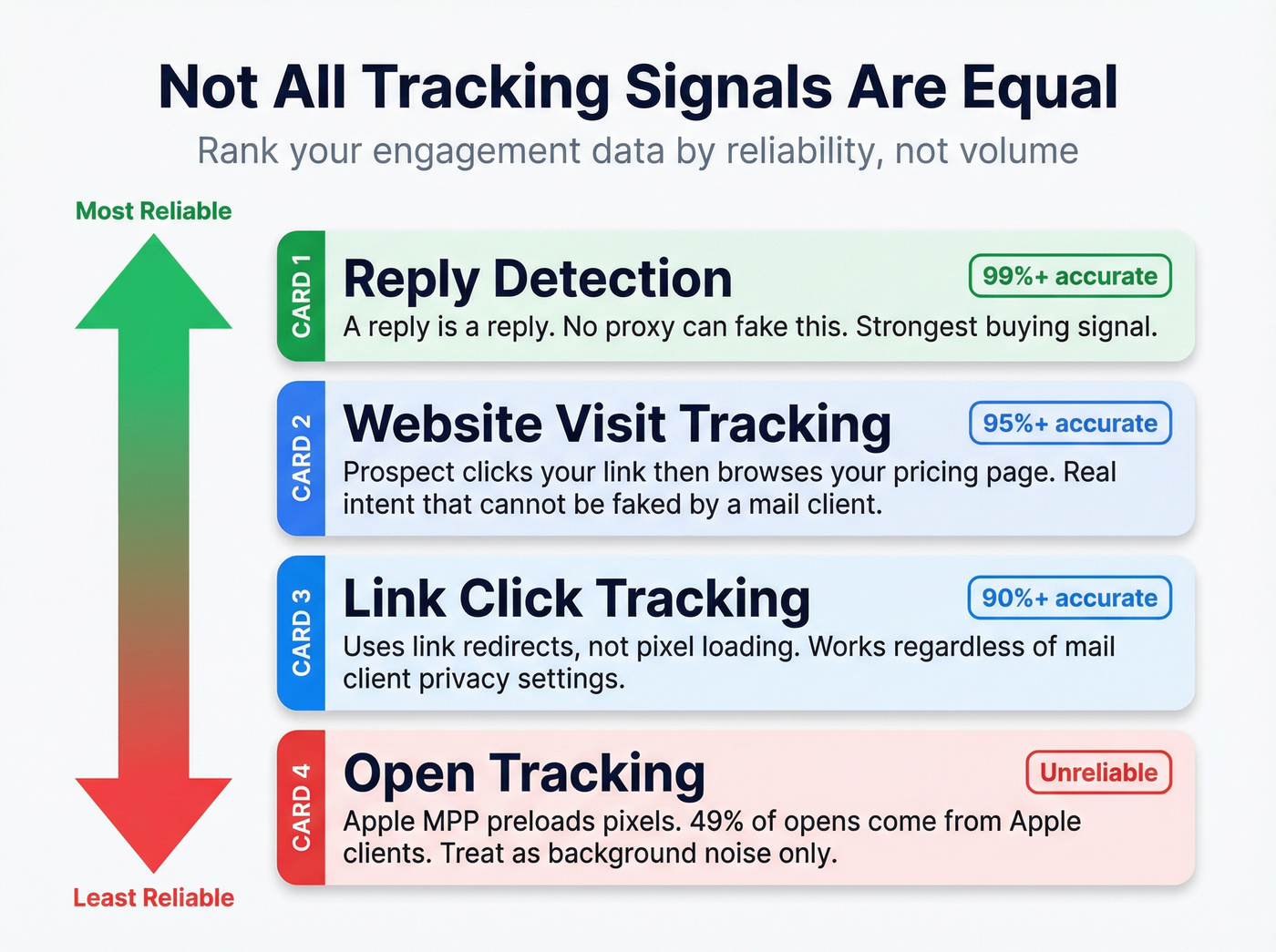
Link click tracking is the most reliable engagement indicator. Make sure your CRM wraps links and reports which ones get clicked. Reply detection should be automatic - some CRMs need manual threading, which is a dealbreaker for busy reps. Real-time notifications on desktop and mobile let reps follow up in the moment when a prospect clicks or replies.
Website visit tracking is the underrated feature. If a prospect clicks your link and then browses your pricing page, that's a buying signal most CRMs miss entirely. In our testing, this single feature changed how reps prioritized their follow-up queues more than any other signal. It's the difference between "they opened my email" and "they're actively researching our product right now."
You'll also want an engagement timeline - a per-contact activity feed showing every click, reply, and visit in chronological order - plus solid Gmail/Outlook integration so tracking works from your rep's actual inbox. And check whether there's a free tracking tier before you sign up. Some CRMs gate tracking behind paid plans without making that obvious.
Open tracking is worth having for directional context, but don't weight decisions on it.

Your CRM's email tracking is only as good as the emails you're sending. If 15% of your list bounces, you're not just losing deliverability - you're poisoning every engagement metric in your pipeline. Prospeo verifies emails at 98% accuracy before they hit your CRM, so every open, click, and reply you track is from a real prospect.
Stop tracking engagement on emails that never arrived.
Tracking Features Compared
| Tool | Click | Reply | Website Visits | Real-Time Alerts |
|---|---|---|---|---|
| Salesflare | ✓ | ✓ | ✓ | ✓ |
| Streak | ✓ | ✓ | ✗ | ✓ |
| HubSpot | ✓ | ✓ | ✓ (add-on) | ✓ |
| Pipedrive | ✓ | ✓ | ✗ | ✓ |
| Zoho CRM | ✓ | ✓ | ✗ | ✓ |
| Freshsales | ✓ | ✓ | ✗ | ✓ |
| Salesmate | ✓ | ✓ | ✗ | ✓ |
| Nutshell | ✓ | ✓ | ✗ | ✓ |
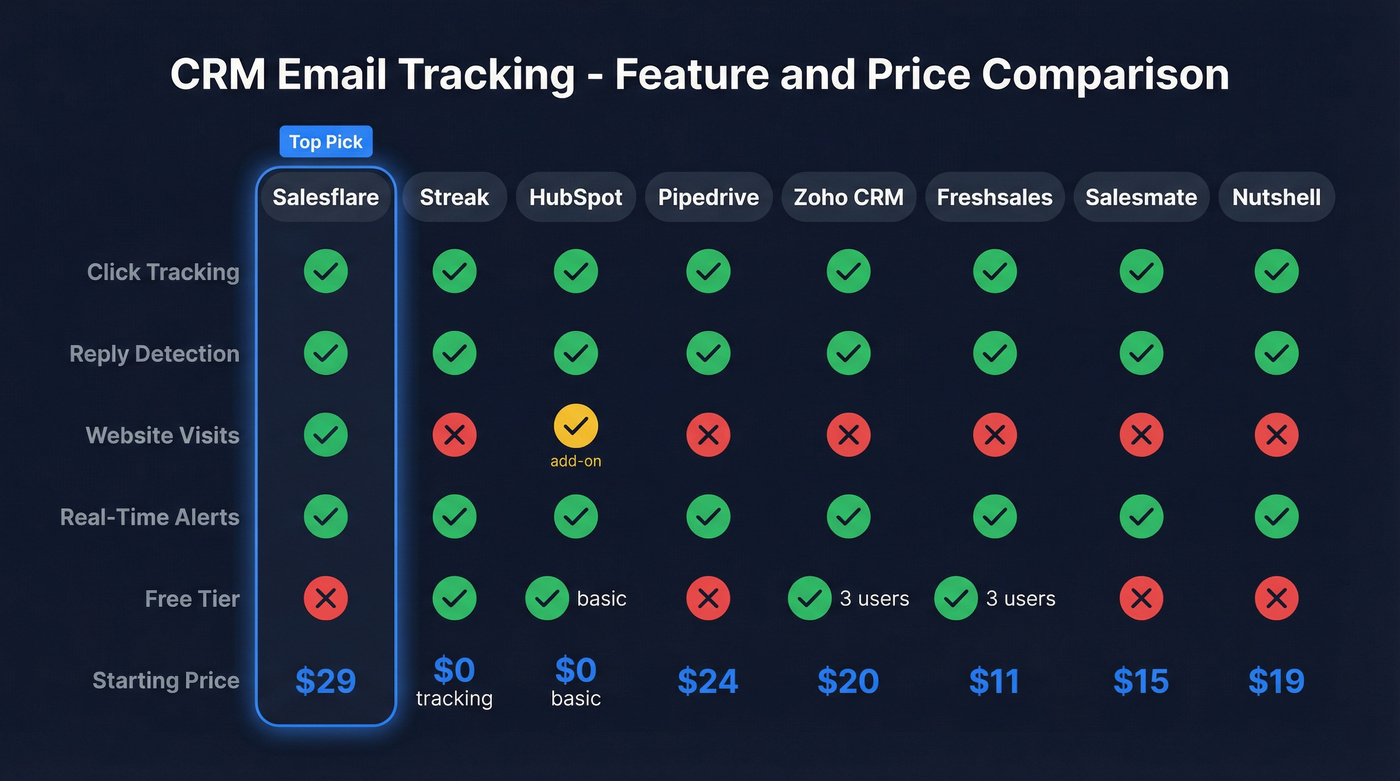
Every tool listed includes open tracking, but as we covered above, that metric is unreliable for a large share of recipients.
| Tool | Free Tier | Starting Price |
|---|---|---|
| Salesflare | No | $29/user/mo |
| Streak | ✓ (tracking) | Free (CRM: $49) |
| HubSpot | ✓ (basic) | Free (Sales: $20) |
| Pipedrive | No | $24/user/mo |
| Zoho CRM | ✓ (3 users) | $20/user/mo |
| Freshsales | ✓ (3 users) | $11/user/mo |
| Salesmate | No | $15/user/mo |
| Nutshell | No | $19/user/mo |
The 9 Best CRMs with Email Tracking
Salesflare - Best for Hands-Off Tracking
Use this if you hate manual CRM logging and want tracking that works out of the box. Skip this if you need a CRM that scales to 100+ reps with complex territory management.
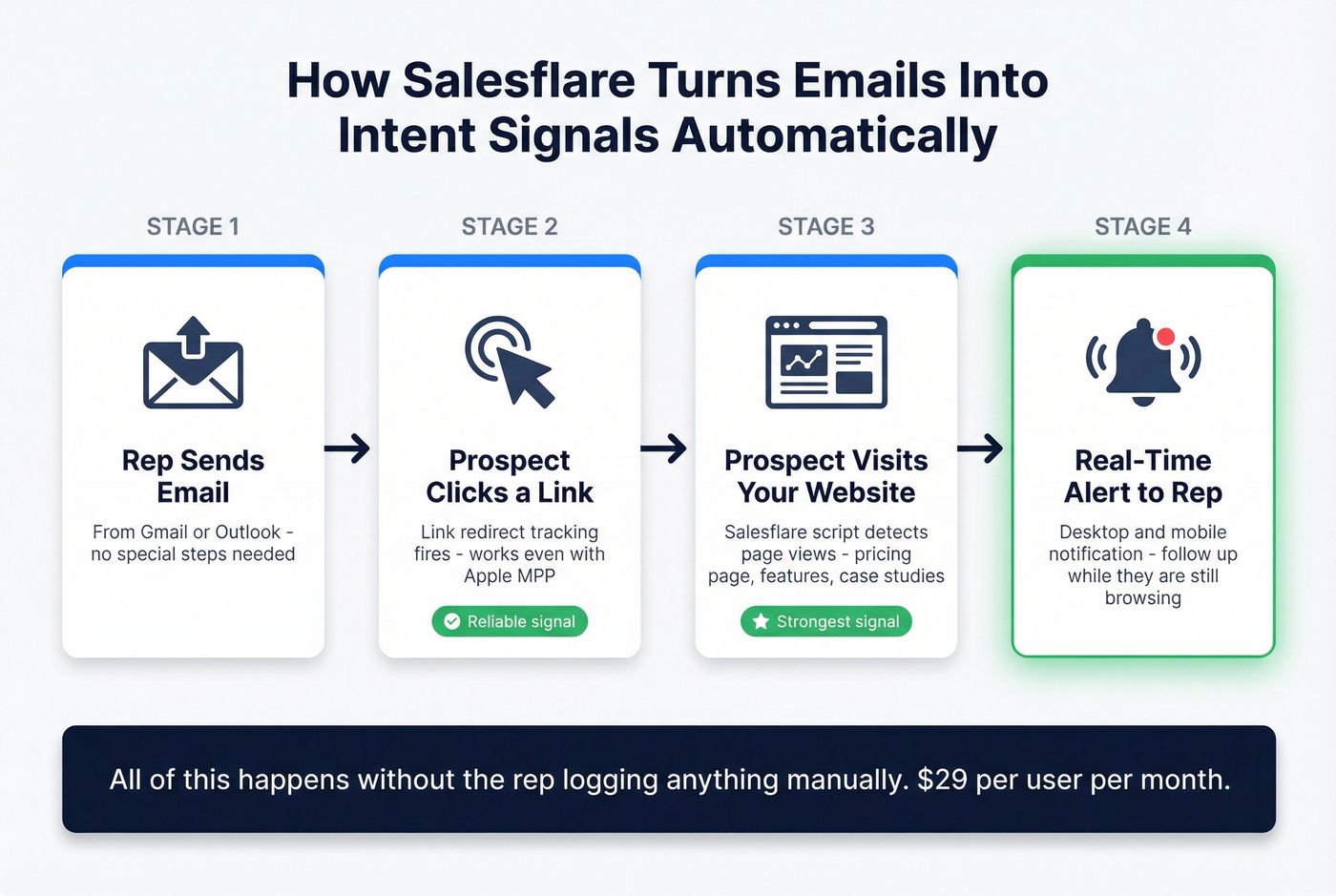
Salesflare's Growth plan ($29/user/mo annual) includes email tracking, link click tracking, and website visit tracking - the three signals most CRMs charge extra for. The website tracking requires a small script on your site, but once it's running, you see exactly which prospects browse your pages after reading your emails. In our testing, that intent signal was worth more than a hundred phantom opens.
The automatic data input is the other standout. Salesflare pulls contact and company info from email signatures, social profiles, and calendar events, then logs meetings and calls without reps lifting a finger. No hidden limits on contacts, tracked emails, or pipelines. Pro ($49/user/mo) adds advanced workflows. Enterprise ($99/user/mo, minimum 5 seats) adds custom training.
For teams under 20 reps who want tracking depth without CRM complexity, Salesflare is the pick. It won't replace Salesforce for a 200-person org, but for small and mid-size sales teams, the tracking-to-price ratio is the best we've found.
Streak - Best Free Email Tracking
Streak's free tier is genuinely impressive: email and link tracking, forever, at no cost. Install the Chrome extension and you get tracking notifications right inside Gmail. For solo founders or early-stage reps who need to know when someone clicks, this is the fastest path to visibility.

The CRM side is where it gets expensive. Pro starts at $49/user/mo annual ($59 monthly), Pro+ hits $69, and Enterprise runs $129. A 10-person team on Pro pays $490/month before you've touched a pipeline. That's real money for what's essentially a Gmail sidebar.
Streak earns a 4.5/5 on GetApp across 479 reviews, with email tracking specifically rated 4.7. The downsides: users consistently flag frequent bugs that disrupt workflow, advanced features are locked behind expensive tiers, and it's Gmail-only. Outlook teams need not apply.
Let's be honest - if your average deal size is under $15k and you're running a team of five or fewer, Streak's free tracking plus a $15/mo standalone CRM like Salesmate will outperform most $50+/user all-in-one platforms. You don't need the bundle. You need the signals.
HubSpot - Best All-in-One Platform
HubSpot is the default pick for teams that want CRM, marketing, and sales in one ecosystem. Not the strongest for tracking specifically, but the most complete platform. Open tracking uses the standard invisible pixel. Click tracking wraps your links through HubSpot's redirect. Both feed into a per-contact activity timeline that's genuinely well-designed.
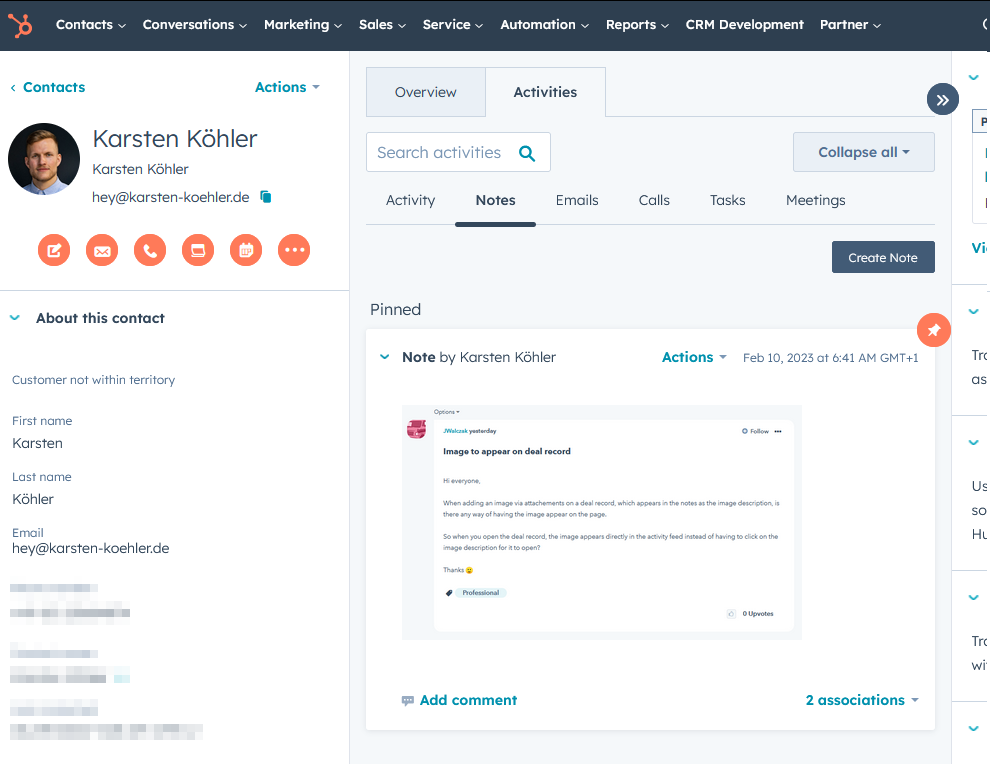
Setup requires the HubSpot Sales Chrome extension for Gmail or the Outlook add-in. Real-time notifications hit desktop and mobile. The integration is seamless once you connect your inbox - every open, click, and reply logs automatically against the contact record without reps switching tabs.
HubSpot's free CRM supports email tracking via its sales extension, which is enough for small teams testing the waters. Sales Hub Starter runs around $20/month. CRM Suite Professional starts at $100/month plus a one-time $1,500 onboarding fee. That onboarding cost catches people off guard. Budget for it.
The tracking works fine. It just isn't differentiated. You're buying HubSpot for the platform, not the tracking. If tracking depth is your primary concern, Salesflare gives you more signal per dollar.
Pipedrive - Best for Pipeline-First Teams
Pipedrive tracks opens and link clicks with real-time alerts in the notifications panel. The pipeline visualization is best-in-class, and email sync is available on Growth and higher plans.
The limitations are worth knowing upfront. If you send to multiple recipients, Pipedrive can tell you the email was opened but can't identify which recipient did it. Viewing your own email in the Sent folder of an external client can trigger a false open. Forwarded emails aren't tracked at all. And if the recipient blocks images, open tracking dies - though link tracking still works.
The Campaigns add-on costs an extra $16/mo on top of your plan. For pipeline management with basic tracking, Pipedrive is solid. For tracking depth, look elsewhere.
Zoho CRM - Budget Enterprise Option
Zoho supports open, click, and reply tracking, and you can use engagement data inside workflows and lead scoring. It's free for up to 3 users, with Standard at $20/user/mo and Professional at $35/user/mo.
The real value is for teams already in the Zoho ecosystem. If you're running Zoho Projects, Zoho Desk, and Zoho Books, adding Zoho CRM keeps everything under one roof. As a standalone tracking play, it's competent but unremarkable. The price-to-feature ratio is hard to beat at the enterprise tier, though, and PCMag rates it highly for overall value.
Freshsales - Best Affordable AI CRM
Free for 3 users. Growth at $11/user/mo. Pro at $47. Freshsales packs email tracking with an engagement timeline and AI-assisted lead scoring - all at prices that make HubSpot's Sales Hub look like a luxury purchase.
For small teams that want CRM and tracking in one tool without spending $50/user/mo, Freshsales is the budget winner. The AI scoring is basic compared to dedicated intent platforms, but at $11/user it doesn't need to be sophisticated - it just needs to rank your hottest leads above the cold ones.
Salesmate
Email tracking with real-time notifications, plus built-in calling and texting. Starter runs $15/user/mo, Pro $39, Business $50. We've seen mid-market teams pick Salesmate specifically because it unifies communication channels - email, phone, SMS - without stitching together three separate tools. If that's your pain point, it's worth a trial.
Nutshell
Simple CRM with email tracking. Foundation starts at $19/user/mo, Growth at $32, Pro at $49. If you don't need website visit tracking or AI scoring, Nutshell keeps things clean. It's the CRM equivalent of a well-organized spreadsheet - and for some teams, that's exactly right.
CRM Tracking vs. Standalone Tracker
Not every team needs to switch CRMs to get better tracking. If your current CRM handles pipeline well but tracking is weak, a $10/mo standalone tracker is the smarter move.
| Feature | CRM w/ Tracking | Standalone Tracker |
|---|---|---|
| Typical cost | $15-$150/user/mo | $0-$15/user/mo |
| Pipeline mgmt | ✓ | ✗ |
| Open/click tracking | ✓ | ✓ |
| Lead scoring | ✓ (some) | ✗ |
| Setup complexity | Medium-High | Low |
Standalone options worth considering: Yesware ($19/user), Mixmax ($12/user), and Mailbutler ($4.95/user). All three add open and click tracking to Gmail or Outlook without requiring a full CRM migration. The consensus on r/sales leans the same way - if you're happy with your CRM's deal management but frustrated by its tracking blind spots, bolt on a standalone tool rather than ripping out your whole stack.
If you're deciding between a CRM and a tracker, it helps to map your stack first using a sales tools checklist.
Fix Your Data Before You Track
Here's a scenario we see constantly: a team pays $50/user/mo for a CRM with email tracking while 12% of their emails bounce because the contact data underneath is weeks stale. The click-tracking dashboard looks great - except it only measures engagement from the 88% of emails that actually arrived. The other 12% silently destroy sender reputation, which means even valid emails start landing in spam.

This is where data quality earns its keep. Prospeo's CRM enrichment plugs into HubSpot and Salesforce, refreshing contact data on a 7-day cycle and returning 50+ data points per contact. For context, Meritt went from a 35% bounce rate to under 4% after cleaning their database - that's the difference between tracking engagement on emails that actually arrive and tracking phantom activity on messages that never left your outbox. Fix the data first, and the tracking takes care of itself.
If you're seeing bounce issues, start with the basics: hard bounce causes, cleanup, and prevention.
You just learned that half your open rates are fake. Now imagine layering that broken data on top of unverified emails - you're making pipeline decisions based on pure noise. Prospeo's 5-step verification and 7-day data refresh feed your CRM contacts that actually exist, at $0.01 per email. Real contacts. Real tracking signals.
Fix the data before you fix the dashboard.
FAQ
Does email open tracking still work in 2026?
Partially. Apple Mail Privacy Protection generates false opens by preloading tracking pixels automatically, and Apple accounts for roughly 49% of all email opens. Click tracking and reply detection remain reliable. Don't make pipeline decisions based on open rates alone - they're directional at best.
Which CRM has the best free email tracking?
Streak offers email and link tracking free forever in Gmail - no CRM subscription required. HubSpot's free CRM also supports tracking via its sales extension, but Streak's free tools are more focused and require zero onboarding into a larger platform.
Can I track emails without a full CRM?
Yes. Standalone trackers like Mixmax ($12/user/mo) and Mailbutler ($4.95/user) add open and click tracking to Gmail without a CRM migration. Streak's free email tools also work without activating any CRM pipeline features.
How do I improve email tracking accuracy?
Verify your contact data first - clean databases keep bounce rates under 4%, which protects sender reputation and ensures tracking signals reflect real engagement. Then prioritize click and reply tracking over open rates, which Apple MPP has made unreliable.
Is built-in CRM tracking better than a separate tool?
Built-in tracking keeps data in one place and can feed lead scoring automatically - fewer tools, fewer integration headaches. A standalone tracker is cheaper if your CRM already handles pipeline well but lacks tracking depth. Most teams under 10 reps do fine with a standalone tool bolted onto their existing setup.