How to Automate Email Follow-Ups in Gmail: Tools, Setup, and the Step Everyone Skips
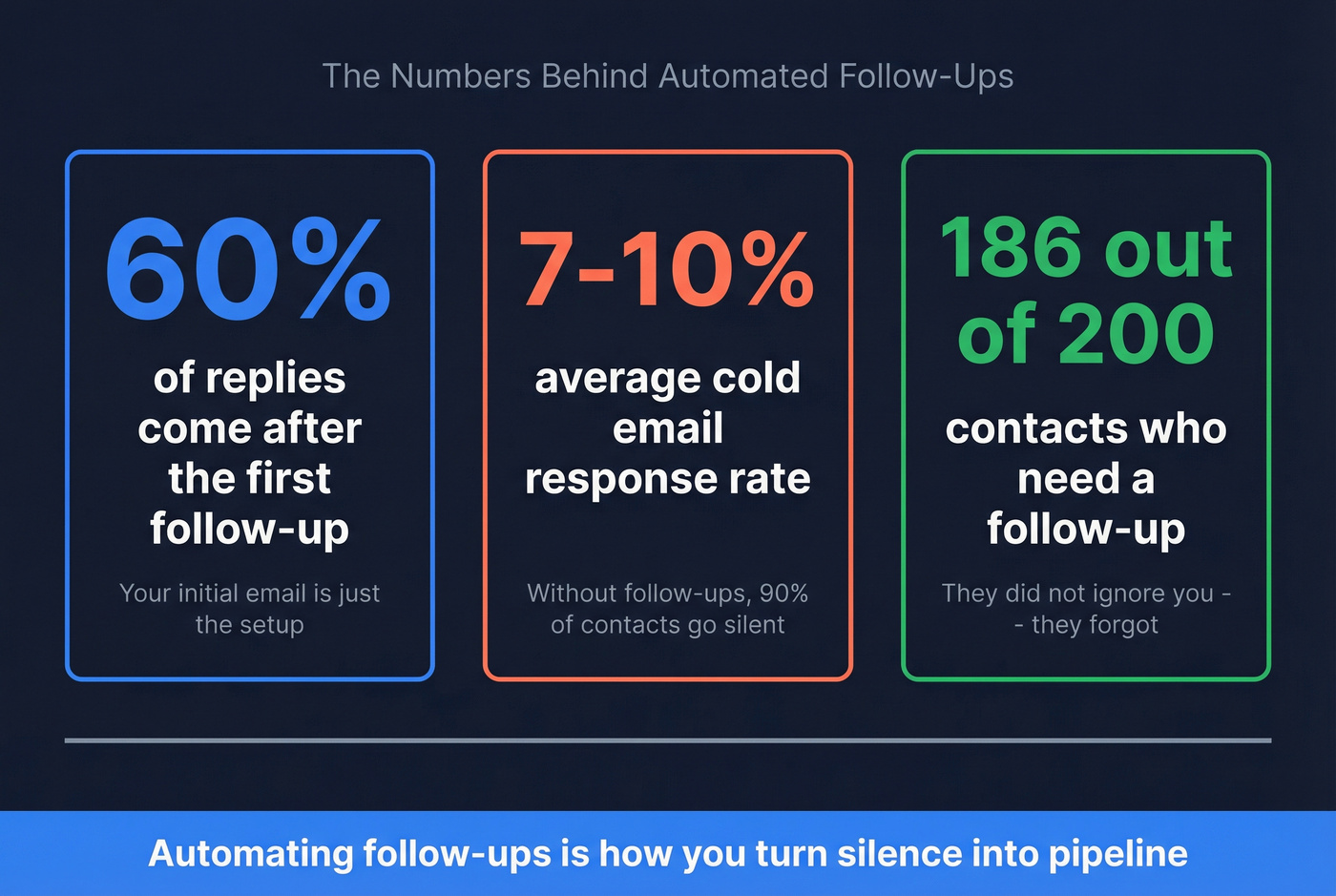
You send 200 cold emails on Tuesday. By Friday, 14 replies - and 186 contacts who went silent. Most of them didn't ignore you. They forgot. About 60% of replies come after the first follow-up, which means your initial send is really just a setup for the automated sequence that follows. The average cold email response rate sits around 7-10%, and automating those follow-ups is how you push that number meaningfully higher without living inside your inbox.
Every guide on this topic covers the tools. Almost none cover the step that determines whether those follow-ups actually land.
What You Need (Quick Version)
Three picks depending on how you work:
- GMass - Best for power users running multi-stage sequences at volume. Conditional targeting per stage, domain-level stop rules, granular control over every send. Starts at $29.95/mo.
- Streak - Best free option. 50 mail merges/day with automatic follow-ups, plus a built-in CRM. $0.
- Mailmeteor - Best for Google Sheets-based workflows. Follow-ups unlock at Premium ($12.99/mo).
The prerequisite none of these tools handle for you: verify your list before you automate anything. Prospeo's free tier covers 75 emails/month with 98% accuracy - enough to test whether your list is clean before you torch your domain on bounces.
How Follow-Up Automation Works in Gmail
Every Gmail follow-up tool runs on the same core logic: send an email, wait a set number of days, check whether the recipient replied (or opened, or clicked), and send the next message if they didn't. That "if no reply" conditional is the engine behind all of it.
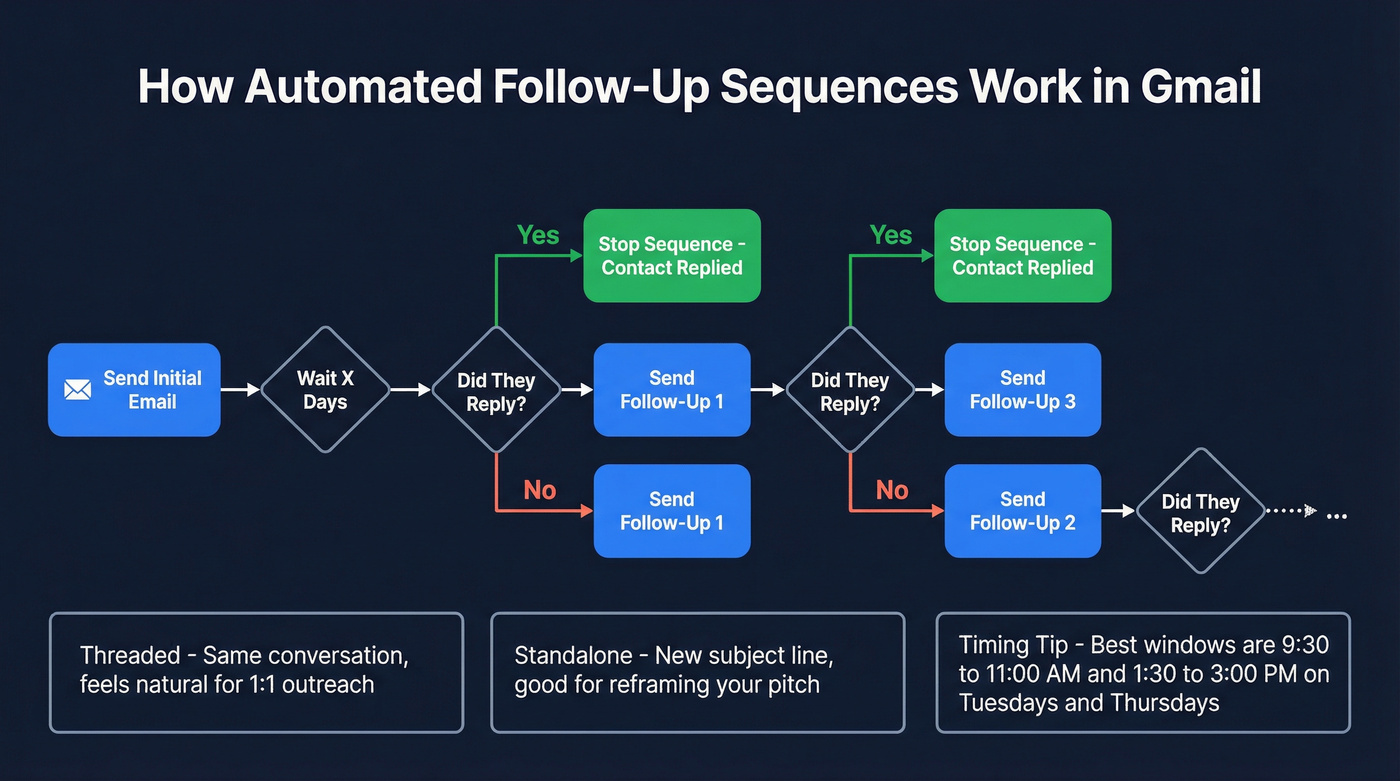
Reply detection works by monitoring your inbox for responses from the original recipients. When a reply comes in, the tool flags that contact and stops the sequence. Sounds simple, but edge cases matter. If you've set a different Reply-To address in GMass, reply detection breaks - the tool can't see responses that land in a different mailbox. We learned this the hard way on a client campaign that ran for three days before anyone noticed replies were piling up in an alias inbox while follow-ups kept firing.
Follow-ups can be threaded (same conversation as your original email) or stand-alone (new message, fresh subject line). Threaded follow-ups feel more natural for 1:1 outreach. Stand-alone messages work better when you want to reframe the pitch entirely. GMass lets you toggle between these - type your follow-up in the plain text box for threading, or select a saved template for a stand-alone send.
One timing detail that trips people up: in GMass, follow-up stages are scheduled relative to when each individual email was sent, not when the campaign launched, unless you enable the account-level "Strict count of days between stages" setting. That matters when you're planning sales cadences and trying to keep spacing consistent across a large list.
Mid-morning windows (9:30-11:00) and post-lunch slots (1:30-3:00) on Tuesdays and Thursdays consistently pull the highest open and reply rates. Most tools let you set send windows so your follow-ups don't fire at 2 AM.
Best Gmail Follow-Up Tools
GMass
Use this if you're running multi-stage outbound sequences from Gmail and need granular control over every step. GMass gives you conditional targeting - follow up only those who didn't reply, didn't open, or didn't click - per-stage Campaign IDs for tracking, and a domain-level stop option that halts follow-ups to an entire company when one person replies.
Skip this if you just need a simple reminder to follow up on a proposal. GMass is built for volume outreach, and it takes longer to configure than lighter tools like Streak. The payoff is more control over every variable.
Pricing jumped in January 2026: Standard is now $29.95/mo, Premium $39.95/mo, Professional $59.95/mo. Team pricing scales down - a 5-user team runs $35/user/mo ($175 total), and 10 users drops to $29.50/user/mo ($295 total). SMTP users get the first 10,000 sends free, then $5 per 10,000 after that.
One operational detail that saves headaches: you can edit or cancel follow-up settings after a campaign launches. Just know that changing settings on a live campaign can trigger an immediate batch send, so adjust during off-hours. And the Reply-To caveat bears repeating: if you set a different Reply-To address, GMass won't detect replies, which breaks the "send until reply" logic entirely. Test this before you launch a big campaign.

Streak
Streak is the common starting point for Gmail-native follow-ups before committing to paid software. The reason is obvious: the free plan includes 50 mail merges/day with automatic follow-ups and a built-in CRM that lives inside Gmail. For a solo founder or early-stage SDR doing 20-30 personalized follow-ups a day, nothing else at $0 comes close.
The 4.5/5 rating from 479 verified reviews on GetApp tells a nuanced story. Users love the Gmail-native experience but consistently flag bugs that disrupt workflow - threads not syncing, pipelines loading slowly, the usual Chrome extension friction. Paid plans bump the mail merge cap to 1,500/day, but the price jump is steep: Pro is $49/user/mo (annual billing; $59 monthly), and Pro+ hits $69/user/mo annual ($89 monthly). Advanced features like CRM integrations are locked behind those tiers.
Here's the thing: Streak's free plan is the best way to test whether Gmail-native follow-ups work for your workflow. If you outgrow it, jump to GMass rather than climbing Streak's pricing ladder.

Mailmeteor
If you live in Google Sheets, Mailmeteor is your tool. Its Sheets integration is the cleanest of anything on this list - your contact list, merge fields, and send status all live in a single spreadsheet. The email cadence setup feels intuitive because you're working in a format you already know.
The catch: follow-ups don't unlock until Premium ($12.99/mo), and even then you're capped at one follow-up per sequence. The Pro plan ($24.99/mo) gives you up to 10 follow-ups, plus email warmup and verification baked in. Daily send limits scale with your plan: 50/day (free), 250/day (Starter), 500/day (Premium), 1,500/day (Pro).
The 4.9/5 rating from 11,741+ reviews is legitimately impressive - that's not a small sample. But the follow-up gating is the biggest gotcha in this entire roundup. If you're evaluating Mailmeteor for automated follow-ups specifically, the free and Starter plans won't help you.
Boomerang
Boomerang isn't an outbound sequencer. It's a reminder and scheduling tool that happens to live in Gmail. The free plan gives you 10 message credits/month - enough for a handful of "remind me if no reply" nudges, not enough for any kind of campaign.
The Personal plan at $4.98/mo (annual) unlocks unlimited message credits and works well for account executives following up on proposals and deals. Think of it as a personal productivity tool, not a cold outreach engine. For teams sending more than 20 follow-ups a day, you need GMass or Mailmeteor instead.
Rebump
The simplest 1:1 bump tool on this list. Rebump sends follow-up bumps in the same thread as your original email on a schedule. The Unlimited plan ($7.99/mo) gives you up to 4 bumps per message. Unlimited Plus ($19.99/mo) extends that to 10 bumps and adds open/read receipts. Unlimited Premium ($35.99/mo) adds an AI bump generator and Zapier integration.
Rebump works best for relationship-driven follow-ups - checking in on a warm lead, nudging a partnership conversation. It's not designed for cold outbound at scale.
Other Options Worth Knowing
Vocus.io starts at $5/user/mo and targets sales teams who want tracking, templates, and follow-ups in one extension. cloudHQ Auto Follow Up offers a free tier up to 200 emails/mo with Premium at $14.99/mo. Right Inbox covers scheduling and follow-up reminders starting around $8/mo - functional but unremarkable. FollowUpThen is the oddball: no extension to install, just forward an email to a time-based address like 3days@followupthen.com and it bounces back as a reminder. Clever for personal use, not for outbound.
Pricing at a Glance
| Tool | Free Plan | Cheapest Paid | Follow-Up Access | Best For |
|---|---|---|---|---|
| GMass | No | $29.95/mo | All paid plans | Volume sequences |
| Streak | 50 merges/day | $49/user/mo (ann.) | Free + paid | Free CRM + follow-ups |
| Mailmeteor | 50/day, no follow-ups | $12.99/mo (Premium) | Premium (1) / Pro (10) | Sheets workflows |
| Boomerang | 10 credits/mo | $4.98/mo (ann.) | All plans | Reminder-style nudges |
| Rebump | No | $7.99/mo | 4 bumps / 10 / AI by tier | 1:1 bump sequences |
| Vocus.io | No | ~$5/user/mo | Paid plans | Sales team tracking |
| cloudHQ | 200 emails/mo | $14.99/mo | Free + paid | Basic automation |
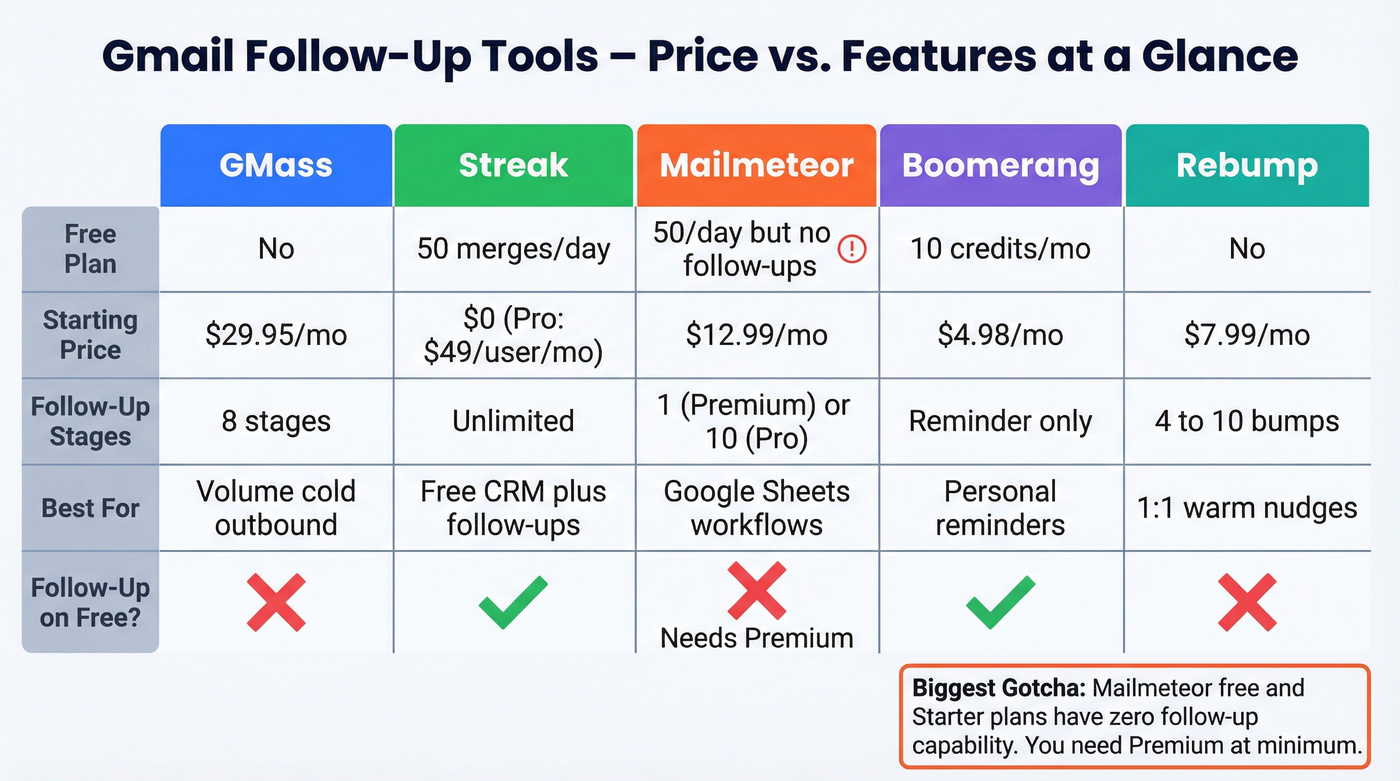
The biggest gotcha in this table: Mailmeteor's free and Starter plans don't include follow-ups at all. You need Premium ($12.99/mo) for even a single automated follow-up. GMass, by contrast, includes follow-ups on every paid tier.

Every bounced email in your Gmail sequence chips away at your domain reputation - and no follow-up tool can fix that. Prospeo's 5-step verification catches bad addresses, spam traps, and honeypots before your first send. 98% email accuracy, 7-day data refresh, and a free tier that covers 75 verifications/month.
Clean your list before you automate, not after your domain is flagged.
The Step Before Automation
Look - if your bounce rate is above 2%, no follow-up tool can save you. Not GMass, not Streak, not a $500/mo dedicated platform. Once bounces creep above that line, your deliverability and domain reputation start getting penalized fast. By the time your follow-ups fire, you're already sending from a damaged domain. Bad data doesn't just waste your follow-ups. It actively destroys your ability to send future emails.
If you want a deeper breakdown of what "bad addresses" actually means in practice, start with invalid emails and how they show up in outbound lists.
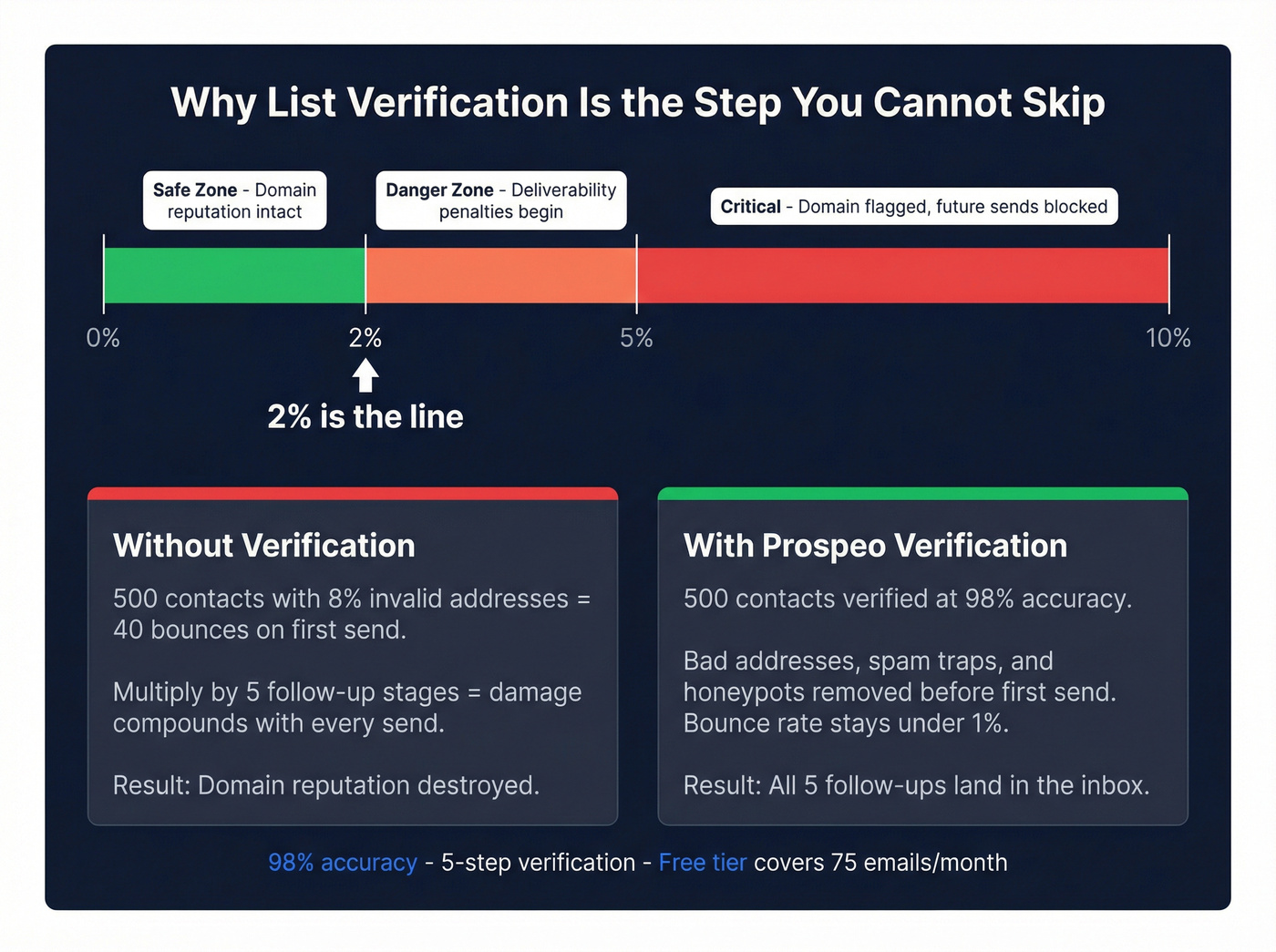
This is the step every Gmail follow-up guide skips, and it's the one that matters most. Load 500 contacts into a 5-email sequence with 8% invalid addresses, and that's 40 bounces on your first send alone. The consensus on r/coldemail is pretty clear: list hygiene is the single highest-ROI thing you can do before launching any outbound campaign, and most people skip it because it feels like busywork.
Prospeo catches invalid emails, spam traps, and honeypots through a 5-step verification process before they enter your sequence. The 98% accuracy rate keeps your bounce rate well under that 2% threshold, and the free tier covers 75 emails/month - enough to validate a small campaign. On paid plans, verification runs roughly $0.01 per email.

You're automating follow-ups to squeeze more replies from your list. But if 15-20% of those addresses bounce, Gmail throttles your entire sending reputation. Prospeo finds and verifies emails from 300M+ profiles at $0.01/email - so every follow-up in your sequence actually reaches a real inbox.
Stop sequencing dead addresses. Start with verified contacts.
Deliverability Rules for Follow-Up Sequences
Automating follow-ups without nailing deliverability is a waste of time. Here's what actually matters:
Authenticate your domain. SPF, DKIM, and DMARC aren't optional anymore. Google and Yahoo's bulk sender requirements mandate all three, plus RFC 8058 one-click unsubscribe headers. Set these up before you send a single automated follow-up. (If you need the full setup flow, use this SPF, DKIM, and DMARC guide.)
Stay under the thresholds. Spam complaints below 0.3% (check Gmail Postmaster Tools). Bounces below 2%. These aren't suggestions - they're the lines where deliverability starts getting punished. This is why we started with list verification: none of these optimizations matter if 8% of your list bounces.
Warm up properly. New domains or Google Workspace accounts should start at 5-10 emails/day and ramp over 4-6 weeks. Jumping straight to 500/day is a fast path to the spam folder. If you're doing this at any scale, follow an automated email warmup plan.
Use a custom tracking domain. Most follow-up tools use shared tracking domains by default. Set up a branded CNAME so your tracking links live on your subdomain. This reduces the risk of getting flagged because someone else on the shared domain got sloppy.
Know your send limits. Free Gmail caps at 500 emails/day. Google Workspace accounts get 2,000/day. If you're running automated follow-ups at any real volume, you need Workspace. CAN-SPAM requires a physical address and unsubscribe mechanism; GDPR adds consent requirements for EU contacts. (For the compliance nuance, see GDPR for Sales and Marketing.)
Building Your Follow-Up Cadence
High-performing sequences typically run 4-7 emails over 14-21 days. Here's a cadence structure that works well for cold outbound from Gmail:
Day 1: Initial email. Clear value prop, one ask. Day 3: First follow-up (threaded). Short, reference the original. Day 7: Second follow-up. New angle or social proof. Day 11: Third follow-up. Ask a question instead of pitching. Day 16: Fourth follow-up. Brief, "closing the loop" framing. Day 21 (optional): Breakup email. Last touch, low pressure.
Schedule sends for mid-morning (9:30-11:00) or post-lunch (1:30-3:00), and weight toward Tuesdays and Thursdays.
Threaded follow-ups work best for emails 2-3, where you're referencing your original message. Stand-alone messages with fresh subject lines work better for emails 4+, where you need to re-engage someone who clearly isn't reading the thread. We've found this threaded-then-standalone pattern outperforms either approach used exclusively - our best-performing campaigns saw a 15-20% lift in reply rates on emails 4 and 5 after switching to fresh subject lines at that stage. If you want plug-and-play copy, start with a follow-up email after no response framework.
Returns diminish sharply after email 5 or 6. We've seen teams run 10-email sequences and all they accomplish is training Gmail's spam filter to hate them.
When to Graduate Beyond Gmail
Gmail-native follow-up tools are perfect up to a point. That point is roughly when you're consistently hitting 1,000+ sends/day, need multi-channel sequences across email, calls, and social touches, or want built-in A/B testing across sequence variants.
Google Workspace's 2,000/day limit is a hard ceiling. GMass and Mailmeteor can't push past it. If you're a 5-person SDR team each sending 400 emails/day with 4-step follow-ups, you're already doing the math on when those limits bite.
Let's be honest about the most common frustration in outbound communities: stacking 5+ Chrome extensions on Gmail until the browser crawls and nothing works reliably. You don't need that. You need one follow-up tool and one verification tool. When your outbound volume stays under a few hundred sends per day, Gmail-native tools handle it fine. When you outgrow that, platforms like Instantly, Smartlead, or Lemlist give you dedicated sending infrastructure, inbox rotation, and deeper analytics. Teams that also need deal tracking and CRM-triggered sequences often look at Pipedrive or HubSpot automated follow-up workflows, which tie email cadences directly to pipeline stages rather than running them from a Gmail extension. If you're building the full stack, use a B2B sales stack blueprint to keep it lean.
FAQ
Can I automate follow-ups in Gmail for free?
Yes. Streak's free plan gives you 50 mail merges/day with automatic follow-ups - the most capable free option available. Boomerang offers 10 message credits/month for reminder-style nudges. Mailmeteor's free tier caps at 50 emails/day but doesn't include follow-ups at all.
How many follow-ups should I send?
High-performing cold email sequences run 4-7 emails over 14-21 days. About 60% of replies come after the first follow-up, so skipping them entirely leaves most potential responses on the table. Returns drop sharply after email 5 or 6.
Will automated follow-ups hurt my deliverability?
Not if you handle the fundamentals. Authenticate with SPF/DKIM/DMARC, keep spam complaints under 0.3%, bounces under 2%, and warm up new domains over 4-6 weeks. The biggest risk is sending to invalid addresses - which is why verifying your list before launching any sequence is the single most important step you can take.
What's the best time to send follow-up emails?
Mid-morning (9:30-11:00) and post-lunch (1:30-3:00) on Tuesdays and Thursdays consistently produce the highest open and reply rates. Most Gmail follow-up tools let you set send windows to hit these slots automatically.