Invalid Emails: What They Are and How to Fix Them
You send 10,000 cold emails on Monday morning. By Tuesday, 1,500 have bounced - a 15% bounce rate. Your ESP flags the account, your domain reputation tanks, and the 8,500 emails that were actually valid start landing in spam. One bad send just poisoned your entire pipeline for weeks.
That scenario plays out constantly. Invalid emails are the silent killer of outbound campaigns, and the problem is bigger than most teams realize. An analysis of 11B+ emails processed found that only 62% of addresses submitted were actually valid - nearly 4 in 10 addresses in a typical database can't receive mail. The gap between "having emails" and "having emails that work" is where deliverability goes to die.
The Short Version
Invalid email addresses are addresses that can't receive mail - permanently or temporarily. Syntax errors, deleted accounts, expired domains, and full mailboxes all qualify. They trigger bounces, tank your sender reputation, and push you closer to violating Gmail and Yahoo's bulk-sender requirements.
Immediate fix: verify your list before every campaign. Keep hard bounces under 1% and total bounces under 2%. Long-term fix: source pre-verified data so you're not cleaning up bad lists after the fact. You shouldn't have to pay twice - once to buy data, and again to verify it works.
What Is an Invalid Email Address?
An invalid email address is any address that can't receive mail when you send to it. Simple enough. But "invalid" covers a wide spectrum, from obviously broken addresses with typos to mailboxes that existed last month but don't anymore.
Some are permanently dead: the domain expired, the mailbox was deleted, or the address never existed in the first place. Others are temporarily unreachable - a full inbox, a server outage, a rate limit. Then there's a gray zone of addresses that technically accept mail but shouldn't be in your outreach list: role-based addresses like info@ or support@, disposable emails from services like Guerrilla Mail, and spam traps that exist solely to catch senders with bad list hygiene.
Types and Risk Levels
| Type | Permanent or Temporary? | Example | Risk Level |
|---|---|---|---|
| Syntax error | Permanent | john@@company.com | Low (easy to catch) |
| Nonexistent mailbox | Permanent | nobody@realcompany.com | High (hard bounce) |
| Deleted account | Permanent | former.employee@company.com | High (hard bounce) |
| Expired domain | Permanent | anyone@defunctcorp.com | High (hard bounce) |
| Full mailbox | Temporary | valid user, inbox at quota | Medium (soft bounce) |
| Server down | Temporary | valid address, host unreachable | Low (retry usually works) |
| Disabled account | Permanent | suspended or deactivated user | High (hard bounce) |
| Role-based | Valid but risky | info@, support@, sales@ | Medium (low engagement) |
| Disposable | Valid but risky | user@tempmail.com | High (never a real prospect) |
| Spam trap | Permanent trap | recycled or planted address | Critical (blacklist risk) |
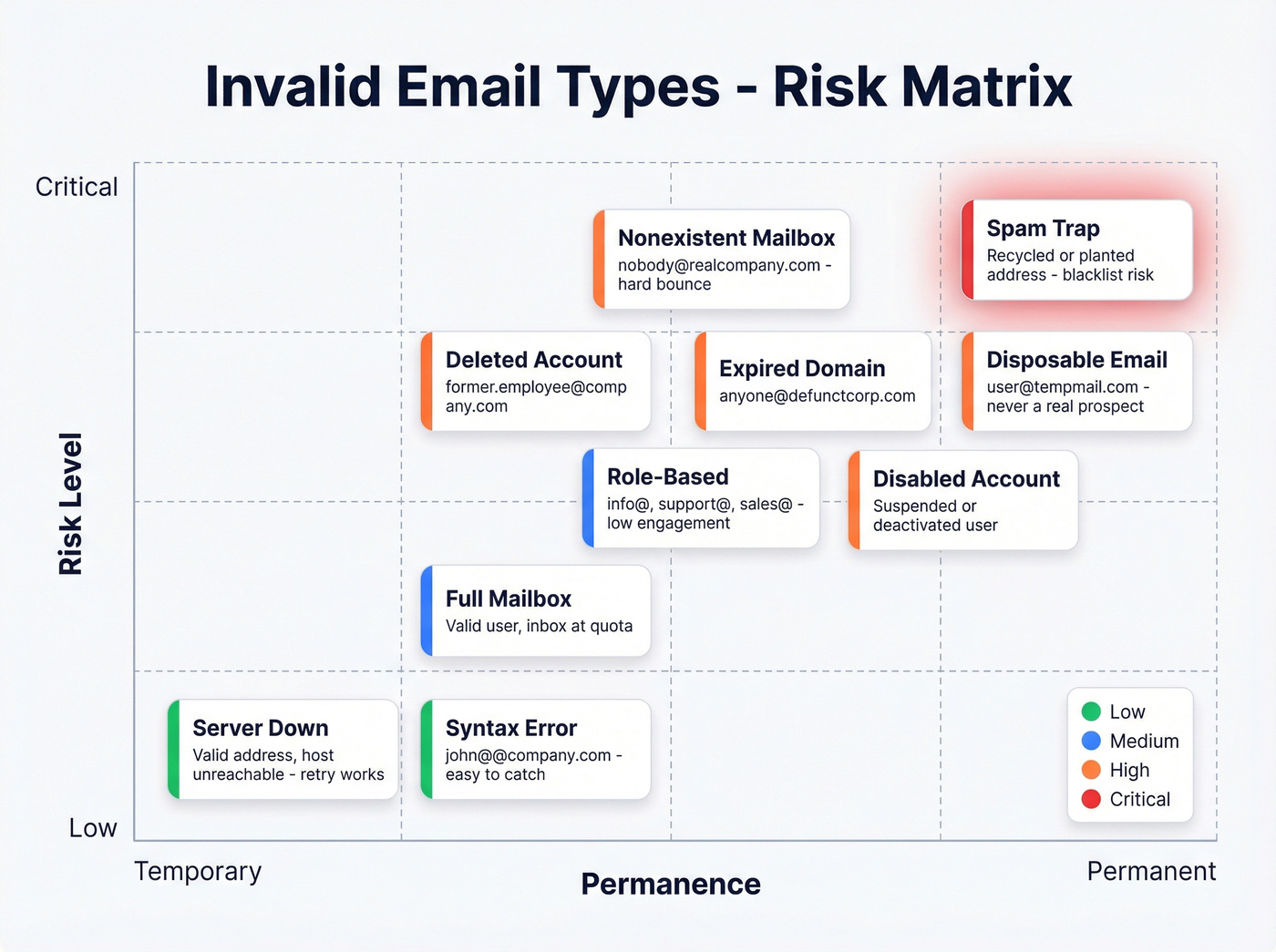
The "valid but risky" category trips up most teams. A catch-all domain will accept mail for any recipient, but that doesn't mean the specific mailbox exists. Role-based addresses inflate your list without adding pipeline value. Disposable emails are someone actively avoiding you. Spam traps sound terrifying, and while they represent roughly 0.01% of addresses in most databases, hitting even one can land you on a blacklist. Typo detection alone has prevented over 10 million bounces across major verification platforms - that's how common simple formatting errors are.
Why Deliverability Stakes Are Higher in 2026
Email deliverability has always mattered. What's changed is that the consequences of getting it wrong are now immediate and severe.
The Deliverability Spiral
Here's how it plays out. You send a campaign with a chunk of bad addresses. Those addresses generate hard bounces. Your bounce rate spikes above 2%. Your sender reputation drops. Once reputation drops, even your valid emails start landing in spam. Your ESP sees the pattern and throttles or suspends your account. Weeks of domain warming, gone.
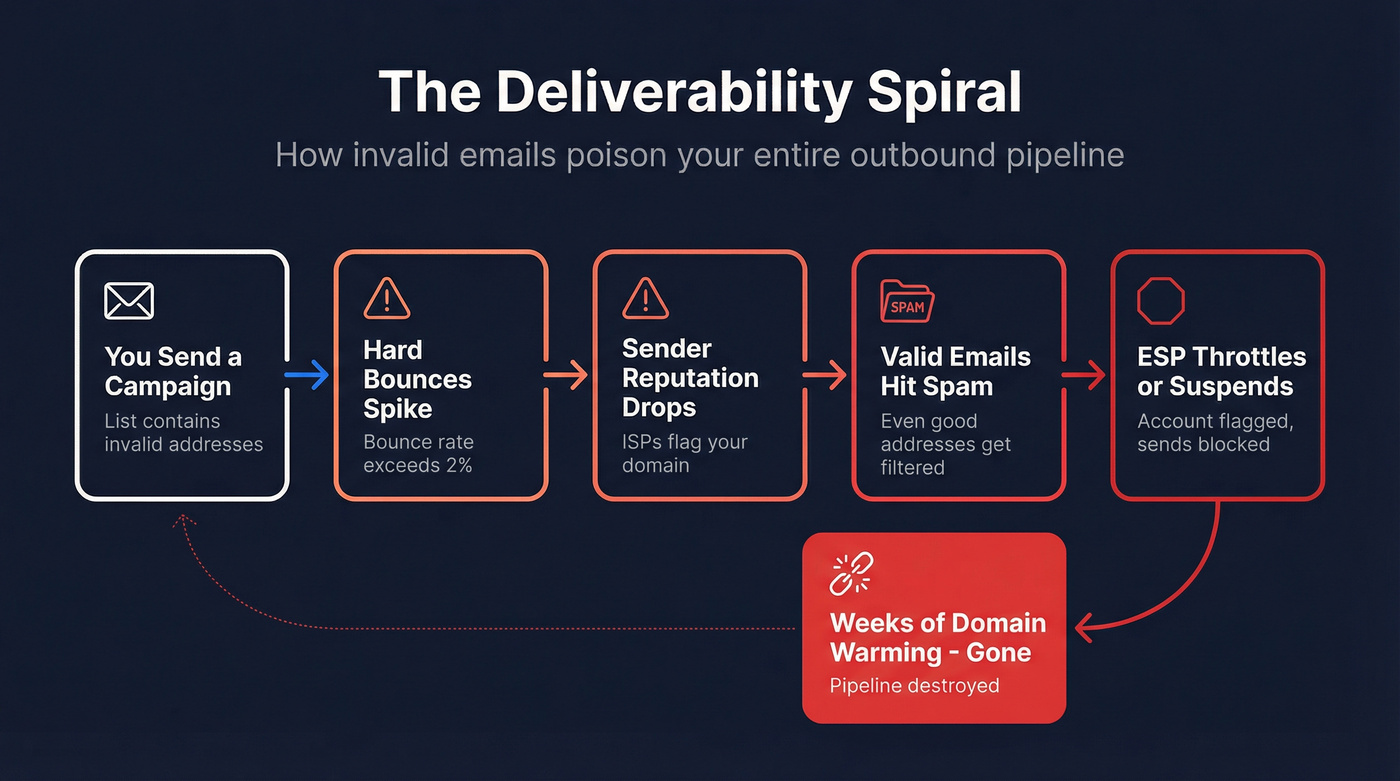
Since February 2024, Gmail and Yahoo require bulk senders (5,000+ emails per day) to authenticate with SPF, DKIM, and DMARC, provide one-click unsubscribe, and keep spam complaint rates under 0.3%. The operational targets most deliverability consultants recommend: total bounces below 2%, hard bounces below 1%. Exceed those thresholds consistently and you're not just hurting one campaign - you're burning a domain that took months to warm up. If you need a tighter operational playbook, use an email deliverability checklist to standardize what gets checked before every send.
Email List Decay by the Numbers
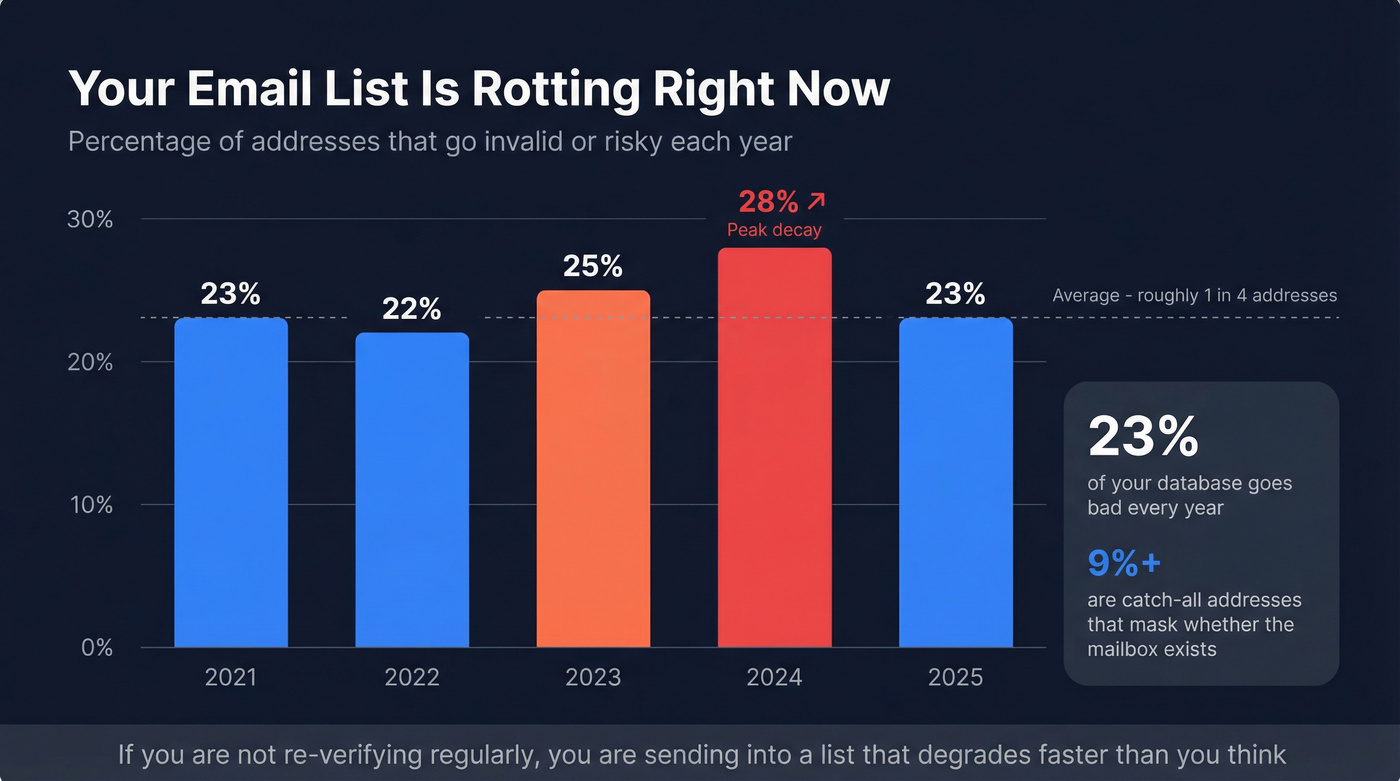
Your list is rotting right now. People leave jobs, companies get acquired, domains expire. Annual email list decay runs at roughly 23%, and that's a floor - not a ceiling - because 9%+ of addresses in any given database are catch-alls that mask whether the mailbox actually exists. (For the B2B-specific version of this problem, see B2B contact data decay.)
| Year | Invalid/Risky Rate |
|---|---|
| 2021 | 23% |
| 2022 | 22% |
| 2023 | 25% |
| 2024 | 28% |
| 2025 | 23% |
Even at the "improved" 23% rate, roughly one in four addresses in your database will go bad within a year. If you're not re-verifying regularly, you're sending into a list that's degrading faster than you think. Bad addresses accumulate silently - by the time your bounce rate spikes, the damage to your sender reputation is already done.
Let's be honest: if more than 5% of your list is undeliverable, your data provider failed you. That's not a cleaning problem. It's a sourcing problem. (This is also why data quality needs to be owned like a revenue KPI, not a one-off cleanup task.)
Hard Bounces vs. Soft Bounces
Not all bounces are equal, and confusing the two will either waste your time or wreck your reputation.
| Category | SMTP Code | Common Causes | What to Do |
|---|---|---|---|
| Hard bounce | 5xx | Invalid address, nonexistent domain, permanently blocked | Suppress immediately - never send again |
| Soft bounce | 4xx | Full mailbox, server temporarily down, greylisting | Retry a few times, then suppress if it persists |
A hard bounce means the receiving server is telling you permanently: this address doesn't exist or can't accept mail. There's no retry that fixes it. Every additional send to a hard-bounced address is pure reputation damage. (If you want a deeper breakdown of causes and fixes, see our guide to hard bounce.)
Soft bounces are temporary - the mailbox is full, the server's overloaded, or you're hitting a rate limit. Most ESPs retry automatically. But if the same address soft-bounces across multiple sends, treat it as dead and suppress it.
Operational rule: give a soft bounce three consecutive sends. After that, it's costing you more in reputation damage than it could ever return in pipeline.

You just read that 4 in 10 emails in a typical database are invalid. Prospeo's 5-step verification pipeline - with catch-all handling, spam-trap removal, and honeypot filtering - delivers 98% email accuracy out of the box. No post-purchase cleaning required.
Stop paying twice - once for bad data, and again to verify it.
How Email Verification Actually Works
Most people use "validation" and "verification" interchangeably. They're not the same thing, and the difference explains why some tools catch far more bad addresses than others. If you’re building a repeatable process, start with a clear email validity check standard across teams.
Validation vs. Verification
Validation is a format check. Does the address follow the right syntax? Is there an @ symbol? Does the domain look plausible? This is what a regex on your signup form does. It catches typos like "john@gamil.com" but tells you nothing about whether the mailbox actually exists.
Verification goes deeper. It checks DNS records, pings the mail server, and determines whether the address can actually receive mail. A benchmark of 15 email verifiers by Hunter found that top performers hit 68-70% accuracy while others landed in the 60-65% range. Hunter notes potential bias in its own methodology, so take the exact numbers with a grain of salt - but the spread between tools is real and significant. If you want to see what “good” looks like across vendors, compare options in our roundup of email ID validators.
The 5-Step Pipeline
Professional verification tools run addresses through multiple stages:
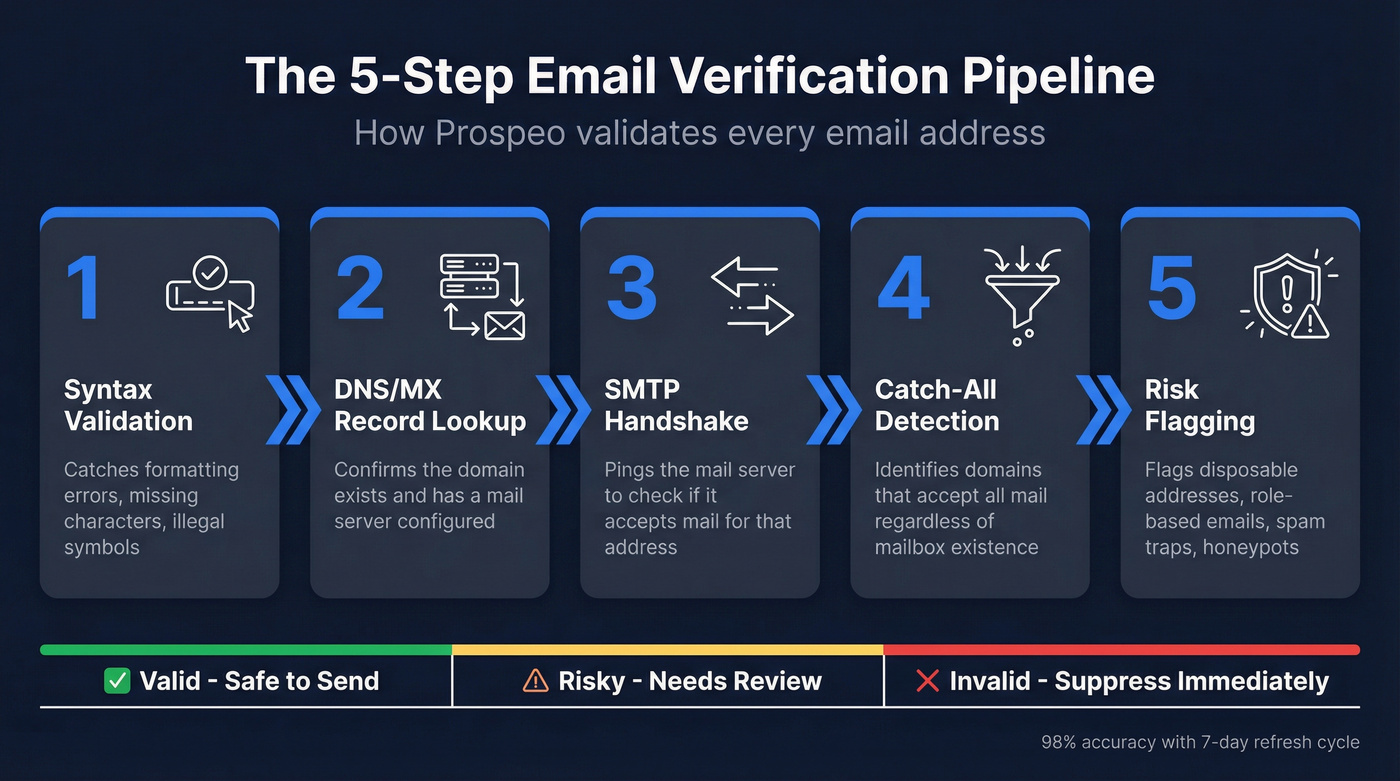
- Syntax validation - catches formatting errors, missing characters, illegal symbols
- DNS/MX record lookup - confirms the domain exists and has a mail server configured
- SMTP handshake - pings the mail server to check if it'll accept mail for that address, without actually sending a message
- Catch-all domain detection - identifies domains that accept all incoming mail regardless of whether the specific mailbox exists
- Risk flagging - flags disposable addresses, role-based emails, spam traps, and honeypots
Prospeo runs every email through this pipeline with proprietary infrastructure - no third-party email providers in the chain. The result is 98% email accuracy with catch-all handling, spam-trap removal, and honeypot filtering built in. Every record refreshes on a 7-day cycle, so addresses that went bad last week get caught before your next campaign.
How to Handle Flagged Addresses
You've verified your list. Now you've got a pile of addresses flagged as invalid, unknown, or risky. Here's the operational playbook.
Suppress Hard Bounces Immediately
Any address that returns a 5xx code gets permanently removed from active sends. No exceptions, no "let's try again next quarter." Most ESPs handle this automatically - SMTP2GO, for example, blocks further sending to hard-bounced addresses for 7 days and requires manual override to re-enable.
Re-Verify Unknowns and Catch-Alls
Catch-all and "unknown" results are the gray zone. The verification tool couldn't confirm or deny the address. These need periodic re-verification because catch-all configurations change - a domain that accepted everything last month might start rejecting nonexistent mailboxes today.
For cold outreach, verify before every campaign. For marketing lists, quarterly is the bare minimum. If you’re running outbound at scale, follow a dedicated email verification for outreach workflow so “unknown” doesn’t quietly become “bounce.”
Suppress or Delete?
This is a workflow decision, not a data quality decision. Suppression means you keep the record in your CRM but block it from sends - preserving history, notes, and deal context. Deletion means removing the record entirely, which reduces clutter and simplifies compliance. This is also a core part of CRM hygiene when you’re trying to keep deliverability stable over time.
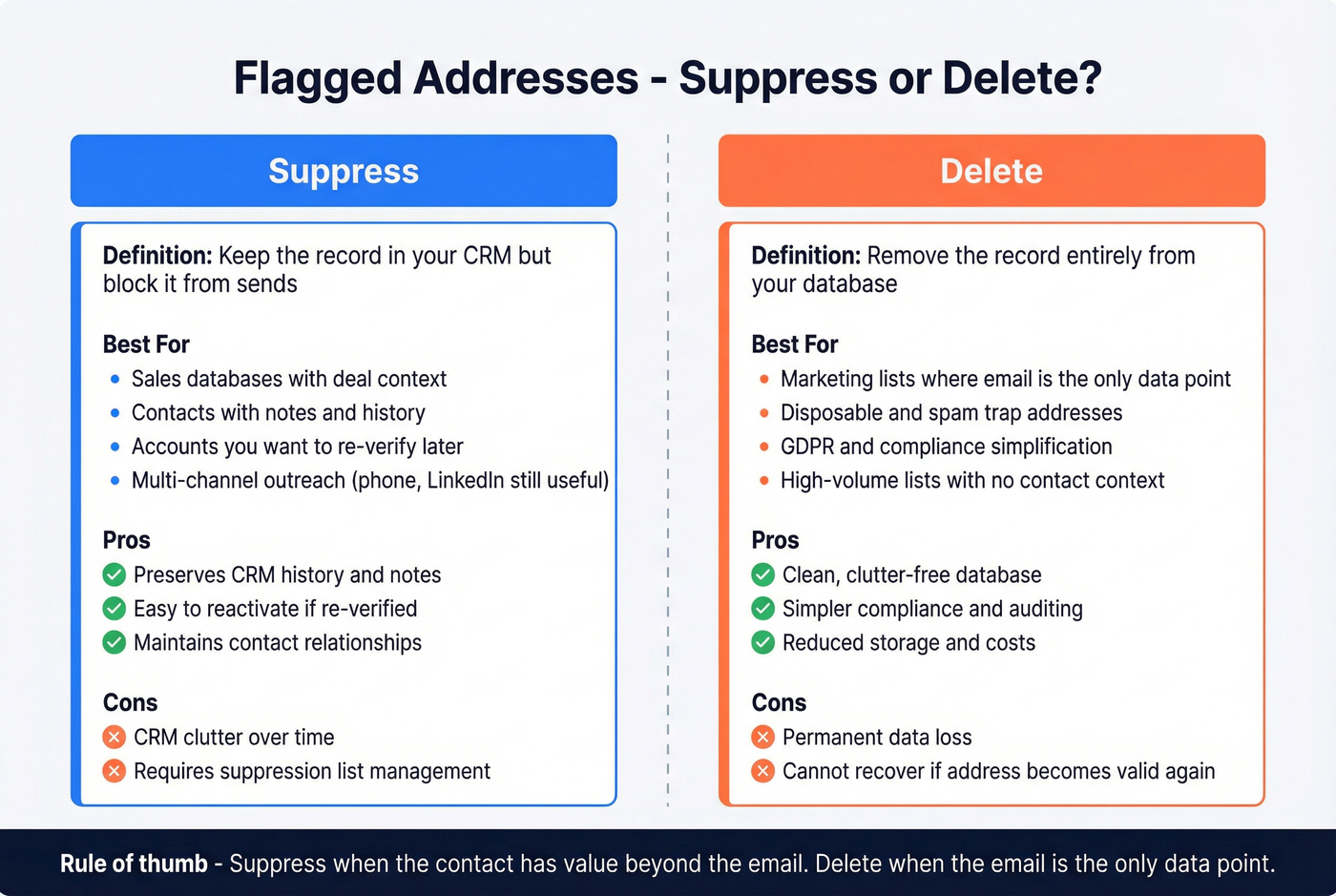
The rule of thumb: suppress for sales databases where the contact record has value beyond the email. Delete for marketing lists where the email is the only data point.
We've seen this play out with real teams. Meritt cut their bounce rate from 35% to under 4% and tripled pipeline from $100K to $300K per week after fixing their data quality workflow.
How to Prevent Invalid Emails
Cleaning bad data is necessary. Not creating bad data in the first place is better.
Real-Time Validation at Signup
An API-level validation check on your forms catches syntax errors, nonexistent domains, disposable addresses, and typos like "gamil.com" - all in under a second, before the form submits. This single step eliminates the most common source of undeliverable marketing addresses. Mailgun's validation API is one popular option for form-level checks.
Double Opt-In
A confirmation email ensures the address is real and the owner intended to sign up. It's the gold standard for marketing lists. Less relevant for cold outreach, but for newsletter signups, gated content, and event registrations, double opt-in dramatically reduces bad entries.
Source Pre-Verified Data
Look - the email verification industry exists because the email data industry is broken. Invalid emails are a symptom of bad data sourcing, and the real fix is using a provider that verifies at collection and refreshes records continuously. If you’re building a repeatable motion, pair this with cold email volume best practices so you don’t scale faster than your deliverability can handle.
You shouldn't have to pay twice for the same email - once to buy it, and again to verify it works. If your data provider requires a separate verification step, that's a tax on their quality problem. In our experience, most teams spending a few hundred dollars a month on verification tools would get better results spending that money on a data source that doesn't need a cleanup step in the first place.
Best Tools for Catching Bad Addresses

| Tool | Best For | Accuracy | Cost per 1K | Free Tier | Notable Feature |
|---|---|---|---|---|---|
| Prospeo | Pre-verified sourcing | 98% | ~$10 | 75 emails/mo | Built-in verification; 7-day refresh |
| ZeroBounce | Bulk list cleaning | ~95-99% | ~$10 (min 2K) | 100/mo | AI scoring + data append |
| NeverBounce | High-volume cleaning | ~95-99% | ~$8 | Yes (limited) | Real-time API + bulk |
| Hunter | Finding + verifying | ~70% | ~$24.50 | 25 searches/mo | Built-in email finder |
| MailerCheck | Budget verification | - | ~$10 | 10 credits | Simple, clean UI |
| Verifalia | Free spot-checks | Basic checks | Free | Yes (limited) | Free email validator |
Prospeo is the pick if you want to eliminate the "buy data then verify data" two-step entirely. Every email in the 143M+ database has already been through the 5-step pipeline, and records refresh weekly. For teams running outbound at scale, you skip the cleaning step altogether.
ZeroBounce is a strong standalone verification tool for bulk list cleaning. Their AI-powered scoring adds context beyond valid/invalid, and they append missing data points during verification. If you've inherited a legacy list with 50,000 addresses of unknown quality, start here.
NeverBounce competes directly on price and handles high-volume lists well. At ~$8 per 1,000, it's cost-effective for pure volume.
Skip Hunter if accuracy is your primary concern - their own benchmark puts them at ~70%, which is fine for finding emails but not great for verification-only use cases.
A sales team at Snyk dropped their bounce rate from 35-40% to under 5%, generating 200+ new opportunities per month after switching to pre-verified data.
Email lists decay 23% per year, and most providers refresh every 6 weeks. Prospeo refreshes every 7 days across 300M+ profiles, so the emails you pull today are verified against live mailbox data - not month-old snapshots that generate hard bounces.
Keep bounce rates under 1% with data that's never more than a week old.
FAQ
Why does Gmail or Outlook say my email address is invalid?
Usually a typo, missing character, or formatting error like spaces or special characters. Check for "gamil.com" instead of "gmail.com" - the classic mistake. If the address is correct, the recipient's mailbox may have been deleted or disabled by their IT team.
What's an acceptable bounce rate?
Keep total bounces below 2% and hard bounces below 1%. Since Gmail and Yahoo's February 2024 policy changes, exceeding these thresholds consistently will hurt deliverability for bulk senders. Most deliverability consultants treat 1% total as the real target.
How often should I clean my email list?
At minimum, quarterly. For cold outreach, verify before every campaign - no exceptions. Email lists decay at roughly 23% per year, so addresses valid three months ago may not be today.
Can an email address become invalid over time?
Yes. People leave jobs, companies shut down, domains expire, and IT teams deactivate accounts. The longer you wait between verification passes, the worse the damage to your sender reputation when you finally send.