The Best Email Scrubbing Services for Clean, Deliverable Lists in 2026
You just sent a 50,000-email campaign and 6,200 bounced. Your domain reputation tanks overnight. Your ESP flags your account. And the "verified" list you bought three months ago? It's already 15% dead.
Email lists rot faster than most teams realize. The annual decay rate has hit 28%, and B2B lists are worse - degrading at 30-35% per year thanks to job changes, company closures, and mailbox turnover. That means roughly a third of your B2B list is dead weight within 12 months. If you aren't running email scrubbing services on a regular cadence, you're sending into a wall.
Here's the thing: most list cleaning tools claim 99% accuracy. The real number, based on independent testing with actual business emails, is closer to 65-70%. ZeroBounce's own data backs this up - only 62% of addresses they processed were valid and safe for sending. That gap is where your deliverability dies. The tools below are the ones that actually perform, tested, priced, and compared so you can pick the right one without running a month-long bake-off.
If your deals typically close under $10K, you probably don't need the most expensive scrubbing tool on the market. A $200/quarter DeBounce plan will protect your sender reputation just as well as an $800 Kickbox plan. Save the budget for better data sources.
Our Picks: Best Email Scrubbing Service for Every Use Case
| Use Case | Pick | Why |
|---|---|---|
| Best overall | Prospeo | 98% email accuracy, 5-step verification, data arrives pre-verified |
| Best accuracy + value | Bouncer | 4.8 G2, free sampling, $0.004/email |
| Best budget scrubber | DeBounce | $0.002/email, 98% accuracy, 115+ integrations |
| Best for marketers | ZeroBounce | Activity data, deliverability toolkit, 4.7 G2 |
| Best for high volume | NeverBounce | 100K+/hour processing, 80+ integrations |
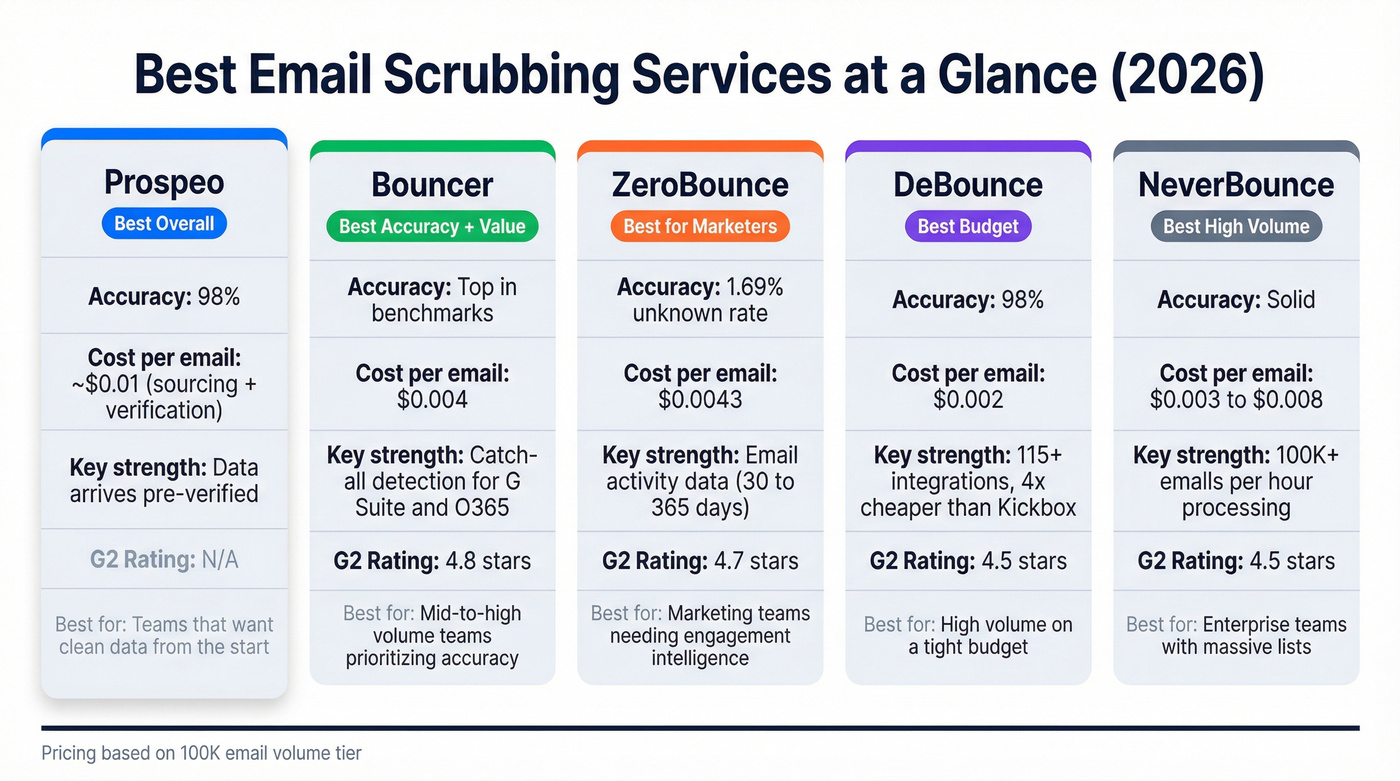
Prospeo sits at the top because it solves the problem upstream - your data arrives clean, so you spend less time and money scrubbing. For teams cleaning existing lists, Bouncer and DeBounce are the best value-to-accuracy combos on the market. ZeroBounce wins if you need engagement intelligence layered on top of verification.
The Accuracy Problem Nobody Talks About
Every email list cleaning service on the planet claims 99% accuracy. It's the industry's favorite lie.
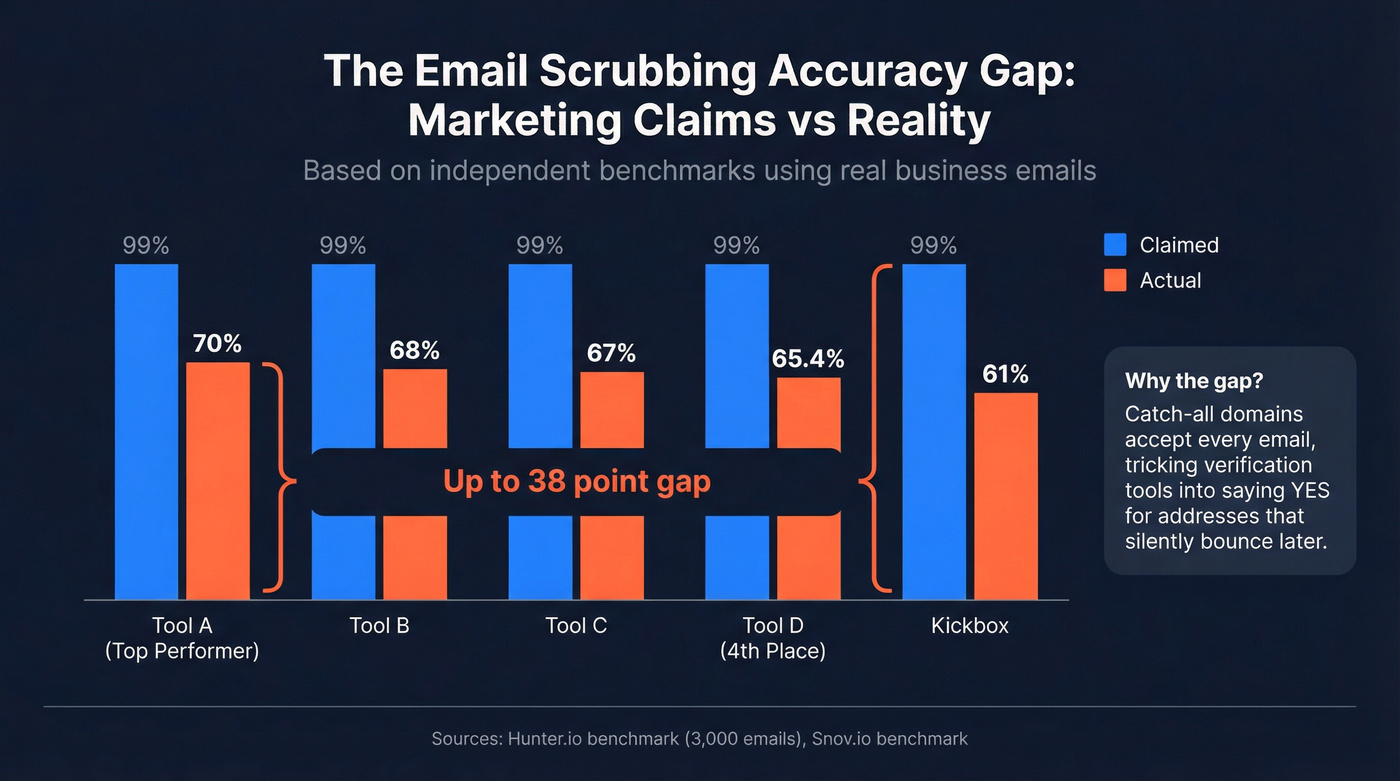
Hunter ran an independent benchmark using 3,000 real business emails - 2,700 from actual outreach campaigns plus 300 known-invalid addresses. The top-performing tool hit 70% real-world accuracy. Fourth place landed at 65.4%. A separate benchmark by Snov.io found Kickbox correctly identified just 61% of known-valid addresses, with 39% flagged as risky or unknown. That's a 30-point gap between what's advertised and what you actually get.

ZeroBounce alone has detected 2.5 billion invalid email addresses in recent years. The scale of the problem is staggering.
The culprit is accept-all (catch-all) domains. These mail servers accept every email sent to them, regardless of whether the specific mailbox exists. When a verification tool pings the server, it gets a "yes" response - even for addresses that silently discard messages or hard-bounce later. Most tools just label these "risky" or "unknown" and move on.
This matters because the three terms vendors throw around - validation, verification, and cleaning - mean very different things:
Validation checks syntax. Does the address have an @ sign? Is the domain formatted correctly? This catches typos like "gmal.com" but nothing else.
Verification pings the mail server via SMTP handshake to confirm the mailbox exists. This is where most tools stop - and where catch-all domains break the system. (If you want the full workflow, see our guide on how to verify an email address.)
Cleaning is the strategic layer. It combines technical checks with engagement data, risk profiling, and deliverability intelligence to decide what to keep, suppress, or delete. Cleaning is a judgment call, not just a technical check.
When you're evaluating tools for scrubbing your lists, you're really asking: how well does this tool handle the messy middle - the catch-alls, the risky addresses, the mailboxes that technically exist but never engage?

Why scrub emails after the fact when you can start with clean data? Prospeo's 5-step verification - including catch-all handling, spam-trap removal, and honeypot filtering - delivers 98% email accuracy on 143M+ verified addresses. Meritt cut their bounce rate from 35% to under 4%.
Skip the scrubbing step entirely. Start with data that's already clean.
What Happens When You Don't Scrub
The consequences aren't theoretical. They're measurable and they compound fast.

Your inbox placement drops. Gmail's inbox rate sits at 87.2% - down from 89.8% as recently as early 2024. Outlook is worse at 75.6%. Even with a clean list, roughly 1 in 6 emails never reach the inbox. Dirty lists make this dramatically worse. (More context in our email deliverability playbook.)
Your domain reputation takes permanent damage. Gmail's spam complaint threshold is 0.3%. Exceed that on a single campaign and you're flagged. Bounce rates above 5% put you in the danger zone - some ESPs will suspend your account outright. If you need a deeper breakdown, start with what is domain reputation and our guide to the spam rate threshold.
Your metrics crater across the board. Teams that clean their lists see 10-15% higher open rates, 30-50% lower bounce rates, and 15-25% better overall deliverability. Flip that: teams that don't clean are leaving that performance on the table with every send.
Here's the threshold framework that actually matters:
- Under 2% bounce rate: You're fine. Keep your regular cleaning cadence.
- 2-5% bounce rate: Clean now. Something's degrading.
- Above 5%: Stop sending. Scrub your entire list before the next campaign.
- Spam complaints above 0.3%: Immediate action required.
For cold email specifically, the bar is even higher: hard bounces need to stay under 1%, and you should never scale past 30 emails per inbox per day. (If you're scaling outbound, use this email pacing and sending limits guide.)
The Best Email Scrubbing Services Compared
Prospeo - Best for Starting With Clean Data
Most scrubbing services fix a problem after it's already happened. Prospeo eliminates the problem at the source. Its 5-step verification process - including catch-all handling, spam-trap removal, and honeypot filtering - means data arrives at 98% email accuracy before you ever think about scrubbing.

The 7-day data refresh cycle is the real differentiator. The industry average is six weeks. In B2B, where lists decay at 30-35% annually, that gap matters enormously. Meritt switched to Prospeo and watched their bounce rate drop from 35% to under 4% - and their pipeline tripled from $100K to $300K per week because clean data converts better.
The database covers 300M+ professional profiles with 143M+ verified emails. It isn't just a scrubbing tool - it's a data platform that makes scrubbing largely unnecessary for new prospecting data. (If you're comparing sourcing + verification costs, see Prospeo pricing.)
Free tier: 75 email finds per month (each verified through the 5-step process). Paid plans start at ~$0.01/email for sourcing + verification - higher than pure scrubbing tools, but you're getting sourced, verified contact data, not just a pass/fail on addresses you already have.
Use this if: You want data that doesn't need scrubbing. The upstream fix.
Skip this if: You only need to clean an existing legacy list of 500K addresses.
Bouncer - Best Accuracy + Value Combo
I watched a team test five verification tools on the same 25,000-email list last year. Bouncer caught 340 more invalid addresses than the next-closest competitor and refunded credits for every "unknown" result. That credit-refund policy alone sets it apart.
Bouncer holds the highest G2 rating in the category at 4.8 stars. Woodpecker chose them as their native integration partner after testing multiple competitors - accuracy was the deciding factor. The unique free sampling feature lets you estimate list quality before paying for a full verification, which saves real money on lists that might not need cleaning.
At $0.004/email for 100K addresses ($400 total), it's right in the sweet spot. Bouncer is the only tool that verifies G Suite and Office 365 catch-all emails - a major differentiator since those domains represent a huge chunk of B2B addresses. GDPR compliant with EU data centers, and data auto-deletes after 60 days.
Use this if: Accuracy is your top priority and you want the best value at mid-to-high volume.
Skip this if: You need the absolute cheapest per-email cost - DeBounce and EmailListVerify beat it on price.
ZeroBounce - Best for Email Marketers
Skip this if you're doing pure cold outreach - you won't use the activity data, and you'll pay more than you need to. But for marketing teams? ZeroBounce is unmatched.

The killer feature isn't verification - it's activity data. ZeroBounce tells you whether a subscriber had email activity in the past 30, 60, 90, 180, or 365 days. No other scrubbing service offers this. For marketing teams, knowing that an address is technically valid but hasn't opened an email in six months is the difference between a clean list and a productive one.
The full deliverability suite includes inbox placement testing, blacklist monitoring, and email scoring. Their unknown rate of 1.69% is the lowest in the industry - fewer ambiguous results you have to make judgment calls on.
At $0.0043/email for 100K ($425 total), it's slightly pricier than Bouncer and NeverBounce. The tradeoff: advanced features like activity data and deliverability tools consume extra credits, which can push your effective cost higher. 4.7 G2 rating with 100 free credits to start.
Use this if: You're running email marketing and need engagement intelligence alongside verification.
DeBounce - Best Budget Option
| DeBounce | Bouncer | Kickbox | |
|---|---|---|---|
| 100K cost | $200 | $400 | $800 |
| Per email | $0.002 | $0.004 | $0.008 |
| Integrations | 115+ | 15+ | 25+ |
| G2 rating | 4.5 | 4.8 | 4.5 |
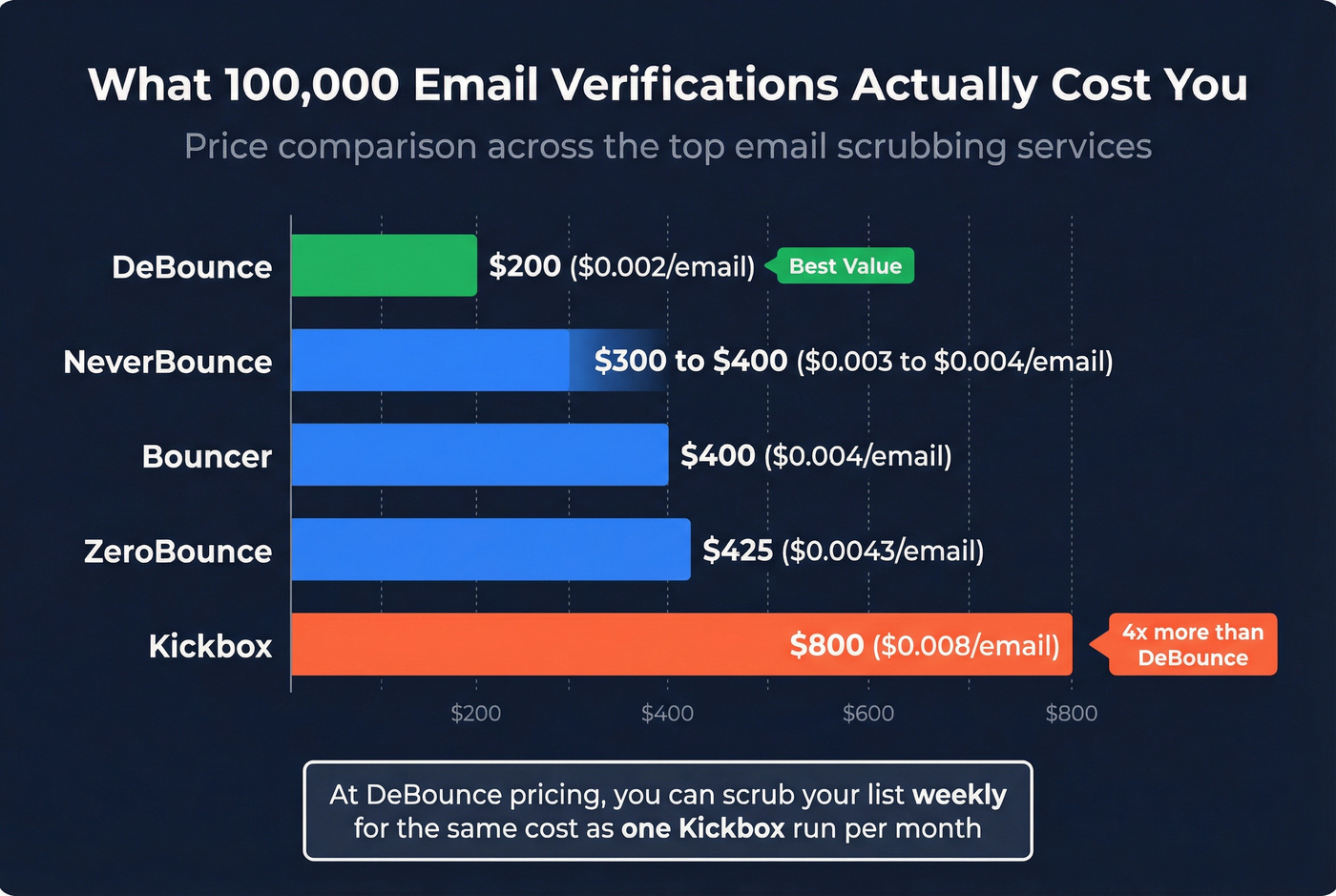
At $0.002/email, DeBounce is four times cheaper than Kickbox and half the cost of Bouncer at scale. That's $200 for 100K emails - the kind of pricing that makes weekly scrubbing economically viable.
The value proposition has caught on in the Clay community specifically. Users are switching from ZeroBounce and NeverBounce to DeBounce for the validation step because the cost difference is dramatic at volume. With 98% accuracy and 115+ integrations, it punches well above its price point.
The caveat you need to know: one Capterra user reported DeBounce incorrectly marked hundreds of contacts as "opted out" - including current customers and the user's own email address. Support didn't respond for over 1.5 months. HubSpot had to resolve it. That's a serious red flag for teams running high-stakes campaigns. 4.5 G2 rating (4.7 on Capterra), but test thoroughly before going all-in.
Use this if: Budget is a primary constraint and you're cleaning large lists regularly.
Skip this if: You need bulletproof support or can't tolerate the occasional false-positive on opt-out status.
NeverBounce - Best for High Volume
NeverBounce processes 100,000+ emails per hour. If you're cleaning massive lists on tight timelines - think pre-event blasts or quarterly database scrubs - that speed matters.
80+ integrations cover most major ESPs, CRMs, and marketing platforms. At $0.004/email for 100K ($400 total), pricing is identical to Bouncer. You get up to 1,000 free credits to test, the most generous free tier among the mid-range tools.
Here's what you should know: NeverBounce is owned by ZoomInfo. That isn't inherently bad - the tool works well independently. But if you're already in a ZoomInfo renewal conversation, NeverBounce will likely get bundled into your contract whether you want it or not. We've seen teams get stuck in this exact trap, where a verification dependency on ZoomInfo's ecosystem creates real friction when they try to switch providers. 4.3 G2 rating - solid but noticeably lower than Bouncer (4.8) and ZeroBounce (4.7).
Use this if: You're processing 100K+ emails regularly and need speed plus broad integrations.
Skip this if: You're actively trying to reduce ZoomInfo dependency, or accuracy matters more than throughput.
Kickbox
Premium positioning with premium pricing. At $0.008/email for 100K ($800 total), Kickbox costs twice as much as Bouncer and four times more than DeBounce. What you get for that premium: 25+ ESP integrations that are deeply built out, not just surface-level connections. 4.5 G2 rating, 100 free credits.
Real talk: Kickbox makes sense if you're already embedded in their ecosystem or need their specific ESP connectors. For everyone else, Bouncer delivers comparable accuracy at half the price. The Snov.io benchmark also flagged that Kickbox banned their test account during research - not a great look for a tool that's supposed to welcome evaluation.
Clearout
110+ integrations and 20+ validation checks make Clearout a solid mid-range option. 4.6 G2 with 490 reviews - that's a large enough sample to trust. At $0.004-0.007/email depending on volume, it sits between the budget options and the premium tier.
The downsides are well-documented in G2 reviews: bulk verification slows during peak hours (16 mentions), the UI feels dated and cluttered, and advanced features have a steep learning curve. If you can live with those rough edges, the accuracy and integration breadth are competitive. Clearout guarantees bounce rates of 3% or less on deliverables.
Emailable
The most generous free tier in the category: 250 credits, no credit card required. That's enough to run a meaningful accuracy test before committing a dollar. 4.8 G2 rating (tied with Bouncer for highest), $0.0042/email at 100K.
The integration library is thinner - roughly 20 connections versus 80+ at NeverBounce or 115+ at DeBounce. If your stack is standard (HubSpot, Mailchimp, etc.), that's fine. If you're running a complex multi-tool workflow, you'll hit walls.
EmailListVerify
The cheapest option at scale, period. $0.0019/email means 100K emails costs just $186. But independent testing gave it a quality rating of 2 out of 5. Only 11 integrations. This is the tool you use when budget is genuinely the only constraint and you're willing to accept that some bad addresses will slip through. Layer it with a second verification pass on the "risky" results if deliverability matters.
Mailfloss
Different model entirely. Instead of bulk uploads, Mailfloss connects directly to your ESP and cleans continuously in the background. Plans run $29-$209/month depending on list size. It's the "set and forget" option for marketing teams that want automated email hygiene without manual CSV uploads.
MillionVerifier, Proofy, BriteVerify, and Verifalia
MillionVerifier is solid mid-range at $0.0037/email with 18+ integrations and a 4.3 G2 rating. Minimum purchase is 10,000 credits, so it isn't ideal for small-scale testing.
Proofy is an underrated budget pick at $0.0032/email with a 4.7 G2 rating. No free credits, which makes it harder to evaluate before buying.
BriteVerify is a legacy enterprise option that hasn't kept pace. Most expensive at scale ($0.01/email for 100K - that's $1,000) with a 4.1 G2 rating and just 25 free credits. If your enterprise procurement already has BriteVerify approved, it works. Otherwise, there's no reason to choose it over Bouncer or ZeroBounce.
Verifalia offers bulk discount pricing as low as $0.00049/email at massive volume - the cheapest per-email cost available anywhere. Free tier available. Quality rating of 3 out of 5 in independent tests. Best for massive one-off list cleans where you're processing millions of addresses and per-unit accuracy on the margins is less critical than cost.
Tools That Didn't Make the Cut
We looked at MailerCheck, QuickEmailVerification, Xverify, and Bounceless. None made it. MailerCheck is solid but redundant if you're already using Mailchimp (same parent company). QuickEmailVerification and Bounceless lack the integration depth and independent accuracy data to recommend confidently. Xverify's pricing isn't competitive enough to justify the thinner feature set.
Email List Scrubbing Pricing at a Glance
The industry average for email verification runs $0.003-$0.01 per email. The sweet spot for most teams is $0.002-$0.005/email - you get reliable accuracy without overpaying for premium positioning.
| Tool | 100K Price | Per Email | G2 | Free Credits |
|---|---|---|---|---|
| Prospeo (find + verify)* | ~$1,000 | ~$0.01 | - | 75/mo |
| Bouncer | $400 | $0.004 | 4.8 | 100 |
| ZeroBounce | $425 | $0.0043 | 4.7 | 100 |
| DeBounce | ~$200 | $0.002 | 4.5 | 100 |
| NeverBounce | $400 | $0.004 | 4.3 | 1,000 |
| Kickbox | $800 | $0.008 | 4.5 | 100 |
| Clearout | ~$420 | $0.004-0.007 | 4.6 | 100 |
| Emailable | $420 | $0.0042 | 4.8 | 250 |
| EmailListVerify | $186 | $0.0019 | 4.5 | 100 |
| Mailfloss | $29-209/mo | Subscription | - | - |
| MillionVerifier | ~$370 | $0.0037 | 4.3 | None |
| Proofy | ~$320 | $0.0032 | 4.7 | None |
| BriteVerify | $1,000 | $0.01 | 4.1 | 25 |
| Verifalia | $389 | $0.0039 | - | Yes |
*Prospeo's ~$0.01/email includes sourcing + verification - data arrives clean, not just scrubbed. Compare it against the cost of buying data elsewhere AND scrubbing it separately.
Integration counts: DeBounce (115+), Clearout (110+), NeverBounce (80+), Kickbox (25+), Emailable (~20), MillionVerifier (18+), Bouncer (15+), EmailListVerify (11).
Look, if you're cleaning 100K emails quarterly, the difference between DeBounce ($200) and Kickbox ($800) is $2,400/year. That's real money. Unless you need Kickbox's specific ESP integrations, the budget tools deliver comparable results.
How These Tools Handle Catch-All Emails
Catch-all emails represent roughly 15-20% of any B2B list - the average sits around 17.5%. Major organizations like The Guardian, The New York Times, and The Financial Times use catch-all configurations. These addresses are the single biggest source of verification inaccuracy, and how a tool handles them tells you more about its quality than any claimed accuracy number.

Most tools take the lazy approach: they label catch-alls as "risky" or "unknown" and leave the decision to you. That's not verification - that's a shrug.
| Tool | Catch-All Approach |
|---|---|
| Bouncer | Verifies G Suite/O365 catch-alls specifically |
| DeBounce | Returns Safe/Risky/Unknown classification |
| ZeroBounce | Labels as catch-all, adds activity data |
| Most others | Labels "risky" - no further action |
The best practice isn't to blanket-suppress all catch-alls (you'll lose legitimate contacts) or to blanket-send to all of them (you'll spike bounces). It's controlled volume with segmentation: send to catch-alls in small batches, monitor bounce rates per domain, and suppress only the domains that actually bounce. In our experience, teams lose 15-20% of their valid contacts by blanket-suppressing catch-alls. Don't make that mistake.
When to Clean Your List (and How Often)
Quarterly cleaning is the baseline. But trigger-based cleaning matters more than calendar-based cleaning.
Clean immediately when:
- Bounce rate crosses 2% on any campaign
- You import a new data set from any source
- You switch ESPs or CRMs (migration always introduces data issues)
- Spam complaints approach 0.3% on any single send
- You haven't cleaned in 6+ months
Clean before:
- Any campaign to 10,000+ recipients
- Product launches or major announcements
- Re-engagement campaigns to dormant segments
Industry bounce rate benchmarks for context: e-commerce averages 0.29%, software averages 0.93%, business and finance sits at 0.48%. If you're above your industry average, you're overdue.
Cold email gets its own rules. Hard bounces must stay under 1%. Spam complaints under 0.3%. Never scale past 30 emails per single inbox per day - spread volume across multiple warmed inboxes. Define "inactive" as 90-180 days without opens or clicks, and run a re-engagement series before removing anyone permanently. (If you're building a system, start with a B2B cold email sequence.)
The math is simple: email lists decay at 28% per year. If you haven't cleaned in 12 months, roughly a third of your list is dead. That's not a gradual decline - it's a cliff.
Best Practices for Email List Hygiene
Verify at the entry point. Use real-time API verification when contacts enter your system - whether through forms, imports, or enrichment. Catching bad addresses before they hit your database is 10x cheaper than scrubbing them out later.
Handle catch-alls with segmentation, not suppression. Don't auto-delete every catch-all address. Segment them, send in controlled batches, and monitor per-domain bounce rates. Suppress only the domains that actually fail.
Use double opt-in for marketing lists. Yes, it reduces sign-up volume. It also eliminates typos, bots, and fake addresses at the source. Cold email lists can't use opt-in - verify them through a dedicated scrubbing service instead.
Define "inactive" and act on it. 90-180 days without engagement is the standard threshold. Run a re-engagement series (2-3 emails) before removing contacts. Some will come back. Most won't - and that's the point.
Monitor weekly, not monthly. Track bounces, complaints, and inbox placement every week. By the time you notice a monthly trend, the damage is already done.
Lock down your authentication stack. SPF, DKIM, and DMARC should be configured and passing before you worry about list quality. Cold lists need verification before every campaign. Opt-in lists need engagement-based cleaning. The tools are the same; the cadence and thresholds are different. (If you need a checklist, start with SPF, DKIM, and DMARC.)
Don't buy lists. Purchased and scraped lists are the fastest path to domain blacklisting. Source your own data through verified platforms, or accept the slower build. (More on vetting vendors in buying business leads.)
Most scrubbing services check data every 4-6 weeks. By then, 30-35% of your B2B list has already decayed. Prospeo refreshes every 7 days - so the emails you pull today are verified today, not last month. At ~$0.01/email, you get sourcing and verification in one step.
Stop paying twice - once for bad data, again to scrub it.
FAQ
What's a good email bounce rate?
Under 2% is safe for most industries; between 2-5% means you should clean immediately; above 5%, stop sending and scrub your entire list. For cold email, keep hard bounces under 1%. Industry benchmarks: e-commerce averages 0.29%, software 0.93%, business and finance 0.48%.
How often should I scrub my email list?
Quarterly at minimum, and before any campaign exceeding 10,000 recipients. Clean after importing new data or switching ESPs. B2B lists decay at 30-35% per year, so waiting 12 months means roughly a third of your list is dead. Picking a reliable email scrubbing service and sticking to a cadence is the simplest fix.
What's the difference between email validation, verification, and cleaning?
Validation checks syntax - does the address have an @ sign and valid domain? Verification pings the mail server via SMTP handshake to confirm the mailbox exists. Cleaning adds the strategic layer: engagement data, risk profiling, and deliverability intelligence to decide what to keep, suppress, or delete. Most tools handle the first two; few do true cleaning.
Can I avoid email scrubbing entirely?
Not for legacy lists, but you can reduce the need dramatically by sourcing pre-verified data. Tools like Prospeo run 5-step verification at the point of sourcing, cutting scrubbing costs for new prospecting data. You'll still need to re-verify anything older than 90 days - addresses don't stay valid forever.
Are free email scrubbing tools reliable?
Free tiers from established tools - Emailable (250 credits), Bouncer (100), DeBounce (100) - are reliable for testing accuracy on small samples. Avoid free-only tools with no paid tier; they typically cut corners on SMTP verification and catch-all handling.