How to Guess Email Address Format (Safely) in 2026
You guess first.last@company.com, load a sequence, and hit send. Day 1 looks fine. Day 2 your bounce rate spikes, Gmail starts deferring, and your "simple" outbound motion turns into a deliverability fire drill.
In 2026, basic infrastructure sloppiness gets punished fast. Gmail has rejected tens of millions of messages over PTR/rDNS issues alone, and once your reputation dips, every other mistake gets amplified.
Guess-and-send is dead.
The modern stance is verify-first. You can still guess email address format quickly, but you don't earn the right to send until you've verified candidates and you've got written rules for catch-all and unknown outcomes.
Look, if you're selling something with a smaller ticket size, you don't need a giant platform to solve this. You need a tight workflow, a verifier, and the discipline to follow your own rules when you're tired and trying to hit quota.
What you need (quick version)
This is the boring prep that keeps you from doing dumb things at 5:47pm on a Friday.
Checklist (keep it safe, keep it repeatable):
- The domain you'll actually send to (parent vs subsidiary,
.comvs country domain) - The person's first + last name (plus middle initial, suffix, and preferred name if you've got it)
- 1-3 known human emails from the same company (best case; role inboxes don't count)
- A way to generate 3-6 candidates (not every permutation under the sun)
- An email verifier to validate before outreach
- A written rule for catch-all and unknown so reps don't improvise mid-campaign
- A collision plan for common names (John Smith problems are real)
Mini decision tree (use this every time):
- Do you have any known human emails at the company?
- Yes -> infer the dominant pattern -> generate 1-3 candidates -> verify -> send only safe outcomes.
- No -> do OSINT (site search, PDFs, GitHub, press) -> infer pattern -> generate 3-6 candidates -> verify.
- Is the domain catch-all/accept-all?
- Yes -> treat "valid" as "deliverable-ish," put it in a slow lane, and cap volume.
- No -> verification is decisive; proceed with normal rules.
- Do you need coverage at scale (hundreds/thousands)?
- Yes -> use enrichment + waterfall to avoid manual guessing.
- No -> manual OSINT + verification is enough.
The one rule I won't budge on: don't send "test emails" to see what bounces. That's not testing; that's paying a deliverability tax.

The most common company email formats (with a baseline prevalence table)
Most companies pick one pattern, roll it out in IT, and never touch it again. That's good news: you're not solving a mystery novel, you're matching a template.
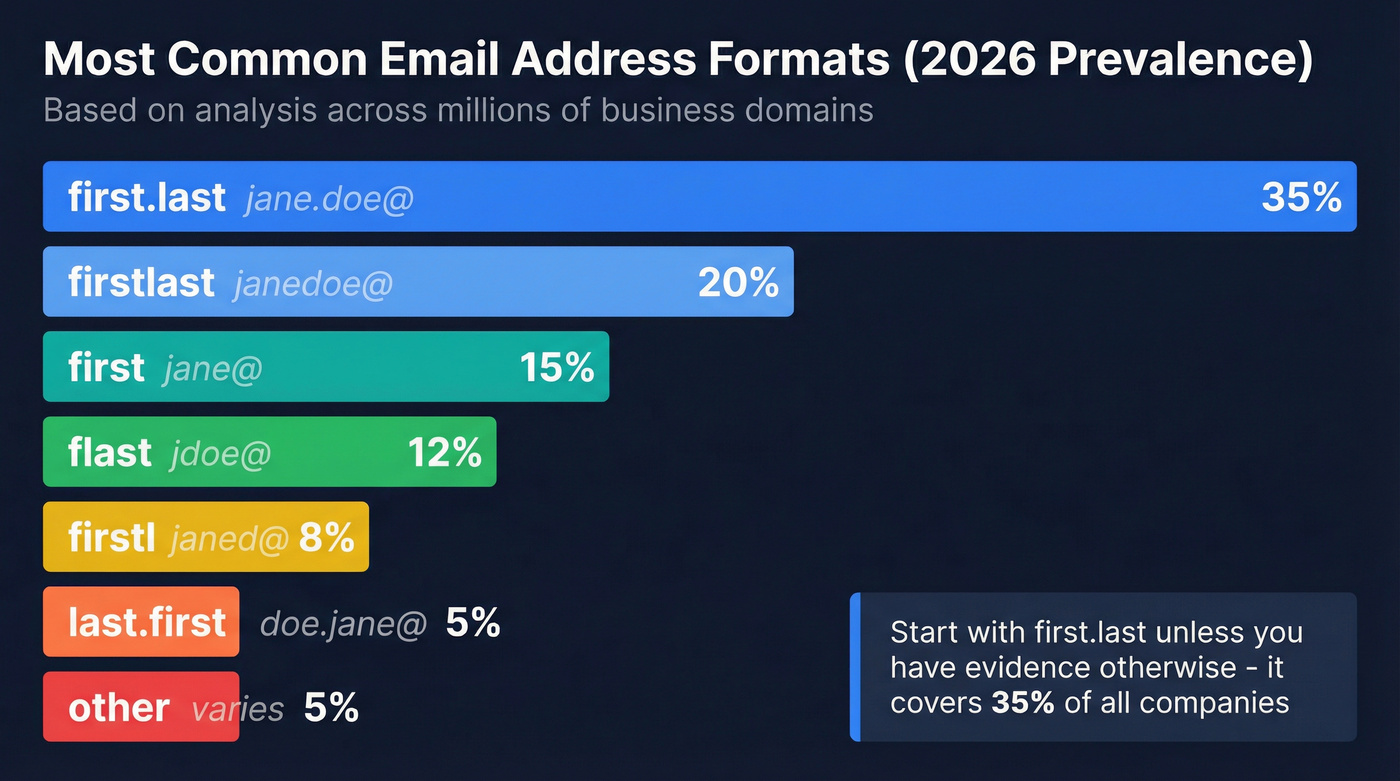
A Cleanlist prevalence breakdown is a solid baseline for what you'll see in the wild:
| Format | Example | Prevalence |
|---|---|---|
| first.last | jane.doe@ | 35% |
| firstlast | janedoe@ | 20% |
| first | jane@ | 15% |
| flast | jdoe@ | 12% |
| firstl | janed@ | 8% |
| last.first | doe.jane@ | 5% |
| other | varies | 5% |
Two practical takeaways that actually change your behavior:
- Start with
first.lastunless you've got evidence otherwise. It's the default because it's readable, scalable, and HR-friendly. - The "other 5%" is where time disappears: underscores, hyphens, middle initials, numeric suffixes, and multi-domain setups.
We've tested this across teams, and the failure pattern's always the same: someone generates 15 permutations "just in case," then wonders why verification costs climb, collisions happen, and risky addresses sneak into sequences.
If you can't narrow it to 3-6 candidates, you don't have a guessing problem. You've got a data problem (wrong domain, wrong name, or no pattern evidence).
The 2026 workflow to guess email address format (without sending test emails)
We use this workflow because it's fast, it scales across reps, and it doesn't rely on "send and pray." It also keeps your process focused on evidence-based pattern matching, not blind permutations.
The 5 methods to guess email address format (Cleanlist blueprint)
Use these in order. Each method is a different way to get pattern evidence without torching deliverability.

- Pattern detection (infer format from known emails)
- Enrichment (pull emails from a data provider, then verify)
- Website investigation (OSINT: site search, PDFs, press pages, etc.)
- Mutual connections (ask someone who already emails them)
- Waterfall enrichment (sequence multiple sources for coverage at scale)
1) Pattern detection: infer the dominant format from known emails (CRM, invoices, PDFs)
- Search your own systems first: CRM contacts, support tickets, invoices, old email threads, calendar invites. One real email beats 20 guesses.
- Pull "official" artifacts: press releases, investor PDFs, conference speaker decks, partner directories, job postings with recruiter contacts.
- Confirm it's a human mailbox.
info@,sales@,support@don't help you infer a person pattern.
Use this if: the company has any public footprint. Skip this if: you're dealing with stealth startups or tiny local businesses with zero indexed content.
2) Generate only 3-6 candidates (not 15 permutations)
Generating every permutation is lazy. It also creates collisions, especially in big orgs, because you're not thinking about who else might own that alias.
Generate 3-6 candidates max, in this order:
first.last@domainfirstlast@domainflast@domainfirst@domain(common in small orgs)firstl@domainlast.first@domain(less common, but real)
If you've got evidence (one known email), don't run the whole list. Mirror the pattern and generate 1-2 collision variants (middle initial or number).
3) Verify candidates and apply decision rules (don't argue with labels)
Verification isn't a vibe. It's a set of checks that produce operational statuses.
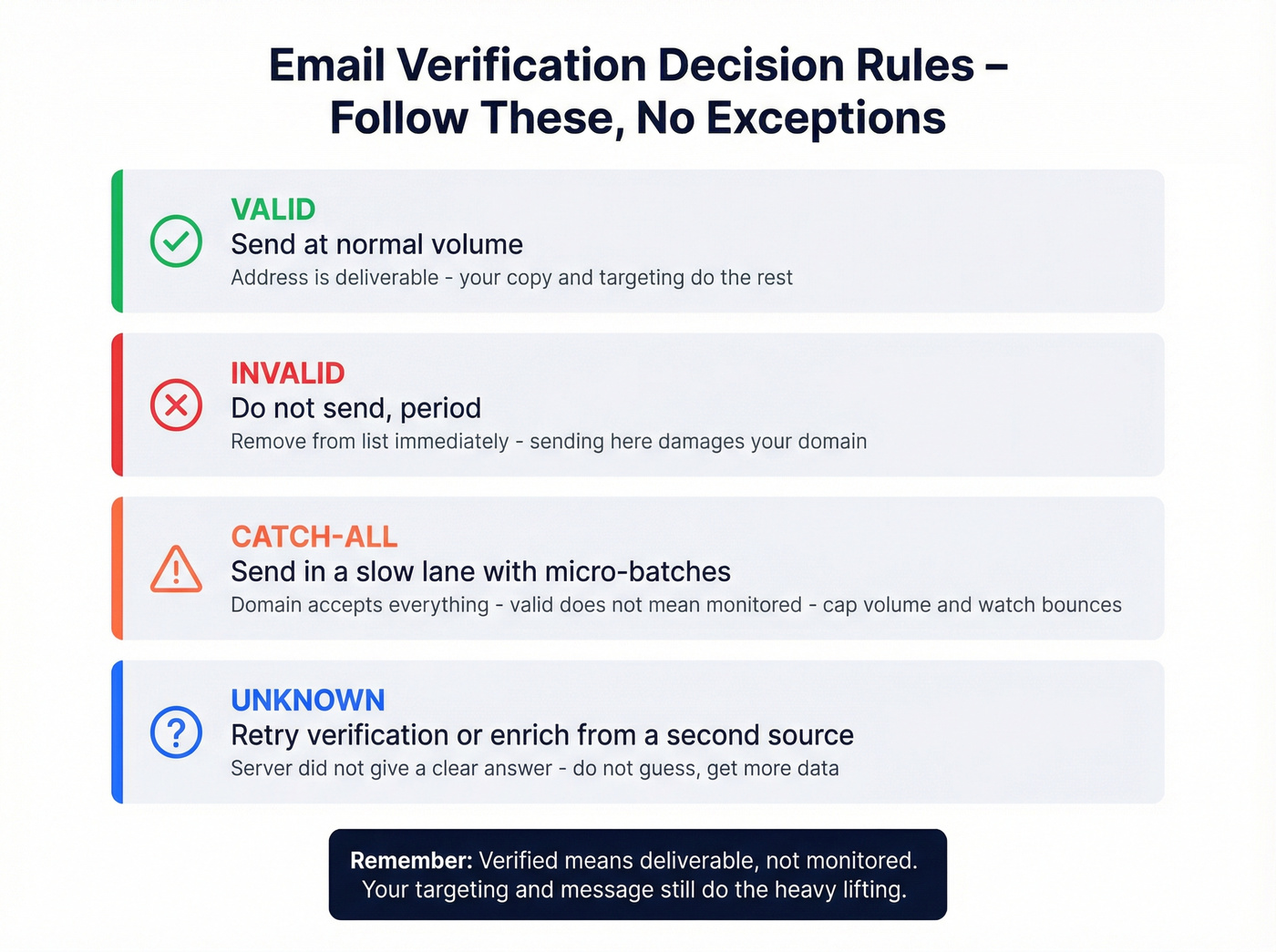
Turn those statuses into rules:
- Valid -> send (normal volume)
- Invalid -> don't send
- Catch-all -> send in a slow lane (micro-batches + monitoring)
- Unknown -> retry + second check or enrich
Here's the part people hate hearing: "Verified" doesn't mean "a monitored inbox." It means the address is deliverable enough to attempt. Your targeting and copy still do the heavy lifting.
For a deeper SOP, see our guide on verify workflows and edge cases.
4) Website investigation (OSINT): find 2-3 real emails, then mirror the pattern
OSINT is slower than tools, but it's shockingly effective for pattern discovery, especially in regulated industries where people still publish PDFs with contact details.
Scenario you'll run into: you're trying to reach a VP at a manufacturing company, and the website has zero obvious emails. Then you find a 14-page safety PDF from two years ago with "jane.doe@company.com" in the footer. That's your pattern. You generate 3 candidates for your VP, verify them, and you're done in 10 minutes without sending a single risky message.
If you need more ways to find email addresses reliably, OSINT + verification is the core combo.
5) Mutual connections: the fastest "format confirmation" nobody uses
If you share a vendor, partner, investor, or community with the target company, ask for the format. It's the cleanest way to avoid guessing.
Simple script (email/Slack):
Quick favor: do you know the email format for people at
company.com? Example: is itfirst.last@company.comorflast@company.com? One example address is enough.
Why this works: you're not asking for an intro or a lead. You're asking for a pattern. People say yes.
When to escalate to enrichment + waterfall (coverage matters)
If you need 200 emails for a campaign by tomorrow, manual guessing is the wrong tool.

Cleanlist's vendor-reported benchmark lines up with what we've seen in practice: waterfall enrichment across 15+ sources hits ~80-90% coverage, while single-source tools land ~50-60%. One source isn't enough at scale, and pretending otherwise is how teams end up "verifying" junk all week.
If you're comparing providers and workflows, start with this rundown of lead enrichment tools and then look at waterfall alternatives for multi-source coverage.
Don't do this: BCC multiple guesses to "see what lands"
Reddit loves this tactic. It's also a great way to look sloppy and spike complaints.
- It's unprofessional (people notice when you BCC five variants of their name).
- It increases complaint risk ("why are you emailing random addresses at my company?").
- It still damages deliverability because you're generating bounces and spam signals.
The alternative is simple: generate 3-6 candidates -> verify -> send only safe outcomes -> slow-lane catch-all.


You just read a full workflow for guessing email formats - pattern detection, OSINT, candidate generation, verification. Prospeo collapses all of that into one step. Search 300M+ profiles, get 98% verified emails, and skip the guessing entirely. At $0.01 per email with catch-all handling built in.
Stop guessing formats. Start pulling verified emails in seconds.
Free ways to guess email address format (OSINT that works)
If you want to do this for free, OSINT's your best friend. The goal isn't to scrape people, it's to find one or two real emails so you can infer the company's pattern and confidently build addresses for new contacts.
Copy/paste query list (Google)
Basic pattern discovery:
site:company.com "@company.com"site:company.com "mailto:"site:company.com "contact" "@company.com"site:company.com filetype:pdf "@company.com"site:company.com filetype:ppt "@company.com""@company.com" "press""@company.com" "media inquiries""@company.com" recruiter"@company.com" HR

Obfuscation searches (people hide emails):
site:company.com "(at) company.com"site:company.com "[at] company.com"site:company.com " at company.com"site:company.com "name (at) company.com"
Fast sanity checks so you don't waste 30 minutes:
- Find 2-3 distinct human emails (not role inboxes).
- Confirm the domain matches what you'll send to (subsidiaries love different domains).
- Write down the pattern and any collision hints (numbers, middle initial).
If you want more operator ideas, SEO Sherpa's guide has a decent list of query patterns you can borrow: Google operator tactics for finding emails.
Advanced OSINT: GitHub commits (pattern discovery gold)
This is the tactic most "email format" pages never mention.
Developers often commit with a work email, and those emails show up in public commit metadata. You're not trying to harvest addresses; you're trying to confirm the format.
Try:
site:github.com "@company.com" "committed"site:github.com "@company.com" "author"site:github.com company.com "users.noreply"
Limitations you'll run into:
- Many commits use
users.noreplyaddresses, which won't show the corporate format. - Some developers use personal emails.
- Still, when you find even one
@company.comcommit email, it's usually enough to lock the pattern.
How email verification works (and why tools disagree)
Email verification has three layers. Tools disagree because they weigh these layers differently and because mail servers actively resist enumeration.
| Layer | What it checks | What it can't guarantee |
|---|---|---|
| Syntax | RFC-style parsing | Inbox exists |
| Domain | DNS MX records | Mailbox exists |
| Mailbox | SMTP handshake to RCPT TO |
Catch-all, blocks, greylisting |
1) Syntax checks (format validation)
This is basic parsing: does jane.doe@company.com look like an email?
It catches obvious junk:
jane..doe@company.comjane.doecompany.com- illegal characters in the local part
Syntax validation is necessary, but it's the easiest part of the job.
2) Domain checks (MX lookup)
This is where people mess up: you check MX records, not "does the domain resolve."
MX tells you where mail is received. No MX usually means the domain doesn't accept email, or email's routed elsewhere and misconfigured, or the domain's parked.
Operational rule: no MX = don't send. Don't get cute.
If you're troubleshooting infrastructure issues that cause deferrals and bounces, this email sending infrastructure guide will save you hours.
3) Mailbox probing (SMTP handshake)
The verifier connects to the mail server and goes far enough into the SMTP conversation to see what happens at:
RCPT TO:<candidate@domain>
This is where you get the statuses you care about:
- hard fails (like
550) - temporary deferrals (like
451) - accept-all behavior (catch-all)
If you're seeing a lot of hard failures, this breakdown of 550 errors helps you diagnose what’s actually happening.
Two lines that match real life:
- A "valid" SMTP result is connectivity, not proof a human reads it.
- Expect tool disagreement on catch-all and unknown. Build rules, don't argue with labels.
Why results conflict so much in 2026
Catch-all domains are a big one: SMTP "accepted" isn't mailbox-level proof on accept-all domains. Then you've got greylisting, throttling, and anti-enumeration defenses where servers intentionally blur mailbox existence to prevent abuse.
Verification isn't perfect. It's still the best guardrail you've got, and it's wildly better than guessing and sending.
Catch-all, greylisting, and anti-enumeration (the real reason "unknown" exists)
Catch-all (accept-all) is the #1 reason email guessing feels harder than it should.
Hunter found 38% of domains in a sample of 2,572 were accept-all. That's not a corner case, that's a huge chunk of B2B.
Hunter also ran the experiment that should scare you straight: sending to 100 accept-all vs 100 valid addresses produced 27% bounces vs 1%. That's how you torch sender reputation fast.
Operational implication (do this immediately):
- Put catch-all addresses in a separate lane
- Cap catch-all to 2-5% of any campaign batch
- If your list is 40% catch-all, split it and slow it down
We've seen teams ignore this and get punished inside 24-48 hours. The cleanup is miserable.
If you’re building process around this, use an email verification list SOP so rules don’t live in someone’s head.
What catch-all means in practice
A catch-all domain is configured to accept mail for any recipient at that domain. The server might accept madeupname@company.com with a 250 response, then silently drop it, route it to a catch-all mailbox nobody monitors, or bounce it later.
So your verifier can detect "this domain is catch-all," but it can't prove "this mailbox exists."
Greylisting: why "unknown" is a workflow step, not a dead end
Greylisting is a defensive tactic: the server temporarily rejects first-time senders with a 451 and expects a retry.
Mimecast's timing is a useful model: retry after 60 seconds, with a retry window up to 12 hours.
A retry schedule that works in practice (example):
- Retry #1: 1 minute
- Retry #2: 10 minutes
- Retry #3: 1 hour
- Retry #4: 6 hours
- If it's still unknown after 12 hours: second verifier or enrichment
Anti-enumeration: why servers make verification harder on purpose
Mail servers used to support commands like VRFY and EXPN that made it easier to confirm users and lists. Security teams disable them because they enable user enumeration.
A common Postfix hardening setup looks like:
disable_expn=yesdisable_vrfy=yes
That's the ecosystem choosing safety over your prospecting convenience.
Catch-all lane SOP (copy this into your outbound playbook)
If you want catch-all to stop wrecking your metrics, run it like an ops process.
Batching
- Send 25-50 emails per domain per day (start small; scale only if bounces stay flat)
- Warm up new sending domains before you touch catch-all-heavy lists
Monitoring
- Watch bounce rate and spam complaint rate daily
- Track a separate metric: bounce rate on catch-all lane only (don't mix it with your clean lane)
Stop-loss thresholds
- If catch-all lane bounce rate exceeds 5% in a day: pause, re-verify, and tighten candidate generation
- If your overall bounce rate exceeds 3-5%: stop the campaign and fix the list (powering through is how domains die)
To keep those thresholds stable, follow email pacing and sending limits instead of blasting lists.
Rules table: what to do with each verifier outcome
| Status | What it usually means | What to do |
|---|---|---|
| Valid | Deliverable | Send normally |
| Invalid | Hard fail (550) |
Don't send |
| Catch-all | Domain accepts all | Slow lane + micro-batch + monitor |
| Unknown | Temp fail / blocked | Retry schedule + second check |
Name normalization + edge cases (so your guesses don't break)
Most "email format guessing" fails on names, not patterns. IT systems normalize names aggressively because edge cases break logins, CRMs, and provisioning.
Microsoft 365's UPN rules are a good proxy for real-world constraints:
- Allowed characters include letters, numbers, and symbols like
' . - _ ! # ^ ~ - Disallowed: extra
@, a period immediately before@, and& - Length constraints: <=64 characters before
@, <=48 after@, <=113 total
Also: RFC rules allow more than most corporate environments accept. Apostrophes might be technically valid, but plenty of systems strip them because integrations choke.
Hyphens, apostrophes, diacritics (normalize to ASCII; remove punctuation)
Rules that keep you out of trouble:
- Convert diacritics:
Muller,Jose,Lukasz - Remove apostrophes:
O'Connor -> oconnor - Treat hyphens as optional: keep them only if you've seen them used at that company; otherwise remove
smith-jones -> smithjones(default)smith-jones -> smith-jones(only with evidence)
Nicknames and preferred names (the sneaky failure mode)
This is where reps get burned: the CRM says "Bob," HR says "Robert," and IT provisions robert.smith@.
Rules I use:
- If you've got a legal name from a public bio or press release, generate candidates for both (preferred + legal) but keep the total at 3-6.
- Common pairs worth trying: Bob/Robert, Bill/William, Liz/Elizabeth, Katie/Katherine, Mike/Michael, Jen/Jennifer
- If the person's customer-facing (sales, partnerships), preferred-name addresses are more common. If they're technical or finance, legal-name provisioning is more common.
Compound first names and multi-part last names
These break naive generators.
- Compound first names:
Mary Annbecomesmaryann,mary.ann, or justmary. - Multi-part last names:
de la Cruzbecomesdelacruz,cruz, orde.la.cruz.
Best practice: find one known email from the company with a multi-part name. That tells you whether they collapse or preserve separators.
Suffixes (Jr., III), middle initials, and collisions
Common handling:
- Drop suffixes:
John Smith Jr. -> john.smith@ - Middle initial is a collision tool:
jane.m.doe@orjanemdoe@
Collision micro-playbook (use this before you change formats):
- Try the dominant pattern first (
first.last). - If invalid, try middle initial (
first.m.last). - If it's still invalid, try numeric suffix (
first.last2). - Only then switch to a different base pattern (
flast,firstlast).
This keeps you from bouncing between formats when the real issue is "someone already owns the clean alias."
Domain variants (parent vs subsidiary; country domains)
This burns teams constantly:
- Parent uses
@parent.com - Subsidiary uses
@subsidiary.com - EMEA uses
@company.co.ukwhile US uses@company.com
Before you generate candidates, confirm the right domain for the person's region and business unit. If you guess the wrong domain, verification results will mislead you.
When multiple formats are valid (aliases, proxy addresses, collisions)
Sometimes you're not wrong. The company really does have multiple valid formats.
In Exchange environments, admins can assign multiple SMTP proxy addresses to the same mailbox. Only one is the "primary," but the others still deliver.
Exchange email address policies use template variables like:
%g= given name%s= surname%i= middle initial%m= alias
So an org might support:
%g.%s@domain->jane.doe@domain%1g%s@domain->jdoe@domain%m@domain-> alias-based addresses
Collisions are the other reason multiple formats appear. Big orgs have lots of repeats, and numeric suffixes are a normal strategy.
What to do when you see multiple formats in the wild:
- Treat the most common pattern as the default.
- Use verification to pick the best candidate.
- If two candidates verify as deliverable on a non-catch-all domain, choose the one that matches the company's dominant pattern (it's more likely the primary).
Tools to guess + verify email formats (with pricing)
Directory-style "company email format" pages are fine for hints, but they're often incomplete. They tell you what's common, not what's safe to send.
Verification is cheap. Burned deliverability is expensive.
If you’re evaluating stacks, compare categories in our roundup of email lookup tools and the ranked list of email verifier websites.
Quick comparison table (2026)
| Tool | Best for | Strength | Weak spot | Pricing (2026) |
|---|---|---|---|---|
| Prospeo | Verify + enrich at high accuracy | 98% verified email accuracy + 7-day refresh | Not a full sales engagement suite | Free tier; typically ~$0.01/email (credit-based) |
| Hunter | Pattern discovery | Domain Search surfaces format fast | Accept-all domains reduce certainty | Free; $49-$299/mo (credit-based) |
| NeverBounce | Bulk list hygiene | Fast, predictable bulk verification | Not an enrichment database | $8/1k pay-as-you-go; ~$49/mo+ (subscription) |
| ZeroBounce | Risk scoring + second opinion | Extra risk signals beyond valid/invalid | Heavier UI/workflow | $20/2k credits; ~$99/mo plan |
| Apify Email Pattern Finder | Automation | Pattern + confidence score | Needs setup/runs | ~$10-$50/mo (usage-based) |
| RocketReach | Quick directory hint | Fast "likely format" lookup | Not a send-safety system | ~$50-$150/mo (credit-based) |
| LeadIQ | Rep workflow assist | Fits capture -> sequence workflows | Not a verification methodology | ~$75-$200/user/mo (seat-based) |
| SignalHire | Quick lookup | Easy format hints | Treat as unverified | ~$50-$200/mo (credit/usage-based) |
Where each tool fits in the workflow
- Pattern discovery: Hunter, Apify, RocketReach, SignalHire
- Verification / hygiene: NeverBounce (bulk), ZeroBounce (risk + second opinion)
- Enrichment + verify (when you need coverage): Prospeo
- Rep workflow assist: LeadIQ (paired with a verifier)
Prospeo (Tier 1)
Prospeo is the publisher's product, and it's the cleanest path from "candidate list" to "send-safe list" if you care about accuracy and freshness. It's "The B2B data platform built for accuracy."
In practice, you use it two ways: (1) verify the 3-6 candidates you generated from a pattern, or (2) skip the guessing and pull verified contact data directly, then still keep your catch-all rules in place so you don't get overconfident on accept-all domains. Prospeo includes 300M+ professional profiles, 143M+ verified emails, and 125M+ verified mobile numbers, with 98% verified email accuracy and a 7-day data refresh cycle.
It's also self-serve: there's a free tier (75 emails/month plus 100 Chrome extension credits/month), and paid usage typically lands around ~$0.01 per verified email on a credit-based model.
Hunter (Tier 1)
Best if: you want to identify a company's dominant email pattern quickly. Skip if: your list is heavy on catch-all domains and you need mailbox-level certainty.
Hunter's Domain Search is still one of the fastest ways to surface known emails and infer the likely format. It's simple, fast, and it pushes you toward pattern evidence instead of random guessing.
Pricing is straightforward: Free, Starter $49/mo, Growth $149/mo, Scale $299/mo.
NeverBounce (Tier 1)
NeverBounce is what you use when you've already got a list and you need to stop bounces from wrecking your sender reputation. It's less about "guessing formats" and more about "make this CSV safe before we torch a domain."
In our experience, it's a great hygiene layer for big, messy lists where you need quick triage and clear outcomes. It's not trying to be a database or a GTM suite; it's a specialist.
Pricing model: pay-as-you-go ($8 per 1,000 credits) and subscriptions starting around ~$49/mo (volume tiers).
ZeroBounce (Tier 2)
ZeroBounce is a strong second opinion when you're dealing with risky segments: older lists, lots of catch-all domains, or mail servers that aggressively block probing. The extra risk signals are useful when you're deciding what goes into the slow lane versus what gets dropped.
Pricing model: $20 for 2,000 credits pay-as-you-go, and a ~$99/mo plan.
Apify Email Pattern Finder (Tier 2)
Apify's Email Pattern Finder is the automation nerd option: scrape known emails from a site, filter role inboxes (info@, sales@), match patterns, and output a pattern + confidence score (0-1).
Expect ~$10-$50/mo depending on runs and compute.
RocketReach (Tier 3)
RocketReach is fine as a quick directory-style hint for "what format does this company tend to use?" Treat it as a starting signal, then verify elsewhere before you send.
Pricing is typically ~$50-$150/mo.
If you want the detailed breakdown, see our RocketReach pricing guide.
LeadIQ (Tier 3)
LeadIQ helps reps capture leads and move faster. It can surface format hints, but it won't save you from bad verification rules or catch-all chaos.
Pricing is typically ~$75-$200 per user/mo.
SignalHire (Tier 3)
SignalHire's format pages are a decent quick lookup when you're stuck. Treat the output as an unverified suggestion and run verification before outreach.
Pricing is typically ~$50-$200/mo.
Catch-all domains, unknown statuses, collision risks - every edge case in this guide exists because guessing is inherently fragile. Prospeo's 5-step verification with spam-trap removal and catch-all detection handles all of it. Data refreshes every 7 days, not 6 weeks.
Replace your guessing workflow with 143M+ already-verified emails.
FAQ
How do I find a company's email format for free?
Use OSINT first: search the company site for real emails (site:company.com "@company.com"), check PDFs/press releases, and try GitHub commit searches for pattern evidence. Once you see one real address, mirror that pattern and generate 3-6 candidates for your target.
What does "catch-all" mean, and can I trust a "valid" result?
Catch-all means the domain accepts mail for any recipient, so SMTP acceptance isn't mailbox-level proof. Treat catch-all as higher risk: run it in a slow lane, micro-batch sends, and cap catch-all to roughly 2-5% of a campaign batch.
Why do verifiers return "unknown," and when should I retry? (451/greylisting)
"Unknown" usually means a temporary deferral (often greylisting) or anti-enumeration blocks. If you see a 451-style temporary failure, retry on a schedule (for example: 1 minute, 10 minutes, 1 hour, 6 hours) within a 12-hour window. If it stays unknown, run a second check or move the lead to enrichment.
What's the safest number of email guesses to generate per person?
Generate 3-6 candidates max. More permutations doesn't increase accuracy; it increases the odds you email the wrong mailbox, especially in large orgs with name collisions. If you've found one known email pattern, generate 1-2 variants for collisions (middle initial or numeric suffix).
Summary: guess the format, but earn the send
If you take nothing else: the job isn't to guess email address format and hit "launch." The job is to find evidence (known emails or OSINT), generate a small candidate set (3-6), verify, and run strict rules for catch-all and unknown.
That's how you keep bounce rates down and avoid turning outbound into a deliverability incident.