How to Verify an Email Address - The Complete Guide for 2026
You just sent 5,000 cold emails. 847 bounced. Your domain reputation dropped overnight, and now even your legitimate emails land in spam. That's not a hypothetical - it's what happens when you skip the step to verify this email or that one and trust your data provider's "99% accuracy" claim at face value.
It takes three months to warm up a domain and three seconds to burn it with a bad list.
Email marketing still returns $36-$40 for every $1 spent. But that ROI assumes your emails reach inboxes. Email lists decay at 25-28% per year - people change jobs, companies shut down, domains expire. The average professional turnover rate hit 41% annually, meaning nearly half the contacts in your CRM from last year are dead addresses. The industry average hard bounce rate is just 0.21%, so if yours is above 2%, you're an outlier for all the wrong reasons. Above 5%, you're actively burning your sender reputation.
Here's the thing: every time you need to check whether an address is real, you're compensating for data that was stale when you got it. Verification is a band-aid. The real question is why your data needs verifying in the first place - and whether there's a way to skip the treadmill entirely.
What You Need (Quick Version)
If you need to check one email right now: Use any free single-verification tool or browser extension. Takes seconds.

If you need to clean a list: Three tools worth your money:
- Prospeo - 98% accuracy with 5-step verification and catch-all handling. Best if you want data verified at the source so you stop re-cleaning. 75 free emails/month.
- Bouncer - Best pure verification accuracy on a budget. $45/10K emails with independent test scores backing the claims.
- EmailListVerify - Cheapest per email at $0.004 each. No frills, gets the job done.
If you want to stop verifying altogether: Get data that's pre-verified and refreshed weekly instead of cleaning dirty data after the fact.
Now let's get into how this actually works, what tools lie about, and the mistakes that'll burn your list.
How Email Verification Actually Works
Most people think verification is a simple yes/no check. It isn't. A proper verification tool runs four distinct steps, and skipping any of them leaves gaps.
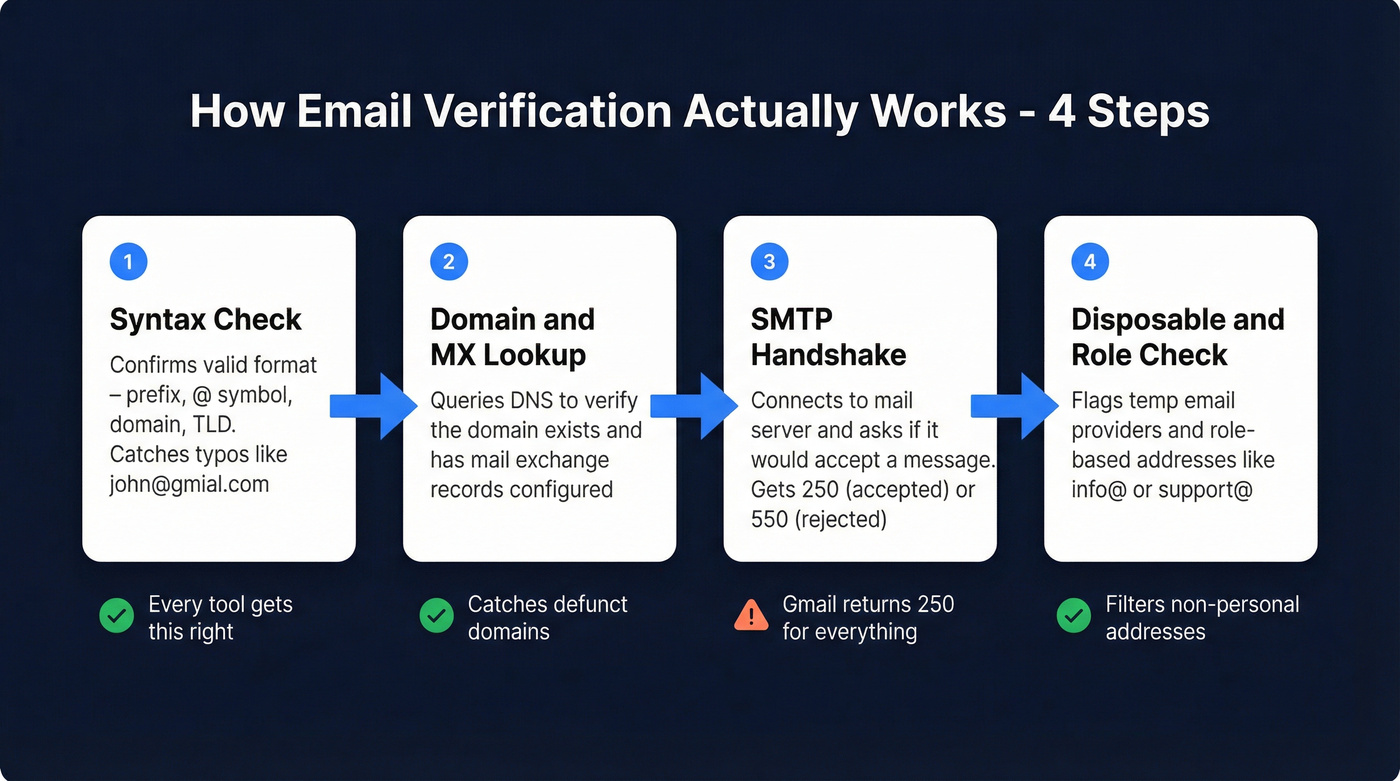
Step 1: Syntax check. The tool confirms the email follows a valid format - prefix, @ symbol, domain, proper TLD. This catches typos like "john@gmial.com" or missing characters. Every tool gets this right.
Step 2: Domain and MX record lookup. The tool queries DNS to verify the domain exists and has mail exchange (MX) records configured. No MX record means the domain can't receive email. Period. This catches defunct companies and parked domains.
Step 3: SMTP handshake. The tool connects to the mail server and asks, "Would you accept a message for this address?" The server responds with a status code - typically 250 (accepted) or 550 (rejected). This step also checks if the domain is a catch-all, meaning it accepts mail to any address whether the specific mailbox exists or not.
Step 4: Disposable and role-based email check. The tool cross-references the domain against databases of known disposable email providers (Guerrilla Mail, Temp Mail, etc.) and flags role-based addresses like info@, support@, or sales@ that aren't tied to a real person.

Some tools advertise 7-9 verification checks - those are typically sub-steps within these four stages, not fundamentally different processes.
One distinction that matters: verification isn't the same as validation. Validation just checks format - it's the mailman confirming the address is written correctly. Verification is the mailman walking to the house and checking if someone actually lives there. You need both, but verification is what prevents bounces.
The whole process takes milliseconds per email. Most tools process 1,000 emails in 1-5 minutes and 10,000 in under 30 minutes.

You just read how the best verification tools top out at 70% accuracy in real tests. Prospeo skips the treadmill entirely - 5-step verification with catch-all handling, spam-trap removal, and honeypot filtering baked into every email before it reaches you. 98% accuracy. Data refreshed every 7 days, not 6 weeks.
Stop cleaning dirty data. Start with emails that don't bounce.
How to Verify This Email (or Any Address) in 30 Seconds
The Manual Method (Don't Bother)
You can verify an email manually using command-line tools:
- Run
[nslookup -type=mx domain.com](https://learn.microsoft.com/en-us/windows-server/administration/windows-commands/nslookup)to find the mail server - Connect via
telnet mail-server.domain.com 25 - Issue SMTP commands:
HELO,MAIL FROM,RCPT TO - Read the response code - 250 means accepted, 550 means rejected
In practice, it's unreliable. Most mail servers rate-limit or block SMTP probes from unknown sources. And here's the big one: Gmail returns a 250 OK for every address, whether the mailbox exists or not. So if you're checking a Gmail address manually, you'll always get a "valid" response - even for completely fake addresses.
I've seen teams waste hours trying to build internal verification scripts based on SMTP. The edge cases will eat you alive.
The Tool Method
Open any verification tool, paste the email, click verify. Done.

For bulk verification, upload a CSV. Most tools return results in minutes. The real question isn't how to check an address - it's which tool to trust with the results.
Real-Time Verification at Signup
One use case most people overlook: verifying emails at the point of entry. If you have a signup form, demo request page, or lead magnet, an API-based verification call can reject invalid addresses before they ever hit your database. This prevents fake signups, reduces fraud, and keeps your list clean from day one - instead of cleaning it after the damage is done.
The 99% Accuracy Lie
Every email verification tool claims 95-99% accuracy. Hunter tested 15 of them with 3,000 real business emails, segmented by company size. The best performer - Hunter itself, which acknowledged the bias - hit 70%. Clearout scored 68%. Kickbox hit 67.5%. Even Bouncer, which tops independent accuracy benchmarks elsewhere, scored 65% in that particular test - showing how much methodology matters.

Let that sink in.
Tools marketing "99% accuracy" performed at 60-70% in controlled testing.

Why the gap? Three reasons:
Gmail's SMTP blind spot. Gmail returns a 250 OK for every address. If your list is heavy on Gmail addresses (and many B2B lists are, especially for founders and small teams), SMTP-based verification literally can't tell you if the mailbox exists. Tools relying primarily on SMTP checks are guessing on every Gmail address.
Catch-all domains. An estimated 15-25% of B2B domains are configured as catch-all - they accept mail to any address at the domain, whether the specific mailbox exists or not. For these domains, SMTP verification is useless. The server says "yes" to everything. Tools without proprietary methods to handle catch-alls are flying blind on a quarter of your list.
"Unknown" results tank accuracy. When a tool can't determine status, it returns "Unknown." In Hunter's benchmark, these unknowns dragged down overall accuracy scores significantly, especially on mid-market and enterprise domains with stricter mail server configurations.
The Reddit sentiment on this is brutal. Users describe verification services as "outrageously expensive for a service that at first sight seems to be a regex with a little bit more verifications." The frustration is justified - credit-based pricing that charges the same rate whether the tool actually verified the email or just guessed is a tax on everyone.
The tools that perform best handle Gmail and catch-all domains through proprietary database lookups rather than relying solely on SMTP. That's the differentiator worth paying for.
Best Email Verification Tools Compared
Here's the full breakdown. I've organized by value - what you actually get per dollar - not by who has the best marketing page.

Pricing & Positioning
| Tool | Free Tier | Cost/10K | Accuracy Claim | Best For |
|---|---|---|---|---|
| Bouncer | 100 | $45 | 99%+ | Budget accuracy |
| ZeroBounce | 100/mo | $64 | 99% | Enterprise compliance |
| NeverBounce | 10 + analysis | $50 | 97% | Free list analysis |
| EmailListVerify | 100 | $24 | 97% | Cheapest per email |
| Emailable | 250 | $50 | 99%+ | Largest free tier |
| Hunter | 50/mo | $149 | ~70% | Email finder suite |
| Clearout | 100 | $58 | 99% | Integrations |
| Kickbox | 100 | $80 | 95% | Sendex scoring |
| Verifalia | 25/day | ~$79 | N/A | Pay-per-use |
| MillionVerifier | None | ~$37 | 99%+ | Bulk budget |
| Snov.io | 50 | $189 | 98% | Prospecting bundle |
*Verification is bundled with email finding at ~$0.01/email - no separate verification cost.
Performance & Integrations
| Tool | Real-World Accuracy | Speed | Integrations |
|---|---|---|---|
| Bouncer | ~65% (Hunter benchmark) | 180K/hr | 15+ |
| ZeroBounce | Not independently tested | 133K/hr | 60+ |
| NeverBounce | Not independently tested | 100K/hr | 80+ |
| EmailListVerify | Not independently tested | N/A | 11 |
| Emailable | Not independently tested | 2M/hr | 50+ |
| Hunter | ~70% (own benchmark) | N/A | 20+ |
| Clearout | ~68% (Hunter benchmark) | 160K/hr | 38 |
| Kickbox | ~67.5% (Hunter benchmark) | N/A | 25+ |
| Verifalia | Not independently tested | Varies | 10+ |
| MillionVerifier | Not independently tested | N/A | 5+ |
| Snov.io | Not independently tested | N/A | 45+ |
Prospeo - Best for Pre-Verified Data
Use this if: You're tired of the find-then-verify two-step. You want emails that are already verified when you export them, refreshed weekly, with catch-all handling built in.
Skip this if: You already have a list from another source and just need a standalone verification pass.
Prospeo's approach is fundamentally different from standalone verifiers. Instead of cleaning dirty data after the fact, it verifies at the source using a proprietary 5-step process - syntax, domain, SMTP, catch-all handling, plus spam-trap and honeypot removal. That fifth step is why its accuracy holds at 98% where basic verifiers drop to 60-70%. The database covers 143M+ verified emails across 300M+ professional profiles, all refreshed on a 7-day cycle. The industry average refresh? Six weeks. By the time most providers' data reaches your CRM, it's already degrading.
The results back this up. Meritt went from a 35% bounce rate to under 4% after switching. That's not a marginal improvement - that's the difference between burning domains and booking meetings.
Pricing runs ~$0.01 per email with 75 free emails and 100 Chrome extension credits monthly. No contracts, self-serve signup. And because verification is baked into the data itself, you're not paying a separate vendor to clean what you just bought - which is the part that always felt absurd to me.

Bouncer - Best Budget Accuracy
Use this if: You have an existing list and need the most accurate verification at the lowest price.
Bouncer consistently tops independent accuracy benchmarks. In EmailVendorSelection's testing, it scored 99%+ accuracy - and unlike most tools making that claim, the number held up under scrutiny. It processes 180K emails per hour and lets you upload up to 250,000 at once.
Pricing starts at $0.007/email for small volumes, dropping to ~$0.0045/email at 10K+ ($45/10K). You get 100 free credits to test. G2 rating sits at 4.8 across 232 reviews, Capterra at 4.9 with 233 - unusually consistent praise for a verification tool.
Where Bouncer falls short: it's purely a verification tool. No database, no enrichment, no prospecting. If all you need is to clean a list, the best value in the space. But if you're also sourcing contacts, you'll need a separate tool for that, which means managing two vendors and two billing cycles.
ZeroBounce - Enterprise Compliance, No Compromises
ZeroBounce is the tool you buy when your security team has veto power. HIPAA compliant, SOC 2 certified, ISO 27001 certified - the trifecta that enterprise procurement demands. If you're in healthcare, finance, or any regulated industry, this is the only verifier that checks every compliance box without compromise.

It offers 60+ integrations, processes 133K emails per hour, and provides 100 free verifications monthly. Their 2026 email statistics report is genuinely useful industry reading - worth bookmarking even if you use a different verifier. The API is well-documented and handles real-time verification at form submission, making it a strong choice for teams that need both list cleaning and signup validation.
Pricing starts at $15/month for small volumes, scaling to $64/10K. Not cheap, but the compliance certifications justify the premium for teams that need them. If you don't need compliance certs, Bouncer gives you comparable accuracy at 30% less.
NeverBounce - Best Free List Analysis
Pros:
- Free bounce rate estimate before you pay to clean - upload your list, see the damage, then decide
- $8/1K on pay-as-you-go, $49/month Growth plan with 10,000 verifications
- 80+ integrations including HubSpot, Mailchimp, Zapier, and n8n
- 7,000+ G2 reviews - the most social proof in the category
- Typo auto-correction catches "gmai" to "gmail" before wasting a credit
Cons:
- Only 10 free credits on signup (the free analysis doesn't include actual cleaning)
- $50/10K at scale is mid-range - not the cheapest, not the most accurate
NeverBounce's pricing page is refreshingly transparent. The free list analysis alone makes it worth bookmarking.
EmailListVerify - Cheapest Per Email
At $0.004/email ($24/10K), EmailListVerify has the lowest per-email cost in the market. You get 100 free credits to test, and there's no subscription required - just upload and go.
The tradeoff is ecosystem. Only 11 integrations versus 60+ for ZeroBounce or 80+ for NeverBounce. No free list analysis preview either. But if budget is the primary constraint and you're cleaning large lists, the math is hard to argue with. It's nearly half the cost of Bouncer and a third of ZeroBounce.
Emailable - Best Free Tier
If you need to test a tool thoroughly before committing, Emailable's 250 free credits give you the most room to evaluate - that's 2.5x more than any competitor's free tier. Fastest processing speed in the category at 2M emails/hour, too, which matters for time-sensitive campaigns.
The downside: subscription pricing at EUR25.50/month isn't the cheapest for ongoing use, and independent benchmark data is thinner than what's available for Bouncer or ZeroBounce.
Other Tools Worth Knowing
Hunter charges $149/10K for verification - and scored 70% accuracy in their own benchmark. Overpriced for standalone verification. But Hunter is really an email finder suite; if you're already paying for the finder, verification is a decent add-on. Don't buy it just for verification.
Clearout runs $58/10K with 160K emails/hour processing and 38 integrations. Solid middle-of-the-road option if your stack already integrates with it.
Kickbox at $80/10K is hard to justify when Bouncer offers better accuracy at $45/10K. Kickbox's Sendex reputation scoring is interesting but not worth the premium for most teams.
Verifalia offers 25 free verifications per day with no rollover. At ~$79/10K, it's expensive at scale. Skip unless you need their specific API implementation.
MillionVerifier comes in at ~$37/10K with no free tier. Decent pricing, but buying blind without free credits is a gamble.
Snov.io is the most expensive at $189/10K for verification alone. Like Hunter, it's a prospecting platform that bundles verification. If you're already in Snov.io's ecosystem, use their verification. Don't switch to them for it.
Mistakes That Burn Your List and Your Budget
These seven mistakes account for most of the wasted spend and domain damage we see in outbound teams.
1. Verify-and-forget. You clean your list once and assume it stays clean. It doesn't. After just 4 weeks, roughly 2% of a freshly verified list goes invalid. With 41% annual professional turnover, contacts churn constantly. A list you verified in January is significantly degraded by April.
2. Treating "valid" and "accept-all" as the same thing. An accept-all (catch-all) result means the domain accepts everything - it's not confirmation the mailbox exists. Sending to accept-all addresses without additional filtering is gambling with your bounce rate. An estimated 15-25% of B2B domains are catch-all, so this isn't a niche problem.
3. Waiting until bounces happen. Reactive verification - cleaning your list after a campaign bounces - is like putting on a seatbelt after the crash. The domain reputation damage is already done. Verify before you send. Always.
4. Thinking verification fixes deliverability. Verification prevents bounces. That's it. It doesn't fix your sender reputation, warm up your domain, manage sending volume, or improve your email content. Google now requires spam rates below 0.3% - and verification alone won't keep you under that threshold. Teams that verify religiously but ignore warmup and authentication (SPF, DKIM, DMARC) still land in spam.
5. Paying twice for the same data. I've seen teams export from one database, verify with a separate tool, then re-verify with a third tool because they don't trust the second one. Three line items for one contact. If your source data is verified at the point of export, you eliminate the verification step entirely.
6. Verifying everything instead of filtering first. Don't burn credits verifying 50,000 contacts when you're only going to email 5,000 of them. Filter by ICP, job title, company size, and intent signals first. Then verify the shortlist. This alone can cut verification costs by 80-90%.
7. Not automating verification. If you're manually uploading CSVs every month, you're wasting hours. Set up API-based verification on your forms, CRM imports, and enrichment workflows. Every manual step is a step someone eventually skips.
How Often to Re-Verify (And a Better Approach)
The standard advice: re-verify your active outbound lists every 3-4 months minimum. Monthly if you're running high-volume sequences. The math supports this - with 25-28% annual list decay and 2% going invalid every 4 weeks, quarterly verification is the bare minimum to stay under the 2% bounce threshold.
But here's the hot take: if your average deal size is under five figures, you probably don't need a separate verification tool at all.
The re-verification treadmill is a symptom, not a solution.
Think about what you're actually doing. You buy data from a provider. The data is already weeks or months old when you get it. You pay a verification tool to clean it. Three months later, you pay again. And again. You're spending money and time compensating for stale data - and that cycle never ends because the underlying problem (data age) never gets fixed.
The better approach is to start with data that's verified at the source and stays fresh. A 7-day refresh cycle means contacts are re-verified weekly - not monthly, not quarterly. When you export a list, the emails have been verified within the last 7 days. Compare that to the industry average refresh cycle of 6 weeks, and you start to see why most providers' data is already degrading by the time you download it.
This isn't about eliminating verification as a concept. It's about eliminating the separate verification step by choosing a data source that handles it continuously - catch-all handling, spam-trap removal, honeypot filtering, all running automatically in the background.
You're reading Prospeo's blog, so take this with appropriate context. But the math is straightforward. If you're paying $45-80 per 10K verifications quarterly, that's $180-320/year per 10K contacts just to keep your list clean. Or you can pay ~$0.01/email once for data that stays verified.
Gmail blind spots. Catch-all domains. Unknown results tanking your deliverability. Every problem in this article exists because your data was stale when you got it. Prospeo's proprietary email infrastructure verifies at the source - 143M+ emails, 7-day refresh cycle, $0.01 per address.
Get off the verification treadmill for good.
FAQ
How do I verify an email address for free?
Most tools offer 10-250 free verifications monthly. Emailable leads with 250 free credits, while Prospeo gives 75 verified emails plus 100 Chrome extension credits. ZeroBounce and Bouncer each offer 100. NeverBounce gives just 10 credits but includes a free bounce rate estimate for your entire list before you pay to clean it.
What's a catch-all domain and why does it matter?
A catch-all domain accepts mail to any address at that domain, whether the specific mailbox exists or not - making SMTP-based verification useless. An estimated 15-25% of B2B domains are catch-all. Quality tools use proprietary methods beyond SMTP to handle these, which is why their accuracy holds where basic verifiers fail.
How often should I re-verify my email list?
Re-verify active outbound lists every 3-4 months minimum, or monthly for high-volume sequences. With 25-28% annual list decay and 2% going invalid every 4 weeks, quarterly is the bare minimum to stay under the 2% bounce threshold. Or use a data source with a weekly refresh cycle to skip re-verification entirely.
What bounce rate should I aim for?
Keep total bounces below 2% and hard bounces below 1%. The industry average hard bounce rate is 0.21% across billions of emails tracked by Mailchimp. Above 2% triggers ISP scrutiny. Above 5%, you're actively damaging your sender reputation and risking blacklisting.