

How to Find the Correct Email Address (Without Guessing)
Guessing first.last@ is how you rack up bounces, burn SDR time, and quietly poison your sending domain reputation.
The fix isn't "find an email that looks right." It's a repeatable way to get the right address, prove it's deliverable, and decide if it's safe to send at your volume.
Here's the thing: most teams don't have an email-finding problem. They've got a decision problem.
What "correct email address" really means in 2026
A correct email address isn't just a string that matches a pattern. It's (1) the address, plus (2) deliverability confidence, plus (3) a clear "safe-to-send" decision based on verification signals and your outreach volume.
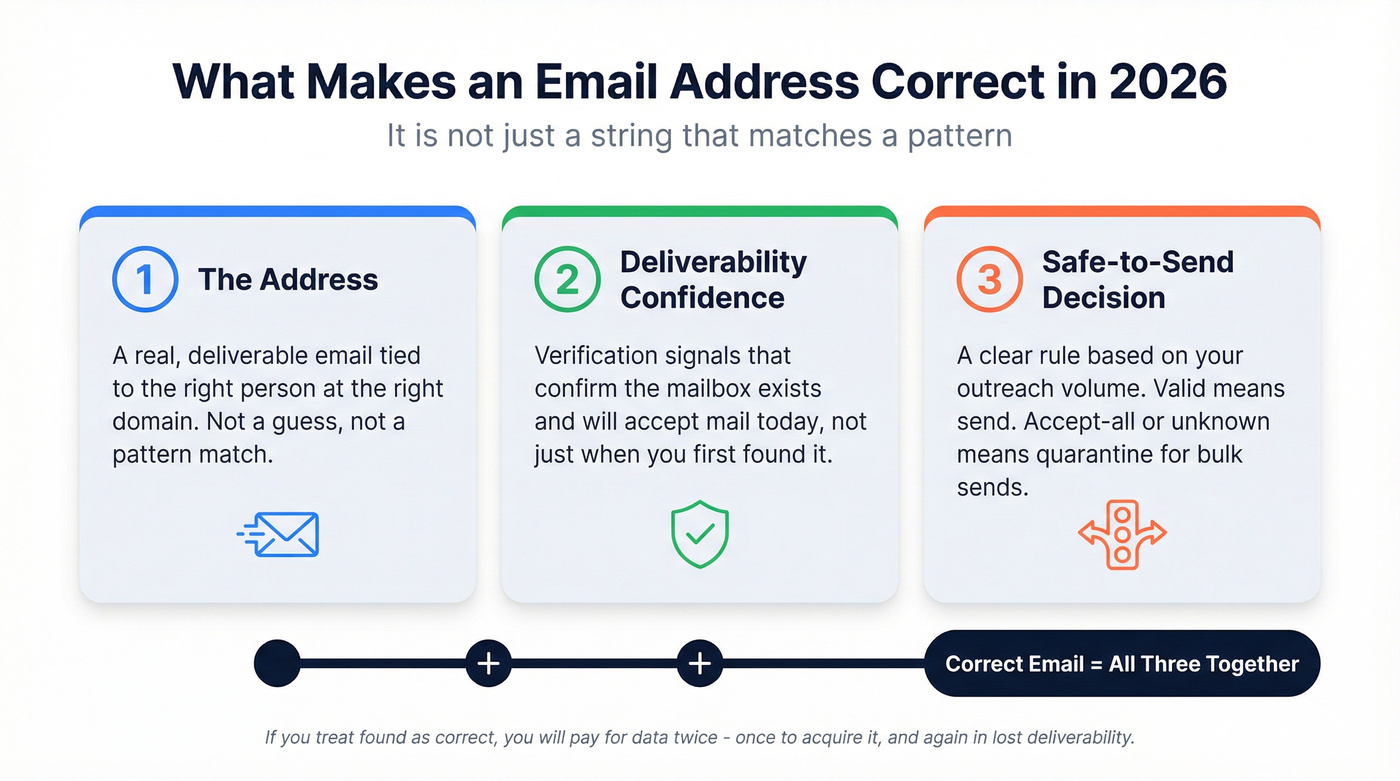
That last part is where teams get hurt. They "find" an email, push it into Outreach/Smartlead/Instantly, and only learn it was wrong after the bounce report shows up - after their domain reputation already took the hit.
Contact data decays fast. Even if you found the right email once, it can be wrong later.
"Correct" also depends on the job you're doing:
- One-to-one outreach: you can take slightly more risk (still verify).
- Scaled cold email: you need strict rules (valid-only, quarantine accept-all/unknown).
- CRM hygiene/enrichment: you care about match rate, duplicates, and consistency.
If you treat "found" as "correct," you'll pay for data twice: once to acquire it, and again in lost deliverability.

How to find the correct email address: the 10-minute workflow
Use this when you need one person's email now - fast, clean, and safe. It's also the quickest way to get solid candidates without turning your day into a research project.
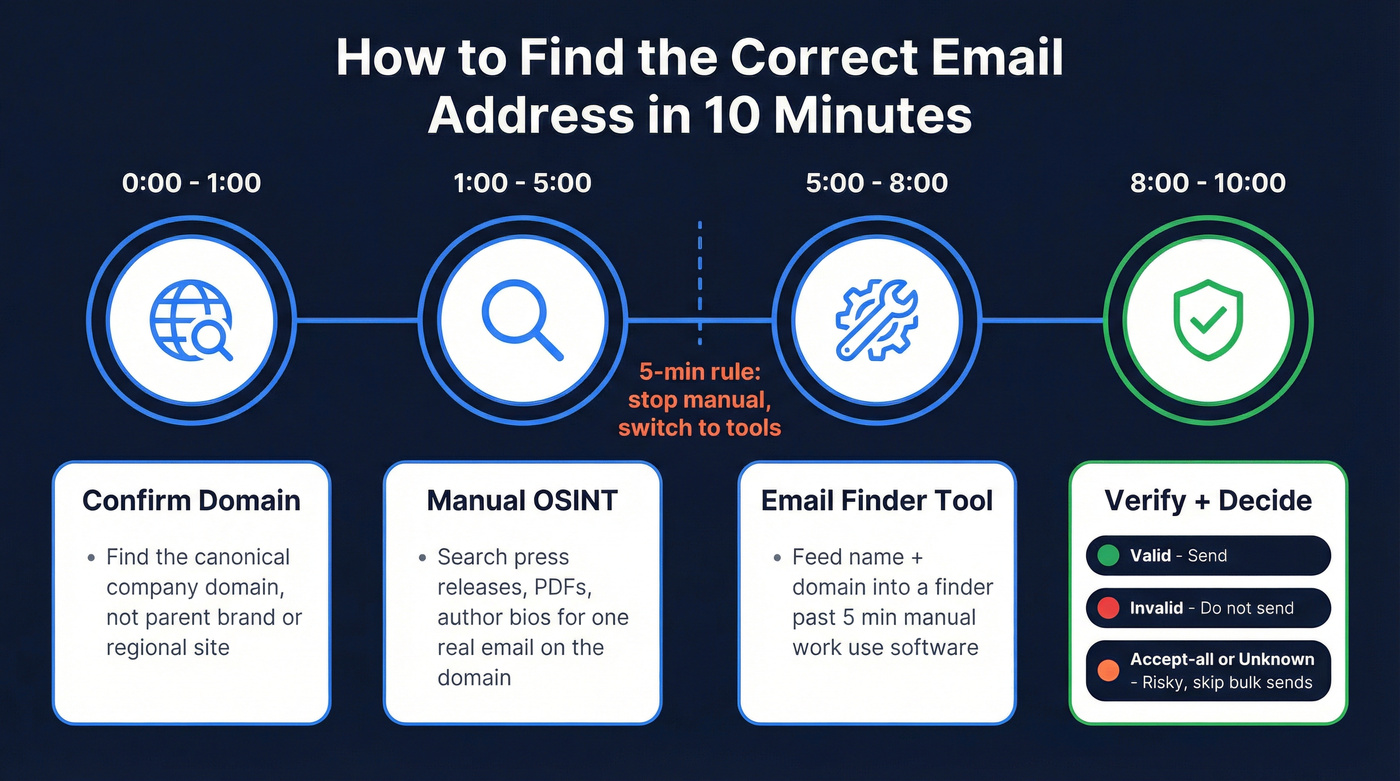
0:00-1:00 - Confirm the company domain
- Find the canonical domain you'll send to (not the parent brand, not a regional site, not a careers microsite).
1:00-5:00 - Do 5 minutes of manual OSINT
- Look for one real email on that domain (press release PDF, author bio, case study, "Contact," etc.).
- If you find one, infer the pattern with high confidence.
Do 5 minutes manual per contact, then switch to a tool.
Past 5 minutes, you're paying SDR rates to do what software does better.
5:00-8:00 - Use an email finder
- Feed it: name + company domain (domain beats company-name search).
- Expect free tools to rate-limit you or cap exports.
8:00-10:00 - Verify + decide "safe to send"
- Valid = send.
- Invalid = don't send.
- Accept-all/unknown/temporary = treat as risky; don't bulk send.
Budget-wise, most teams end up in the $30-$200+/mo range for email finding + verification, depending on volume and whether they also need enrichment. (If you’re comparing options, see email lookup tools and email verifier websites.)
Step 1 - Confirm the domain (don't guess twice)
Use this if...
- You already know the exact website the company uses for employee email (often the same as the main site, but not always).
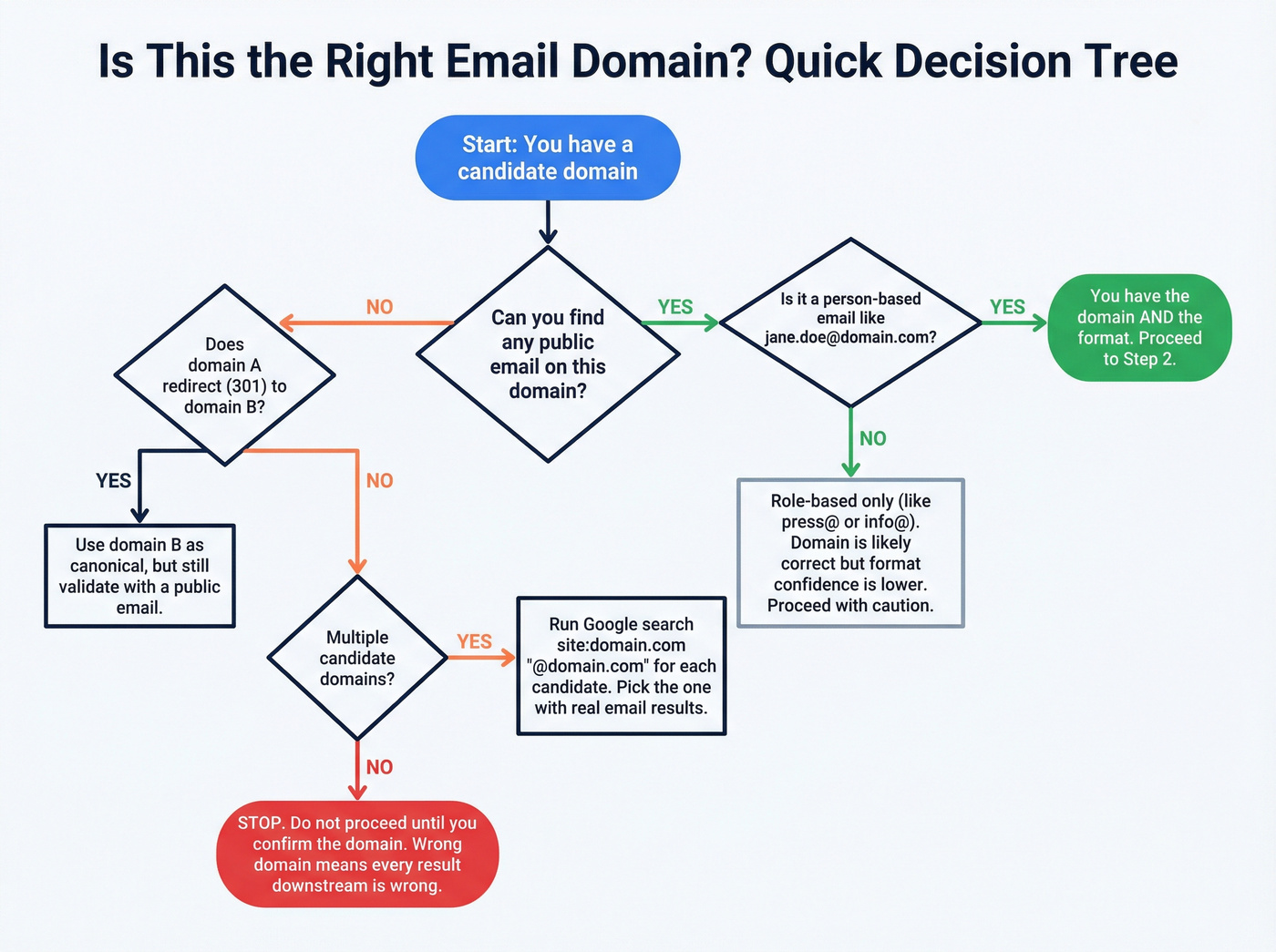
- You can validate it by finding any public email on that domain (even a generic one).
Skip this if...
- You're relying on a company name search alone and assuming the tool will map it correctly.
Two common "wrong domain" traps:
- Subsidiaries: you search "Acme Logistics" and grab
acme.com, but employees useacmelogistics.com(or the parent uses a different corporate domain). - Regional domains: the UK site is
company.co.uk, the US site iscompany.com, and the email domain is neither - it'scompanygroup.comorcompanyglobal.com.
Domain accuracy is the foundation. If you get the domain wrong, every "verified" result downstream is just confidently wrong.
Micro-checks: canonical domain checklist (takes 60 seconds)
When you see multiple domains, run these quick checks before you search anything:
- Look at the company's email footer in any public PDF (case study, press kit). That's the cleanest "this is our real email domain" signal.
- Check the careers domain vs corporate domain. Recruiting often runs on a different domain; employee mail rarely does.
- Confirm redirects: if
domainA.com301s todomainB.com, treatdomainB.comas canonical for searching - but still validate with a real email somewhere public. - Watch for "group" domains: holding companies use
group.comwhile product marketing lives onproduct.com. - If you're stuck: search
site:domain.com "@domain.com"for each candidate domain and pick the one that actually contains email addresses.
Hot take: if you can't confidently pick the right domain, stop.
You're not being thorough - you're about to generate a list of perfectly verified emails for the wrong company.

You just read the 10-minute workflow. Prospeo does it in seconds. 300M+ profiles, 98% email accuracy, 5-step verification with catch-all handling - so you never have to guess formats or burn your domain on bad data.
Skip the OSINT. Get the correct email address in one click.
Step 2 - Find one confirmed email, then infer the pattern
The fastest manual method isn't "guess formats." It's find one real email on the domain, then infer the format. In our experience, this beats blind permutations because you're anchoring on proof, not probability.
Start with sources that leak real addresses:
- Contact / About / Team pages (sometimes hidden in HTML, PDFs, or embedded docs)
- Press releases (older ones are best)
- Author bios (blog posts, guest posts, partner pages)
- Case studies / whitepapers (PDFs are gold)
- Conference speaker pages and archived event agendas
Don't stop at page 1. Companies clean up their main site, but they forget the 2019 partner PDF sitting in a subfolder.
A practical pattern workflow:
- Find any email on the domain (even
press@domain.comhelps). - Check whether it's role-based or person-based.
- If it's person-based (like
jane.doe@domain.com), you've got the format. - Only then generate the target person's email.
If you can't find a person-based email, you can still infer patterns by finding multiple role-based addresses (sometimes they reveal separators or subdomains), but your confidence drops.
One more trick that still works: sign up for a newsletter or download a gated asset and inspect the sender address. Sometimes it's an ESP domain; if it's the company domain, you just got a clean pattern signal.
WHOIS/RDAP: what it can (and can't) do now
WHOIS used to be a sneaky way to find admin/tech contacts. In 2026, privacy redaction's the norm, so it's not a reliable email source.
Use WHOIS/RDAP for what it's still good at:
- Confirming domain ownership clues (org name, registrar patterns)
- Finding related domains (brand variants, older domains still in use)
- Spotting infrastructure hints (nameservers, mail provider clues)
A simple tool like who.is is enough for this. Treat it as domain confirmation, not email discovery.
Copy/paste Google operator templates (template pack)
Paste these as-is, then swap in the name/company/domain:
"[Name]" + "[Company]" + emailsite:[companydomain.com] + "[Name]" + contact"[Name]" + "press release""[Name]" + "author bio""[Company Name]" + "email format"
Extra operator moves that save time:
site:companydomain.com "@companydomain.com"(find any email on-site)site:companydomain.com filetype:pdf "@companydomain.com"(PDF hunting)intext:"@companydomain.com" "[Name]"(force the domain + name together)
Common B2B email formats (with a quick "pattern confidence" rule)
Pattern confidence rule: only generate permutations after you've seen one real email on that domain. Otherwise you're rolling dice. (If you still need a safer approach, use this guess formats workflow.)
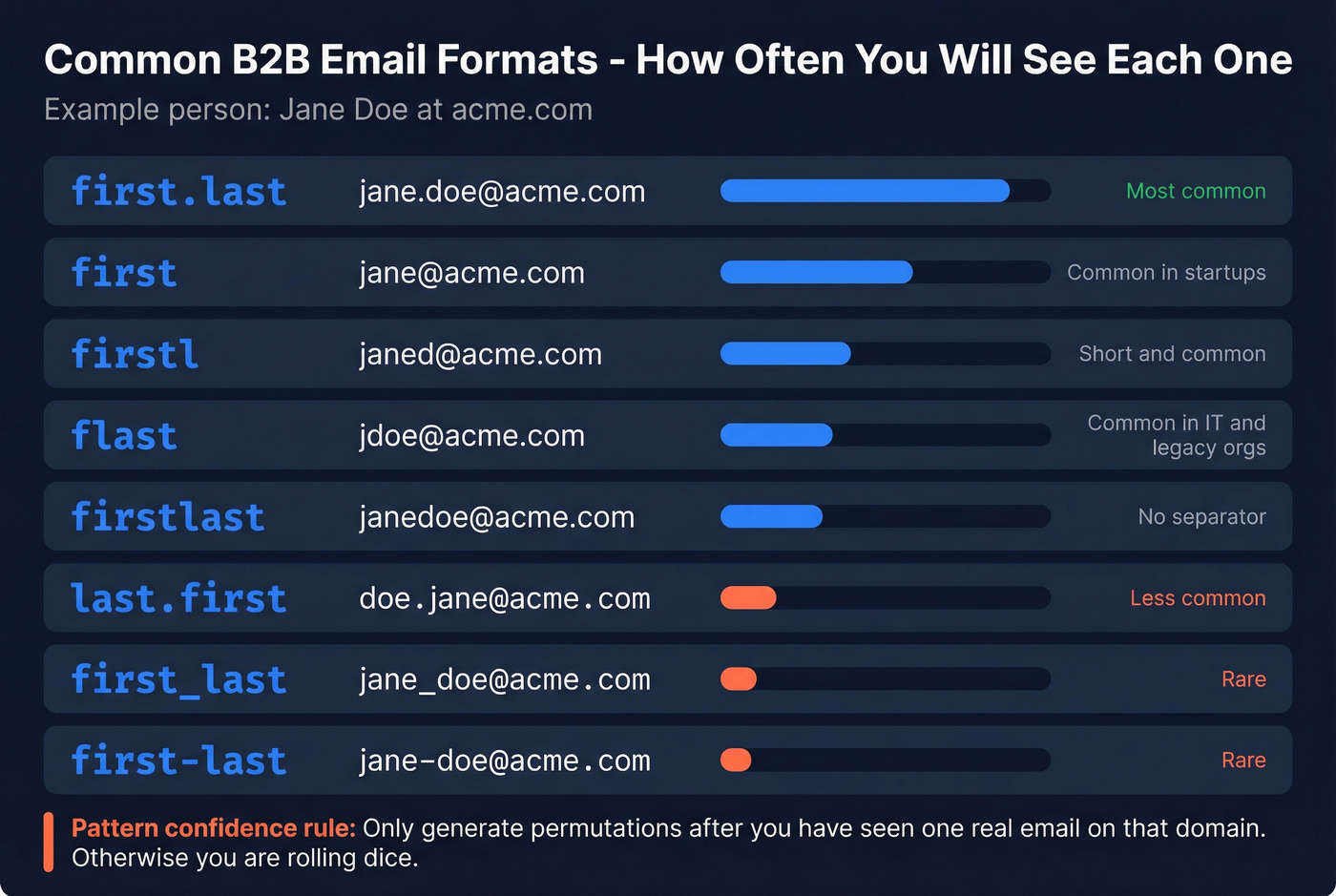
| Format | Example (Jane Doe) | Notes |
|---|---|---|
| first.last | jane.doe@ | Most common |
| first | jane@ | Common in startups |
| firstl | janed@ | Short + common |
| flast | jdoe@ | Common in IT/legacy |
| firstlast | janedoe@ | No separator |
| last.first | doe.jane@ | Less common |
| first_last | jane_doe@ | Seen in some orgs |
| first-last | jane-doe@ | Seen in some orgs |
If you've found press@domain.com only, don't assume first.last@domain.com. That's how you end up emailing a sinkhole on an accept-all domain and blaming your copy.
Step 3 - Use an email finder (fast path after the 5-minute rule)
Once you've done your 5 minutes of manual work, tools win on speed and consistency. The catch is simple: free tools hit rate limits fast, and a lot of "finder" tools quietly turn into "verifier" tools once you hit volume.
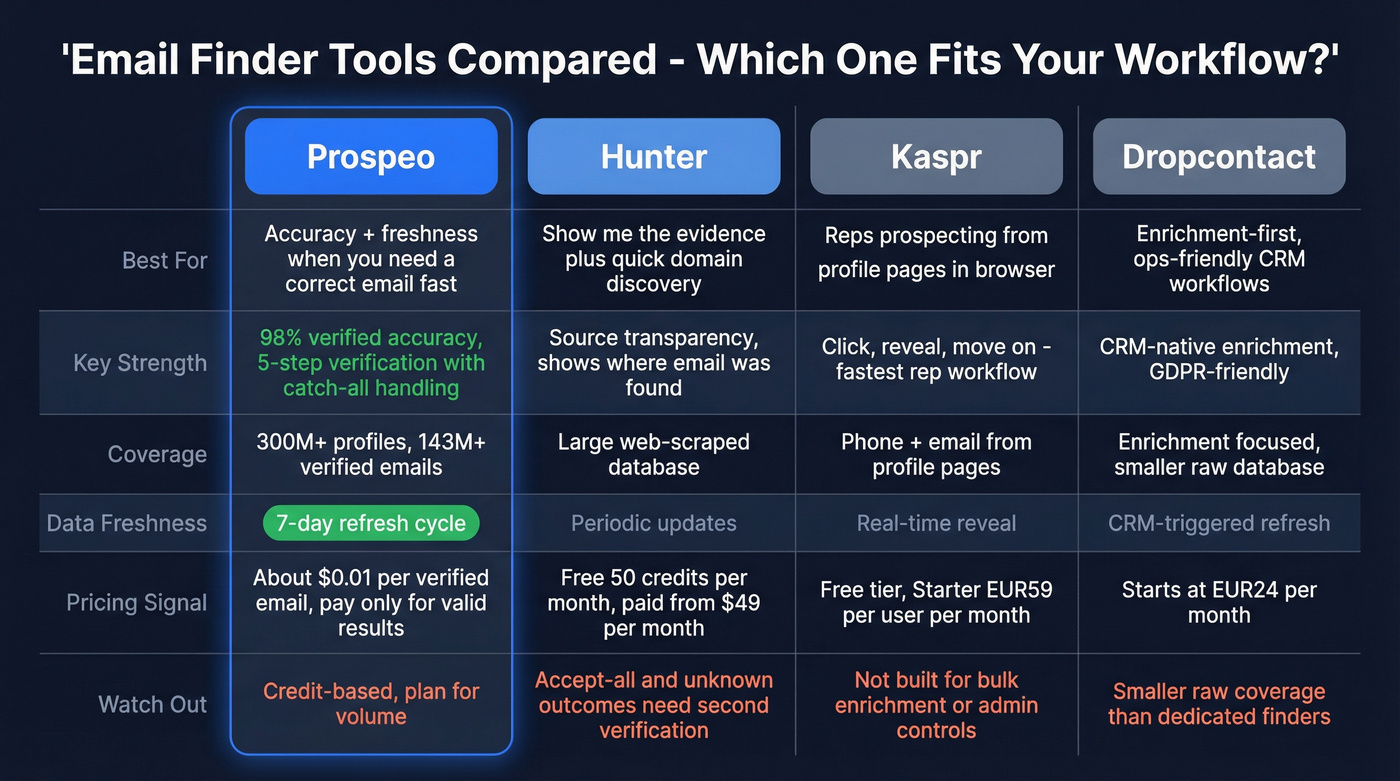
We've tested this workflow across outbound teams, and the best results come from treating finders as candidate generators and verifiers as your gatekeeper. You want both, and you want clear rules for what gets sent. (For deeper setup details, see email finder CRM integration.)
Here's the shortlist I'd actually use in production, plus the best use case for each.

Prospeo (best for accuracy + freshness when you need a correct email fast)
When the requirement is "get me the correct email address quickly - and protect deliverability," Prospeo's the cleanest execution. Prospeo is "The B2B data platform built for accuracy," with 98% verified email accuracy and a 7-day data refresh cycle (industry average: 6 weeks). That freshness matters because "verified" emails go stale, and stale emails bounce.
Coverage is deep: 300M+ professional profiles and 143M+ verified emails, with verification built into the workflow so you're not just generating permutations and hoping.
Billing's straightforward: pricing is credit-based and works out to roughly ~$0.01 per verified email at common tiers, and for the Email Finder you only pay when a valid email is returned. If you prospect from web sources, the Chrome Extension keeps the workflow moving.
Links: Email Finder, Pricing, Chrome Extension.
Hunter (best for "show me the evidence" + quick domain discovery)
Hunter's biggest advantage is source transparency. It's strong at showing where an email pattern/address was found and giving you enough context to trust (or reject) the result.
- Great at: domain search, pattern discovery, small batches, and quick verification in one place.
- Watch-outs: enterprise mail setups with lots of accept-all/unknown outcomes. For anything high-stakes, I want a second opinion.
Pricing signal: Free includes 50 credits/mo. Paid tiers are $49 / $149 / $299 per month.
Use it when you want receipts (sources + dates), not just an answer.
Kaspr (fastest for reps who prospect from professional profile pages)
Kaspr is built for speed: click, reveal, move on. It's a rep tool more than a data ops tool.
- Ideal for: individual reps prospecting from web-based professional profiles who want a quick "reveal" workflow.
- Skip it if: you need bulk enrichment, strict admin controls, or a domain-first process.
Pricing signal: Free is EUR0, Starter is EUR59/user/mo, Business is EUR99/user/mo.
If your team lives in the browser, this feels frictionless.
Dropcontact (enrichment-first, ops-friendly, and unusually transparent)
Dropcontact is a data ops pick: structured enrichment, dedupe, and reporting that helps you set expectations internally. They also publish benchmark-style reporting (effective enrichment, error rates, bounce metrics), which is rare and genuinely useful.
Pricing signal: Starter EUR79/mo and Growth EUR120/mo.
If you care about pipeline hygiene and measurable enrichment performance, this is the vibe.
What to look for in any email finder result (the trust checklist)
A finder result's only as good as its evidence. Prioritize tools that show:
- Source URL / source type (where the email was discovered)
- Last seen / discovery date (freshness beats "big database" marketing)
- Verification timestamp (when it was last checked)
- Clear status definitions (what "valid," "accept-all," "unknown" mean in their system)
- Credit rules (do failed searches cost credits, or only successful finds?)
Real talk: if a tool won't tell you why it thinks an email's correct, it's not a data product. It's a slot machine.
Other options to know (Mailmeteor, EXPERTE, ZeroBounce, Skrapp)
These are useful, but they're not the first tools I'd build a process around:
- Mailmeteor: free reverse email lookup, plus low-cost SMB sending and light lookup workflows.
- EXPERTE: free one-offs for quick checks; good when you need a single lookup and nothing else.
- ZeroBounce: verification-heavy and deliverability-focused; commonly ~$20-$200+/mo depending on volume.
- Skrapp: SMB email finder pricing; commonly ~$49-$199/mo depending on credits.
Use these as a second opinion, a verifier layer, or for one-off lookups - not as your only source of truth.
How to find the correct email address safely: verify + decide
Verification is where "found" becomes "correct." It's also where people get confused because two tools can look at the same email and disagree.
That's normal.
If you expect 90% of emails to come back "valid," your expectations are the problem, not your tool.
Why "valid" still isn't the same as "will land in the inbox"
"Valid" means the mailbox probably exists. It doesn't mean:
- your message won't be filtered,
- the domain won't silently drop it,
- your sending domain/IP has enough reputation,
- the recipient will ever see it.
Treat verification as bounce protection, not a guarantee of inbox placement. The teams that win combine verification with segmentation, conservative ramping, and re-verification windows.
Why verifiers disagree (the three realities)
- Temporal validity: deliverable today, dead tomorrow (job change, mailbox removed, domain migration).
- Greylisting and throttling: servers intentionally return temporary failures (4xx) to slow unknown senders.
- Inconsistent SMTP behavior: some servers accept then bounce later, some block based on IP reputation, and some reveal nothing.
This is why "verification accuracy" marketing mostly annoys me. The best teams don't chase certainty; they enforce a decision rule that protects deliverability.
How SMTP verification works (simple, practical)
SMTP verification is a polite knock on the mail server's door:
- DNS/MX lookup: find where mail for the domain's handled.
- Connect to the SMTP server: open a session.
- Send
EHLOto identify the client. - Send
MAIL FROMwith a sender address. - Send
RCPT TOwith the target email to see if the server accepts it.
If the server accepts the recipient (250), many tools label it "valid." If it rejects (550), it's "invalid." If it defers (421/450), it's "temporary" or "unknown."
Catch-all domains can accept everything at step 5, and strict servers can refuse to reveal anything useful.
SMTP response codes -> what your verifier is really telling you
| Code family | Example | What it means | Typical status |
|---|---|---|---|
| 2xx | 250 | Accepted | Valid |
| 4xx | 450 / 421 | Try again later | Temporary |
| 5xx | 550 | Rejected | Invalid |
| Mixed/blocked | - | No clear signal | Unknown |
If you see lots of 4xx, that's greylisting or rate limiting. It doesn't mean the email's bad; it means the server won't answer cleanly. (If you’re debugging bounces, this guide on 550 Recipient Rejected helps.)
Verification status handling playbook (the decision table)
| Verifier status | What it usually means | Safe action |
|---|---|---|
| Valid | Mailbox likely exists | Send (OK to scale) |
| Invalid | Mailbox doesn't exist | Don't send |
| Accept-all | Domain accepts any RCPT | Don't bulk send |
| Unknown | Server reveals nothing | Don't bulk send |
| Temporary (4xx) | Greylist/throttle | Retry later |
Two rules I enforce:
- Don't send bulk on accept-all/unknown. That's how you get late bounces and silent drops that wreck performance and reputation.
- Retry temporary (4xx) once or twice over time. If it never resolves, treat it like unknown.
Re-verification windows (simple rules that prevent "stale valid" pain)
Store status + timestamp, then re-verify based on risk:
| Your use case | Re-verify if status is older than | Why |
|---|---|---|
| One-to-one outreach | 90 days | Lower volume, higher personalization |
| Normal outbound sequences | 30-60 days | Job changes + mailbox churn show up fast |
| Big campaign / high-volume send | 7-14 days (or immediately before launch) | You're protecting domain reputation |
Non-negotiable: always re-verify before a major send.
"Valid from last quarter" is how good teams create bad bounce spikes.
Catch-all domains: the branch most guides ignore
Catch-all domains are the reason "verified" doesn't always mean deliverable.
A catch-all server accepts mail for any address at the domain - real or fake - so SMTP probing can't prove mailbox existence. That creates false certainty, and it shows up later as late bounces, silent drops, or campaigns that look "fine" on paper but die in the inbox.
Here's a scenario I've seen too many times: a team pulls 5,000 contacts from a security-heavy segment, half the domains are accept-all, the verifier labels a bunch as "good," and they blast from their primary domain on Monday. By Thursday, reply rates crater, Gmail starts throttling, and everyone blames the copy. It wasn't the copy. It was the decision rule.
Common failure modes:
- Late bounces: server accepts now, bounces later after internal checks.
- Silent drops: mail is accepted then discarded (no bounce, no reply).
- Sinkholes: suspicious mail gets routed to a blackhole mailbox.
- Rate-limit/greylist: you get 4xx responses until you back off.
The playbook that works:
- Treat accept-all as "risky," not "valid."
- Prefer first-party confirmation signals: a real email found in a PDF, an employee email in an author bio, or a reply from the recipient.
- Use a second verification pass (different infrastructure) if the contact matters.
- Send one-to-one first (high personalization, low volume) before scaling.
- Watch outcomes: if accept-all sends produce low replies and weird bounce timing, stop and adjust.
Look, blasting accept-all at scale is a self-inflicted wound.
Benchmarks & expectations: what "good" looks like (and what to measure)
Benchmarks in this space are messy because vendors run most of them. Still, a couple patterns are consistent across real-world ops: domain-first search beats company-name search, and your "valid rate" will be lower than you want if you're strict about risk statuses.
What you should measure internally (because your ICP matters more than any benchmark):
- Valid rate (of attempted finds)
- Hard bounce rate (by source tool + by domain type)
- Accept-all rate (and performance tracked separately)
- Reply rate by verification status (valid vs accept-all vs unknown)
- Wrong-domain rate (quiet killer in enrichment)
If you only track "emails found," you'll optimize for the wrong thing.
Correct email is only half the job: deliverability + compliance guardrails
Even with perfect finding and verification, you can still land in spam if your sending setup's sloppy.
For Gmail/Yahoo bulk sender requirements, the basics are non-negotiable:
- Authenticate with SPF, DKIM, and DMARC
- Support one-click unsubscribe (RFC 8058)
- Keep spam complaint rate under 0.3%
Minimum viable deliverability setup (MVDS)
If you do nothing else, do this:
- SPF: one record, minimal includes, no "SPF flattening" hacks unless you understand them.
- DKIM: enable for your sending provider; rotate keys if you change providers.
- DMARC: start with
p=none, then move toquarantineonce you're stable; monitor alignment. - Postmaster Tools: set up at least Google Postmaster Tools; check weekly during ramp.
- Suppression lists: global suppression for hard bounces, unsubscribes, and complaints; never re-import them.
- Re-verification: re-check anything older than your window (30-60 days for normal outbound).
(If you need the DNS/authentication walkthrough, start with SPF, DKIM, and DMARC.)
The secondary-domain tactic (protect your primary)
This is the simplest operational pattern that prevents "one bad list" from wrecking your main domain:
- Primary sending domain: valid-only contacts. This is your reputation engine.
- Secondary sending domain: accept-all/unknown experiments at low volume, high personalization.
- Separate tracking + separate suppression lists: don't let risky experiments contaminate your clean pool.
If you're scaling, single-provider setups are fragile. As volume grows, teams split across multiple domains (and sometimes multiple ESPs) so one deliverability issue doesn't stall the whole quarter. (More on that in how to scale outbound sales.)
Field ops sidebar: cold outreach at scale (what operators actually do)
- Budget $2.50-$3.50/mailbox through resellers.
- Run 3-5 mailboxes/domain (more than that gets fragile fast).
- Cap at 15-25 sends/day/mailbox once warmed.
- Do a 14-day warmup minimum before you push volume.
- Keep warmup running; don't "graduate" and turn it off.
- Open tracking's unreliable now. Optimize for replies and inbox placement, not opens.
If you're tempted to crank volume per inbox, don't. Add domains and keep per-inbox behavior human.
Compliance basics (UK/EU + US) in one screen
UK/EU-style compliance comes down to lawful basis and proportionality.
- Legitimate interests (ICO framework): the three-part test is purpose, necessity, and balancing. If you can't justify all three, don't process/send.
- Business emails can still be personal data (like
firstname.lastname@company.com), so UK GDPR can apply. - PECR governs electronic marketing rules in the UK and treats B2B differently than B2C, but it still expects responsible outreach.
- CAN-SPAM (US): don't mislead, include an address, and honor opt-outs quickly.
If you sell into regulated industries or the UK/EU, write an internal outreach policy you can defend. "We found the email on the internet" isn't a policy.
FAQ
What if I find multiple possible emails for the same person?
Pick the address that matches a confirmed domain pattern, verify each candidate, then send only to the one marked valid. If none return valid, treat the contact as risky and avoid bulk sends - retry verification in 24-72 hours or cross-check with a second tool.
Are role-based emails (info@, sales@) ever "correct"?
Yes, when the company publishes them for routing (support, partnerships, press) and you're fine with a shared inbox. For outbound to a specific buyer, they usually convert worse; keep volume low and go 1:1, or switch to a named contact.
What does "accept-all" mean, and should I email it?
Accept-all means the domain's mail server accepts any recipient during SMTP checks, so tools can't confirm whether the mailbox exists. Don't bulk email accept-all results; use them only for low-volume tests on a separate domain and judge by replies, not labels.
What's a good free tool to find work emails, and is Prospeo free?
For quick free lookups, Hunter's free plan includes 50 credits/month, and Prospeo's free tier includes 75 email credits + 100 Chrome extension credits/month with verification built in. If you're doing real outbound, prioritize a tool that returns clear statuses so you can scale only on valid and quarantine risky results.
Why does a "verified" email still bounce later?
Verification is time-sensitive, and mail servers can change behavior after the check (mailbox removed, policy tightened, or catch-all rules). To prevent surprise bounce spikes, store the verification timestamp and re-check anything older than 30-60 days (or 7-14 days before a big campaign).
Summary: the practical way to do this without wrecking deliverability
If you're serious about how to find the correct email address, the winning workflow's boring: confirm the domain, find one real on-domain email to infer the pattern, use a finder, then verify and apply a strict send rule.
Scale only on valid, quarantine accept-all/unknown, and re-verify before major sends. (If you want the broader workflow, see email lookup.)
Because "found" isn't the same as "safe."
Every bounced email chips away at your domain reputation. Prospeo's proprietary verification catches invalid, accept-all, and spam-trap addresses before they hit your sequences - refreshed every 7 days, not 6 weeks.
Stop deciding if an email is safe to send. Let verification do it for you.