How to Set Up Email Finder CRM Integration (Without Wrecking Your Data)
A RevOps lead I know ran a bake-off between three email finders in early 2026. The "winner" on data volume created 4,000 duplicate contacts in HubSpot within five days. Sales reps started prospecting accounts that were already customers. Marketing's segmentation broke. The whole thing took two weeks to clean up.
That's email finder CRM integration done wrong.
77% of B2B buyers prefer email contact, so your team will be importing contact data at scale - whether you plan for it or not. Incomplete CRM data causes 12-15% annual revenue loss, and most of that damage comes from the gap between finding an email and getting it into your CRM cleanly.
The integration itself takes 15 minutes. Getting it right - field mapping, deduplication, verification before import, refresh cycles - that's where teams either build a clean pipeline or create a mess that compounds every quarter. This is the setup guide I wish someone had before I watched that HubSpot instance implode.
What You Need to Connect Your Email Finder to a CRM
Three ways to integrate: native integrations (one-click, one-way import), Zapier/Make workflows (configurable middleware), and bidirectional API sync (two-way, full attribution). Most teams should start with native and only graduate when they hit a wall.
Quick picks:
- Best all-in-one with built-in CRM: Apollo.io - native HubSpot/Salesforce sync, massive database, built-in sequences. One-CRM-at-a-time limitation is a real gotcha.
- Best for compliance-heavy European teams: Cognism - five-layer email verification, DNC list checks, direct CRM record updates via browser extension.
Three Types of Email Finder CRM Integration
Before you pick a tool, understand what kind of integration you actually need. The wrong type creates more problems than no integration at all.

| Feature | Native | Zapier/Make | Bidirectional/API |
|---|---|---|---|
| Setup time | 15-30 min | 1-2 hrs | 2-4 hrs |
| Sync direction | One-way | Configurable | Two-way |
| Field mapping | Limited | Full control | Full control |
| Activity logging | Rarely | Partial | Yes |
| Cost | Included | Per task/op | Included or API |
| Best for | Small teams | Multi-tool stacks | RevOps orgs |
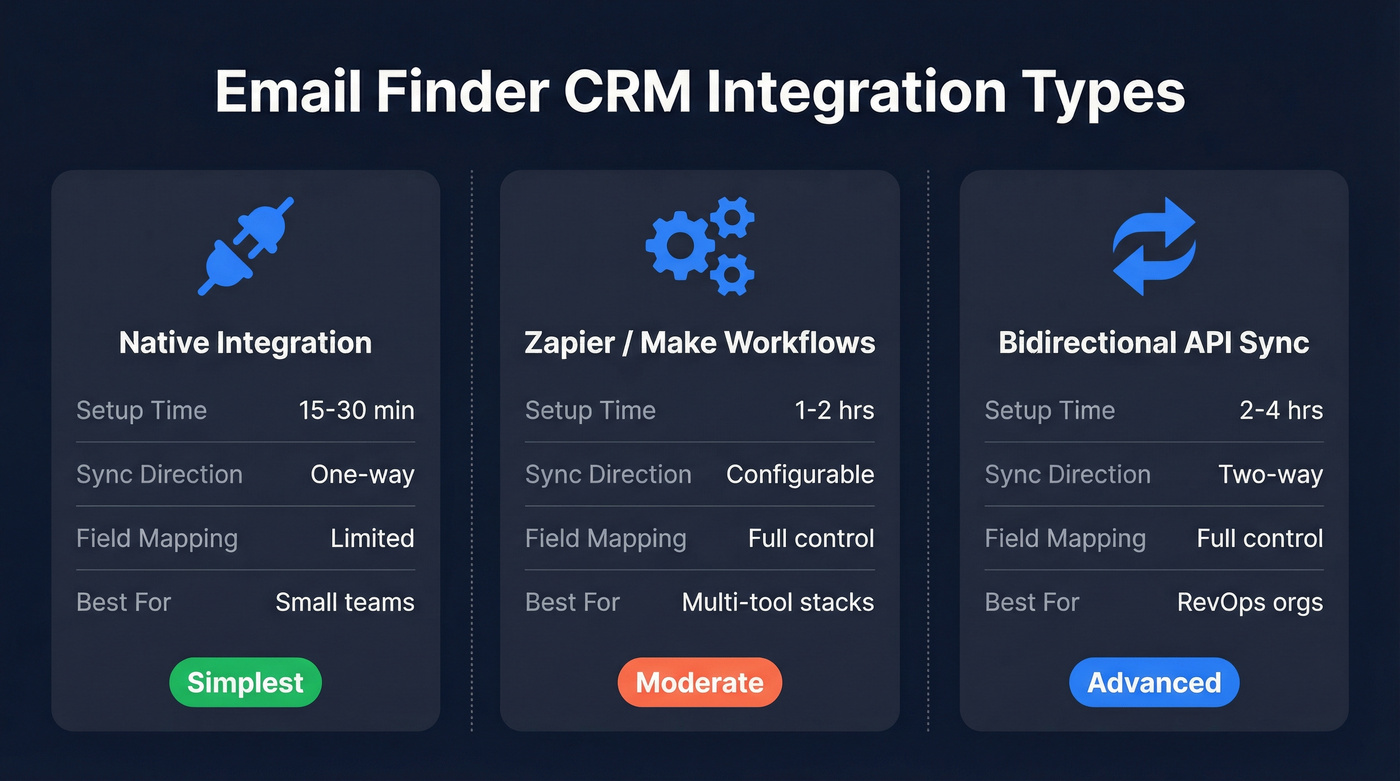
Native Integration (One-Way Import)
This is the simplest path. You connect your email finder to your CRM - usually Salesforce or HubSpot - and contacts flow in one direction: from the finder into the CRM. Setup takes 15-30 minutes, and most tools include this on their free or starter plans.
The tradeoff is control. Native integrations typically offer limited field mapping and rarely log activity data back to the CRM. You get the contact record, but you don't get a paper trail of how it was sourced, when it was verified, or what sequence it entered. For small teams running straightforward outbound, that's fine. For RevOps teams building attribution models, it's not enough.
Zapier and Make Workflows
When native integrations don't cover your workflow - maybe you need to route leads to different CRM owners based on territory, or you're stitching together three tools - Zapier and Make fill the gap.

Zapier connects to 8,000+ apps and is faster to set up for simple trigger-action automations. Make connects to 3,000+ apps but handles complex workflows with branching logic and parallel processing far better. Make's visual builder is genuinely superior for multi-step automations.
Here's the thing: cost at volume will bite you. I've seen teams whose Zapier bill tripled in a single quarter after scaling their outbound. Make uses operations-based pricing, which is typically cheaper for complex workflows - but you'll spend more time troubleshooting when something breaks.
If your email finder has a native CRM connection, use it. Only reach for Zapier or Make when you need custom logic the native connection can't handle.
Bidirectional Sync and API
This is the enterprise play. Bidirectional sync means data flows both ways - contacts go into the CRM, and CRM updates (stage changes, activity logs, ownership changes) flow back to the email finder or your enrichment layer.
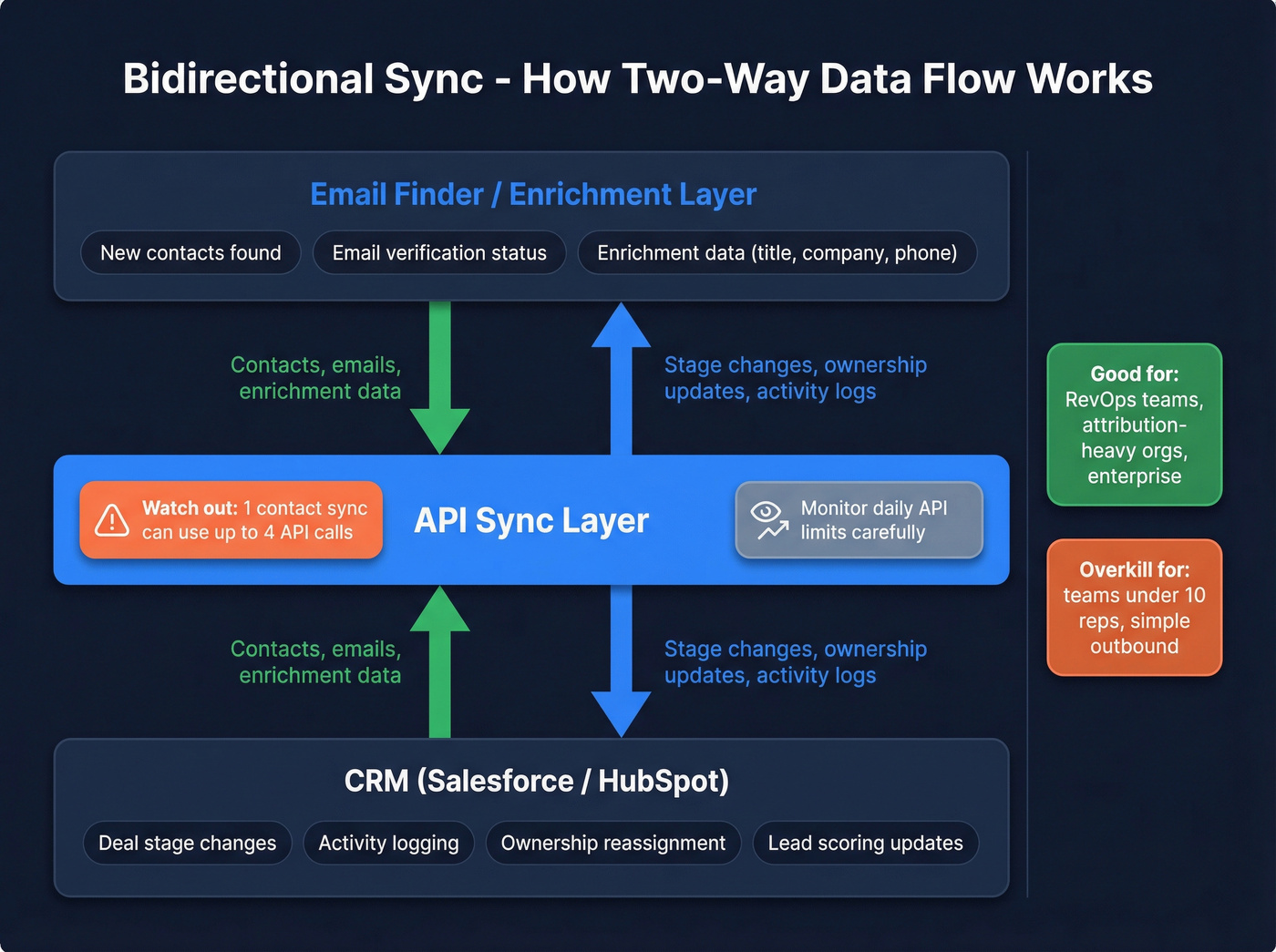
Setup takes 2-4 hours and often requires API configuration. A single contact sync between HubSpot and Salesforce can consume up to 4 API calls per record, so watch daily API limits carefully. Purpose-built tools like OutboundSync exist specifically for logging email activities and statuses back to CRM - needed for proper attribution and reporting.
If you're running an attribution-heavy org where marketing and sales need to see the full journey, bidirectional sync is worth the setup time. If you're a 5-person sales team, it's overkill.
Best Email Finders With CRM Integration in 2026
Not every email finder treats CRM integration the same way. Some bolt it on as an afterthought. Others build their entire workflow around it. Here's how the major players stack up.

Prospeo
Use this if: You're running outbound and CRM data quality directly impacts your deliverability and pipeline. You need verified, fresh data flowing into Salesforce or HubSpot without creating garbage records.
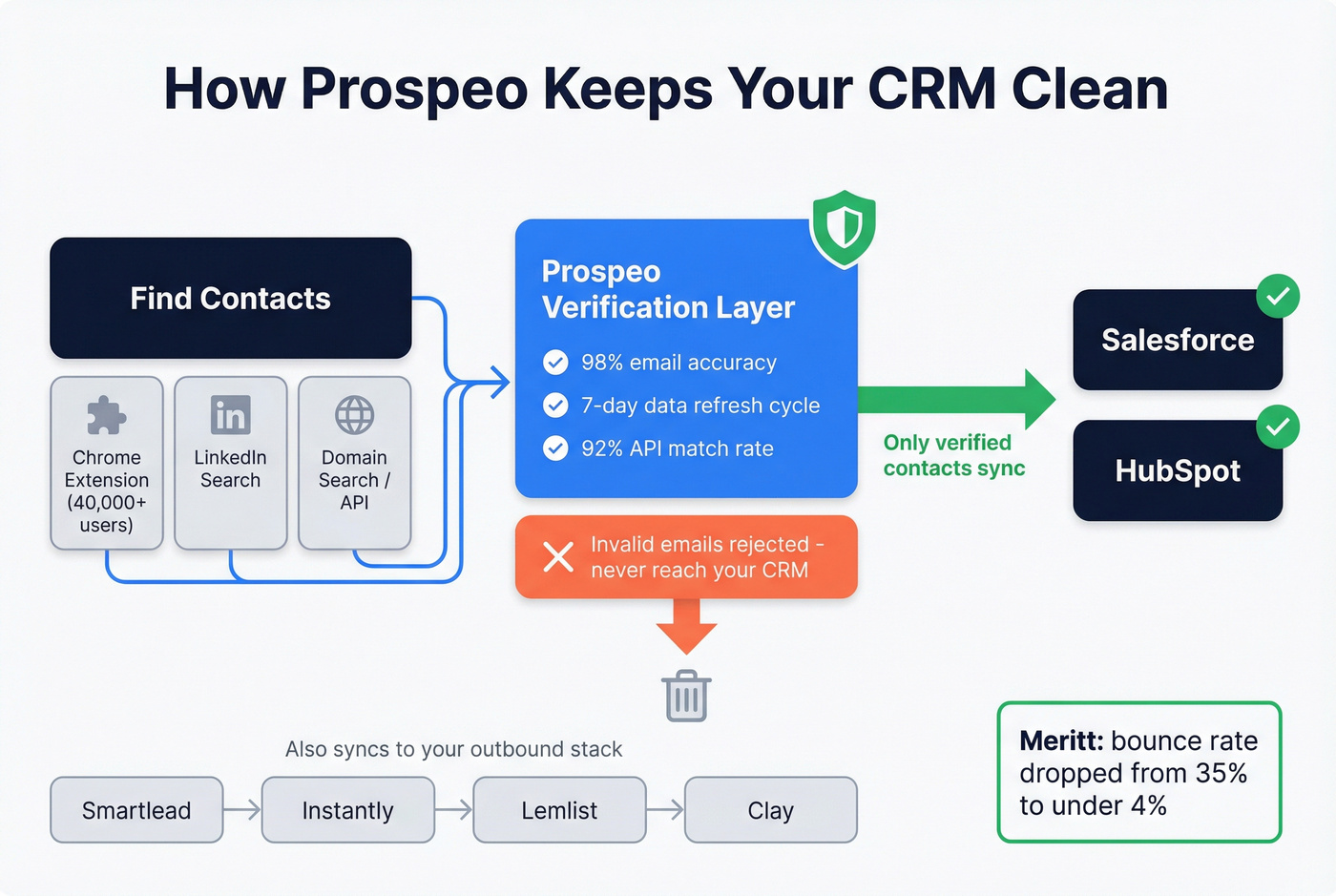
Prospeo's native Salesforce and HubSpot integrations push verified contacts directly into your CRM - and the key word is verified. With 98% email accuracy and a 7-day data refresh cycle (the industry average is 6 weeks), data is confirmed valid before it ever touches a CRM record. That alone eliminates the bounce-rate spiral that kills domain reputation.
Beyond CRM, Prospeo connects natively to Smartlead, Instantly, Lemlist, Clay, Zapier, and Make - so your entire outbound stack stays in sync. The API runs a 92% match rate for enrichment workflows, and the Chrome extension (40,000+ users) lets reps find verified contacts from any website and push them into the platform for CRM sync in one click.
The CRM impact is measurable: Meritt went from a 35% bounce rate to under 4% after switching, meaning their CRM stopped filling with dead-end contacts that wasted rep time. Snyk's 50-person AE team dropped bounces from 35-40% to under 5%, generating 200+ new opportunities per month from a cleaner pipeline.
Free tier: 75 emails + 100 Chrome extension credits/month. Paid plans run ~$0.01/email with no contracts.
Apollo.io
Use this if: You want email finding, sequencing, and CRM in one platform and don't mind being locked to a single CRM connection.
Skip this if: You're a multi-CRM org. Apollo only connects to one CRM at a time - Salesforce or HubSpot, not both. Switching requires disconnecting and reconfiguring.
Apollo is the obvious starting point for SMB teams that want everything in one place. The native HubSpot and Salesforce sync supports configurable field mapping, and it syncs contacts, accounts, and deals bidirectionally. At 4.7/5 on G2 with 9,408 reviews, it's the most-reviewed tool in the category by a wide margin.
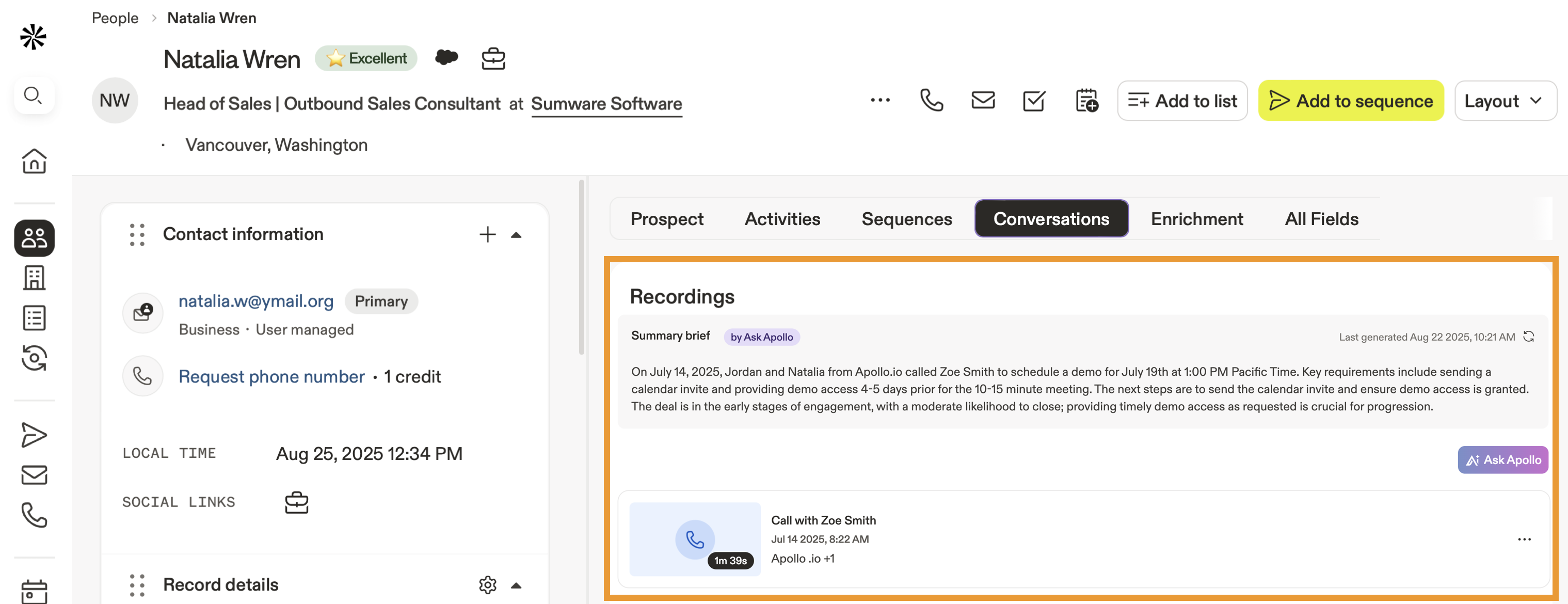
The gotcha that catches everyone: after enabling the integration, there's a 6-hour configuration window to set up sync settings and map fields before syncing auto-enables. I've set up Apollo's HubSpot sync for three different teams, and the 6-hour window catches someone every single time. Miss it, and data starts flowing with default mappings. The most common frustration on community forums: reps who enabled sync without mapping fields first and spent days cleaning up default-mapped garbage data. You also need super admin permissions on HubSpot, which means IT involvement at most companies.
Free tier includes 75 credits/month. Basic runs $59/mo, Professional $99/mo.
Cognism
Use this if: You're an enterprise team in a regulated industry or selling heavily into Europe. GDPR compliance isn't optional for you - it's a daily operational requirement.
Skip this if: You're an SMB. Pricing is enterprise-level and quote-based, typically $1,000-3,000/mo for small teams. The most common complaint on forums mirrors ZoomInfo's: paying for modules you don't fully use.
Cognism's five-layer email verification - including compliance checks and machine learning - means every contact that hits your CRM has been screened against global DNC lists. The browser extension lets SDRs update CRM records directly from professional profiles, cutting the "find contact, copy, paste into CRM" workflow down to a single click.
Integrations cover Salesforce, HubSpot, Outreach, and Salesloft. The Cognism Enrich product handles on-demand CSV enrichment and CRM enrichment via API. Where Cognism wins over ZoomInfo: EMEA compliance and mobile verification. Where ZoomInfo still wins: US database depth and workflow breadth.
Hunter.io
Hunter is the email finder you set up in five minutes and never think about again - which is both its strength and its ceiling.
Domain search finds all emails associated with a company, useful for mapping entire organizations. Confidence scores per result help you prioritize outreach. Ease of setup scores 9.5/10 on G2, and the overall rating sits at 4.4/5 (629 reviews), making it the fastest tool to get running. Hunter's CRM connection works via native connections and Zapier, supporting both Salesforce and HubSpot for straightforward contact imports.
The limitation that drives people to other tools: credits. Limited credits are the #1 complaint. No phone numbers at all. CRM sync is gated behind paid plans.
Pricing: Free (50 searches/month), Starter $49/mo, Growth $149/mo. Enough to test on free, but you'll hit the wall fast if you're prospecting seriously.
Snov.io
Pros: True all-in-one combining email finding, verification, and drip campaigns. 4.5/5 on G2 (477 reviews) with a quality of support score of 9.1/10 - best-in-class for customer service. Connects to HubSpot and Pipedrive natively. Free tier includes 50 credits/month.
Cons: Email deliverability issues are the top complaint (36 G2 mentions). Steep learning curve - the platform tries to do a lot, and onboarding takes longer than simpler tools. CRM integration starts at the $39/mo Starter plan.
Pricing: Starter $39/mo (1,000 credits), Pro $99/mo (5,000 credits).
ZoomInfo
Here's my hot take: ZoomInfo is still the best all-in-one platform for enterprise sales intelligence. But most teams don't need all-in-one, and they definitely don't need to pay for it.
ZoomInfo processes 1B+ buying signals monthly across 100M company profiles. The extension syncs directly with Salesforce, HubSpot, Outreach, and Salesloft. It includes intent data, org charts, and technographics alongside contact info. The integration stack is the deepest in the category.
The problem is the price tag. A 10-seat contract with intent data and mobile numbers runs $15,000-40,000/year. That's real money for a Series A company. And the #1 complaint on every community forum? Paying for modules you don't use. If your average deal size doesn't justify five-figure data spend, you almost certainly don't need ZoomInfo-level data.
Best-in-class for enterprise. Overkill and unaffordable for most teams.
Dropcontact
Best for: European teams where GDPR compliance is non-negotiable and the prospect base is primarily EU-based.
Skip this if: Your prospects are mostly outside Europe. Performance deteriorates significantly in other regions.
Dropcontact is the GDPR purist's choice. No database storage; it generates and verifies emails in real time via proprietary algorithms. Native integrations with HubSpot, Salesforce, and Pipedrive include automatic deduplication and company change detection. EU servers. 98% email validity in Europe with bounce rates under 2%.
The pay-per-search model charges you even when it doesn't find results - that's a tax on prospecting into difficult markets. No mobile numbers by design (a deliberate GDPR choice). Starts at EUR29/mo.
Other Notable Tools
Lusha - 4.3/5 on G2 (1,610 reviews). Free tier with 40 credits/month, paid from $36/mo. CRM integration is well-built and praised by users. The elephant in the room: data inaccuracy is the #1 complaint with 40+ G2 mentions. Test thoroughly before committing.
Wiza - Pay-as-you-go at $0.15/email, Pro plan $30/mo (100 credits). Good for low-volume prospecting teams that need occasional CRM pushes without a monthly commitment. Not built for scale.
Skrapp - Free tier with 100 credits/month, Professional at $39/mo. Basic CRM integrations for budget-conscious teams. Gets the job done if your needs are simple and your volume is low.
UpLead - Essentials at $74/mo (billed annually). The standout feature: real-time email verification before export, so bad data never reaches your CRM. 95% data accuracy. Worth testing if verification-before-export matters to your workflow.

Bad email data doesn't just bounce - it wrecks your CRM, kills domain reputation, and wastes rep hours on dead contacts. Prospeo's native Salesforce and HubSpot integrations push only 98% verified emails into your CRM, refreshed every 7 days. Meritt cut their bounce rate from 35% to under 4%. Snyk's 50 AEs generate 200+ opportunities per month from cleaner pipeline data.
Stop importing garbage contacts. Start with 75 free verified emails.
Integration Depth Comparison
Not all "CRM integrations" are created equal. Some tools give you a one-click export. Others give you bidirectional sync with field mapping and activity logging.
| Tool | Native CRMs | Sync Type | Field Mapping | CRM Tier |
|---|---|---|---|---|
| Prospeo | SF, HubSpot | One-way + API | Yes | Free |
| Apollo.io | SF, HubSpot | Bidirectional | Yes | Free |
| Cognism | SF, HubSpot | One-way + API | Yes | Paid |
| Hunter | SF, HubSpot | One-way | Limited | $49+ |
| Snov.io | HubSpot, Pipedrive | One-way | Limited | $39+ |
| ZoomInfo | SF, HubSpot | Bidirectional | Yes | $15K+ |
| Dropcontact | SF, HubSpot, Pipedrive | One-way + cleanse | Yes | EUR29+ |
About 60-70% of email finders gate CRM integrations behind paid plans. Prospeo and Apollo are the notable exceptions - both include CRM sync on their free tiers. If you're evaluating on a budget, that distinction matters more than feature lists.
Integration depth winners by team type:
- SMB / solo operators: Apollo (everything built in, free CRM sync)
- Data-quality-obsessed teams: Prospeo (verified before import, 7-day refresh)
- Enterprise with compliance needs: ZoomInfo (deepest integration stack) or Cognism (GDPR-first)
- European-only prospecting: Dropcontact (auto-dedup, EU servers)
The real question isn't "does it connect to my CRM?" Almost everything does. The question is "what happens to my data after it connects?" Field mapping, deduplication, activity logging, and refresh cycles are where the differences actually matter.
How to Set Up Your Email Finder to CRM Workflow

Native Integration Setup (15-30 Minutes)
Connect the accounts. In your email finder's settings, find the CRM integration page. Authenticate with your CRM credentials. You'll typically need admin or super admin permissions - check with IT first.
Map your fields. Don't accept default mappings blindly. Map email to email, phone to phone, company to company - but also map custom fields like lead source, data provider, and verification date. These fields are critical for attribution later.
Set sync rules. Decide what triggers a sync: manual export only, automatic on save, or scheduled batch? For most teams, manual export is safest during the first week. Switch to automatic once you've confirmed the mapping is clean.
Test with 10 records. Export a small batch and check every field in your CRM. Look for: correct field mapping, no duplicate creation, proper lead source tagging, and accurate company association. If anything's off, fix it before scaling.
Enable deduplication. Use the "upsert on email" strategy - your CRM should search for existing records by email address before creating new ones. In HubSpot, this happens automatically for contacts. For companies, it deduplicates on domain name.
Zapier or Make Setup (1-2 Hours)
Set your trigger. The trigger is typically "New Contact Found" or "New Row in Spreadsheet" from your email finder. Some tools (Apollo, Snov.io) have native Zapier triggers; others require a webhook.
Add a search step before creating. This is the most important step people skip. Before creating a new CRM record, add a "Search Contact by Email" step. If found, update the existing record. If not found, create new. This is your deduplication layer.
Map every field explicitly. Don't rely on auto-mapping. Map first name, last name, email, phone, company, title, lead source, and any custom fields. Add a "Data Source" field set to your email finder's name - you'll thank yourself during attribution reviews.
Add error handling. In Make, use error handlers for API failures and duplicate detection. In Zapier, set up a filter to skip records that already exist. Without this, a single API timeout can create orphaned records.
Monitor costs. Zapier charges per task - a 5-step zap processing 1,000 contacts burns 5,000 tasks. At scale, this adds up fast. Make's operations-based pricing is typically 40-60% cheaper for complex workflows.
How to Prevent Duplicates When Syncing Email Finder Data
Duplicates are the silent killer of CRM data quality. Every integration creates them if you're not deliberate about prevention. Here's the hierarchy of deduplication techniques, from simplest to most sophisticated:
Merge & Purge is the brute-force approach. Run a bulk deduplication after every major import. Fast but reactive - you're cleaning up messes instead of preventing them. Tools like Koalify for HubSpot automate this.
Fuzzy Matching catches the near-duplicates that exact matching misses. "Sara K." and "Sarah Khan" at the same company are probably the same person. Most CRMs don't do this natively - you'll need a third-party tool or custom logic in your automation layer.
Rule-Based Deduplication lets you define match criteria: "if email AND phone match, merge. If email matches but company doesn't, flag for review." This is the sweet spot for most teams - structured enough to catch duplicates, flexible enough to avoid false merges.
AI/ML-Based Deduplication learns patterns over time and handles edge cases that rules can't anticipate. Salesforce and HubSpot both offer this in premium plans. Worth it for databases over 100K contacts; overkill for smaller teams.
Here's what trips people up in practice: HubSpot deduplicates contacts on email address and companies on domain name. Sounds clean, right? Except domain variations create phantom duplicates. "company.com" and "company.co.uk" register as two different companies. ZoomInfo imports are notorious for this - one integration can create hundreds of duplicate company records from domain variations alone.
The fix: create a custom unique identifier property (company registration number, internal account ID, or a normalized domain field) and use it as your primary dedup key during imports. Email address alone isn't enough for companies.
Always test with a small batch - 10 to 50 records - before running any bulk sync. Check for duplicates manually. If you find even one, your dedup logic has a hole.
Four CRM Enrichment Workflows for Email Finder Data
Finding an email is step one. Keeping that data accurate over time is where most teams fall apart. B2B contact data decays at roughly 30% per year - people change jobs, companies rebrand, phone numbers rotate. Your enrichment workflow determines whether your CRM gets better or worse over time.

There are four enrichment patterns worth knowing:
Waterfall enrichment pulls from prioritized data vendors in sequence until a verified field is found. If Vendor A doesn't have a mobile number, try Vendor B, then Vendor C. This maximizes coverage but requires orchestration - tools like Clay excel here. (If you're building this seriously, see waterfall enrichment stacks and orchestration patterns.)
Real-time enrichment triggers when a rep takes action: views a profile, opens a record, or adds a contact. The data populates instantly. Best UX for sales teams but requires API integrations and can hit rate limits at scale.
Bulk enrichment is owned by RevOps. Upload a CSV or run a CRM-wide enrichment job on a schedule - weekly, monthly, or quarterly. This ensures full coverage across your database, not just the records reps happen to touch.
Self-serve enrichment embeds enrichment directly into CRM workflows. A rep clicks "enrich" on a contact record, and missing fields populate automatically. Low overhead, high adoption.
Every enrichment workflow has three components: Append (add missing fields), Verify (confirm accuracy), and Refresh (keep data current). Most teams nail Append and forget about Refresh entirely. If you need a tighter SOP, use a dedicated email verification list workflow.
Ownership matters too. RevOps should own the enrichment strategy and tooling. Sales runs the workflows inside the CRM. Marketing uses the enriched data for segmentation and targeting. Without clear ownership, enrichment becomes everyone's problem and nobody's priority.
Your CRM integration is only as good as the data flowing through it. At $0.01/email with 92% API match rates and native connections to HubSpot, Salesforce, Clay, Zapier, and Make - Prospeo fits into any outbound stack without middleware headaches. No contracts, no 6-hour configuration windows, no single-CRM lockout.
Clean CRM data from day one. Free tier, no sales call required.
GDPR and Compliance Checklist for CRM-Synced Data
If you're syncing email finder data into a CRM, you're processing personal data. GDPR applies (for EU contacts) and CCPA applies (for California residents). Here's the checklist:
- Establish a legal basis. For B2B prospecting, this is typically "legitimate interest." Document it. If audited, you'll need to show why contacting this person serves a legitimate business purpose.
- Implement consent forms. Your CRM should support customizable consent tracking. HubSpot, Salesforce, Zoho ($14-52/mo per user), and Pipedrive ($14.90-99/mo per user) all offer GDPR tools.
- Mark personal data fields. Identify which CRM fields contain personal data (email, phone, name, IP address). Most CRMs let you tag these for compliance reporting.
- Encrypt at rest and in transit. AES encryption is the standard. Confirm your CRM and email finder both support it.
- Maintain audit logs. Every data import, export, modification, and deletion should be logged. Non-negotiable for GDPR compliance.
- Fulfill data subject requests. You need a process for access, rectification, restriction, deletion, and portability requests - and you need to respond within 30 days.
For tools, Dropcontact and Cognism are the strongest GDPR-first options. Dropcontact's zero-database approach (real-time generation, EU servers, no stored data) is the gold standard for compliance-first teams. For a practical outbound-specific checklist, see GDPR for Sales and Marketing.
The biggest compliance gap I see: teams that verify emails but don't maintain data processing agreements with their email finder vendor. If your provider doesn't offer a DPA, that's a red flag.
How to Measure If Your Integration Is Working
Most teams set up their integration and never measure whether it's actually working. Here's what to track:
| Metric | What to Measure | Target |
|---|---|---|
| Completeness | % of records with email, phone, title | >85% |
| Accuracy | Bounce rate on enriched emails | <5% |
| Freshness | % of records updated in last 90 days | >70% |
| Conversion lift | Close rate: enriched vs unenriched | >15% lift |
| Engagement | Reply rate: enriched vs unenriched | >20% lift |
Conversion rate changes tell you if enrichment is actually driving revenue. Compare close rates for enriched leads versus unenriched leads. If there's no meaningful difference, your enrichment data isn't adding signal - it's adding noise.
Engagement rate comparisons are the leading indicator. Segment your outbound sequences by enriched vs. unenriched contacts. If enriched contacts aren't responding at higher rates, something's wrong with your data quality or targeting. If you're auditing the full stack, start with email outreach analytics.
User feedback is underrated. Ask your sales reps: "Are the phone numbers connecting? Are the emails bouncing? Are the job titles accurate?" Reps know within a week whether the data is good. Build a feedback loop - even a simple Slack channel - where reps can flag bad records.
Look, database size is the wrong evaluation criterion. A tool with 300M profiles refreshed weekly will outperform a tool with 500M profiles refreshed every six weeks. Freshness beats volume every time. The contact who changed jobs three weeks ago is a dead lead in a stale database and a live opportunity in a fresh one. (If you want the benchmarks behind this, read B2B contact data decay.)
FAQ
Which email finders offer free CRM integrations?
Should I use Zapier or a native integration for my email finder?
Use native integrations when available - they're faster (15-30 minutes vs. 1-2 hours), cheaper, and vendor-maintained. Only reach for Zapier or Make when you need custom routing logic, multi-tool workflows, or your email finder lacks a native connection to your specific CRM. Watch Zapier task costs at scale; Make is typically 40-60% cheaper for complex automations.
How do I stop my email finder from creating duplicate contacts in my CRM?
Use "upsert on email" logic - search for existing records before creating new ones. In HubSpot, contacts deduplicate on email and companies on domain name. Watch for domain variations (.co.uk vs .com) that create phantom company duplicates. Always test with 10-50 records before bulk syncing, and consider a custom unique identifier for company-level deduplication.
How often should I refresh email finder data in my CRM?
B2B contact data decays at roughly 30% per year, so quarterly refreshes are the minimum and monthly is better for active prospecting databases. A 6-week refresh cycle will cost you in bounces and missed opportunities if you're running weekly outbound. Some tools refresh every 7 days automatically; most competitors average 4-6 weeks.
Is it GDPR-compliant to sync email finder data into my CRM?
Yes, provided you establish a legal basis (typically legitimate interest for B2B), maintain audit logs, respond to data subject requests within 30 days, and ensure your vendor has a signed data processing agreement. Dropcontact and Cognism are the strongest GDPR-first options. If your email finder provider doesn't offer a DPA, that's a red flag - find one that does.