What Is a Valid Email Address? Rules & Examples (2026)
You just watched a 500-contact cold email campaign bounce at 19%. The list looked clean - every address had an @ sign and a .com at the end. But "looks valid" and "actually delivers" are two very different things, and that gap is where sender reputations go to die.
Understanding what makes an email address valid - and what makes one actually deliverable - is the difference between inbox placement and blacklist territory. Let's break it down.
Quick Navigation
Building a form? Jump to the anatomy section for the exact character rules and length limits your validation logic needs.
Cleaning a list? Format validity doesn't mean the inbox exists. You need verification, not just validation - the [validation vs. verification section](#validation-vs-verification - theyre-not-the-same) explains why.
Just curious? A valid email address follows the structure local-part@domain and obeys specific character, dot, and length rules defined by internet standards. But a syntactically perfect address can still bounce. At least 23% of any email list goes stale every year. That's the part most guides skip.
What Does "Valid" Actually Mean?
A valid email address conforms to the format rules in RFC 5322 - the internet standard governing email message syntax. Every email address has two parts separated by an @ symbol: the local part before the @, and the domain after it.
Here's the thing most 200-word help docs won't tell you: format validity is necessary but not sufficient. An address like perfectly.formatted@company-that-closed-last-year.com passes every syntax check and delivers to nobody. The format rules matter - they're the foundation. But they're only the first layer of a much deeper question about what constitutes a valid email address in practice versus in theory.
The Anatomy of a Valid Email Address Format
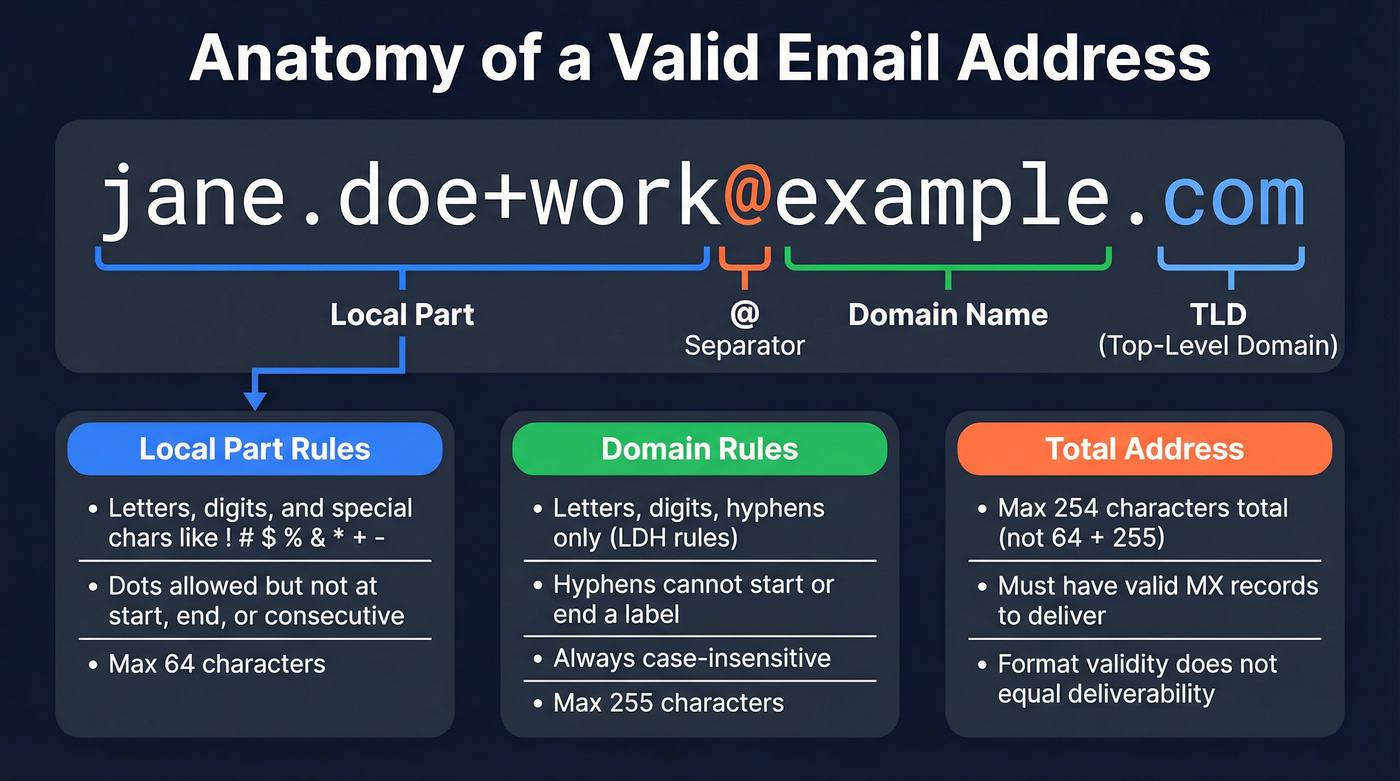
RFC 5322 defines an email address as addr-spec = local-part "@" domain, where the local part can be a dot-atom, a quoted string, or an obsolete legacy form. Here's what each piece actually allows.
Local-Part Rules
The local part - everything before the @ - supports two formats. The common one is the dot-atom, which allows:
- Uppercase and lowercase letters (A-Z, a-z)
- Digits (0-9)
- These special characters:
! # $ % & ' * + - / = ? ^ _ { | } ~ - Dots (
.), with three constraints: no dot at the start, no dot at the end, and no two consecutive dots
So jane.doe@example.com is valid. jane..doe@example.com isn't. Neither is .jane@example.com.
The less common format is the quoted string, which wraps the local part in double quotes and opens up a much wider character set - including spaces. "John Doe"@example.com is syntactically valid per RFC 5322. In practice, many providers and web forms reject these, but they're still legal by the spec.
Domain Rules
The domain follows LDH rules - letters, digits, and hyphens. Each label between dots can't start or end with a hyphen. The domain portion is always case-insensitive, so Example.COM and example.com resolve identically.
RFC 5321 also permits domain literals - IP addresses in square brackets. user@[192.168.2.1] and user@[IPv6:2001:db8::1] are valid address forms. You'll almost never see these in the wild, but they exist in the spec and occasionally trip up overly strict validation logic.
Length Limits
These are the numbers most guides forget:
| Component | Max Length | Standard |
|---|---|---|
| Local part | 64 chars | RFC 5321 |
| Domain | 255 chars | RFC 5321 |
| Total address | 254 chars | RFC 5321 |
That 254-character total limit catches people off guard - it's not 64 + 255. If your form validation doesn't enforce these limits, you're accepting addresses that'll fail at the transport layer.
Valid vs. Invalid Email Examples
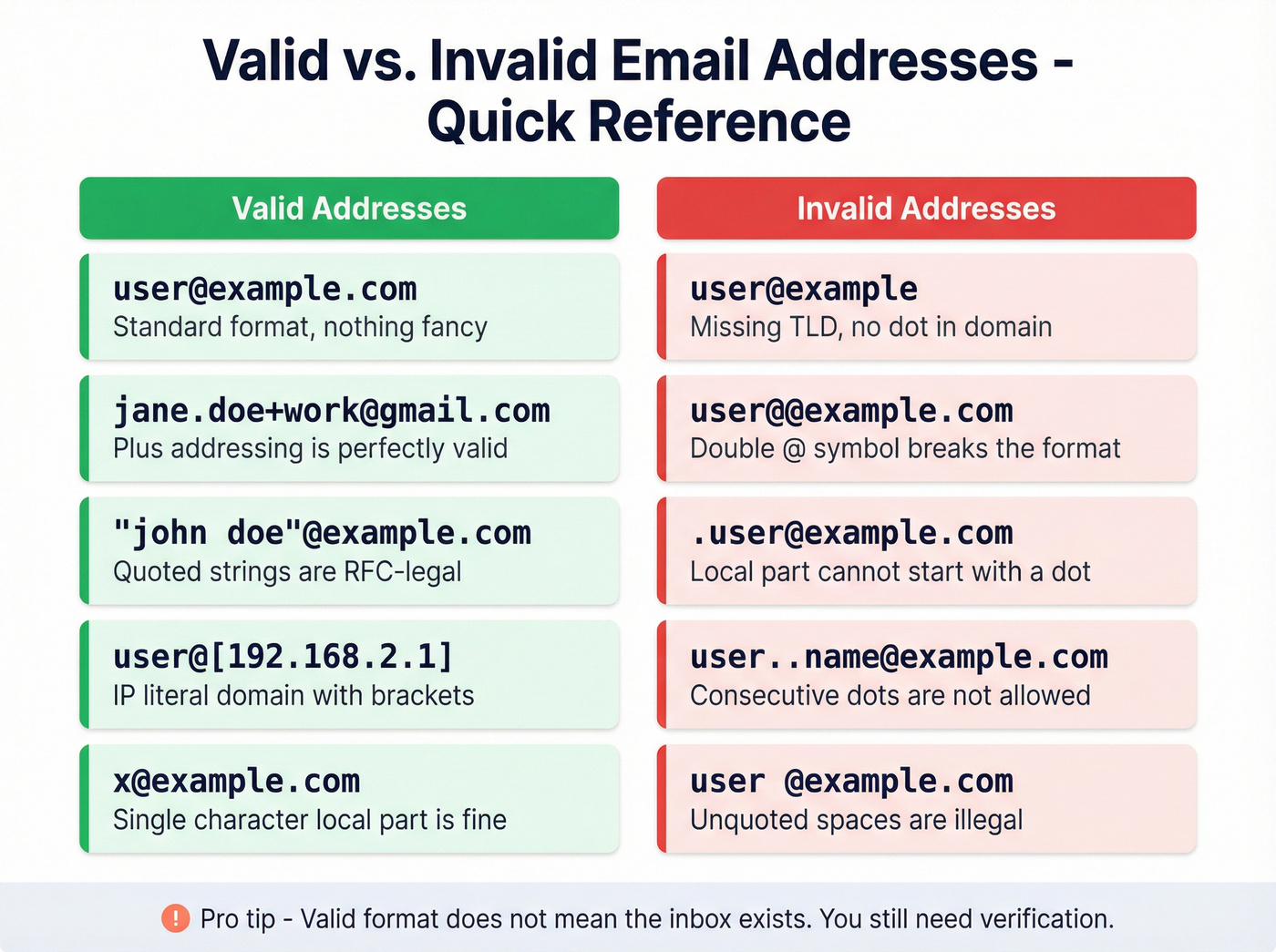
Some addresses that look wrong are technically valid. Some that look fine will bounce immediately. We've compiled the most common cases we see trip up validation logic.
| Address | Valid? | Why |
|---|---|---|
user@example.com |
Yes | Standard format |
jane.doe+work@gmail.com |
Yes | Plus addressing |
"john doe"@example.com |
Yes | Quoted string |
user@[192.168.2.1] |
Yes | IP-literal domain |
x@example.com |
Yes | Single-char local |
postmaster@example.com |
Yes | Required by RFC 5321 |
user@example |
No | No TLD |
user@@example.com |
No | Double @ |
.user@example.com |
No | Leading dot |
user..name@example.com |
No | Consecutive dots |
user @example.com |
No | Unquoted space |
user@123.123.123.123 |
No | Bare IP (needs brackets) |
The "valid but weird" entries - quoted strings, IP literals, plus addressing - are where most regex validators break. They're RFC-compliant but practically useless for outbound email.
The right answer for most applications: enforce what works. Require an @ sign, a domain with a TLD, and reject quoted strings and IP literals. You'll block a handful of RFC-valid addresses and save yourself thousands of bounces.

Syntax checks tell you an address looks right. Prospeo's 5-step verification tells you it actually delivers - catching catch-all domains, spam traps, and honeypots that regex never will. 98% email accuracy, under 4% bounce rates for 15,000+ companies.
Stop validating format. Start verifying deliverability at $0.01 per email.
RFC Rules vs. Real-World Deliverability
The gap between RFC compliance and real-world deliverability is where most email problems live.
Gmail, Outlook, and Provider-Specific Behavior
Gmail ignores dots in the local part entirely. john.doe@gmail.com, johndoe@gmail.com, and j.o.h.n.d.o.e@gmail.com all hit the same inbox. This is a Gmail-specific behavior, not an RFC rule - and it means deduplication logic that treats those as separate addresses will create phantom contacts in your CRM. If you're checking whether a Gmail address is unique in your database, strip the dots before comparing.
Outlook supports plus addressing: myname+newsletters@outlook.com routes to the myname inbox. Useful for filtering, but some poorly built forms reject the + character even though it's perfectly valid.
Case sensitivity is the biggest myth. RFC 5321 says the local part can be case-sensitive - the receiving server gets to decide. In practice, virtually every system treats User@domain.com and user@domain.com as the same mailbox. Lowercase everything and move on.

Why Regex Alone Fails
A fully RFC-compliant regex for email validation runs hundreds of characters long. Even that monster regex can't tell you whether the mailbox exists, whether the domain has MX records, or whether the server is a catch-all that accepts everything and silently discards what it doesn't recognize.
Regex validates syntax. Period. It doesn't validate deliverability. A regex that passes "john doe"@[192.168.2.1] is technically correct and practically useless for anyone sending outbound email. In our experience, teams that rely on regex alone see bounce rates 3-5x higher than those using proper verification.
Internationalized Email Addresses
RFC 6531 extends email to support non-ASCII characters in the local part - think Cyrillic, Chinese, or accented Latin characters. On the domain side, Internationalized Domain Names use Punycode encoding to convert Unicode domains to ASCII: muller.de transmits as xn - mller-kva.de.
ICANN's Universal Acceptance initiative is pushing adoption, and ICANN's own account system now supports internationalized addresses - but still requires a secondary ASCII-based email as a fallback. That tells you everything about the current state of adoption. If you're building for a global audience, support EAI where you can, but don't assume the rest of the internet does.
Validation vs. Verification - They're Not the Same
These terms get used interchangeably, and that causes real problems. They're different steps in the same process.
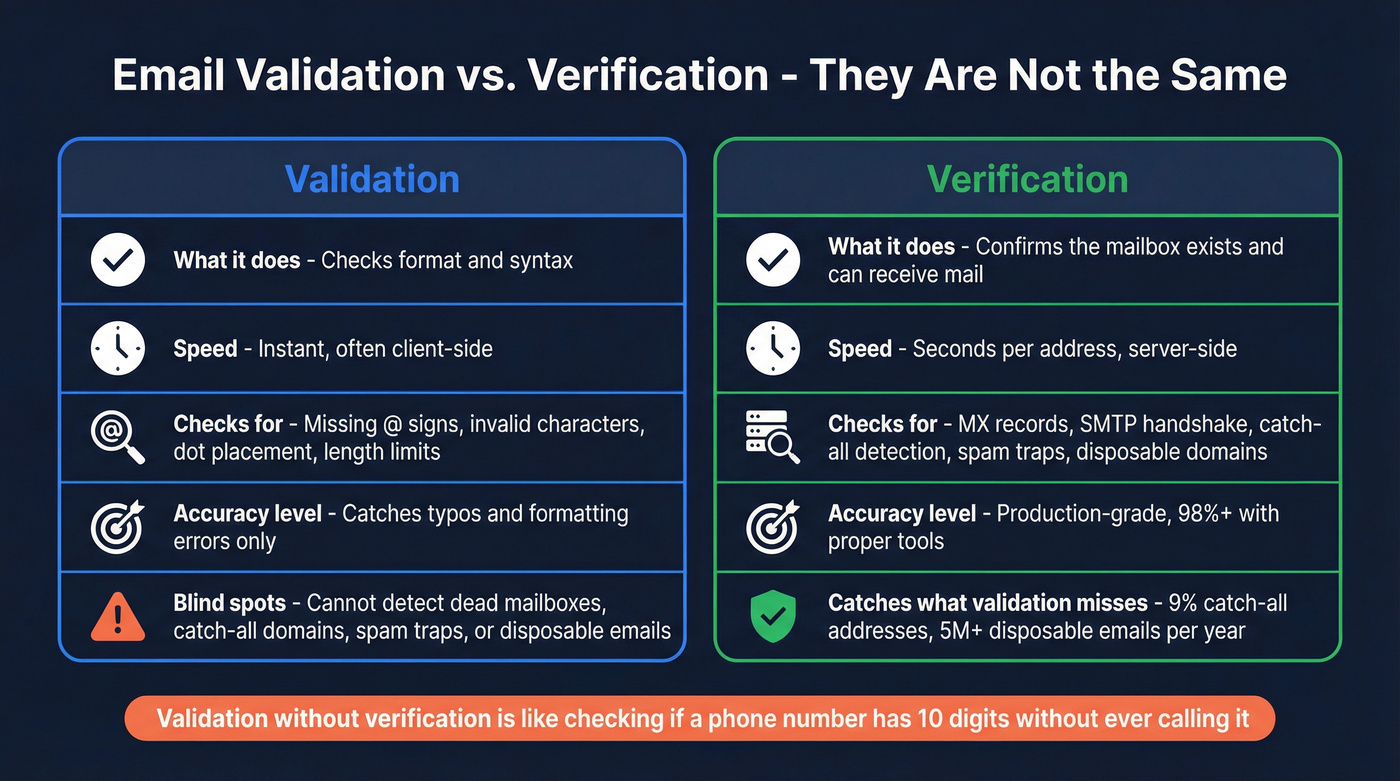
Validation catches formatting errors at the point of entry - typos, missing @ signs, invalid characters. It's a syntax check that confirms you have a properly formatted address. Fast, often client-side, and it prevents obviously broken addresses from entering your system.
Verification confirms the mailbox actually exists and can receive mail. It goes deeper: MX record lookups, SMTP handshakes, catch-all detection, spam-trap identification. It's what separates "syntactically correct" from "will actually deliver."
The hidden risk is catch-all domains - servers configured to accept mail for any address, even ones that don't exist as real mailboxes. In ZeroBounce's 2025 dataset, catch-all emails made up about 9% of all addresses checked. They pass both validation and basic verification, but they can still bounce or land in a dead mailbox.
Disposable email addresses from services like Guerrilla Mail and Mailinator are a separate category - syntactically valid, temporarily functional, and worthless for any real communication. ZeroBounce identified 5+ million disposable emails in their 2025 dataset alone, which gives you a sense of the scale.
How to Check If an Email Is Valid
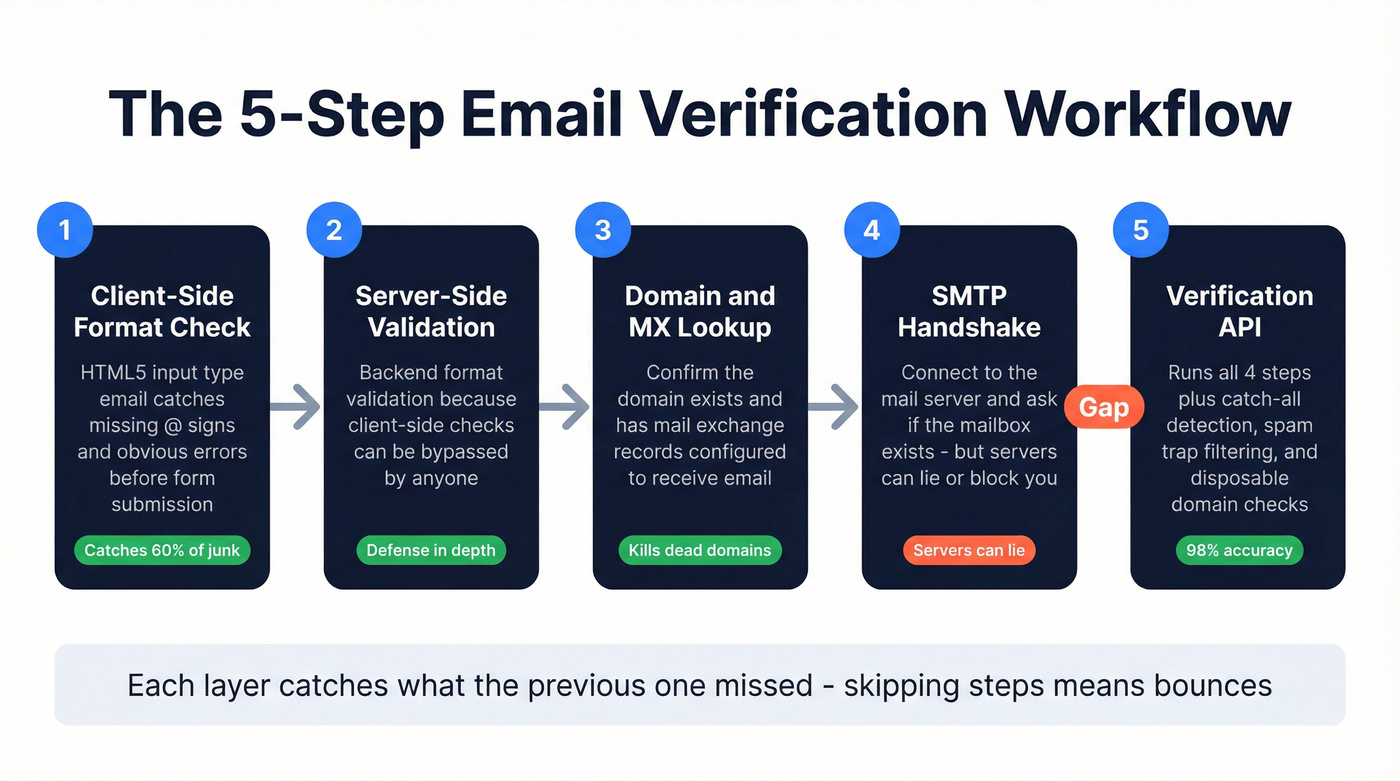
A production-grade email check isn't one step - it's a layered workflow where each layer catches what the previous one missed. Whether you're verifying a single contact or an entire list, the process follows the same sequence.
Client-side format check. HTML5's
<input type="email">handles the basics. It'll reject missing @ signs and obvious formatting errors before the form even submits. It's not thorough, but it's free and instant.Server-side validation. Client-side checks can be bypassed. Your backend needs its own format validation - don't trust the browser alone.
Domain and MX record check. Confirm the domain exists and has mail exchange records configured. An address at a domain with no MX records isn't going anywhere.
SMTP handshake. Connect to the mail server and ask if the mailbox exists. The catch: servers can lie. Some accept everything during the handshake and bounce later. Others block verification attempts entirely.
Verification API. This is where you get production-grade accuracy. A proper verification service runs all four steps above plus catch-all detection, spam-trap filtering, and disposable domain identification. Prospeo's email verification runs this five-step process across 143M+ verified email records with 98% accuracy - upload a CSV, connect your CRM, or hit the API.
Double opt-in remains the gold standard for confirming real humans. Send a confirmation link, require a click. It adds friction to signups, but it guarantees every address on your list belongs to someone who actually wants to hear from you.
Your list loses 23% of valid addresses every year to job changes, domain shutdowns, and deactivated mailboxes. Prospeo refreshes 300M+ profiles every 7 days - not every 6 weeks - so the emails you pull are verified the moment you need them.
Get emails that actually deliver, not just emails that pass regex.
Why Valid Addresses Matter for Deliverability
ZeroBounce's 2025 analysis of 11+ billion email addresses found more than 2.6 billion were invalid. At least 23% of an email list degrades every year as people change jobs, companies shut down, and inboxes get abandoned. That 23% rate is actually an improvement - list decay hit 28% in 2024 and 25% in 2023, suggesting better hygiene practices industry-wide, but the problem isn't going away.
The decay compounds. Catch-all emails account for roughly 9% of all addresses, masking bounces that would otherwise alert you to list quality problems. Spam traps sit at just 0.01% prevalence, but hitting even one can get your entire domain blacklisted.
Since 2024, Google and Yahoo's bulk sender requirements mandate spam complaint rates below 0.3%. The practical benchmark for bounce rates is under 2% total, with hard bounces as close to zero as possible. Exceed those thresholds and your deliverability tanks - not just for the bad campaign, but for every email your domain sends afterward.
Look, if your bounce rate is above 5%, you don't have a "deliverability problem." You have a data problem. Fix the inputs and the outputs fix themselves.
Best Practices for Clean Email Lists
Keeping a list clean isn't a one-time project. It's ongoing discipline. Most teams treat list hygiene as a quarterly chore, but the teams with the best deliverability treat it as infrastructure. Here's the checklist that actually matters.
Implement double opt-in. Yes, it reduces signup volume. It also eliminates fake addresses, typos, and bot submissions at the source. The tradeoff is worth it for any list you plan to email more than once.
Validate in real time at the form. Don't wait until send time to discover bad addresses. Real-time validation catches formatting errors and non-existent domains before they enter your database.
Verify before every campaign. Lists decay between sends. A 7-day data refresh cycle - like what Prospeo runs - keeps data current between campaigns rather than letting it go stale for weeks.
Remove hard bounces immediately. A single send to a hard-bounced address is a mistake. A second send is negligence. Automate this - your ESP should suppress hard bounces automatically, but verify it's actually happening.
Monitor bounce rates and sender reputation. Track your bounce rate per campaign and per domain. For teams that are consistently above 2%, there's a leak somewhere in the hygiene process.
Stay compliant. GDPR requires consent and easy unsubscribe. CAN-SPAM mandates a physical address and opt-out mechanism. Beyond the legal risk, compliant lists simply perform better because they're built on genuine engagement.
Skip all of this if you're sending fewer than 50 emails a month to people you know personally. But the moment you're doing any kind of outbound at scale, every item on this list becomes non-negotiable.
FAQ
Is the local part of an email case-sensitive?
Technically yes per RFC 5321, but practically no. Gmail, Outlook, Yahoo, and nearly all enterprise mail servers treat User and user identically. Lowercase everything in your database and deduplication logic to avoid phantom duplicates.
Can an email address contain spaces?
Only inside a quoted-string local part, like "john doe"@example.com. This is syntactically valid per RFC 5322 but rejected by most real-world providers and web forms. Don't accept them in production.
What's the maximum length of an email address?
254 characters total per RFC 5321. The local part maxes at 64 characters, the domain at 255. Most real-world addresses are under 50 characters - if you're seeing longer ones, they're likely generated or malicious.
What is a catch-all email domain?
A domain configured to accept mail sent to any address - even non-existent mailboxes. In ZeroBounce's 2025 dataset, catch-all emails were about 9% of all addresses checked. Prospeo's 5-step verification includes catch-all detection, flagging these risky addresses before they inflate your bounce rate.
How do I verify emails in bulk?
Use a verification API that checks MX records, SMTP response, catch-all status, and spam-trap presence. Most tools let you upload a CSV or connect directly to your CRM. Free tiers are common - Prospeo includes 75 email credits per month at no cost, with no card required.