Verification Email: What It Means + How to Make It Work (2026)
The most expensive email problem isn't fancy. It's the verification email that never shows up, or the list full of addresses that never should've been emailed in the first place.
In 2026, mailbox providers are stricter, and "good enough" setups quietly fail.
Here's the thing: if your average deal is under five figures, you don't need enterprise deliverability theater. You need two boring things done perfectly: authentication and list hygiene. Do that, and you'll beat teams spending 10x more.
What "verification email" means (two different intents)
People search "verification email" for two totally different reasons, and mixing them is how you waste a week.
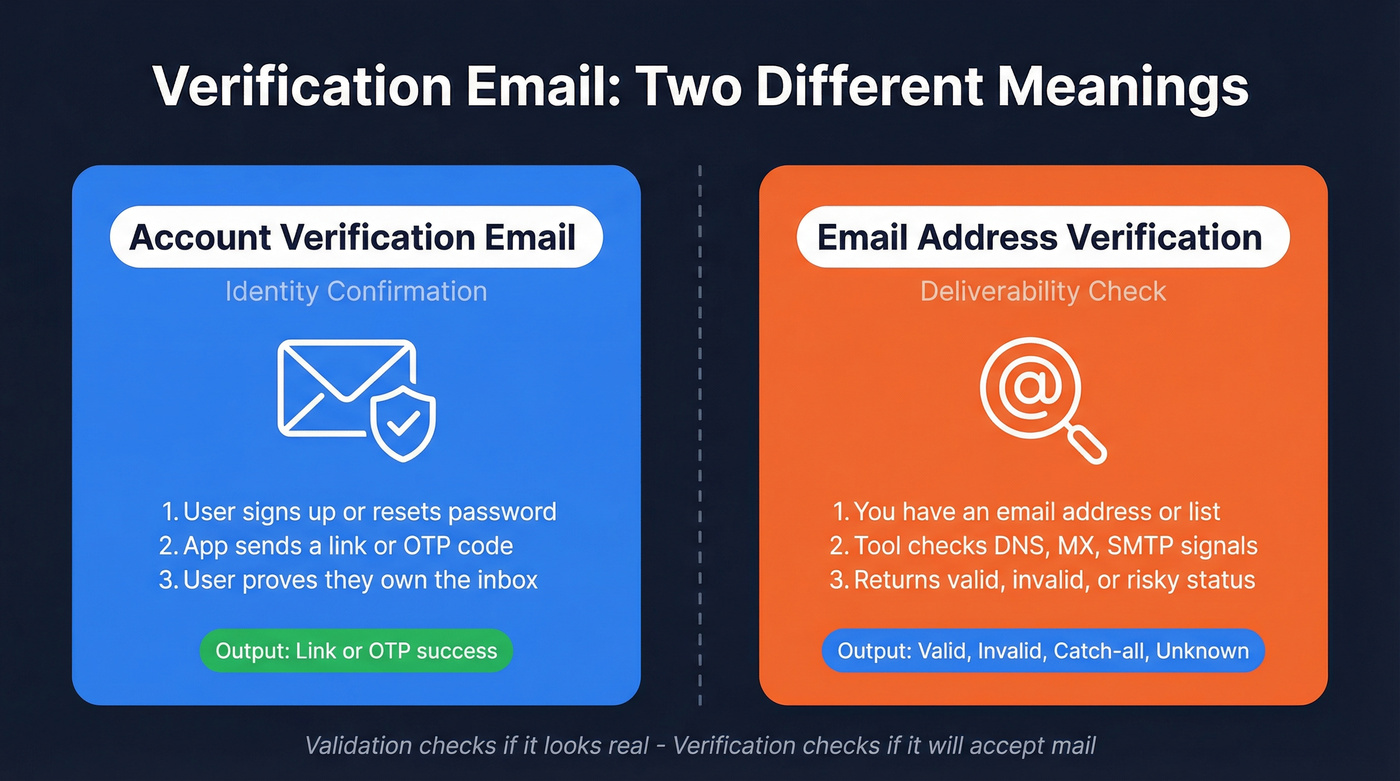
- Account verification email (identity confirmation): you sign up (or reset a password), and the app sends an email for verification with a link or one-time code (OTP) to prove you control the inbox.
- Email address verification (deliverability check): you're confirming an address is deliverable before you import it, enrich it, or send outreach.
A clean way to remember it:
- Validation = "Does this email look real?" (syntax, typos, domain exists)
- Verification = "Will this mailbox accept mail?" (DNS/MX, SMTP behavior, risk signals)
Here's the fork:
| You mean... | Goal | Typical output |
|---|---|---|
| Account verification email | Confirm user identity | Link/OTP success |
| Email address verification | Prevent bounces | Valid/invalid/etc. |
The trap is catch-all (accept-all) domains. A domain can accept everything during checks and still bounce later, which is why you'll see "unknown/risky" statuses even from excellent tools. That ambiguity is the modern email ecosystem.
If you're here because your OTP/link message isn't arriving, jump to "Why verification emails don't arrive in 2026." If you're here to clean lists before outreach/import, jump to "How email address verification works."

What you need (quick version)
Treat verification as a pipeline gate, not a one-off task. The right gate depends on which "verification email" problem you're solving.
Track A: My app's verification emails (OTP/link) aren't arriving
Use this checklist:
- Separate streams: transactional mail must be isolated from marketing (separate DKIM domain and/or IP).
- Authenticate first: SPF + DKIM + DMARC. Skip this and you're debugging blind.
- Check PTR early: reverse DNS (PTR) mismatches are a common rejection trigger in 2026.
- Watch complaint rate: keep it under 0.3% and run your program like it's <0.1%.
- Add resend + fallback UX: resend logic, rate limits, and a "change email" option.
Hard call: if OTP deliverability's failing, don't waste time swapping templates before you've verified auth/alignment/PTR and checked whether you're on a dirty shared IP pool.
Track B: I need to verify email addresses before outreach/import
Use this checklist:

- Put verification in three places: capture -> pre-enrichment -> pre-send.
- Set a default policy and enforce it in tooling: Valid = send/import; Invalid = block; Catch-all = segment; Unknown = hold + recheck.
- Plan for 10-30% catch-all/unknown in B2B lists. Build your workflow to route it, not "fix it."
- Avoid the cost trap: if your files skew catch-all/unknown, tools that charge for unknowns raise your effective cost fast.
How to implement the gate (so it actually sticks):
- Forms (real-time): call a verifier API on submit; block obvious junk and disposable domains before they hit your CRM.
- CRM/ETL (batch): run nightly/weekly verification on new leads; write the result into fields like
email_status,verified_at,risk_reason, and asend_allowedboolean. - Sequencer (pre-send): re-verify anything older than 30-60 days right before a sequence launches; that's where stale "valid" emails turn into bounce spikes.
Skip-this-if #1: if you only need list cleaning and you already have the emails, don't buy a data platform. Buy a verifier with fair billing and move on.
Skip-this-if #2: if your file has lots of catch-all/unknown, avoid any verifier that charges for unknowns. You'll pay for uncertainty and still have to segment it.

You just read about building verification gates before outreach. Prospeo eliminates the heaviest gate entirely - every email in our 143M+ database is run through a 5-step verification process with catch-all handling, spam-trap removal, and honeypot filtering. 98% accuracy. 7-day refresh cycle.
Start with verified emails instead of cleaning bad ones after the damage is done.
Account verification emails (OTP/link): implementation blueprint
If you're building account verification emails (or fixing a flaky one), the goal isn't "send an email." The goal is complete verification with minimal friction while staying secure under abuse.
Step 1: Pick your verification method (link vs OTP) based on risk
- Magic link is simplest for users. It's also easiest to forward accidentally.
- OTP code is better when you want the user to prove inbox access inside the current session.

For higher-risk actions (password reset, payout changes), use OTP or step-up verification even if signup uses links.
Step 2: Token security rules (don't get cute)
Your token rules should be boring and strict:
- Single-use tokens. Once redeemed, they're dead.
- Short expiration: 10-20 minutes for OTP; 30-60 minutes for links.
- Bind to context: store a token hash server-side, tie it to user + purpose (signup vs reset), and optionally device/session.
- Don't log tokens. Teams accidentally ship tokens into analytics logs and then wonder why accounts get hijacked.
Step 3: "Pending verification" state (and don't half-create accounts)
The clean pattern:
- User signs up -> account created in Pending Verification
- App blocks sensitive actions until verified
- Verification completes -> account becomes Active
Build the edge cases into the product, not support tickets: wrong email, typo, user never receives the message, user requests multiple resends, user signs up twice.
I've seen teams "solve" this by creating full accounts immediately and then trying to patch over it with a banner that says "Please verify." It turns into a mess: duplicate accounts, support tickets, and a security hole when unverified users can still trigger sensitive flows.
Step 4: Resend logic + rate limiting (abuse is guaranteed)
Resend is necessary. Resend without controls is a spam cannon.
Do this:
- Cooldown timer: allow resend every 30-60 seconds.
- Hard cap: 5 resends per hour per user/email.
- IP-based throttling: stop scripted abuse.
- Progressive friction: after repeated attempts, require CAPTCHA or a secondary check.
Don't do this:
- Don't hide resend behind tiny text.
- Don't force users to wait 10 minutes with no alternative path.
- Don't mint a new token every second without invalidating old ones.
Step 5: Email content UX rules (this is where most teams blow it)
Most verification emails fail because they're designed like newsletters. Treat it like a security prompt.
Rules that work:
- Put the code above the fold.
- Make it copy/paste friendly.
- Keep copy short: "Your code is 123456. It expires in 10 minutes."
- Avoid per-digit input boxes that break paste behavior.
- Include a clear "If you didn't request this, ignore" line.
Also: make the sender name obvious. "no-reply@" is fine, but "Acme Security" as the display name beats "Acme Notifications" for trust.
Step 6: Operational safety nets
If verification's business-critical (it is), add:
- Delivery telemetry: send, accepted, deferred, bounced, complaint.
- Fallback channel: SMS or authenticator for high-value accounts.
- Support playbook: "If you're on Outlook/Exchange, check quarantine" beats "check spam folder."
Opinion: teams obsess over token crypto while their emails are quietly quarantined by DMARC misalignment. Security isn't just the token. It's the whole delivery chain.
Why verification emails don't arrive in 2026 (provider rules + infrastructure)
"Not arriving" usually means one of three things:
- Rejected (blocked at SMTP time)
- Deferred (temporarily delayed: greylisting, throttling, rate limits)
- Delivered-but-hidden (accepted, then routed to spam/quarantine/tabs)
This is why "delivered" isn't the finish line.
In one large inbox placement dataset from 2025, only about 60% of messages landed in a visible inbox location, with roughly 36% landing in spam and 4% blocked or missing. Don't treat those numbers as gospel for your program, but do treat the pattern as real: acceptance doesn't guarantee visibility, and verification flows suffer because they're time-sensitive.
Decision tree: what to check first
If users never receive anything (and you see no provider acceptance):

- Check SPF/DKIM/DMARC alignment first.
- Check reverse DNS (PTR) for the sending IP.
- Check if you're sending from a shared IP with a bad neighbor; shared reputation drags down even clean senders.
If you see "accepted/delivered" but users still don't see it:
- It's landing in spam, quarantine, or a filtered tab.
- Run seed tests and check inbox placement, not just SMTP acceptance.
- For Microsoft environments, check tenant quarantine and admin-side policies. End-user "Safe Senders" rarely overrides server filtering.
If it arrives sometimes, but not reliably:
- You're getting deferrals (greylisting, rate limiting) or reputation swings.
- Your resend logic might be amplifying the problem by spiking volume right when providers are already throttling you.
Provider rules that matter now (and why they hit verification flows)
Here's the short version product teams need to internalize:

- Complaint rate: keep it <0.3% (run it like <0.1%)
- Authentication: SPF/DKIM/DMARC alignment is table stakes
- Unsubscribe compliance: applies to bulk mail, but bulk behavior still affects domain reputation
Yahoo enforcement (started February 2024):
- Spam rate must stay <0.3%.
- Forward + reverse DNS must be valid.
- Bulk senders need one-click unsubscribe and must honor unsubscribes within 2 days.
Google tightening (stricter enforcement starting November 2026):
- Complaint rate <0.3%, ideal <0.1%.
- For higher-volume senders (5,000+/day), alignment and one-click unsubscribe expectations get strict fast.
Blunt caveat: OTP/account messages don't require List-Unsubscribe headers. But your domain reputation is shared, so bulk noncompliance and high complaints in marketing still hurt transactional placement.
The sneaky 2026 failure mode: PTR/reverse DNS drift
PTR has always mattered, but in 2026 broken PTR is increasingly a hard rejection trigger. And drift makes it a recurring failure mode.
DNS changes, IP swaps, vendor migrations, and "temporary" infrastructure fixes create permanent deliverability problems. This is why "set and forget" deliverability is a lie: your verification email flow breaks, and nobody notices until signups drop and someone finally checks the logs.
Shared IP reputation: the tax you didn't budget for
If you're on a shared IP pool, you're renting reputation.
- If another sender on the pool gets complaints, you inherit the stink.
- Your transactional messages get throttled or spam-foldered even if your own traffic is clean.
If verification is core to your product, paying for a dedicated IP (or a higher-tier pool) is often cheaper than losing conversions.
Email verification vs email authentication (don't confuse them)
Email address verification answers: "Is this mailbox deliverable?" Email authentication answers: "Is this sender allowed to send as this domain?"
They're different layers, and you need both.
The missing definition: what "alignment" means
Alignment is simple: the domain your user sees in the From: address must match (or be authorized by) the domains used by SPF and DKIM.
If your From domain is acme.com but DKIM signs as vendor-mail.com, DMARC alignment fails unless configured correctly. Microsoft, Google, and Yahoo treat that as a trust hit.
The plain-language stack
| Method | What it does | Where it lives |
|---|---|---|
| SPF | Lists allowed senders | DNS TXT |
| DKIM | Signs messages cryptographically | DNS + headers |
| DMARC | Tells receivers what to do on failure | DNS TXT |
| ARC | Preserves auth through forwarding | Headers |
Two concrete "this is why you're stuck" examples
- Example 1 (auth is fine, still spam-foldered): your OTP message is perfectly authenticated, but you're on a shared IP pool with a bad reputation. Providers accept the message, then bury it. Fix: move transactional to a cleaner pool/dedicated IP and keep marketing separate.
- Example 2 (list is verified, still quarantined): you verified the address and it's real, but DMARC alignment fails because your From domain doesn't align with DKIM/SPF. Result: Microsoft quarantines it, users never see it, and your support team gets blamed.
Opinion: if you're choosing between "buy another verifier" and "fix DMARC alignment," fix alignment first. Verification improves bounces; authentication improves trust.
How email address verification works (and what results mean)
Email verification tools look like magic, but the pipeline's consistent.
The typical verification pipeline (what tools actually do)
- Syntax check (typos, malformed addresses)
- Domain + MX lookup (domain can receive mail)
- SMTP handshake (asks the server about mailbox behavior without sending a message)
- Disposable email detection (imperfect in 2026)
- Role-based detection (
sales@,info@,support@) - Catch-all detection (domain accepts all recipients)
Good tools do this "stealth" style: no email is sent to the recipient. It's a server-to-server check.
Real talk: verification isn't a truth oracle. Modern mail servers intentionally hide mailbox existence to reduce abuse. That's why "unknown" exists, and that's why your workflow needs routing rules.
Common checks you'll see in results (reason codes that matter)
Different tools name these differently, but you'll see variations of:
- Mailbox disabled / user unknown (hard invalid)
- Mailbox full (deliverability risk; recheck later)
- Greylisting / temporary deferral (retry window matters)
- SMTP tarpitting (server slows responses to deter abuse)
- No MX / null MX (domain refuses email)
- Parked domain / misconfigured domain (high bounce risk)
- Internationalized email (EAI/IDN) (some stacks still break)
- Gibberish/keyboard smash detection (form spam)
- Spam-trap / honeypot signals (don't send)
- Blocklist/risk signals (domain-level risk, not always mailbox-level truth)
- Free vs corporate classification (useful for routing, not deliverability)
- Accept-all confirmed (treat as segment, not "valid")
Status dictionary: what to do with each result
Use this table as your operational policy. The biggest mistake teams make is treating statuses as labels instead of routing rules.
| Status | Meaning | What to do |
|---|---|---|
| Valid | Deliverable now | Send/import |
| Invalid | Will bounce | Block |
| Catch-all | Domain accepts all | Segment + retry |
| Unknown | Can't confirm | Hold + recheck |
| Risky | Mixed signals | Send only if high value |
| Disposable | Temp mailbox | Block (most cases) |
| Role-based | Shared inbox | Decide by use case |
Catch-all/unknown handling that actually works
Catch-all and unknown are where your process maturity shows.
Segment them.
Then retry later (24-72 hours) because greylisting and transient SMTP behavior are real, and because some providers behave differently depending on time, volume, and the IP you're checking from.
Use alternate signals for high-value leads: enrichment, recent activity, or a second verifier if the deal size justifies it. And throttle sends to these domains; catch-all environments often have stricter filtering, and blasting them is how you burn reputation even if your bounce rate looks "fine."
In B2B, 10-30% catch-all/unknown is normal. If you're seeing 40%+, your list source is the real problem.
Where verification plugs in (integration patterns that save time)
- Forms: verify on submit; block disposable and obvious invalids before they hit your CRM.
- Google Sheets/Airtable: run a batch verifier on new rows; write back status + timestamp so sales stops guessing.
- Zapier/Make/n8n/Pipedream: route by status (Valid -> CRM + sequencer; Catch-all/Unknown -> enrichment queue; Invalid -> suppress).
- CRMs (HubSpot/Salesforce): store
email_statusandverified_at, then build views and workflows that prevent unverified records from entering sequences. - Outbound sequencers: re-verify right before launch; it's the cheapest insurance you can buy.
Tools that verify email addresses (shortlist + pricing reality)
Reality check before you buy
Two numbers keep teams honest:
- In a benchmark across 15 tools on 3,000 emails, top results landed around 65-70% accuracy in that methodology (unknowns counted as wrong). That's why "99% accuracy" promises collapse the moment you test mixed B2B domains.
- Disposable detection is weaker than most people assume. A January 2026 community test across 272 cases found 59% average detection, with only one tool catching every provider. Disposable providers rotate domains; static blocklists lose.
Now pick based on workflow fit and billing mechanics, not vibes - starting with a solid email verifier websites comparison if you want a wider scan.
Prospeo (Tier 1)
We use tools like this every day, and Prospeo is the one I'd pick when you want verification to behave like a hard gate inside outbound, not a separate "clean the CSV" chore you do once and forget.
Prospeo is "The B2B data platform built for accuracy" with 300M+ professional profiles, 143M+ verified emails, and 125M+ verified mobile numbers, used by 15,000+ companies and 40,000+ Chrome extension users. Email accuracy is 98%, and the data refresh cycle is 7 days (the industry average is about 6 weeks), which matters because a "valid last quarter" address is exactly how you end up with bounce spikes and throttling right when you launch a new sequence.
Operationally, it fits real workflows: 92% API match rate, 83% enrichment match rate, and 50+ enrichment data points per contact, plus native integrations like Salesforce, HubSpot, Clay, Zapier, Make, Instantly, Lemlist, and Smartlead. Pricing's self-serve and transparent: budget ~$0.01/email (credit-based), 10 credits per mobile, plus a free tier with 75 emails + 100 extension credits/month.
On the screen above, the workflow is exactly what you want: upload a CSV -> get a status breakdown (valid/invalid/catch-all/unknown) -> export clean segments (for example, "valid only" for sequencers, "catch-all" for a slower lane). Then push those segments into your CRM or outbound tool so unverified records don't slip into a send.
Kickbox (Tier 1)
Kickbox is the easiest verifier to budget for because pricing's public and simple: 500 checks for $5, 1,000 for $10, 10,000 for $80, 100,000 for $800, 250,000 for $1,500, and 1,000,000 for $4,000, plus 100 free verifications to start.
The killer detail: unknown results are free. In B2B, that single policy keeps your effective cost from exploding when catch-all/unknown hits 10-30% of your file.
Clearout (Tier 1)
Clearout is a strong pick for list-cleaning teams who care about fair billing mechanics. You're charged 1 credit for definitive outcomes (valid/invalid/catch-all), unknown results are free, duplicates in the same uploaded list don't cost extra, and credits don't expire, which is perfect for spiky verification volume.
They also offer deliverability guarantees with conditions. Treat guarantees as directional, not absolute, because aggressive filtering environments always create exceptions.
Email Hippo (Tier 2)
Email Hippo is built like a product line: CORE for bulk files, and MORE/INSIGHT/ASSESS for API-driven verification with deeper signals like greylisting and trust scoring. If you need real-time verification at signup, their API throughput is the draw: ~430ms average response and up to 250 requests/sec.
Budget $10-$1,750/month depending on volume and product tier, plus pay-per-file options for batch cleaning.
Hunter (Tier 2)
Hunter is the workflow-friendly choice: find emails, verify them, and run lightweight prospecting without stitching five tools together. Their validation vs verification definitions are genuinely useful, and their benchmark is a good antidote to "99% accuracy" marketing.
Budget $50-$400/month for subscriptions; effective verification cost lands around $0.0008-$0.01/check depending on plan and volume.
Verifalia (Tier 2)
Verifalia is a clean "run a file, get segments back" tool that ops teams like because it's straightforward. It's best when your job is to produce clean exports (valid vs invalid vs catch-all) and hand them to a sender or CRM workflow.
Pricing is credit-based; budget $10-$300/month for small teams, and $0.001-$0.01/check at volume depending on speed settings.
ZeroBounce (Tier 2)
ZeroBounce is a popular verifier for bulk cleaning and API verification at capture. The right way to evaluate it is simple: test it on your own lead sources, then measure bounce rate and inbox placement after you send.
Budget $0.001-$0.008/check depending on volume, with monthly plans for ongoing hygiene.
NeverBounce (Tier 3)
NeverBounce is a solid default for bulk list cleaning when you want a familiar tool and quick turnaround. Pricing is credit-based or subscription depending on plan; budget $0.001-$0.01/check at volume, and confirm how your plan bills unknowns.
Mailgun Email Validation (Tier 3)
Mailgun Email Validation fits best when you already send through Mailgun and want verification directly in your capture flow. It's an API add-on priced per verification; budget $0.001-$0.01/check depending on volume and plan.
GlockApps (Tier 3)
GlockApps isn't an email verifier. It's an inbox placement tester for when "delivered" still means "missing." Budget $30-$150/month depending on how many seed tests and inbox placement reports you run.
Comparison table (features + pricing mechanics)
| Tool | Best for | Status granularity | Catch-all handling | Unknowns charged? | API/real-time | Approx pricing model |
|---|---|---|---|---|---|---|
| Prospeo | B2B data | High | Yes + traps | N/A | Yes | ~$0.01/email |
| Kickbox | Cost clarity | Med | Yes | No | Yes | $5-$4k packs |
| Clearout | Fair credits | High | Yes | No | Yes | Credits, no expiry |
| Email Hippo | API scale | High | Yes + score | Varies | Yes | $10-$1,750 |
| Hunter | Find + verify | Med | Catch-all aware | Yes | Yes | ~$50-$400/mo |
| Verifalia | File cleaning | Med | Yes | Yes | Yes | $0.001-$0.01 |
| ZeroBounce | Bulk + API | Med | Yes | Varies | Yes | $0.001-$0.008 |
| NeverBounce | Basic clean | Med | Yes | Varies | Yes | $0.001-$0.01 |
| Mailgun Validation | Form API | Med | Limited | Varies | Yes | $0.001-$0.01 |
| GlockApps | Inbox tests | N/A | N/A | N/A | N/A | ~$30-$150/mo |
Catch-all domains, unknowns, and stale data are the problems this article warns you about. Prospeo's proprietary email infrastructure refreshes every 7 days - not the 6-week industry average - so your lists stay deliverable without constant re-verification workflows.
Skip the bounce spike. Get emails that are verified before you ever touch them.
Monitoring your verification email flow + fixes checklist (so it stays working)
Deliverability isn't a project. It's maintenance.
And yes, that's annoying.
This cadence keeps verification flows from silently degrading.
Weekly checks (15 minutes)
- Seed testing / inbox placement: "accepted" isn't "inbox." Seed tests catch "delivered but spam-foldered" fast - use a seed list so results are comparable over time.
- Complaint rate: calculate complaints / emails received. If you're near 0.3%, you're already in the danger zone.
- Bounce spikes: sudden hard bounce increases mean list source drift or a broken verification gate.
Monthly checks (30 minutes)
- PTR/reverse DNS: check it monthly. PTR drift is a 2026 rejection driver, and it breaks during infra changes.
- SPF/DKIM/DMARC alignment: confirm nothing changed in DNS, sending vendor, or From domains - this is easier with a lightweight DMARC monitoring workflow.
- Stream separation: keep marketing and transactional reputations from contaminating each other.
List hygiene cadence (so your "valid" emails don't rot)
- High-volume lists (10k+ records): re-verify every 2-4 weeks.
- Lower-volume lists: re-verify monthly or before each campaign.
- Any record older than 60 days: re-verify before it enters a sequencer - especially if you're following an email verification list SOP across sources.
When users say "I added you to Safe Senders" (Outlook reality)
Outlook Safe Senders rarely overrides server-side filtering. Your help doc for enterprise users should say: check quarantine first, then ask an admin to add a server-side allow rule (and confirm DMARC alignment so you're not fighting policy with wishful thinking).
FAQ
What's the difference between an account verification email and email address verification?
An account verification email is a message (link or OTP) used to confirm a user controls an inbox. Email address verification checks whether an address is deliverable before you send to it. In practice: one protects signup/reset flows; the other prevents bounces and reputation damage in outreach.
What does "catch-all" or "unknown" mean, and should I email it anyway?
Catch-all means the domain accepts mail for any address, so tools can't confirm the mailbox exists. Unknown means the server won't give a definitive answer.
Segment these, retry checks in 24-72 hours, and only send when the lead's high value. Then throttle volume and watch complaints.
Does verifying an email address send an email to the person?
No. Most tools don't send a message to the recipient. They use syntax checks, DNS/MX lookups, and an SMTP handshake to infer deliverability without notifying the mailbox owner.
If a vendor claims "verification emails" are being sent as part of checking, treat that as a red flag for outreach hygiene.
How often should you verify email addresses in a B2B pipeline?
Verify at three points: at capture (real-time), before enrichment/import, and again before sending if the record's older than 30-60 days.
For large lists, recheck every 2-4 weeks. For smaller lists, do it monthly or right before each campaign to avoid bounce spikes.
What's a good free tool to clean a list before sending?
For small batches, use a free tier that gives enough credits to run a real test: Prospeo includes 75 emails + 100 extension credits/month, and Kickbox includes 100 free verifications.
If your file has lots of catch-all/unknown, prioritize tools that don't charge for unknowns to keep costs predictable.
Summary: make verification a gate, not a panic button
A verification email problem is usually one of two things: your product's OTP/link flow is getting blocked or hidden, or your pipeline's missing a real verification gate before you send.
In 2026, the winning play is boring: separate transactional from marketing, lock in SPF/DKIM/DMARC + PTR, and enforce list hygiene with clear routing for valid/invalid/catch-all/unknown. If you're building this into outbound, start with a deliverability-first cold email server setup and keep an eye on domain reputation as you scale.