DMARC Monitoring: How to Track, Triage, and Enforce in 2026
Months of deliverability work can get wiped out by one thing: you tighten authentication, then find out three vendors are still sending misaligned mail from your domain. DMARC monitoring is how you catch that before mailbox providers do. In 2026, it's not optional. It's table stakes.
What you need (quick version)
Checklist (minimum viable DMARC monitoring):
- A single DMARC record at
_dmarc.yourdomain.comwithp=noneto start - A working
rua=mailbox (or tool address) that can receive daily XML - SPF + DKIM enabled for every legitimate sender (ESP, CRM, support desk, product mail, invoicing, etc.) - see our SPF + DKIM setup guide
- Alignment decisions: relaxed vs strict (
aspf,adkim) - A weekly owner + a 20-minute review cadence (or it'll become dashboard shelfware)
- A "new sender/IP" triage loop (because new stuff always appears)
- A path to enforcement:
p=none -> quarantine -> rejectwithpctramp
Provider rules you can't ignore:
- Yahoo expects spam rate <0.3% and bulk senders must publish DMARC at p=none or stronger - and DMARC must pass.
- Yahoo also expects List-Unsubscribe support (one-click recommended, RFC 8058) and to honor unsubscribes within 2 days.
- Microsoft's Outlook.com consumer requirements apply to domains sending >5,000 emails/day. Enforcement began May 5, 2026 (and it's active in 2026).
Do this this week (seriously):
- Inventory every system that sends as your domain (including "one-off" tools).
- Publish DMARC with
rua=and start collecting aggregate reports. - Fix the top 1-2 misaligned sources before you touch enforcement.
What DMARC monitoring actually is (and what it isn't)
DMARC monitoring means collecting and reviewing DMARC reports - mostly aggregate (RUA) reports - so you can see who's sending mail using your domain and whether that mail is authenticating and aligning. Whether you do that with raw XML or DMARC monitoring tools, the goal's the same: turn reports into an accurate sender inventory and a clear enforcement plan.

Here's the thing: DMARC isn't "SPF passed" or "DKIM passed."
DMARC = pass + align (not just SPF/DKIM pass).
Alignment is the part teams miss. DMARC checks whether the domain in the 5322.From header aligns with the domain authenticated by SPF (tied to the 5321.MailFrom / envelope sender) or DKIM (d= domain). You can have SPF pass and still fail DMARC if the domains don't align.
What DMARC monitoring isn't:
- It's not a deliverability dashboard that tells you why Gmail throttled you today - for that, use an email deliverability workflow.
- It's not a replacement for bounce/complaint monitoring.
- It's not "set DMARC once and forget it." Your sending ecosystem changes constantly.
Monitoring vs enforcement (quick callout)
- Monitoring (
p=none): collect visibility; don't block failures. - Enforcement (
p=quarantine/p=reject): tell receivers what to do with mail that fails DMARC.
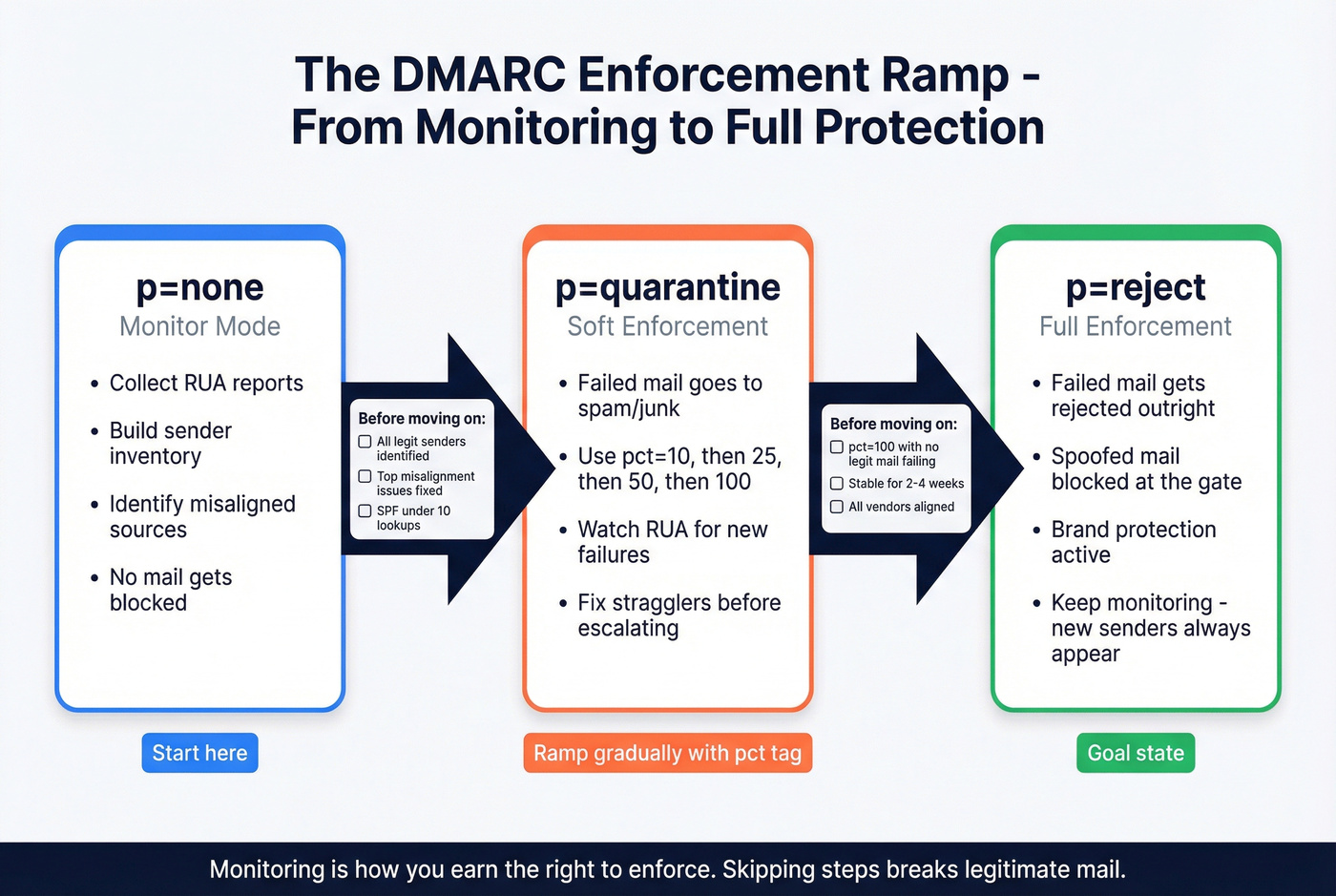
Monitoring is how you earn the right to enforce.
Why DMARC monitoring matters now (provider enforcement in 2026)
Mailbox providers stopped treating authentication as "best practice" and started treating it as admission to the inbox.
If you're still missing DKIM/DMARC alignment in 2026, expect junking, throttling, and occasional outright rejection - especially once you cross "bulk sender" thresholds.
The timeline that matters
- Feb 2026 (Yahoo): bulk senders must authenticate with SPF and DKIM, publish DMARC with p=none or stronger, and DMARC must pass. Yahoo also pushes operational hygiene (DNS correctness, RFC compliance) and a spam rate below 0.3%. Two practical requirements teams miss:
- Support List-Unsubscribe (one-click recommended, RFC 8058)
- Honor unsubscribes within 2 days
- May 5, 2026 (Microsoft Outlook.com consumer): requirements kicked in for domains sending >5,000 emails/day - and they're enforced in 2026. SPF and DKIM need to pass, DMARC must exist at p=none or stronger, and DMARC must align with SPF or DKIM (ideally both). Microsoft also sends RUA and doesn't plan to send RUF.
- 2026 reality: "We're at p=none" isn't a comfort blanket. Providers expect you to monitor, fix misalignment, and move toward enforcement, because attackers don't wait for your roadmap.

Hot take (because it's true)
If your outbound volume matters and you're still sitting at p=none in 2026, you're choosing to let spoofing happen.
Use/skip guidance (who needs to care most)
Treat DMARC monitoring as mandatory if:
- You send meaningful volume (marketing, product, sales, support).
- You use multiple third parties (ESP + CRM + ticketing + invoicing + webinar tools).
- You've had a spoofing incident, brand impersonation, or "fake invoice" moment.
De-prioritize (not ignore) if:
- You truly send almost nothing from your domain and can lock it down fast (parked domains are perfect candidates for strict policies).
- You're early and only send from a single provider with clean alignment.
One more operational point: Microsoft calls out the SPF 10-DNS-lookup limit as a real failure mode. Teams "add one more include" and break SPF for half their traffic. DMARC monitoring is how you notice before replies fall off a cliff. If you need a refresher on syntax and limits, start with an SPF record walkthrough.
And yes, complaints and bounces are tied to this. When you tighten authentication, you're usually also scaling sending, and that's where list quality becomes inseparable from compliance: high bounces and complaints make provider thresholds harder to hit, even if your DNS is perfect. (If you’re actively cleaning lists during ramp, follow an email verification list SOP.)

You're tightening DMARC to protect deliverability. But authentication alone won't save you if 30% of your list bounces. Prospeo's 98% verified email accuracy and 5-step verification process means your outbound stays under Yahoo's 0.3% spam threshold and Microsoft's bulk sender rules.
Don't let bad data undo months of DMARC enforcement work.
What to monitor in DMARC reports (signals that drive action)
DMARC aggregate reports are noisy until you decide which signals trigger work. This is the short list that moves the needle.
| Signal | What it means | What to do |
|---|---|---|
| source_ip new | New sender or infra change | Identify system; verify SPF/DKIM |
| disposition=none | Receiver didn't enforce | Fine at p=none; prep for ramp |
| disposition=quarantine/reject | Receiver enforced policy | Stop the bleeding; fix alignment |
| alignment fail | SPF/DKIM domain mismatch | Align 5322.From with SPF/DKIM |
| count spikes | Volume shift or abuse | Confirm campaign/vendor; investigate |
| Pass rate trend down | Config drift | Check DNS, DKIM selectors, SPF includes |
| One IP dominates fails | Single misconfigured sender | Fix that sender first; fastest win |
| Many IPs low-volume fails | Spoofing background noise | Move toward quarantine/reject |
The RUA fields that matter most when you're scanning XML fast:
- source_ip: who sent it
- disposition: what the receiver did
- identifiers/header_from: the domain in 5322.From
- auth_results: which SPF/DKIM domains passed
- count/volume trend: what changed since last week
Top 10 actions you'll take from DMARC monitoring (the "so what" list)
- Unknown sender with real volume -> identify the system; assign an owner; decide "legit vs abuse."
- Vendor sending from root domain -> move them to a subdomain (e.g.,
billing./marketing.) or force aligned DKIM. - SPF permerror (often 10-lookup limit) -> flatten SPF or reduce
include:chains; stop "just add another include." - DKIM selector missing/invalid -> publish the selector record; rotate keys; confirm the vendor is signing.
- SPF passes but doesn't align -> change the envelope sender / return-path domain to align with 5322.From (or rely on aligned DKIM).
- DKIM passes but
d=doesn't align -> configure custom DKIM sod=matches your domain/subdomain. - Sudden volume spike from one IP -> check for a new campaign, a new region, or a compromised credential.
- High failure rate only at one receiver -> receiver-specific issue (policy interpretation, DNS propagation, or that receiver seeing a different path).
- Legit mail failing due to forwarding/lists -> consider ARC (details below) and prioritize DKIM alignment.
- Spoofing background noise across many IPs -> stop over-investigating; move toward
quarantine/rejectonce legit sources are clean.

RUA vs RUF in 2026 (what to enable and why)
You'll see two report types in DMARC docs:

- RUA (aggregate reports): periodic summaries (usually daily) that roll up authentication results by source IP and domain alignment.
- RUF (forensic/failure reports): near-real-time failure reports that can include message-level details (often redacted), which creates privacy and operational noise.
Enable RUA. It's the only monitoring stream that scales: trend lines, inventory, and a clean path to enforcement.
Skip RUF. Provider support keeps shrinking, and the signal-to-noise ratio's brutal. Microsoft's stance makes the decision easy: they send RUA to the addresses you publish, and they don't plan to send RUF.
When RUF is tempting (and why it still disappoints)
RUF sounds great when you're chasing a specific spoofing incident: "show me the failed messages." In practice, you get inconsistent coverage, redacted payloads (or none), and a privacy/compliance headache, then you burn time on message-level artifacts instead of fixing the misaligned legitimate sources that are actually hurting you.
If you want message-level investigation, do it with your security tooling and mailbox logs, not by building your program around RUF.
How to read a DMARC aggregate (RUA) report in 5 minutes
Most teams lose time because they treat the XML like a mystery novel. It's not. It's a structured summary with the same handful of sections every time.
The 5-minute cheat sheet (what to scan first)
1) report_metadata = who sent the report + time window
Look for org_name, report_id, and date_range (begin/end epoch).
2) policy_published = what policy you published
This is your DMARC record as the receiver understood it: p, sp, pct, adkim, aspf. If your monitoring tool shows something different than your DNS, this section is the truth from the receiver's perspective.
3) <record> = the actionable unit
Each record is typically grouped by source IP and contains row/source_ip, row/count, row/policy_evaluated (disposition + dkim/spf results), identifiers/header_from, and auth_results.
Mini-walkthrough: "SPF pass but DMARC fail" in plain English
This is the most common "how is this possible?" pattern:
auth_results/spf/result= pass- SPF authenticated domain =
bounce.vendor.com header_from=yourcompany.com- SPF passes, but alignment fails because
bounce.vendor.comdoesn't align withyourcompany.com
Same story with DKIM: DKIM passes, but d= is a vendor domain that doesn't align with your From domain.
DMARC only needs one of SPF or DKIM to pass and align. Operationally, you want both aligned when you can. It's more resilient to forwarding and weird routing, and it gives you fewer "it worked yesterday" surprises.
What "good" looks like
- Most volume comes from a small set of known IPs/providers.
- DMARC pass rate is high and stable.
- Failures are either obvious spoofing noise (low volume, many IPs) or a single misconfigured vendor you can fix quickly.
What "bad" looks like (and why dashboards exist)
If you're receiving dozens of XML files per day, manual review becomes a tax. Parsing XML by hand is a great way to burn an afternoon and learn nothing.
Dashboards exist because humans shouldn't be doing this in raw XML.
DMARC monitoring workflow that prevents "dashboard shelfware"
Most DMARC monitoring programs fail for one boring reason: nobody owns the weekly loop. The tool isn't the solution. The cadence is.
I've watched teams connect rua, celebrate for a week, then never look again until a deliverability incident hits. That mistake is so common it's basically a rite of passage, and it's also completely avoidable.
Step-by-step workflow (the one that sticks)
Step 1: Centralize report intake
- Route
rua=to a shared mailbox or tool address. - If you're DIY, use a dedicated mailbox just for DMARC reports.
Step 2: Build your "known senders" inventory
Create a living list:
- Vendor/system name
- Expected From domain
- Expected DKIM
d=domain - Expected SPF domain (5321.MailFrom)
- Owner (marketing ops, IT, product, RevOps)
Step 3: Weekly review (20 minutes) Every week, answer four questions:
- Any new source_ip?
- Any alignment failures on legitimate sources?
- Any volume trend spikes (count jumps)?
- Any receivers showing quarantine/reject actions unexpectedly?
Step 4: Turn findings into tickets Monitoring without ticketing is just vibes.
- "Vendor X misaligned DKIM" -> ticket to whoever owns Vendor X
- "SPF includes exceeded 10 lookups" -> ticket to DNS/email admin
- "Unknown IP sending 2,000/day" -> security incident triage
"New sender triage" decision tree (the money part)
When a new IP shows up in reports:
- Is the volume meaningful?
- 1-5 messages/day across random IPs = spoofing background noise.
- 100+ messages/day = treat it as real until proven otherwise.
- Does it map to a known vendor/system?
- Yes -> validate SPF/DKIM setup and alignment.
- No -> check internal changes (new marketing tool, new support platform, new relay).
- Is DMARC passing?
- Pass -> add to inventory, keep watching.
- Fail -> fix alignment before enforcement ramps.
- Is the From domain correct?
- If a vendor is sending as your root domain when they should be using a subdomain, that's a policy decision, not a technical accident.
Ownership cadence (who should run it)
- Smaller org: IT/security owns DNS/auth; marketing ops owns ESP behavior; RevOps owns outbound tooling.
- Bigger org: shared responsibility, but assign a single DMARC monitoring owner who runs the weekly review and routes tickets.
The tool can't fix organizational ambiguity. It can only expose it.
Monitoring -> enforcement playbook (none -> quarantine -> reject)
You don't jump to p=reject because a blog told you to. You earn it by proving legitimate mail is aligned.
The phased rollout
Phase 1: p=none (visibility)
- Goal: discover all legitimate senders and fix alignment.
- Stay here until your legitimate sources are consistently passing.
Phase 2: p=quarantine (soft enforcement)
- Start with
pctramp: 5% -> 25% -> 50% -> 100%. - Watch for false positives (legit mail getting quarantined).
Phase 3: p=reject (hard enforcement)
- Use
pctif you're nervous. - Keep monitoring forever. New vendors and new infra will appear.
Risk controls that prevent self-inflicted outages
- Use subdomains to compartmentalize risk. Put bulk/third-party sending on
marketing.example.com,billing.example.com, etc., to protect the root domain's reputation. - Set
sp=intentionally. Decide whether subdomains inherit the root policy or get their own. - Keep
ruarunning during enforcement. Enforcement without monitoring is driving with your eyes closed.
Forwarding breaks DMARC; use ARC when it's worth it
Forwarders and mailing lists can modify messages in ways that break SPF and DKIM alignment, which cascades into DMARC failure. If you rely heavily on forwarding paths (partners, listservs, ticketing relays), ARC (Authenticated Received Chain) is the practical mitigation Microsoft recommends.
ARC isn't magic; it's a trust chain: a trusted intermediary records what it saw when it received the message, then the next hop can use that chain to make a better decision even if the message was modified downstream, which is exactly why DKIM alignment is still the safest "default win" for most orgs.
When ARC is worth doing: you control the forwarder/list infrastructure or you can trust the ARC sealer. When ARC isn't worth doing: you're hoping random intermediaries will seal correctly and receivers will always honor it.
Common setup mistakes that break monitoring (and fast fixes)
Most "monitoring isn't working" issues are DNS syntax problems, duplicate records, or alignment misunderstandings.
Troubleshooting checklist
- Tag order inside the DMARC TXT value matters:
v=DMARC1must be first, andp=must immediately follow it. - Wrong hostname: DMARC record belongs at
_dmarc.yourdomain.com, not the root. - Multiple DMARC records: if you publish more than one TXT record starting with
v=DMARC1, receivers can treat the policy as invalid and ignore it. Fix: keep exactly one DMARC record. - Bad separators: use semicolons
;between tags, not colons. - Typos and copy/paste junk: stray quotes, extra spaces, missing
=. - Wildcard TXT collisions: a wildcard TXT can cause unexpected results at
_dmarclookups. - Broken SPF due to DNS lookups: SPF has a hard limit of 10 DNS lookups. Too many
include:chains can flip SPF from pass to permerror, which then cascades into DMARC failures. Flatten or reduce includes. - Misaligned vendor DKIM: vendor signs with
d=vendor.comwhile you sendFrom: yourcompany.com. Fix: enable custom DKIM sod=aligns to your domain/subdomain. - Misaligned envelope sender: SPF passes for a vendor return-path domain that doesn't align with your From domain. Fix: align the return-path domain or rely on aligned DKIM.
Quick ops commands that save time:
dig +short TXT _dmarc.yourdomain.comdig +short TXT yourdomain.com(SPF)dig +short TXT selector._domainkey.yourdomain.com(DKIM)
DMARC monitoring tools & paths (SaaS shortlist + DIY)
If you're doing DMARC monitoring manually, you're paying an "XML tax" every week. Tools turn that firehose into: known senders, new senders, pass/fail trends, and alerts you can route.
Look, if your plan is "we'll just skim the XML," you're going to quit after week two.
My picks (I'll actually commit)
- Fastest free start: Valimail Monitor
- Best small-team paid dashboard: EasyDMARC Plus
- Best DIY (security/ops teams): parsedmarc + OpenSearch/Elasticsearch (or a lighter SQLite setup)
- Best "I'll read it every week": Postmark DMARC Digests
- Best for learning DMARC while you fix it: dmarcian
- Best for outbound teams protecting reputation upstream: Prospeo (list verification + data freshness)
Comparison table A (quick decision)
| Tool | Best for | Free tier | Retention | Starting price |
|---|---|---|---|---|
| Valimail Monitor | Fast free visibility | Yes | ~30-90 days | Free; Enforce Starter $5,000/yr |
| EasyDMARC | Small-team UI | Yes | 14 days (free) | $44.99/mo (Plus) |
| PowerDMARC | Budget paid ramp | Yes | 10 days (free) | $15/mo (Basic) |
| dmarcian | Learn + clarity | Limited | ~1 month (entry) | $24/mo (Basic) |
| Postmark Free Monitor | Free weekly summaries | Yes | Short rolling window | Free |
| Postmark DMARC Digests | Weekly digest you'll read | No | Past 60 days | $14/domain/mo |
| parsedmarc | DIY/SIEM control | OSS | You decide | ~$20-200/mo infra |
Comparison table B (workflow + gotchas)
| Tool | Alerting/workflow | DIY effort | Notes/gotchas |
|---|---|---|---|
| Valimail Monitor | Good alerts | Low | Visibility first; automation in Enforce |
| EasyDMARC | Good alerts | Low | Clear limits; easy ramp |
| PowerDMARC | Decent alerts | Low | Strong value; UI less "teaching" |
| dmarcian | Guidance-heavy | Low | Great for cross-team education |
| Postmark Free Monitor | Minimal | Low | Watch for duplicate DMARC record |
| Postmark DMARC Digests | Digest email | Low | Not a drill-down dashboard |
| parsedmarc | Your stack | High | You own ingestion/storage/alerts |
What users actually like (real sentiment)
A lot of DMARC tools look similar until you live with one. One standout in user feedback is DMARC Report (DuoCircle): it holds a 4.8/5 rating across 463 reviews on G2, and users consistently praise human-readable dashboards, alerts that are useful instead of noisy, and clear visibility into who's sending as you.
That's the bar: reduce the XML tax and make the weekly loop easy.
Valimail Monitor (fastest free visibility)
Valimail Monitor is the quickest way to go from "we published rua" to "we can see what's happening." It's free, and it's genuinely useful for identifying unknown senders and alignment failures without building anything.
Use it if: you want speed-to-signal and a clean view of your sending ecosystem. Skip it if: you're expecting full enforcement automation without paying. Monitor is visibility; Enforce is where policy automation and workflows live.
Pricing signal: Monitor is free; Enforce Starter starts at $5,000/year.
EasyDMARC (best small-team paid dashboard)
EasyDMARC's free tier is one of the cleanest "try it and understand it" experiences: 1,000 emails/month, 1 domain, 14 days of history, and 1 invited user. It's enough to validate your setup and learn what "normal" looks like.
If you want a real dashboard without enterprise pricing games, Plus at $44.99/mo (or $35.99/mo billed annually) is a sensible step up.
parsedmarc (DIY control: architecture first, then reality)
If you want monitoring to behave like an ops pipeline - ingest -> parse -> store -> query -> alert - parsedmarc is a strong foundation.
DIY architecture (a practical blueprint):
- Mailbox / intake: dedicated
ruainbox (IMAP), or pull via Microsoft Graph / Gmail API - Parser: parsedmarc service to extract records and normalize fields
- Storage: Elasticsearch/OpenSearch (common), or a lightweight database for smaller setups
- Dashboard: Kibana/OpenSearch Dashboards, Grafana, or a simple internal UI
- Alerting: SIEM rules (Splunk/Elastic), email/Slack, or scheduled queries
The "lighter-than-ELK" option (worth doing): If you don't want to run a full search cluster, store parsed output in SQLite/Postgres and generate a daily or weekly summary. You lose fancy drill-down, but you keep the core value: new senders, alignment failures, and volume spikes.
Maintenance reality: parsedmarc isn't set-and-forget. Budget a few hours per month for credentials, mailbox/API changes, upgrades, and dashboard tweaks, and budget more if you're multi-domain and you actually want alerting that doesn't wake people up for spoofing noise.
Pricing signal: software is free; expect ~$20-200/month in infra for a small setup (plus your time).
PowerDMARC (budget-friendly paid ramp, no drama)
PowerDMARC is the "I need more than free, but I'm not buying enterprise" option. Free includes 10,000 emails/month with 10 days of history.
Paid Basic starts at $15/mo (or $12/mo billed yearly). Straightforward value play.
dmarcian (teaches while you fix)
dmarcian's best feature isn't a chart. It's how it teaches DMARC while you're fixing it, which matters when you're coordinating across IT and marketing ops and trying to avoid the classic "we changed one thing and broke three senders" mess.
Its pricing model is also refreshingly sane: it's based on DMARC-capable messages (legitimate traffic reported via DMARC), so you aren't paying for every spoofed message in the background noise.
Pricing signal: $24/mo for Basic ($19.99/mo billed yearly).
Postmark Free DMARC Monitor (free weekly summaries)
Postmark's free DMARC Monitor is a solid "do the minimum, consistently" option: connect your reporting address and get simple summaries without living in a dashboard.
The gotcha that trips people: it can prompt you to "add a DMARC record" even if you already have one. If you publish a second DMARC TXT record, you can invalidate DMARC processing entirely.
Fix: never create a second DMARC record. Update the existing _dmarc TXT value and add additional rua recipients in the same record (comma-separated), for example:
rua=mailto:dmarc@yourdomain.com,mailto:postmark@dmarc.postmarkapp.com
Pricing signal: free.
Postmark DMARC Digests (best "I'll actually read it" option)
Postmark DMARC Digests are a digest, not a dashboard, and that's why they work. If your biggest problem is "nobody logs into the tool," a weekly email summary is the right level of friction.
Paid starts at $14/month per domain and includes visibility for the past 60 days.
MxToolbox DMARC lookup (not monitoring, but great for record checks)
MxToolbox is a record checker. Use it for "is my DMARC/SPF/DKIM record valid and visible?" moments. Don't confuse it with monitoring.
FAQ
What's the difference between DMARC monitoring and DMARC enforcement?
DMARC monitoring means publishing DMARC (usually p=none) and reviewing RUA aggregate reports to see who's sending and whether mail passes and aligns. DMARC enforcement means switching to p=quarantine or p=reject so receivers quarantine or reject mail that fails DMARC.
In practice: monitor first, then ramp pct as your legitimate pass rate stabilizes.
How often should I review DMARC aggregate (RUA) reports?
Review RUA reports weekly at minimum, and do a quick daily check during any policy ramp (for example, when you move from p=none to p=quarantine with pct=5-25%). This cadence catches new senders and alignment breakage before it turns into throttling or junk placement.
If you change ESPs or add a new tool, check within 24 hours.
Do I need RUF (forensic) reports in 2026?
No. Most teams should skip RUF in 2026 because provider support keeps shrinking and the privacy and ops overhead is high compared to the value. You'll get more actionable signal from RUA trends plus a tight "new sender" triage loop. Microsoft sends RUA and doesn't plan to send RUF, which is a pretty strong hint.
Why do I see "SPF pass" but DMARC still fails?
DMARC can fail even when SPF passes because DMARC requires SPF (or DKIM) to pass and align with the 5322.From domain. A common case is SPF passing for a vendor return-path domain (like bounce.vendor.com) while the From domain is your brand domain, which breaks alignment.
Fix it with aligned DKIM (custom signing) or an aligned envelope sender.
How can I reduce bounces/complaints while I move to DMARC quarantine/reject?
Reduce bounces and complaints by verifying addresses before you send, removing risky segments, and refreshing old lists at least monthly during rollout. Prospeo verifies emails in real time with 98% accuracy and refreshes data every 7 days, which helps keep complaint and bounce rates from sabotaging enforcement. Aim for bounces under ~2% and keep unsubscribe flows clean.
You just spent weeks aligning SPF, DKIM, and DMARC across every vendor. Now protect that investment. Prospeo refreshes 300M+ contacts every 7 days - so you're never sending to stale addresses that spike bounces and trigger the provider thresholds you worked so hard to stay under.
Clean authentication deserves clean data. Start at $0.01 per email.
Summary: the point of DMARC monitoring in 2026
In 2026, you don't "set DMARC" and call it done. You run a simple loop: collect RUA reports, keep a living sender inventory, triage new sources, and ramp from p=none to quarantine/reject once legitimate traffic is aligned.
Do that consistently and DMARC monitoring stops being an XML chore and becomes the fastest way to prevent spoofing and protect inbox placement.