SPF Record: The Practitioner's Complete Guide to Setup, Syntax, and Troubleshooting
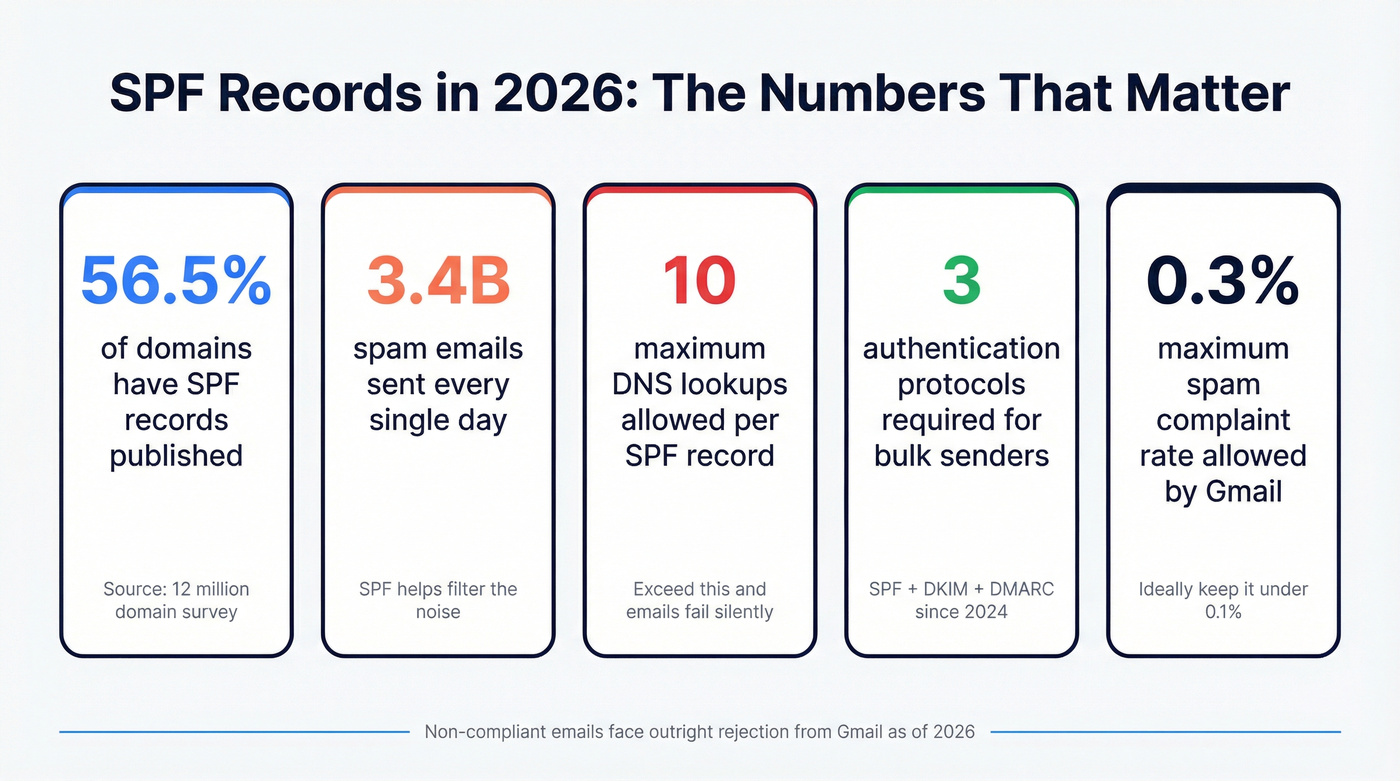
Your SPF record is probably fine. Or it's silently killing your deliverability and you don't know it. A survey of 12 million domains found that while 56.5% have SPF records published, 2.9% contain errors - that's hundreds of thousands of domains with broken authentication, sending emails into the void without a single bounce notification to explain why.
What You Need (Quick Version)
Before we go deep, here's the cheat sheet:
- Every domain that sends email needs exactly one SPF TXT record. Not two. Not zero. One.
- Start with
v=spf1 include:[your-provider] ~all- use softfail, not hardfail, until you've audited every sending service. - Stay under 10 DNS lookups or your emails fail silently. No warning. No bounce. Just... gone.
- SPF alone isn't enough. Google and Yahoo require SPF + DKIM + DMARC for bulk senders. This has been enforced since 2024, and as of 2026, non-compliant emails face outright rejection from Gmail.
- Authentication protects your domain. Data quality protects your sender reputation. You need both - a perfect authentication setup won't save you if you're blasting emails to dead addresses.
What Is an SPF Record?
SPF stands for Sender Policy Framework. It's a DNS TXT record that tells the world which servers are allowed to send email on behalf of your domain. Without it, anyone can impersonate your domain.
Think of it like a guest list at a venue. Your domain is the venue. The SPF record is the list at the door. When an email arrives at Gmail or Outlook claiming to be from yourdomain.com, the receiving server checks the guest list: "Is this sender's IP address on the list?" If yes, the email passes. If not, it gets flagged or rejected.
The technical spec behind all of this is RFC 7208, published in 2014 and still the governing standard. It replaced the older RFC 4408 and formalized everything from syntax rules to the infamous 10 DNS lookup limit. A bit of trivia that signals you know your stuff: SPF originally had its own dedicated DNS record type - Type 99 - but it was deprecated in 2014. All SPF records are now published exclusively as TXT records.
Here's the thing: SPF doesn't check the "From" address that users see in their inbox. It checks the envelope sender - the return-path address used during SMTP transmission. This distinction matters enormously, and it's the reason SPF alone can't prevent spoofing. More on that later.
Why Email Authentication Matters in 2026
3.4 billion spam emails get sent every single day. 92% of malware is delivered via email. Google's AI defenses block roughly 15 billion unwanted emails daily - and they're getting more aggressive about it, not less.

SPF isn't optional anymore. It's table stakes.
The Google/Yahoo Mandates
In February 2024, Google and Yahoo rolled out bulk sender requirements that made authentication non-negotiable:
- Bulk senders (5,000+ emails/day): Must implement SPF + DKIM + DMARC. All three. No exceptions.
- All senders: Must have at least SPF or DKIM configured.
- Non-bulk senders: Must have valid PTR records, keep spam rates below 0.3%, and follow RFC 5322 formatting.
- Spam rate: Must stay below 0.3% (ideally under 0.1%).
- One-click unsubscribe: Required for marketing emails.
As of 2026, non-compliant emails face temporary and permanent rejection from Gmail. Not spam folder. Rejection.
One detail that catches people off guard: intermediaries forwarding bulk email must now sign with ARC (Authenticated Received Chain). ARC preserves authentication results across forwarding hops. And having DMARC + SPF but without DKIM still fails Google's requirements. You need the full stack.
The trajectory is clear. By 2027, an estimated 408.2 billion emails will be sent per day. Mailbox providers will only get stricter.
How SPF Works (Under the Hood)
The SPF check happens in five steps, and it's faster than you'd think:

- Sender transmits email. Your server connects to the receiving server and says "I'm sending on behalf of yourdomain.com."
- Receiving server extracts the envelope sender. This is the MAIL FROM address (also called the return-path or 5321.MailFrom) - not the "From" header users see.
- Server queries DNS. It looks up the TXT records for the envelope sender's domain, searching for one that starts with
v=spf1. - Server checks the sending IP. It evaluates each mechanism in the record left to right, checking if the sending server's IP matches any authorized source.
- Server returns a result. Pass, Fail, SoftFail, Neutral, None, TempError, or PermError. That result feeds into DMARC's decision engine.
The critical detail most guides gloss over: SPF validates the envelope sender, not the From header. A spoofer can set the From header to ceo@yourcompany.com while using a completely different envelope sender domain. SPF won't catch that. This is exactly why DMARC exists - to bridge the gap between what SPF checks and what users actually see.

You just spent time locking down your SPF record to protect deliverability. But authentication only stops spoofing - it can't fix a list full of invalid addresses. Bad data triggers spam complaints, inflates bounce rates past that 0.3% threshold, and undoes every DNS tweak you just made. Prospeo's 5-step email verification delivers 98% accuracy so your authenticated emails actually land.
Protect your sender reputation with data as clean as your DNS records.
SPF Record Syntax Reference
This is the section you'll bookmark. Every record follows the same structure: version tag, mechanisms, qualifier. Let's break each piece down.
Mechanisms
Mechanisms are the rules that define who's authorized to send. There are eight of them:
| Mechanism | What It Does | Example | DNS Lookup? |
|---|---|---|---|
ip4 |
Matches an IPv4 address or range | ip4:203.0.113.0/24 |
No |
ip6 |
Matches an IPv6 address or range | ip6:2001:db8::/32 |
No |
a |
Matches domain's A record IPs | a or a:mail.example.com |
Yes |
mx |
Matches domain's MX record IPs | mx or mx/24 |
Yes |
include |
Pulls in another domain's SPF | include:_spf.google.com |
Yes |
exists |
Passes if A record exists | exists:%{i}.spf.example.com |
Yes |
ptr |
Reverse DNS lookup (deprecated) | ptr:example.com |
Yes |
all |
Matches everything (catch-all) | ~all or -all |
No |
Key details:
ip4without a prefix length assumes/32(single host).ip6without a prefix assumes/128.ip4,ip6, andalldon't count toward the 10-lookup limit. Everything else does.ptris deprecated per RFC 7208 SS5.5. It's expensive, unreliable, and wastes a lookup. Remove it today.- Mechanisms are evaluated left to right. If none match, the default result is Neutral.
Qualifiers
Every mechanism can be prefixed with a qualifier that determines what happens when it matches:

| Qualifier | Name | Meaning | When to Use |
|---|---|---|---|
+ |
Pass | Authorized (default) | Rarely written explicitly |
- |
Fail | Reject unauthorized | Only after thorough audit |
~ |
SoftFail | Probably unauthorized | Recommended default |
? |
Neutral | No assertion | Almost never useful |
Use ~all unless you've tested extensively with -all and confirmed every legitimate sender is covered. Hardfail sounds more secure, but it blocks legitimate emails from services you forgot to include. I've seen teams break their own transactional email for weeks because they went straight to -all without auditing.
Modifiers
Two modifiers exist, and each can appear only once per record:
redirect=- Replaces the current domain's SPF evaluation with another domain's record. Useful for organizations managing many domains from one policy. Example:v=spf1 redirect=_spf.example.com. Note:redirectcounts toward the 10-lookup limit just likeinclude.exp=- Points to a TXT record containing a custom failure message. Rarely used in practice. Example:exp=explain._spf.example.com
Annotated Examples
Simple (Google Workspace only):
v=spf1 include:_spf.google.com ~all
Authorizes Google's mail servers. Everything else gets softfailed.
Combined (Google + dedicated IP + SendGrid):
v=spf1 ip4:203.0.113.25 include:_spf.google.com include:sendgrid.net ~all
Authorizes a specific IP, Google, and SendGrid. The ip4 doesn't count toward lookups.
Parked domain (sends no email):
v=spf1 -all
Tells the world: nothing should ever send email from this domain. Use this for every domain you own that doesn't send mail.
Long record note: If your record exceeds 255 characters, your DNS provider will split it into multiple strings within a single TXT record. These are concatenated without spaces during evaluation - this is normal behavior per the RFC, not an error.
How to Create an SPF Record
Identify Your Email Senders
This is where most people skip ahead and pay for it later. Before you write a single line of DNS, audit every service that sends email from your domain:
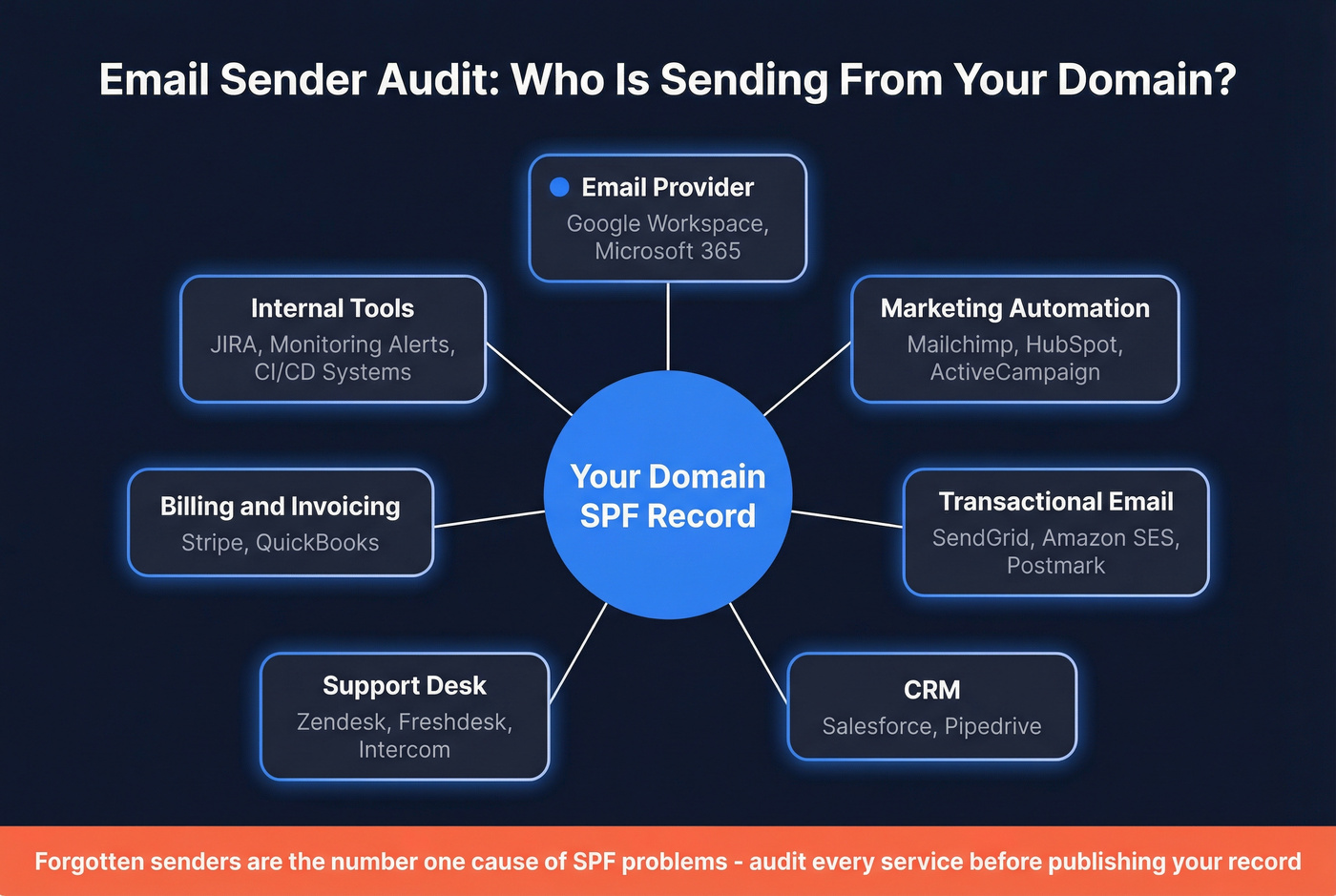
- Email provider: Google Workspace, Microsoft 365
- Marketing automation: Mailchimp, HubSpot, ActiveCampaign
- Transactional email: SendGrid, Amazon SES, Postmark
- CRM: Salesforce (sends notifications, alerts, workflow emails)
- Support desk: Zendesk, Freshdesk, Intercom
- Billing/invoicing: Stripe, QuickBooks
- Internal tools: JIRA notifications, monitoring alerts
Forgotten senders are the #1 cause of SPF problems. That billing system your finance team set up two years ago? It's sending invoices from your domain, and if it's not in your record, those invoices are failing authentication.
Build Your Record
Start with the version tag and add mechanisms one by one:
v=spf1
Add includes for each service:
v=spf1 include:_spf.google.com include:sendgrid.net
Add direct IPs if any service requires them:
v=spf1 ip4:203.0.113.25 include:_spf.google.com include:sendgrid.net
End with your qualifier:
v=spf1 ip4:203.0.113.25 include:_spf.google.com include:sendgrid.net ~all
One record. One domain. Multiple SPF records on the same domain cause a PermError - a fatal failure that breaks authentication for every email you send.
Publish the DNS TXT Record
The process is nearly identical across DNS providers:
- Log into your DNS management panel
- Navigate to DNS records (Cloudflare calls it "DNS," GoDaddy uses "Manage DNS," Namecheap uses "Advanced DNS")
- Add a new record:
- Type: TXT
- Host/Name:
@(root domain) - Value: Your SPF record string
- TTL: 1 hour (3600 seconds)
- Save
DNS propagation typically takes 1-4 hours. It can take up to 48 hours in edge cases, but in our experience most changes go live within 30 minutes on Cloudflare and similar providers.
Validate Your Record
Don't assume it's working. Verify it.
Use MxToolbox SPF Lookup or dmarcian's SPF Surveyor to check for:
- Correct syntax (no spaces in mechanisms, no typos in domains)
- Total DNS lookup count under 10
- No duplicate records on the domain
- All intended services included
SPF Records for Popular Email Services
Here's a quick reference for the services you're most likely using:
| Service | Include Statement | Est. Lookups |
|---|---|---|
| Google Workspace | include:_spf.google.com |
3-4 |
| Microsoft 365 | include:spf.protection.outlook.com |
2-3 |
| Mailchimp | include:servers.mcsv.net |
1-2 |
| Amazon SES | include:amazonses.com |
1 |
| SendGrid | include:sendgrid.net |
1-2 |
| Salesforce | include:_spf.salesforce.com |
1-2 |
| HubSpot | include:spf.hubspot.com |
1-2 |
A combined record using Google Workspace, SendGrid, and Salesforce:
v=spf1 include:_spf.google.com include:sendgrid.net include:_spf.salesforce.com ~all
That's already 5-8 lookups from three services. Add HubSpot and you're flirting with the limit.
The Mailchimp gotcha: Mailchimp uses its own domain as the return-path (envelope sender) for bounce handling. This means the receiving server checks Mailchimp's SPF record, not yours. Adding include:servers.mcsv.net to your record burns a lookup without providing any authentication benefit. Check your email headers: if the Return-Path shows a Mailchimp domain, you can safely remove that include and reclaim a lookup. The same applies to other vendors that use their own return-path domain - always verify before adding an include.
Microsoft's official recommendation: use subdomains for third-party senders. Run marketing email from marketing.yourdomain.com with its own SPF TXT record. This protects your main domain's reputation and gives each subdomain its own 10-lookup budget.
If you're using a *.onmicrosoft.com domain, Microsoft pre-configures SPF for you. Custom domains need manual setup.
The 10 DNS Lookup Limit (And How to Fix It)
This is the section that'll save you hours of debugging. The 10-lookup limit is the single most common source of SPF failures in production, and it's the one most people don't know about until it breaks.
Why the Limit Exists
RFC 7208 mandates a maximum of 10 DNS-querying mechanisms per SPF evaluation. The reason is practical: without a limit, a malicious record could trigger an unbounded chain of DNS queries, creating a denial-of-service attack against the receiving server's DNS infrastructure.
Exceeding the limit causes a PermError. That's not a soft failure - it's a fatal authentication failure. DMARC treats PermError as an SPF fail, which can quarantine or reject your email depending on your DMARC policy.
What Counts (And What Doesn't)
| Counts Toward Limit | Doesn't Count |
|---|---|
include |
ip4 |
a |
ip6 |
mx |
all |
ptr |
|
exists |
|
redirect (modifier) |
There's also the two-void-lookup rule: if two consecutive lookups return no data, that also triggers a PermError. It's a secondary DoS prevention mechanism that catches edge cases.
How Fast You Hit the Limit
Faster than you think. Here's a real example from r/sysadmin - a company's record that was actively breaking their email:
v=spf1 include:spf.protection.outlook.com include:spf.messaging.microsoft.com
include:spf.dynect.net include:servers.mcsv.net include:_spf.covisint.com
include:amazonses.com include:spf_c.oraclecloud.com include:salesforce.com
a:edge.example.com ip4:x.x.x.x mx include:spf.mandrillapp.com ~all
That's 11 includes plus a and mx mechanisms. Way over the limit. The sysadmin's mail server was rejecting emails from this company with "SPF error, too many DNS lookups." Users complained about missing emails. Nobody connected the dots for weeks.
This happens organically. Your marketing team signs up for a new email tool. They forward you the setup docs: "Add this include to your SPF record." You check your DNS and realize you already have 9 includes. Welcome to the 10-lookup limit.
And here's the kicker - some of those includes are doing nothing. Vendors that use their own domain in the return-path never trigger a lookup against your record. You're burning lookups on includes that provide zero authentication value. Before optimizing, check the Return-Path header in emails from each service. You might find two or three includes you can remove immediately.
Does the Limit Actually Get Enforced?
Yes.
This comes up constantly on r/DMARC - practitioners asking whether major providers actually enforce it or just look the other way. The limit is a MUST-level requirement in RFC 7208. Google, Microsoft, and Yahoo enforce it. Some smaller providers are lenient, but relying on that is gambling with your deliverability. One provider update, one policy change, and your emails start failing.
Treat the limit as a hard wall, not a suggestion.
How to Fix It
Here's the priority list, from easiest to most complex:
- Remove includes that do nothing. Check the Return-Path header for each sending service. If the vendor uses their own domain as the envelope sender, their include is never evaluated. Remove it and reclaim the lookup.
- Audit and remove unused includes. That email tool you trialed six months ago? Its include is still in your record, burning a lookup. Kill it.
- Replace
aandmxmechanisms with directip4/ip6addresses. IP mechanisms don't count toward the limit. If your mail server has a static IP, useip4:x.x.x.xinstead ofa. - Remove
ptrentirely. Deprecated, expensive, and wastes a lookup. No reason to keep it. - Prefer DKIM for DMARC alignment. If DKIM handles your DMARC alignment, SPF becomes less critical - reducing the pressure to cram everything into one record. (If you need a refresher on the full stack, see SPF, DKIM, and DMARC.)
- Use subdomains for third-party senders.
marketing.yourdomain.comgets its own record with its own 10-lookup budget. This is Microsoft's official recommendation and it's the cleanest long-term solution. - Consider SPF flattening. This converts
includemechanisms into direct IP addresses, eliminating nested lookups. The catch: vendor IPs change, so flattened records need regular maintenance. - Dynamic SPF tools automate flattening and keep records updated when vendors change IPs. Expect to pay $50-200/month for enterprise stacks. Worth it if you're managing 15+ sending services.
Common SPF Mistakes (And How to Avoid Them)
The Dental Office That Couldn't Send Appointment Reminders
This one's from r/DMARC and it's a perfect case study. A dental office was using GoDaddy + Kinsta + Microsoft Outlook + practice management software. After the 2024 Google/Yahoo mandates kicked in, their appointment reminders started bouncing for Gmail and Yahoo recipients.
The fix? Two characters.
Their record had three errors:
- Spaces in the include syntax:
include: edgedatacenter.cominstead ofinclude:edgedatacenter.com. That space breaks the mechanism entirely. - A typo in the domain:
include:mail.edgedatacetner.com- "datacetner" instead of "datacenter." - Blindly trusting vendor instructions. The practice management software's support team gave them incorrect setup docs.
Always validate what vendors tell you to add. Copy-paste their include statement, then verify it resolves to an actual SPF record.
The Full Mistake Checklist
- Multiple SPF records on one domain. Causes PermError. Merge everything into a single record.
- Using
+all. This authorizes the entire internet to send as you. It's the SPF equivalent of leaving your front door open with a sign that says "come in." - Spaces in mechanism syntax.
include: domain.comis notinclude:domain.com. The space breaks it. - Typos in include domains. One wrong letter and the include resolves to nothing - or worse, to someone else's domain.
- Adding includes that do nothing. Some vendors use their own domain as the return-path, meaning their include is never checked during authentication. Verify by examining the Return-Path header before adding their include.
- Forgetting a sending service. That billing system, that monitoring tool, that support desk. Audit everything.
- Leaving
ptrin place. Deprecated. Remove it. Save the lookup. - Not testing after changes. Every change should be followed by a validation check. Every single time.
- Exceeding 10 DNS lookups. The most common silent failure, and it deserves a spot on every checklist.
SPF Result Codes Explained
When a receiving server evaluates your record, it returns one of seven results. Understanding these is critical for debugging:
| Result | Meaning | Common Cause | DMARC Impact |
|---|---|---|---|
| Pass | IP is authorized | IP matches a mechanism | Passes alignment |
Fail (-all) |
IP explicitly unauthorized | Hardfail set, IP not listed | Fail |
SoftFail (~all) |
Probably unauthorized | Softfail set, IP not listed | Fail (most implementations) |
Neutral (?all) |
No assertion made | Explicit neutral qualifier | Fail (most implementations) |
| None | No SPF record found | Missing TXT record | Fail |
| TempError | Transient DNS error | DNS timeout | Deferred, retried |
| PermError | Record can't be interpreted | Multiple records, >10 lookups, bad syntax | Fail |
The most dangerous result is PermError. It's caused entirely by your configuration - not by the sending server, not by the recipient, not by network issues. It affects every email from your domain, and DMARC treats it as a hard fail.
Something most guides get wrong: SoftFail and Neutral are both treated as fail by most DMARC implementations, including OpenDMARC. Some articles suggest SoftFail is "safe" - it's not. It's safer than Hardfail during testing because some receivers are more lenient, but DMARC still counts it as a failure.
SPF Alone Isn't Enough - DKIM and DMARC
If you're not using SPF, DKIM, and DMARC together in 2026, you're not doing email authentication. You're doing email theater.
Why SPF Breaks (And DKIM Doesn't)
SPF checks the envelope sender against the sending IP. When email is forwarded - through a mailing list, an alias, or an internal relay - the IP changes but the record doesn't update. SPF fails.
DKIM works differently. It cryptographically signs the message itself. The signature travels with the email regardless of how many servers relay it. Forwarded email? DKIM still passes.
This is why experienced practitioners rely on DKIM for DMARC alignment. SPF is your first line of defense, but DKIM is the one that survives the real world.
Google and Yahoo now require forwarded emails to be signed by ARC (Authenticated Received Chain), which preserves authentication results across forwarding hops - the emerging standard for solving the forwarding problem.
Microsoft's Three SPF Limitations
Microsoft's official documentation explicitly lists three things SPF can't do:
- SPF doesn't validate the From header users see - only the envelope sender.
- SPF breaks on forwarding.
- SPF doesn't protect against message tampering.
These aren't edge cases. They're fundamental architectural limitations. DKIM and DMARC exist specifically to fill these gaps.
The Authentication Stack
Think of it as three layers:
- SPF = the guest list. Who's allowed to send?
- DKIM = the digital signature. Has the message been altered?
- DMARC = the policy enforcer. What happens when checks fail, and do the domains align?
All three are stored as DNS TXT records. The recommended implementation order:
- SPF first (you're here)
- DKIM immediately after
- DMARC with
p=none(monitoring mode) - Tighten to
p=quarantineafter reviewing reports - Eventually move to
p=reject
For a solid reference on SPF, DKIM, and DMARC best practices, URIports maintains an excellent guide.
Beyond Authentication - Protecting Your Sender Reputation
Here's my frustration with most SPF guides: they stop at DNS. They act like authentication is the whole story. It's not.
You can have perfect SPF, DKIM, and DMARC alignment and still land in spam. Authentication gets you in the door. Sender reputation determines whether you stay.
Google's bulk sender requirements include keeping spam rates below 0.3%. Bouncing off invalid email addresses inflates that rate. We've seen teams with flawless DNS records and 35-40% bounce rates wonder why their deliverability is tanking. The answer isn't another TXT record - it's cleaner data.
Your SPF record tells the world your emails are legitimate. Tools like Prospeo make sure you're sending them to real people. With 98% email accuracy powered by a 5-step verification process - including catch-all handling, spam-trap removal, and honeypot filtering - teams pairing verification with proper authentication routinely see bounce rates drop from 35-40% to under 5%. The free tier gives you 75 email verifications per month to test it. (If you're comparing options, see our rankings of email verifier websites and the full email verification workflow.)
Google rejects non-compliant senders outright in 2026. You've handled SPF, DKIM, and DMARC - now handle the other half. Bounce rates above 3% destroy domain reputation regardless of authentication. Prospeo verifies every email with catch-all handling, spam-trap removal, and honeypot filtering on a 7-day refresh cycle. Teams using Prospeo data see bounce rates under 4%.
Don't let bad data waste the authentication stack you just built.
FAQ
Can I have multiple SPF records on one domain?
No. RFC 7208 requires exactly one SPF TXT record per domain. Multiple records cause a PermError, which means authentication fails for every email you send. Combine all mechanisms into a single record - for example, v=spf1 include:_spf.google.com include:sendgrid.net ~all. Merge, don't multiply.
Should I use ~all (softfail) or -all (hardfail)?
Use ~all (softfail) unless you've thoroughly audited every service that sends email from your domain. Hardfail (-all) rejects unauthorized emails outright, which can block legitimate messages from services you forgot to include. Most practitioners stick with softfail permanently - the security gain from hardfail is minimal once DMARC is enforced at p=reject.
How do I fix the 10 DNS lookup limit?
Start by removing includes that do nothing - check the Return-Path header for each vendor, and if they use their own envelope sender domain, their include is never evaluated. Then replace a and mx mechanisms with direct ip4 addresses (which don't count toward the limit), and move third-party senders to subdomains so each gets its own 10-lookup budget.
What's the best way to verify my emails aren't bouncing after SPF setup?
After configuring your SPF record, monitor DMARC aggregate reports for authentication failures and track your bounce rate. If bounces exceed 3-4%, the issue is likely data quality, not DNS. Prospeo's email verification catches invalid addresses, spam traps, and catch-all domains before you hit send - pairing it with proper authentication is the fastest way to protect deliverability.
Does SPF protect against email spoofing on its own?
No. SPF only validates the envelope sender (return-path), not the "From" header recipients see in their inbox. An attacker can spoof the visible From address while passing SPF with a different envelope domain. You need DMARC to enforce alignment between the two, plus DKIM for cryptographic message integrity. All three protocols working together is the 2026 standard for spoofing prevention.