
Dealfront pricing (2026): what it costs, what's quote-based, and the real cost drivers
Dealfront pricing looks simple until you try to budget it.
Two things blow up the bill fast: pricing per website/domain and credits once you start revealing and exporting contacts. Add a quote-only Sales Intelligence product on top, and a "quick tool purchase" turns into a real procurement line item.
Here's the plain-English breakdown: the Leadfeeder tier ladder, how credits work, billing terms that actually matter, and a few true-cost scenarios so you can stop guessing.
Dealfront pricing at a glance (2026)
Dealfront is one brand with two very different buying motions. Treat them like separate purchases when you plan budget and ownership.

- Web Visitors Identification (Leadfeeder) is the self-serve side. You can see tiers and pricing (most visibly on annual billing).
- Sales Intelligence ([Echobot heritage](https://news.cision.com/san-francisco-oy/r/echobot-and-leadfeeder-become-dealfront - a-go-to-market-platform-to-give-companies-the-data - applic,c3746076)) is quote-based. Seats, modules, and usage caps drive the number, and the sales process looks like a classic data vendor deal.
Most "Dealfront is expensive" complaints I've seen come from mixing those two motions. Teams buy Web Visitors and expect a full prospecting database. Or they budget for Sales Intelligence and forget Web Visitors is priced per website, so multi-domain setups multiply quickly.
One more thing: review sites often show a public starting price, but those pages can lag reality. For example, G2's Dealfront pricing page shows its pricing info "last updated Oct 10, 2024." That's not useless, but it's not current enough to treat as a contract quote in 2026.
| Dealfront solution | Public starting point | What drives cost (in practice) |
|---|---|---|
| Web Visitors ID | €99/mo (region-dependent) / $99/mo (annual billing) | Identified companies/mo + number of websites + credit usage |
| Sales Intelligence | Quote-only | Seats + modules + usage caps + data regions |
What you're actually buying: Dealfront is two products
Dealfront still behaves like two products living under one roof.
Web Visitors Identification (Leadfeeder) identifies companies visiting your site, shows pages viewed, and supports alerts/workflows. It's metered by companies identified per month, which makes it forecastable once you know your traffic and ICP.
Sales Intelligence (Echobot-style) is prospecting data, decision-makers, enrichment, TAM work, and sales workflows. It's quote-based, and pricing is driven by seats, modules, and usage limits.
Here's the thing: visitor identification doesn't fail because the product is weak. It fails because nobody operationalizes the signal.
I've watched teams pay for a big tier, then check it once a week, then complain "it didn't create pipeline." Real talk: if you can't name the owner of "what we do when a target account hits the pricing page twice," you're not ready for a big plan.
Dealfront is also Europe-first, so GDPR/DPA questions show up earlier than they do with US-first vendors. That's good. It can also slow down Sales Intelligence timelines and shape contract terms (regions covered, data processing, and who signs what).
Web Visitors Identification pricing: the tier ladder
Web Visitors Identification follows the Leadfeeder ladder: you pay based on identified companies per month. This is the only part you can budget with confidence without a sales call.
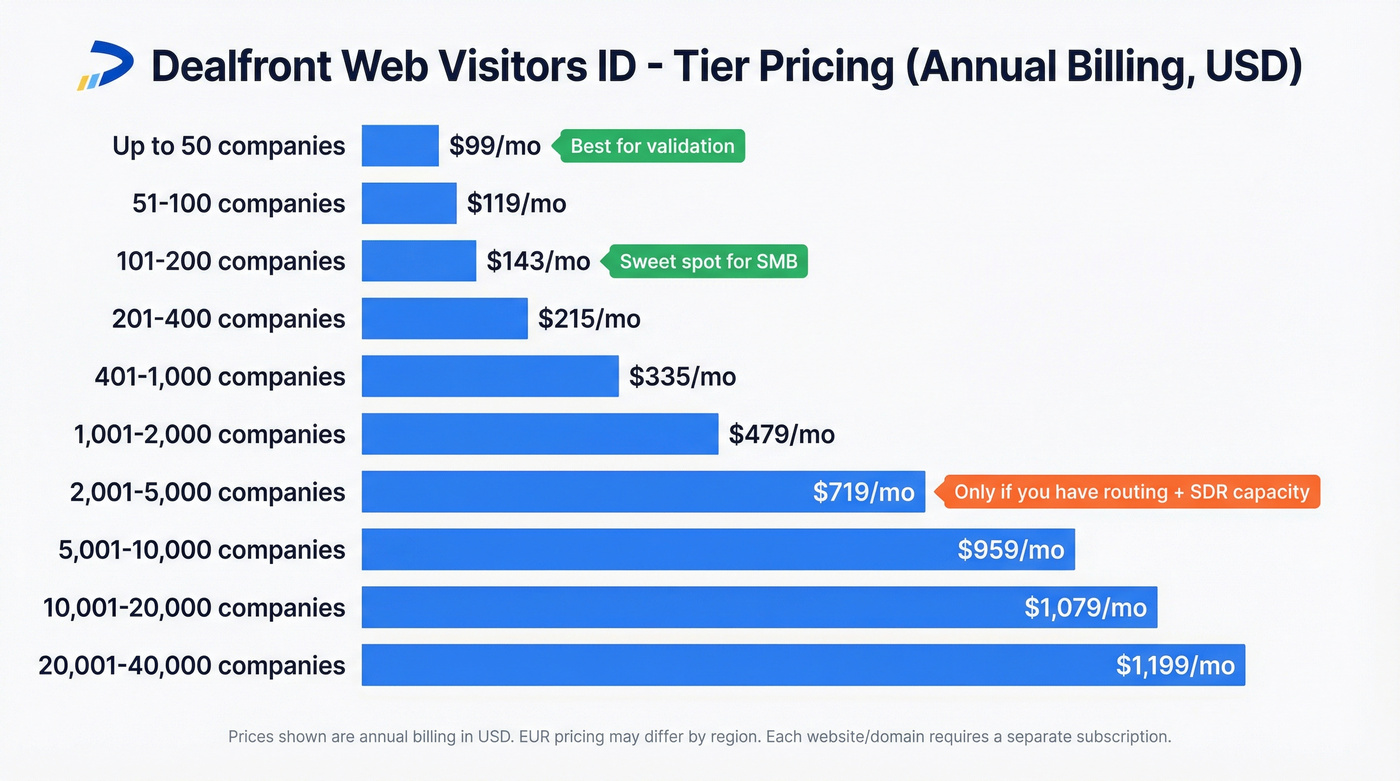
Per Leadfeeder's pricing page, annual billing starts at $99/mo and scales with identified companies.
| Identified companies / mo | Price (annual, USD) |
|---|---|
| <= 50 | $99/mo |
| 51-100 | $119/mo |
| 101-200 | $143/mo |
| 201-400 | $215/mo |
| 401-1,000 | ~$335/mo |
| 1,001-2,000 | ~$479/mo |
| 2,001-5,000 | ~$719/mo |
| 5,001-10,000 | ~$959/mo |
| 10,001-20,000 | ~$1,079/mo |
| 20,001-40,000 | $1,199/mo |
A few budgeting notes that actually matter:
- The ladder is shown in USD on Leadfeeder's site (annual-billed). Dealfront's Web Visitors Identification is also commonly listed as starting at EUR99/mo on review sites, so expect currency/region differences.
- The meter is companies identified/month (not sessions, not pageviews, not "leads created").
- If you're between tiers, start lower and enforce a workflow. Upgrading later is easy; undoing a messy process isn't.
How the meter works
Repeat visits from the same company count once in the period. That's the right model: you're paying for breadth of account visibility, not getting punished because one hot account came back all week.
Filtering matters too. Visitor-ID tools typically filter obvious noise (ISPs and low-quality traffic patterns), which keeps your identified-company count closer to real businesses and avoids the "we're paying for junk traffic" argument.
Common tier picks (what I'd actually recommend)
- 50 companies/mo ($99/mo): validate the channel and build the habit of acting on signals.
- 200 companies/mo ($143/mo): a solid starting tier for many SMB B2B sites with steady traffic.
- 1,000 companies/mo (~$335/mo): only worth it if you already have a defined follow-up motion (routing rules + SDR capacity + SLAs).
- 5,000+ companies/mo (~$719/mo and up): you're buying process maturity as much as software. If you don't have routing, scoring, and follow-up discipline, this turns into expensive noise.
Don't pick a tier based on ego.
Pick it based on last month's traffic and how many accounts your team can realistically work.
The #1 gotcha: pricing is per website
Dealfront's Web Visitors Identification subscriptions are priced per website/domain.

So if you start with company.com and later add company.co.uk and company.de, you didn't "expand coverage." You multiplied the subscription, and you multiplied the number of places your team has to monitor and respond to intent signals.
This isn't a trick; it's the model. It just hits harder for multi-region companies, multi-brand portfolios, and teams with separate product domains.
My rule: decide which domains are pipeline-critical before you buy. If nobody will follow up on traffic from a domain, don't pay to identify it.

Dealfront's per-website pricing and quote-only Sales Intelligence add up fast. Prospeo gives you 300M+ profiles, 98% email accuracy, and 125M+ verified mobiles - all self-serve at ~$0.01/email with no annual contracts.
Stop budgeting around opaque quotes. Start prospecting in minutes.
Free vs paid: limits, storage window, and what you actually get
The free tier is useful for a quick reality check ("do we even get identifiable companies?"), but it's not built for a serious workflow. The two constraints that hit first are the storage window and operational features.

Per Dealfront's Leadfeeder plan details, the free tier includes unlimited users, caps you at 100 identified companies, and stores only 7 days of data. Seven days is brutally short: if you don't check it daily (or you're out for a week), the signal disappears before you can act.
| Feature | Free | Paid (Web Visitors Identification) |
|---|---|---|
| Identified companies | 100 max | Tier-based (50 -> 40,000/mo) |
| Data storage | 7 days | Unlimited visits data storage |
| Users | Unlimited | Unlimited |
| Credits included | - | 25 credits/month included |
| Alerts & workflows | Basic/limited | Operational alerts + workflow features (plan-dependent) |
| Integrations | Limited | CRM + marketing integrations (plan-dependent) |
Two edge cases buyers miss:
- Free plan "works," but you can't build a habit. If the data expires in a week, you never get to compare before/after on campaigns, outbound sequences, or account warming.
- Paid plan value depends on ownership. If nobody owns routing ("who follows up, when, and how"), you'll pay for visibility and still feel like nothing happens.
In our experience, the cleanest evaluation is a 14-30 day test where you track one metric: qualified accounts that hit a defined intent threshold, not total identified companies. (If you need a scoring model, start with website visitor scoring and tighten it weekly.)
Credits explained (and why they change your total cost)
Your Web Visitors tier is only the baseline. The swing factor in Dealfront pricing is credits, because credits determine how many contacts you can turn into actionable records.

Dealfront documents credit behavior in its help center, including pricing plans/payment methods and how credits are spent:
- https://help.dealfront.com/en/articles/1272480-leadfeeder-pricing-plans-and-payment-methods
- https://help.dealfront.com/
The practical model:
- Identifying companies doesn't cost credits.
- In most workflows, it's 1 credit to reveal contact details and 1 credit to export/sync that contact.
- Every Leadfeeder solution includes 25 credits/month.
- Credits don't roll over.
- Reveals persist for 12 months, so you don't pay again to re-reveal the same person during that window.
One accuracy note: exact credit events depend on the action (reveal vs export) and the integration path. Don't guess. Run the workflow you'll actually use and watch what the product charges credits for.
What costs credits vs what doesn't
Doesn't cost credits
- Seeing identified companies
- Browsing company activity
- Viewing suggested contacts at a company (often name/title previews)
Usually costs credits
- Revealing contact details
- Exporting/syncing contacts into CRM or downstream tools
This is where teams get surprised: the UI makes it feel like "the contacts are right there," but operationalizing them is what consumes credits.
Burn-rate example: reveal 200 contacts + sync 200 to CRM
- Reveal 200 contacts = ~200 credits
- Sync/export 200 contacts = ~200 credits
- Total = ~400 credits
With 25 included, you're short ~375 credits.
Add-on credit pricing isn't published publicly; you buy more credits via support/CSM/AM. For planning, I've seen teams model $1-$3 per credit in this category once they're buying packs, and that gets you close enough to avoid a budget surprise.
So that ~375-credit gap is roughly:
- Low end: 375 x $1 = $375
- High end: 375 x $3 = $1,125
Strong opinion: "sync everything to CRM" is the fastest way to burn budget with nothing to show for it. If you're trying to keep your CRM clean, follow a CRM hygiene rule: only sync records that hit a threshold you trust.
A better play is to export only when an account hits a threshold you trust: pricing page visits, repeat visits in a short window, a target account list match, or a scoring rule that's been tested against meetings booked.
Annual vs monthly credit behavior (what to assume)
Assume this going in:
- Annual is cheaper per month and better for bursty campaigns (launches, events, quarterly outbound pushes).
- Monthly is right for pilots because you can stop quickly, but you'll feel the credit ceiling sooner.
If you're piloting, set a hard rule: "We only reveal/export when X happens." That one rule prevents the "we ran out of credits, so the tool's bad" spiral.
Billing, renewals, and cancellation terms (read this before you buy)
Billing mechanics are standard SaaS, but "standard" still bites teams that don't model cash flow and renewal timing.
Dealfront's Leadfeeder billing doc is here: https://help.dealfront.com/en/articles/1272480-leadfeeder-pricing-plans-and-payment-methods
What to choose (and why)
Choose annual billing when:
- you've already proven a workflow (alerts -> routing -> outreach -> meetings),
- you know which domains you're tracking,
- you've estimated monthly credit burn.
Annual is often shown as materially cheaper than monthly and billed 12 months upfront. If you're confident you'll use it, annual is usually the correct financial decision.
Choose monthly billing when:
- you're still validating match rate and internal follow-up behavior,
- you need low commitment,
- you want to avoid procurement delays.
Monthly is typically credit-card friendly and easier to start/stop.
Renewal and cancellation: the part that causes surprise spend
Model this like procurement would:
- Annual invoicing is annual-only (monthly is usually card-based).
- Annual cancellation commonly requires notice (often 30 days) before term end to avoid renewal.
- Monthly can be canceled before the next billing period.
Concrete scenario: if your annual term ends June 30, treat late May as the real decision deadline. Miss it, and you can roll into another term even if usage dropped.
Put a renewal reminder on the calendar the day you sign.
Make it 90 days before term end, and include the two numbers that matter: domains tracked and average monthly credits consumed.
Sales Intelligence cost: what to expect (quote-only) + how to get a clean quote
Sales Intelligence is quote-only, so the goal isn't to find a public price. It's to avoid getting quoted for a bundle you won't use, then spending the next 12 months trying to justify it.
The budget range to plan for in 2026
For most mid-market teams, plan for a five-figure annual minimum, with a realistic working range of $20,000-$40,000 per year depending on seats and modules.
That's consistent with how mid-market data-tool procurement usually lands once you include the modules you actually need, not just "platform access." If you want a sanity check against other vendors, compare it to typical global database pricing dynamics.
If you're expecting "a few hundred bucks a month," you're looking at the wrong product. Sales Intelligence is a contract purchase.
What moves the quote (the levers that matter)
- Seats (SDRs, AEs, RevOps, marketing users)
- Modules (prospecting, enrichment/datacare, workflows, intent-like signals)
- Usage caps (exports, enrichment runs, API calls)
- Data scope (countries/regions, industries, depth of firmographics)
- Contract terms (annual vs multi-year, renewal uplift language)
Procurement reality: if you need something live next week, buy Web Visitors. Sales Intelligence is a "this quarter" project.
Ask sales for this (copy/paste quote checklist)
Ask for a proposal that explicitly lists:
- Seat count and price per seat (and whether view-only seats exist)
- Exact modules included (named, not "platform access")
- Export limits (per user/month and org-wide)
- Enrichment limits (records/month, fields returned, and overage pricing)
- API access (included or add-on, rate limits, and overage pricing)
- Data regions covered (EU-only vs global, and any region-based pricing)
- Bundling clarity: whether Web Visitors is included, discounted, or separate
- Renewal terms: notice period + any renewal uplift cap language
If a quote doesn't separate seats, modules, and usage caps, it's not a quote. It's a blank check.
True cost model: 3 realistic scenarios
Pricing pages rarely show what you actually pay once you add domains and start exporting.
Assumptions:
- Web Visitors tier priced per website
- Credit add-ons estimated at $1-$3/credit
- Sales Intelligence (if added) estimated at $20k-$40k/year
| Scenario | Web Visitors tier | Websites | Credits | True cost signal |
|---|---|---|---|---|
| Solo site, light use | 200/mo ($143) | 1 | 25 | ~$143/mo |
| Add 2 domains | 200/mo ($143) | 3 | 25 | ~$429/mo |
| "Sync everything" | 1,000/mo (~$335) | 1 | 400 | ~$710-$1,460/mo |
Scenario 1: 1 website, you only reveal when it matters 200 companies/mo and you stay inside included credits. Clean ROI case.
Scenario 2: 1 website -> add 2 more domains Same workflow, same credit behavior. Cost still jumps ~3x because each domain is its own subscription.
Scenario 3: you export aggressively Credits dominate. The software didn't "get expensive." Your workflow did.
ROI expectations in 2026 (so you don't overpay for match rate)
Visitor identification is valuable, but it's not a mind reader. Budget based on realistic match rates, not best-case demos.
Using MarketBetter benchmarks as a reference point:
- Company-level identification often lands around 30-65% of visits.
- Person-level identification is typically 5-20% in most setups.
- Blended approaches (company ID plus contact workflows) can reach 60-80% coverage for actionability.
Remote and hybrid work is the structural headwind: more browsing happens from home networks, which means less corporate-network traffic for IP-based identification to match cleanly.
Pricing implication: don't buy the 40,000-company tier because you want a big number. Buy the tier that matches the subset of traffic your team will actually work.
When Dealfront is worth it (and when pricing friction is the deal-breaker)
Stop asking "what's the monthly price?" Ask the two questions that determine your bill:
- How many contacts will you reveal and export/sync each month?
- How many websites/domains do you need to track?
If you can answer those, Dealfront pricing becomes predictable. If you can't, start by tightening your account identification rules and tracking operational throughput (response SLAs, routing, and handoffs).
Choose Dealfront if
- You sell into Europe and want a visitor-ID workflow that supports outbound follow-up.
- Your site has enough traffic that identifying even 30-65% of companies creates real pipeline.
- You're disciplined about credits (reveal/export only when intent is real).
Skip Dealfront (or downscope) if
- You need person-level identification as the primary value driver.
- You have lots of domains and nobody wants to decide which ones are worth paying for.
- You refuse quote-based procurement for data tools.
One trust-building reality: a lot of "data quality" complaints happen when teams use visitor identification as a full prospecting database, or when credit rationing prevents consistent exporting. Align the product to the job (signal -> workflow), and the value is much easier to capture.
If what you really need is verified contact data with transparent, self-serve pricing, tools like Prospeo are a cleaner fit. Prospeo is "The B2B data platform built for accuracy" with 300M+ professional profiles, 143M+ verified emails, 125M+ verified mobile numbers, 98% email accuracy, and a 7-day refresh cycle. (If you're comparing data vendors, start with this B2B data providers breakdown.)
Final recommendation
Buy this like a RevOps person, not like someone browsing a pricing page.
I've seen one simple setup work over and over: route only target accounts, set a tight reveal/export rule, and review outcomes weekly for a month. Do that, and you'll know exactly which tier you should be on and whether credits are a rounding error or your main cost.
Use this checklist before you commit:
- Pick your Web Visitors tier based on companies identified/month (use last month's traffic as baseline).
- Count websites/domains you'll track. Each one multiplies subscription cost.
- Model credits from your workflow: how many contacts you'll reveal + export/sync each month.
- Choose billing: monthly for pilots, annual only after the workflow's proven.
- Put a renewal reminder 90 days before term end and confirm notice requirements.
Net: Dealfront pricing is predictable once you model domains + credits. If you don't, it won't be.
If you're evaluating Dealfront for visitor ID plus prospecting data, you're buying two products. Prospeo combines a 300M+ leads database, intent data across 15,000 topics, and CRM enrichment - refreshed every 7 days, not 6 weeks.
Get enterprise-grade B2B data without the enterprise procurement process.