Website Visitor Scoring: The Complete Blueprint (2026)
Website visitor scoring is how you stop wasting follow-up on "top leads" who read one blog post and bounced, while the real buyer hits pricing twice, checks security, and disappears.
Here's the take most teams need to hear: if your average deal's small and your sales cycle's mostly self-serve, you don't need a fancy predictive model yet. You need a ruthless, explainable rules-based score with decay and a tight routing SLA. That alone fixes most "we have traffic but no pipeline" problems.
Look, scoring isn't a dashboard. It's a decision.
What website visitor scoring is (and isn't)
Website visitor scoring assigns points to on-site activity (and sometimes account attributes) so you can prioritize follow-up. It's not "analytics," and it's not "a dashboard." It's a decisioning layer: who gets routed to sales, who goes to nurture, and who gets ignored.
The SERP's messy because a lot of pages that look relevant are actually about traffic estimation or site grading. Tools like SE Ranking's Website Traffic Checker are useful for competitive research, but they aren't visitor scoring: they estimate volume and sources. They don't tell you which specific visits (or accounts) deserve action.
One more confusion to kill: traffic trend overlays (classic search vs AI-powered search / AI Mode, algorithm update markers, etc.) are acquisition analytics, not prioritization. They help you understand why traffic moved. Website visitor scoring helps you decide what to do with the people who showed up.
The core reality is that most visitors don't fill out a form. A commonly cited ballpark is around 96% of visitors leaving without sharing contact info. If your scoring model only starts after a form fill, you're scoring the smallest, noisiest slice of demand.
Website visitor scoring isn't a magic identity graph, either. Identification is a separate layer (company-level or person-level). Scoring works on anonymous sessions; identification determines whether you can route it to a rep.
Myths vs reality:
Myth: "More pageviews = hotter." Reality: 12 low-intent blog clicks can be colder than one pricing + integrations visit.
Myth: "Scoring is a one-time setup." Reality: good scoring's always-on. Your site changes, campaigns change, bot patterns change.
Myth: "Predictive is always better than rules." Reality: rules win early because they're explainable. Predictive wins later, after you've got clean outcomes data.
Myth: "Visitor scoring is just lead scoring." Reality: visitor scoring starts before you know who the person is. Lead scoring starts after you've got a record.
Practitioner reality check (the stuff people complain about in RevOps Slack channels):
- Sales stops trusting scoring the moment they see one "hot lead" that's clearly a student, job seeker, or competitor.
- Marketing over-scores content because it's easy to track, then wonders why "engaged" doesn't turn into meetings.
- Everyone forgets decay, and three months later the queue's full of ghosts.
What you need (quick version)
Minimum checklist (don't overbuild it)
- A tracking source (GA4 events are enough to start)
- 5-7 signals you actually trust
- A simple points rubric (1-10 per action)
- A decay rule so old activity stops looking "hot"
- A destination for activation (HubSpot/Salesforce + your sequencer)
4-step quick-start that works in the real world
- Start rule-based. Pick 5-7 signals and assign points. Don't touch ML yet.
- Add identification + CRM sync. Company-level's fine at first; person-level's a bonus.
- Add enrichment + verification after a "hot" threshold. Once a visitor/account crosses your hot line, enrich and verify so reps don't waste sequences on bounces.
- Go predictive after 60-90 days. Only after you've collected enough outcomes (meetings, opps, closed-won) to train and validate.
Opinion: the fastest way to kill scoring is to start with 40 signals and a "data science project." Start small, ship, and iterate weekly.
Website visitor scoring model: the 4 pillars (Fit, Behavior, Intent, Interaction)
A clean model keeps you honest. The version that works across most B2B stacks is four pillars:

| Pillar | What it measures | Examples of signals | Common mistake |
|---|---|---|---|
| Fit | ICP match | industry, size, tech | over-weighting fit |
| Behavior | On-site actions | pages, events, depth | counting noise clicks |
| Intent | Research intensity | pricing, comparisons | no recency/decay |
| Interaction | Touches w/ you | email replies, calls | mixing outcomes in |
Two definitions that end internal arguing:
- Lead score = intent (numeric). "How likely are they to buy soon?"
- Lead grade = fit (A-F). "How well do they match our ICP?"
So you can label someone A95 (perfect fit, high intent) versus C25 (meh fit, low intent). That's operationally useful because it tells sales what to do: A95 gets routed now, C25 gets nurtured or excluded.
Strong recommendation: separate fit and intent instead of jamming everything into one number. Fit's relatively stable. Intent's volatile. Mixing them creates dumb outcomes like "big company read one blog post" outranking "perfect buyer binge-read pricing + security."

Your scoring rubric means nothing if you can't identify and reach high-intent visitors. Prospeo identifies companies hitting your site, enriches them with 50+ data points, and returns 98% accurate emails - so reps act on scores, not stale CRM records.
Turn your hottest visitor scores into booked meetings today.
Build your first scoring rubric (copy/paste template)
You want a rubric you can explain to a rep in 30 seconds. A solid baseline is the "trigger + points" approach: define triggers (page view / event / outbound / feedback), score each 1-10, and allow additive stacking.

Step 1: Define your triggers (keep it boring)
Trigger types you'll use:
- Page view triggers (URL contains
/pricing,/security,/case-studies) - Event triggers (
video_play,calculator_submit,chat_open) - Outbound link triggers (docs download, integration partner click)
- Feedback triggers (NPS/ratings, if you've got them)
Scoring scale: 1-10 points per trigger. Stacking rule: additive. If a page matches two rules, points add.
Step 2: Use this starter rubric (B2B SaaS example)
Low-intent / navigation (1-2 points)
- Any page load: +1
- Careers page: +0 (or -2 if you get lots of job seekers)
- Blog post: +1
- About page: +1
Mid-intent / evaluation (3-6 points)
- Case study page: +4
- Integrations page: +5
- Documentation page: +5
- Webinar signup: +6
- Pricing FAQ: +6
High-intent / buying motion (7-10 points)
- Pricing page: +8
- Security / compliance page: +8
- "Compare" page: +9
- ROI calculator submit: +10
- "Request demo" page view: +10 (page view only, not the submit)
Negative scoring (yes, you need it)
- Personal email domain captured: -10
- Competitor company domain: -50
- ISP / carrier org identified (noise): -15
- Session duration < 10 seconds: -5
Step 3: Per-visit vs rolling score (pick one now)
For analytics, scoring each visit is useful ("which channels drive high-engagement visits?").
For RevOps activation, you also want a rolling 30-day score at the person/account level:
- Rolling score = sum of (visit_score × recency_weight) over the last N days
Step 4: Don't sabotage yourself
- Do: score behaviors that predict conversions (pricing, security, integrations, return visits).
- Don't: score the conversion itself as "engagement."
If you give "form submit" +50 points, you're not measuring intent. You're duplicating conversion reporting. Scoring should predict conversions, not re-label them.
Worked example: one journey -> points -> decay -> routing outcome
This is the part most guides skip. Let's make it concrete.
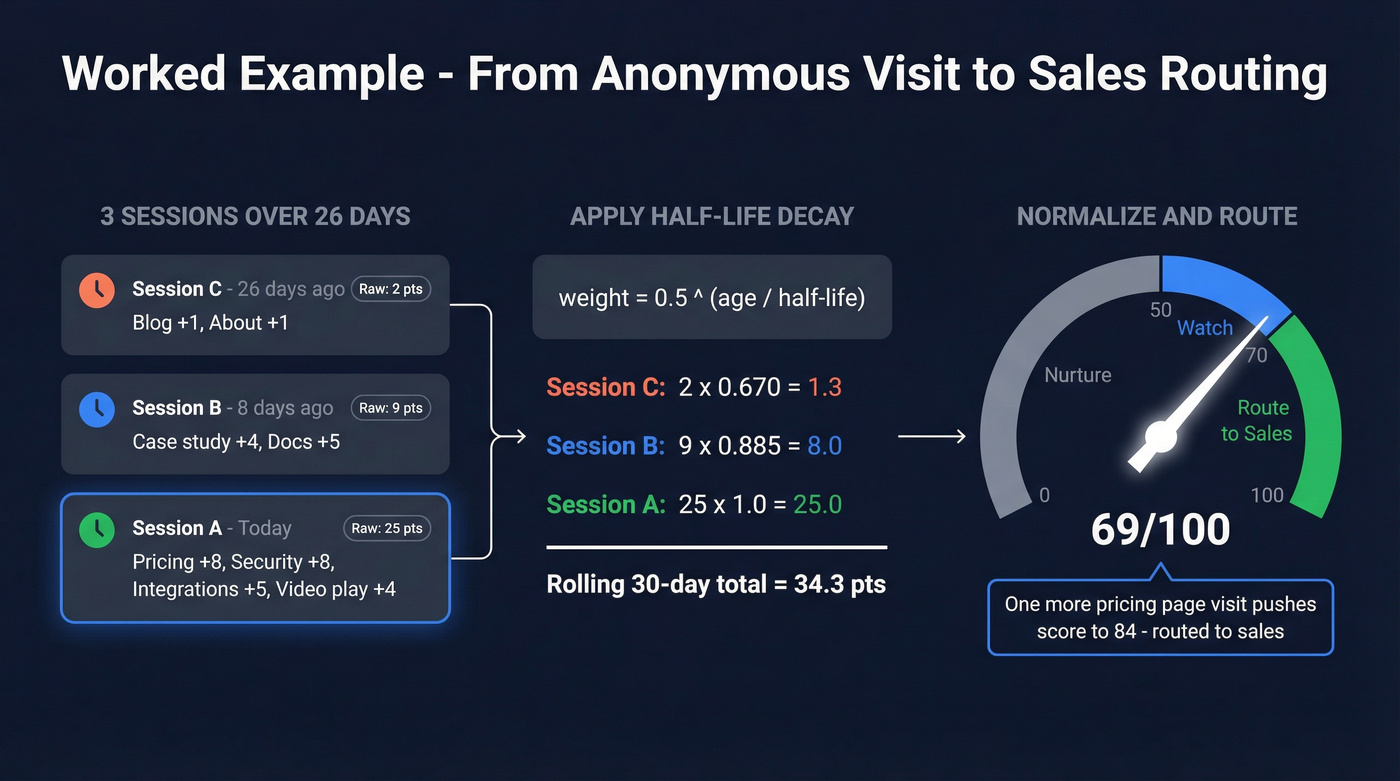
Visitor journey (anonymous -> identified later)
Assume a single visitor (or account) has these sessions:
Session A (today)
/pricingpage view: +8/securitypage view: +8/integrations/slackpage view: +5video_playon product page: +4 Raw session score (A): 25
Session B (8 days ago)
/case-studiespage view: +4/docspage view: +5 Raw session score (B): 9
Session C (26 days ago)
- Blog post: +1
- About page: +1 Raw session score (C): 2
Apply decay (half-life defaults)
Use half-life decay so recency matters:
- High-intent half-life: 10 days (pricing/security/integrations)
- Early-stage half-life: 45 days (blog/about/case studies)
Half-life formula:
recency_weight = 0.5^(age_in_days / half_life_days)
Now compute weighted points (simplified by applying one half-life per session based on dominant intent):
- Session A age = 0 days -> weight = 1.0 -> 25 × 1.0 = 25.0
- Session B age = 8 days -> weight = 0.5^(8/45)= ~0.885 -> 9 × 0.885 = 8.0
- Session C age = 26 days -> weight = 0.5^(26/45)= ~0.670 -> 2 × 0.670 = 1.3
Rolling 30-day score ~= 25.0 + 8.0 + 1.3 = 34.3
Normalize to a 0-100 score (so humans can use it)
Raw scores grow differently by business. Normalize so routing thresholds stay stable.
A simple starting normalization:
- Pick a cap that represents "very hot" behavior in 30 days (say 50 raw points)
- Normalized score =
MIN(100, ROUND(raw_score / 50 * 100))
So:
- Normalized score = 34.3/50*100 ~= 69/100
Routing outcome
If your starting threshold's 70/100, this visitor's one meaningful action away from routing. If they return tomorrow and hit /pricing again (+8 raw, weight ~1.0), their raw score becomes ~42 -> normalized 84/100 -> routed.
That's the entire point: website visitor scoring should predict near-term action, not reward ancient curiosity.
Recency/decay is non-negotiable (with a half-life formula)
Without decay, scoring turns into a junk drawer. Someone who visited pricing once 90 days ago stays "hot" forever. That's how reps waste cycles and stop trusting the system.

Half-life decay's the cleanest approach: simple, explainable, easy to implement in SQL.
The formula (copy/paste)
recency_weight = 0.5^(age_in_days / half_life_days)
Then:
- weighted_points = raw_points × recency_weight
- total_score = SUM(weighted_points)
Starting defaults that work
- High-intent signals: half-life 7-14 days (pricing, security, compare, demo page)
- Early-stage signals: half-life 30-60 days (blog, webinars, case studies)
Non-technical shortcut: -25% monthly without activity. It's not as elegant, but it prevents "forever hot" leads.
Decay isn't optional. It's the difference between "a model" and "a backlog of old clicks."
Thresholds, routing, and governance (make it operational)
A score that doesn't route is just a number.

Practical threshold defaults (start here)
Two ways to set an initial threshold without overthinking it:
- Percentile method (best starting point): set MQL = top ~20% by score, then tune.
- Normalized method (if you use 0-100): a common starting threshold lands around 70/100 for "route to sales," with a "watch" band around 50-69.
These are starting defaults, not universal laws. The right threshold's the one that creates a manageable queue and produces meetings.
Routing workflow (simple, effective)
- Score updates on a schedule (hourly/daily's enough for most teams).
- If score crosses threshold, create/flag in CRM:
- If known contact: assign owner + task
- If only company known: route to account owner or SDR pod
- SLA clock starts (speed matters more than people admit):
- Hot: same day
- Warm: 48 hours
- Cool: nurture only
SLA + governance checklist
- One owner for the model (RevOps, not "everyone")
- One owner for routing rules (Sales Ops or RevOps)
- Weekly review: top scored -> meetings created -> opps created
- Monthly calibration: adjust weights, add negative scoring, prune dead signals
- Change log: every scoring change gets a date + reason
Benchmarks (use as a sanity check, not a scoreboard): many B2B teams see ~25-35% MQL->SQL when definitions are tight. ~40-50% happens when routing, ICP, and follow-up discipline are genuinely aligned.
Measurement: does your scoring predict pipeline (or just activity)?
Most scoring programs fail because they measure the wrong thing. They celebrate "more MQLs" while pipeline quality quietly drops.
Two identification rates you need (or you'll fool yourself)
- Raw identification rate: identified visits / total visits
- Clean identification rate: identified visits from real companies / total visits (excluding ISPs/carriers and obvious junk)
Clean identification rate's the one that matters because it reflects usable signal, not just matches.
Segment clean identification by:
- ICP vs non-ICP industries
- employee bands
- geo
- paid vs organic
Engagement tiers (quick sanity check)
Use tiers to spot broken scoring distributions:
- Hot: 3+ pageviews/visit and at least one high-intent page
- Warm: 2-3 pageviews/visit
- Cool: 1-2 pageviews/visit
- Ice: bounce / single touch
This is a starting heuristic, not physics. If your "hot" bucket's full of one-page sessions, your model's lying to you.
The evaluation pattern that actually matters
Your scoring should concentrate future outcomes.
Method:
- Take accounts/visitors that aren't already opportunities
- Bucket them by score decile (top 10%, next 10%, etc.)
- Track over the next 30-90 days: meetings, opps created, pipeline $
If the model works, the top decile captures a disproportionate share of future opportunities. Concentration's the whole point.
Do this / Don't do this
- Do: evaluate on future meetings/opps created after the score timestamp.
- Don't: "validate" scoring by showing that high scores correlate with form fills that happened in the same session. That's circular.
Website visitor scoring in GA4 + BigQuery (DIY foundation)
GA4's UI is fine for marketing reporting. For website visitor scoring, BigQuery's where you sessionize, weight events, apply decay, and join to CRM outcomes.
Minimum viable GA4 event taxonomy (so scoring isn't guesswork)
If you only do one thing this week, do this: standardize event names and parameters so your scoring rules don't become a brittle mess of URL edge cases.
Recommended events (keep names consistent):
page_view(default)view_pricing(fire when URL matches/pricing)view_security(URL matches/security,/trust,/compliance)view_integrations(URL matches/integrations)view_compare(URL matches/compare,/vs)view_case_study(URL matches/case-studies,/customers)view_docs(URL matches/docs,/documentation)start_demo(demo request page view)submit_demo(form submit) - track it, don't score itcalculator_submitchat_openvideo_play
Parameters to include where possible:
content_group(e.g.,pricing,security,docs,blog)product_area(optional, if you've got multiple products)asset_name(for calculators, webinars, downloads)
If you can't reliably fire 8-12 events like the above, stop debating scoring weights and fix instrumentation first.
Step-by-step foundation
- Enable GA4 -> BigQuery export (daily's enough for most teams).
- Create a session key you can trust:
CONCAT(user_pseudo_id, ga_session_id)
- Build a session table (one row per session) with:
- session_start timestamp
- pageviews
- key events (
view_pricing,view_security,calculator_submit, etc.) - traffic source (see caveat below)
- Apply scoring + decay at session level, then roll up to:
- visitor (
user_pseudo_id) - company/account (if you've got identification)
- visitor (
- Write back to your activation system (HubSpot/Salesforce) as properties/fields.
Why GA4 UI and BigQuery won't match (don't panic)
Discrepancies come from UTC timestamps, processing delays, UI modeling/thresholding, and cross-day sessions. If you're trying to reconcile to the last decimal point, you're going to have a bad week.
Attribution caveat (this trips everyone)
traffic_sourcein BigQuery is first-user acquisition (user-level). It doesn't change per session.collected_traffic_sourceis event-level and is the better choice for session attribution; it's consistently available in newer GA4 exports, and older partitions often have gaps.
SQL snippet #1: count sessions with a composite key
-- GA4 BigQuery: session counting pattern
WITH events AS (
  SELECT
    user_pseudo_id,
    (SELECT value.int_value FROM UNNEST(event_params)
      WHERE key = 'ga_session_id') AS ga_session_id,
    event_timestamp
  FROM `your_project.your_dataset.events_*`
)
SELECT
  COUNT(DISTINCT CONCAT(user_pseudo_id, CAST(ga_session_id AS STRING))) AS sessions
FROM events
WHERE ga_session_id IS NOT NULL;
SQL snippet #2: scoring + decay pattern (URL + event mapping -> rollup)
This is a simplified reference pattern you can adapt. It maps URLs and events to points, computes a session score, applies half-life decay, then rolls up to a rolling 30-day visitor score.
DECLARE half_life_days INT64 DEFAULT 10; - high-intent default

WITH base AS (
  SELECT
    user_pseudo_id,
    (SELECT value.int_value FROM UNNEST(event_params) WHERE key = 'ga_session_id') AS ga_session_id,
    TIMESTAMP_MICROS(event_timestamp) AS event_ts,
    event_name,
    (SELECT value.string_value FROM UNNEST(event_params) WHERE key = 'page_location') AS page_location
  FROM `your_project.your_dataset.events_*`
  WHERE _TABLE_SUFFIX BETWEEN FORMAT_DATE('%Y%m%d', DATE_SUB(CURRENT_DATE(), INTERVAL 30 DAY))
                          AND FORMAT_DATE('%Y%m%d', CURRENT_DATE())
),
scored_events AS (
  SELECT
    user_pseudo_id,
    ga_session_id,
    event_ts,
    CASE
      WHEN event_name = 'view_pricing' THEN 8
      WHEN event_name = 'view_security' THEN 8
      WHEN event_name = 'view_integrations' THEN 5
      WHEN event_name = 'view_compare' THEN 9
      WHEN event_name = 'calculator_submit' THEN 10
      WHEN event_name = 'video_play' THEN 4
      WHEN event_name = 'page_view' AND REGEXP_CONTAINS(page_location, r'/case-studies|/customers') THEN 4
      WHEN event_name = 'page_view' AND REGEXP_CONTAINS(page_location, r'/docs|/documentation') THEN 5
      WHEN event_name = 'page_view' AND REGEXP_CONTAINS(page_location, r'/blog/') THEN 1
      WHEN event_name = 'page_view' THEN 1
      ELSE 0
    END AS points
  FROM base
  WHERE ga_session_id IS NOT NULL
),
session_scores AS (
  SELECT
    user_pseudo_id,
    ga_session_id,
    MIN(event_ts) AS session_start_ts,
    SUM(points) AS raw_session_score
  FROM scored_events
  GROUP BY 1,2
),
decayed AS (
  SELECT
    user_pseudo_id,
    ga_session_id,
    session_start_ts,
    raw_session_score,
    DATE_DIFF(CURRENT_DATE(), DATE(session_start_ts), DAY) AS age_in_days,
    POW(0.5, DATE_DIFF(CURRENT_DATE(), DATE(session_start_ts), DAY) / half_life_days) AS recency_weight,
    raw_session_score * POW(0.5, DATE_DIFF(CURRENT_DATE(), DATE(session_start_ts), DAY) / half_life_days) AS weighted_session_score
  FROM session_scores
)
SELECT
  user_pseudo_id,
  SUM(weighted_session_score) AS rolling_30d_score_raw
FROM decayed
GROUP BY 1;
Do this / Don't do this
- Do: keep scoring logic in one SQL view/table with a change log.
- Don't: scatter scoring rules across GTM, a CDP, and your CRM. You'll never know which number's "real."
In practice, website visitor scoring becomes your prioritization input for outbound, too. It's the bridge between anonymous intent and classic lead scoring once a visitor becomes a known contact in your CRM, and it's one of the few systems that forces marketing and sales to agree on what "high intent" actually looks like.
Failure modes (why visitor scoring breaks in the real world)
Visitor scoring fails in predictable ways. Here are the ones that matter, with fixes you can implement this week.
Symptom: MQL volume spikes, SQL rate drops. Cause: bot-driven submissions and junk traffic polluted your "conversion" events. Teams see sudden swings in the tens of percent during bot waves; 40-50% jumps happen in ugly periods. Fix: bot filtering, stronger CAPTCHA, server-side validation, and negative scoring for suspicious patterns (0s session duration, weird geos, disposable domains).
Symptom: Paid campaigns look "high intent," but pipeline doesn't move. Cause: performance campaigns optimize toward easy conversions and create signal noise. Fix: separate scoring by channel, down-weight low-quality sources, and require a second high-intent action (pricing + return visit) before routing.
Symptom: Sales says "these are junk" even when scores are high. Cause: you scored content consumption like buying intent (blog binge != evaluation). Fix: cap low-intent points per session, and shift weight to pricing/security/integrations/comparison behaviors.
Symptom: Identification rate looks great, but reps chase Comcast and Verizon. Cause: you tracked raw identification rate, not clean identification rate. Fix: ISP filtering + negative scoring + "company confidence" thresholds before routing.
Symptom: Everyone's hot all the time. Cause: no decay, or decay half-life's too long for high-intent signals. Fix: implement half-life decay; start with 7-14 days for pricing/security.
Compliance-by-design checklist (GDPR/CCPA/CPRA)
Keep it operational and boring (that's a compliment):
- Define purpose. "Prioritize outreach and improve customer experience."
- Choose a lawful basis and document it. If you rely on legitimate interests, run the ICO-style three-part test (purpose, necessity, balancing) and document it: https://ico.org.uk/for-organisations/uk-gdpr-guidance-and-resources/lawful-basis/legitimate-interests/
- Minimize data. Score behaviors; avoid sensitive attributes.
- Honor opt-outs everywhere. One broken opt-out flow can become a six-figure order; regulators have issued a nearly $350,000 penalty tied to tracking/opt-out failures in a published enforcement narrative.
- Vendor controls. DPAs, subprocessors list, retention settings, deletion workflows.
- Document scoring logic in plain language. If a customer asks, you should be able to explain what you track and what it changes.
Tooling stack options (lightweight vs RevOps-grade)
You don't need a monster stack. You need: (1) measurement, (2) identification (optional at first), (3) scoring logic, (4) activation into HubSpot/Salesforce.
Here's a practical menu with pricing signals.
Quick stack comparison (what each tool is "for")
| Tool | Best for | Pricing (starting) | Notes |
|---|---|---|---|
| GA4 | Tracking/events | $0 | Foundation |
| Prospeo | Enrichment + verification for hot accounts | Free tier available | Use after threshold so reps work clean data |
| Salespanel | B2B attribution + scoring | ~$99/mo | Pipeline tie-in |
| Factors.ai | Identification + scoring | Free tier available | Paid for scale |
| Leadfeeder | Company identification | ~EUR99/mo | Simple sales handoff |
| Snitcher | Company ID (SMB) | ~EUR49/mo | Fast validation |
| Leadinfo | Company ID (EU-heavy) | ~EUR69/mo | EU depth |
| Matomo | Privacy-first analytics | ~$29/mo | First-party control |
| Fathom | Lightweight analytics | ~$15/mo | Not a scoring engine |
| SimilarWeb | Market/traffic intel | ~$199/mo | Not visitor scoring |
Pricing shown is a starting signal; currencies vary by vendor and most tools scale by traffic, seats, or features.
Tier 1 (the ones we'd actually start with)
Prospeo (enrich + verify after the score crosses your "hot" line)
Visitor scoring tells you who to act on. The part that breaks in real life is what happens next: reps get a "hot" account, grab the first email they can find, bounce a bunch of messages, and then everyone decides scoring "doesn't work."
Prospeo is the piece you add right at the handoff. It's "The B2B data platform built for accuracy", and it's built for the exact moment your model says "go now": enrich the account/contact, verify emails and mobiles in real time, then push clean records into HubSpot/Salesforce and your sequencer so the first touch doesn't torch deliverability.
We've run this workflow with teams that had a scoring model they liked but a follow-up motion they hated, and the difference wasn't the rubric. It was the data hygiene at the moment of activation, plus a simple rule: no enrichment until the score's hot (otherwise you burn credits and clutter your CRM).
Prospeo facts you can plan around: 300M+ professional profiles, 143M+ verified emails, 125M+ verified mobile numbers, 98% email accuracy, and a 7-day refresh cycle. Enrichment returns 50+ data points per contact, with an 83% enrichment match rate and 92% API match rate. You also get 15,000 intent topics powered by Bombora, which pairs nicely with visitor scoring when you want messaging that matches what the account's researching, not just what page they hit.

Salespanel (choose it when you want revenue attribution + scoring without a warehouse)
Salespanel's the practical choice when you want web behavior tied to pipeline and revenue reporting without building a full BigQuery model on day one.
Choose Salespanel if:
- you need "what did this account do?" + "did it turn into pipeline?" in one place
- you want scoring that sales can understand without a black-box debate
- you don't have RevOps bandwidth to maintain SQL models yet
What to measure in week 1 (or you'll drift):
- top 20% scored accounts -> meetings created within 14 days
- SLA compliance (same-day follow-up on hot)
- channel split: paid vs organic score distribution
Pricing starts around $99/mo, which is a bargain if it replaces spreadsheet glue and stops reps from working the wrong accounts.
Factors.ai (scoring philosophy + the pitfalls it prevents)
Factors.ai is opinionated in the right way: start rules-based, add decay, then layer predictive once you've got outcomes. That order prevents the most common failure mode: "we built a model nobody trusts."
What it prevents:
- Over-scoring content because it's easy to track
- No-decay models that keep accounts hot forever
- Dirty identification where ISP traffic inflates "intent"
Pricing starts around $0/mo and scales up as you add features and usage.
Tier 2 (good, but narrower)
Leadfeeder (company identification + sales handoff)
Leadfeeder's the classic "who's visiting" list that sales teams understand quickly. Use it when you want lightweight company identification feeding HubSpot/Salesforce and you aren't trying to build sophisticated scoring yet.
Pricing starts around EUR99/mo.
Snitcher (company ID for SMBs)
Snitcher's a solid SMB option for validating whether the right companies are showing up on your site before you invest in heavier scoring and routing.
Pricing starts around EUR49/mo.
Matomo (privacy-forward analytics alternative)
Matomo's useful when you need first-party analytics controls and tighter privacy posture. It's not a scoring engine by itself, but it can be your measurement backbone.
Plans start around $29/mo.
Tier 3 (useful add-ons, not scoring engines)
Leadinfo
Leadinfo's an EU-leaning visitor identification option with pricing from ~EUR69/mo.
Fathom Analytics
Fathom's clean, lightweight analytics from ~$15/mo. Great for measurement hygiene, but it won't give you operational scoring without additional tooling.
SimilarWeb
SimilarWeb starts around ~$199/mo and is market/traffic intelligence, not visitor scoring.
Hotjar / Smartlook / Crazy Egg (group mention)
These are qualitative UX tools (heatmaps, recordings) that help you diagnose why certain pages correlate with "hot" behavior. Typical pricing ranges ~$30-$200+/mo depending on traffic and features.
Skip these if you don't have someone who'll actually watch recordings and turn findings into page changes. Otherwise it's just another tab nobody opens.
FAQ
What's the difference between website visitor scoring and lead scoring?
Website visitor scoring assigns points to anonymous or identified website behavior to prioritize follow-up, while lead scoring typically starts after you've got a known contact record. Visitor scoring is pre-form-fill prioritization; lead scoring is post-capture qualification and routing.
How many signals should a visitor scoring model include?
Start with 5-7 signals you trust and can explain to sales, then expand only after you've validated that the top-scored bucket predicts meetings and pipeline. More signals adds noise faster than it adds accuracy.
What's a good website visitor identification rate in 2026?
A practical expectation is 20-40% typical identification for many setups, 40-60% with stronger tooling/data, and up to ~80% in favorable US-heavy conditions. Track clean identification rate too, or ISP/carrier noise will inflate the number.
How do you add score decay without rebuilding your whole model?
Add a recency multiplier to your existing points instead of changing the rubric: recency_weight = 0.5^(age_in_days / half_life_days). Start with 7-14 days half-life for high-intent signals and 30-60 days for early-stage engagement.
What's a good free tool to enrich and verify hot visitors before outreach?
Prospeo's free tier includes 75 email credits plus 100 Chrome extension credits per month, and it verifies in real time with 98% email accuracy and a 7-day refresh cycle. Use it after a score threshold so reps only sequence clean, enrichment-backed contacts.
Sources
- Visitor identification reality-check and the "~96% don't convert" stat: https://www.data-mania.com/blog/website-visitor-identification-2026-what-works-hype-best-tools/
- MQL->SQL benchmark ranges and definitions: https://www.revblack.com/guides/revops-lead-scoring-playbook
- Practitioner notes on bot-driven form spikes: https://www.reddit.com/r/advertising/comments/1pz0e8p/dealing_with_the_2026_spike_in_botdriven_form/
- ICO guidance on legitimate interests: https://ico.org.uk/for-organisations/uk-gdpr-guidance-and-resources/lawful-basis/legitimate-interests/
- CPPA enforcement actions and orders: https://cppa.ca.gov/enforcement/
Step 3 of your scoring stack is enrichment and verification after the "hot" threshold. Prospeo handles both - 92% match rate on enrichment, 7-day data refresh, and verified mobiles with a 30% pickup rate. No stale data inflating ghost scores.
Stop routing high-scoring visitors to bounced emails.