

How to Automatically Create Salesforce Leads from Email (2026)
You tried Make.com, and it didn't work with Outlook. You Googled it and landed on a StackExchange thread from 2012 and a Salesforce help page that literally didn't load. Meanwhile, your AEs are still manually copying referral emails into lead records like it's 2014.
Here's the math that should make your VP of Sales uncomfortable: 30 referral emails a week times 5 minutes each equals 2.5 hours of selling time burned on data entry. Every single week. That's over 125 hours a year per rep - gone.
Published setup guides routinely conflate Email-to-Case with Email-to-Lead, which tells you how widespread this confusion is. We've watched teams waste entire sprints chasing the wrong feature. So let's fix it - here's every way to automatically create Salesforce leads from email, from 15-minute no-code setups to custom Apex.
What You Need to Turn Inbound Emails into Salesforce Leads (Quick Version)
| Scenario | Method | Cost | Setup Time |
|---|---|---|---|
| Live today, no dev | Zapier | ~$30/mo | 15 min |
| Long-term, no dev | Email-to-Flow | Free | 2-4 hrs |
| Dev available, complex parsing | Apex Email Service | Free | 4-8 hrs |
| High volume, varied formats | Mailparser | $30-$300/mo | 1 hr |
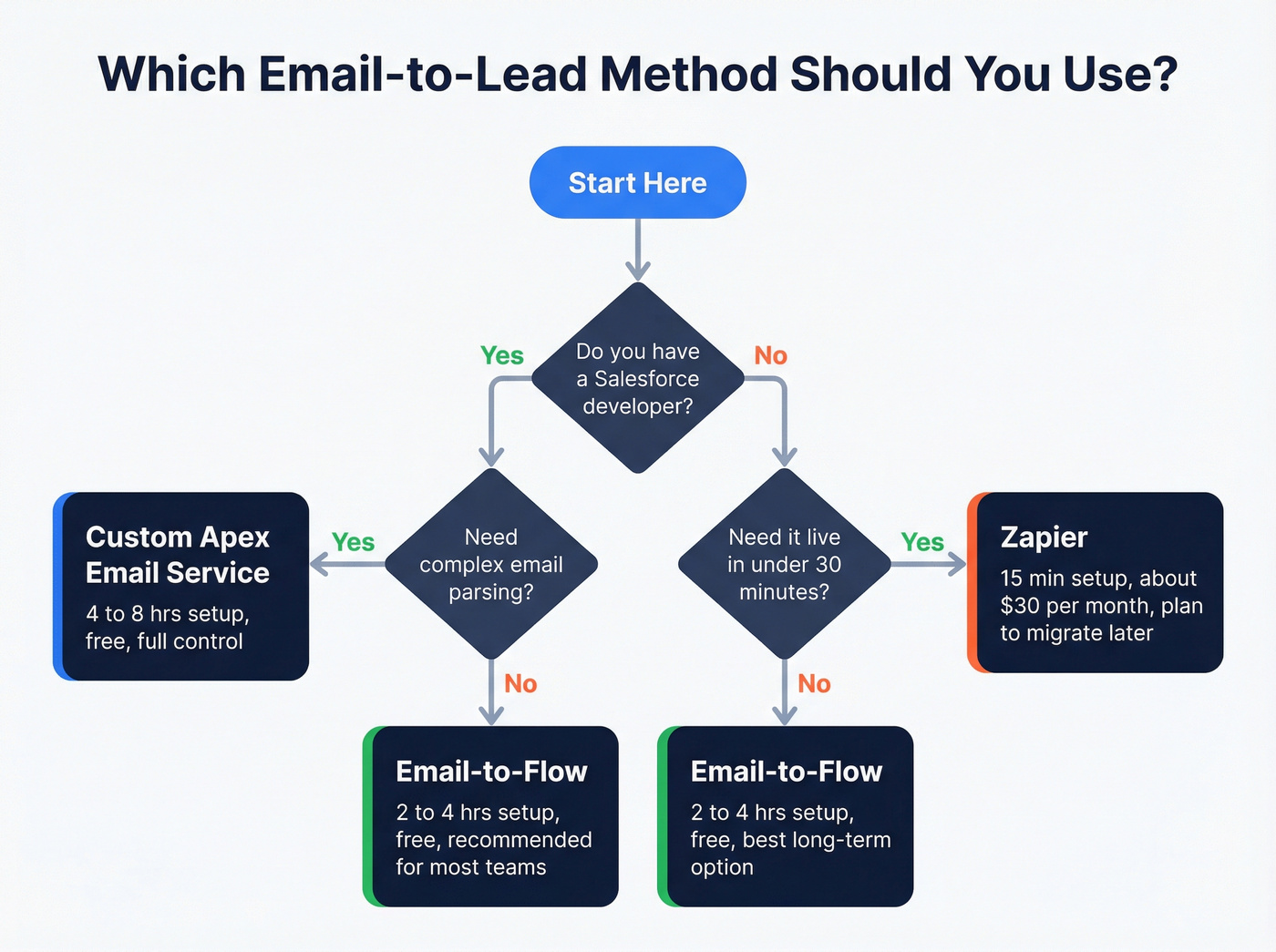
Whichever method you choose, auto-created leads arrive with incomplete data - usually just an email address and maybe a name. We'll cover how to enrich them automatically at the end (and how to keep CRM data clean once you do).
Why Email-to-Lead Doesn't Exist Natively (And What Does)
This is the single biggest source of confusion in the Salesforce ecosystem, and it trips up admins constantly.
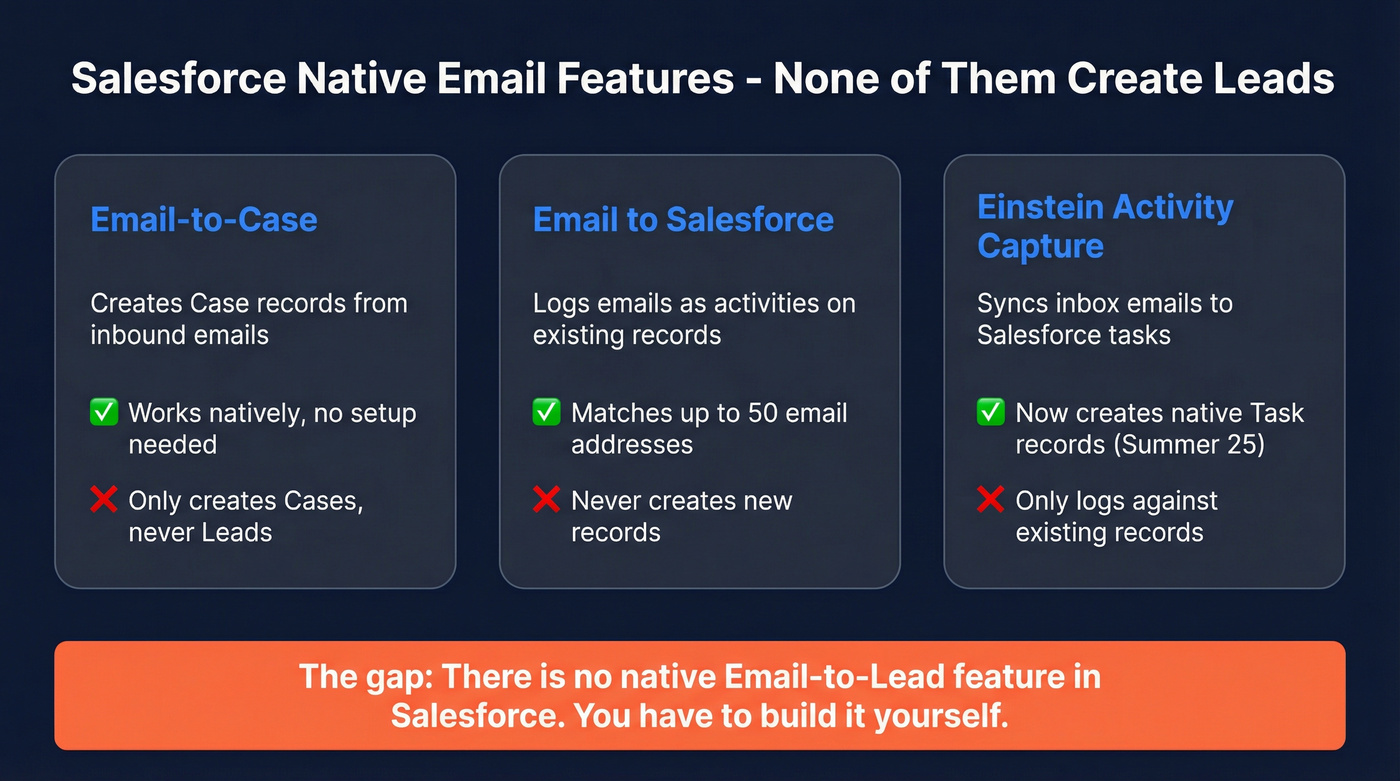
Email-to-Case is a native Salesforce feature. It automatically creates Case records from inbound emails. It works out of the box. You'd think Email-to-Lead would work the same way.
It doesn't. Because it doesn't exist.
Email-to-Lead is not a native Salesforce feature. There's no toggle, no setup wizard, no standard configuration. If you want to create Lead records from inbound emails, you need custom development or a third-party tool.
Here's what Salesforce does offer - and why each one falls short:
Email to Salesforce gives every user a unique routing address. Forward emails to it, and Salesforce logs them as activities against existing records. It matches up to 50 email addresses from the To and CC fields. If no match is found, the email lands in "My Unresolved Items" for manual assignment. It never creates a new lead.
Web-to-Lead creates leads from form submissions - not emails. It caps at 500 leads per day, requires HTML forms, and has zero parsing intelligence.
Einstein Activity Capture syncs emails between your inbox and Salesforce. Since the Summer '25 update (now live), EAC converts captured emails into native Task and Email Message records - but it only logs activity against records that already exist. The lead must be in Salesforce first. EAC won't create one for you.
Salesforce gives you the platform capability to build email-to-lead via Email Services, but they've never shipped a turnkey feature. That gap is what this entire guide fills (and it’s a classic example of no-code sales automation vs. custom work).

Every method in this guide creates leads with just an email address and maybe a name. That's not a lead - it's a placeholder. Prospeo's Salesforce integration enriches every auto-created lead with 50+ data points - verified phone, title, company size, tech stack - at a 92% match rate. Your reps stop Googling and start selling.
Turn skeleton leads into complete records for $0.01 each.
Every Method to Generate Leads from Inbound Emails in Salesforce
Email-to-Flow - The Modern No-Code Approach (Recommended)
This is the right answer for 80% of teams. If you're a Salesforce admin who's comfortable with Flow Builder, stop reading the other methods and start here.
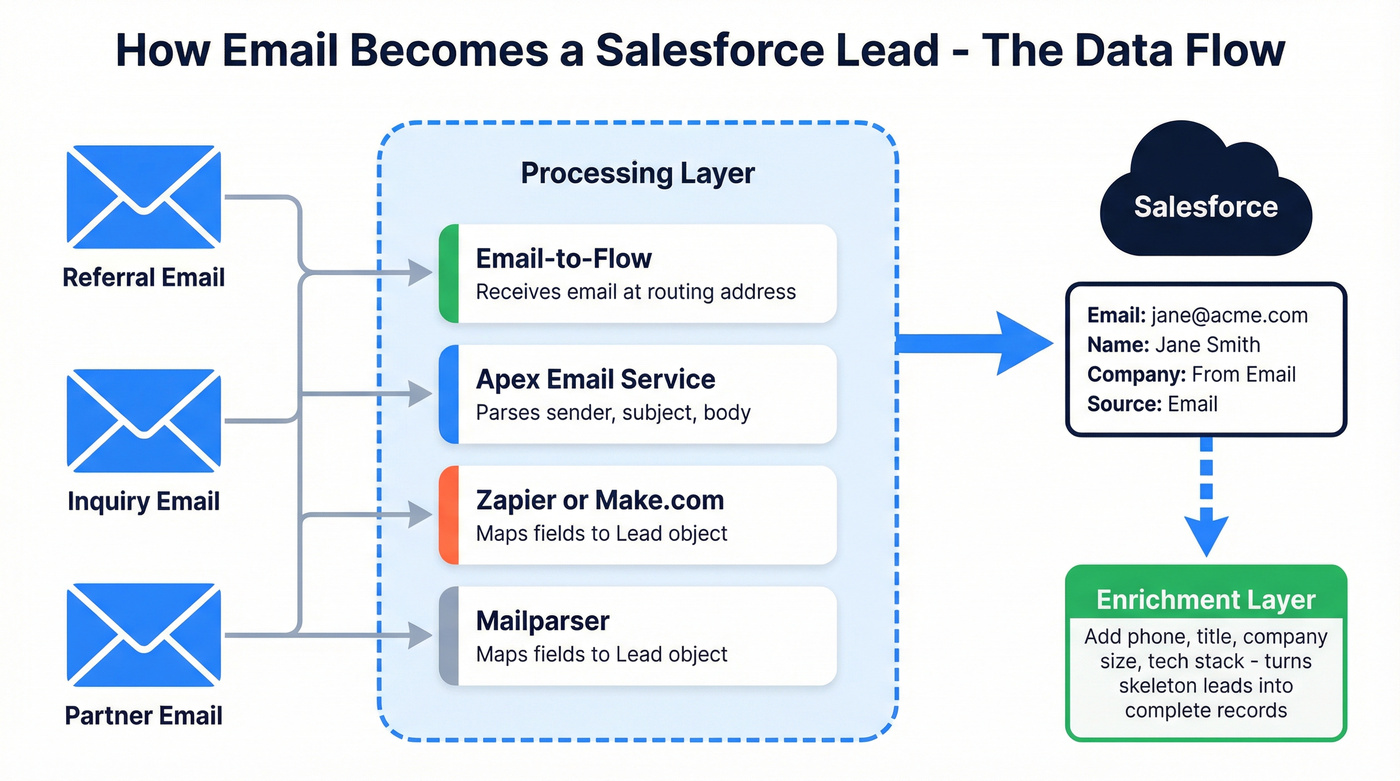
Email-to-Flow is an open-source component built by Praxis Solutions and featured on the official Salesforce Admins blog. It bridges the gap between Email Services (which require Apex) and Flow Builder (which doesn't). You get the power of Email Services with the flexibility of no-code automation.
How it works:
An inbound email gets forwarded to a Salesforce Email Service address. The EmailToFlow Apex class receives the email, extracts the data (sender, subject, body, attachments), and passes it into a Flow as variables. From there, you build whatever logic you want in Flow Builder - create a lead, attach files, send confirmation emails, notify a queue. No Apex required beyond the pre-built class.

Setup steps:
- Install the open-source Email-to-Flow package from Praxis Solutions
- Create a custom object for intermediate data storage (the package guides you through this)
- Navigate to Setup → Email Services and create a new service, selecting "EmailToFlow" as the Apex class
- Set Accept Attachments to "All" - this is critical and easy to miss
- Create an Email Address for the service (this generates your routing address)
- Configure your email client (Gmail, Outlook, etc.) to forward relevant emails to the routing address
Budget 2-4 hours for a Salesforce admin to get this running end to end. The Flow itself is where you'll spend most of your time - building the parsing logic, setting field mappings, and adding duplicate-checking steps.
The extensibility is what makes this the winner. Need to route leads by zip code? Add a Decision element. Want to attach the original email as a file? The component handles attachments natively. Need to notify a Slack channel? Add an action. The package also includes a PDF Viewer LWC for viewing email attachments directly on Salesforce records - a nice touch that saves reps from downloading files.
One caveat: the Context User for the Email Service must have access to the EmailToFlow Apex class. Miss that permission and you'll get silent failures with no error message. Ask me how I know.
Custom Apex Email Service - Full Control, Zero Cost
If you have a developer and need to parse complex email formats - structured referral templates, forwarded inquiry forms, emails with specific body patterns - a custom Apex Email Service gives you total control.
Common use case: a SaaS company parsing trial signup notification emails to auto-create leads for their SDR team, or a financial services firm routing partner referral emails with specific formatting into segmented lead queues. A frequent question in these orgs is where SDRs should create contacts - directly in Salesforce from enriched leads, or only after qualification. The answer depends on your data model, but automating the initial lead creation from email ensures SDRs spend their time on that decision rather than on manual data entry.
The core interface hasn't changed in over a decade. You implement Messaging.InboundEmailHandler, and Salesforce hands you the email object to do whatever you want with it. Here's a simplified version:
global class EmailToLeadHandler implements Messaging.InboundEmailHandler {
    global Messaging.InboundEmailResult handleInboundEmail(
        Messaging.InboundEmail email,
        Messaging.InboundEnvelope envelope
    ) {
        Messaging.InboundEmailResult result = new Messaging.InboundEmailResult();

        // Check for existing lead to prevent duplicates
        List<Lead> existing = [
            SELECT Id FROM Lead
            WHERE Email = :email.fromAddress
            LIMIT 1
        ];

        if (existing.isEmpty()) {
            Lead newLead = new Lead();
            newLead.Email = email.fromAddress;
            newLead.LastName = email.fromName != null
                ? email.fromName : 'Unknown';
            newLead.Company = '[From Email]';
            newLead.Description = email.plainTextBody;
            newLead.LeadSource = 'Email';
            insert newLead;
        }

        result.success = true;
        return result;
    }
}
A few things to note:
The duplicate-checking logic is essential. Without it, every forwarded email from the same person creates a new lead. The example above checks by email address - in production, you'd also check Contacts (something Email2LeadPro notably doesn't do).
Gmail forwarding has a verification quirk. Google sends a confirmation email to the Salesforce routing address, and you have to fish the confirmation link out of the debug log. It's not hard, but it's the kind of thing that wastes 30 minutes if you don't know about it.
Budget 4-8 hours of developer time for a production-ready implementation with error handling, attachment processing, and proper test coverage.
If you're writing custom Apex for this in 2026 and you don't have very specific parsing needs, use Email-to-Flow instead. The Praxis component gives you the same Email Service foundation with Flow-based logic on top. Save your developer's time for something that actually requires code.
Zapier / Make.com - The Duct-Tape Solution
These work. They're fast to set up. And you should plan to replace them within 6 months.
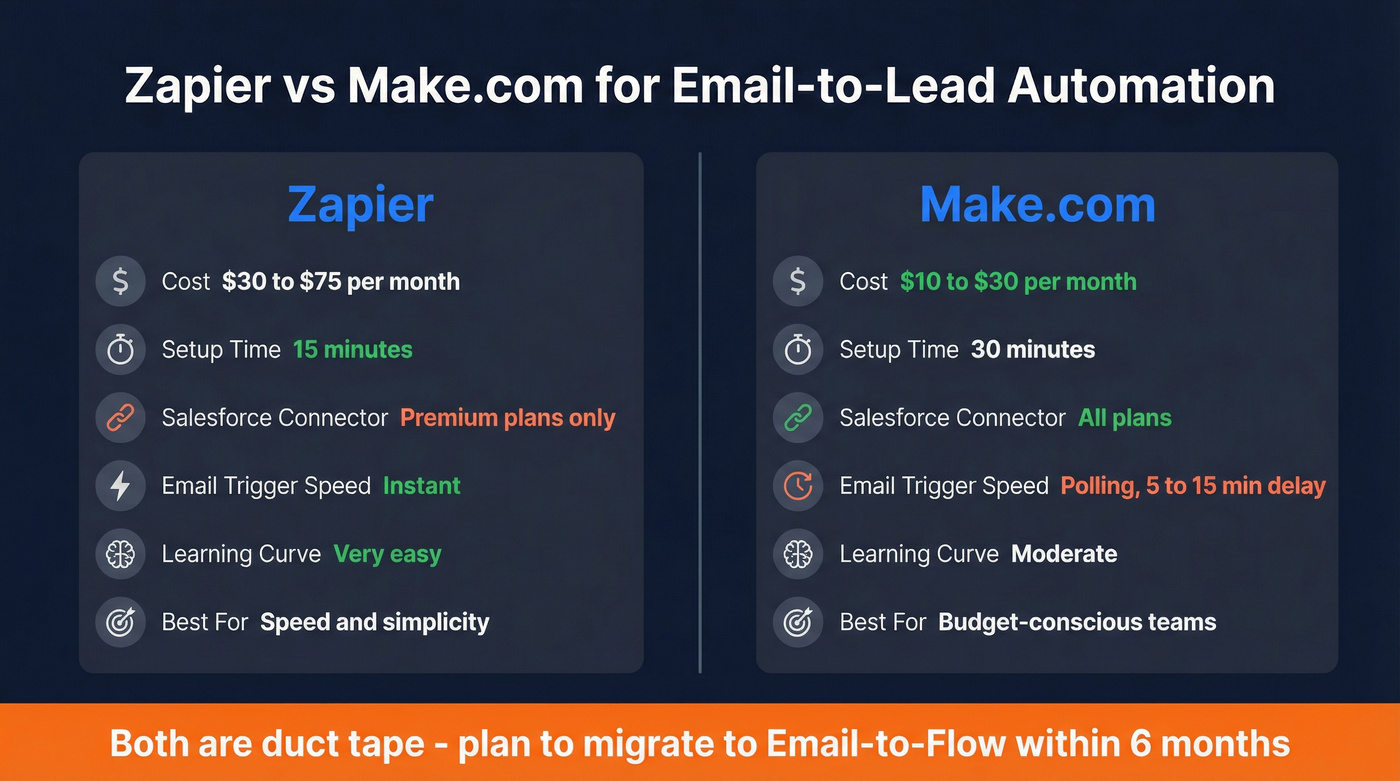
Zapier is the 15-minute option. Create a Zap with "Email by Zapier" as the trigger (you get a custom @robot.zapier.com address) and "Create Lead" as the Salesforce action. Map the fields, turn it on, done.
The catch: Salesforce is a Premium connector. You can't use it on Zapier's free plan. Expect to pay $30-75/mo depending on your task volume. The email trigger is instant (no polling delay), and inbound emails are unlimited on paid plans.
Make.com is cheaper - Salesforce is available on all plans, starting around $10.59/mo as of early 2026. Use the "Watch Emails" trigger and "Create a Record" action (there's no dedicated "Create Lead" action - you select the Lead object from a dropdown).
That Reddit user who said Make.com "wasn't working" with Outlook was hitting an email trigger configuration issue, not a platform limitation. Make.com's email triggers require specific IMAP/SMTP settings that Outlook doesn't always expose cleanly. If you're on Microsoft 365, use the dedicated Outlook module instead of the generic email trigger.
| Zapier | Make.com | |
|---|---|---|
| Cost | ~$30-75/mo | ~$10-30/mo |
| Setup time | 15 min | 30 min |
| SF connector | Premium (paid only) | All plans |
| Email trigger | Instant | Polling (5-15 min) |
| Best for | Speed | Budget |
Use Zapier if you need to be live in 15 minutes and don't mind paying a premium for simplicity. Use Make.com if you're cost-sensitive and comfortable with a slightly steeper learning curve. Plan to migrate to Email-to-Flow either way - iPaaS tools add a recurring cost and a point of failure that native solutions don't have.
AppExchange Apps - Managed Solutions
Email2LeadPro
Use this if you want a managed, no-code solution and you're okay with some setup friction.
Skip this if you need to check for existing Contacts (not just Leads) before creating records, or you need flexible parsing without writing Apex.
Email2LeadPro has processed over 4 million emails and supports multiple email templates via separate Email Service addresses. Pricing is per production org (sandbox is free) - expect ~$50-150/mo based on similar AppExchange apps, though you'll need to email apps@cloudgofer.com for a quote.
The honest user feedback: "a little tricky to get going." Common errors include REQUIRED_FIELD_MISSING and Argument-cannot-be-null during initial setup. The 30-day free trial via AppExchange helps, but budget extra time for configuration. The biggest gap: it only checks for duplicate Leads, not Contacts. If someone's already a Contact in your org, Email2LeadPro will create a duplicate Lead anyway.
Ortoo Email-to-Lead AI Edition
This is the enterprise sledgehammer. Ortoo's solution is powered by their Email-to-Anything (E2A) engine and integrates with Q-assign for workload-based, expertise-based, and availability-based lead routing. It can convert emails into any Salesforce object, not just Leads.
Best for large orgs that need AI-powered parsing, enrichment, and intelligent lead routing in one package. If you're a 10-person sales team, this is massive overkill. If you're running 200+ reps across regions with complex routing rules, it earns its ~$200-500+/mo price tag.
CTK Email Parser
A 100% native, no-code parser with Salesforce Shield compatibility. Lightning-ready, works across Sales Cloud, Service Cloud, and Platform editions. Pricing isn't published - expect ~$50-150/mo based on comparable native AppExchange tools. Best for orgs with strict compliance requirements that rule out external data processing.
Email Parsing Tools - External Parsers
Mailparser is the standout here. At $29.95-$299.95/mo, it handles structured emails that other tools choke on - parsing subjects, headers, bodies, attachments, HTML, and even PDFs. Users call it "ETL without all the heavy programming," and it's rated "Excellent" across 53 Capterra reviews.
Mailparser connects to Salesforce natively, via Zapier, or API, which gives you flexibility in how you integrate. For high-volume, varied-format emails from external systems (think partner referral forms, registration confirmations, inquiry emails from different sources), it's the most flexible parser available.
Parserr offers a direct Salesforce integration without requiring Zapier as a middleman. Rule-based field extraction lets you map any text in the email body to specific Lead fields. Pricing runs ~$30-100/mo.
Mixmax deserves a brief mention: if your team already uses Mixmax for Gmail sequences, the Salesforce Autocreate feature (available on all paid plans starting at $29/user/mo) can automatically create leads when you email recipients who don't have an existing Salesforce record. It's Gmail-only and not a standalone solution, but it's convenient if you're already in the ecosystem.
Full Pricing Comparison for Email-to-Lead Methods
| Method | Cost | Setup | Skill Needed | Best For |
|---|---|---|---|---|
| Email-to-Flow | Free | 2-4 hrs | Admin | Most teams |
| Apex Email Service | Free | 4-8 hrs | Developer | Complex parsing |
| Zapier | ~$30-75/mo | 15 min | None | Quick fix |
| Make.com | ~$10-30/mo | 30 min | None | Budget no-code |
| Email2LeadPro | ~$50-150/mo | 1-2 hrs | Admin | Managed solution |
| Ortoo AI | ~$200-500+/mo | 2-4 hrs | Admin | Enterprise routing |
| Mailparser | $30-300/mo | 1 hr | None | Structured emails |
| Parserr | ~$30-100/mo | 1 hr | None | Direct SF integration |
| Mixmax | $29-89/user/mo | 30 min | None | Gmail teams |
The free options (Email-to-Flow and Apex) require time investment upfront but zero ongoing cost. The paid options trade money for speed. Pick based on whether your bottleneck is budget or admin hours.
If your deals average under $15K, you almost certainly don't need anything beyond Email-to-Flow plus an enrichment layer. The AppExchange apps and enterprise tools exist for orgs with complex routing needs and compliance requirements - not for a 15-person sales team processing 50 referral emails a week.
After Setup - Enriching Your Auto-Created Leads
Here's the next problem nobody warns you about: your automation works perfectly, leads are flowing into Salesforce, and... they're useless. Each record has an email address, maybe a name, and nothing else. No company. No title. No phone number.
Reps look at these skeleton leads and do one of two things: spend 5 minutes manually researching each one, or ignore them entirely. Either way, you've automated the wrong part of the problem.

Prospeo's native Salesforce integration handles this automatically. When a new lead is created, it enriches the record with verified contact data - 83% of leads come back with company, title, direct dial, and 50+ additional data points. Email accuracy sits at 98%, so your sequences don't bounce (and it helps to verify an email address before you scale volume). At roughly $0.01 per email, it costs less than the 5 minutes an AE would spend manually researching each lead.
The free tier gives you 75 emails per month with no credit card required - enough to test the enrichment workflow before committing (see Prospeo Pricing for plan details).
You just saved 125 hours per rep by automating lead creation from email. Don't waste that time on stale data. Prospeo refreshes every record on a 7-day cycle - not the 6-week industry average - so your auto-created leads stay accurate long after they hit Salesforce.
Keep your CRM data fresh without lifting a finger.
Common Mistakes That Break Email-to-Lead Automation
These are the five issues I've seen kill email-to-lead projects over and over. Every single one is avoidable.
1. Confusing "Email to Salesforce" with Email Services. One logs activity against existing records. The other creates new records via Apex. They sound similar. They do completely different things. If you set up "Email to Salesforce" and wonder why no leads are being created, this is why.
2. Not verifying the forwarding address. When you configure Gmail to forward to your Salesforce Email Service address, Google sends a confirmation email to that routing address. The confirmation link is buried in the debug log - you have to go to Setup → Debug Logs, find the email, and click the verification link. Skip this step and forwarding silently fails.
3. Skipping duplicate checking. Without explicit duplicate logic, every forwarded email from the same person creates a new lead - even if one already exists for that person. In Apex, query existing leads by email before inserting. In Flow, add a Get Records element before Create Records. In Zapier, use a "Find Record" step first.
4. Ignoring assignment rules. Leads land in a default queue and nobody follows up. I've seen an org run this way for three years with "very poor adoption" before realizing the problem wasn't the automation - it was that leads were going to a queue nobody monitored. Build assignment rules or Flow-based routing from day one (tie it to speed-to-lead metrics so it’s measurable).
5. Not handling attachments. If your referral emails include attachments (PDFs, images, documents), set Accept Attachments to "All" in your Email Service configuration. The default is "None," which silently drops every attachment. For Email-to-Flow, this is especially important since the Praxis component handles file attachments natively.
FAQ
Does Salesforce have a native Email-to-Lead feature?
No. Salesforce offers Email-to-Case natively but has never shipped a built-in Email-to-Lead function. To create leads from inbound emails, you need Email Services with Apex, the open-source Email-to-Flow component from Praxis Solutions, or a third-party tool like Zapier or an AppExchange app.
Will Einstein Activity Capture create leads from my emails?
It won't. Einstein Activity Capture syncs emails between your inbox and Salesforce but only logs activity against records that already exist. Since the Summer '25 update, EAC writes native Task and Email Message records, but the lead must already be in your org.
What's the cheapest way to auto-create Salesforce leads from email?
Email-to-Flow from Praxis Solutions is free and open-source, requiring only a Salesforce admin comfortable with Flow Builder. A custom Apex Email Service is also free but needs 4-8 hours of developer time. Both options have zero ongoing subscription costs.
How do I enrich leads that were auto-created from email?
Auto-created leads typically arrive with only an email address and name. Tools like Prospeo can enrich new leads with verified emails, direct dials, company data, and 50+ data points at ~$0.01 per record. The free tier covers 75 emails per month - enough to validate the workflow before scaling.
Where should SDRs create contacts - as leads first or directly as contacts?
Most orgs should follow a lead-first model: inbound emails automatically create Salesforce leads, and SDRs convert them to contacts only after qualification. This keeps your contact database clean and preserves accurate funnel metrics, conversion rates, and source attribution that you lose when reps bypass the lead object entirely.