How to Run a Gmail Blacklist Check (And What to Do When You're Still Blocked)
Your sales team just told you half their cold emails are bouncing off Gmail. Here's the problem: there's no such thing as a Gmail blacklist - which makes a gmail blacklist check more complicated than it sounds. Gmail doesn't publish one, doesn't maintain a public list, and doesn't tell you directly when you're blocked. What it does do is reference external blocklists, run its own internal reputation algorithms, and watch how recipients engage with your messages. Blocklists are reference databases, not blocking mechanisms - Gmail decides what to do with that data on its own terms.
The real question isn't "am I on Gmail's blacklist?" It's "why is Gmail rejecting my mail, and what do I fix first?"
What to Check Right Now
If you're actively getting blocked, run this three-step diagnostic before anything else:
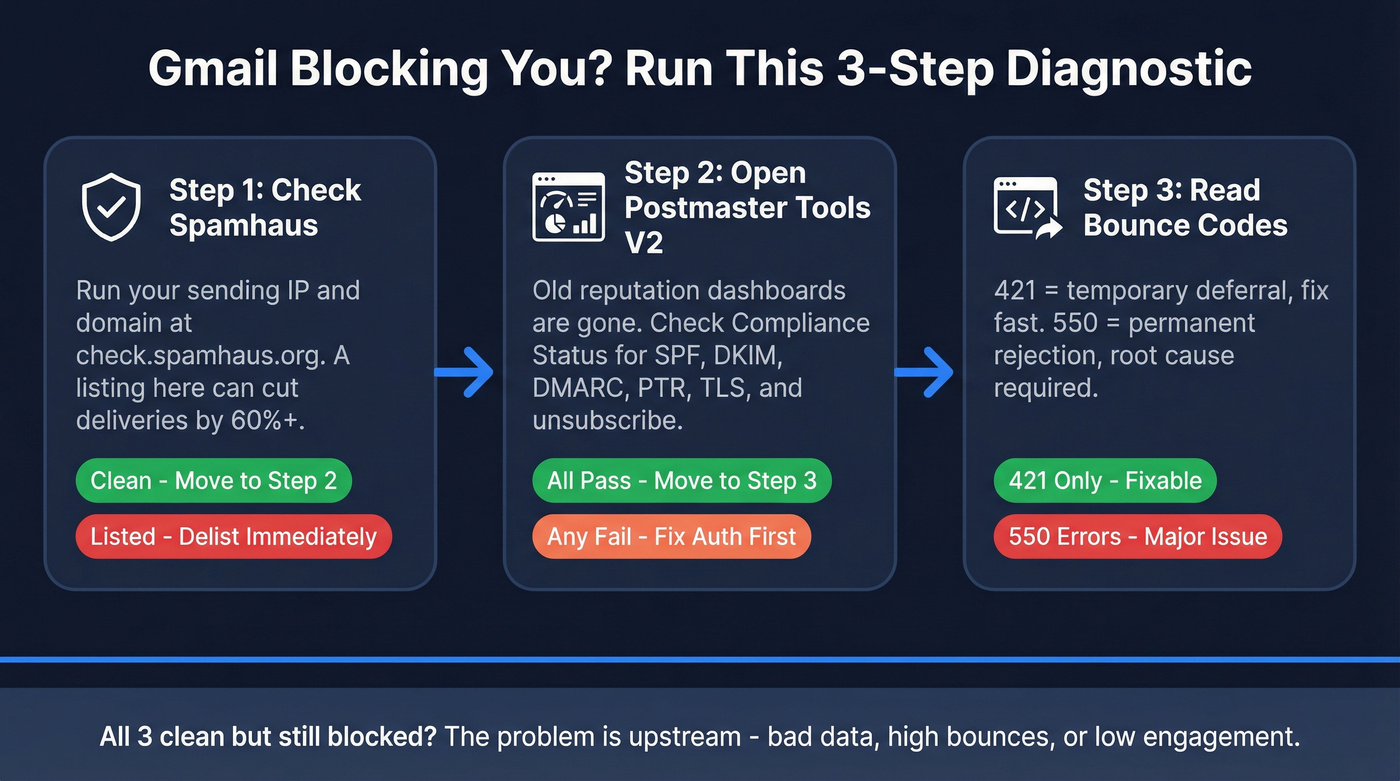
Check Spamhaus. The only public blocklist that truly matters for Gmail delivery. A Spamhaus listing can reduce deliveries by 60%+. Run your sending IP and domain through check.spamhaus.org right now.
Open Google Postmaster Tools V2. The old IP Reputation and Domain Reputation dashboards were permanently retired on September 30, 2025. Compliance Status is now your primary diagnostic - a pass/fail report card for authentication and sender requirements. Set it up here if you haven't already.
Read your bounce codes. A 421 error means Gmail is temporarily deferring your mail. A 550 means permanent rejection. The sub-code tells you exactly what's wrong.
If all three come back clean and Gmail is still blocking you, the problem is upstream - bad data, high bounces, or low engagement.
Check Public DNSBLs First
There are 100+ known blocklists, and most don't matter for Gmail delivery. Industry terminology has shifted from "blacklist" to "blocklist" or "denylist," but the tools and processes are identical. Here are the lists worth checking:
Spamhaus is the heavyweight. Gmail actively references Spamhaus data, and a listing here has real consequences - check free at check.spamhaus.org. Barracuda BRBL is used by some mail filters but less impactful for Gmail specifically. CBL (cbl.abuseat.org) catches compromised IPs sending spam and is worth a quick check. URIBL is a domain-based blocklist, as opposed to IP-based. And MXToolbox runs your IP against dozens of lists simultaneously, covering both IP-based and domain-based blocklists - free and fast, but don't panic if you're flagged on some obscure list you've never heard of.

Here's the thing: being listed on a blocklist and being blocked by Gmail aren't the same event. Check whether your bounce codes explicitly reference a blocklist. If they don't, the listing may not be your actual problem - the listing and the deliverability issue might share a root cause like spam trap hits or complaint spikes. Spamhaus is the only list where a listing alone is enough to tank your Gmail delivery. For everything else, treat the listing as a symptom, not the diagnosis.
This is one of the most common frustrations we see in email deliverability forums. Teams with clean blocklist checks still getting blocked by Gmail, and nobody can tell them why.
Google Postmaster Tools in 2026
Postmaster Tools is the closest thing to a Google email blocklist check that actually exists. But if you haven't logged in since mid-2025, the interface you remember is gone.
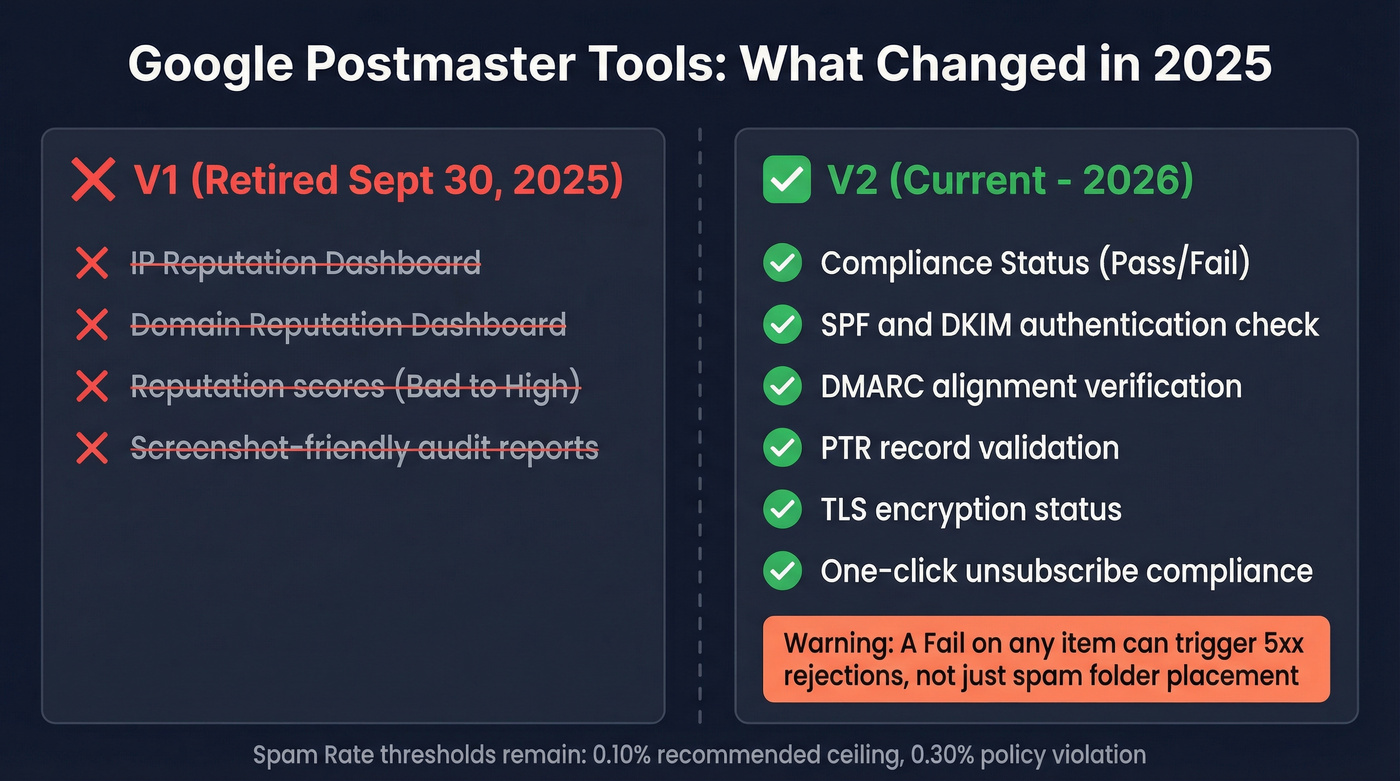
What Changed
Google retired the V1 interface on September 30, 2025. The IP Reputation and Domain Reputation dashboards - the ones everyone used to screenshot in deliverability audits - are permanently removed.
V2 replaces reputation scores with Compliance Status, a pass/fail report card covering SPF/DKIM authentication, DMARC alignment, PTR records, TLS encryption, and one-click unsubscribe implementation. A "Fail" on any of these isn't just a warning. With enforcement ramping up in late 2025, a compliance failure can trigger 5xx-level rejections - not just spam folder placement, but outright blocking.
The Spam Rate You're Misreading
Postmaster Tools shows two threshold lines on the spam rate chart: 0.10% (recommended ceiling) and 0.30% (policy violation). These represent the percentage of inbox-delivered messages that recipients manually click "Report spam" on.
That definition matters more than most people realize. The GPT spam rate only counts manual spam reports from recipients who see your email in their inbox. It doesn't measure how often Gmail automatically filters your mail to spam or promotions.
The spam rate paradox: A declining spam rate can actually be a bad sign. If Gmail starts auto-filtering more of your mail to spam, fewer people see it in their inbox, so fewer can report it. Low GPT spam rate doesn't equal good inbox placement.
Cross 0.30% and Gmail cuts off mitigation support until you maintain sub-0.3% for 7 consecutive days. That's a brutal waiting period when your pipeline is stalled.

Most Gmail blocks trace back to one thing: bad email data inflating your bounce rate. Prospeo's 5-step verification and 7-day data refresh cycle keep bounce rates under 4% - the same threshold that keeps Gmail from flagging you as a bulk spammer.
Stop diagnosing Gmail blocks. Eliminate the bad data causing them.
Read Your Gmail Bounce Codes
Your mail server logs contain the most specific diagnostic data Gmail gives you. Here's what the common codes mean and what to do about each one:
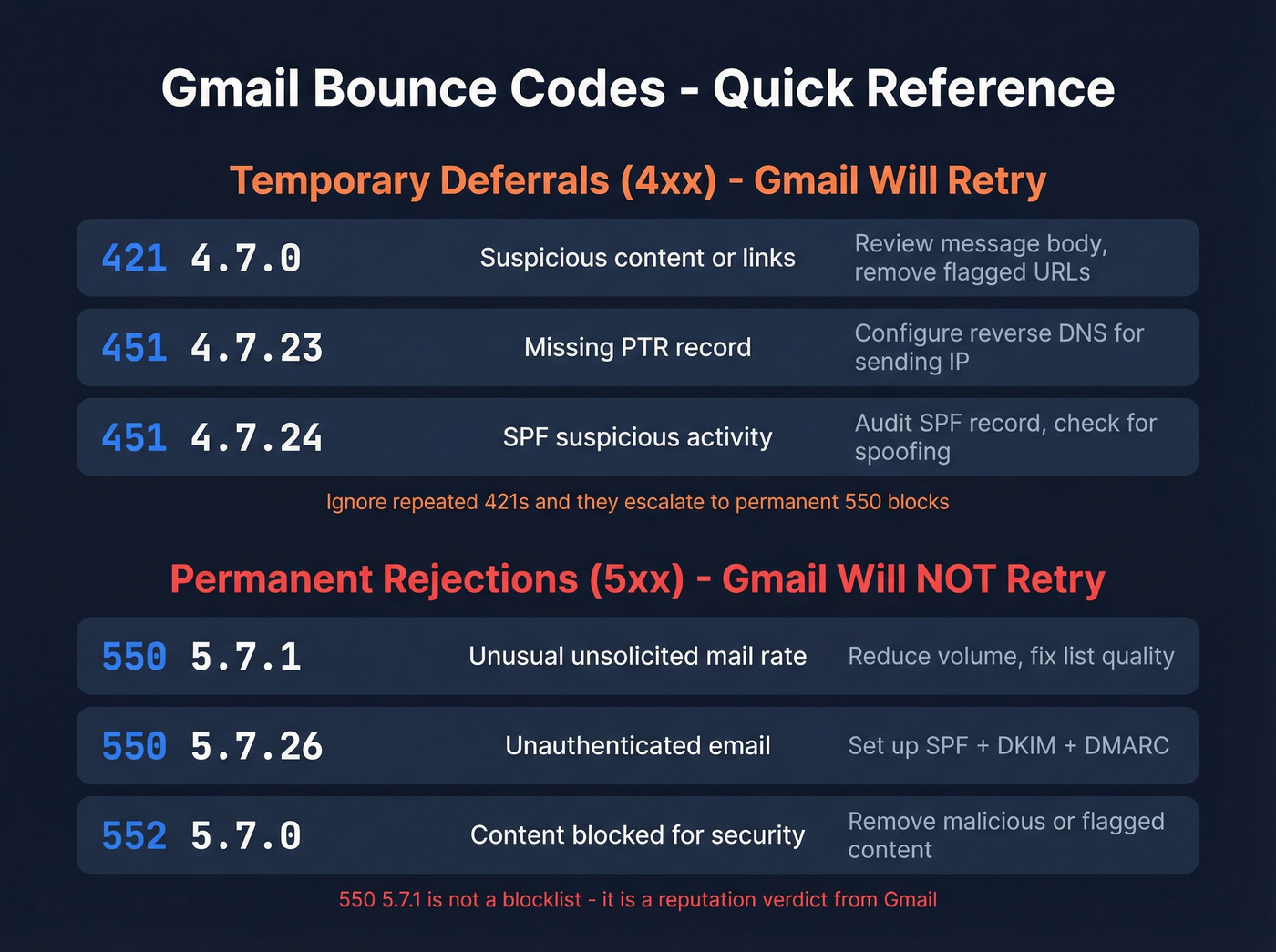
| Code | Type | Meaning | Fix |
|---|---|---|---|
| 421 4.7.0 | Temp | Suspicious content/links | Review message body, remove flagged URLs |
| 451 4.7.23 | Temp | Missing PTR record | Configure reverse DNS for sending IP |
| 451 4.7.24 | Temp | SPF suspicious activity | Audit SPF record, check for spoofing |
| 550 5.7.1 | Perm | Unusual unsolicited mail rate | Reduce volume, fix list quality |
| 550 5.7.26 | Perm | Unauthenticated email | Set up SPF + DKIM + DMARC |
| 552 5.7.0 | Perm | Content blocked (security) | Remove malicious/flagged content |
421 codes are temporary deferrals - Gmail's servers will retry, and the issue can resolve if you fix the underlying problem quickly. Ignore repeated 421s and they escalate to permanent 550 blocks. 550 codes are permanent rejections - Gmail won't retry, and you must fix the root cause before mail flows again.
If you're seeing 550 5.7.1, that's Gmail telling you your sending behavior looks like spam. That's not a blocklist. It's a reputation verdict.
Why Gmail Blocks You Without a Listing
If you send 5,000+ emails per day to personal Gmail accounts, you're classified as a bulk sender. That classification is permanent - you can't "un-become" a bulk sender by reducing volume later.
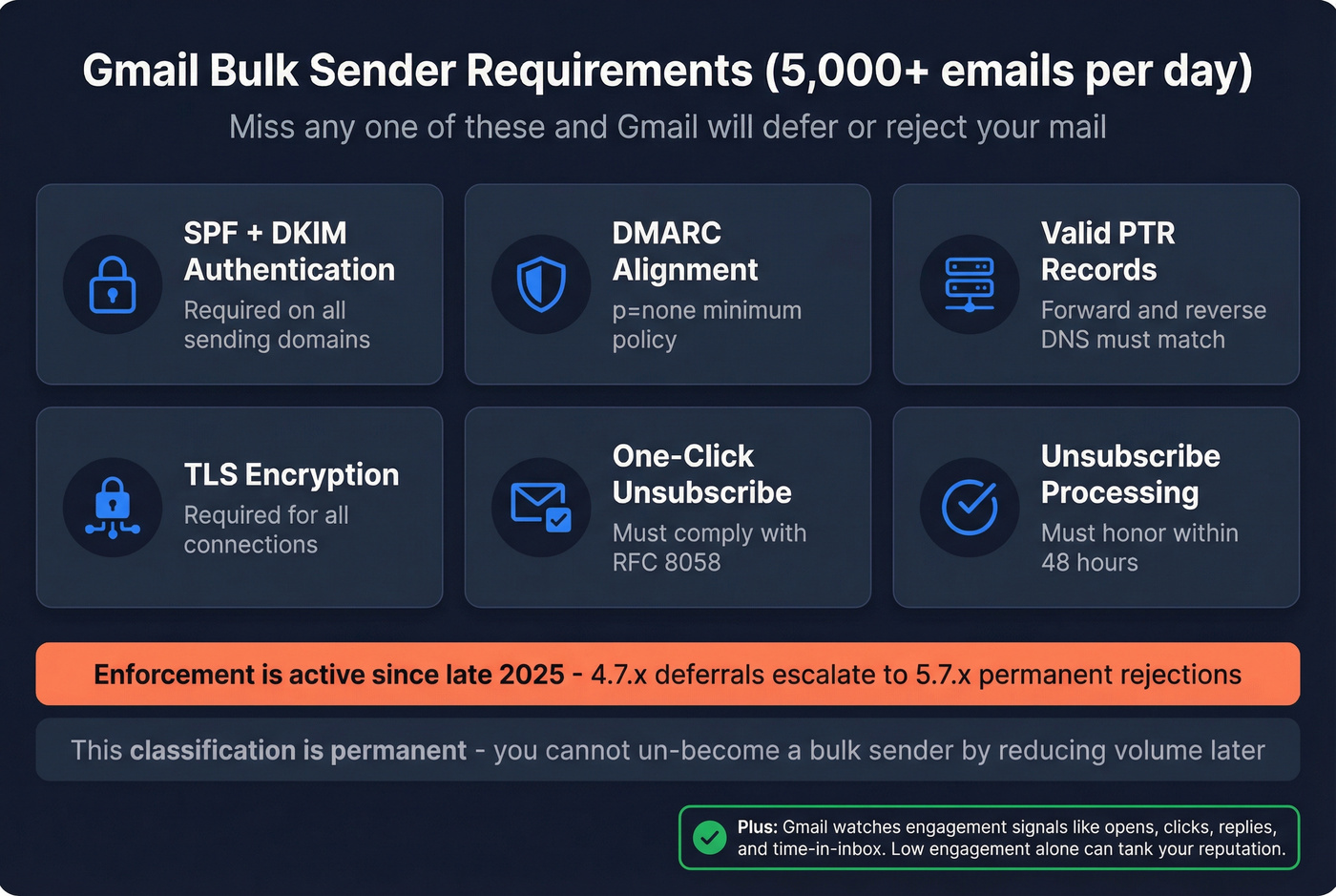
Bulk senders must meet every one of these requirements or face deferrals and rejections: SPF + DKIM authentication on all sending domains, DMARC alignment (p=none minimum), valid forward and reverse DNS with PTR records, TLS encryption for all connections, a one-click unsubscribe header compliant with RFC 8058, and unsubscribe request processing within 48 hours. Since late 2025, Gmail has been actively enforcing these with 4.7.x temporary deferrals escalating to 5.7.x permanent rejections.
We've seen teams with perfect Spamhaus records get blocked simply because their unsubscribe header wasn't RFC 8058 compliant. Maddening.
But authentication is only half the story. Gmail watches engagement signals - opens, clicks, replies, and time-in-inbox. If recipients consistently ignore your emails, Gmail infers they're unwanted. No blocklist listing required. Your reputation drops without any external blocklist being involved.
Look, if your deals average under $15k, you probably can't afford the deliverability damage from sending unverified cold emails. The cost of a bounced email isn't the bounce itself - it's the cumulative reputation hit that eventually blocks your entire domain from reaching Gmail inboxes.
How to Get Unblocked
- Pause sending immediately. Every bounced message while you're blocked makes the problem worse. Stop all outbound to Gmail addresses.
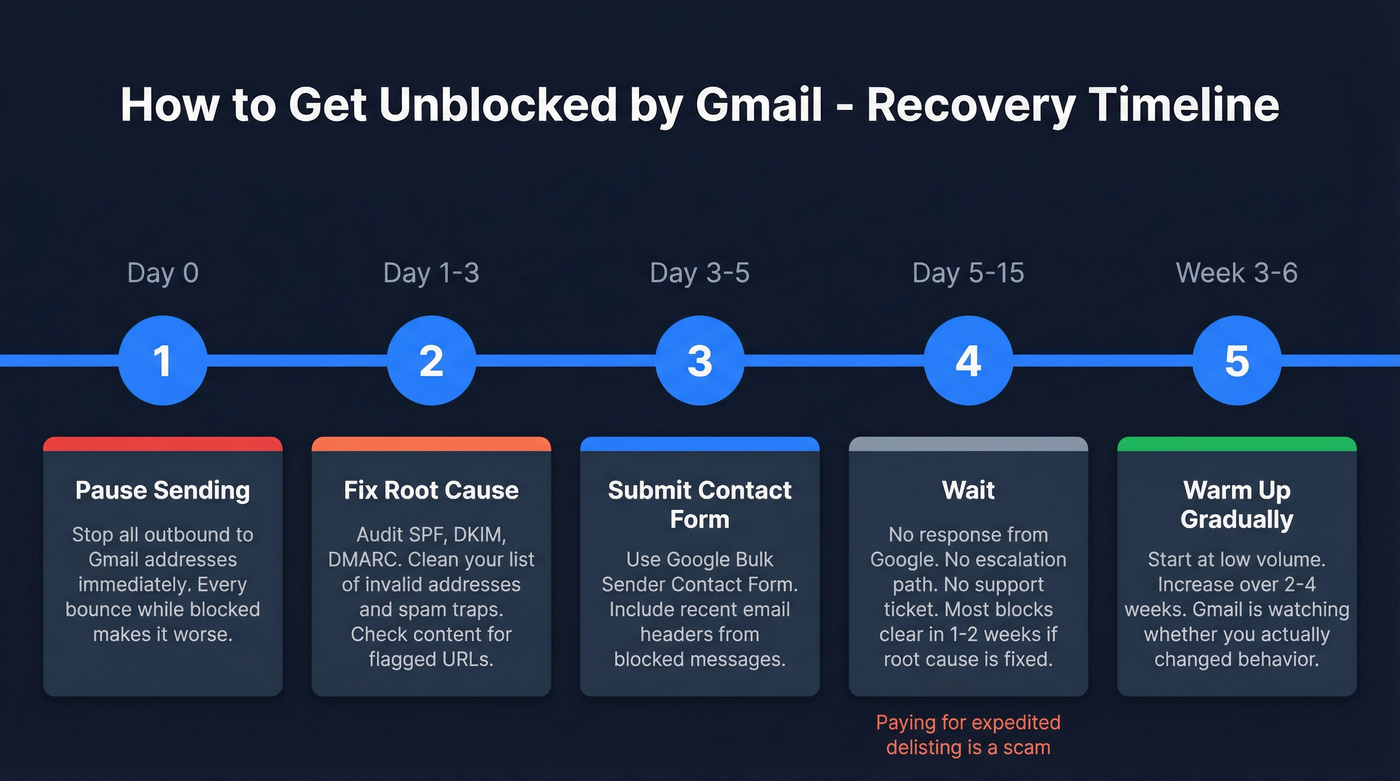
Fix the root cause. Check your authentication (SPF, DKIM, DMARC), review your list for invalid addresses and spam traps, and audit your content for flagged URLs. If you need a refresher on authentication, see SPF + DKIM + DMARC.
Submit Google's Bulk Sender Contact Form. Include recent email headers from messages that triggered the block.
Wait. Google doesn't respond directly. In our experience, most blocks clear in around 1-2 weeks if you fix the root cause before submitting the form. There's no escalation path, no support ticket, no phone number to call. The up-to-15-day window is maddening, but it's the only process that exists.
Warm up gradually. Don't resume full volume. Start low and increase over 2-4 weeks. Gmail is watching whether you've actually changed behavior. If you want a deliverability-first approach, use an automated email warmup plan.
Paying a third party for "expedited delisting" is a scam - there's no legitimate fast-track to Gmail's abuse team.
Preventing Future Blocks
Monitor Postmaster Tools weekly, not monthly - catch compliance failures before they escalate. Sunset unengaged contacts aggressively; if someone hasn't opened in 90 days, stop mailing them (use re-engagement email subject lines before you suppress). Keep your bounce rate under 2%, warm up new domains and IPs over 2-4 weeks before scaling, and verify every email address before it enters your sending pipeline.
On the flip side, never buy email lists. Purchased lists are loaded with spam traps and dead addresses. Don't ignore soft bounces; three consecutive soft bounces on the same address should trigger automatic suppression. And don't change sending IPs to "escape" a reputation problem - Gmail tracks domain reputation too, so you'll just burn the new IP.
Most Gmail blocking starts with bad data. You email an address that bounces, hit a spam trap, or send to someone who left the company two years ago. Each of those events chips away at your sender reputation. Prospeo's email finder runs a 5-step verification process with 98% accuracy - including catch-all handling and spam-trap removal - so bad addresses never enter your pipeline in the first place. If you're auditing list health, start with an email checker tool or compare options in our email ID validators roundup. The free tier gives you 75 email verifications per month with no contract, enough to audit your most critical sends.

Teams using unverified lists hit 35%+ bounce rates and trigger 550 5.7.1 rejections. Prospeo delivers 98% email accuracy across 143M+ verified addresses - so Gmail sees clean sending behavior, not spam signals.
Clean data means clean reputation. Start with 75 free verified emails.
FAQ
Does Gmail have an official blacklist?
No. Gmail doesn't publish or maintain a public blacklist. It uses public DNSBLs (primarily Spamhaus), internal reputation signals, engagement data, and authentication checks to decide whether to deliver, defer, or reject your mail. Google Postmaster Tools V2 is the closest thing to a diagnostic - it shows your Compliance Status and spam rate.
How do I run an email blacklist check for Google?
Start with MXToolbox to scan your sending IP and domain against all major public blocklists. Then open Google Postmaster Tools to review your Compliance Status and spam rate. Finally, check your mail server logs for Gmail-specific bounce codes (421 for temporary, 550 for permanent). These three steps together give you the most complete picture.
How long does it take to get unblocked by Gmail?
Most blocks clear within 1-2 weeks after you fix the root cause and submit Google's Bulk Sender Contact Form. Google doesn't confirm removal - you'll notice mail starts flowing again. If your spam rate exceeded 0.30%, you must maintain sub-0.3% for 7 consecutive days before Gmail restores mitigation support.
Can bad contact data trigger a Gmail block?
Absolutely - it's one of the most common causes. Every invalid address you send to signals Gmail that you don't maintain your lists. Verifying emails before sending keeps bounce rates under 2% and protects your sender reputation from preventable damage.
Should I check blocklist status regularly?
Yes - schedule a weekly routine. Even if deliverability looks fine today, a compromised server, a bad list import, or a sudden complaint spike can land you on a blocklist overnight. Checking Spamhaus and MXToolbox weekly, alongside Postmaster Tools compliance, lets you catch a listing within 24 hours instead of discovering it weeks later when pipeline has dried up.