Klaviyo Bounce Rate: How to Check, Fix & Prevent It
You just sent a 50,000-contact Klaviyo campaign and your bounce rate came back at 4.7%. Your deliverability score dropped from "Good" to "Fair" overnight, and Gmail is throttling your next send. That spike didn't come from nowhere - it came from a list you didn't verify.
If your bounce rate is above 2%, check authentication first (SPF/DKIM/DMARC), clean your list using the segment recipe below, then verify every future import before it touches Klaviyo. Hard bounces should stay under 0.5%.
What Is Bounce Rate in Klaviyo?
Bounce rate measures the percentage of emails that fail to reach recipients because they're rejected by an inbox provider:
Bounce rate = (bounced emails / delivered emails) x 100
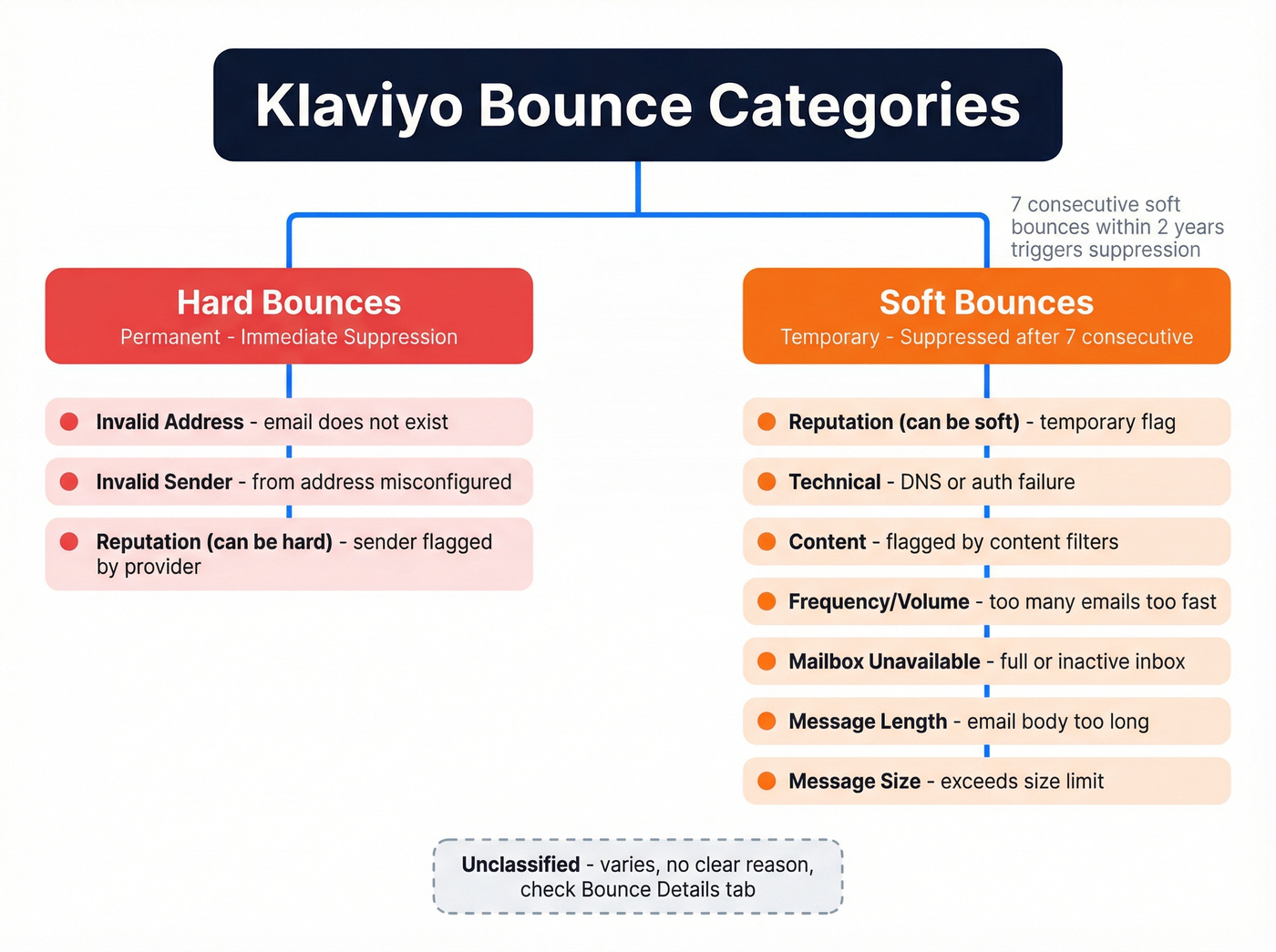
Send 2,000 emails, get 50 bounces, and you're at 2.5%. Klaviyo splits bounces into two types. Hard bounces are permanent failures - the address doesn't exist, and Klaviyo automatically suppresses the profile right away. Klaviyo also treats "Dropped email" events as bounce suppressions. Soft bounces are temporary - a full inbox, a server timeout, a message that's too large. If a profile soft bounces more than 7 consecutive times, Klaviyo suppresses it too.
One detail most guides miss: Klaviyo only counts soft bounces within a 2-year lookback window for that consecutive-bounce suppression logic. A soft bounce from 2024 still counts against a profile today.
What's a Good Bounce Rate?
Keep your total bounce rate under 2% and your hard bounce rate under 0.5%.
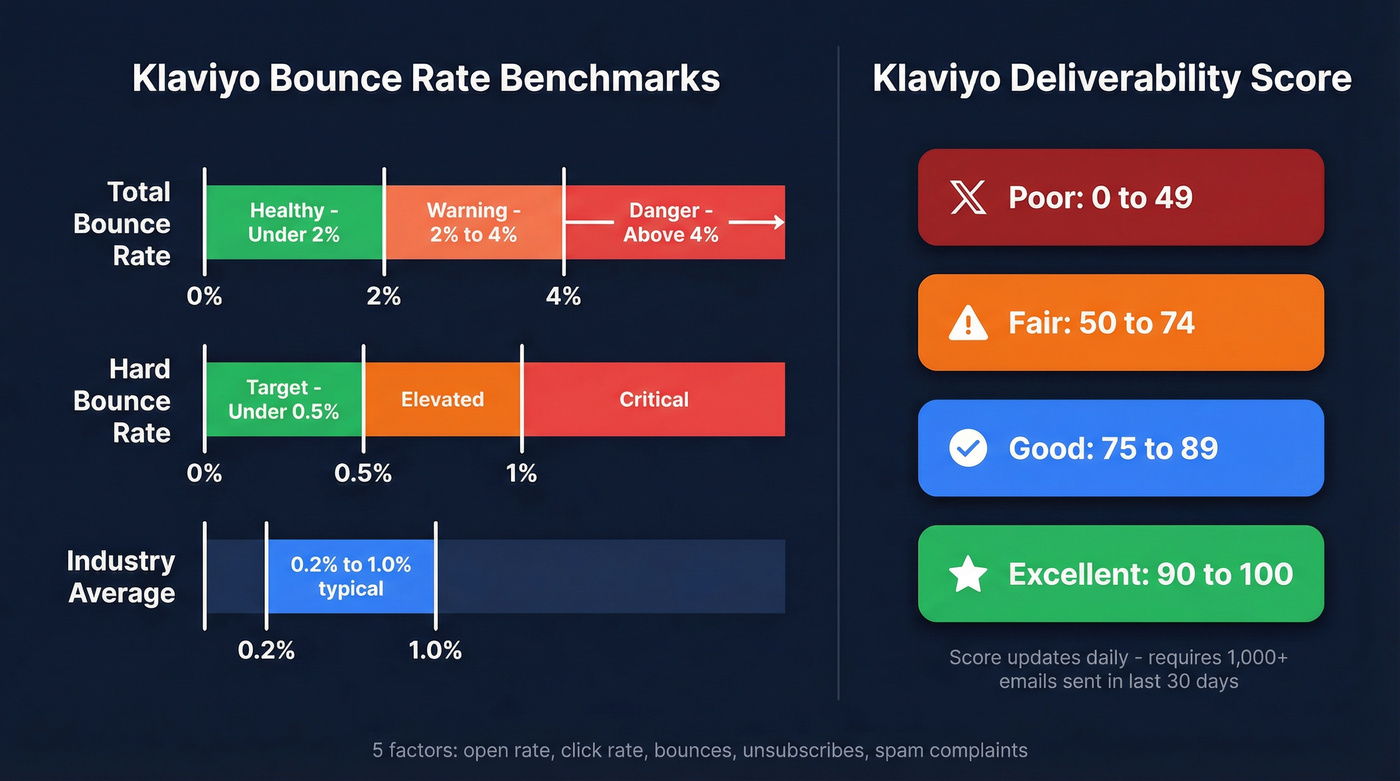
Mailchimp's benchmark dataset, based on billions of emails, shows typical rates across industries ranging from roughly 0.2% to 1%, which aligns with what healthy Klaviyo senders see. Brevo's 2025 Marketing Benchmark analyzing 44B+ emails tells a similar story. In practice, a hard bounce rate around 0.2% to 0.8% is normal for well-maintained lists.
Your Klaviyo deliverability score runs 0-100 across four tiers: Poor (0-49), Fair (50-74), Good (75-89), and Excellent (90-100). Bounces are one of five metrics feeding that score, alongside open rate, click rate, unsubscribe rate, and spam complaints.
Here's the thing: most Klaviyo users obsess over open rates when bounces are the metric that'll actually get them throttled. A 0.3% open rate improvement means nothing if Gmail is rejecting 4% of your sends.
How to Check Bounces in Klaviyo
Navigate to Analytics > Deliverability > Email. You'll land in the Deliverability Hub with three tabs: Score, Reports, and Bounce Details.
The Score tab shows your deliverability score, updated daily - you need at least 1,000 emails sent in the last 30 days for it to populate. The Reports tab lets you filter by date range, message type, and up to 5 inbox providers or domains, so you can isolate whether Gmail, Yahoo, or Outlook is causing the problem. The Bounce Details tab shows a heatmap of all 10 bounce categories across your top 5 providers, with counts and color-coding.
Look there first when you see a spike.

Every hard bounce in Klaviyo started as an unverified import. Prospeo's 5-step email verification catches invalid addresses, spam traps, and catch-all domains before they touch your sending infrastructure - at 98% accuracy and just $0.01 per email.
Clean your list before Klaviyo has to suppress it for you.
Why Your Bounce Rate Is High
Bounce Categories
Klaviyo classifies bounces into 10 categories. Here's the complete reference:
| Bounce Category | Type | What It Means | Fix |
|---|---|---|---|
| Invalid address | Hard | Email doesn't exist | Double opt-in + verify imports |
| Reputation | Soft/Hard | Sender reputation flagged | Branded domain + warm-up |
| Technical | Soft/Hard | DNS/auth failure | Check SPF/DKIM/DMARC |
| Content | Soft | Flagged by content filters | Remove spam triggers |
| Frequency/volume | Soft | Too many emails too fast | Batch sending + ramp slowly |
| Mailbox unavailable | Soft | Full or inactive inbox | Sunset flow + list cleaning |
| Message length | Soft | Email body too long | Trim content |
| Message size | Soft | Exceeds size limit | Keep under 110KB |
| Invalid sender | Hard | From address misconfigured | Verify sender domain |
| Unclassified | Varies | No clear reason | Check Bounce Details tab |
Job Changes and Dead Addresses
This one catches B2B senders off guard. When contacts change jobs, their old corporate email addresses get deactivated - turning previously valid addresses into hard bounces overnight. The average workforce turns over roughly 20-30% per year, which means a B2B list that was clean six months ago already has thousands of dead addresses sitting in it. If you're running B2B campaigns in Klaviyo, job-change churn can account for a huge share of your invalid-address bounces, and it's the kind of problem that only gets worse the longer you wait to address it.
Yahoo and Microsoft Policy Bounces
If you're seeing [554 Message not allowed - [PH01]](https://senders.yahooinc.com/smtp-error-codes/) Email not accepted for policy reasons from Yahoo, you're hitting their authentication enforcement wall. This exact error shows up repeatedly in the Klaviyo Community, and it's strongly tied to missing branded sending domain setup.
Google and Yahoo started enforcing new sender requirements in February 2024. Microsoft Outlook followed in May 2025. If you send more than 5,000 daily emails, DMARC is mandatory. These policy bounces are most common when authentication and domain alignment aren't fully in place.
Authentication Checklist
Before you touch your list, confirm these are set up:
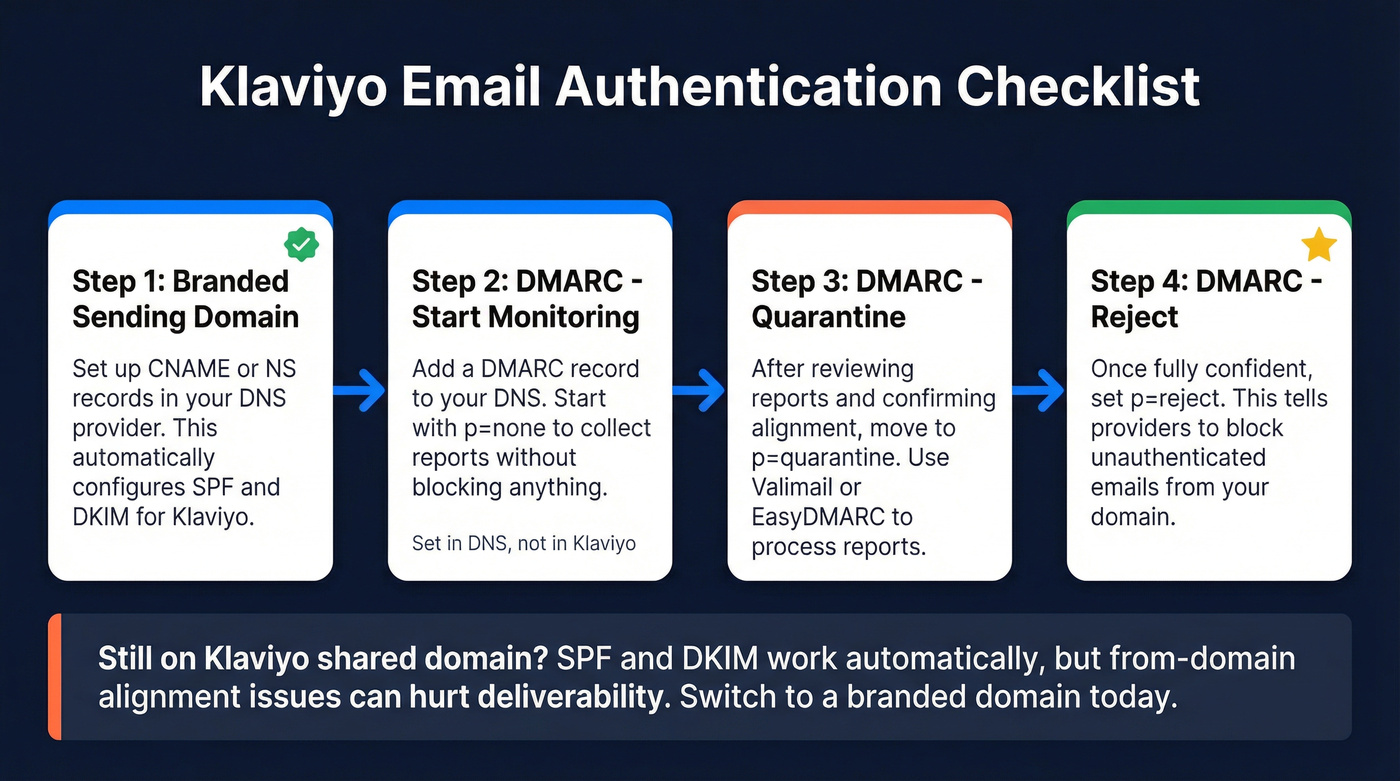
- SPF and DKIM: Automatically configured when you set up a branded sending domain in Klaviyo via CNAME or NS records.
- DMARC setup: Set in your DNS, not in Klaviyo. Start with
p=noneto monitor. - DMARC progression: Move to
p=quarantine, thenp=rejectonce you're confident in alignment. Use Valimail or EasyDMARC to process reports.
If you're still on Klaviyo's shared sending domain, your SPF and DKIM are automatically authenticated. But shared-domain setups can still create from-domain vs sending-domain misalignment, and branded-domain alignment is the long-term fix for meeting modern mailbox-provider requirements. Switch to a branded domain today.
How to Reduce Your Klaviyo Bounce Rate
Start with these steps, in order of impact:
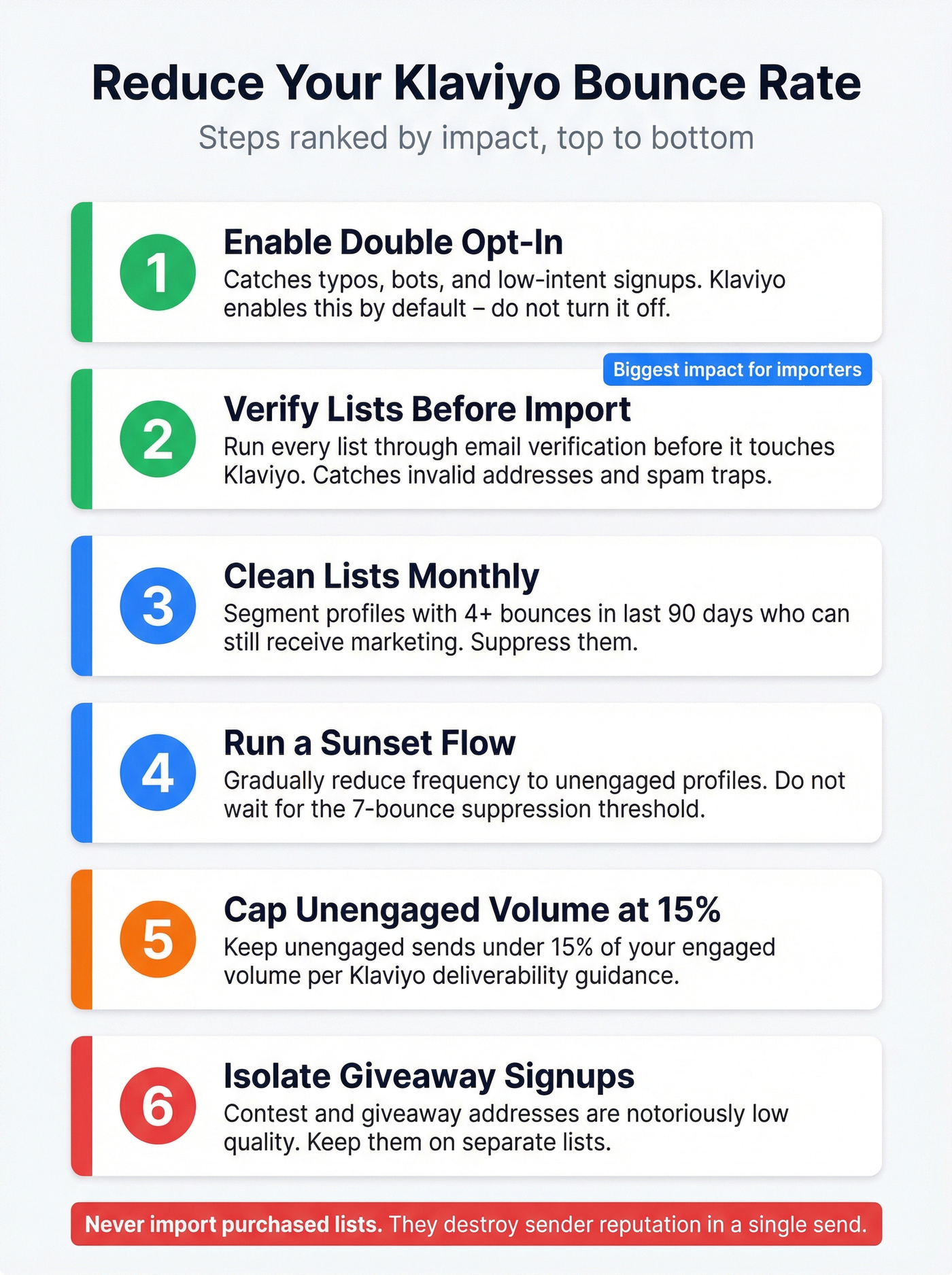
Enable double opt-in. Klaviyo sets lists to double opt-in by default - don't turn it off. It catches typos, bots, and low-intent signups before they enter your database.
Clean lists monthly. Build a segment of profiles with 4+ bounced emails in the last 90 days who can still receive email marketing. Suppress them.
Run a sunset flow. Gradually reduce send frequency to unengaged profiles before suppressing them. Don't wait for Klaviyo's 7-bounce threshold - each bounce still damages your reputation.
Keep unengaged volume under 15% of your engaged sends, per Klaviyo's deliverability guidance.
Isolate contest and giveaway signups on separate lists. These addresses are notoriously low-quality.
Never import purchased lists. They're loaded with invalid addresses and spam traps. We've seen this destroy sender reputations in a single send.

Verify Your List Before Importing
Klaviyo's own docs don't cover this part: verify your list before it ever enters your account. Klaviyo suppresses hard bounces after the fact, but by then the damage to your sender reputation is already done.
In our testing, pre-import verification eliminated hard bounces almost entirely. Prospeo runs a 5-step verification process - catch-all handling, spam-trap removal, honeypot filtering - with 98% email accuracy. Snyk's sales team dropped bounce rates from 35-40% to under 5% after switching to pre-import verification. The free tier gives you 75 emails per month to test, and paid plans run roughly $0.01 per email.
If you're comparing tools, start with an email verification workflow and a dedicated email checker tool for bulk uploads.
NeverBounce charges ~$8 per 1,000 emails with 80+ integrations, and ZeroBounce starts at ~$15 per 2,000 emails. Both work. Skip NeverBounce if you need granular catch-all handling, though - that's where it falls short compared to dedicated verification tools.
Job changes silently kill B2B lists. Prospeo refreshes 300M+ profiles every 7 days - not every 6 weeks - so you catch deactivated corporate emails before they become hard bounces in your next Klaviyo campaign.
Replace dead addresses with verified contacts before your next send.
Klaviyo vs. Other Platforms: Bounce Handling
If you're migrating to Klaviyo or running campaigns across multiple platforms, it helps to understand how bounce handling differs.
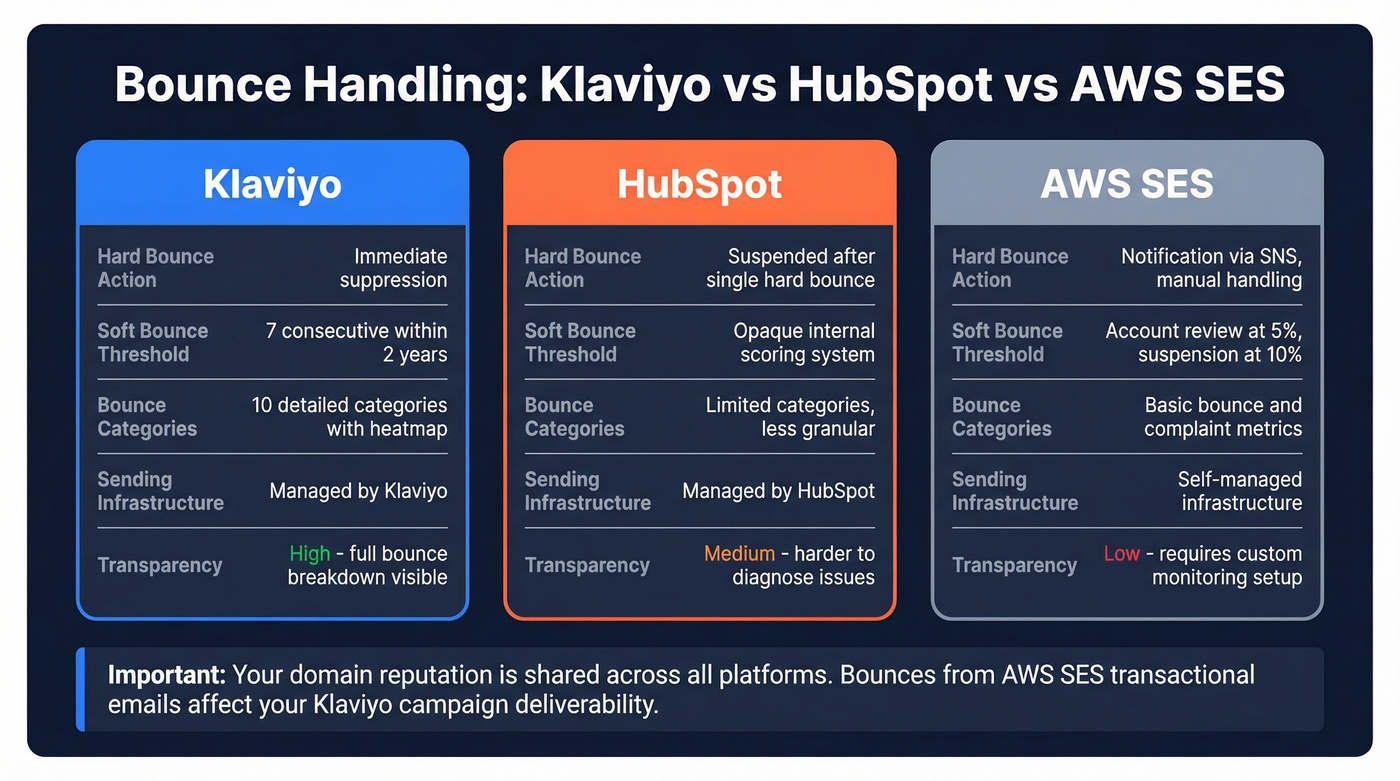
HubSpot suspends sending to contacts after a single hard bounce but uses a more opaque scoring system for soft bounces. It doesn't expose the same granular 10-category breakdown Klaviyo provides, which makes diagnosing problems harder. For teams using AWS SES as their sending infrastructure for transactional email, Amazon recommends staying below 2% and will place your account under review at 5%, with potential suspension at 10%.
Klaviyo abstracts this away since it manages its own sending infrastructure. But if you're also sending transactional emails through Amazon SES, those bounce rates feed into the same domain reputation that affects your Klaviyo campaigns. Let's be clear: your domain reputation doesn't care which platform sent the email.
If you're troubleshooting deeper issues, use an email deliverability checklist and confirm your SPF, DKIM, DMARC alignment end-to-end.
FAQ
What triggers Klaviyo to suppress a bounced email?
Hard bounces trigger immediate suppression - the profile is blocked from future sends. Soft bounces trigger suppression after 7 consecutive failures within a 2-year window. Once suppressed, profiles can't receive email marketing unless manually unsuppressed.
Does bounce rate affect my deliverability score?
Yes. It's one of five metrics - alongside open rate, click rate, unsubscribe rate, and spam complaints - that determine your 0-100 Klaviyo deliverability score. The score updates daily and requires 1,000+ emails sent in the last 30 days.
How can I prevent hard bounces before sending?
Verify your email list before importing it into Klaviyo using a dedicated verification tool. Pre-import verification catches invalid addresses, spam traps, and catch-all domains. Combined with double opt-in, this eliminates the vast majority of hard bounces.
Is the bounce formula the same in Klaviyo and Mailchimp?
The formula is essentially identical, but suppression logic differs. Klaviyo suppresses after 7 consecutive soft bounces within two years; Mailchimp uses its own internal threshold that's less transparent. When comparing metrics across platforms, make sure you're looking at the same time window and message types - campaign-only versus campaign-plus-flow numbers can diverge significantly.