The Email Marketing Deliverability Playbook ESPs Won't Write
Your marketing team just ran a big campaign - the one you spent three weeks building - and open rates dropped from 35% to 12% overnight. Nobody changed the subject line. Nobody switched the audience. The emails just stopped reaching inboxes.
The problem almost certainly isn't your content, your send time, or your subject line. It's upstream. Bad data, missing authentication records, and decayed lists wreck email marketing deliverability more than every spam-trigger word combined. Fixing it starts with data, authentication, and monitoring. This is the operational playbook: DNS records you can copy, warm-up schedules you can follow, and benchmarks you can measure against.
What You Need (Quick Version)
Three things solve 80% of deliverability problems:
- Set up SPF + DKIM + DMARC. The actual DNS records are below - copy, paste, publish.
- Verify your list before every send. Bad data is the #1 preventable deliverability killer. Run every list through verification that catches invalid addresses, spam traps, and honeypots before you hit send.
- Monitor with free tools. Google Postmaster Tools, Microsoft SNDS, and Yahoo Sender Hub cost nothing and surface problems before they compound.
Everything else in this article is the how and why behind those three pillars.
Delivery vs. Inbox Placement
Most marketers confuse delivery with deliverability, and the distinction matters enormously. Delivery means the mailbox provider accepted your email - it didn't bounce. Deliverability means the email actually landed in the inbox where someone can see it. An email that's "delivered" to the spam folder is technically delivered but functionally invisible.
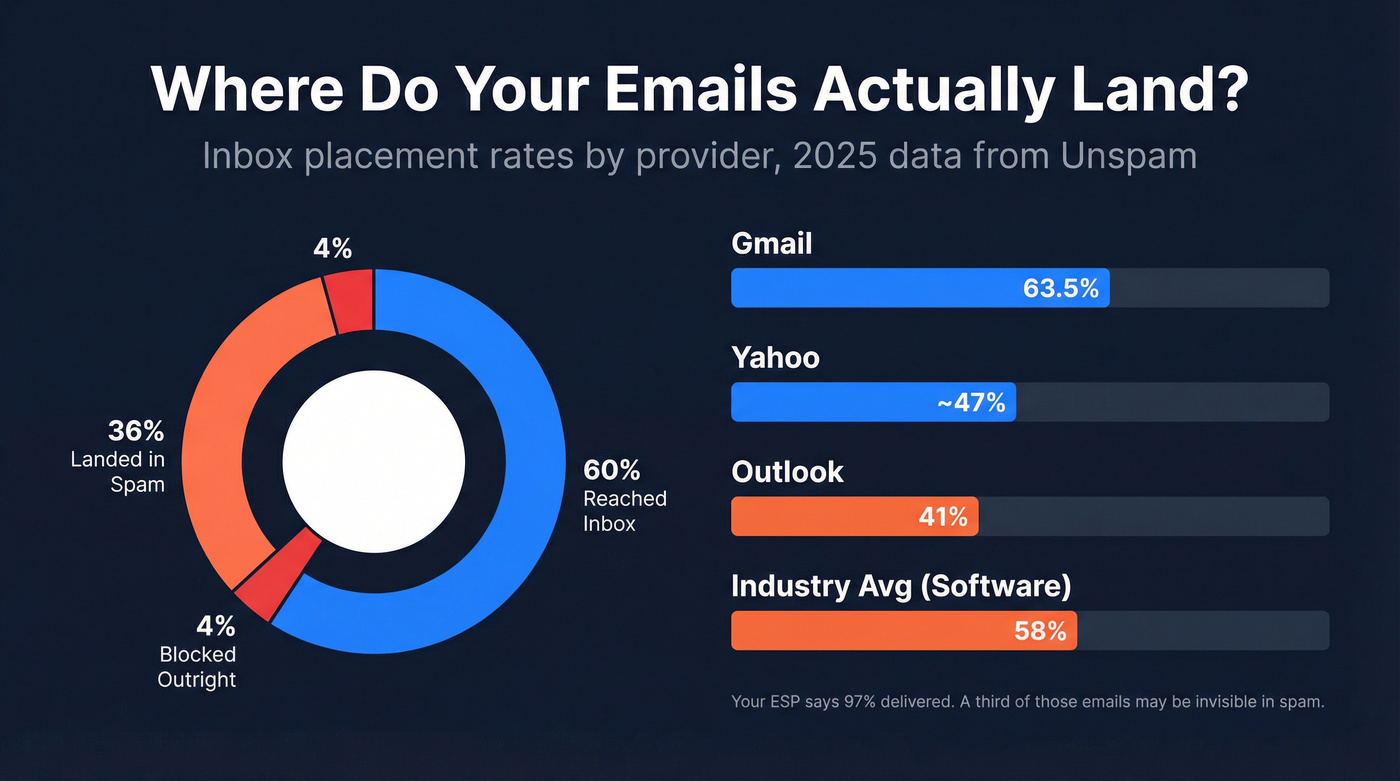
The gap between those two metrics is staggering. An Unspam analysis of millions of email tests in 2025 found that only 60% reached a visible mailbox location, 36% landed in spam, and 4% were blocked outright. Your ESP might report a 97% delivery rate while a third of your emails sit in spam folders, unseen and unclicked.
Provider-specific numbers make this even starker. Gmail inbox rates peaked at 87.5% mid-2025 before dropping to 63.5% by December as enforcement tightened. Outlook hovers around 41%. Yahoo sits in the 45-50% range. If your audience skews Outlook-heavy, expect significantly tighter filtering than Gmail-centric benchmarks suggest. Industry matters too - travel brands see roughly 68% inbox placement, retail sits at 62%, and software companies average just 58%. Know your baseline before you start optimizing.
That's why "delivery rate" as reported by most platforms is a vanity metric. Inbox placement is what drives revenue.
The Revenue Math
Email remains the highest-ROI marketing channel by a wide margin. A Litmus survey of nearly 500 marketers found that 35% see $10-$36 return for every $1 spent, and another 30% report $36-$50 returns. At the high end, 5% of respondents see north of $50 per dollar.
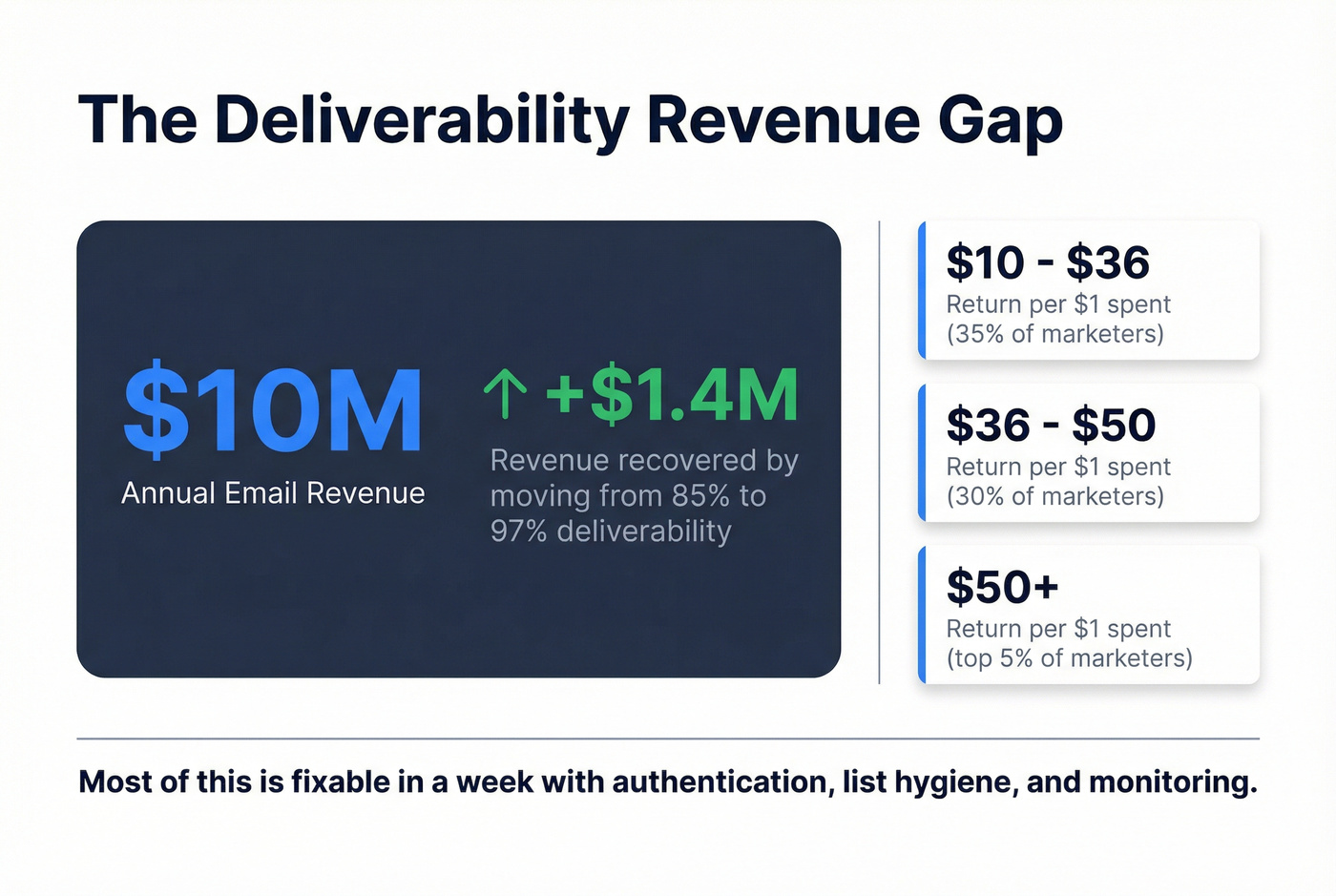
Now apply the deliverability math. Oracle's deliverability team documented that for an email program generating $10M annually, moving deliverability from 85% to 97% can mean up to $1.4M in additional revenue. That's not a hypothetical - it's a 14% improvement in reach translating directly to a 14% revenue lift.
The frustrating part? Most of this is fixable in a week. Authentication records, list hygiene, and monitoring tools are either free or cheap. The revenue you're losing to poor inbox placement dwarfs the cost of fixing it.
What Affects Inbox Placement
Seven factors determine whether your emails reach inboxes or spam folders.
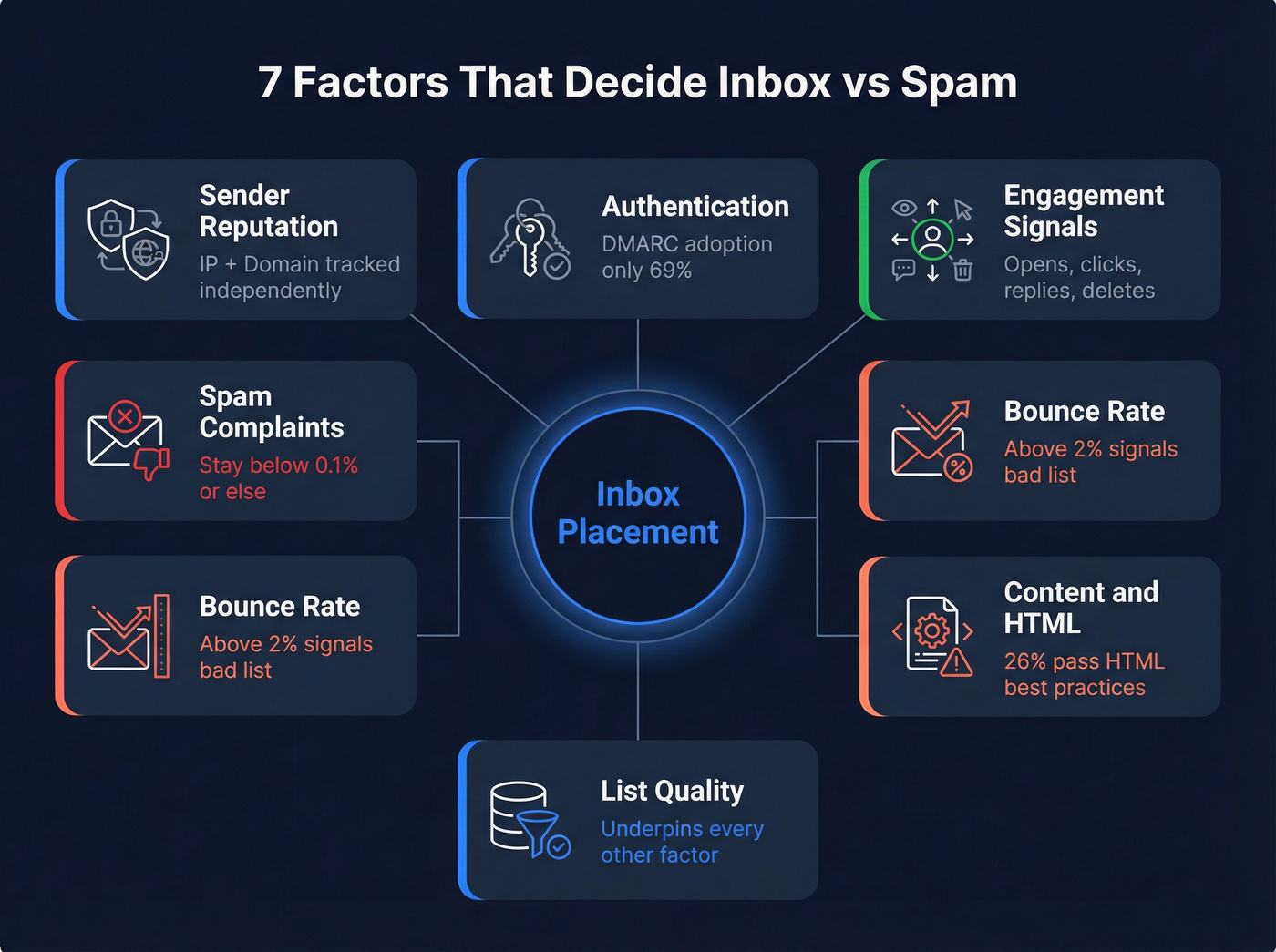
Sender reputation operates at two levels: IP reputation and domain reputation. Mailbox providers track both independently. A clean IP on a damaged domain still lands in spam. Most modern filtering weighs domain reputation more heavily, which means you can't just switch IPs and start fresh.
Authentication is table stakes. SPF adoption sits at 92%, DKIM at 88%, but DMARC lags at just 69% according to Unspam's 2025 dataset. That 31% gap is a massive vulnerability - and for bulk senders, DMARC is now a requirement from Google, Yahoo, and Microsoft.
Engagement signals are the new king of filtering. Gmail and Outlook track opens, clicks, replies, and deletes at the domain level. If recipients consistently ignore your emails, the algorithm learns to deprioritize you. Sending to unengaged segments actively damages your reputation for engaged ones. One wrinkle worth calling out: Apple Mail Privacy Protection auto-opens emails, inflating open rates while providing zero signal about actual engagement. Don't rely on Apple opens for segmentation - use clicks and replies instead. For a deeper breakdown of what to track, see open rates vs click rates.
Spam complaints have a hard threshold: stay below 0.1%. Hit 0.3% and you're in serious trouble. Every "Report Spam" click is a vote against your domain.
Bounce rates above 2% signal list quality problems. Hard bounces are especially damaging - they tell providers you're sending to addresses that don't exist, which is a hallmark of purchased or scraped lists.
Content and HTML quality matter more than most teams realize. Only 26% of emails in Unspam's dataset passed HTML best-practice checks, and poor HTML structure made emails 18-25% more likely to land in spam. Broken links appeared in 1 out of every 8 emails tested.
List quality underpins everything above. Bad addresses cause bounces. Disengaged contacts tank engagement metrics. Spam traps destroy reputation. Every other factor improves when your list is clean. And here's a stat that should alarm you: only 14% of emails in Unspam's dataset included a compliant List-Unsubscribe header.
2026 Bulk Sender Rules
If you send 5,000+ emails per day to Gmail, Yahoo, or Outlook.com recipients, you're a bulk sender. Here's how enforcement has rolled out:
| Date | Provider | Action |
|---|---|---|
| Feb 2024 | Google, Yahoo | Initial enforcement; 421 deferrals |
| Apr 2024 | Google, Yahoo | Stricter rejection rates |
| May 2025 | Microsoft | Outlook.com rejection begins |
| Nov 2025 | Permanent 550 rejections | |
| 2026 | All three | Full enforcement; industry standard |
As of 2026, this is the baseline. Non-compliance equals rejection.
The requirements checklist:
- Publish SPF and DKIM; ensure alignment with your From domain
- Publish DMARC with at least
p=none(thoughp=rejectis best practice) - Support one-click unsubscribe via List-Unsubscribe + List-Unsubscribe-Post headers (RFC 8058)
- Process unsubscribes within 2 days
- Keep spam complaint rate below 0.1%
When something goes wrong, Gmail tells you why with specific SMTP error codes:
| Error Code | Meaning |
|---|---|
| 421-4.7.26 | SPF + DKIM failing |
| 421-4.7.30 | DKIM doesn't pass |
| 421-4.7.32 | No DMARC alignment |
If you're seeing these in your bounce logs, the fix is in the next section. If you need a broader runbook, use this email deliverability checklist.

You just read that bounce rates above 2% destroy sender reputation. Prospeo's 5-step email verification - with spam-trap removal, honeypot filtering, and catch-all handling - delivers 98% accuracy. That's how Snyk cut bounce rates from 35-40% to under 5% across 50 AEs.
Stop bleeding revenue to bad data. Verify before you send.
How to Set Up Authentication
SPF
SPF tells mailbox providers which servers are authorized to send email on behalf of your domain. You publish it as a single TXT record in DNS.
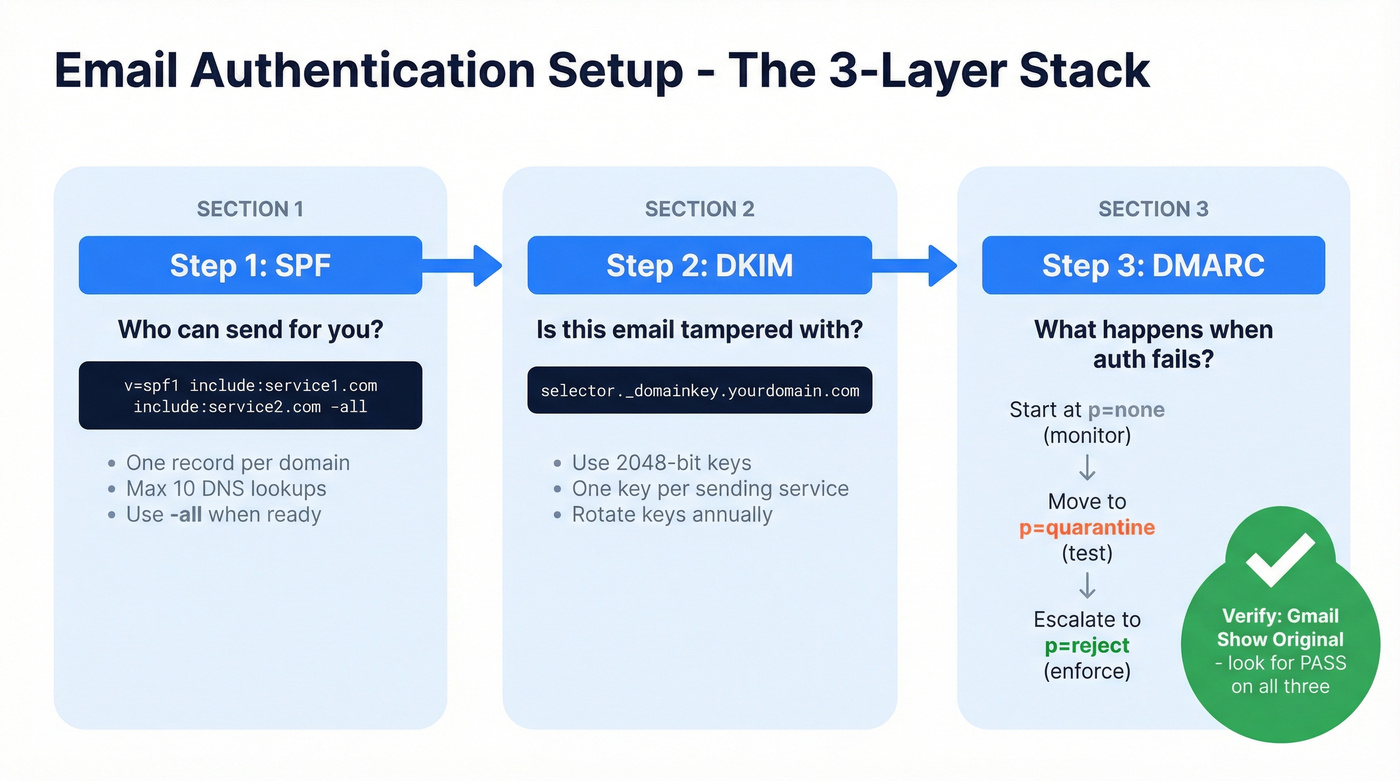
v=spf1 include:mailgun.org include:_spf.google.com -all
Key rules: you can only have one SPF record per domain. If you use multiple sending services, merge them into a single record with multiple include: statements. Be mindful of the 255-character-per-string DNS limit and stay within the 10-DNS-lookup limit. The -all at the end means "reject anything not listed" - use it once you're confident your record is complete.
If you want the full breakdown (including alignment and common mistakes), see SPF + DKIM + DMARC.
DKIM
DKIM adds a cryptographic signature to every email, proving it hasn't been tampered with in transit. Each sending service needs its own DKIM record.
default._domainkey.yourdomain.com TXT "v=DKIM1; k=rsa; p=MIGfMA0GCS..."
Use 2048-bit keys - 1024-bit is outdated and weaker. Rotate keys annually. Every service that sends on your behalf should have a separate DKIM selector and key.
DMARC Rollout
DMARC ties SPF and DKIM together and tells providers what to do when authentication fails. The rollout should be gradual:
_dmarc.yourdomain.com TXT "v=DMARC1; p=none; rua=mailto:reports@yourdomain.com; ruf=mailto:forensics@yourdomain.com; sp=quarantine; aspf=r; adkim=r"
Start at p=none to collect reports without affecting delivery. Once you've reviewed the reports and confirmed all legitimate sending sources pass authentication, move to p=quarantine. After a few weeks of clean data, escalate to p=reject.
Here's the thing: DMARC at p=none is the bare minimum. If you're still sitting there in 2026, you're running with the door open. The whole point of DMARC is enforcement - p=reject is where the real protection lives.
To validate everything, send a test email to a Gmail address, open it, click the three dots, and select "Show original." You'll see SPF, DKIM, and DMARC with PASS or FAIL next to each.
How to Warm Up a New IP or Domain
Let's talk about the most common warm-up failure we see. A team migrates from Mailchimp to HubSpot and their first send to 50,000 contacts lands 40% in spam. They skipped the ramp and paid for it immediately.
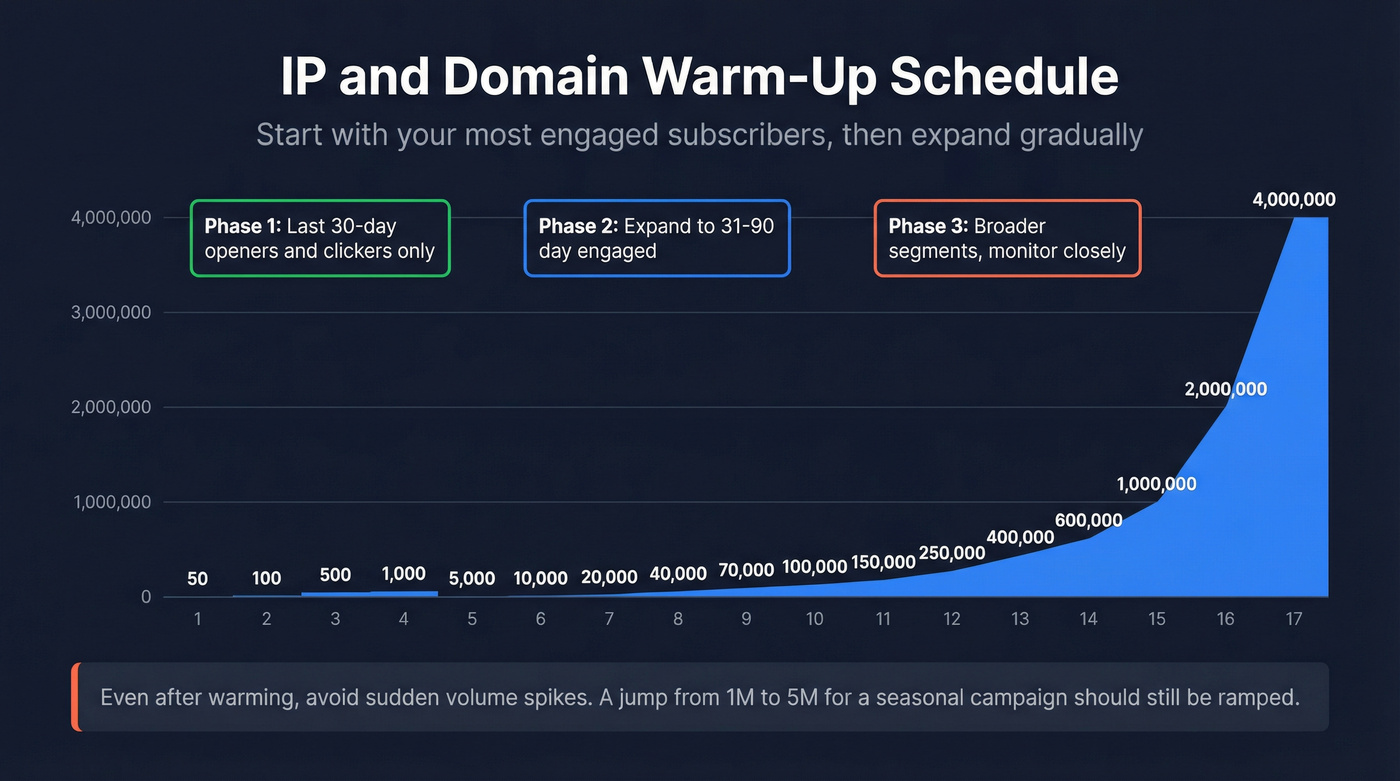
IP warming builds reputation for a new dedicated IP address. Domain warming builds reputation for a new sending domain or subdomain. The scenario determines what you need:
- Warm IP + new domain: You still need domain warming
- New IP + established domain: IP warming required, but domain reputation helps
- New IP + new domain: Warm both simultaneously - this is the hardest path
The strategy is the same regardless: start with your most engaged subscribers and ramp volume gradually. Send to people who opened or clicked in the last 30 days first, then expand to 31-90 days, then broader segments.
If you're doing this for outreach (not opt-in marketing), use an automated email warmup approach that matches cold constraints.
Here's a concrete day-by-day ramp from Braze for a dedicated IP:
| Day | Volume | Day | Volume |
|---|---|---|---|
| 1 | 50 | 10 | 100,000 |
| 2 | 100 | 11 | 150,000 |
| 3 | 500 | 12 | 250,000 |
| 4 | 1,000 | 13 | 400,000 |
| 5 | 5,000 | 14 | 600,000 |
| 6 | 10,000 | 15 | 1,000,000 |
| 7 | 20,000 | 16 | 2,000,000 |
| 8 | 40,000 | 17 | 4,000,000 |
| 9 | 70,000 |
The full process typically takes 2-6 weeks depending on your target volume and engagement rates. Even after warming, large volume jumps - say, 1M to 5M for a seasonal campaign - should be ramped. Sudden spikes look suspicious to mailbox providers regardless of your established reputation.
List Hygiene
You don't have a deliverability problem. You have a data quality problem.
That's not a hot take - it's the pattern behind almost every deliverability crisis we've seen. Bad addresses cause bounces. Bounces damage sender reputation. Damaged reputation pushes emails to spam. Spam placement tanks engagement metrics. Lower engagement further damages reputation. It's a cascade, and it starts with data.
The fix is straightforward: verify before you send. Double opt-in for new subscribers. Sunset contacts who haven't engaged in 6 months. Run re-engagement campaigns before you cut them - but cut them if they don't respond. If you need copy ideas, use these re-engagement campaigns and re-engagement subject lines.
Prospeo's 5-step verification catches the problems most tools miss: invalid addresses, catch-all domains, spam traps, and honeypots at 98% accuracy. The results speak for themselves - Meritt dropped bounce rates from 35% to under 4%, Snyk went from 35-40% to under 5%, and Stack Optimize maintains under 3% bounce with 94%+ deliverability across all client accounts. The free tier gives you 75 email verifications per month plus 100 Chrome extension credits to test it.
If you're comparing vendors, start with this list of email checker tools or the deeper breakdown of email ID validators.
List decay is the silent deliverability killer this article warns about. Prospeo refreshes its 300M+ contact database every 7 days - not every 6 weeks like competitors. Stack Optimize built a $1M agency on Prospeo data with 94%+ deliverability and zero domain flags.
Every week your list ages, your inbox placement drops. Fix it at the source.
Cold Email - Different Rules
Cold outreach operates under tighter constraints than opt-in marketing email. There's no prior relationship, no engagement history, and mailbox providers are watching closely for signals of unsolicited bulk mail.
The warm-up schedule for a cold outreach inbox is much more conservative:
- Week 1-2: 5-10 emails/day
- Week 3-4: 15-20/day
- Week 5-6: 30-40/day
- Week 7+: Max 50/day per inbox
Never exceed 50 cold emails per day from a single inbox. At peak volume, split the load: 25 warm-up emails and 25 cold sends. Increase volume by no more than 20-30% per week.
Your monitoring targets are non-negotiable: reply rate above 5%, bounce rate under 2%, spam complaints under 0.1%. If any of those slip, reduce volume immediately and diagnose. Cold outreach lives and dies on data quality - verified contact data is the difference between a domain that builds reputation and one that gets blacklisted. For more on staying compliant and effective, see cold email tactics.
Look, if your deal sizes sit below five figures, you probably don't need a dedicated IP or enterprise deliverability tooling. A clean list, proper authentication, and a shared IP from a reputable ESP will get you 95% of the way there. Save the infrastructure budget for when volume actually demands it.
Tools Worth Using
Start with the free tools, because if you aren't using all three of these, you're flying blind.
Google Postmaster Tools shows your domain and IP reputation with Gmail, spam rates, authentication results, and delivery errors. Microsoft SNDS provides sender data for Outlook.com/Hotmail/Live. Yahoo Sender Hub covers Yahoo and AOL. Together, they give you visibility into three major mailbox providers - and they cost nothing. For quick one-off checks, mail-tester.com and MXToolbox's free lookup can diagnose issues in seconds.
Paid tools fall into four categories: inbox placement testing, verification, warm-up, and monitoring.
| Tool | Type | Best For | Price |
|---|---|---|---|
| Google Postmaster | Monitoring | Gmail reputation tracking | Free |
| Microsoft SNDS | Monitoring | Outlook.com sender tracking | Free |
| Yahoo Sender Hub | Monitoring | Yahoo/AOL reputation tracking | Free |
| Prospeo | Verification | Pre-send list cleaning | Free tier; ~$0.01/email |
| Mailtrap | Testing/delivery | Staging email tests | From $15/mo |
| Everest by Validity | Inbox placement | Seed-list inbox testing | From $29/mo |
| ZeroBounce | Verification | Bulk list cleaning | From $49/mo |
| GlockApps | Inbox placement | Multi-provider placement tests | From $85/mo |
| MXToolbox | Monitoring | DNS and blacklist monitoring | $129-$399/mo |
| InboxAlly | Warm-up/placement | Engagement-based warm-up | From $149/mo |
A word on seed-list inbox placement tests like GlockApps and Everest: they're a useful proxy, but they don't reflect reality. Seed accounts don't engage with your emails - they don't open, click, or reply. Since engagement is a major filtering signal, seed-list results will always diverge from actual inbox placement for your real audience. Use them as a directional signal, not gospel.
The benchmark framing that keeps showing up across deliverability teams in our experience is simple: list hygiene is the single highest-leverage deliverability investment. Run verification before every major send, not just once a quarter. If you want a full measurement framework, use email deliverability tracking.
Automation Deliverability Tips
Skip this section if you aren't running automated sequences yet - but come back when you do, because this is where silent damage happens.
Email automation - welcome flows, nurture drips, re-engagement campaigns - runs continuously without manual oversight. A broken trigger or stale segment can silently send to invalid addresses for weeks before anyone notices. We've seen teams discover that a welcome sequence had been bouncing 15% of sends for three months because nobody checked. Apply the same hygiene rigor to your automated flows: verify addresses at the point of entry, suppress hard bounces immediately, and audit your automation segments quarterly to remove contacts who've gone cold.
FAQ
What's a good inbox placement rate?
Target 95%+ as your floor and 98%+ as excellent. Your ESP-reported delivery rate should be 99%+. These are different numbers - delivery rate measures server acceptance, inbox placement measures where the email actually lands. Keep spam complaints below 0.1% and bounce rate under 2%.
Why are my emails going to spam?
The most common causes are missing or misconfigured authentication (SPF/DKIM/DMARC), high bounce rates from bad contact data, spam complaint rates above 0.1%, poor sender reputation, or sudden volume spikes. Check Google Postmaster Tools for your domain reputation first - it'll tell you whether the problem is authentication, reputation, or content.
How long does IP warming take?
Typically 2-6 weeks depending on your target volume, sending frequency, and engagement rates. Start with your most engaged subscribers - people who opened or clicked in the last 30 days - and ramp gradually using the day-by-day schedule above.
Do I need a dedicated IP address?
Only if you send 100,000+ emails per month consistently. Below that volume, a shared IP from a reputable ESP is fine and actually beneficial - you benefit from the collective sending reputation. A dedicated IP gives you full control but requires proper warming and consistent volume to maintain it.