Hard Bounce: Codes, Benchmarks, and the Prevention Workflow
You sent 10,000 emails. 400 came back as hard bounces. Your ESP is throttling your sends, your domain reputation is tanking, and the campaign you spent two weeks building is dead on arrival. These permanent failures aren't just a metric - they're the fastest way to destroy your outbound infrastructure.
What You Need (Quick Version)
A hard bounce means the email permanently failed. The address doesn't exist, the domain is dead, or the server flat-out rejected you. Remove the address immediately - never retry.
If your permanent bounce rate is above 1%, your data source is the problem. Above 2%, stop sending and verify your entire list before the next campaign. The fix is always upstream: verify before you send, not after you bounce.
What Is a Hard Bounce?
A hard bounce is a permanent email delivery failure. The receiving mail server looked at your message, determined it can't be delivered, and sent back a non-delivery report (NDR). The key word is permanent. Unlike a temporary glitch, this won't resolve itself if you wait an hour and try again.
The most common reason is simple: the email address doesn't exist. The person left the company, someone fat-fingered the address during a webinar signup, or the entire domain expired. Whatever the cause, the server's response is final - and retrying doesn't just waste sends, it actively damages your sender reputation with every attempt. Non-existent domains fall into the same bucket. Treat them identically and remove them.
Hard Bounce vs. Soft Bounce
Not all bounces are the same, and treating them identically is a mistake that costs teams email deliverability every day.
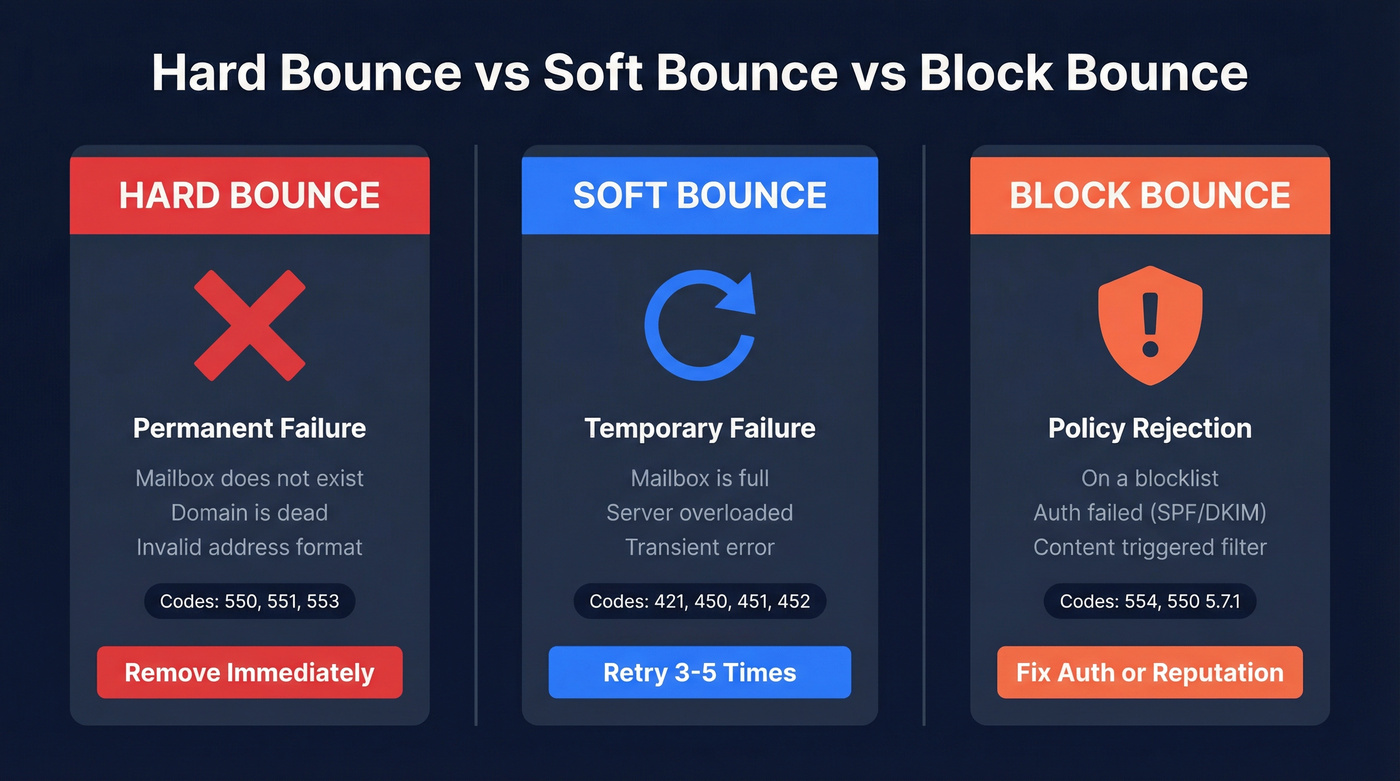
| Type | Meaning | Common Codes | Action |
|---|---|---|---|
| Hard | Address doesn't exist | 550, 551, 553 | Remove immediately |
| Soft | Temporary failure | 421, 450, 451, 452 | Retry 3-5 times |
| Block | Policy rejection | 554, 550 5.7.1 | Fix auth/reputation |
Permanent bounces mean the mailbox doesn't exist, the domain is dead, or the address format is invalid. SMTP codes in the 550-553 range signal these. No retry strategy - remove the address from every list it touches and add it to your suppression file.
Soft bounces are temporary. The mailbox might be full (452), the server overloaded (421), or there's a transient processing error (451). Your ESP will typically retry automatically. But here's the operational rule: if an address soft bounces across 3-5 consecutive sends, treat it as permanent and remove it.
Block bounces are the ones that sting. The address exists, the server is running, but it rejected you on policy grounds - you're on a blocklist, your authentication failed, or your content triggered a filter. Code 554 and enhanced code 550 5.7.1 are the telltale signs. The fix isn't removing the address; it's fixing your sending infrastructure.
SMTP Codes Cheat Sheet
Every bounce comes with a code. Understanding these codes is the difference between diagnosing a problem in minutes versus spending days guessing.
The RFC 3463 enhanced status code format follows a class.subject.detail structure. The class tells you severity (4 = temporary, 5 = permanent), the subject tells you category (1 = addressing, 2 = mailbox, 3 = mail system, 7 = security/policy), and the detail tells you exactly what went wrong.
| Code | Enhanced | Plain English | Action |
|---|---|---|---|
| 550 | 5.1.1 | Mailbox doesn't exist | Remove now |
| 551 | 5.1.6 | Address moved, no forward | Remove now |
| 553 | 5.1.3 | Invalid address format | Fix or remove |
| 550 | 5.7.1 | Blocked by policy | Fix auth/reputation |
| 421 | 4.7.x | Temporary throttle | Slow down, retry |
| 450 | 4.2.1 | Mailbox temp unavailable | Retry later |
| 452 | 4.2.2 | Mailbox full | Retry 3-5 times |
Codes starting with 5 are your permanent failures requiring immediate removal. Codes starting with 4 are temporary and worth retrying. The enhanced codes after the basic three-digit response give you the granularity to actually fix the problem rather than just react to it.

Every hard bounce traces back to unverified data. Prospeo's 5-step verification with catch-all handling, spam-trap removal, and honeypot filtering delivers 98% email accuracy - so your bounce rate stays under 1% instead of torching your domain.
Stop diagnosing bounce codes. Start with data that doesn't bounce.
Why Hard Bounces Wreck Deliverability
ISPs don't just deliver or reject individual emails. They build a reputation profile for your sending domain over time, and every permanent bounce tells Gmail, Microsoft, and Yahoo that you're sending to addresses that don't exist - which is exactly what spammers do.
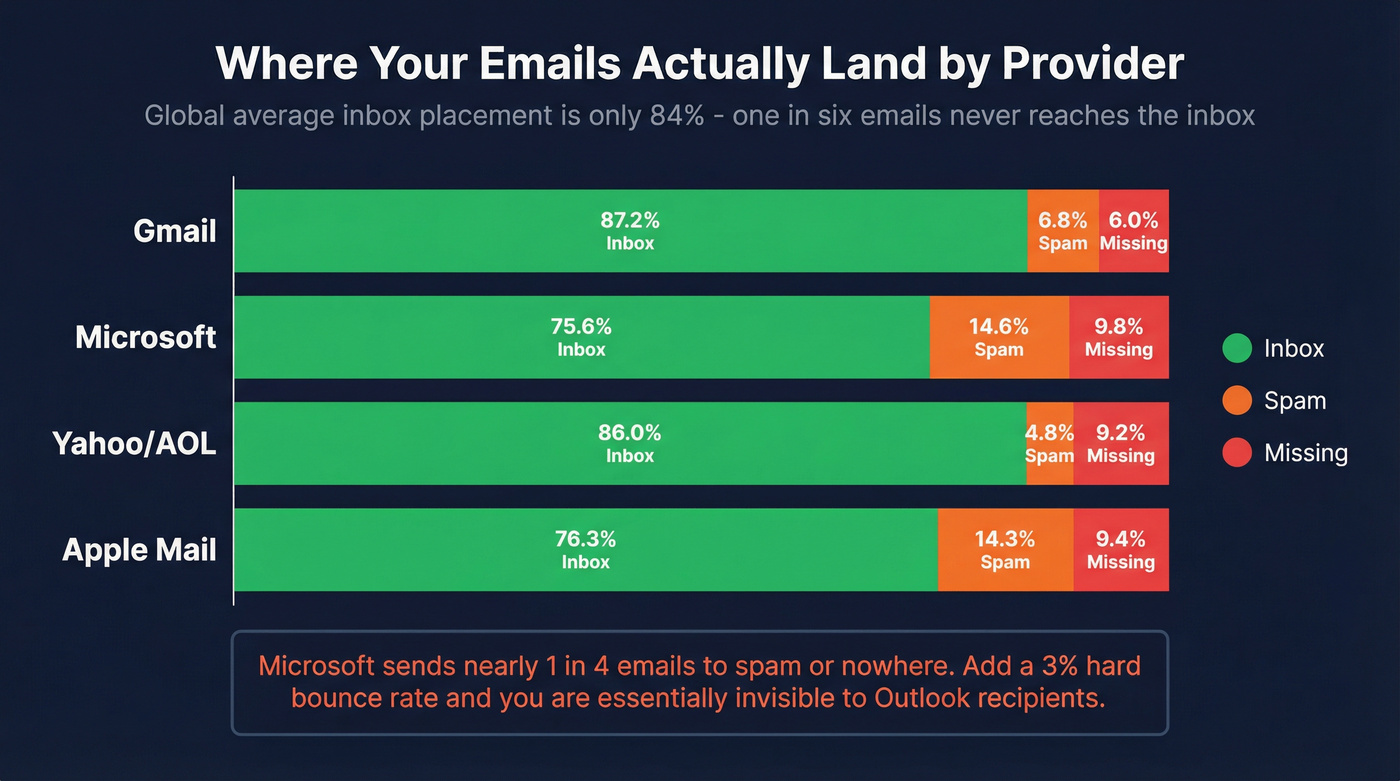
A hard bounce rate above 2% on any single send triggers filtering or blocking. Global inbox placement sits at roughly 84%, meaning one in six emails doesn't reach the inbox even under normal conditions. The ISP breakdown makes this starker:
| Provider | Inbox | Spam | Missing |
|---|---|---|---|
| Gmail | 87.2% | 6.8% | 6.0% |
| Microsoft | 75.6% | 14.6% | 9.8% |
| Yahoo/AOL | 86.0% | 4.8% | 9.2% |
| Apple Mail | 76.3% | 14.3% | 9.4% |
Microsoft is already sending nearly 1 in 4 emails to spam or nowhere. Add a 3% permanent bounce rate on top of that, and you're essentially invisible to Outlook recipients. The damage compounds - once your domain reputation drops, even your clean sends start landing in spam.
Here's the thing most guides won't tell you: engagement-based filtering means even valid addresses can bounce you if enough recipients at that provider have been ignoring your emails. Reputation isn't per-address. It's everything.
Acceptable Bounce Rates
| Rating | Total Bounce | Hard Bounce |
|---|---|---|
| Excellent | < 1% | < 0.5% |
| Good | 1-2% | 0.5-1% |
| Acceptable | 2-3% | 1-1.5% |
| Concerning | 3-5% | 1.5-3% |
| Critical | > 5% | > 3% |
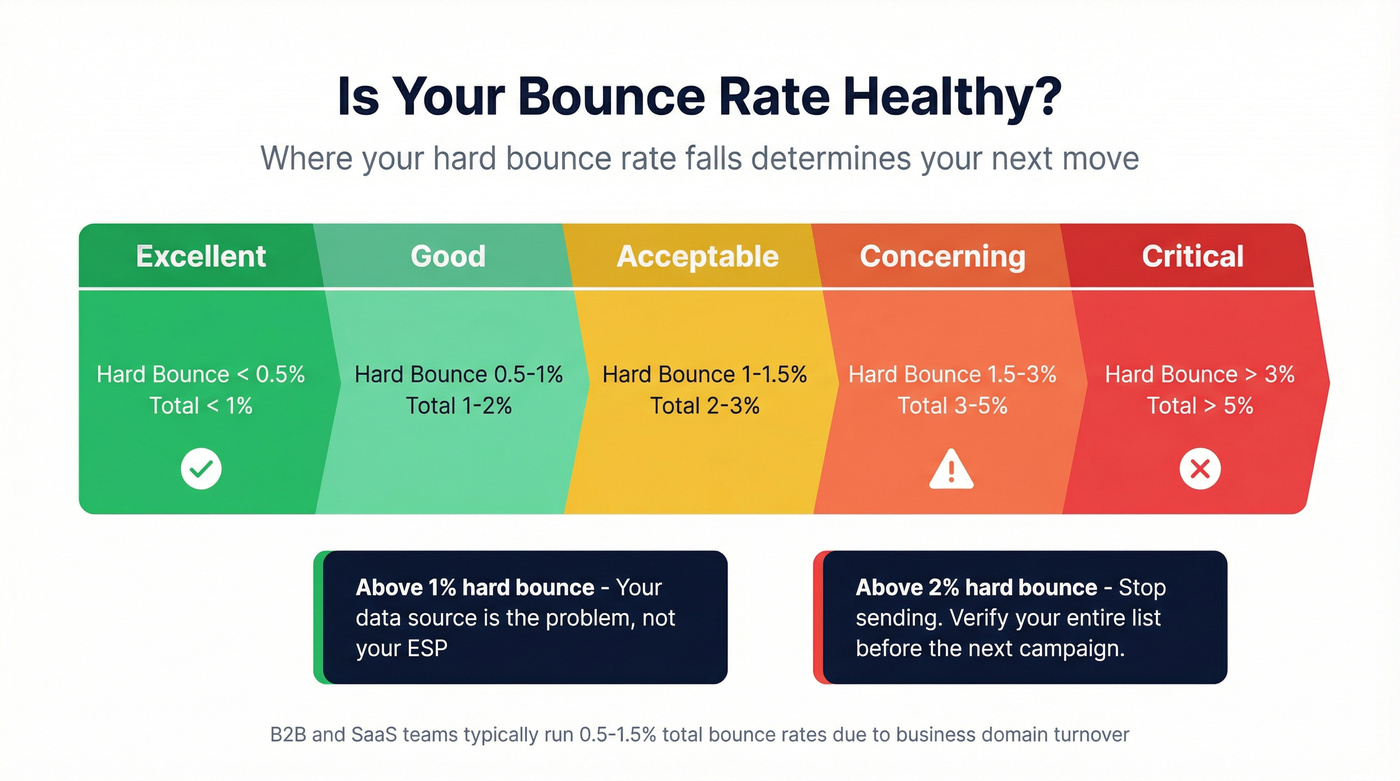
B2B and SaaS teams typically run 0.5-1.5% total bounce rates because they're sending to business domains with higher turnover. E-commerce sits higher at 1.5-3% due to consumer email churn.
If you're running outbound sequences for deals under $15k, you probably can't afford a permanent bounce rate above 0.5%. The math just doesn't work - your domain is your most valuable asset, and replacing a burned domain costs more than the deals you're chasing. The consensus on r/coldemail backs this up: once you torch a domain, you're starting from scratch with warmup, and that's weeks of lost pipeline.
Above 1% means your data source is the problem, not your ESP. Above 2% and you should stop sending entirely until you've verified your list.
What Causes Hard Bounces
Most permanent bounces trace back to one root cause: bad data entering the pipeline.
Invalid or non-existent addresses are the top offender. The person left the company, the account was deactivated, or the address never existed in the first place. Email data decays at roughly 2% per month - a list that was 95% valid in January is 83% valid by December. In one study, 2.3% of a verified list went stale in just 8 weeks.
Typos and formatting errors are entirely preventable with real-time validation on forms, but they still account for a surprising share of bounces. "john@compnay.com" instead of "john@company.com" is the kind of thing that should never make it into a sequence.
Purchased or scraped lists are the fastest path to a destroyed domain. These lists are stale by definition and often seeded with spam traps. Skip this if you value your sending infrastructure at all.
Catch-all domains deserve special attention. They accept everything during the SMTP handshake, so verification tools mark them as valid. But catch-all addresses are 27x more likely to bounce than standard addresses when the actual mailbox doesn't exist behind the catch-all. This is one of the most underappreciated causes of permanent delivery failures in outbound.
Role-based addresses like info@, sales@, or support@ generate bounces and spam complaints at higher rates than personal addresses.
We see this scenario constantly: a sales team imports 5,000 conference leads, nobody verifies them, and three months later 8% no longer exist. Data freshness isn't optional. It's the entire game.
How to Prevent Hard Bounces
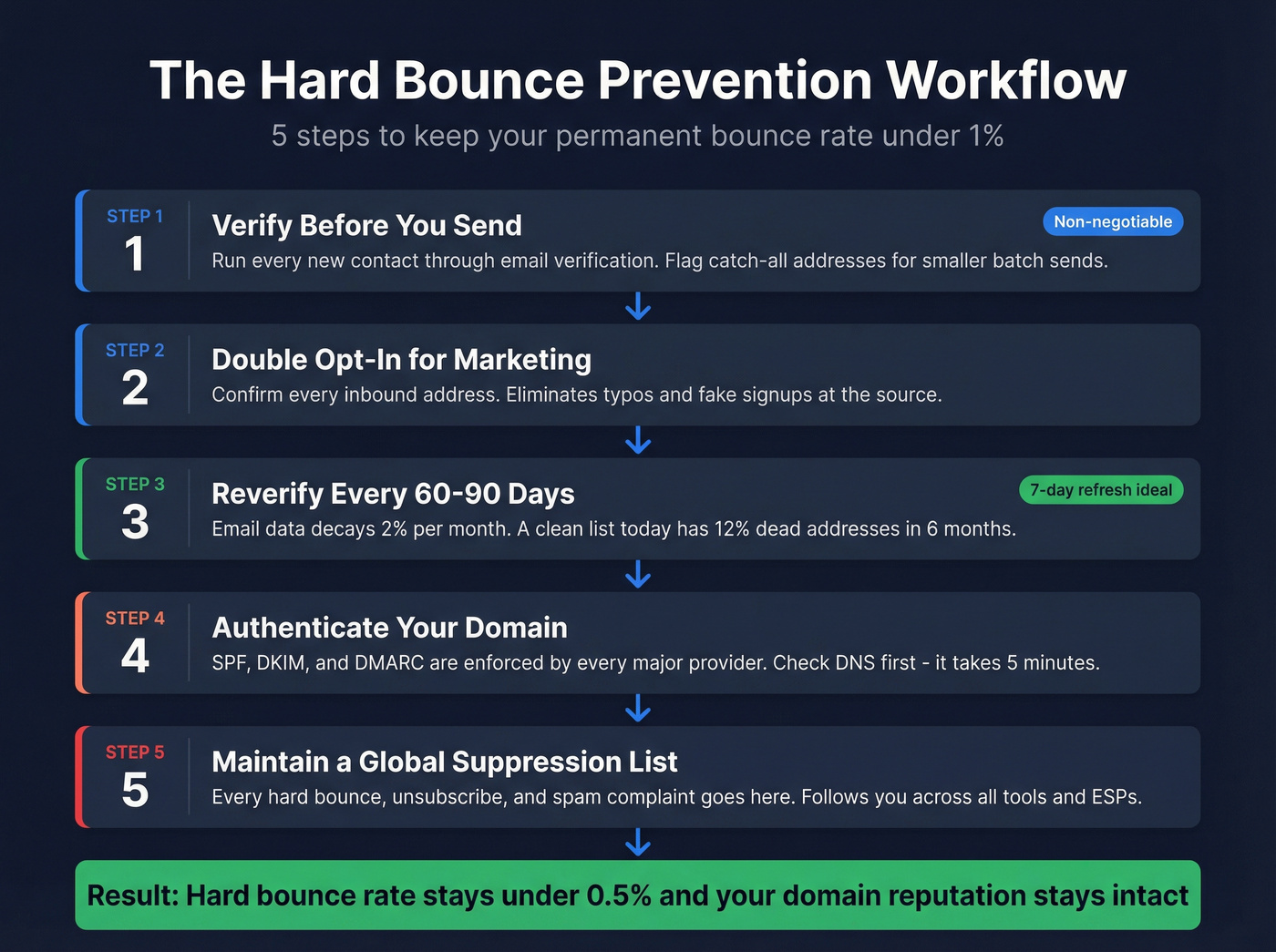
Prevention is a workflow, not a one-time fix. Four steps keep permanent bounces under 1%.
Verify Before You Send
Non-negotiable. Every new contact should pass through email verification before it enters a sequence. Flag catch-all addresses for extra scrutiny - send them in smaller batches or deprioritize them entirely, since verification tools can't confirm whether the actual mailbox exists behind the catch-all.
For context on verification tools and costs:
| Tool | Cost per 1K | Accuracy | Notes |
|---|---|---|---|
| Prospeo | ~$10 | 98% | Free tier: 75/mo, 7-day refresh |
| DeBounce | $1.50-$2 | 97%+ | Budget option |
| MillionVerifier | ~$3.70 | 99% claimed | Bulk-focused |
| NeverBounce | $8 | 97-99% | Mid-range |
| ZeroBounce | $10 | 99% claimed | Pay-as-you-go |
| Hunter | ~$24.50 | 95%+ | Bundled with finder |
Prospeo's 5-step verification process - including catch-all handling, spam-trap removal, and honeypot filtering - runs on a 7-day data refresh cycle versus the 6-week industry average. That freshness gap matters when email data decays 2% per month.
Use Double Opt-In for Marketing
For marketing lists, double opt-in eliminates typos and fake signups at the source. It's the single most effective way to prevent permanent bounces from inbound contacts - every address on your list has been confirmed by the owner.
Set a Reverification Cadence
Verifying once isn't enough. At 2% monthly decay, a list that's clean today will have 12% dead addresses in six months. Reverify active lists every 60-90 days minimum. For high-volume outbound, monthly reverification pays for itself in preserved deliverability. We've found that teams who reverify monthly spend less on verification credits than they'd spend recovering from a single deliverability hit.
If you're building this into RevOps, tie it to CRM hygiene so bad records don't re-enter sequences.
Authenticate Your Domain
SPF, DKIM, and DMARC aren't optional anymore - every major mailbox provider enforces them. Without proper authentication, even valid addresses will block-bounce your emails. We've seen teams chase phantom "data quality" problems for weeks when the real issue was a missing DKIM record. Check your DNS first. It takes five minutes and saves days of troubleshooting.
If you need the full setup, follow an SPF, DKIM, DMARC checklist and validate your SMTP authentication flow end-to-end.
Maintain a Suppression List
Every permanent bounce goes on a global suppression list. Every unsubscribe. Every spam complaint. Also add any address that soft bounces 3-5 consecutive sends. This list follows you across campaigns, ESPs, and tools - if you're switching from Mailchimp to Instantly, that suppression list comes with you. Skipping this step is how teams bounce the same dead addresses month after month.
This is also where email deliverability tracking pays off: you can spot repeat offenders before they burn a domain.
Email data decays 2% per month. Prospeo refreshes every 7 days - not the 6-week industry average - so the addresses in your sequences actually exist when you hit send. At $0.01 per email, fixing your data costs less than one bounced campaign.
Replace your stale list with 143M+ verified emails today.
2026 Bulk Sender Requirements
Gmail, Yahoo, and Microsoft enforce specific requirements for anyone sending at scale. Violate them and your emails get rejected outright.
- Authentication: SPF, DKIM, and DMARC must all pass. No exceptions.
- One-click unsubscribe: Required for marketing and commercial email. The List-Unsubscribe header must be present.
- Spam complaints under 0.3%: Monitor via Google Postmaster Tools. Trending toward 0.3% means you're already in trouble.
- Bounces under 2%: This is the hard ceiling. Exceed it and you'll see throttling within days.
For new domains, start at 5-10 emails per day and ramp over 4-6 weeks. Sending 500 emails from a week-old domain is the fastest way to get blacklisted. Let's be honest - most domain reputation problems we see trace back to teams skipping warmup entirely. If you're scaling, use an email sending infrastructure plan and a proven automated email warmup workflow.
FAQ
Can a hard bounce fix itself?
No. A permanent delivery failure means the address doesn't exist or the domain is dead. Remove it immediately and never retry - each attempt damages your sender reputation further with the receiving provider.
What bounce rate should concern me?
Above 1% signals a data quality problem. Above 2%, major providers like Gmail and Microsoft will throttle or block your sends. Stop sending and verify your entire list before resuming. Mailchimp's documentation echoes the same thresholds.
Does a hard bounce hurt sender reputation?
Yes. Every permanent failure tells the receiving provider you're sending to nonexistent addresses - a hallmark of spammers. Repeated incidents can land your domain on blocklists within days.
How do I verify emails before sending?
Run your list through an email verification tool before any campaign. Look for a service that handles catch-all domains, spam traps, and honeypots - those are the edge cases that basic validators miss.
What's the difference between a hard bounce and a block bounce?
A hard bounce means the address doesn't exist. A block bounce means the address exists but the server rejected you for policy reasons - blacklisting, failed authentication, or content filtering. Different root cause, different fix. Google's sender guidelines break down the policy requirements that trigger block bounces.