

How Email Validation Helps Avoid Spam Traps (and What It Can't Do)
Spam traps don't ruin deliverability because you're unlucky. They ruin deliverability because your list got sloppy and nobody stopped the bleeding.
Email validation doesn't "find traps." It blocks the dumb stuff - typos, dead domains, disposables, and other risky addresses - before those mistakes touch your sending domain and start dragging your reputation down (and your domain reputation with it).
Here's the hook: if your list source is messy, validation matters more than warm-up. Warm-up helps you ramp volume. It doesn't stop you from mailing a trap (see automated email warmup for what warm-up is actually good for).
What you need (quick version)
- Treat spam traps as a hygiene failure, not a thing to "detect." You win by keeping risky addresses out of your list.
- Use 0.3% as your Gmail spam-rate working ceiling. Above that, inbox placement gets ugly fast.
- Validate ~72 hours before sending. Don't validate on Monday and blast on Friday.
- Validate at capture (forms, lead gen, imports) to stop typos and junk signups from entering your CRM.
- Suppress aggressively: invalid, typos, disposable, and role accounts don't belong in campaigns.
- Treat catch-all and unknown as risk buckets, not "valid." For cold outbound, default to suppress.
- Use triggers, not vibes: if bounces go >3% or complaints go >0.3%, pause and clean.
- Run monthly or quarterly hygiene as a minimum ops SLA.

Spam traps in 90 seconds (types + why they exist)
Spam traps are email addresses used to identify senders with bad list practices: emailing addresses that were never real, or continuing to email addresses that should've been removed. A simple taxonomy (popularized by HubSpot and used widely in deliverability teams) is: pristine, recycled, and typo traps.
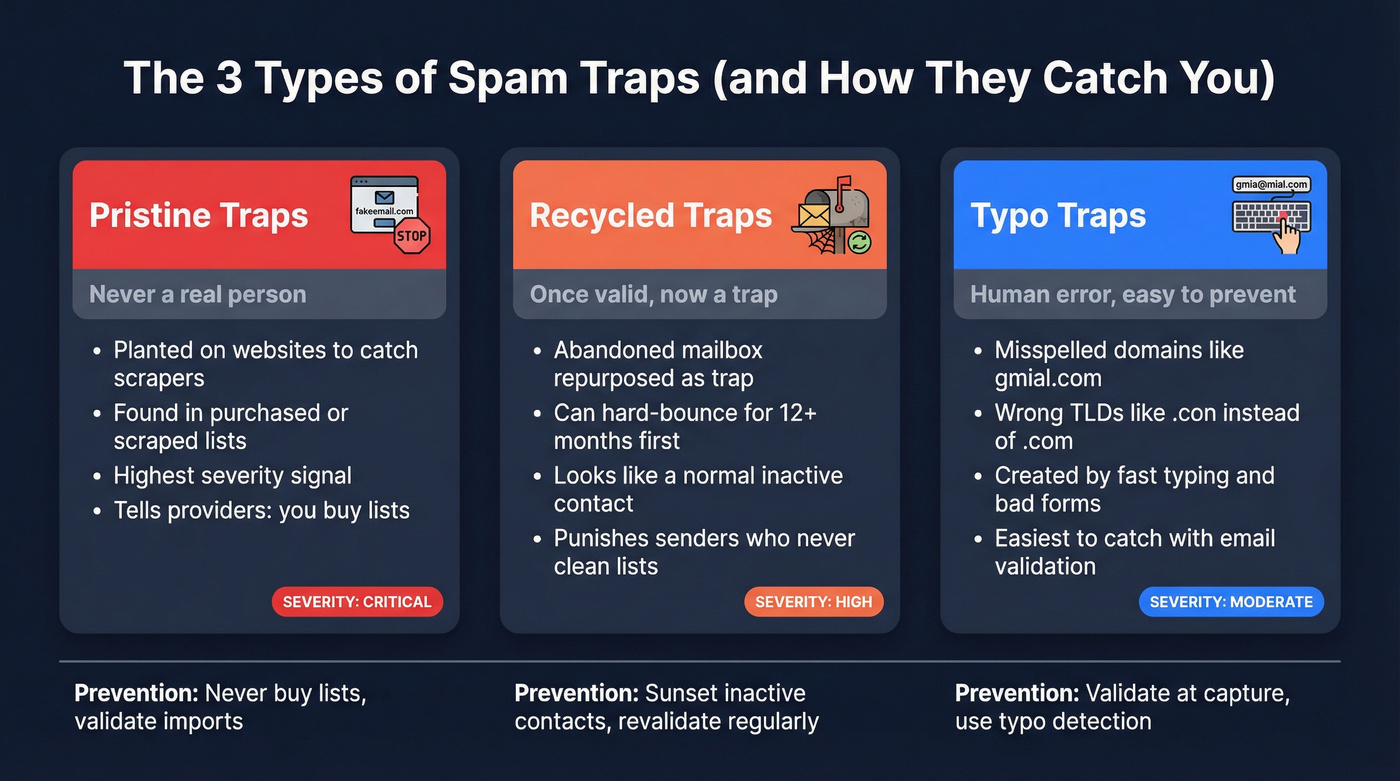
They exist because mailbox providers and blocklist operators need a clean signal that separates "legitimate sender with normal mistakes" from "sender who scrapes, buys lists, or never cleans." Traps are that measuring stick. When you hit them, you're telling the ecosystem, "I don't control my list."
And the chain reaction is what hurts:
- Trap hit -> reputation signal
- Reputation signal -> blocklist risk
- Blocklist risk -> filtering that spreads beyond one provider (Gmail, Outlook, corporate gateways)
- Filtering -> "delivered" emails that land in Spam/Junk anyway
I've seen this play out the same way in real teams: someone imports an event list, a rep enriches it, and sequences go out fast because "we paid for the leads." A contact changes jobs, their old mailbox gets deprovisioned, and the team keeps emailing it for months because it never produced a bounce anyone cared about. Later, that address gets repurposed as a trap. In your CRM it looks like an inactive lead. To filters, it looks like you refuse to stop.
Pristine traps (hidden addresses; scraper/purchased-list signal)
Pristine traps were never real mailboxes. They're planted on web pages (often hidden in code) to catch scrapers and purchased-list behavior.
If you buy lists, scrape the open web, or import "mystery leads" without strict validation, pristine traps are the landmines you step on (if you're doing imports, use a repeatable email verification list SOP).
Recycled traps (once-valid -> abandoned -> repurposed)
Recycled traps start as real addresses. Then they're abandoned, hard-bounce for a long period, and later get repurposed as traps.
They're dangerous because they look like normal contacts that stopped engaging - which is exactly how most CRMs are full of them.
Spamhaus has a detail worth remembering: "dead address" traps can hard-bounce for 12 months or more, then get silently turned back on as traps.
Typo traps (e.g., gmial.com; why they're common)
Typo traps are misspellings of common domains: gmial.com, hotnail.com, .con instead of .com. Spamhaus also calls out patterns like yaaho.com, ynail.com, and homail.com.
They're common because humans type fast, forms don't validate, and sales teams import messy data. Typo-domain traps are generally weighted differently than pristine traps - still bad, but not the same "you scraped the web" signal.
Typo traps are the easiest win for validation because they're detectable without any mailbox-provider magic.
Why spam traps wreck deliverability (even when you don't see "bounces")
Spam traps don't show up neatly in ESP reports. They don't behave like normal invalid addresses. Many accept mail, which means your dashboards can look "fine" while your reputation gets downgraded behind the scenes.

Deliverability damage usually shows up as a slow-motion failure:
- Open rates drift down week over week
- Replies fall off a cliff (especially on cold)
- Gmail starts routing you to Promotions or Spam
- Outlook starts junking you even when you authenticate correctly
- You see more "delivered" but fewer conversions
Trap hits are a strong negative signal to mailbox providers and blocklist operators. Once your reputation drops, inbox placement collapses - and then even your good emails (to real people) get punished.
One nuance most teams miss: opens are noisy and increasingly meaningless as a safety signal. Apple Mail Privacy Protection (MPP), security scanners, and inbox prefetching can trigger "opens" that look like engagement but aren't. If your trap-avoidance strategy is "keep anyone who opened," you're using a broken instrument.
Use signals that are harder to fake:
- Replies
- Clicks
- Site visits / intent events
- Form fills
- Time-based inactivity rules (with conservative assumptions)
This is also why "just suppress non-openers" doesn't solve trap risk. Traps can sit there accepting mail while your system tells you everything is delivered and "opened."
How email validation reduces spam-trap risk (what it checks)
Email validation is a stack of checks that answers two questions:

- Is this address structurally deliverable?
- Is this address risky enough that sending is a bad idea?
Most validators classify results into buckets like valid, invalid, accept-all (catch-all), and unknown, plus risk flags like disposable and role-based. Those buckets are only useful if you turn them into suppression rules (more on this in how to verify an email address).
Here's the practical mapping from validation outputs to trap risk:
- Typo traps -> syntax checks + typo-domain detection (catch
gmial.com,.con, etc.) - Dead/abandoned domains -> DNS/MX checks (stop "send into a wall" bounce spikes)
- Recycled traps -> you can't detect them directly; you mitigate with revalidation cadence + engagement sunset
- Pristine-trap-like junk -> disposable/role flags + source controls + capture validation (you reduce the garbage that correlates with trap exposure)
Syntax + typo-domain detection (typo traps prevention)
This is the cheap layer: does the address follow email syntax rules, and does the domain look like a common typo?
It catches:
- Missing
@, invalid characters, double dots - Obvious domain misspellings (
gmial.com,yaaho.com) - Wrong TLD patterns (
.con)
This layer prevents typo traps and reduces pure garbage entering your list.
Domain/MX/DNS checks (dead domains, misconfigured domains)
Next layer: does the domain exist, and does it have valid MX records to receive mail?
It catches:
- Dead domains (expired or non-resolving)
- Domains with no MX records
- Misconfigured DNS that will never accept email
This is where validation saves you from sending into a wall and spiking bounce rates (if you're seeing rejects, this guide helps: 550 Recipient Rejected).
Mailbox/SMTP signals + risk categories (role, disposable, catch-all, unknown)
The deeper layer is mailbox-level signaling. Validators attempt to determine whether a mailbox exists or whether server behavior suggests risk.
Two realities matter here:
- SMTP probing has limits. Greylisting, timeouts, and strict servers intentionally make mailbox verification ambiguous, and some providers actively try to prevent third-party probing from being definitive.
- "Unknown" is a legitimate outcome. It means the validator refused to guess, which is often the most honest answer you'll get.
Operationally:
- Disposable: suppress. These correlate with low intent and high complaint risk.
- Role-based (
info@,sales@): suppress for cold outbound; handle separately for customer ops. - Catch-all / accept-all: treat as risk. The domain accepts mail for any address, so existence can't be confirmed.
- Unknown: treat as unsafe for cold outbound. If you send anyway, do it with safeguards and low volume.

Spam traps punish sloppy lists. Prospeo's 5-step verification - with catch-all handling, spam-trap removal, and honeypot filtering - kills risky addresses before they ever reach your sending domain. 98% email accuracy, refreshed every 7 days.
Skip the cleanup. Build lists that never needed it.
How email validation helps avoid spam traps (and why "trap detection" is a bad promise)
Remember this: spam traps aren't a list you can check against.
Spamhaus makes the philosophy explicit: fix the underlying acquisition and hygiene problems, don't "hunt traps." Traps are never revealed by their owners. That's the whole point.
Kickbox and Emailable land on the same operational truth: there's no accurate way to detect actual spam trap addresses reliably. Any vendor promising "trap detection" at high precision is selling you a story.
Why trap lists aren't public (and why that's the point)
If trap addresses were public, bad senders would just suppress them and keep spamming. Trap operators keep them secret because they're a measurement tool.
Spamhaus calls traps part of filtering's secret sauce. The goal isn't to help you game the system - it's to force better list practices.
Recycled traps: why they look "valid"
Recycled traps are the nightmare scenario because externally they can look like a normal mailbox:
- Domain exists
- MX exists
- SMTP may accept mail
- No bounce
- No engagement (which looks like... a normal inactive contact)
If your process is "remove hard bounces, keep mailing everyone else forever," you're building recycled-trap exposure into your system.
The hidden cost of "trap detection": false positives + ethics
Even if a vendor uses heuristics to guess "trap-like" addresses, you inherit two problems:
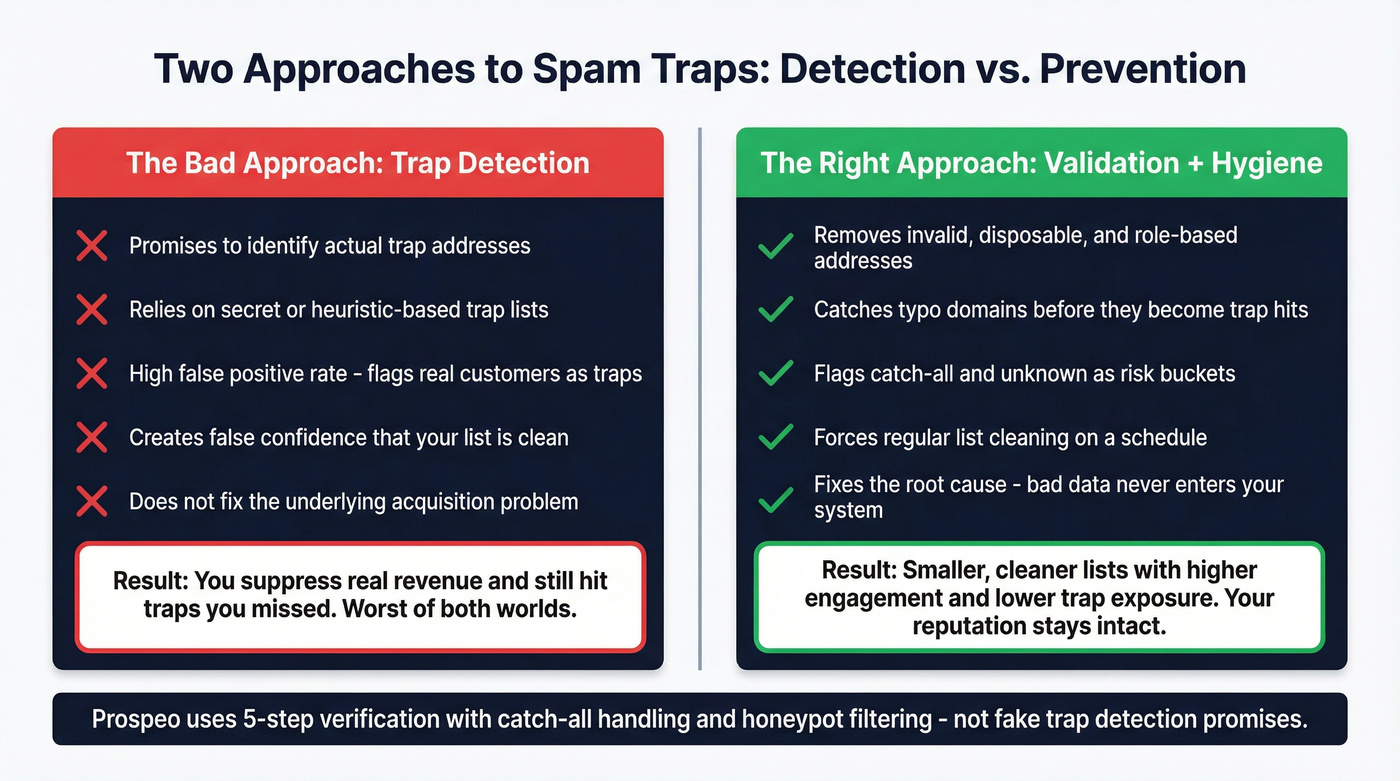
- False positives hurt real revenue. If the tool flags legitimate addresses as traps, you suppress real prospects and customers. That's not a deliverability win - it's self-sabotage.
- Ethics and privacy get messy fast. "Trap detection" implies maintaining or inferring sensitive lists about addresses that were never meant to be profiled.
Look, I'd rather you miss a few marginal cold prospects than torch a sending domain you need for the next 12 months.
How email validation helps avoid spam traps: the operational playbook
I've watched teams obsess over copy and sequencing while sending to lists that were 15-25% rotten. That's backwards. Fix the list first, then optimize messaging.

Below is a workflow you can run every week without heroics.
Step 1: Validate at capture (forms/lead gen) to stop typos and junk
If you control the capture point (forms, event signups, partner leads), validate there.
Minimum bar:
- Syntax + typo-domain correction prompts ("Did you mean gmail.com?")
- Block disposables
- Use confirmed opt-in for newsletter-style programs when you can tolerate it
This prevents typo traps and reduces pristine-trap-like junk from ever entering your CRM. If you're growing lists without confirming consent, pristine-trap exposure is a predictable outcome (for capture mechanics, see B2B lead capture).
Skip this if: you only send to confirmed double opt-in subscribers and you already prune inactive addresses monthly. You'll still benefit from validation on imports and reactivations, but you don't need to obsess over pre-send validation for every tiny newsletter drop.
Step 2: Bulk validate ~72 hours before every send (especially outbound)
Validate close to send-time so you're not relying on stale results, but not so late that you can't rebuild segments.
This matters most for:
- Cold outbound sequences (high volume, low forgiveness)
- Any list import (events, partners, enrichment runs)
- Reactivations ("we haven't emailed you in a year")
Clean workflow: validate -> suppress -> upload only safe addresses -> send (if you’re building sequences, use a consistent B2B cold email sequence structure).
Step 3: Apply suppression rules (drop vs "send with safeguards")
Write this policy down. If it's not written, someone will "just send it" because they're behind quota.
Suppress (don't send):
- Invalid
- Typos you can't confidently correct
- Disposable
- Role accounts (for cold outbound)
Catch-all (accept-all): send only with safeguards
- Only send if you have a strong signal (recent inbound, warm referral, high intent)
- Throttle volume
- Personalize heavily
- Watch complaints like a hawk
Unknown: treat as unsafe for cold outbound. Unknown means the validator refused to guess. That's a gift. Take it. Suppress unknown for cold, and only revisit if you have a separate reason to believe the contact is real (for example: they just filled a form, replied recently, or booked time).
Step 4: Add a simple risk score (so decisions aren't emotional)
You don't need "AI scoring." You need consistency.
Risk score (0-10):
- Catch-all result: +3
- Unknown result: +4
- Role-based: +2
- Age of last verification >90 days: +2
- No positive engagement in >120 days: +3
- Source is imported/partner/event list: +2
- Source is scraped/purchased: +5 (and yes, stop doing this)
Action bands:
- 0-2: Send normally
- 3-5: Send with safeguards (lower volume, tighter targeting, stronger personalization)
- 6-10: Suppress and re-source/re-verify
This model beats gut feel, and it's easy to enforce in RevOps because it turns arguments into a checklist (if you want a more formal approach, map it to your data quality scorecards).
Step 5: Hygiene cadence (minimum SLA)
Microsoft's guidance for high-volume senders is blunt: remove invalid and inactive addresses monthly or quarterly. Treat that as your minimum hygiene SLA, even if you're not "high volume," because list decay doesn't care about your org chart or your sending volume.
One sentence that saves a lot of pain: if you can't explain why an address is still on your list, it shouldn't be on your list (this is basically the same discipline as how to keep CRM data clean).
Step 6: Warm-up and ramp - after validation, not before
Warm-up helps you ramp sending volume without shocking mailbox providers. It doesn't protect you from trap hits.
My rule:
- Validate and suppress first (so you're not warming up on garbage)
- Then ramp volume gradually
- Monitor bounces and complaints; pause if bounces go >3% or complaints go >0.3%
Mini proof moment (what "good" looks like)
Take a 10,000-contact import for outbound.
A realistic outcome after validation + suppression:
- 8-15% suppressed as invalid/typo/disposable/role
- Another 5-10% flagged as catch-all/unknown and held back
- Net effect: bounce rate drops under 3%, complaint risk drops, and your domain stops bleeding reputation on day one
That's the boring win: fewer risky sends, steadier inbox placement, and more replies from the people who actually exist.
Executing the workflow fast (tooling that doesn't slow ops down)
In our experience, the teams that stay out of trouble do two things well: they validate close to send-time, and they make suppression dead simple (one export, one upload, no debates).
Pricing is self-serve at about $0.01/email with a free tier, and you can see details here: https://prospeo.io/pricing.
How often to validate (use decay math, not vibes)
Email lists rot. That's not a moral failing - it's math.
ZeroBounce's 12-month verification dataset puts annual decay at 23%. They also found catch-all addresses were over 9% of checked emails, which matters because catch-all can hide non-existent mailboxes behind "accepts everything" behavior. And they detected spam traps at 0.01% - tiny, but still worth designing around (related: B2B contact data decay).
Trap hits are disproportionately damaging compared to ordinary bounces because they're a reputation signal, not just a delivery failure.
Cadence table (practical defaults)
| List type | Cadence | Re-verify age | Risk level |
|---|---|---|---|
| Cold/outbound | Every send | >90 days | Very high |
| Single opt-in | Every 1-3 mo | >90 days | High |
| Double opt-in | Every 6-12 mo | >180 days | Medium |
| Post-import spike | Immediately on import + recheck 72h pre-send | Any age | Very high |
Provider guardrails you can't ignore (Gmail + Outlook)
Validation helps, but mailbox providers still grade you on behavior. Two guardrails matter more than any tool choice.
Gmail: monitor Postmaster Tools; why low volume can hide data
Checklist:
- Keep spam rate under 0.3% (working ceiling)
- Monitor Google Postmaster Tools for spam rate and reputation trends
- Don't assume "no data" means "no problems" - low volume can hide signals
That 0.3% number is the commonly referenced working ceiling in Postmaster Tools guidance. Treat it like an operational red line: if you cross it, stop sending and fix the list and targeting.
Outlook.com: authentication requirements + enforcement
Microsoft's bar is stricter. If you send >5,000 emails/day to Outlook.com consumer domains, you need:
- SPF
- DKIM
- DMARC (at least
p=nonewith alignment to SPF or DKIM)
Checklist:
- DMARC published with alignment (even at
p=none) - SPF includes your sending infrastructure
- DKIM signing enabled for your sending domain
- Expect non-compliance to route to Junk now, and outright rejection later (for setup, see SPF DKIM & DMARC).
If you think you hit a trap or got blocklisted (remediation checklist)
Treat it like an incident: pause, diagnose, tighten controls. Don't "warm up harder" and hope.
Troubleshooting checklist:
- Pause the campaign causing the spike
- Pull the segment source (where did these addresses come from?)
- Suppress invalid, disposable, role, unknown, and long-unengaged
- Reduce volume and ramp back gradually after cleaning
- Check your domain/IP reputation and blocklist status (triage guide: blacklist alert)
If you're dealing with a Spamhaus listing, fix the plumbing before you ask for removal:
- PTR (reverse DNS) set correctly
- Valid HELO domain that matches reverse DNS expectations
- FcrDNS (forward-confirmed reverse DNS)
- RFC 5321/5322 compliance (SMTP and message format)
Choosing an email validator (what "accuracy" should mean)
Most teams pick a validator based on a single number: "accuracy." That's how you end up with a tool that labels everything as "valid" and quietly burns your domain.
A better definition: accuracy is the combination of correctly identifying invalid mailboxes, not mislabeling risky mailboxes as safe (especially catch-all/unknown), and being honest when it can't know, even if that honesty makes your "valid" rate look worse on a slide deck.
Hunter's 2026 benchmark is useful mainly because it shows methodology (a mixed set of real and invalid emails) and because it penalizes "Unknown" outcomes. That penalty matters: it pushes vendors to guess, and guessing is how you mail risky addresses. Hunter also discloses the dataset comes from their outreach activity, so treat the ranking as directional, not definitive.
Here's a criteria table I use in bake-offs:
| Criteria | What "good" looks like | Why it matters |
|---|---|---|
| Catch-all handling | Separate bucket | Avoid false "valid" |
| Unknown policy | Conservative | Reduce trap risk |
| Bulk + real-time | Both | Capture + pre-send |
| Export workflow | Suppression-ready | Faster ops |
| Pricing | Self-serve | No contracts |
Prospeo fits the operational criteria that actually move the needle: bulk + real-time verification, suppression-ready exports, API/integrations, 98% email accuracy, and a 7-day refresh cycle (vs around 6 weeks for many providers). If you’re comparing options, start with a ranked list of email verifier websites.
Recycled traps hide in stale data. Most providers refresh every 6 weeks - Prospeo refreshes every 7 days. That means fewer dead addresses silently converted into traps sitting in your CRM. At $0.01/email, clean data costs less than one spam folder.
Your domain reputation is worth more than a dirty list. Protect it.
FAQ
Do spam traps bounce, or do they accept mail?
Many spam traps accept mail, so they won't show up as clean bounces. That's why they're so damaging: they look delivered while they degrade reputation and inbox placement. If bounces rise above 3% or complaints exceed 0.3%, pause sends and clean the segment immediately.
Can an email verifier reliably "detect spam traps"?
No - trap owners don't publish trap addresses, and recycled traps can look like normal inactive mailboxes from the outside. The practical approach is to remove typos, invalids, dead domains, disposables, and role accounts, then sunset unengaged contacts on a monthly or quarterly cadence to reduce exposure.
How should I handle catch-all (accept-all) domains?
Treat catch-all as a risk bucket, not a green light. For cold outbound, default to holding them back; if you do send, throttle volume and require a strong signal (recent inbound or referral). Re-verify anything older than 90 days and watch complaint rate closely.
What's a good free tool to validate emails before a campaign?
A good free option is Prospeo's free tier (75 email credits/month plus 100 Chrome extension credits) because it gives clear buckets (valid/invalid/accept-all/unknown) and suppression-ready exports. For a campaign, validate about 72 hours before launch and suppress invalid, disposable, role, and unknown results to keep bounce rate under 3%.
Bottom line
Email validation doesn't detect spam traps. It prevents trap hits by stopping risky addresses from entering your list and by enforcing suppression rules before you send.
Run validation at capture, validate again about 72 hours pre-send, suppress invalid/disposable/role, treat catch-all/unknown as risk, and sunset inactive contacts on a monthly or quarterly cadence. That's how email validation helps avoid spam traps without relying on fake "trap detection."
External references used (recommended reading)
- HubSpot's spam trap taxonomy and blocklist linkage: understand spam traps and email blocklists
- Spamhaus on why traps are secret and how to fix root causes: spamtraps: fix the problem, not the symptom
- Microsoft's high-volume sender requirements: Outlook's new requirements for high-volume senders
- ZeroBounce's email list decay benchmark: email list decay benchmark
- Hunter's methodology example for verifier benchmarking: email verifiers benchmark guide