

Demo Request Follow Up: The 2026 Playbook
Most Teams Blow This (Here's How Not To)
Workato tested 114 B2B companies by filling out their demo request forms. Zero called back within five minutes. The average personalized email took nearly 12 hours to arrive, and 63% of companies never responded to inbound leads at all.
These are prospects who raised their hand - and got silence.
We've audited dozens of follow-up sequences over the past two years, and the same mistakes show up every time: slow response, single-channel outreach, and emails sent to addresses that haven't been valid in months. The bar is underground, which means nailing your demo request follow up is a genuine competitive advantage.
Here's the short version:
- Respond within 5 minutes. Companies that do close at 32% vs 12% for those waiting 24+ hours.
- Run a 17-21 day cadence with 8-12 touches across email, phone, and LinkedIn. 70% of reps quit after one email.
- Verify your contact data before launching any sequence. A perfect cadence sent to dead inboxes is wasted pipeline.
Why Response Time Decides the Deal
An Optif.ai study of 939 B2B companies broke down response time against close rates:
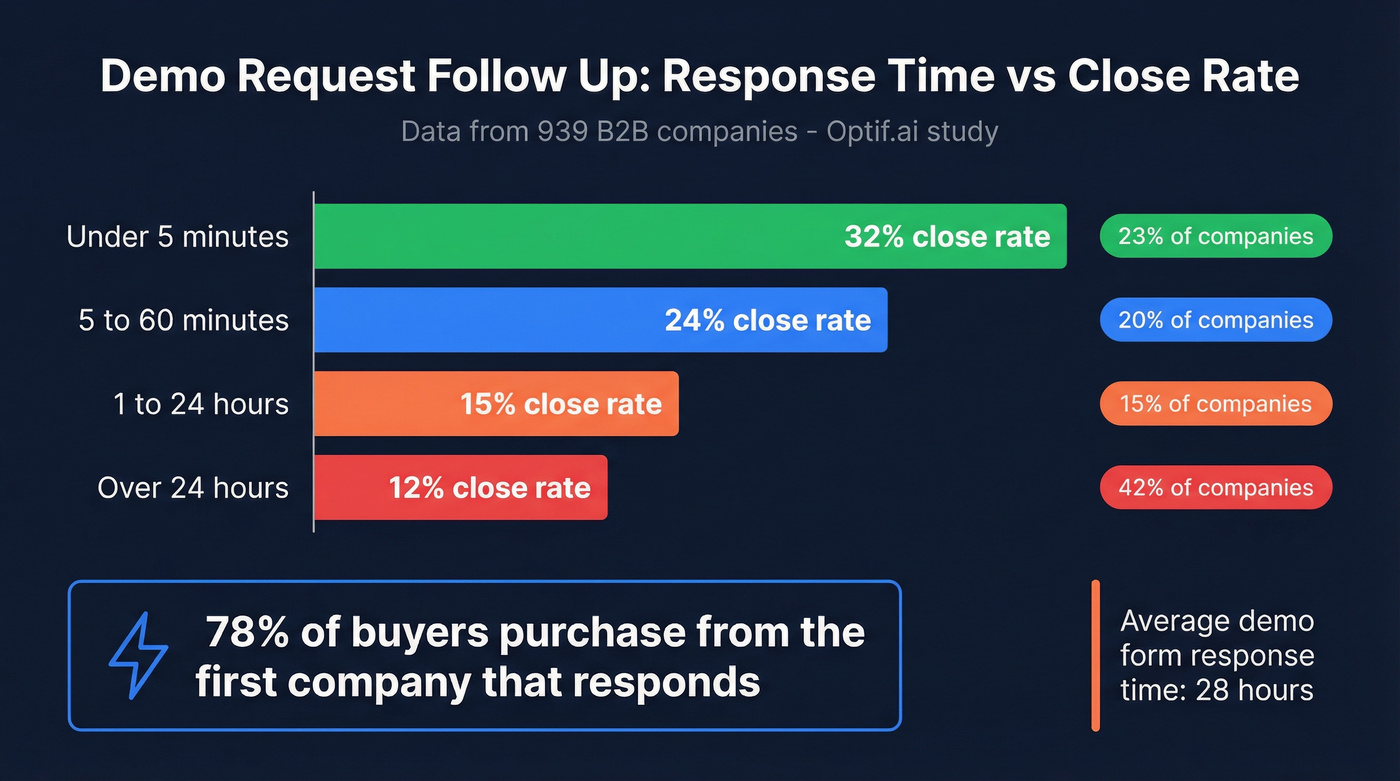
| Response Time | Close Rate | % of Companies |
|---|---|---|
| < 5 minutes | 32% | 23% |
| 5-60 minutes | 24% | 20% |
| 1-24 hours | 15% | 15% |
| > 24 hours | 12% | 42% |
Forty-two percent of companies take longer than 24 hours. That's not a minor operational gap - it's leaving deals on the table every single day.
You're also 100x more likely to connect with a lead within 5 minutes than after an hour. The benchmark for demo request forms specifically is even worse: 28 hours average response time, with worst performers at 96 hours. And across lead-response benchmarks, 78% of buyers purchase from the first company that responds. If your competitor has a 5-minute SLA and you're running at 28 hours, you've already lost.
Two Types of Demo Follow-Up
Following up on an inbound demo request - someone filled out your form, and you need to get them scheduled. Speed is everything. The templates and cadence below cover this.
Following up after the demo happened - the call's done, and now you need to move them toward a decision. This is where frameworks like "Say It and Prove It" and competitive positioning come in. We cover both.
Writing Follow-Ups That Get Replies
Most follow-up emails fail because they're generic recaps nobody asked for. "Thanks for your time, here's a summary of what we discussed" doesn't move deals forward.
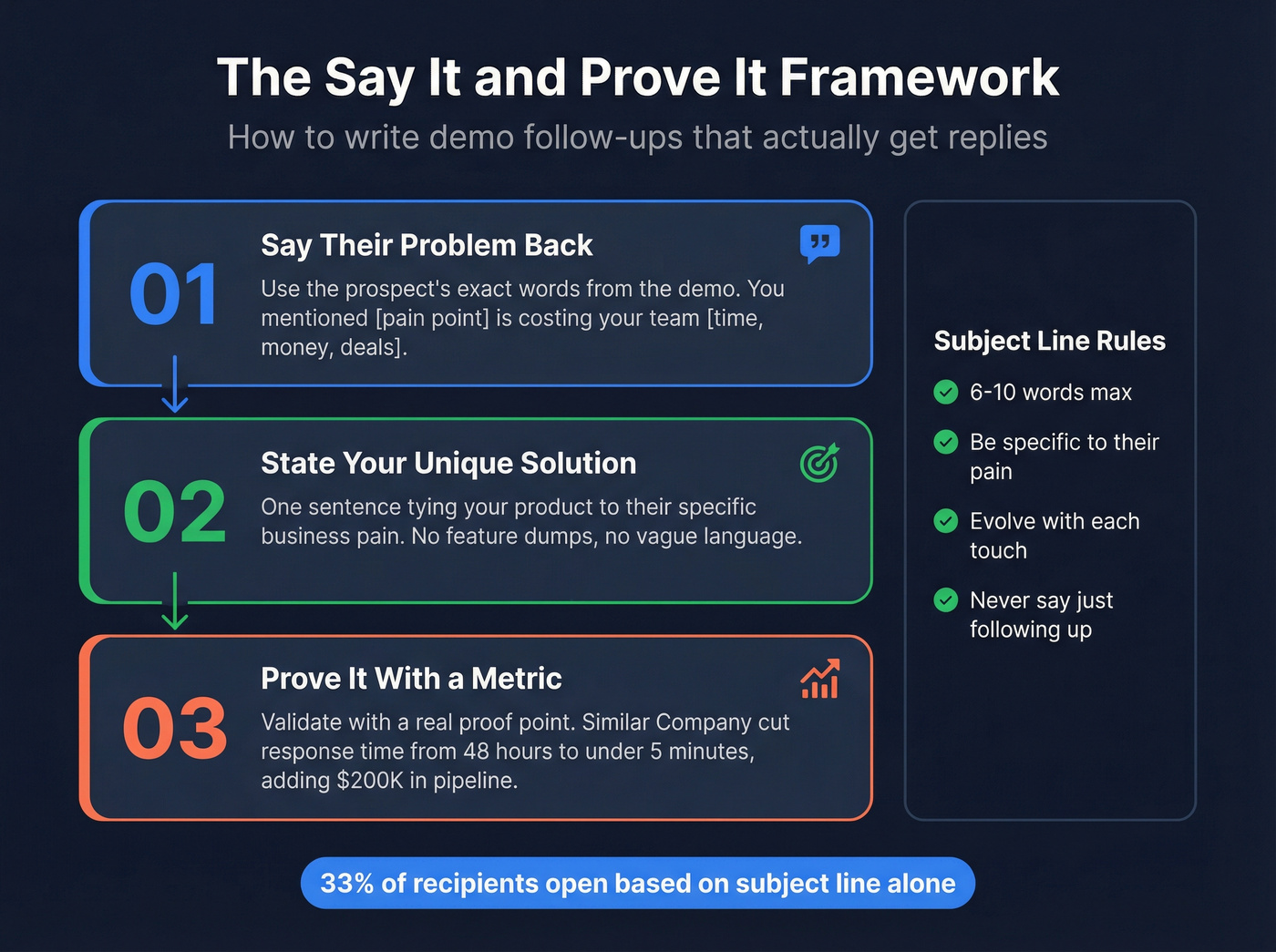
Jason Hersh at Gainsight uses a framework called "Say It and Prove It" that's worth stealing. Reaffirm the prospect's problem using their exact words, state how you uniquely solve it tied to their business pain, then validate with a proof point and a concrete metric. No feature dumps. No vague "we'd love to continue the conversation."
Subject lines matter more than most reps think - 33% of recipients decide to open based on the subject line alone. Keep them between 6-10 words, make them specific, and evolve them with each touch. "Following up" is dead. Match the subject line to the scenario:
- Post-demo recap: "Re: your [specific pain point] - recap + proof"
- No response (Day 3): "The [specific feature] question from our call"
- No-show recovery: "Take two? 🎬"
- Competitive deal: "Why [similar company] chose us over [Competitor]"
- Breakup email: "Should I close your file?"
- Value-add touch: "3 minutes - your [specific workflow] question"

A perfect follow-up cadence means nothing if your emails bounce. 63% of companies never respond to inbound leads - and bad data is a top reason why. Prospeo's 98% email accuracy and 7-day refresh cycle ensure every demo follow-up hits a real inbox, not a dead address.
Stop losing hand-raisers to stale data. Fix your contact hygiene first.
7 Templates for Every Scenario
Instant Acknowledgment (Within 5 Min)
Send this the moment the form submission hits. Automate it if you have to, but personalize the first line.
Subject: Got your request, [Prospect Name] - let's get you scheduled
Hi [Prospect Name],
Just saw your demo request come through. I took a quick look at [Company] and have a few ideas on how we can help with [specific pain point from form data or company context].
Here's a link to grab 30 minutes this week: [Calendar Link]
In the meantime, here's an interactive demo so you can explore the features most relevant to your team. Feel free to forward it to anyone else who should be in the loop.
Talk soon, [Your Name]
Including an interactive demo link gives the prospect something to explore immediately and makes it easy to loop in stakeholders before the live call.
Post-Demo Recap (Same Day)
Send within 5-10 minutes of the demo ending. Use the "Say It and Prove It" structure.
Subject: Re: your search for [specific outcome] - recap + proof
Hi [Prospect Name],
You mentioned [specific pain point in their words] is costing your team [time/money/deals]. That's exactly what [Your Product] was built to solve - [one sentence on how].
Here's proof: [Similar Company] was dealing with the same issue and [specific metric, e.g., "cut their response time from 48 hours to under 5 minutes, adding $200K in pipeline within 90 days"].
I've attached the deck from today. Next step: [specific action]. Does [day/time] work for a 20-minute follow-up with [stakeholder]?
[Your Name]
No Response (Day 3)
Don't just "check in." Reference something specific from the demo they reacted to.
Subject: The [specific feature/workflow] question from our call
Hi [Prospect Name],
During our demo, you asked about [specific moment - a feature, a workflow, a competitive question]. I dug into this a bit more and wanted to share [resource: case study, data point, or short video].
Worth 2 minutes if [specific pain point] is still a priority for Q[X]. Want me to set up a quick call with our [solutions engineer/product lead] to go deeper?
[Your Name]
No-Show Recovery
Around 20-30% of booked demos end in no-shows. Don't take it personally - priorities shift.
Subject: Take two? 🎬
Hi [Prospect Name],
Looks like today didn't work out - no worries at all. Here's a fresh link to reschedule whenever's convenient: [Calendar Link]
In the meantime, here's a 3-minute interactive demo covering the [specific use case] we were going to discuss.
[Your Name]
Tech Difficulties Redo
Screen shares freeze. Audio drops. It happens. Acknowledge it quickly and offer two paths forward.
Subject: Let's redo that - minus the tech gremlins
Hi [Prospect Name],
Sorry about the technical issues on our call. Two options:
- Live redo - grab a time here: [Calendar Link]
- Watch the recording - I re-recorded the demo covering [specific features discussed]: [Link]. We can hop on a shorter call afterward for Q&A.
Which works better?
[Your Name]
Competitive Deal Follow-Up
If you know they're evaluating competitors, lean in. This is the template most reps are too timid to send - and it's the one that wins deals.
Subject: Why [similar company] chose us over [Competitor]
Hi [Prospect Name],
I know you're evaluating a few options - that's smart. One thing I'd suggest: ask each vendor to demo [specific workflow where you win]. That's where the differences show up.
Here's why teams choose us over [Competitor]: [one-sentence differentiator + proof point with metric].
Happy to do a side-by-side walkthrough if that's useful. 15 minutes - I'll keep it tight.
[Your Name]
Breakup Email (Day 17-21)
This email isn't really a goodbye - it's a pressure release that often triggers a reply.
Subject: Should I close your file?
Hi [Prospect Name],
I've reached out a few times and haven't heard back, so I don't want to keep cluttering your inbox.
- Yes - you're still interested, just buried. I'll follow up in [timeframe].
- No - timing's off. No hard feelings. I'll check back in 6 months.
Either way, the door's open.
[Your Name]
70% of reps quit after sending just one email. Don't be that rep.
Build Your Cadence Day by Day
A single template isn't a strategy. You need a structured cadence with graduated spacing so your follow-ups don't look automated.
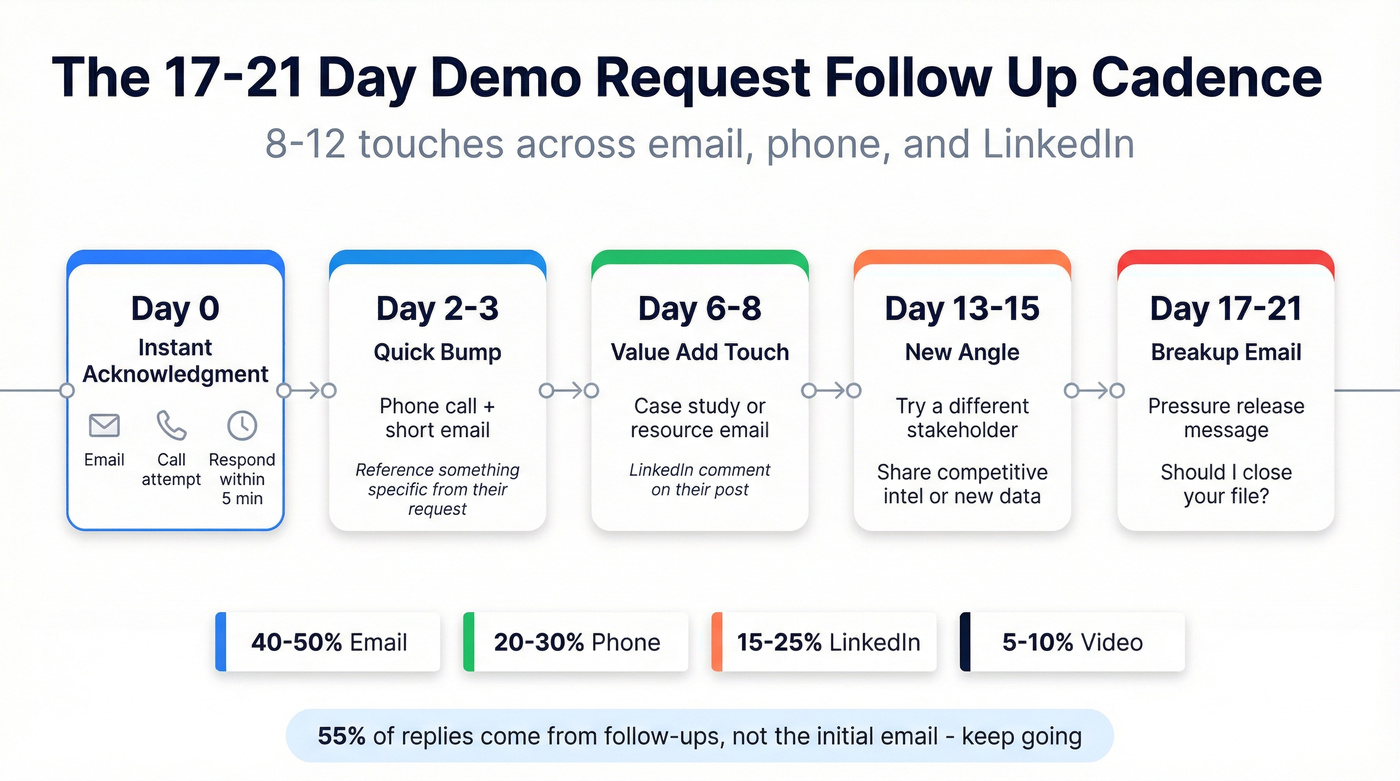
The 3-7-7 rule gives you a clean baseline, but for teams that want more touchpoints, graduated spacing works better:
- Day 0 - instant acknowledgment or post-demo recap
- Day 2-3 - quick bump + phone call
- Day 6-8 - value-add email (case study, resource)
- Day 13-15 - new angle (different stakeholder, competitive intel)
- Day 27-29 - breakup/pause email
RAIN Group research shows meetings require 8 touches on average. Outreach recommends 8-12 touchpoints over 17-21 days. One counterintuitive finding: waiting 3 days before your first follow-up yields roughly a 31% increase in replies compared to following up within 24 hours - give the prospect time to breathe after the initial acknowledgment. Send Tuesday through Thursday, 9-11 AM in the prospect's time zone, when B2B open rates peak.
| Channel | % of Touches | Example |
|---|---|---|
| 40-50% | Recap, value-add, breakup | |
| Phone | 20-30% | Day 3 and Day 10 calls |
| 15-25% | Comment on post, DM | |
| Video | 5-10% | Personalized Loom recap |
McKinsey found that standardizing sales engagement processes drives 10-20% pipeline improvements. The cadence is the process. And 55% of replies come from follow-ups, not the initial email - so the initial send is just the opening move.
When the Prospect Goes Dark
Silence after a demo usually isn't a hard no. It's shifted priorities, internal politics, or budget timing. Only 25% of leads are ready to buy right away - the rest need nurturing.
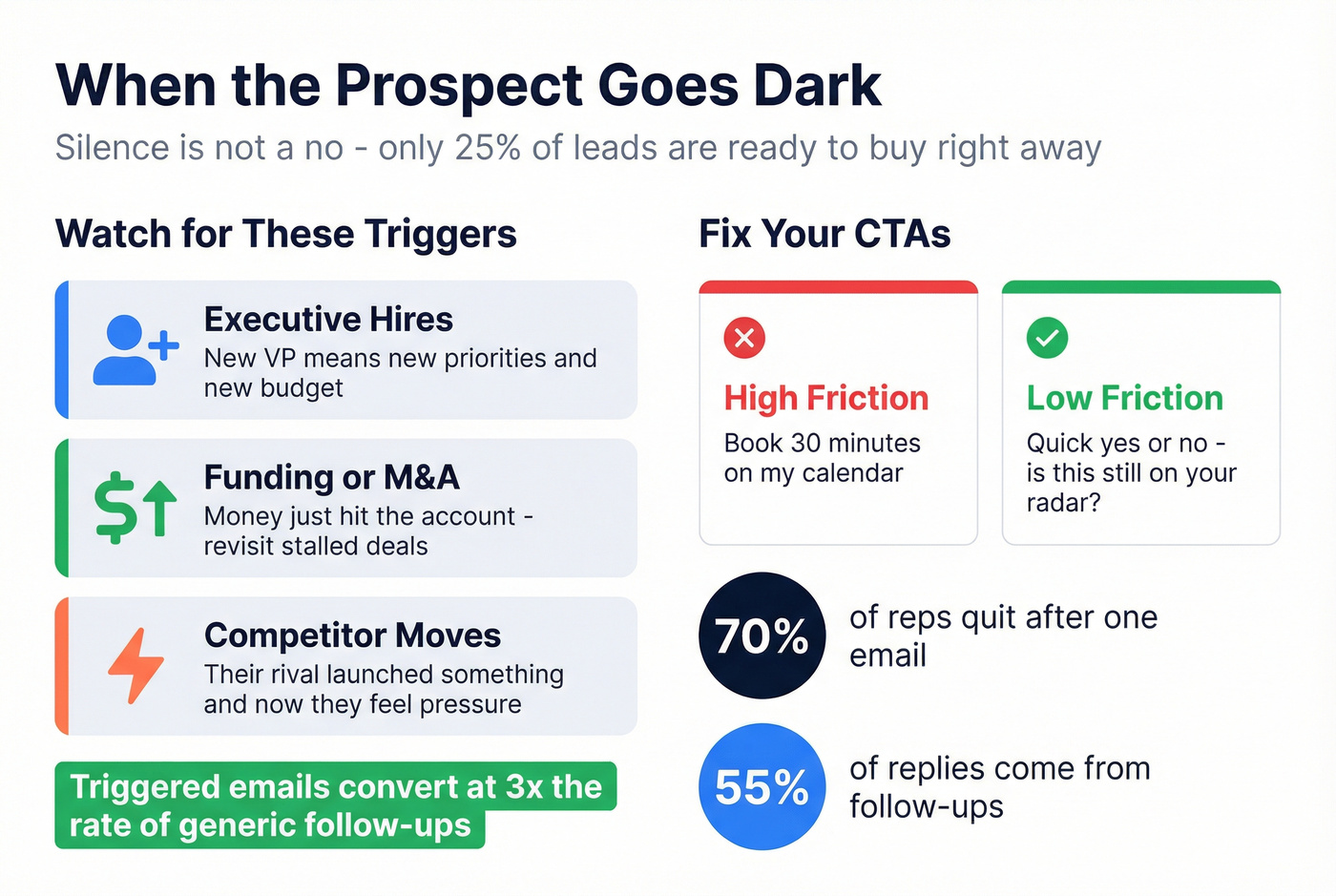
Ask any rep on r/sales about post-demo outreach and you'll hear the same thing: the first email is easy, it's touches 3-7 that separate closers from order-takers. Let's be honest - most reps don't have a plan for those middle touches. The key is re-engaging with a reason, not a "just checking in." Watch for these triggers:
- Executive hires - new VP means new priorities and new budget
- Funding or M&A - money just hit the account
- Competitor moves - their rival launched something, and now they're feeling pressure
Triggered emails convert at 3x the rate of generic follow-ups. When you spot one, tie your outreach directly to it: "Saw [Company] just raised a Series C - congrats. When we spoke in March, [specific pain point] was on hold due to budget. Is that conversation worth revisiting?"
Ditch the high-friction CTAs. "Book 30 minutes" feels like a commitment. "Quick yes or no - is this still on your radar?" gets replies. Low-friction, closed-ended asks outperform open-ended asks every time.
The Data Problem Nobody Mentions
Here's the thing: every template above is useless if your emails bounce. We've seen teams build beautiful 12-touch cadences, load them into Outreach or Instantly, and watch 35-40% of emails hit dead inboxes. That doesn't just waste the sequence - it tanks your domain reputation, which means even your valid emails start landing in spam.
Your follow-up cadence is only as good as your data hygiene. Most follow-up guides skip verification entirely, which is like building a race car and filling it with sugar water.
Meritt switched to Prospeo and went from a 35% bounce rate to under 4% - pipeline tripled from $100K to $300K per week. Snyk's 50-person AE team saw similar results: bounces dropped from 35-40% to under 5%, and AE-sourced pipeline jumped 180%. In our experience, teams that skip the verification step and go straight to sequencing waste 30-40% of their cadence effort on addresses that were dead before the first email sent.
Prospeo runs every address through a 5-step verification process - catch-all handling, spam-trap removal, honeypot filtering - with 98% email accuracy and a 7-day refresh cycle. For the phone touches in your cadence, that's 125M+ verified mobile numbers with a 30% pickup rate across all regions. Upload your prospect list, verify in bulk, and push clean contacts straight to your sequencer. You only pay for valid addresses.
If you want to go deeper on deliverability, start with an email deliverability checklist and a quick domain health audit, then validate lists with mailbox verification before you scale volume.

You just read that 78% of buyers choose the first vendor to respond. Speed only matters if you're reaching the right person. Prospeo gives you verified emails and direct dials for every stakeholder on the buying committee - at $0.01 per email, with 125M+ verified mobiles.
Respond in 5 minutes to contacts that actually pick up.
FAQ
How soon should I follow up after a demo request?
Within 5 minutes. Companies responding that fast close at 32% vs 12% for those waiting 24+ hours. Automate the acknowledgment email if needed, but personalize the first line with company-specific context from the form submission.
How many follow-ups should I send after a demo?
Eight to twelve touchpoints over 17-21 days across email, phone, and LinkedIn. 70% of reps stop after one email, and 55% of replies come from subsequent touches - persistence is math, not pestering.
What do I do if the prospect no-shows?
Send a light "take two" email within an hour with a reschedule link and an interactive demo. Around 20-30% of booked demos end this way - it's rarely personal, so keep the tone casual and zero-pressure.
How do I make sure follow-up emails actually get delivered?
Verify every address before launching your sequence. A 5-step verification process that catches spam traps, honeypots, and invalid mailboxes at 98% accuracy is the standard you should aim for - teams using this approach typically see bounce rates drop from 35%+ to under 5%.
What's the best subject line for a demo follow-up email?
Reference something specific from the conversation - a pain point, a feature question, or a competitor they mentioned. Generic lines like "Following up" get ignored; specific lines like "The [workflow] question from our call" earn 2-3x higher open rates.