

Domain Health Checker: The Complete Guide for 2026
Your open rates just cratered 40% overnight. The marketing team's panicking, the SDRs are blaming the copy, and nobody's checked whether the domain got blacklisted after last week's cold email batch bounced at 15%. Domain health problems don't announce themselves - they silently kill your deliverability until someone finally runs a domain health checker and sees the damage.
One in six legitimate marketing emails never reaches the inbox. Gmail's inbox placement dropped from 89.8% in early 2024 to 87.2% by Q4 after bulk-sender enforcement kicked in. That's the average - domains with authentication gaps or reputation damage perform far worse.
What You Need (Quick Version)
Domain health comes down to five pillars: your domain is resolvable, correctly configured, secure, performant, and reputable. Every checklist item maps to one of those five.
You don't need 10 tools. You need three:
- One DNS/auth checker (MxToolbox or EasyDMARC's free scanner) for records and authentication
- One blacklist monitor (Spamhaus or MxToolbox's monitoring tier) for reputation
- One inbox placement tester (GlockApps or Mail-Tester) for actual delivery results
Here's the thing most guides skip: the single biggest factor that damages domain health isn't a misconfigured SPF record. It's sending to unverified email addresses. A 15% bounce rate can overwhelm otherwise "correct" authentication and tank your reputation in days. Fix the data first, then fix the plumbing.
What Is a Domain Health Check?
A domain health check is a structured audit confirming your domain is resolvable, correctly configured, secure, performant, and reputable. You're checking vital signs across five systems that all need to work together for emails to land. For the deliverability side, pair this with a broader email deliverability review so you’re not only checking DNS.
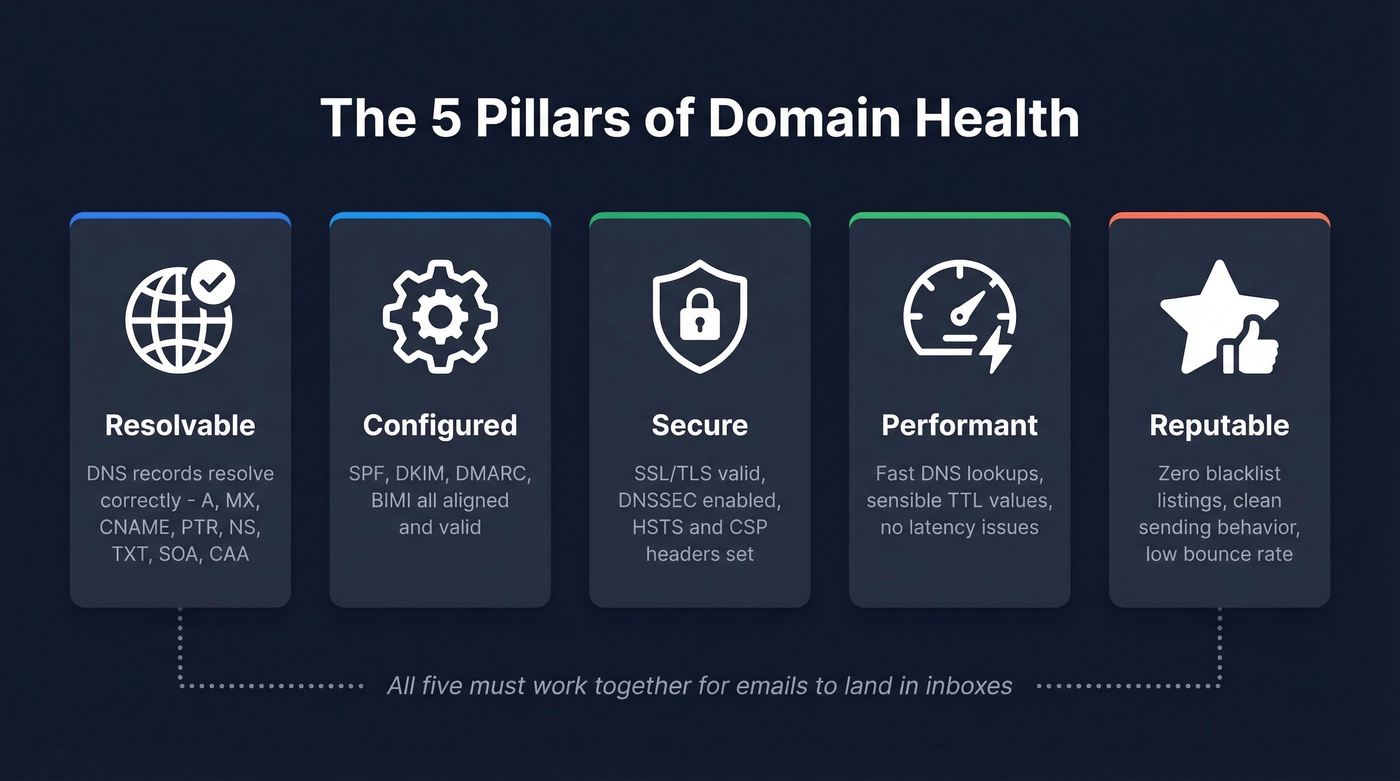
Resolvable means your DNS records actually resolve - A, AAAA, CNAME, MX, TXT, PTR, NS, CAA, and SOA records all pointing where they should, with no dangling references. Configured means email authentication (SPF, DKIM, DMARC, and optionally BIMI) is set up correctly and aligned. Secure covers SSL/TLS certificates, DNSSEC, and security headers like HSTS and CSP. Performant means DNS lookups resolve quickly and TTL values are sensible. Reputable means you're not on any blacklists and your sending behavior hasn't triggered spam filters.
Most tools only cover one or two of these pillars. MxToolbox handles DNS and blacklists well but won't tell you if your emails land in inboxes. DMARC monitoring tools handle authentication but ignore SSL and DNSSEC. That's why you need a small toolkit, not a single tool.
The Complete Domain Health Checklist
DNS Records
Every record type serves a purpose, and a single misconfiguration can break things downstream. We've seen one retailer trace a ~5% conversion drop to slow DNS lookups in Europe caused by misconfigured regional records. Another company dealt with intermittent outages for weeks before discovering a legacy A record conflicting with a newer CNAME on the same hostname.
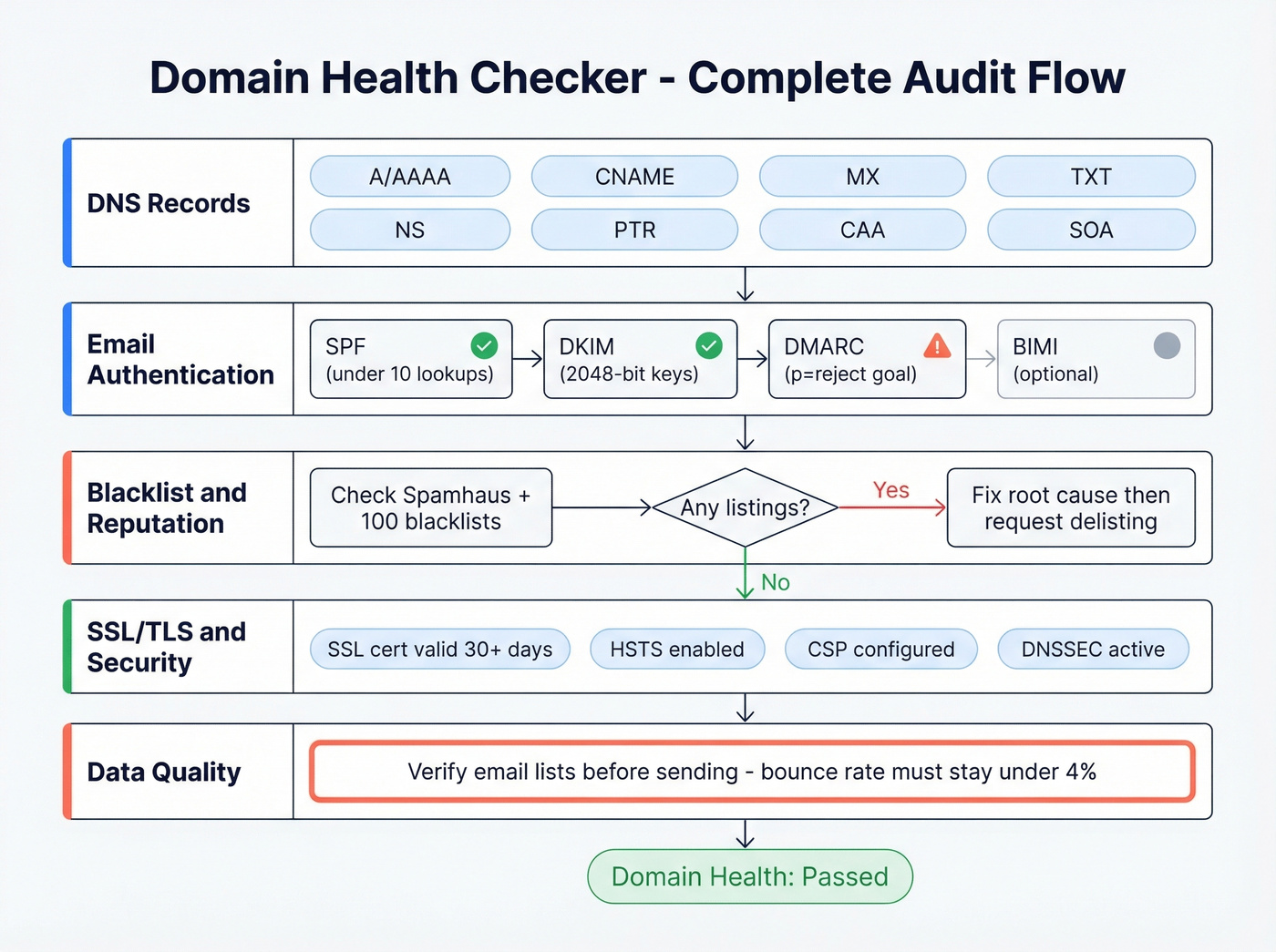
A/AAAA records should point to the correct IP addresses for your domain and subdomains. Check for stale records pointing to decommissioned servers, especially after cloud migrations. CNAME records must not coexist with other record types on the same hostname - that conflict breaks resolution. MX records need correct priority values pointing to active mail servers.
TXT records hold your SPF and DMARC policies - verify you have exactly one SPF record per domain. If you need syntax help, keep a reference of SPF record examples handy. NS records should point to your actual nameservers, not a previous provider's. PTR records (reverse DNS) are non-negotiable for self-hosted mail: the PTR should map to a hostname with an A record back to the same IP. CAA records restrict which certificate authorities can issue SSL certs for your domain. SOA records should have reasonable TTL and refresh values.
Watch for DNS drift - unauthorized or unintended changes that accumulate over time. Dangling CNAMEs pointing to deprovisioned services are a subdomain takeover risk that firewalls won't catch.
Email Authentication
SPF: Verify you have exactly one SPF TXT record. Stay under the 10 DNS lookup limit - every include: mechanism counts, and exceeding 10 causes a permanent fail. Use ip4: and ip6: mechanisms where possible to reduce lookups.
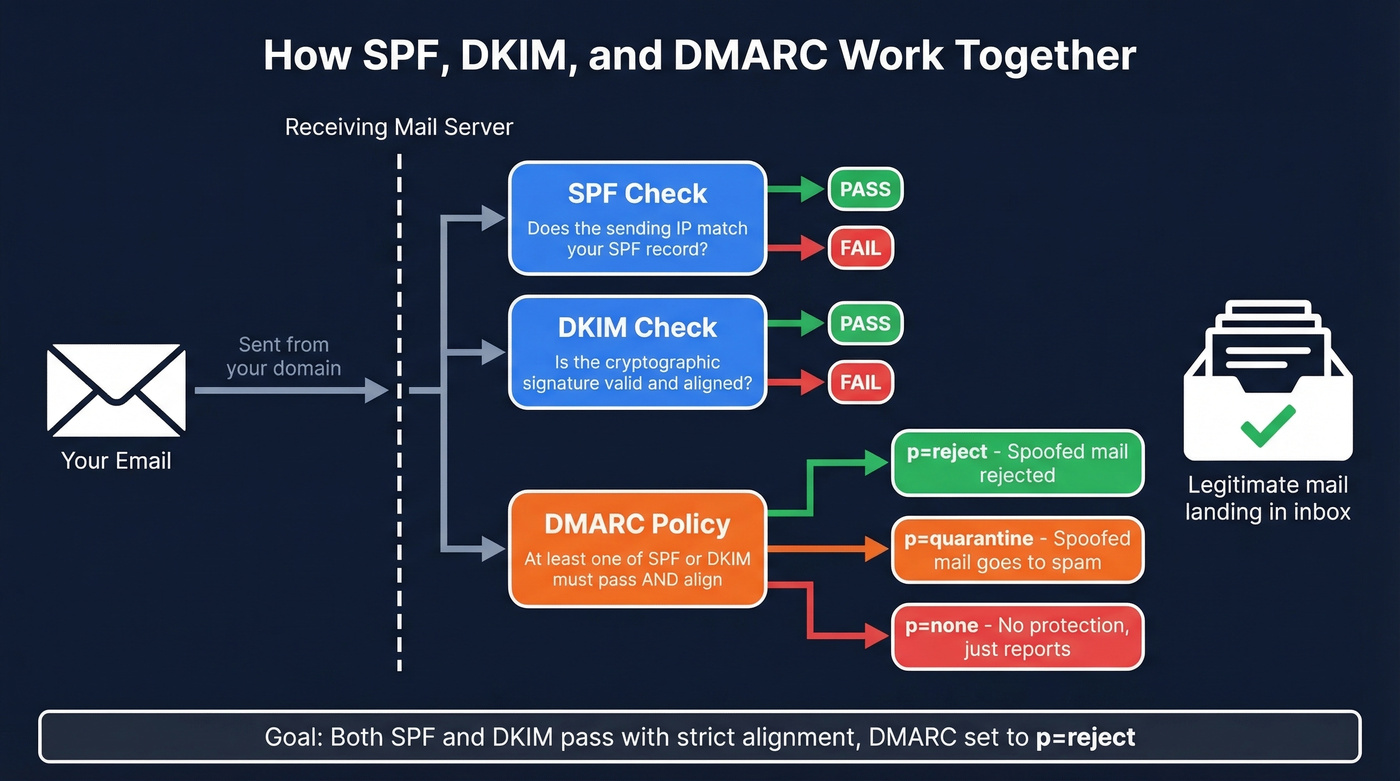
DKIM: 2048-bit keys are the standard now. Confirm DKIM is enabled for every sending service - your marketing platform, transactional email provider, and CRM - and that signatures align with your visible From domain. If you’re unsure, follow a quick process to verify DKIM is working.
DMARC: Here's the full tag reference:
| Tag | Purpose | Example |
|---|---|---|
| v | Version | v=DMARC1 |
| p | Policy | reject |
| sp | Subdomain policy | none |
| pct | % of mail filtered | 100 |
| rua | Aggregate reports | mailto:dmarc@... |
| ruf | Forensic reports | mailto:forensic@... |
| aspf | SPF alignment | s (strict) |
| adkim | DKIM alignment | s (strict) |
If your DMARC policy is still p=none, you don't have DMARC protection - you have DMARC theater. Move to p=quarantine, then p=reject. Monitor aggregate reports at each stage. If you want the technical nuance, read up on DMARC alignment.
BIMI: Requires DMARC at p=quarantine or p=reject and a Verified Mark Certificate for full support. Worth implementing once your authentication is locked down.
Blacklist and Reputation
Check your domain and sending IPs against major blacklists. Spamhaus is the one that matters most. MxToolbox checks 100+ blacklists as part of its monitoring.
Pass/fail criteria: zero active listings. Any listing needs immediate investigation. If you’re already listed, follow a dedicated Spamhaus blacklist removal playbook.
SSL/TLS and Security Headers
Valid SSL certificate that's not close to expiry - ideally 30+ days remaining. HSTS header enabled to force HTTPS. CSP configured to prevent XSS. These aren't directly email-related, but they strengthen your security posture and reduce phishing risk on your domain.
DNSSEC and WHOIS
DNSSEC adds cryptographic signatures to DNS responses, preventing cache poisoning. Splunk estimates that 90% of organizations suffer DNS attacks each year, yet DNSSEC remains underdeployed. WHOIS data should be current, and domain expiration should be monitored - an expired domain is a domain someone else can register.

You read it above: the single biggest factor that tanks domain health is sending to unverified addresses. A 15% bounce rate overwhelms even perfect authentication. Prospeo's 5-step email verification delivers 98% accuracy - teams using it consistently report bounce rates under 4%.
Fix the data before you fix the DNS. Start verifying for free.
Common Problems and Fixes
SPF Exceeding 10 Lookups
This is the most common authentication failure we see. Every SaaS tool you add - HubSpot, Salesforce, Mailchimp, your ticketing system - adds include: mechanisms to your SPF record. Hit 11 lookups and SPF permanently fails for every email you send.
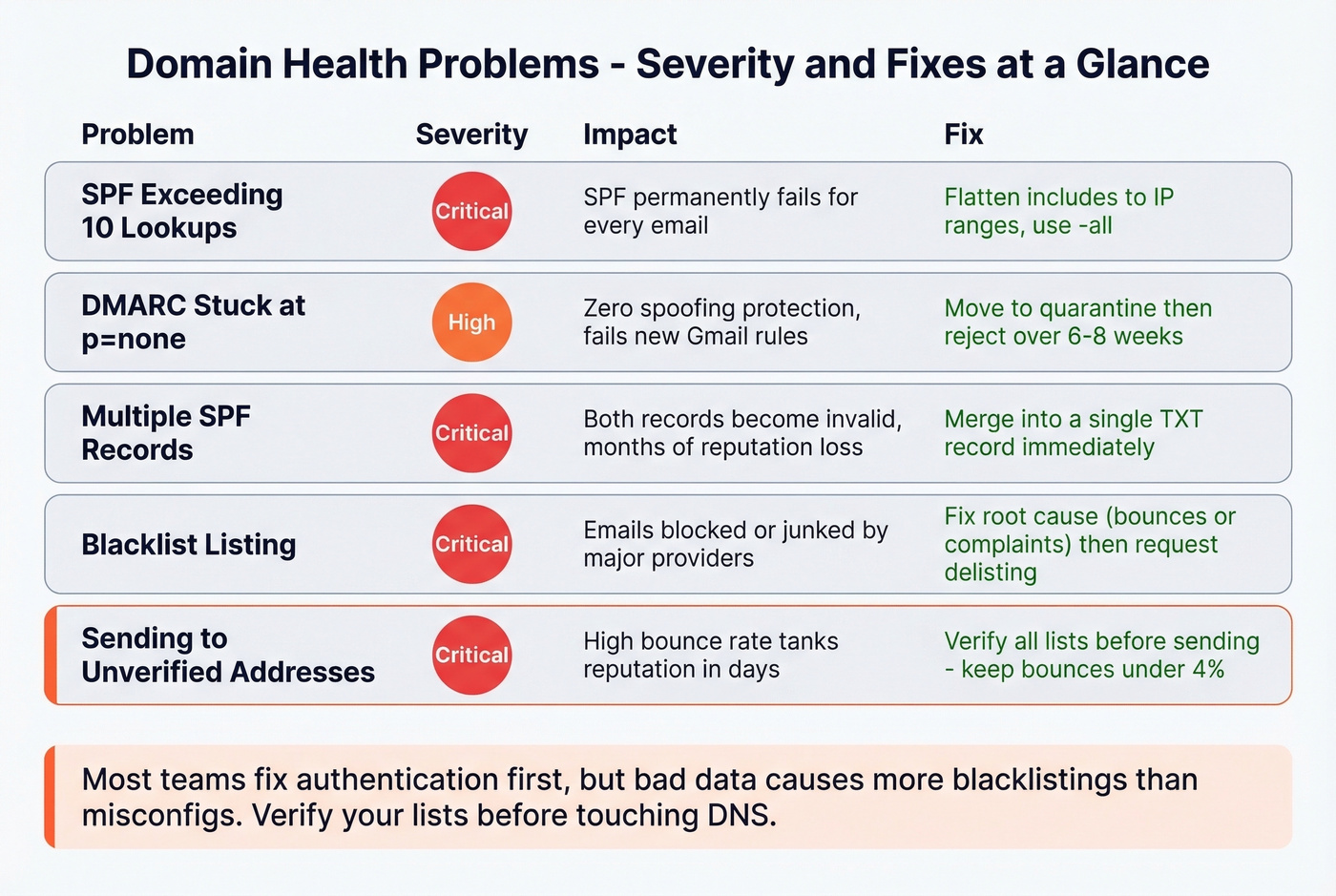
The fix is flattening: replace include: mechanisms with the actual IP ranges they resolve to, or consolidate sending through fewer services.
v=spf1 ip4:198.51.100.0/24 ip4:203.0.113.0/24 include:_spf.google.com -all
Use -all (hard fail), not ~all (soft fail). Soft fail is just another form of DMARC theater.
DMARC Stuck at p=none
Let's be honest: p=none does nothing except collect reports. It doesn't protect your domain from spoofing, and it doesn't satisfy the stricter enforcement Gmail and Microsoft are rolling out. Set a timeline - six to eight weeks is reasonable to move from p=none through p=quarantine to p=reject:
v=DMARC1;p=reject;pct=100;rua=mailto:dmarc-reports@yourdomain.com
Multiple SPF Records
Two SPF TXT records on the same domain means both are invalid. We've seen teams lose months of sender reputation over a single duplicate SPF record that nobody noticed. It happens constantly when a new marketing tool's setup guide says "add this TXT record" and nobody checks if one already exists. Merge them into one record.
Getting Delisted from Blacklists
Identify which blacklist flagged you using MxToolbox, fix the root cause - usually high bounce rates or spam complaints - then submit a delisting request through the blacklist's portal. Most providers delist within 24-72 hours once the underlying issue is resolved. The hard part isn't the delisting; it's making sure the behavior that got you listed doesn't repeat. To prevent repeat issues, focus on how to improve sender reputation alongside your technical fixes.
The Problem Most Guides Ignore: Bad Data
Every fix above is useless if you're sending to invalid addresses. A 15% bounce rate wrecks your reputation fast. Prospeo catches invalid contacts before they become bounces, running a 5-step verification process with spam-trap and honeypot removal across 143M+ verified addresses. If you're running outbound at any scale, list verification isn't optional - it's the first line of defense for domain health. If you’re troubleshooting, start with email bounce rate benchmarks and root causes.

Best Tools for Checking Domain Health
A Reddit user built their own domain health checker because they were tired of juggling five different tools. That frustration is universal - most teams still end up using multiple tools to cover DNS, email auth, blacklists, SSL, and inbox placement. Until someone solves that cleanly, here's what works.
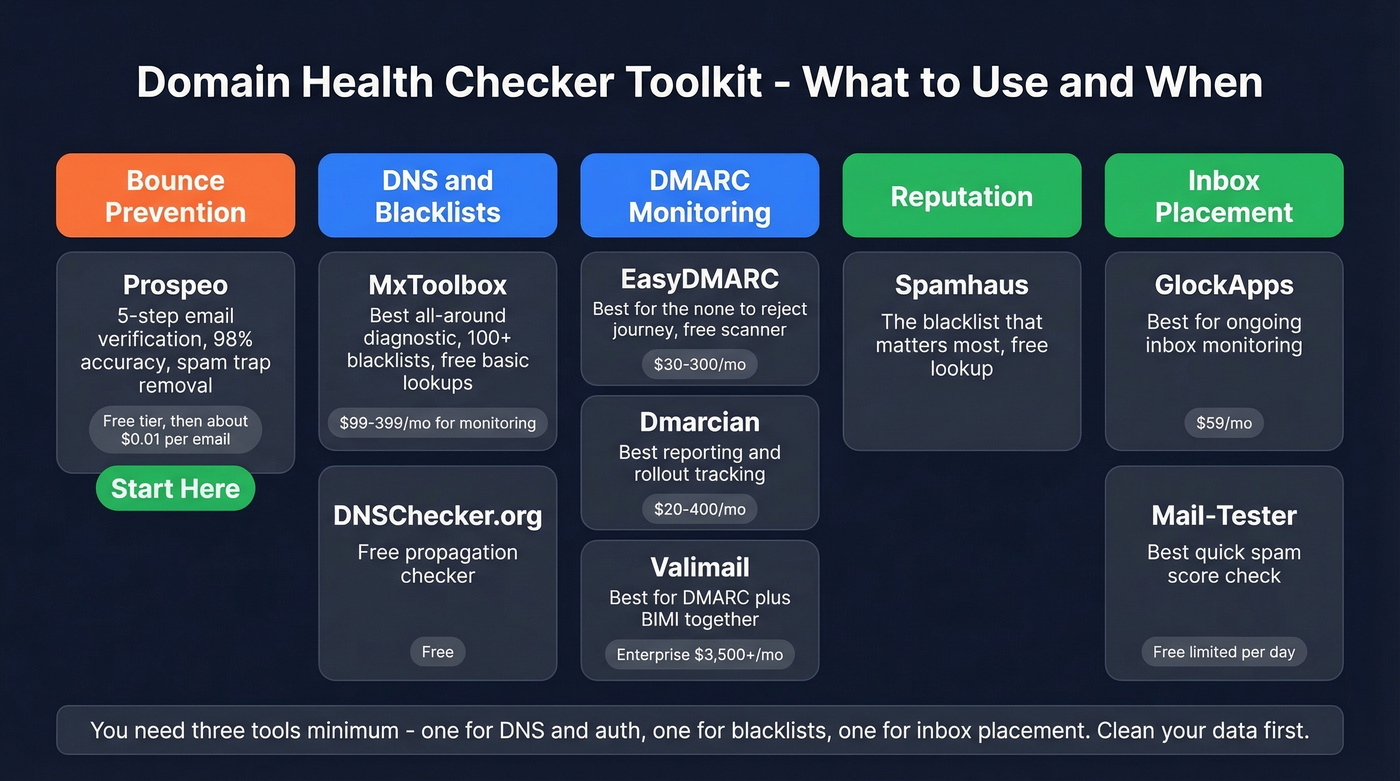
| Category | Tool | Our Take | Price |
|---|---|---|---|
| Bounce Prevention | Prospeo | Start here - bad data causes more damage than misconfigs | Free tier; ~$0.01/email |
| DNS + Blacklist | MxToolbox | Best all-around diagnostic | Free; ~$99-399/mo |
| DNS + Blacklist | DNSChecker.org | Best free propagation checker | Free |
| DMARC Monitoring | EasyDMARC | Best for the p=none to p=reject journey | Free scanner; ~$30-300/mo |
| DMARC Monitoring | Dmarcian | Best reporting and rollout tracking | Free checker; ~$20-400/mo |
| DMARC Monitoring | Valimail | Best for DMARC + BIMI together | Free Monitor; enterprise ~$3,500+/mo |
| Reputation | Spamhaus | The blacklist that matters most | Free lookup |
| Inbox Placement | GlockApps | Best for ongoing inbox monitoring | Free limited; ~$59/mo |
| Inbox Placement | Mail-Tester | Best quick spam score check | Free (limited/day) |
Google Admin Toolbox and WhatsMyDNS are also useful for quick MX checks and global propagation verification, respectively.
Our take: Most teams obsess over authentication records while ignoring the data quality that actually gets them blacklisted. If you're running high-volume outbound, you'll get more deliverability ROI from cleaning your lists than from perfecting your DMARC policy. Do both, obviously - but fix the data first. If you’re scaling outbound, also watch your email velocity so you don’t spike complaints.
DNS and Blacklist Checkers
MxToolbox is the default for a reason - it's fast, free for basic lookups, and checks 100+ blacklists. In our experience, it's where most teams start and where most teams stop, which is the problem. It's a diagnostic tool, not a deliverability tool. It won't tell you whether your emails actually land in inboxes or hit spam folders.
DNSChecker.org fills a different niche: confirming records have propagated across global nameservers after DNS changes. Use it every time you update a TXT or MX record.
DMARC Monitoring Tools
EasyDMARC and Dmarcian both handle the p=none to p=reject journey well, with aggregate report parsing that makes DMARC data actually readable. Valimail adds BIMI validation on top. For most teams, EasyDMARC's free scanner is enough to diagnose issues; paid tiers add ongoing monitoring and enforcement tracking.
After Microsoft's May 2025 requirements kicked in, 400,000 domains added DMARC records in a rush. If you haven't yet, you're behind.

Skip GlockApps If...
...you only send transactional email to opted-in users. GlockApps sends test emails to seed accounts across Gmail, Microsoft, Yahoo, and Apple Mail, then reports where each one landed - inbox, spam, or missing entirely. It's invaluable for cold outbound and marketing campaigns, but overkill if you're just sending receipts and password resets. Mail-Tester gives you a quick spam score for individual messages without the ongoing cost.
How Often to Audit Domain Health
| Cadence | What to Check |
|---|---|
| Always-on | DMARC aggregate reports, blacklist alerts |
| Weekly | Bounce rate trends, spam complaint rate |
| Monthly | Full DNS audit, SSL certificate expiry, WHOIS renewal |
| After any change | New sending tool, DNS migration, IP change |
Separate transactional email from marketing traffic using subdomains or dedicated IPs. This limits blast radius - a bad marketing campaign won't take down your order confirmations. If you’re doing this, treat it like a proper tracking domain setup so attribution and deliverability don’t fight each other.
Run a full check after each infrastructure change so problems surface before they snowball into reputation damage. And verify outbound lists before every campaign. For lists sourced from other providers, re-verify before each send - data decays faster than most teams realize.
Every blacklisting, every reputation hit, every deliverability crash traces back to the same root cause: bad contact data. Prospeo refreshes 300M+ profiles every 7 days - not every 6 weeks - so you're never sending to stale, bouncing addresses that torch your domain health.
Stop running domain health checks after the damage is done. Prevent it.
Google, Yahoo, and Microsoft Compliance in 2026
The rules are clear now, and enforcement is real. If you're sending more than 5,000 emails per day to Gmail, Yahoo, or Microsoft addresses, here's what's required:
- SPF and DKIM configured and aligned with your From domain
- DMARC policy published and moving toward enforcement
- Spam complaint rate under 0.3% maximum, with 0.1% recommended
- One-click unsubscribe header in all marketing emails
- ARC headers for forwarded messages to preserve authentication through mailing lists
The enforcement timeline has been progressive: initial requirements in February 2024, one-click unsubscribe by June 2024, and by late 2025, Gmail began issuing temporary and permanent rejections for non-compliant bulk senders. In 2026, this is strictly enforced at the SMTP level. Non-compliant messages don't get spam-foldered - they get rejected.
Even if you send fewer than 5,000 emails per day, DMARC protects your domain from being spoofed for phishing. Understanding the link between email deliverability and domain health is what separates teams that consistently land in inboxes from those constantly firefighting spam-folder issues. There's no good reason to skip it.
FAQ
How long does a scan take?
A basic scan covering DNS records, SPF/DKIM/DMARC, and blacklist status takes under 60 seconds with MxToolbox or EasyDMARC's free scanner. A full audit including inbox placement testing, DNSSEC validation, security headers, and SSL review takes 15-30 minutes depending on how many sending services you need to verify.
What's the best free tool?
MxToolbox for DNS and blacklist diagnostics, EasyDMARC's free scanner for authentication, and Mail-Tester for a quick spam score. Together they cover four of the five pillars without spending anything.
What counts as a passing score?
There's no universal score. Focus on pass/fail criteria: valid SPF under 10 lookups, DKIM signing active, DMARC at p=reject, zero blacklistings, valid SSL, and bounce rate under 2%. If all those pass, your domain's deliverability posture is solid.
How do I get off a blacklist?
Identify which blacklist flagged you using MxToolbox, fix the root cause (usually high bounce rates or spam complaints), then submit a delisting request through the blacklist's portal. Most providers delist within 24-72 hours once the underlying issue is resolved.
Do I need DMARC if I send fewer than 5,000 emails per day?
Yes. The 5,000/day threshold triggers stricter bulk sender enforcement, but all domains benefit from DMARC. Without it, anyone can spoof your domain for phishing emails - and your recipients' mailbox providers have no way to distinguish legitimate mail from forgeries.