

How to Remove Your IP or Domain From Every Spamhaus Blacklist
It's Monday morning. Slack lights up: "Are our emails even going out?" You check your bounce logs, and there it is - a Spamhaus listing silently rejecting messages to Gmail, Outlook, and half your prospect list. Spamhaus helps protect over 3 billion mailboxes, and the SBL alone maintains 30,000-40,000 active listings at any given time. If you're on one of those lists, your outbound is dead until you fix it.
Most guides treat every Spamhaus list the same, skip root-cause fixes, and leave you relisted within hours. We've walked dozens of teams through this process, and the pattern is always the same: people rush to the delist form, ignore the underlying problem, and end up worse off than before. Here's the actual removal path for each list type, the troubleshooting scenarios nobody else covers, and how to stay off permanently.
Three Steps to Delist From Spamhaus
- Check your listing at check.spamhaus.org. Enter your IP or domain - the tool auto-detects your client IP if you're unsure.
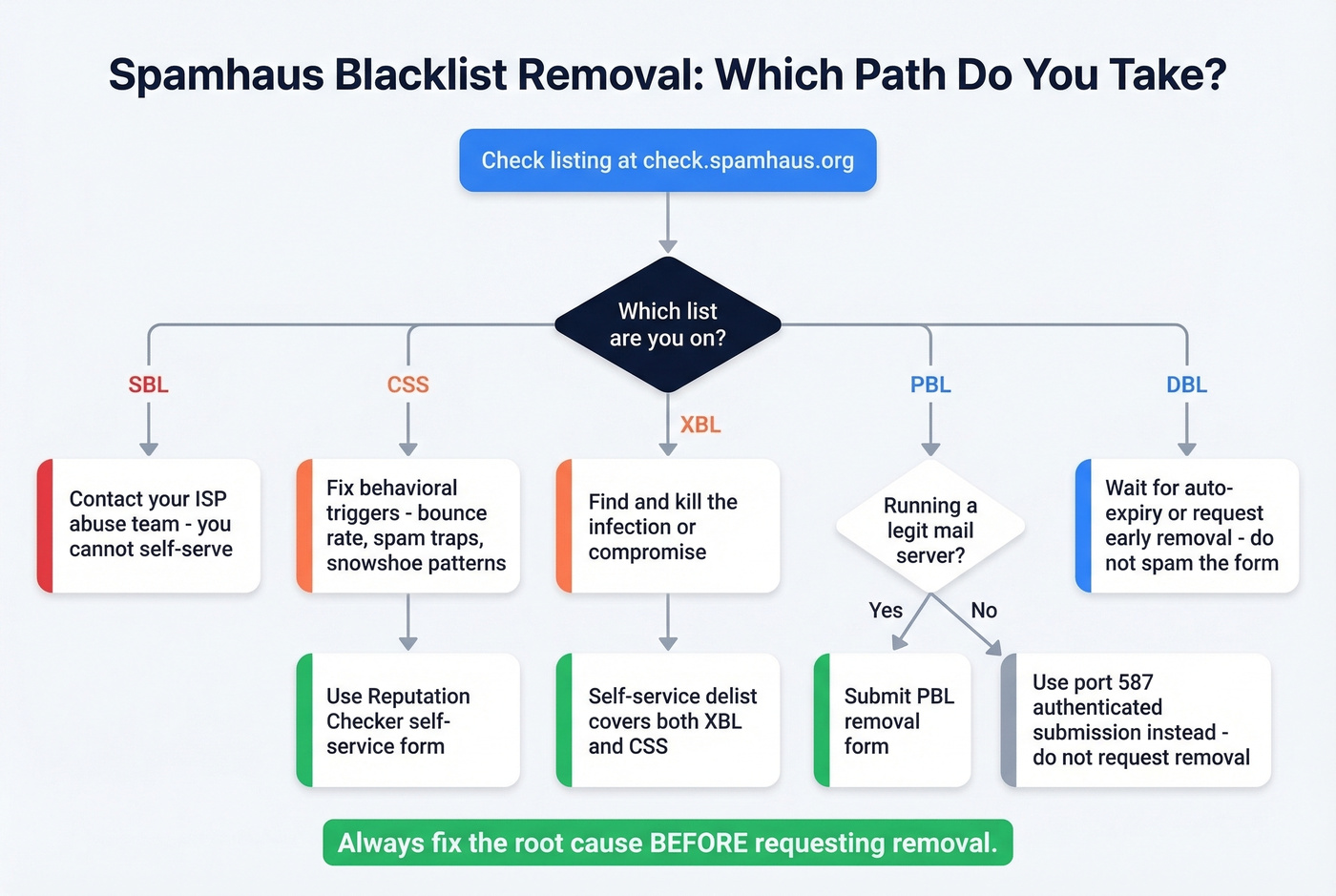
- Identify which specific list you're on. SBL, CSS, XBL, PBL, and DBL each have completely different removal paths. Don't guess.
- Fix the root cause before requesting removal. Delist without resolving the underlying problem and you'll be relisted quickly - and Spamhaus can disable self-service delisting until they're satisfied the issue is fixed.
Spamhaus delisting is free. Anyone charging you for "blocklist removal" is selling you something you can do yourself.
Check Your Listing Status
Head to the Spamhaus Reputation Checker at check.spamhaus.org. The single search field accepts IPv4, IPv6, domains, email addresses, and hashes.
One thing that trips people up: MXToolbox and other monitoring tools often report "Spamhaus ZEN." You're never actually listed on ZEN - it's a composite zone that combines SBL, CSS/CBL, XBL, and PBL results. The Reputation Checker breaks this down and shows you exactly which underlying list triggered the hit, displayed in the required removal order.
Which List Are You On?
Your role determines your path: end users contact their ISP for SBL; sysadmins use the self-service Checker for CSS/XBL. Each list targets different problems, and the removal process varies dramatically.
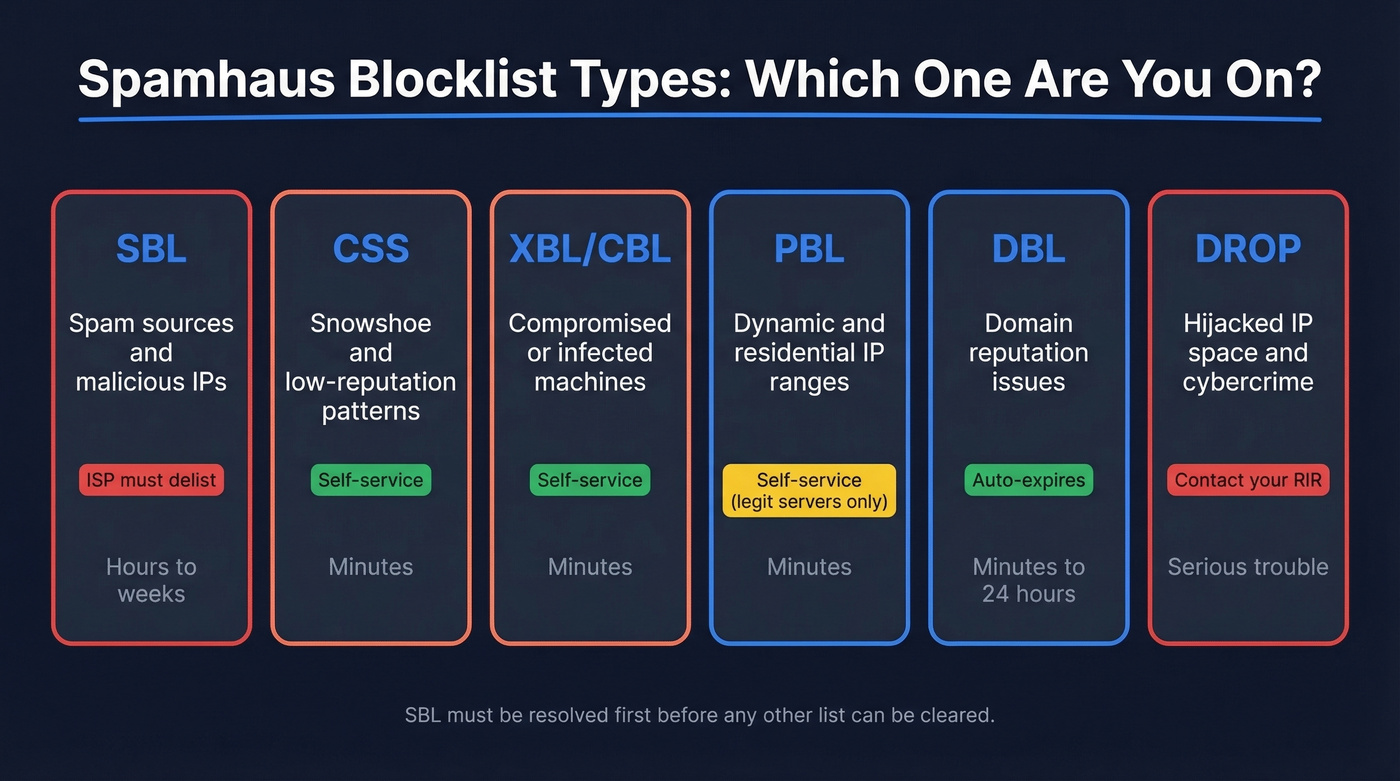
| List | Targets | Who Delists | Self-Service? | Timeline |
|---|---|---|---|---|
| SBL | Spam sources, malicious IPs | ISP/network owner | No | Hours to weeks |
| CSS | Snowshoe/low-reputation patterns | You | Yes | Minutes |
| XBL/CBL | Compromised machines | You | Yes | Minutes |
| PBL | Dynamic/residential IP ranges | You (if legit server) | Yes | Minutes |
| DBL | Domain reputation | Auto-expires | Partial | Minutes to 24 hours |
SBL (Spamhaus Block List)
SBL is the big one. It's IP-based, maintained by Spamhaus's OSINT research team, and you can't remove yourself - only your ISP or network owner can request removal. You must resolve your SBL listing before you can touch any other list. The Reputation Checker enforces this order, so don't waste time trying to clear CSS or XBL first.
If your ISP is slow to respond, escalate through their abuse team. Be specific about what you've already fixed.
CSS (Composite Snowshoe)
CSS targets snowshoe and low-reputation sending patterns - distributing mail across many IPs and domains to fly under the radar. Unlike SBL, CSS offers self-service delisting through the Reputation Checker.
The behavioral triggers are pattern-based: spam trap hits, recycled addresses, volume spikes, snowshoe-like distribution across your sending infrastructure, and bounce rates above roughly 0.5%. Repeated delisting without fixing the root cause gets your auto-delist privilege revoked. That's a hole you don't want to dig yourself into.
XBL (Exploits Block List) / CBL
XBL targets compromised or infected machines sending spam without the owner's knowledge. It's powered by the CBL (Composite Blocking List). Self-service delisting is straightforward, and one removal request covers both XBL and CSS when both are present.
If you're on XBL, something on your network is compromised. Delisting without finding and killing the infection is pointless - you'll be back on the list before lunch.
PBL (Policy Block List)
Here's the thing: PBL isn't a spam list. It's a policy list declaring that certain IP ranges shouldn't send email directly to destination mail servers. Most residential and dynamic IPs belong here by design.
Only request PBL removal if you're running a legitimate mail server from that IP. For everyone else, the correct fix is using authenticated submission on port 587 through your ISP's smarthost. Fighting PBL from a home connection is the wrong battle.
DBL (Domain Block List)
DBL is domain-only - no IPs involved. Most listings happen automatically and expire automatically once the triggering criteria no longer match. You can request early removal through the Reputation Checker, but excessive removal requests can get you blocked from the form.
New domains start with poor reputation by default. DBL reputation builds over time, not overnight.
DROP / ASN-DROP
If you're on DROP or ASN-DROP, your IP space has been identified as high-risk - hijacking, cybercrime operations, bulletproof hosting. You have much bigger problems than email deliverability. Contact your RIR.
Fix the Root Cause First
Delisting without remediation guarantees relisting. Spamhaus can disable self-service delisting if you keep requesting removal without fixing the problem. This is the worst position to be in, so get it right the first time.
Compromised System Checklist
Spamhaus publishes a five-step remediation process for hacked systems:
- Take the site or server offline if possible
- Remove all infected files
- Update your CMS and every plugin/extension to the latest secure version
- Run a full security audit of the server
- Change all passwords and enable 2FA everywhere
Don't trust a clean antivirus scan as proof you're clear - Spamhaus warns that AV scans frequently miss infections. If you're still using FTP, switch to SFTP immediately. Compromised FTP credentials remain one of the most common infection vectors.
CSS Immediate Containment
If you're on CSS due to a compromised device, close port 25 on your router or firewall right now. Then restrict port 25 access to only your known mail server IPs. This stops the bleeding while you hunt down the source.
Pre-Flight Checklist Before Removal
Before you touch that delist form, confirm every one of these:
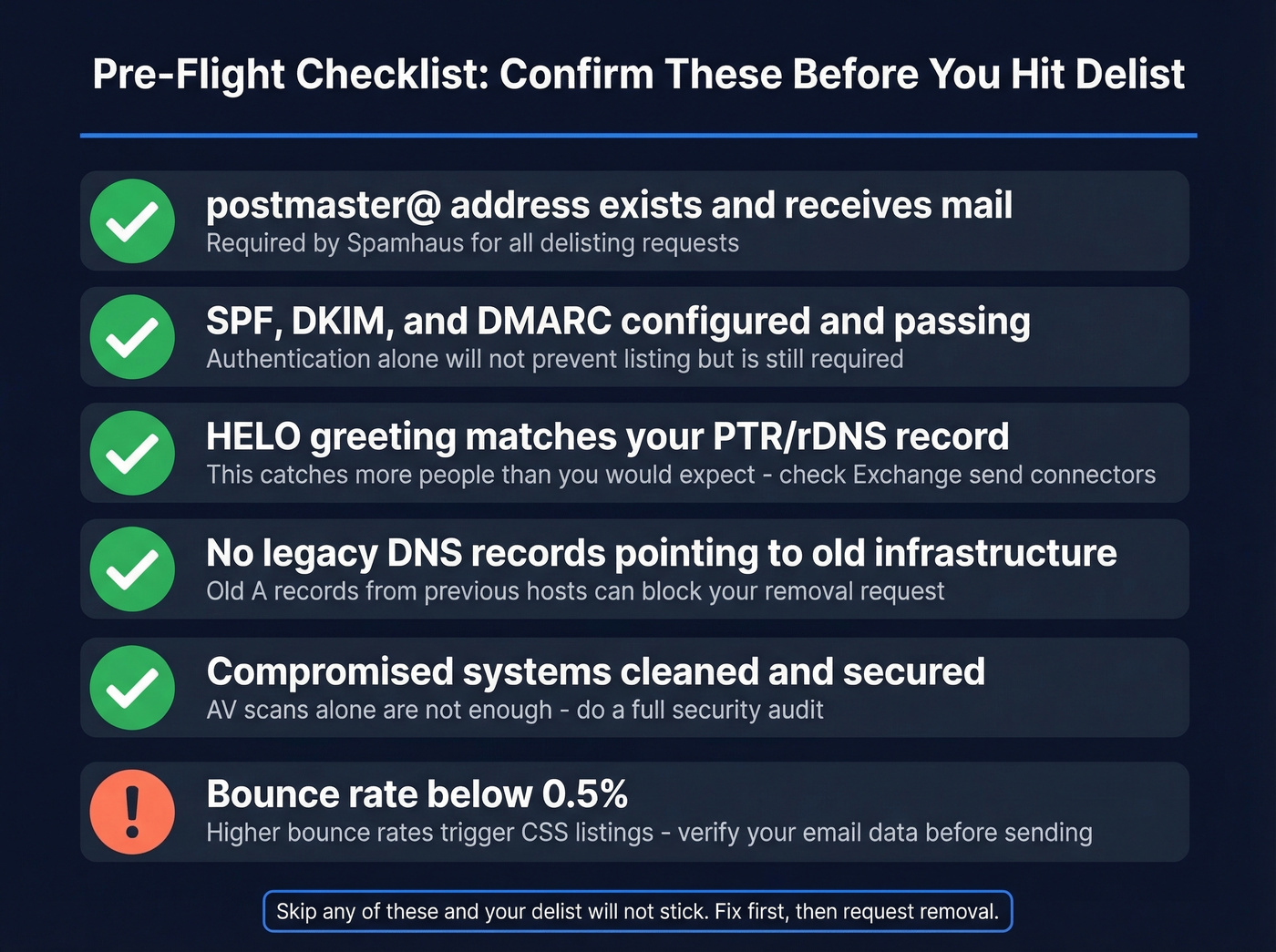
- postmaster@yourdomain.com exists and receives mail
- If you send directly from your own server, your DNS/mail routing is consistent with your setup
- SPF, DKIM, and DMARC are configured and passing (see SPF and DMARC alignment)
- Your HELO greeting matches your PTR/rDNS record per RFC 5321
- No legacy DNS records point to old or flagged infrastructure
That HELO/PTR alignment requirement catches more people than you'd expect. We've seen teams get relisted repeatedly because their Exchange send connector was missing a proper FQDN in the HELO scope. Self-hosters on Reddit report the same pattern - meeting these gating requirements is what separates a delist that sticks from one that lasts an hour.
Submit Your Delisting Request
With root causes fixed, here's the actual submission process by list type.
SBL: Contact your ISP's abuse team directly. You can't self-serve this one. Provide them with the Spamhaus listing details and evidence of remediation.
CSS and XBL: Use the Reputation Checker's self-service form. One request covers both lists when both are present. Removal processes in minutes once approved.
PBL: Only submit if you genuinely run a mail server from that IP. The form will ask you to confirm this. On a residential connection? Use port 587 authenticated submission instead.
DBL: Listings auto-expire, but you can request early removal through the Checker. Don't spam the form - excessive requests get you blocked. Expect processing within minutes, though some users see up to 24 hours of propagation lag.

Most Spamhaus CSS listings trace back to one thing: bad email data spiking your bounce rate above 0.5%. Prospeo's 5-step verification, spam-trap removal, and honeypot filtering deliver 98% email accuracy - so your outbound never triggers the patterns Spamhaus watches for.
Fix the root cause. Start with data that doesn't get you blacklisted.
Authentication Won't Save You
"I have SPF, DKIM, and DMARC set up - why am I still listed?"
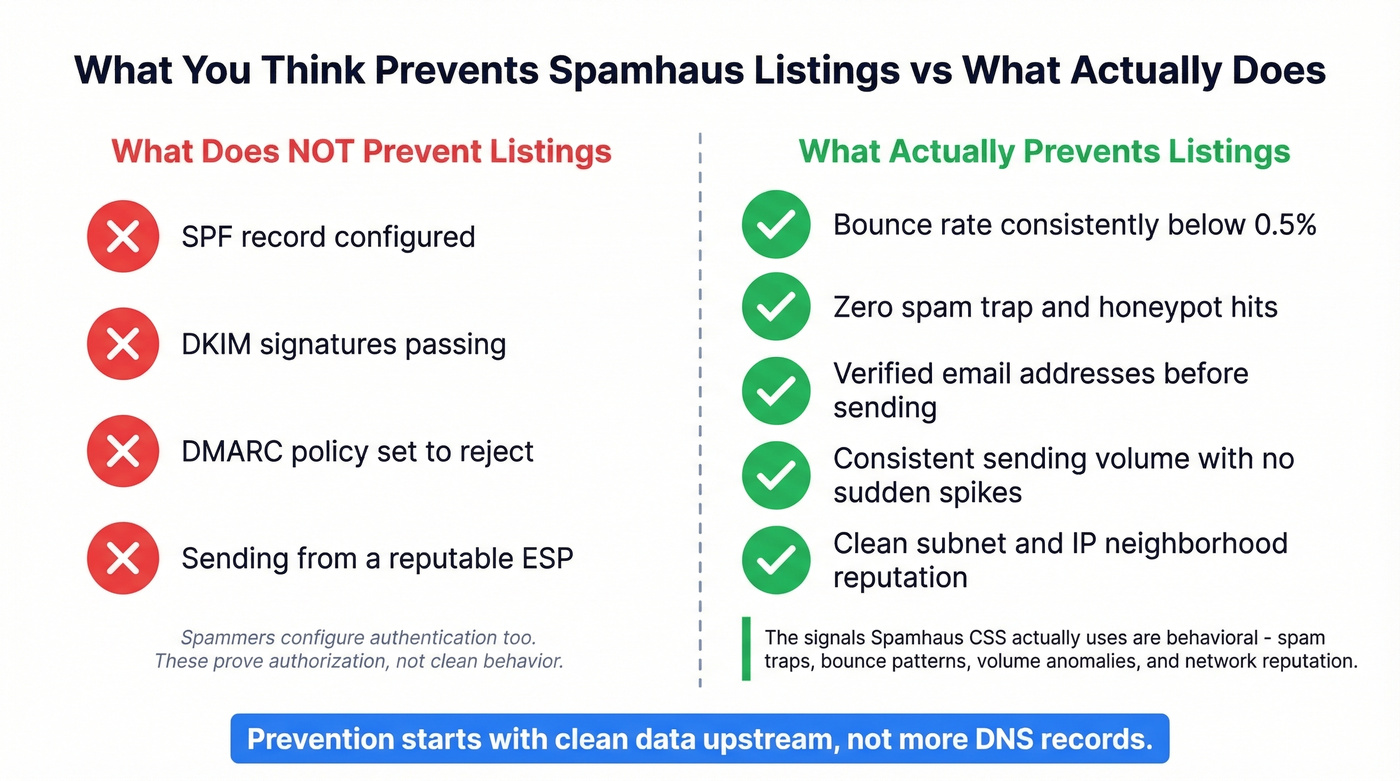
We hear this constantly. Authentication proves you're authorized to send from your domain. It doesn't prove your sending behavior is clean. Spammers configure authentication too. CSS doesn't care about your DMARC policy - it uses spam traps, honeypots, and proprietary behavioral intelligence to identify abusive patterns.
The signals that actually trigger CSS listings are behavioral: bounce rates above roughly 0.5%, hitting recycled spam traps, volume spikes, snowshoe distribution across IPs, and network neighborhood effects where your subnet's overall reputation drags you down. A perfect DMARC record won't help if you're sending to a list full of dead addresses and trap domains.

What actually prevents listings is clean data upstream. Sending to unverified addresses generates the bounces and trap hits that trigger CSS and DBL listings in the first place. Tools like Prospeo with 5-step verification and spam-trap removal catch these bad addresses before they ever reach your sending infrastructure - the kind of prevention that keeps you off blocklists entirely.
When Delisting Fails
Sometimes you do everything right and still can't get clear.
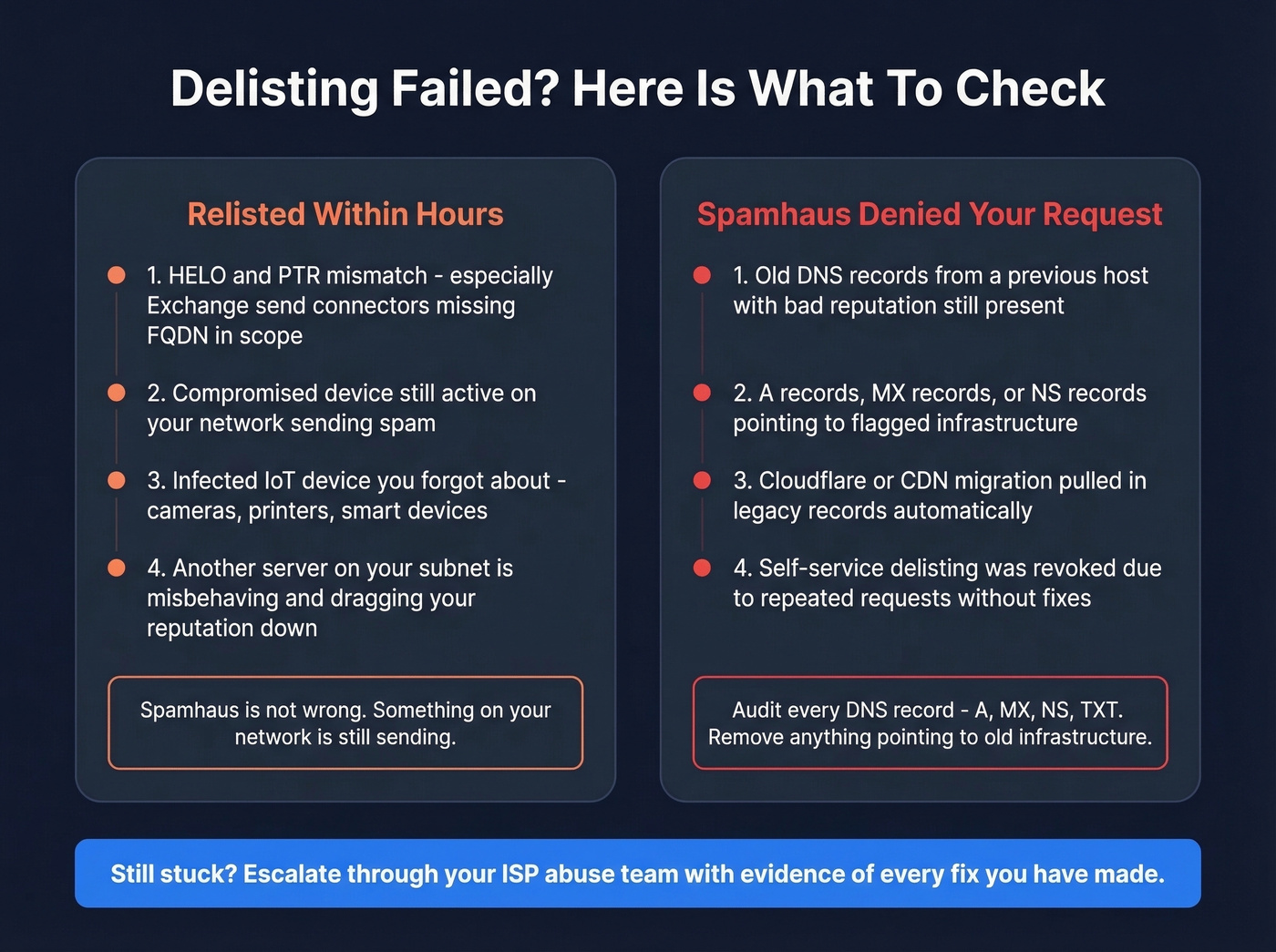
Relisted Within Hours
This is the #1 frustration on r/sysadmin. One user reported getting re-blocked within an hour of delisting. The listing details showed HELO values from completely different networks - a sign of either HELO spoofing or a misconfigured send connector.
If you're relisted immediately, check for HELO/PTR mismatch (especially on Exchange servers missing FQDN in the send connector scope), a compromised device still sending from your network, or an infected IoT device you forgot about. Spamhaus isn't wrong - something on your network is still misbehaving.
Spamhaus Denied Your Request
DNS history is the silent killer. One sysadmin reported that migrating to Cloudflare pulled in old A records from a previous host with a terrible reputation. Even after deleting those records, Spamhaus denied the removal request.
The fix: audit every DNS record - A, MX, NS, TXT. Remove anything pointing to old infrastructure. Spamhaus researchers look at your full DNS footprint, not just your current sending IP.
ISP Controls Your Listing
Some IP ranges are intentionally non-delistable by end users. Spectrum/Charter customers, for example, find their residential IPs permanently PBL-listed by ISP policy. You have three options: use a third-party SMTP relay service, get a static IP through a business account, or switch providers entirely. Skip the PBL removal form if this is your situation - it won't work.
What Happens If You Ignore a Listing
Don't test Spamhaus's patience. When a listing goes unresolved, Spamhaus escalates - first to extended IP ranges, then to your infrastructure IPs, and potentially to your entire ASN.
An escalated listing doesn't just affect your sending IP. It can take down email for every customer on your network. In our experience, catching a listing within 24 hours versus a week makes the difference between a minor inconvenience and a pipeline disaster.
Stay Off Spamhaus Permanently
Getting delisted is the easy part. Staying off is the real challenge.
Let's be honest: most legitimate senders who end up on Spamhaus don't have a security problem - they have a data problem. Purchased lists, scraped emails, and stale contacts turn into spam traps over time. If your deal sizes justify outbound, they justify verified data.
Verify every email before sending. Never use purchased or scraped lists - this is still the most common cause of CSS listings for marketing teams. (If you need a safer workflow, start with how to generate an email list.) Enforce double opt-in on web forms and add CAPTCHA to prevent bot signups that inject trap addresses. Restrict port 25 to your mail server IPs only. Monitor bounce rates and keep them below 0.5% (see email bounce rate). Use clear mailserver rDNS like mta.yourdomain.com - not generic hostnames that look like compromised boxes. If you host clients, enforce your AUP, because one compromised site on shared hosting can get the entire IP listed.
We've watched teams cycle through delist-relist loops for weeks before realizing the root cause was a two-year-old prospect list full of recycled trap addresses. Clean data is cheaper than remediation.
Prospeo's verification process with spam-trap removal and honeypot filtering catches dead addresses before they wreck your sender reputation. With a 7-day data refresh cycle versus the 6-week industry average, contacts verified last month are still accurate this month - 98% email accuracy means fewer bounces, fewer trap hits, and a reputation that stays clean (more on how to improve sender reputation).
Stack Optimize built a $1M agency sending 4x the volume with bounce rates under 3% and zero domain flags - all on Prospeo data refreshed every 7 days. When your contact data decays slower than your competitors' 6-week refresh cycle, you stay off blocklists permanently.
Clean data every 7 days means you never see that Spamhaus listing again.
Post-Delisting Monitoring
Once you're clear, set up automated monitoring so you catch future listings before your team notices bounces.
MXToolbox is the standard tool. To configure blacklist alerts: navigate to Notifications in the left nav, then toggle MXToolbox Blacklist Summary under Monitoring. Use Notifications by Type > Summaries > Monitoring for more granular control, and assign team members who should receive alerts.
| Plan | Price | What You Get |
|---|---|---|
| Free | $0/mo | 1 domain, weekly monitoring |
| Delivery Center | ~$129/mo | Inbox placement, complaints |
| Delivery Center Plus | ~$399/mo | + domain impersonation protection |
The free tier handles basic blacklist monitoring. For high-volume sending, Delivery Center adds inbox placement analysis and complaint reporting that help you catch reputation problems before they escalate to a listing.
FAQ
How long does Spamhaus delisting take?
CSS and XBL self-service removals process in minutes. DBL can take up to 24 hours for full DNS propagation. SBL depends entirely on your ISP's response time - expect hours to weeks.
Does Spamhaus charge for removal?
No. Spamhaus delisting is completely free across every list type. Any third party charging for "removal services" is reselling a process you can do yourself at check.spamhaus.org.
Why does MXToolbox show "Spamhaus ZEN"?
ZEN is a composite lookup zone combining SBL, CSS/CBL, XBL, and PBL into a single query. You're never listed on ZEN itself. Use the Spamhaus Reputation Checker to identify which underlying blocklist triggered the hit.
Should I remove my IP from the PBL?
Only if you run a legitimate mail server from that IP. Most residential and dynamic IPs belong on the PBL by design - it's a policy declaration, not a spam accusation. Use port 587 authenticated submission through your ISP's relay instead.
How do I prevent future Spamhaus listings?
Verify every email address before sending, keep bounce rates below 0.5%, and monitor your blocklist status with MXToolbox alerts. Ensure your HELO greeting matches your PTR/rDNS per RFC 5321. Cleaning your lists with a verification tool that includes spam-trap and honeypot filtering catches bad addresses before they generate the trap hits and bounces that trigger listings.