

Spam Trap Removal: What to Actually Do When You've Been Hit
Your Monday morning starts with a Spamhaus alert. Inbox placement has cratered, your sequences are dead, and the VP of Marketing is asking what happened. One cold email practitioner on r/coldemail described deliverability "plummeting overnight" after a basic verifier missed advanced traps. The instinct is to panic-search for a spam trap removal fix and buy the first cleaning service that promises a miracle.
Don't. Traps aren't the problem - they're a symptom of something broken in your data pipeline.
Already hit? Stop sending, diagnose the trap type, clean your list, delist, and warm up (full workflow below). Want to prevent it? Use a verifier with dedicated trap detection - not just syntax/MX checks - and never let data go stale.
What Spam Traps Actually Are
Spam traps are diagnostic signals, not enemies. The type you hit tells you exactly what's broken.
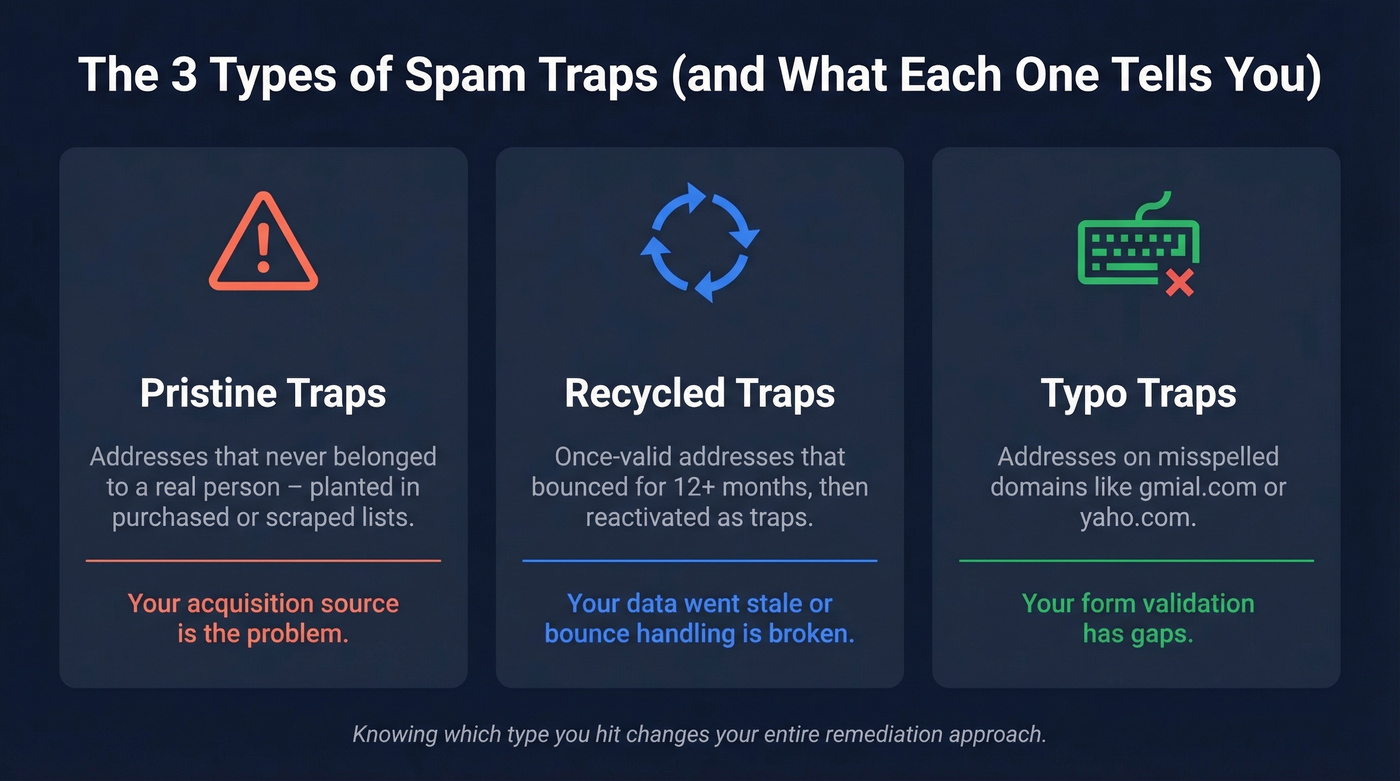
Pristine traps are addresses that never belonged to a real person - planted in purchased or scraped lists. If you're hitting these, your acquisition is the problem. Recycled traps are once-valid addresses that bounced for at least 12 months before being reactivated as traps. They signal stale data or broken bounce handling. Typo traps sit on misspelled domains like "gmial.com" and point to form validation gaps.
Knowing which type you hit changes the entire remediation approach, so don't skip this step.
You Can't "Remove All Spam Traps"
Here's the thing - any service promising to scrub every trap from your list is selling you something that doesn't exist. Spam traps are valid email addresses, and they change constantly. Data hygiene services catch some commercial sensor networks, but none reliably identify every trap that actually causes your mail to be blocked.
The real fix isn't hunting individual addresses. It's fixing the process that let them onto your list in the first place.
The 72-Hour Remediation Playbook
Once you've confirmed a spam trap hit, here's the exact sequence:
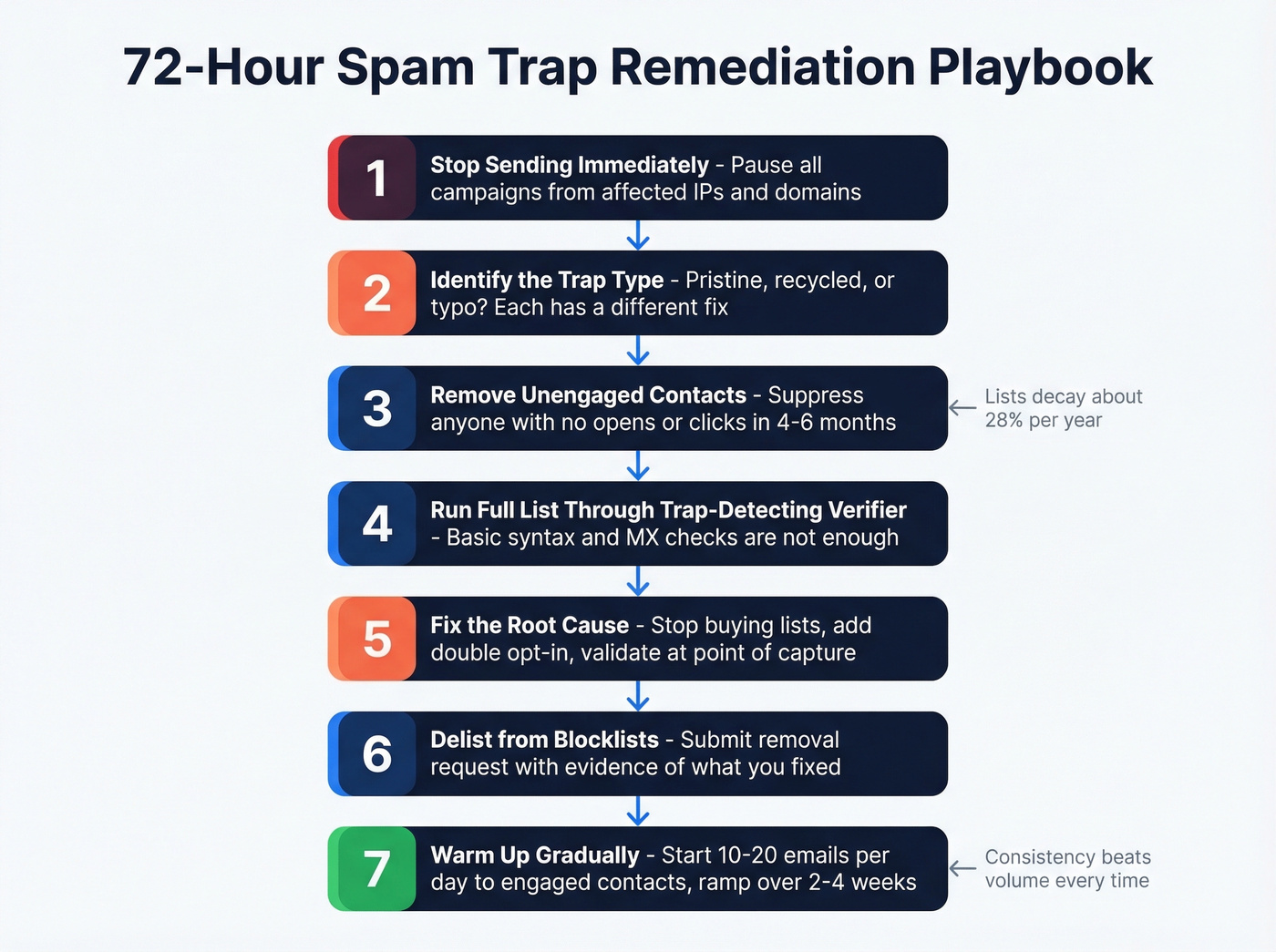
1. Stop sending immediately. Every email you send while listed digs the hole deeper. Pause all campaigns from affected IPs and domains.
2. Identify the trap type. Pristine trap? You've got a bad acquisition source. Recycled trap? Your data went stale or your bounce processing is broken. Typo trap? Your forms aren't validating input.
3. Remove unengaged contacts. Anyone who hasn't opened or clicked in 4-6 months gets suppressed. Email lists decay by roughly 28% per year - if you haven't cleaned in a while, the rot is worse than you think. Still hitting traps after the first clean? Tighten to 3 months of inactivity.
4. Run your full list through a verifier with trap detection. Basic syntax and MX validators won't catch traps. In our testing, verifiers without dedicated trap filtering miss the addresses that actually cause blocklist hits. If you’re evaluating vendors, see our breakdown of email reputation tools and what they actually measure.

5. Fix the root cause. Stop purchasing lists. Implement double opt-in for inbound signups. Add real-time email validation at point of capture. If a partner feed is the source, cut it. If you’re doing outbound, align this with a safer B2B cold email sequence so you don’t re-trigger the same signals.
6. Delist from blocklists (next section). If you need the deeper workflow, follow our full Spamhaus blacklist removal guide.
7. Warm up gradually. Start with 10-20 emails per day to your most engaged segment and ramp over 2-4 weeks. For tooling options, compare unlimited email warmup tools before you pick a provider.

Prospeo's 5-step verification catches spam traps, honeypots, and catch-all risks that basic validators miss - at $0.01 per email. Every record refreshes every 7 days, so verified contacts don't decay into recycled traps before you hit send.
Stop cleaning up trap hits. Start preventing them entirely.
Getting Delisted from Spamhaus
Spamhaus protects over 3 billion mailboxes - when they list you, the impact is immediate. Their combined ZEN list alone rejects roughly 85% of a typical mail relay's incoming traffic.
Here's the process:
- Confirm your listing via the Spamhaus lookup page.
- Identify affected IPs and domains - know exactly what's listed and on which list.
- Stop sending from impacted assets. Not "reduce volume." Stop.
- Fix the root cause and document what you changed. (If you’re also tightening authentication, use these SPF record examples to avoid misconfigurations.)
- Submit a delist request. Be concise. State specifically what you fixed. Spamhaus wants evidence, not promises.
Expect 24-72 hours for delisting once the root cause is genuinely resolved. Repeat offenders wait longer - sometimes a week or more.
Recovery Timeline
We've seen straightforward cases - clean the list, fix acquisition, warm up consistently - recover in about 4 weeks. More complex situations involving inconsistent sending patterns or content issues stretch to 2+ months.
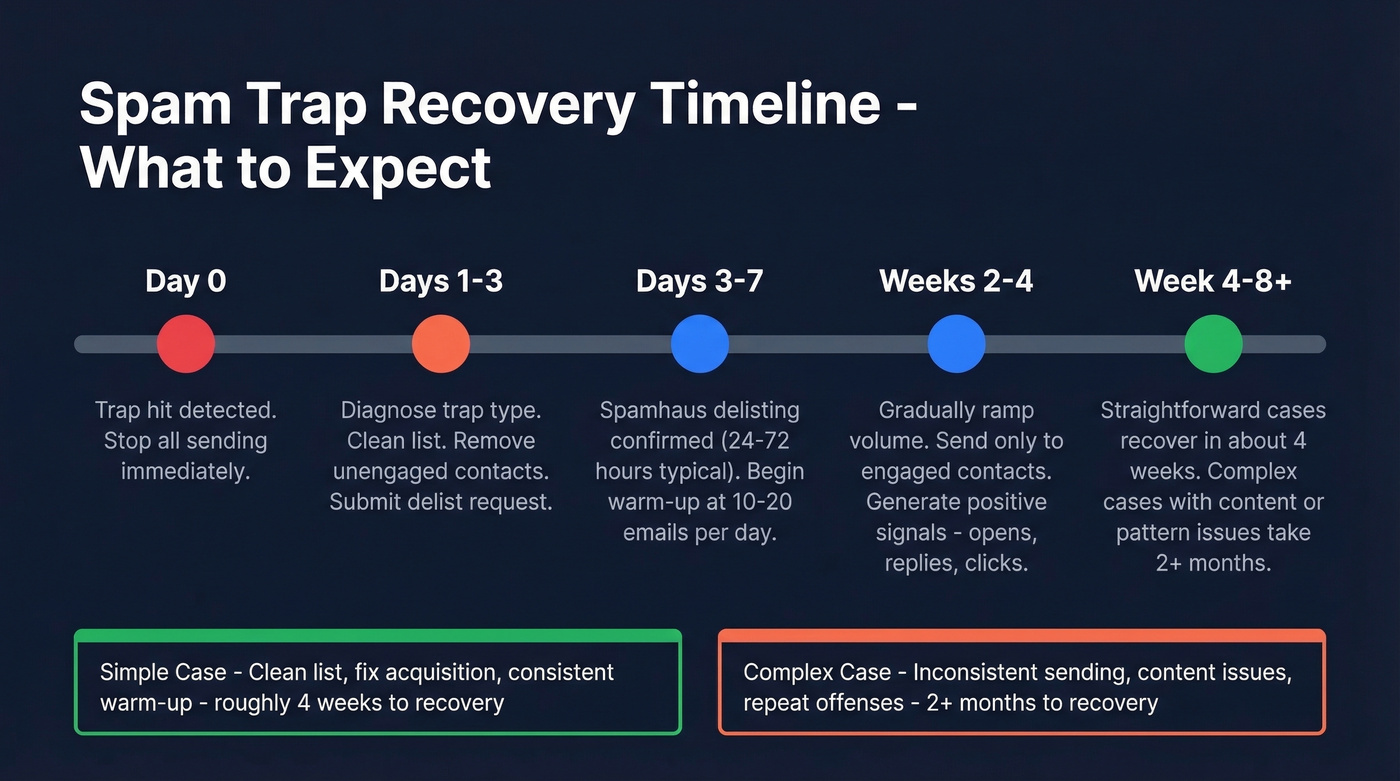
The warm-up protocol that works: start at 10-20 emails per day to your most engaged contacts. You're generating positive signals - opens, replies, clicks - that rebuild your reputation. Ramp gradually. Consistency matters more than volume, and a steady daily cadence beats sporadic blasts every time. Let's be honest: most teams rush this step and end up right back on a blocklist within weeks. If you want the broader framework, use our email deliverability guide to audit the full stack.
Spam Trap Detection Tools Compared
Not all email verifiers catch traps. Some only check syntax and MX records - that's table stakes, not protection.
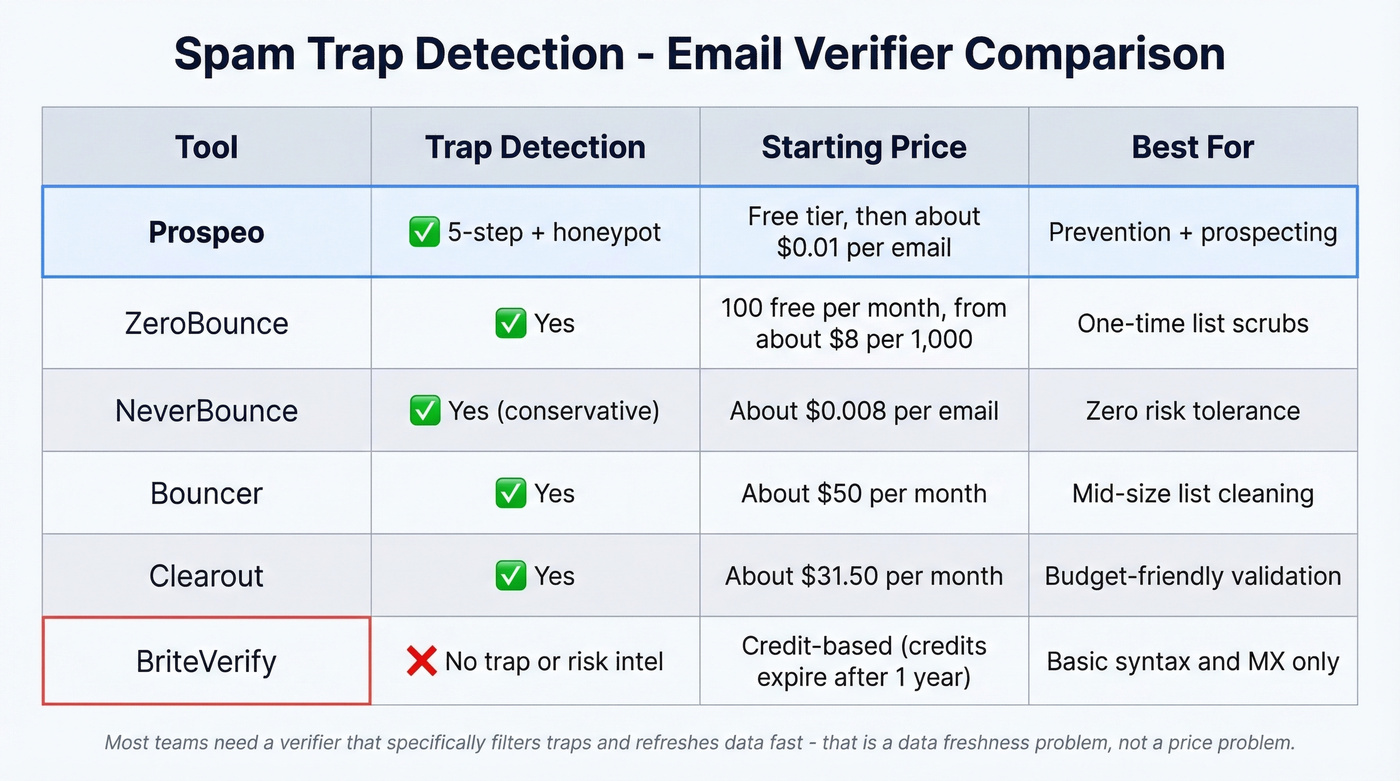
| Tool | Trap Detection | Starting Price | Best For |
|---|---|---|---|
| Prospeo | Yes (5-step + honeypot) | Free; ~$0.01/email | Prevention + prospecting |
| ZeroBounce | Yes | 100 free/month; from ~$8/1,000 | One-time list scrubs |
| NeverBounce | Yes (conservative) | ~$0.008/email | Zero risk tolerance |
| Bouncer | Yes | ~$50/mo | Mid-size list cleaning |
| Clearout | Yes | ~$31.50/mo | Budget-friendly validation |
| BriteVerify | No trap/risk intel | Credit-based (expire 1yr) | Basic syntax/MX only |
ZeroBounce delivers 99%+ accuracy and detects spam traps, abuse emails, and disposable addresses. A 563-email comparison test found it marked 61 more emails as safe than NeverBounce - though 2 of those bounced. Solid for one-time scrubs.
NeverBounce takes a stricter approach - fewer false positives but more suppressed addresses. If your risk tolerance is zero, that conservatism is a feature, not a bug.
Look, most teams don't need the most expensive verifier. They need one that specifically filters traps and refreshes data fast enough that verified emails don't decay into recycled traps before you send. That's a data freshness problem, not a price problem. If you’re comparing vendors, start with these data enrichment services to understand where verification fits in the pipeline.
Skip BriteVerify if traps are your concern. It handles core validation fine, but it isn't built to surface trap or risk intelligence. Credits expire after one year, too.
How to Prevent Traps Before They Cause Damage
Prevention is where the real leverage lives. The teams that never get hit aren't lucky - they've built verification and hygiene into every step of their data pipeline.
Double opt-in for every signup form. No exceptions. Real-time email verification at point of capture catches typo traps before they enter your database. Suppress contacts inactive for 4-6 months, and process hard bounces immediately - a bouncing address today is a recycled trap in 12 months.
Refresh contact data regularly. A 7-day refresh cycle prevents recycled trap accumulation far better than the industry-standard 6-week cadence. Monitor blocklists proactively with tools like MXToolbox or Google Postmaster Tools so you don't wait for the Monday morning alert. And tag subscribers by acquisition source so you can isolate problems fast when something goes wrong. To keep volume safe while you rebuild, follow an email velocity plan instead of guessing.
Spam trap removal isn't a one-time project. It's an ongoing discipline baked into how you handle data.
Bad data sources are the #1 cause of spam trap hits. Prospeo's 300M+ profiles go through proprietary trap filtering, honeypot removal, and catch-all handling - no third-party email providers, no recycled junk. 98% email accuracy, verified weekly.
Replace the data pipeline that got you blocklisted.
FAQ
Can you identify specific spam trap addresses on your list?
No. Mailbox providers never publicize which addresses are traps, so no service can flag every one. The proven approach is suppressing unengaged contacts and running your list through a verifier with dedicated trap detection to catch the highest-risk addresses before they trigger a blocklist hit.
How long does Spamhaus delisting take?
Typically 24-72 hours once you've fixed the root cause and submitted a removal request with clear documentation of what changed. Cases involving pristine traps from purchased lists take longer - sometimes a week or more.
Do email verification tools catch all spam traps?
No tool catches 100% of traps. Verifiers with dedicated trap and honeypot filtering catch significantly more than basic syntax/MX validators. Pair verification with consistent list hygiene for the best protection.
What's the difference between pristine and recycled traps?
Pristine traps are addresses created solely to catch senders using purchased or scraped lists - they never belonged to a real person. Recycled traps are abandoned addresses reactivated after 12+ months of inactivity. Pristine traps indicate a bad data source; recycled traps indicate stale data or broken bounce handling. The remediation path is different for each.