

Email Velocity: How Fast Can You Actually Send?
You switched from 20 manual emails a day to 200 through a bulk sending tool. Open rates cratered. Replies dried up. Your domain reputation took a hit you didn't see coming. Cold email practitioners on r/coldemail report this same pattern constantly - switching from manual to bulk sending tanks performance overnight. That's email velocity gone wrong, and it's one of the fastest ways to torch a cold outreach program.
The quick version: Email velocity is how fast you transmit messages to a provider's infrastructure. Your safe speed depends on sender reputation, not your ESP's technical cap. Jump to the provider limits table or the warmup ramp schedule.
What Is Email Velocity?
Email velocity measures the rate at which your mail server delivers messages to receiving infrastructure - Gmail, Microsoft, Yahoo, and so on. It's not just "emails per day." It's emails per minute, per hour, per connection, all filtered through the lens of your sender reputation.
There's no universal safe sending speed. New or low-reputation senders face stricter throttling; established, high-reputation senders can push faster without consequence.
A brand-new domain sending 200 cold emails on day one will land in spam fast. With 361 billion+ emails sent daily worldwide, ISPs have every reason to be aggressive about throttling. The ISP doesn't care about your ESP's advertised limit. It cares about your track record.
Here's the core tension: your tool says you can send 2,000 a day. The receiving server decides whether it'll accept 2,000 a day from you.
Sending Limits by Provider
The technical limit your ESP advertises is a trap. Google Workspace allows 2,000/day technically, but that doesn't mean 2,000 cold emails/day is deliverability-safe. A spam complaint rate as low as 0.1% - just 1 complaint per 1,000 emails - can trigger reputation damage. Here's what the caps actually are versus what's safe for cold outreach.
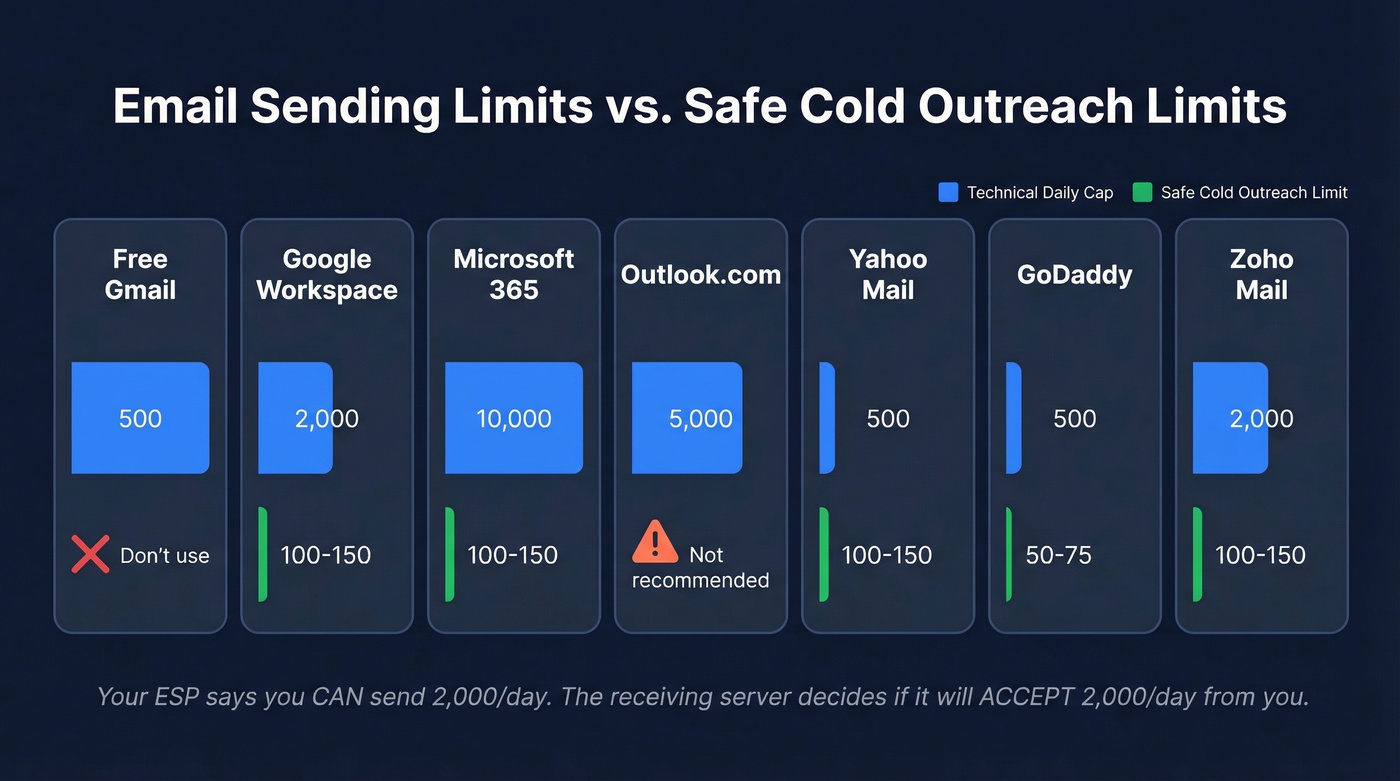
| Provider | Daily Cap | Safe Limit (Cold) | Throttle Zone |
|---|---|---|---|
| Free Gmail | 500 | 500 | Don't use for cold | 10-15/min |
| Google Workspace | 2,000 | 100-150 | 20-30/min |
| Microsoft 365 | 10,000 recipients | 100-150 | ~20/min |
| Outlook.com | 5,000 | 5,000 | Not recommended | - |
| Yahoo Mail | 500 | 500 | 100-150 | ~100/hr |
| GoDaddy | 500 | 50-75 | - |
| Zoho Mail | 250-2,000 (tier) | 250-2,000 (tier) | 100-150 | - |

Two numbers matter most. Microsoft 365's 10,000-recipient cap looks generous until you compare it to the recommended safe range for cold outreach of 100-150/day. And free Gmail accounts? Not for cold email. Period.
The most recent inbox placement data from Q4 2025 shows average inbox rates of 56.97% for Gmail, 67.95% for Office 365, and 57.48% for Yahoo. Even before you push sending speed, inbox placement can be a coin flip at some providers. Push too hard and those numbers get worse fast.
Warmup Ramp Schedule
Every new domain needs a warmup period before you touch cold outreach. The ramp takes 2-4 weeks minimum. No shortcuts.
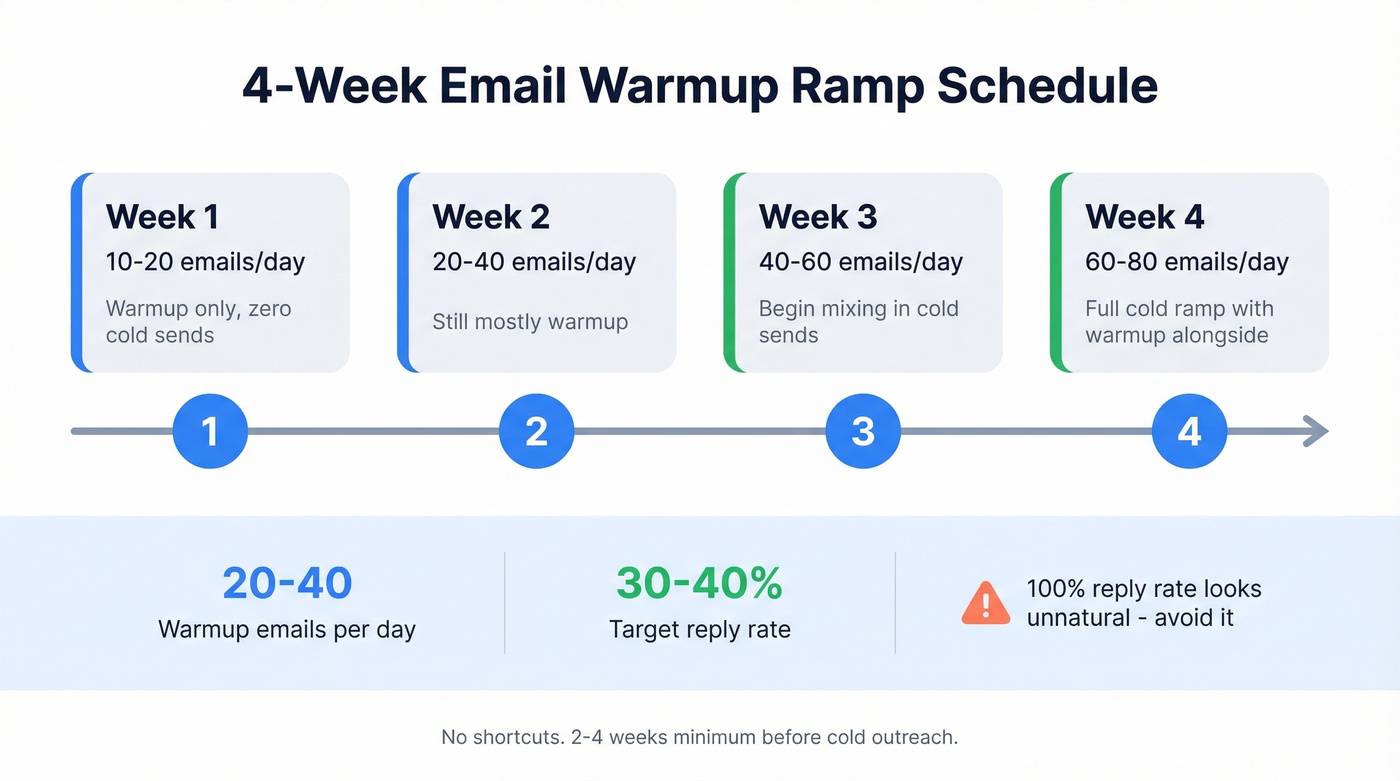
- Week 1: 10-20 emails/day, warmup only, zero cold sends
- Week 2: 20-40/day, still mostly warmup
- Week 3: 40-60/day, begin mixing in cold sends
- Week 4: 60-80/day, full cold ramp with warmup alongside
During warmup, target 20-40 warmup emails per day with a 30-40% reply rate. A 100% reply rate looks unnatural and can trigger pattern-detection algorithms - you want it to mimic real conversation, not a bot talking to itself.
Tools like Instantly ($37/mo) and Smartlead ($39/mo) automate this process. Budget options include Warmup Inbox ($19/mo per mailbox) or Woodpecker's $5/mo add-on. They're all worth the spend. Manual warmup is tedious and easy to mess up.
Cold Outreach Velocity Math
The math is straightforward: ~30 cold emails per day per domain, plus ~20 warmup emails running in the background. Need to send 150 cold emails a day? You need roughly 5 domains. In our experience, the 30-emails-per-domain rule holds across industries and company sizes.
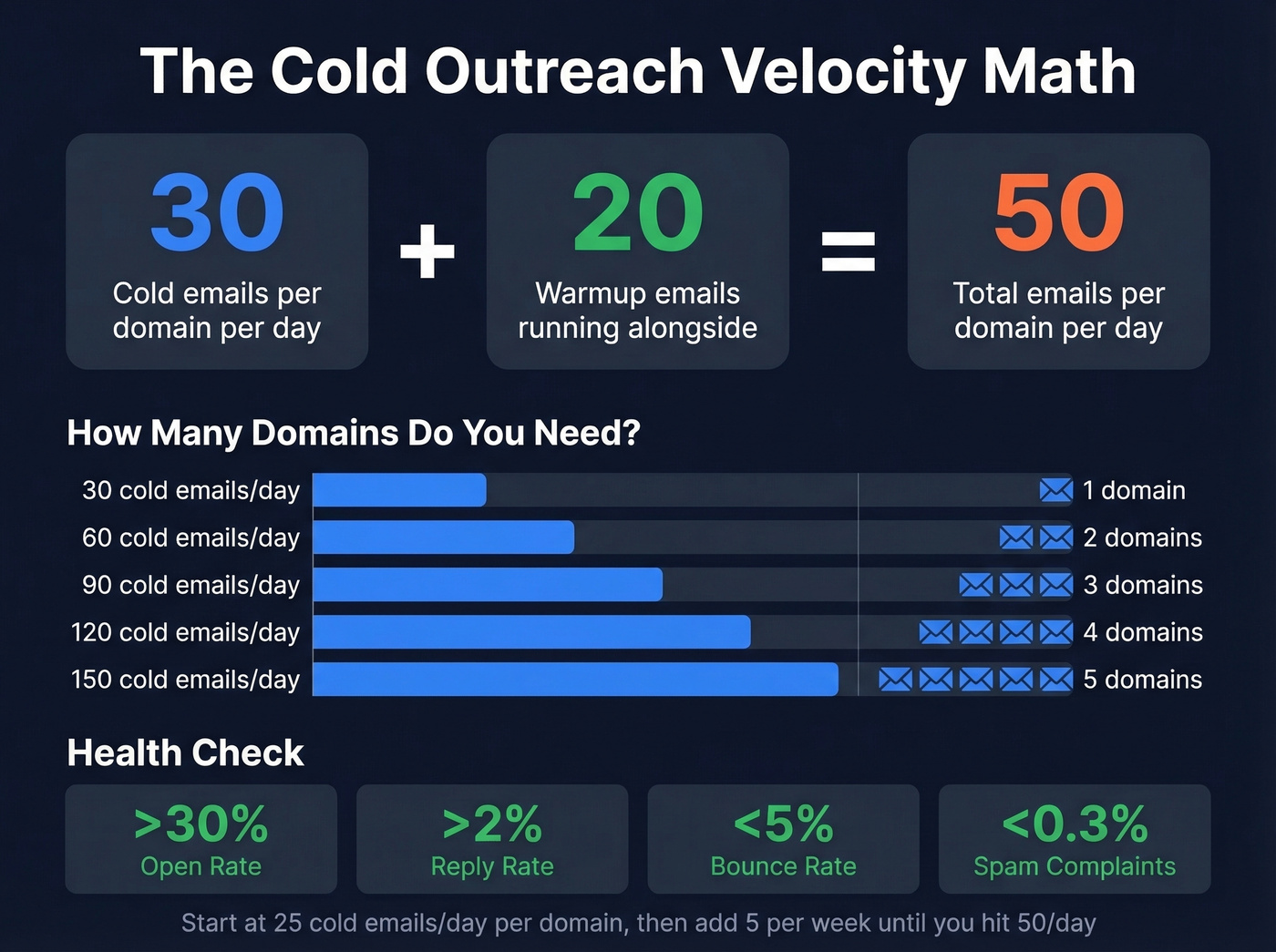
Start at a max of 25 cold emails/day per domain, then add 5 per week until you hit 50/day. That's your ceiling per domain for sustained cold outreach.
Use this if you're scaling outbound methodically: open rate stays above 30%, reply rate above 2%, bounce rate under 5%, and spam complaints under 0.3% (see bounce rate benchmarks and fixes).
Skip this if you're thinking "I'll just blast 500 from one domain and see what happens." You won't like what happens.
For reps doing high-volume prospecting, 40-60 personalized cold emails per day is a realistic productivity target. That's 2 domains per rep, minimum, if you want to stay inside conservative per-domain limits.
Let's be honest: most teams don't have a velocity problem. They have a data quality problem disguised as a velocity problem. Fix your list accuracy first, and you'll find your existing infrastructure handles more volume than you thought.

Most velocity problems are data quality problems in disguise. Every bounced email damages your sender reputation and lowers the speed ISPs will tolerate from your domain. Prospeo's 5-step verification delivers 98% email accuracy with a 7-day refresh cycle - so your lists never go stale.
Stop burning domains on bad data. Start with emails that actually land.
What Happens When You Send Too Fast
When you exceed your velocity ceiling, ISPs don't send a polite warning. They respond with SMTP error codes, and understanding them separates a temporary slowdown from a serious deliverability crisis.
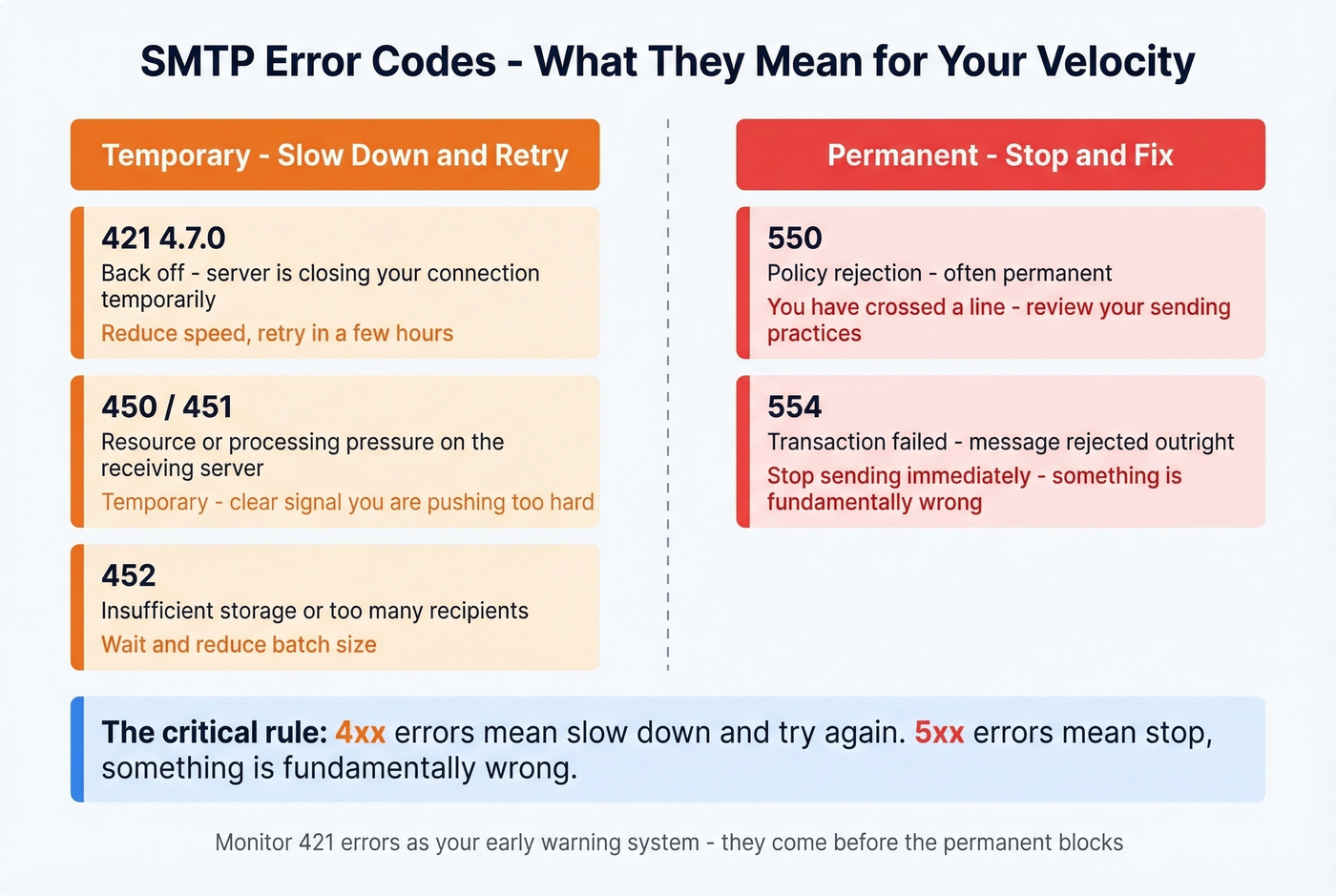
421 4.7.0 - "Back off." The server's closing your connection temporarily. Reduce sending speed and retry in a few hours.
450/451/452 - Resource or processing pressure. Temporary, but a clear signal you're pushing too hard.
550/554 - Policy rejection. Often permanent. You've crossed a line.
The critical distinction: 4xx errors mean "slow down and try again." 5xx errors mean "stop - something's fundamentally wrong." Beyond error codes, ISPs use tarpitting and greylisting to manage throughput from unknown senders. Google and Microsoft don't publish clear throttling thresholds by reputation tier, which is exactly why conservative sending limits exist - they're your buffer against the unknown.
How to Sustain High Velocity
Your SDR manager asks why half the team's emails are bouncing. The list was scraped from a cheap database 3 months ago. Every bounce is a reputation hit, and the damage compounds fast. Here's how to prevent that spiral.
Warm up every new domain before cold sending. No exceptions. Even if you're in a rush. Two weeks of warmup saves you months of reputation repair (use a structured email deliverability checklist).
Verify every email before it enters your sequence. Bad emails bounce, bounces damage reputation, damaged reputation lowers your velocity tolerance - it's a vicious cycle. Stack Optimize built from $0 to $1M ARR running 94%+ deliverability with under 3% bounce rates across all client domains, powered by Prospeo's 5-step verification and 7-day data refresh cycle. Those numbers keep ISPs happy and velocity ceilings high.

Set up email authentication. SPF, DKIM, and DMARC aren't optional. Without them, ISPs treat your domain as unverified - and unverified senders get throttled first. Configure all three before sending a single cold email (start with SPF, then confirm DKIM, and get DMARC alignment right).
Monitor 421 errors as your early warning system. If you're seeing them regularly, you're already too fast. Pull back before 4xx errors become 5xx errors. Add blocklist monitoring so you catch reputation damage before it spreads (pair this with email reputation tools).
Spread sends across the day. Never batch-blast 150 emails at 9:00 AM. Distribute them over 6-8 hours. ISPs track sending patterns, and a sudden spike from a single domain looks exactly like spam because, well, that's exactly what spam looks like.
Stack Optimize scaled to $1M ARR with under 3% bounce rates and zero domain flags - all on Prospeo data. When you send 30-50 cold emails per domain per day, every address needs to be real. Prospeo's proprietary verification catches spam traps, honeypots, and catch-all risks before they wreck your reputation.
Protect your velocity ceiling at $0.01 per verified email.
Velocity as a Pipeline Signal
Email velocity isn't just a deliverability metric - it's a leading indicator for pipeline health. When you track how quickly prospects engage with your outreach sequences, you can forecast deal momentum. A spike in reply rates at higher send volumes signals strong market fit; a drop signals list fatigue or messaging problems (track this alongside pipeline health).
We've seen teams use response velocity - the time between send and reply - as a proxy for deal urgency. Prospects who reply within 2 hours convert to meetings at 3-4x the rate of those who reply after 48 hours. Revenue teams that monitor these patterns can predict which deals will close faster and allocate rep time accordingly.
Velocity vs. Cadence
People confuse these constantly. Velocity is SMTP throughput - how fast messages leave your server. Cadence is the timing between touches in a sequence. They're related but distinct.
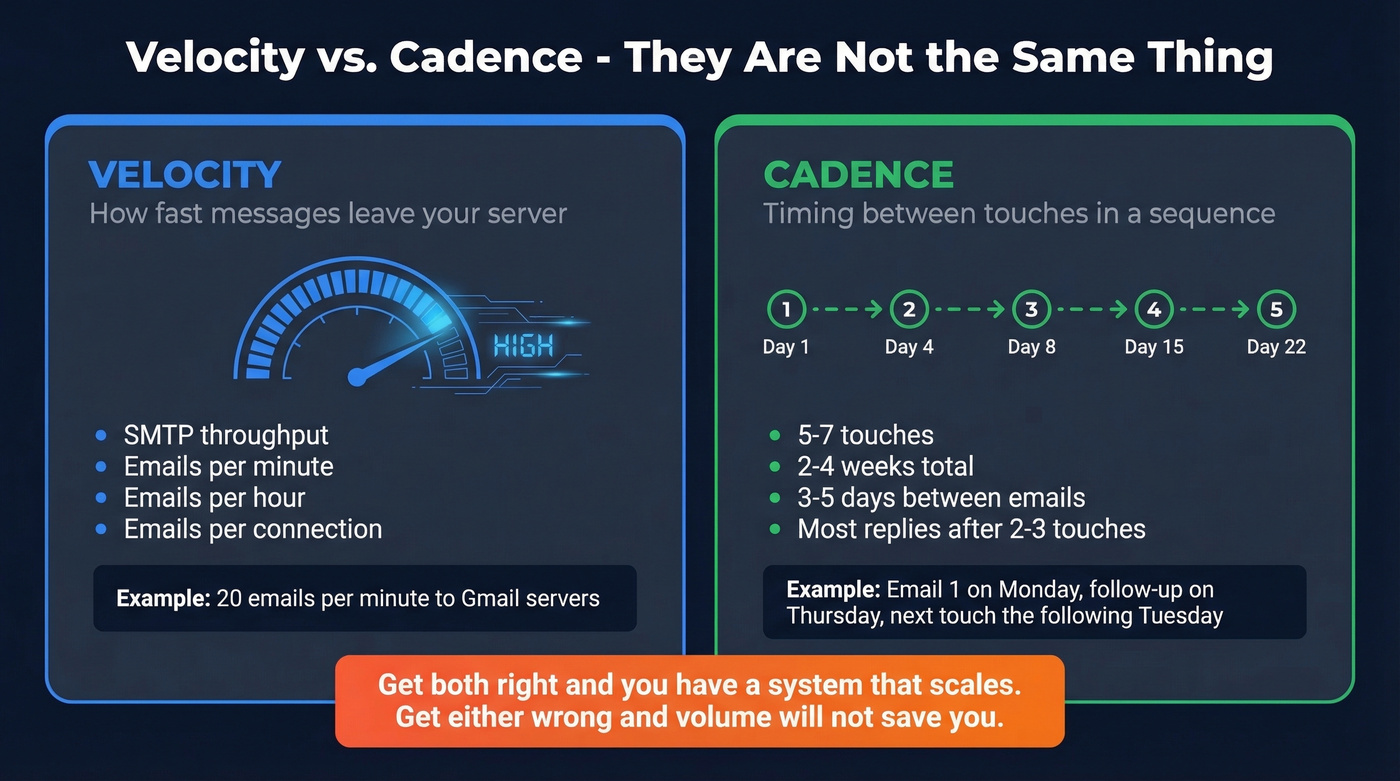
Standard B2B cold outreach cadence runs 5-7 touches over 2-4 weeks, with 3-5 days between emails. Most replies come after 2-3 touches. You can have perfect velocity management and still fail because your cadence is wrong, or vice versa. Get both right and you've got a system that scales (see a full B2B cold email sequence build).
FAQ
How many cold emails can I send per day?
About 30 per domain is the safe ceiling, plus 10-20 warmup emails alongside. Scale by adding domains - 150 cold emails/day requires roughly 5 domains. Your ESP's technical cap is irrelevant; sender reputation determines what ISPs actually accept.
What does a 421 SMTP error mean?
It's a temporary throttle from the receiving server telling you to slow down - not a permanent block. Reduce your sending volume for a few hours and retry. Ignoring repeated 421s can escalate into permanent 550/554 policy rejections.
How do I avoid getting blocklisted?
Warm up every new domain for 2-4 weeks and verify your entire list before launch to catch dead addresses and spam traps. Keep bounce rates under 5%, spam complaints under 0.3%, and spread sends across the full business day. If you're already seeing high bounces, that's a data quality problem - clean your list before sending another email.