

What Is a Tracking Domain? Setup Guide for 2026
Your open rates look great. Thirty, forty, even fifty percent. But reply rates? Zero. Meetings booked? Zero. What's happening between "opened" and "replied" is often invisible - and frequently, the culprit is a tracking domain you didn't know you had. About 1 in 7 marketing emails never reach the inbox, and a misconfigured or shared redirect domain is one of the quieter reasons why.
The Short Version
A tracking domain rewrites your email links and open pixels through a domain you control instead of your ESP's shared one. If you send B2B email, set up a custom version - corporate security gateways routinely block shared ones. Setup usually takes 10-20 minutes: pick a subdomain, add a CNAME record, enable SSL. And your domain's reputation depends on your bounce rate, so verify your data before you send.
What Is a Tracking Domain?
Every time your email tool tracks an open or a click, it routes traffic through a domain. Open tracking embeds a tiny invisible pixel - a 1x1 image - that loads from a server when the recipient opens the email. Click tracking rewrites every link so it redirects through a server before landing on the final URL. That server logs the event, then forwards the recipient to the intended page.
The domain handling those redirects and pixel loads is your tracking domain. It's separate from your sending domain (the domain in your From: address) and serves a completely different function.
| Tracking Domain | Sending Domain | |
|---|---|---|
| Purpose | Handles link redirects and pixel loads | Appears in the From: address |
| DNS record | CNAME (points to ESP) | MX, SPF, DKIM, DMARC |
| Reputation impact | Affects link trust and URL filtering | Affects sender reputation |
Most ESPs assign you a shared one by default. That's where the problems start.
Shared vs. Custom Domains
When you use a shared domain - something like click.mailchimp.com, tracking.constantcontact.com, or links.sendgrid.net - you're sharing reputation with every other sender on that domain. If someone else on the same shared infrastructure sends garbage, your links inherit the damage.
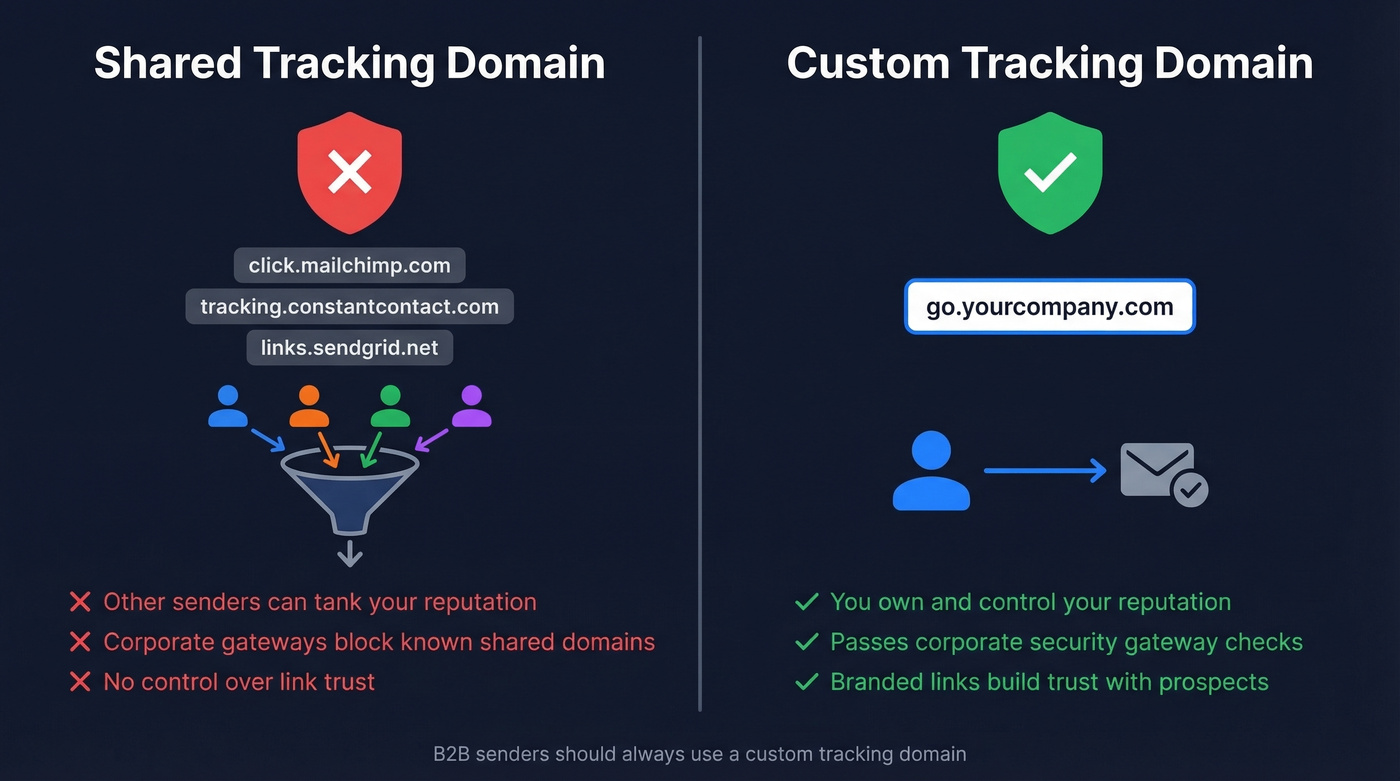
Corporate email security gateways don't care that you're a legitimate sender. Proofpoint, Mimecast, Barracuda, and Microsoft Defender evaluate URLs by domain reputation and historical abuse patterns. When a shared domain accumulates enough flags, the gateway blocks or rewrites every link using it - including yours.
Here's a scenario we've seen play out multiple times: an SDR manager asks why bounce rates spiked overnight. Nothing changed in the sequences. The list is the same. But Mimecast just started returning 554-style rejections on emails containing the ESP's shared tracking links. The team didn't do anything wrong. Someone else on the same domain did.
This comes up constantly in cold email communities on Reddit - should you bother with custom setup, especially if you're trying to keep emails "simple"? If you're sending B2B, it's not optional.
Use a custom tracking domain if: you send any B2B email, especially to enterprise recipients behind security gateways.
Skip it if: you're sending transactional emails to consumers on a platform that handles deliverability end-to-end. Even then, it's still a good idea.
Why Custom Domains Matter for B2B
A custom tracking domain isn't an upgrade. It's a seatbelt.
Corporate gateways filter URLs based on domain reputation and abuse history. When your links route through go.yourcompany.com instead of a shared ESP domain, you control the reputation. No one else's sending behavior can tank your link trust overnight. There's a branding benefit too - recipients who hover over a link see your domain, not a generic redirect, and that matters when you're emailing a VP who's been trained to distrust unfamiliar URLs.
Around 19% of emails are lost or caught by spam filters before they reach the inbox. Setting up a custom domain for email tracking won't fix everything, but it removes one of the most common and preventable failure points in the chain.
Here's the thing: if your average deal size is under $10k, you probably don't need enterprise-level tooling. But you absolutely need a custom link-tracking domain. It's the highest-ROI deliverability fix you can make in under 20 minutes.
Authentication and DNS Alignment
DMARC alignment is where teams often get confused. DMARC checks that the domain in your visible From: address matches the domains used by SPF and DKIM. For SPF alignment, the From: domain must match the Return-Path domain. For DKIM alignment, it must match the d= domain in the DKIM signature.
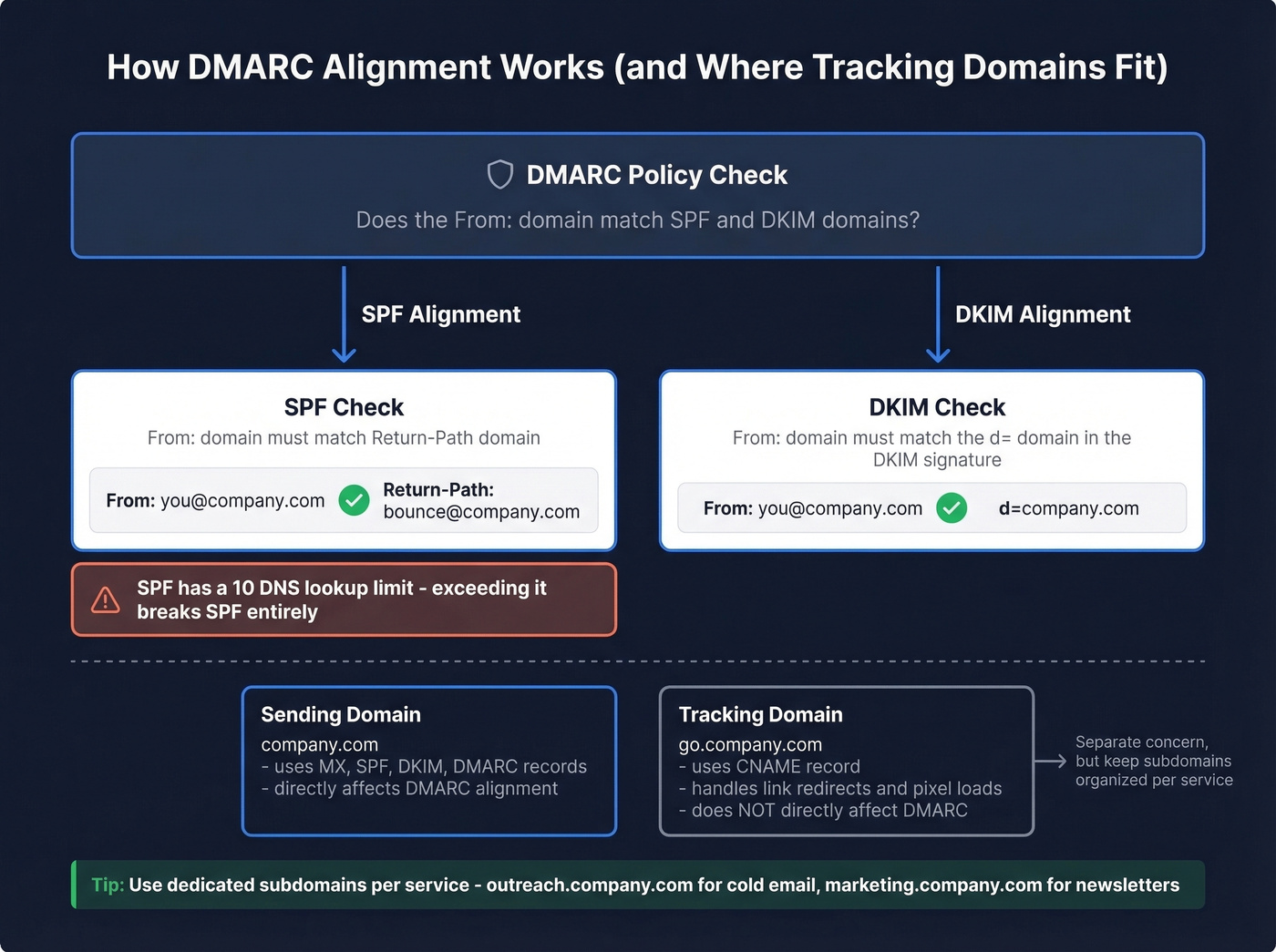
A mismatched tracking domain won't directly break DMARC - tracking domains handle link redirects, not envelope headers. But when teams start adding multiple sending services (outreach tool, marketing automation, transactional email), SPF records get crowded. SPF has a hard 10-DNS-lookup limit. Exceed it and SPF fails entirely, which cascades into DMARC failure. You can only have one SPF record per domain - if you're adding a new sending service, merge its include: into your existing record rather than creating a second one.
Use dedicated subdomains per sending service. outreach.yourcompany.com for cold email, marketing.yourcompany.com for newsletters. This keeps SPF records clean and makes troubleshooting straightforward.

A custom tracking domain keeps your links clean. But if 35% of your emails bounce, your domain reputation tanks anyway. Prospeo's 5-step verification delivers 98% email accuracy - teams using it cut bounce rates from 35%+ to under 4%.
Protect the domain reputation you just spent 20 minutes setting up.
Open Tracking in 2026: What Still Works
Let's be honest - open tracking is becoming a vanity metric. Apple holds roughly 49% of email opens per Litmus research, and Mail Privacy Protection pre-loads tracking pixels for all of them, meaning 55%+ of global opens are affected. In some segments, up to 75% of reported opens are artificial.
That doesn't mean you should ditch your custom email tracking setup. It means you should shift what you measure. Click tracking - which runs through your custom domain - is still reliable. Reply rate and inbox placement rate are the metrics that actually correlate with pipeline. Open rates are noise.
How to Set Up a Custom Tracking Domain
Setup is straightforward. Most teams finish in under half an hour, plus DNS propagation time. You're creating a subdomain you own that your ESP uses to route all tracking requests - opens, clicks, and redirects - instead of its default shared domain.
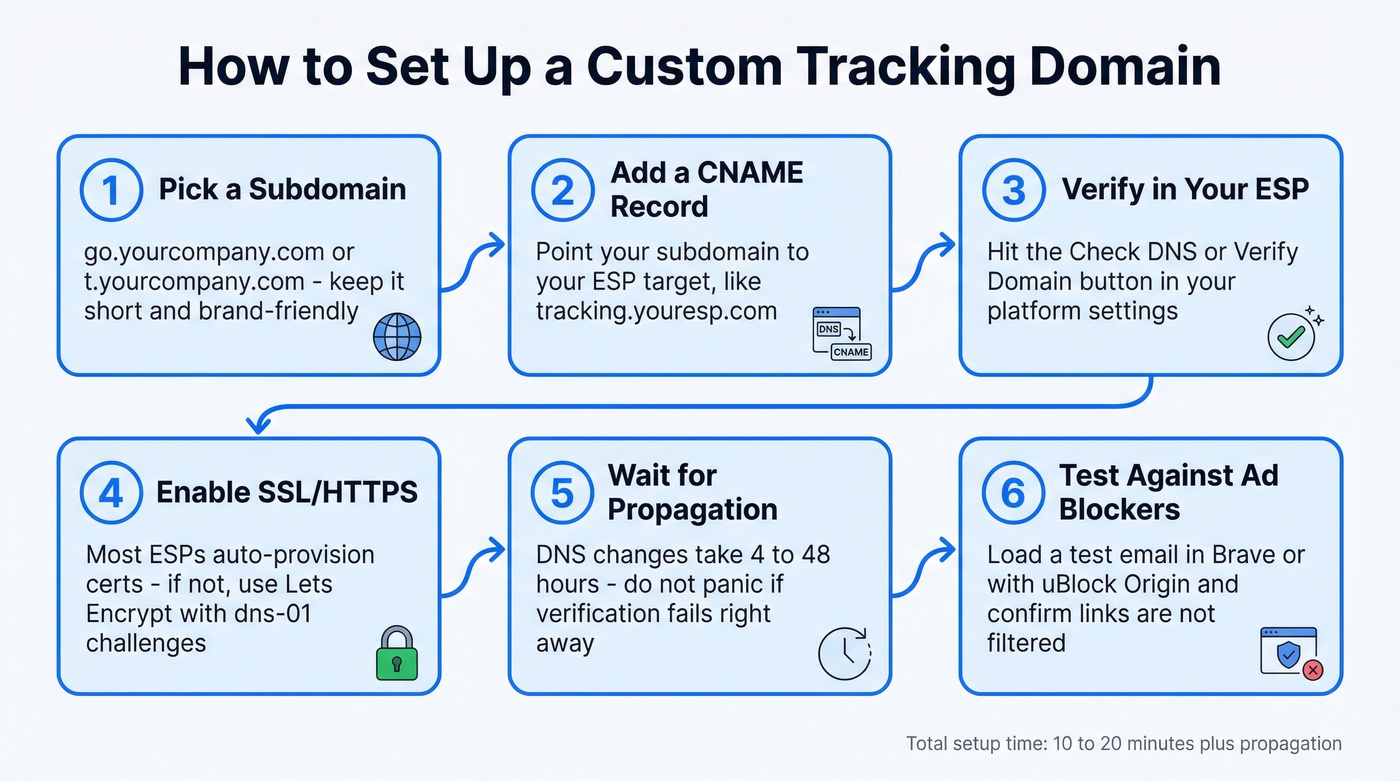
- Choose a subdomain. Use something short and brand-friendly:
go.yourcompany.com,t.yourcompany.com,e.yourcompany.com, orclick.yourcompany.com. Avoid obvious prefixes liketracking.- they're more likely to get flagged by filters and blockers. - Add a CNAME record in your DNS provider. Point your chosen subdomain to the target your ESP provides (e.g.,
go.yourcompany.com -> tracking.youresp.com). - Verify in your ESP. Most platforms have a "check DNS" or "verify domain" button. Click it.
- Enable SSL/HTTPS. This isn't optional. Some security layers and inbox experiences block or warn on non-HTTPS links. Most ESPs auto-provision SSL certificates. If you're self-managing, Let's Encrypt with dns-01 challenges works well - dns-01 doesn't require opening port 80, which is ideal for subdomains that don't serve web traffic. If your subdomain uses a
.appor.devTLD, HTTPS is mandatory regardless since these TLDs enforce HSTS. - Wait for propagation. DNS changes typically take 4-48 hours. Don't panic if verification fails immediately.
- Test against ad blockers. After setup, load a test email in a browser with uBlock Origin and Brave's built-in blocker enabled. Confirm your links aren't being filtered.
Name your subdomain something you'd be comfortable seeing in a prospect's URL bar. That's the real test.
Troubleshooting Setup Failures
Most setup failures come down to DNS mistakes. Here's what we see repeatedly:
| Failure Mode | Fix |
|---|---|
| CNAME typo | Double-check the target string character by character |
| A record instead of CNAME | Delete the A record, create a CNAME |
| Root domain used (not subdomain) | Always use a subdomain - never the bare domain |
| Propagation not complete | Wait 4-48 hours, then re-verify |
| CAA record blocking cert | Add a CAA record allowing your cert provider |
| Cloudflare proxy enabled | Try DNS-only mode first; some providers require proxying, but many setups break when proxied |
If emails are bouncing after setup, check the SMTP error codes:
| Code | Meaning |
|---|---|
| 550 5.7.1 | Blocked - spam or blacklist |
| 554 5.7.1 | Message rejected by server |
| 421 4.7.0 | Temporary block, poor reputation |
| 5.7.26 | DMARC/authentication failure |
A 5.7.26 error usually points to DMARC/authentication failure. Go back to your SPF, DKIM, and DMARC setup before touching anything else.
Monitoring Domain Reputation
Setting up a custom tracking domain is step one. Keeping it healthy is the ongoing work.
MXToolbox is the free starting point - it checks your domain against 105 DNS-based blacklists. For continuous monitoring, MailMonitor ($99/month) watches 100+ blocklists and alerts you automatically. Keep an eye on Spamhaus DBL specifically - it's the blacklist that matters most. SORBS is permanently decommissioned, so ignore any tool that still references it.
Check weekly at minimum, and daily during active campaigns. When performance drops, follow this sequence: check blacklists, review SMTP error codes, test inbox placement, fix the root cause. If bounces caused the blacklisting, fix the data first - verify your list before resuming sends. No amount of domain monitoring helps if you're sending to dead addresses.
The Upstream Problem: Data Quality
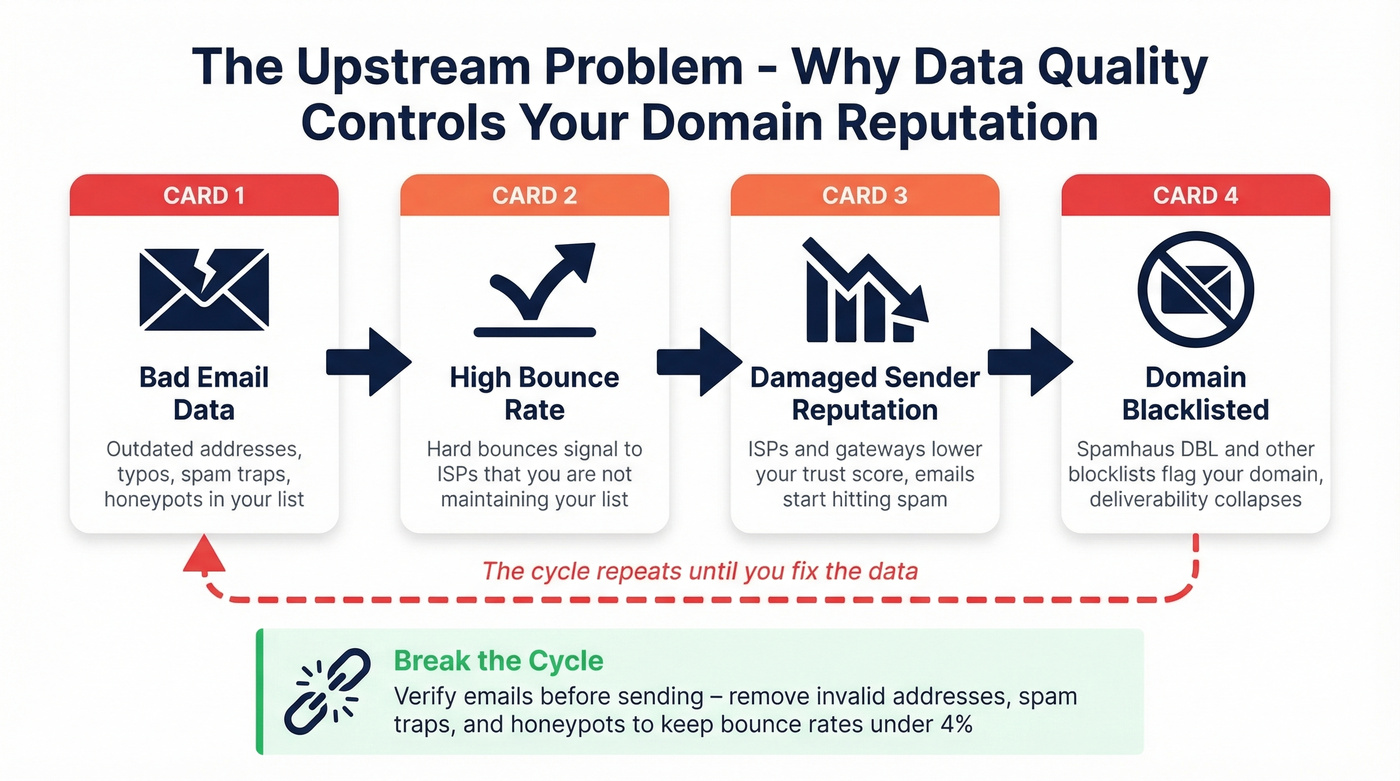
Your tracking domain's reputation is downstream of your data quality. The chain is simple: bad email data leads to bounces, bounces damage your sending reputation, and a damaged reputation gets your domain blacklisted. Fix the symptom all you want - if the data is bad, the cycle repeats.

This is where email verification breaks the cycle. Prospeo's 5-step verification process delivers 98% email accuracy with catch-all handling, spam-trap removal, and honeypot filtering - all refreshed on a 7-day cycle versus the 6-week industry average. Meritt dropped bounce rates from 35% to under 4%, and Snyk went from 35-40% bounces to under 5% across 50 AEs. When your data is clean, your domain stays off blacklists.
You're isolating link reputation with custom tracking domains. Now isolate your data quality problem. Prospeo refreshes 300M+ profiles every 7 days - not the 6-week industry average - so your outbound hits real inboxes, not dead addresses that spike bounces.
Bad data destroys deliverability faster than a shared tracking domain ever will.
FAQ
Do I need one for text-only emails?
Yes, if you use any link tracking at all. Your ESP rewrites links through the tracking domain regardless of email format. Open tracking also uses a pixel loaded through it - so even "text-only" emails with tracking enabled hit the domain. If you disable all tracking entirely, then no, you don't need one.
Can I use my root domain instead of a subdomain?
No. Always use a subdomain like go.yourcompany.com. If your root domain gets blacklisted from tracking activity, it affects all your email - transactional, marketing, internal, everything. A subdomain isolates the blast radius.
How do I check if my domain is blacklisted?
Run it through MXToolbox - it's free and checks 105 blacklists. For ongoing monitoring, MailMonitor ($99/month) sends automatic alerts. If bounces caused the blacklisting, clean your email list with a verification tool before resuming sends - fixing the list first prevents the same cycle from repeating.
What's the difference between a custom and default tracking domain?
A custom tracking domain is a subdomain you own - like go.yourcompany.com - that replaces your ESP's default shared domain for handling opens and clicks. The difference is reputation isolation: with a custom domain, your link reputation depends solely on your own sending behavior, not on thousands of other senders sharing the same infrastructure.