

Return Path Email: What It Is, Why It Matters, and How to Set It Up
Your DMARC reports keep showing SPF alignment failures. You've set up SPF, published your DKIM keys, and everything should work - but bounces land in the wrong place and authentication breaks silently. The culprit is almost always the return path email header, and most teams either misunderstand it or ignore it entirely.
What You Need (Quick Version)
- Return-Path = where bounces go. It's set by the receiving mail server, not by you directly.
- If your Return-Path domain doesn't match your From domain, SPF alignment fails and DMARC breaks - even if SPF itself passes.
- Fix it by setting up a custom Return-Path via CNAME at your ESP.
- Some ESPs don't support this. MailChimp and Constant Contact on standard plans won't let you customize Return-Path.
- The best way to reduce bounces isn't better Return-Path config - it's cleaner email data. Verify addresses before you send.
What Is a Return-Path Header?
The Return-Path is an email header that tells mail servers where to send bounce notifications - also known as non-delivery reports. Here's the critical detail most articles get wrong: you don't set the Return-Path. The receiving mail server, the final-delivery MTA, sets it based on the SMTP envelope's MAIL FROM value, per RFC 5321 section 4.4.
During an SMTP transaction, the sending server declares a MAIL FROM address (the envelope sender). When the message reaches its final destination, the receiving MTA stamps that value into the Return-Path header. It's a trace header, not something you compose. This means the Return-Path reflects your sending infrastructure, not your marketing copy. If your ESP sends on your behalf using their own bounce domain, that's what shows up.
The terminology around this concept is a mess. Here's a reference:
| Term | Same Thing? | Context |
|---|---|---|
| Return-Path | Yes | Header added at final delivery |
| Bounce address | Yes | Common informal name |
| Reverse path | Yes | RFC terminology |
| Envelope From | Yes | SMTP envelope context |
| MAIL FROM | Yes | SMTP command value |
| RFC5321.MailFrom | Yes | DMARC report field |
These all point to the same underlying concept: the SMTP envelope sender used for bounce handling, which gets recorded as the Return-Path header at final delivery. When you see RFC5321.MailFrom in a DMARC aggregate report, you're looking at the envelope-from value that becomes the Return-Path.
Return-Path vs. From vs. Reply-To
These three headers confuse everyone. They serve completely different purposes:
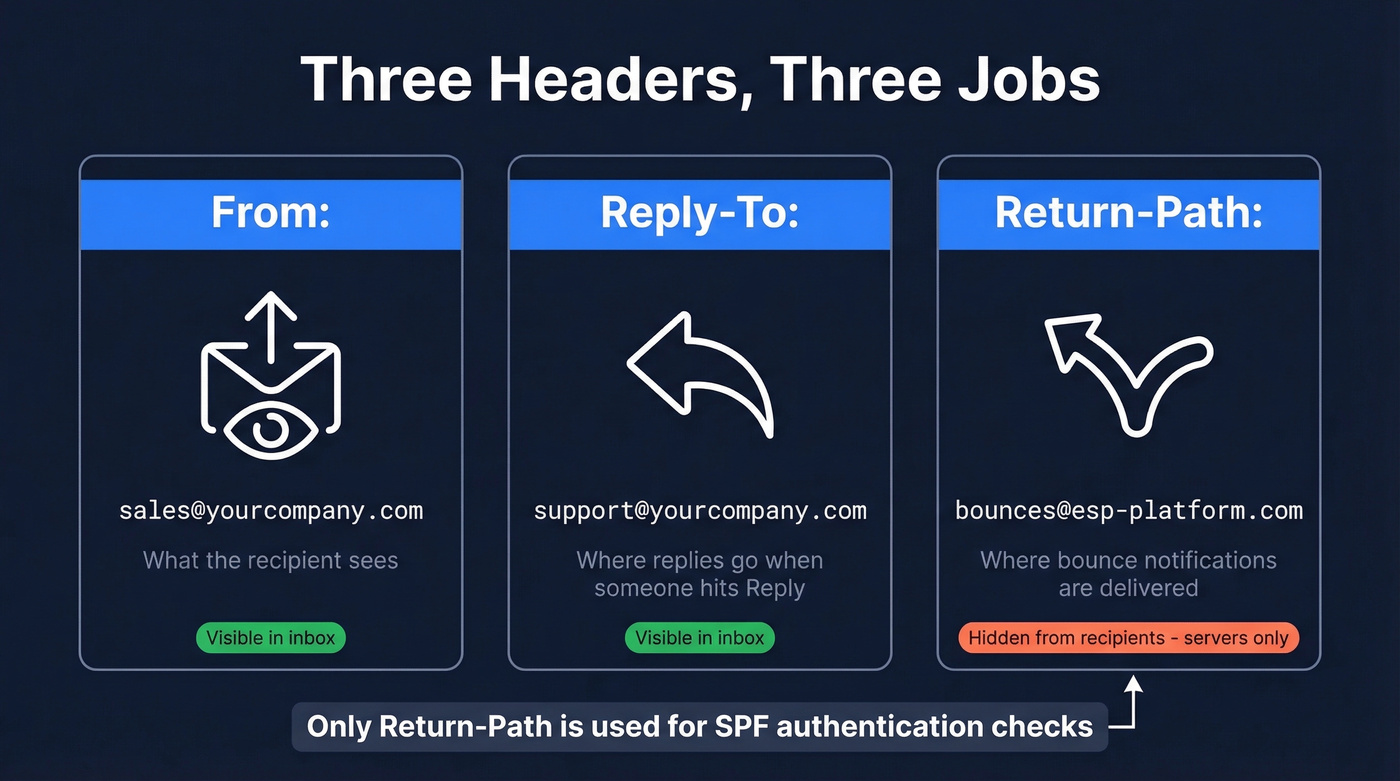
| Header | Who Sees It | What It Does |
|---|---|---|
| From | Recipient | Display address in inbox |
| Reply-To | Recipient | Where replies go (if set) |
| Return-Path | Mail servers only | Where bounces go |
The From address is what your recipient sees in their inbox. Reply-To redirects manual replies - useful when you send from a no-reply address but want responses going to support. The Return-Path is invisible to most users and lives in the raw message headers, only mattering to mail servers processing bounces and running authentication checks.
In Gmail, click "Show original" to find the Return-Path: line. Most people never check, which is exactly why misconfigurations go unnoticed for months.
How Return-Path Drives Authentication
Here's where this header becomes operationally critical.
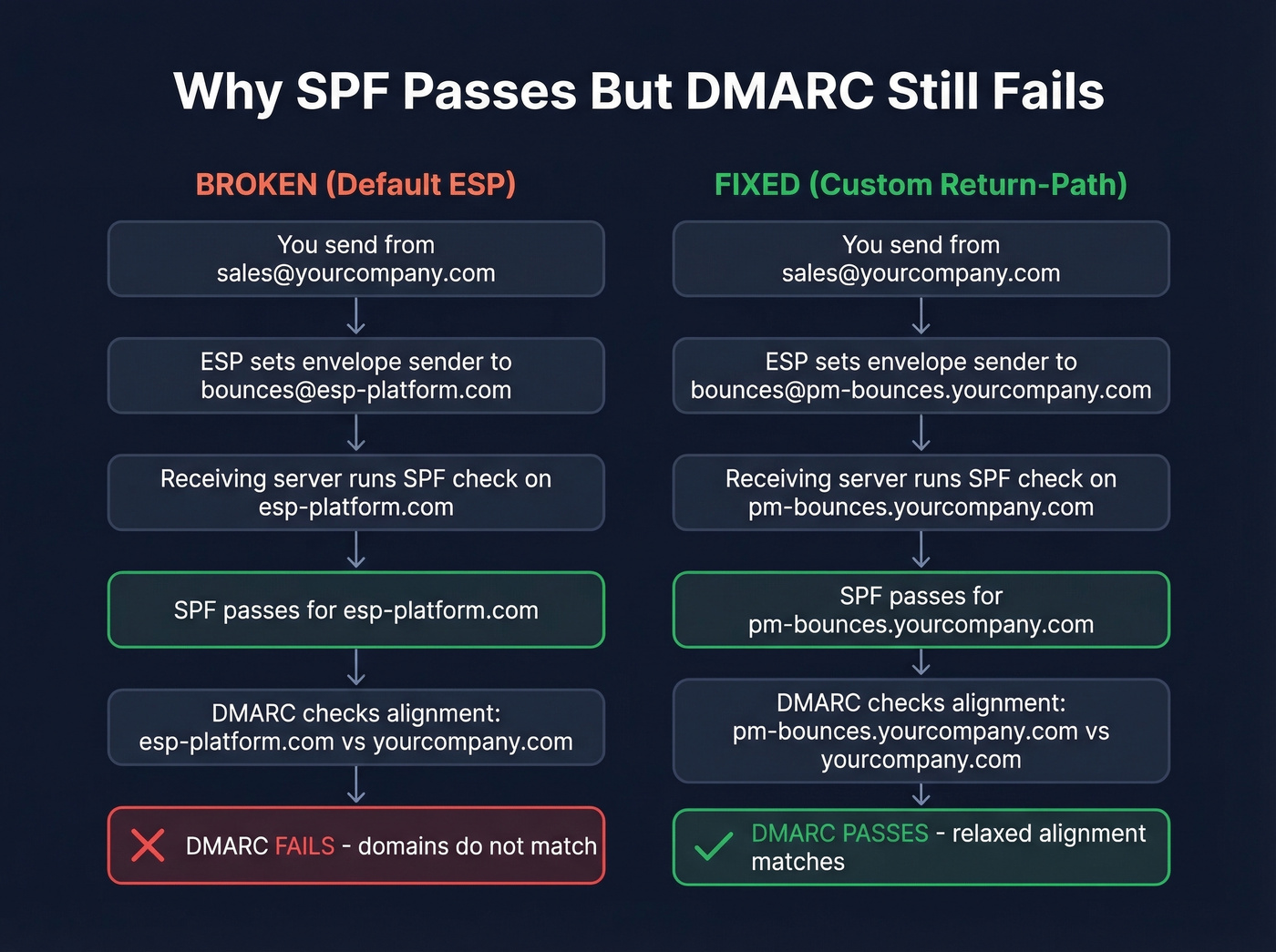
When a receiving server runs an SPF check, it doesn't look at your From domain. It looks at the Return-Path domain. In our experience, this single misunderstanding is the biggest source of DMARC failures teams run into.
Say you send from sales@yourcompany.com, but your ESP's default bounce address is bounces@esp-platform.com. SPF checks the DNS records for esp-platform.com, not yourcompany.com. SPF passes - the ESP's servers are authorized to send for their own domain - but that pass is meaningless for DMARC.
DMARC requires alignment: the domain that passes SPF or DKIM must match the domain in your visible From header. If your From is yourcompany.com and your envelope sender is esp-platform.com, SPF alignment fails. DMARC doesn't care that SPF technically passed. The domains don't match.
DMARC alignment comes in two flavors. Relaxed (aspf=r) allows organizational-domain matching, so mail.yourcompany.com aligns with yourcompany.com. Strict (aspf=s) requires an exact domain match. Most senders use relaxed, and for good reason - strict alignment breaks the moment you use any subdomain for bounce handling, which is exactly what a custom Return-Path setup does. (If you want the deeper mechanics, see our guide to DMARC alignment.)
Major mailbox providers including Google and Yahoo tightened bulk-sender requirements starting in 2024, requiring SPF/DKIM and pushing DMARC adoption. If your Return-Path alignment is broken, you're relying solely on DKIM. That's not redundancy. That's a single point of failure.
Why You Need a Custom Return-Path
Set this up if:
- You send outbound or marketing email through an ESP
- You want SPF alignment for DMARC redundancy alongside DKIM
- You care about receiving your own bounce notifications
- You're on an ESP that supports it (ActiveCampaign, Postmark, SendGrid, SES, Mailjet)
Skip this if you only send transactional email from your own mail server with matching domains. In that case, your envelope sender already matches your From domain and there's nothing to fix.
Here's the thing: MailChimp and Constant Contact don't support custom Return-Path on standard plans. That means SPF will never align for DMARC on those platforms. DKIM is your sole alignment mechanism. If DKIM breaks for any reason - key rotation issues, header modification by a forwarding server - DMARC fails completely. (Related: if you're still debugging DNS, these SPF record examples can help.)
This is a recurring frustration in deliverability communities. We've seen teams discover their ESP doesn't support a custom envelope sender only after they've built out their entire sending infrastructure on the platform. ActiveCampaign supports custom Return-Path on lower-tier plans, and Postmark has supported it from day one.
If your ESP doesn't let you set a custom Return-Path, that's not a minor limitation - it's a dealbreaker for any team serious about deliverability. You're paying for a platform that structurally prevents full authentication. Switch.

The best Return-Path configuration in the world won't save you from sending to invalid addresses. Prospeo's 5-step email verification catches bad data before it triggers bounces - 98% accuracy, refreshed every 7 days.
Stop configuring bounce handling for emails that should never have been sent.
Setting Up a Custom Return-Path
The process follows the same pattern across most ESPs:
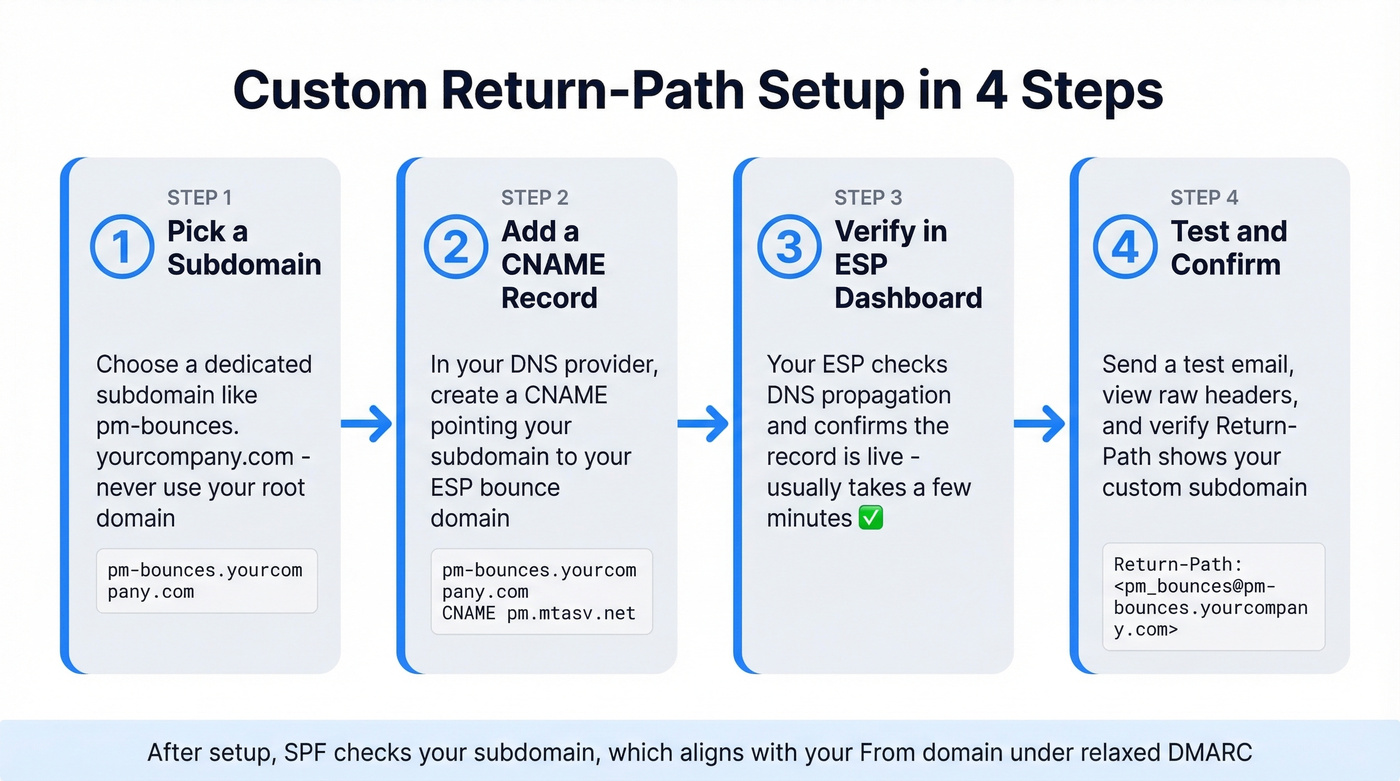
- Choose a subdomain for bounce handling, like
pm-bounces.yourcompany.com. Don't use your root domain. - Create a CNAME record in your DNS pointing that subdomain to your ESP's bounce domain. For Postmark:
pm-bounces.yourcompany.compointing topm.mtasv.net. - Verify in your ESP dashboard. Most platforms check DNS propagation and confirm the record is live.
- Test. Send a test email, view the raw headers, and confirm the Return-Path shows your custom subdomain.
After setup, your headers should look something like:
Return-Path: <pm_bounces@pm-bounces.yourcompany.com>
SPF now checks pm-bounces.yourcompany.com, which aligns with yourcompany.com under relaxed DMARC. A few provider-specific notes worth knowing: Oracle Email Delivery supports only one active custom return path per email domain. Mailjet uses a bnc3.-prefixed subdomain and a CNAME pointing to bnc3.mailjet.com.
VERP for Bounce Tracking
Variable Envelope Return Path (VERP) encodes the recipient's address into the bounce address itself. Instead of a single Return-Path for all recipients, each outgoing message gets a unique envelope sender:
newsletter-owner+alice=example.com@company.com
The @ in the recipient's address becomes = to avoid two @ signs. When a bounce returns to this address, you immediately know which recipient failed - no need to parse the wildly inconsistent bounce message body.
Dan Bernstein's original VERP proposal from 1997 laid out the rationale: bounce notification formats vary so much across mail servers that reliably extracting the failed recipient from the body is essentially impossible. That observation still holds nearly three decades later.
Modern implementations use ID-based VERP, replacing the raw recipient address with a hashed identifier. This avoids exposing email addresses in headers (which matters for GDPR compliance) and keeps addresses shorter. VERP works with Postfix, Exim, qmail, and Sendmail. Most high-volume ESPs implement some form of it behind the scenes - you just don't see it. It's compatible with SPF/DKIM/DMARC as long as your SPF record covers the VERP domain.
Backscatter and Spoofing Risks
Backscatter occurs when a spammer forges your domain as the envelope sender. When those spam messages bounce, the notifications flood your domain - because that's where the Return-Path points. Your mail server gets hammered with thousands of bounces for emails you never sent, and this traffic can get your domain blacklisted. (If you're already seeing bounce spikes, start with email bounce rate benchmarks and diagnostics.)
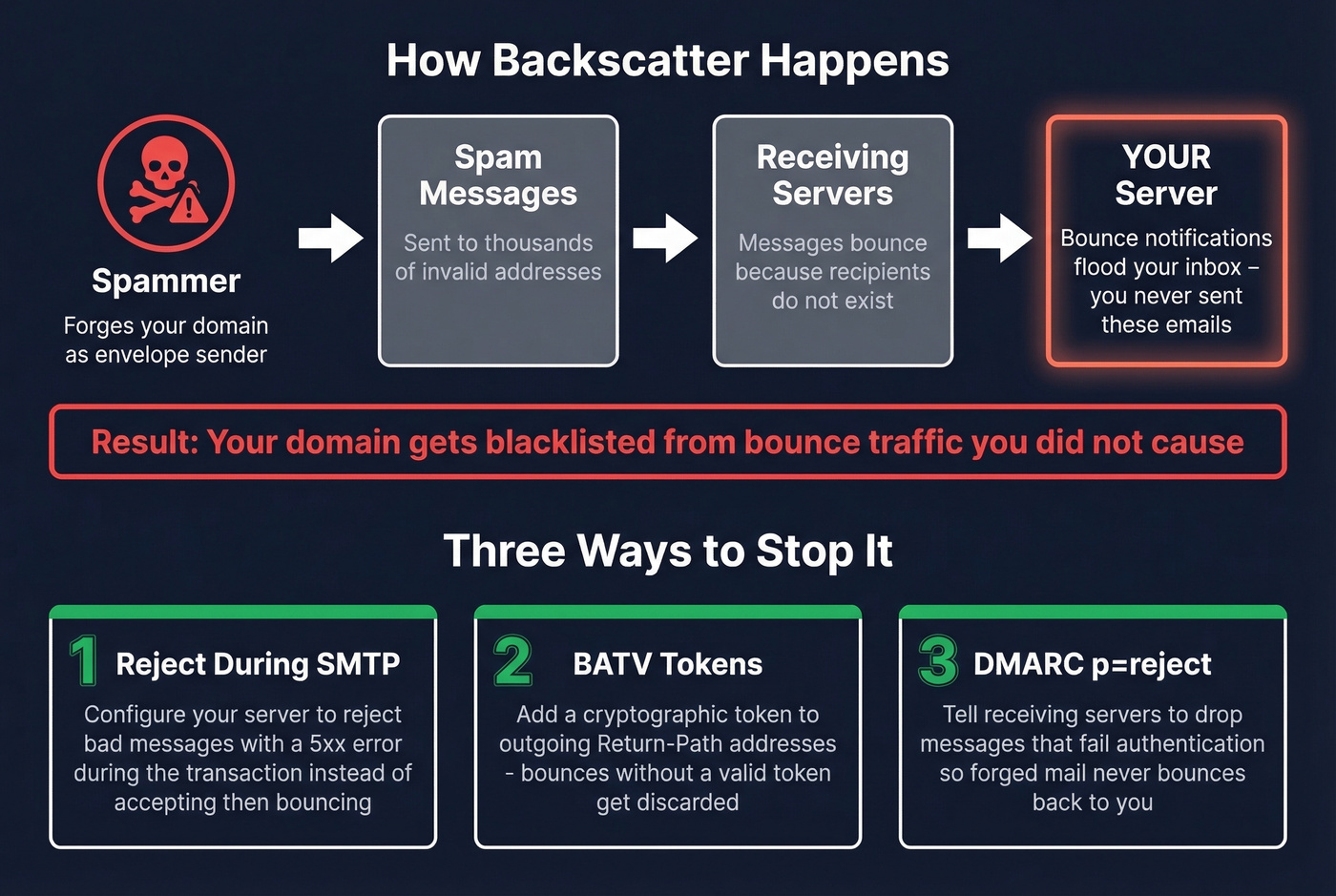
Three mitigations worth implementing:
Reject during the SMTP session. Configure your mail server to reject invalid messages with a 5xx error during the transaction, rather than accepting and bouncing later. Accept-then-bounce is the primary mechanism that generates backscatter.
BATV (Bounce Address Tag Validation). This adds a cryptographic token to your outgoing Return-Path. When a bounce arrives, your server checks for a valid token. No token means the bounce is bogus - discard it.
DMARC p=reject. Once you've verified alignment, a reject policy tells receiving servers to drop messages that fail authentication. This reduces the volume of forged mail that makes it far enough to bounce back at you.
Troubleshooting Common Failures
Amazon SES custom MAIL FROM still failing SPF. You've configured a custom MAIL FROM domain in SES, but DMARC reports keep showing failures. The most common cause: you're missing one of the required DNS records for that MAIL FROM subdomain. SES needs both a TXT record for SPF and an MX record pointing back to SES's feedback endpoint. Skip the MX record and the configuration never fully activates. (If you're validating your setup end-to-end, use this checklist on how to verify DKIM is working.)
Two MX records causing conflicts. If your custom Return-Path subdomain has multiple MX records pointing to different services, bounce routing becomes unpredictable. Keep the bounce subdomain's MX aligned to the ESP's instructions - one service, one MX.
Discovering your ESP doesn't support custom Return-Path after you've committed. We've seen this happen more than once. Let's be clear: check envelope-sender customization support before you sign the contract. It's not in the marketing materials. Ask support directly or send a test email from a trial account and inspect the headers yourself.
Fix the Root Cause: Bad Data
Return-Path configuration matters. But let's be honest about what it actually solves. The Return-Path header is a symptom management tool - it routes bounces correctly and enables authentication. The disease is bad contact data.
If a meaningful chunk of your list is invalid addresses, you're generating bounces that damage your sender reputation regardless of how perfectly your headers are configured. We've worked with teams who spent weeks debugging DMARC alignment only to realize 15% of their list was dead addresses. The upstream fix is verifying emails before you hit send. Prospeo's email finder runs a 5-step verification process - catch-all handling, spam-trap removal, honeypot filtering - with a 7-day data refresh cycle and 98% email accuracy. At roughly $0.01 per email with a free tier included, it's cheaper than debugging DMARC failures after the fact. (If you're building a repeatable process, start with an email deliverability guide and then lock in how to improve sender reputation.)
When your list is clean, bounce handling becomes a monitoring tool instead of a firefighting tool.

Bounce rates above 3% destroy sender reputation faster than any Return-Path misconfiguration. Prospeo's 143M+ verified emails and proprietary verification infrastructure keep bounce rates under 4% - at $0.01 per email.
Fix the root cause: start with data that doesn't bounce.
FAQ
Who sets the Return-Path header?
The receiving mail server (final-delivery MTA) sets it, not the sender. It reflects the SMTP MAIL FROM value declared during the sending transaction, per RFC 5321 section 4.4. You influence it indirectly by configuring a custom envelope sender at your ESP.
Can I see the Return-Path in Gmail?
Yes. In Gmail, click "Show original" and search for Return-Path:. In Outlook, open message properties. Every delivered message contains this header - most clients just hide it from the default view.
What is a null Return-Path?
An empty Return-Path (<>) is used for bounce notifications per RFC 5321 section 4.5.5. It prevents infinite bounce loops - if a bounce itself bounced, the null sender ensures no further notification is generated. You'll see this on every legitimate bounce message.
How do I reduce email bounces without configuring Return-Path?
Verify addresses before sending. Pre-send verification catches invalid addresses, spam traps, and catch-all domains upfront so bounces never happen. Combine that with regular list hygiene and your bounce rate stays under 3%.