

AI Email Checker: What It Means (and What to Use)
Search "ai email checker" and you'll get four completely different product categories mashed together. One verifies that addresses exist. Another fixes your grammar. A third scans for spam triggers. And a fourth checks whether your text looks AI-generated.
No wonder people buy the wrong thing. Let's sort this out.
Pick Your Category First
- Fix grammar and clarity - Grammarly, LanguageTool, or the free Notch checker
- Scan for spam triggers - A cold-email scanner that flags AI phrases, spammy words, and weak CTAs
- Detect AI-written text - Grammarly's AI Detector or similar
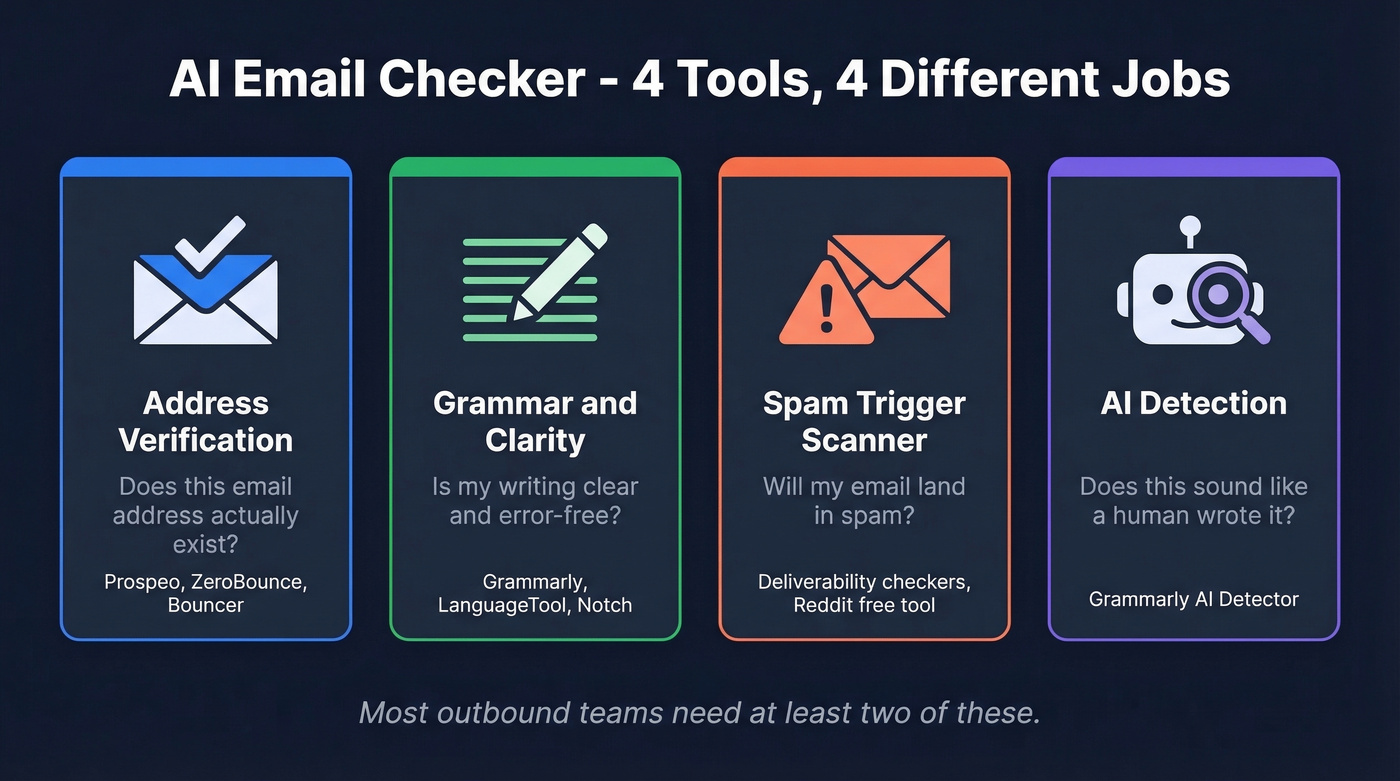
With over 300 billion emails exchanged daily, verification tools, Grammarly alternatives, deliverability scanners, and AI detectors all call themselves email checkers. The rest of this guide breaks each category down so you buy the tool that solves your actual problem.
Email Address Verification
This is the category that matters most for outbound teams - and where getting it wrong costs real money. One bad list can burn a warmed-up domain in a single send. The industry benchmark is total bounces below 2%, with hard bounces under 1%. Miss those thresholds and Gmail starts throttling you.
Here's the thing: if your average deal size sits below five figures, you probably don't need a $64-per-10K verifier. A tool at $0.01/email with strong catch-all handling will do more for your pipeline than an expensive one with marginally higher accuracy on clean domains.
In our testing, catch-all handling is where most budget tools fall short. Some enterprise domains accept mail to any address, so verifiers can't confirm whether a specific mailbox exists. Most tools return these as "risky" or "unknown" and leave you guessing. Aggressive catch-all filtering - the kind that actually reduces surprises on send day - is what separates good verifiers from mediocre ones.
If you’re comparing vendors, it helps to separate list cleaning from broader email deliverability work.
Verification Tools Compared (2026)
| Tool | Free Tier | Cost / 10K | Accuracy | Best For |
|---|---|---|---|---|
| Bouncer | 100 emails | $45 | 99%+ | Fast list cleaning |
| EmailListVerify | 100 emails | $24 | 97% | Best budget pick |
| MillionVerifier | - | ~$37 | 99%+ | Cheapest at scale |
| NeverBounce | 10 credits | $50 | 97% | Fast API |
| Emailable | 250 emails | $50 | 99%+ | 2M/hr throughput |
| Clearout | 100 emails | $58 | 99% | 38 integrations |
| ZeroBounce | 100 emails/mo | $64 | 99% | Risky-email accuracy |
| Verifalia | - | Not public | 99% | 30+ verification steps |
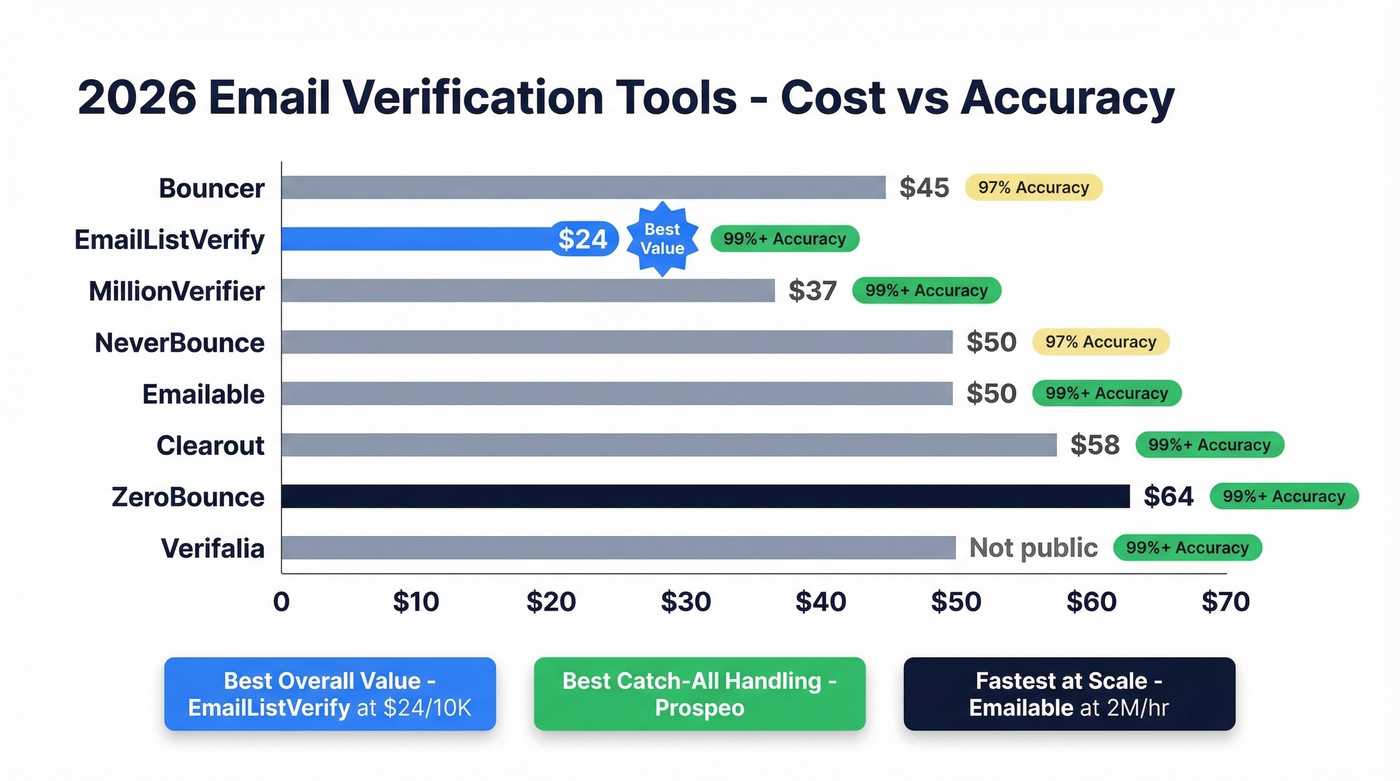
Best overall value: EmailListVerify. Best catch-all handling: Prospeo. Fastest at scale: Emailable.
If you want more options in this category, see our breakdown of Bouncer alternatives.
Reddit sentiment backs this up - ZeroBounce gets praise for accuracy with risky emails but credits burn fast at volume. NeverBounce is quick but inconsistent with catch-all domains.
What Verification Actually Fixed
Meritt dropped their bounce rate from 35% to under 4% after switching to Prospeo's verified data workflows. Snyk - with 50 AEs prospecting daily - went from 35-40% bounces to under 5%, generating 200+ new opportunities per month. Clean data isn't a nice-to-have. It's the foundation everything else sits on.
If you’re troubleshooting bounce spikes, start with email bounce rate basics and then move into spam trap removal if needed.
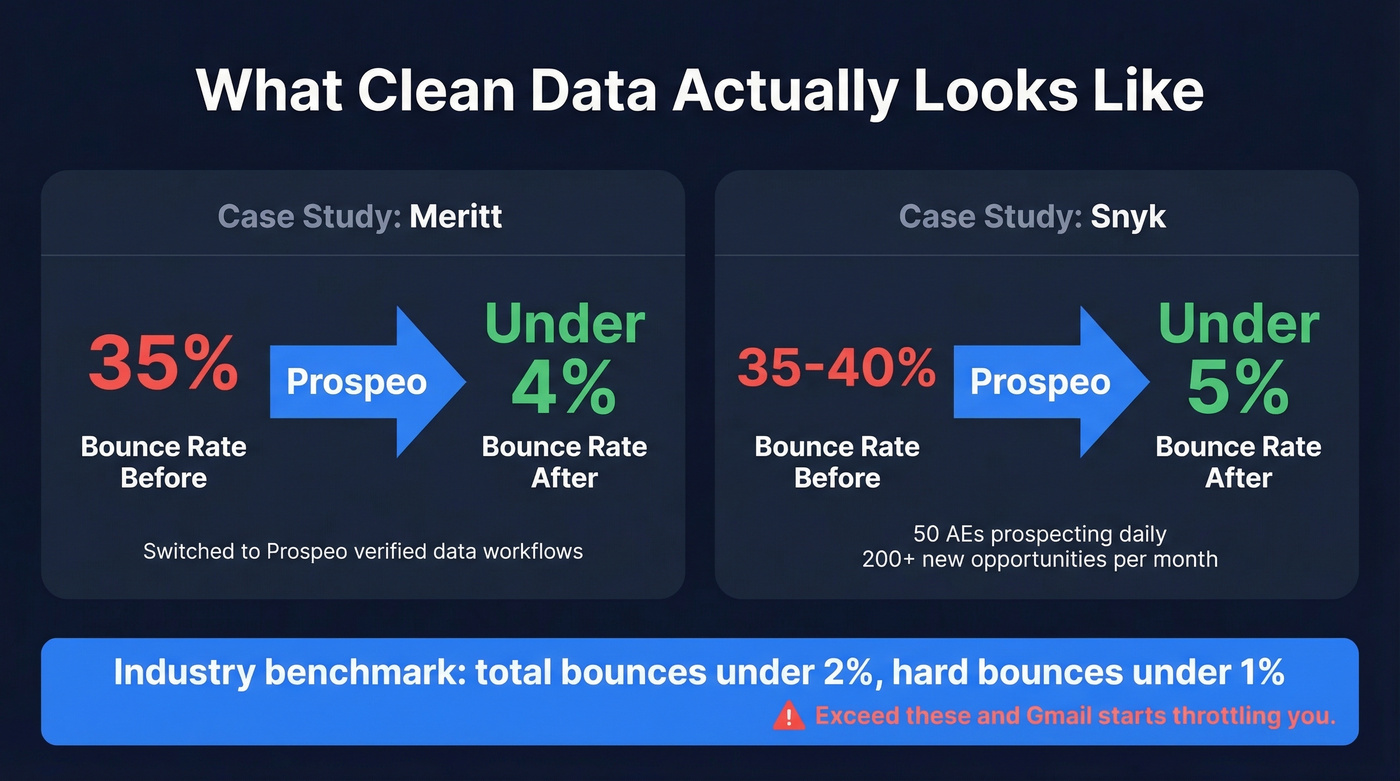

Most AI email checkers verify addresses after you've already bought bad data. Prospeo's 5-step verification with catch-all handling delivers 98% accuracy at $0.01/email - so there's nothing to clean up later. Meritt cut bounces from 35% to under 4%. Snyk did the same across 50 AEs.
Verify 75 emails free this month. No contract, no sales call.
Grammar and Clarity Checkers
Grammarly remains the default here. It works inside Gmail and Outlook via browser extensions, catches grammar and tone issues, and costs $12/user/month for Pro. We've found it catches more tone issues than LanguageTool, but LanguageTool is better value for multilingual teams at $5.83/month.
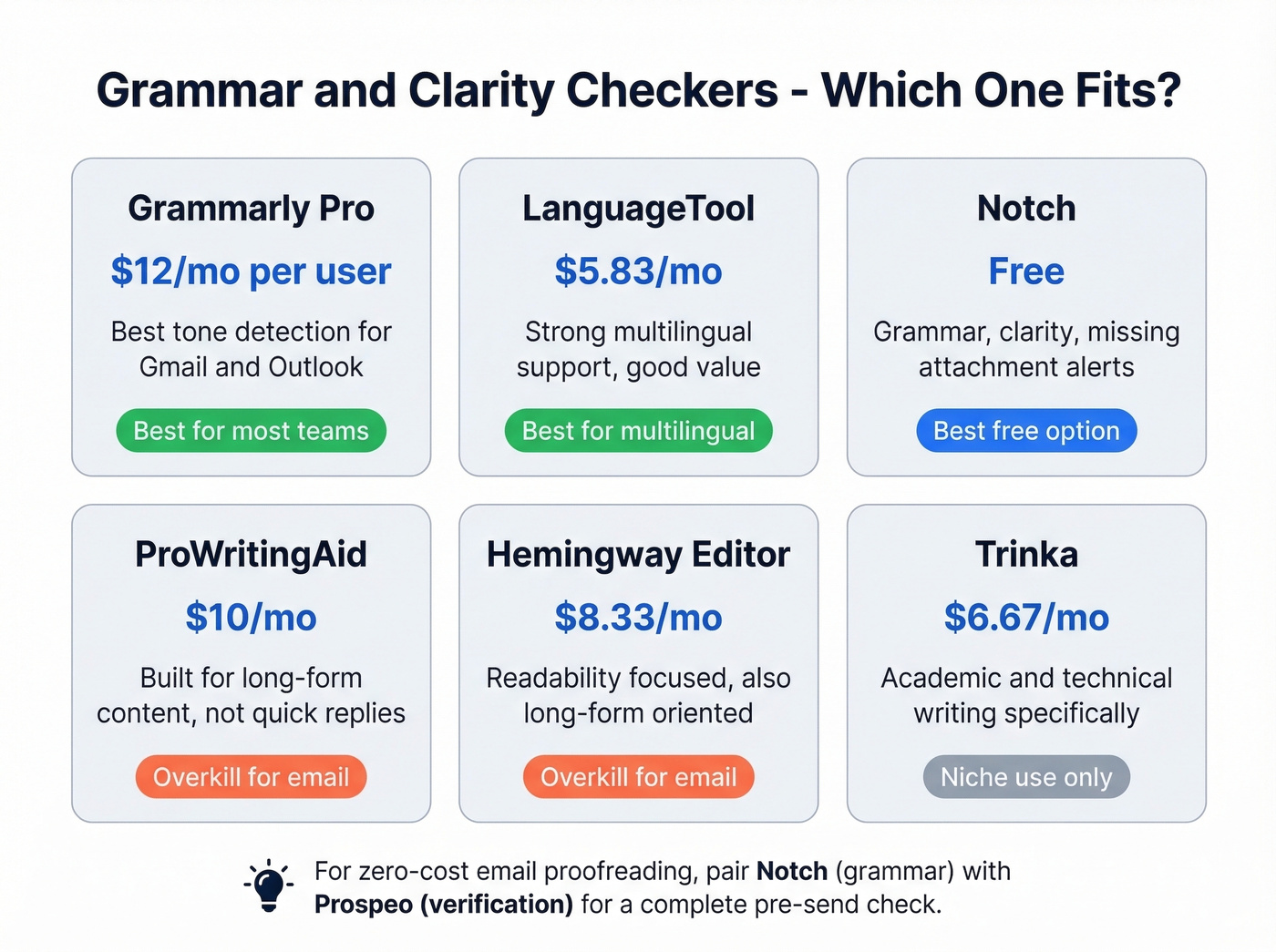
ProWritingAid ($10/mo) and Hemingway Editor ($8.33/mo) are overkill for inbox communication - they're built for long-form content, not quick replies. Trinka ($6.67/mo) targets academic and technical writing specifically. QuillBot focuses more on paraphrasing than proofreading, so skip it unless rewriting is your primary need.
For a zero-cost option, Notch offers a free tool that corrects grammar, improves clarity, and flags missing attachments before you hit send. No sign-up required.
If you’re writing outbound sequences, pairing proofreading with stronger email copywriting fundamentals usually moves reply rates more than any checker.
Your pre-send workflow is only as good as your data source. Prospeo refreshes 300M+ profiles every 7 days - not every 6 weeks like competitors - so catch-all traps and dead addresses get caught before they torch your domain. That's why teams using Prospeo stay under 4% bounce rates consistently.
Skip the list-cleaning step entirely. Start with data that's already clean.
Tone Rewriting
Use this if: You write emails that are grammatically correct but land wrong - too aggressive, too passive, too robotic.
Skip this if: You're confident in your communication style and just need typo-catching.
YAMM's AI Tone Rewriter runs on gpt-4o-mini and lets you paste an email, pick a target tone, and get a rewritten version. It's available through the GPT for Work extension for Google Sheets or Excel - no API key required. It's more "rewriter" than "checker," but for teams sending templated outreach, it's the fastest way to humanize copy that sounds like a robot wrote it. PolitePost does something similar if you specifically need to soften blunt messages.
If you need examples that already sound human, keep a swipe file of sales follow-up templates and adapt from there.
Spam Triggers and Deliverability
Your email can be grammatically perfect, sent to a verified address, and still land in spam. Gmail's cracking down on overused AI phrases, and most senders don't realize their copy is the problem.
A Reddit builder created a free tool that scans for 1,000+ AI phrases, spam triggers, weak CTAs, and robotic openers - with category breakdowns showing exactly what to fix. Some tools even generate a ready-made prompt you can paste into ChatGPT or Claude to rewrite flagged sections.
Before every send, check for these common killers: robotic openers like "I hope this email finds you well," spam-trigger words like "guaranteed" or "act now," weak or missing CTAs, more than three links in a cold email, and mismatched sender identity where your display name doesn't match your domain.
This category is separate from email verification. Verification confirms the address exists. Spam checking confirms your content won't get flagged. You need both.
For a deeper dive into this category, use a dedicated email spam checker and track improvements over time.
AI Detection for Email Copy
Grammarly's AI Detector analyzes text and estimates how likely it is to be AI-generated. This matters if your outreach reads like ChatGPT wrote it - because increasingly, recipients can tell.
But let's be honest about what these tools don't do. They don't improve deliverability. They don't check addresses. They answer one question: "does this sound like a human wrote it?" That's useful for quality control on outbound sequences, not for technical email health.
The Pre-Send Workflow
Three steps, five minutes, dramatically fewer bounces:
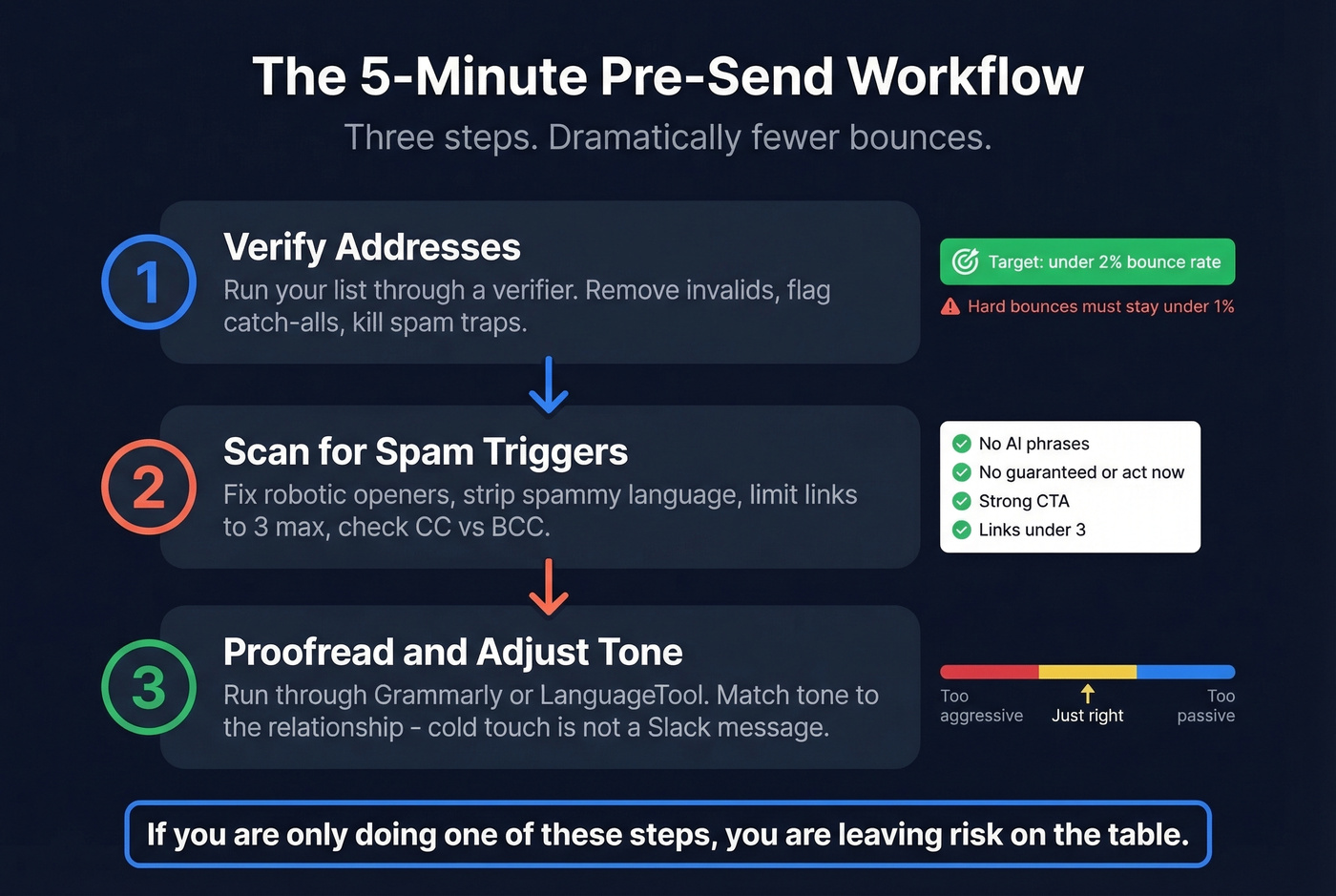
- Verify addresses. Run your list through a verifier. Remove invalids, flag catch-alls, kill spam traps. Target under 2% total bounce rate.
- Scan for spam triggers. Paste your copy into a deliverability checker. Fix robotic openers, strip spammy language, limit links. Double-check CC vs. BCC while you're at it - a single misdirected email exposed nearly 300 email addresses in the Serco incident, and GDPR fines run up to 4% of annual turnover or EUR 20M.
- Proofread and adjust tone. Run through Grammarly or LanguageTool. Make sure the tone matches the relationship - a first cold touch shouldn't read like an internal Slack message.
If you’re scaling volume, also watch email velocity and keep your infrastructure clean (SPF/DKIM/DMARC).
Most outbound teams need at least two of these steps. If you're only doing one, you're leaving risk on the table.
FAQ
What does an AI email checker actually do?
It's an umbrella term covering four distinct tools: email address verification, grammar/proofreading checkers, spam-trigger scanners, and AI-detection tools that estimate machine-generated text. Which one you need depends on whether you're fixing data quality, writing quality, or deliverability.
Should I verify emails before cold outreach?
Every time. Keep total bounces below 2% and hard bounces under 1%. Exceeding those thresholds damages your sender reputation with Gmail and Outlook, meaning even good emails start landing in spam. One unverified list can undo weeks of domain warmup.
Is there a free tool that covers verification and proofreading?
No single free tool handles both well. Prospeo offers 75 free email verifications per month with catch-all handling, while Notch provides free grammar and clarity checks. Pair them for a zero-cost pre-send workflow that covers data quality and writing quality.