

Email Spam Checker: What Actually Works in 2026 (And What Doesn't)
You sent 5,000 emails last Tuesday. Open rate dropped from 35% to 12% overnight. Nothing changed - same copy, same audience, same sending schedule. But something shifted under the hood, and now your carefully written sequences are rotting in spam folders.
The instinct is to search "email spam checker" and run a quick test. That's fine. But most of those tools check the wrong thing.
Nearly 45.6% of all email traffic is spam, costing businesses $20.5 billion per year in lost productivity and technical overhead. Spam filters have gotten dramatically smarter to deal with this volume, and the tools you use to test against them need to keep up. Most don't.
What You Need (Quick Version)
- Quick free test before a campaign: Mail-Tester. Send a test email, get a score. Takes 30 seconds.
- Ongoing deliverability monitoring: GlockApps (Essential plan: $59/mo). Tests against 5 real spam filters and tracks inbox placement over time.
Here's the contrarian take that shapes this entire article: most spam checkers scan your copy for trigger words. Modern spam filters barely care about individual words. They care about your sender reputation, authentication records, and list quality. Content scanning is the least important layer - and it's the one most tools focus on.
Three Types of Spam Checkers
People searching for a spam testing tool are usually looking for three different things, and the distinction matters.
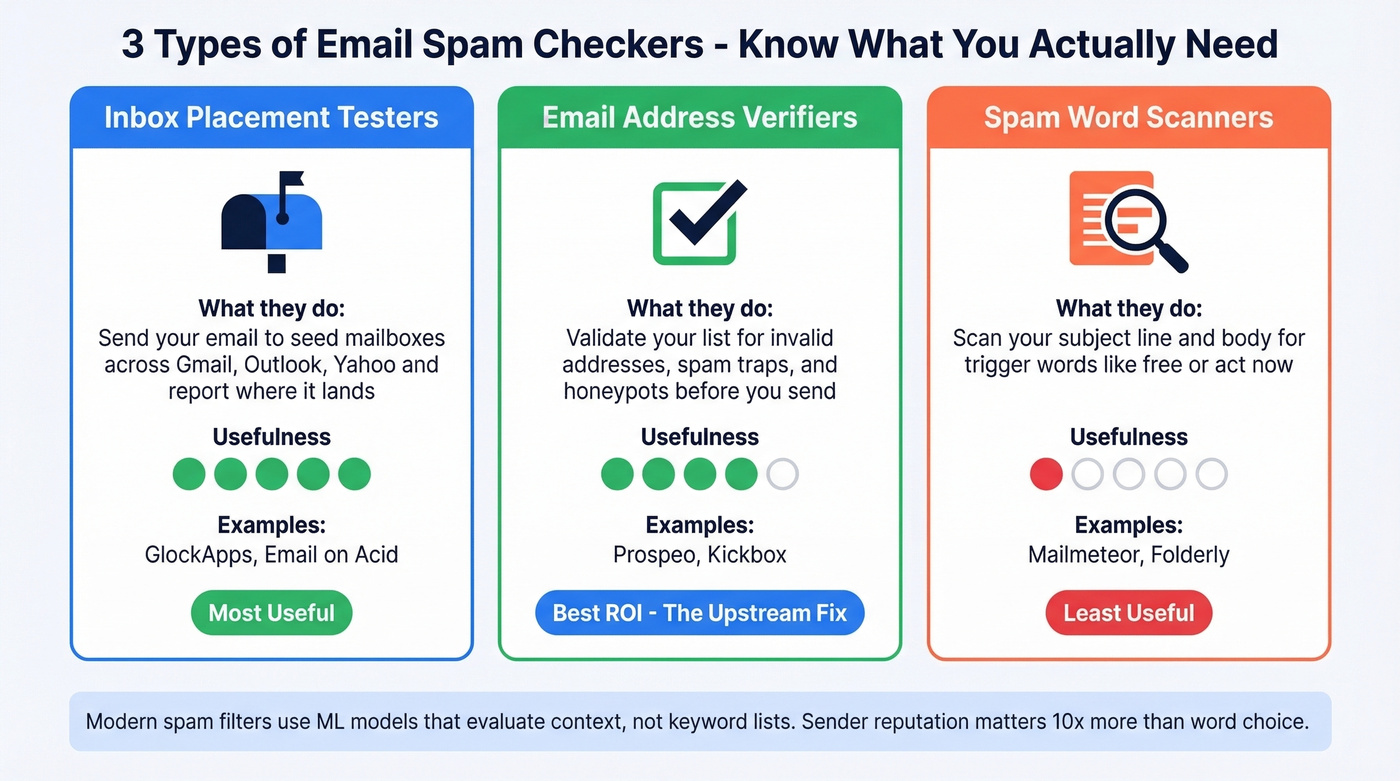
Inbox Placement Testers
These send your email to a network of seed mailboxes across Gmail, Outlook, Yahoo, and others, then report where it landed - inbox, spam, promotions, or missing entirely. GlockApps and Email on Acid fall here. They're the most useful type for diagnosing deliverability problems.
Email Address Verifiers
These check whether the addresses on your list are valid, active, and safe to send to. They don't test your email content - they test your list. Bad addresses cause bounces, bounces destroy sender reputation, and reputation is what actually determines inbox placement. This is the category most teams underinvest in, and it's where we've seen the biggest ROI in our own outbound workflows.
Spam Word Scanners
These scan your subject line and body copy for "trigger words" like "free," "act now," or "limited time." Mailmeteor and similar tools live here. They're the least useful type - a sanity check at best, misleading at worst.
How Spam Filters Actually Work in 2026
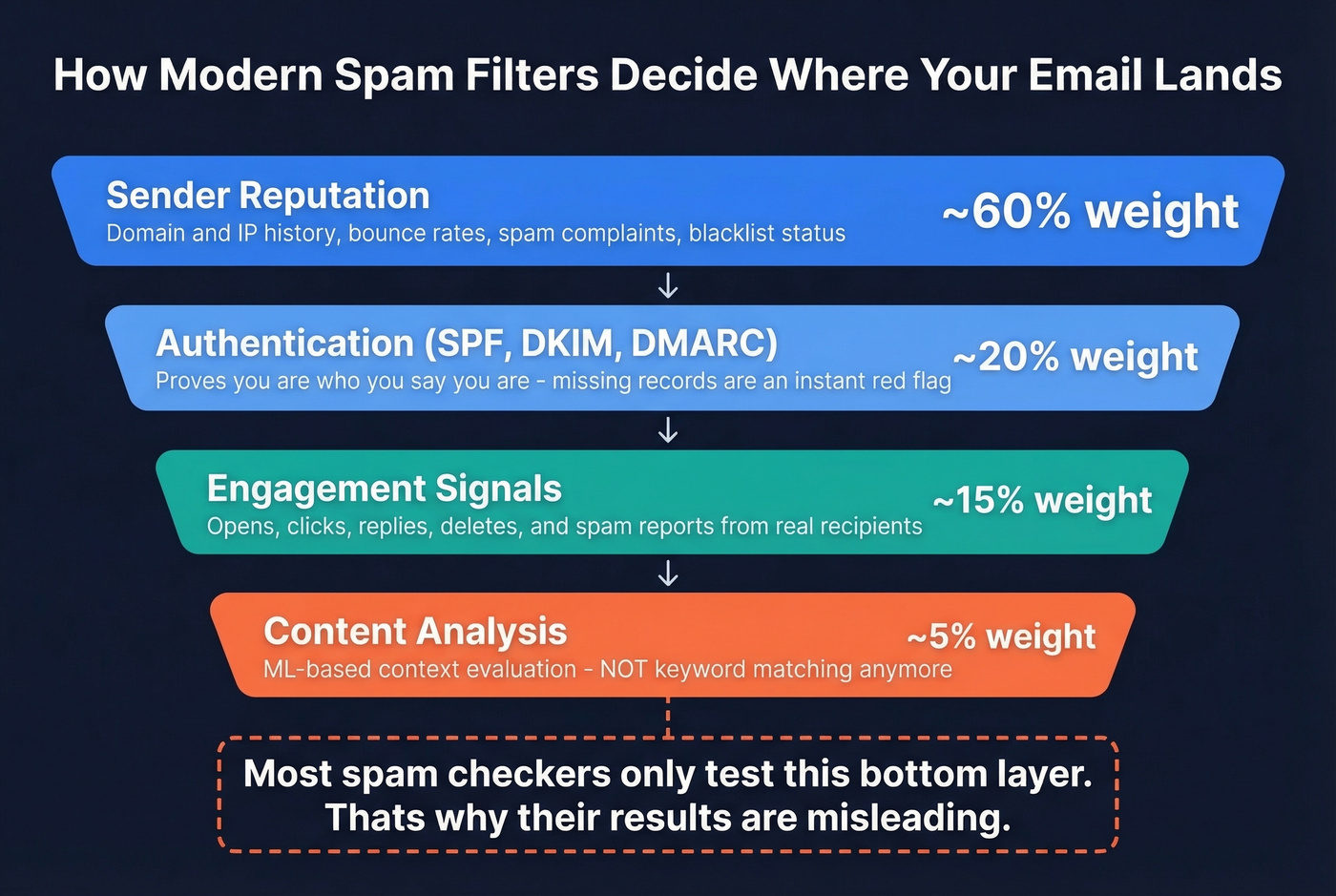
Modern spam filtering is a multi-layer machine learning system, not a keyword blacklist. Understanding this explains why most spam checkers give you incomplete - or outright misleading - results.
Gmail alone blocks 99.9% of spam, processing 15 billion unwanted messages daily. Their RETVec text vectorizer improved spam detection by 38% while reducing false positives by 19.4%. It's specifically designed to catch adversarial text manipulations - misspellings, homoglyphs, leetspeak, invisible characters. The old trick of swapping "o" for "0" doesn't work anymore.
The filtering stack works in order of importance:
Sender reputation is the biggest factor. Your domain and IP carry a score based on historical sending behavior. High bounce rates, spam complaints, and blacklist appearances crater it. No amount of clever copywriting overcomes a bad reputation score.
Authentication comes next. SPF, DKIM, and DMARC tell mailbox providers you are who you say you are. Missing or misconfigured records are an immediate red flag.
Engagement signals matter more than most people realize. If recipients consistently ignore, delete, or mark your emails as spam, filters learn to deprioritize you. Opens, clicks, and replies get rewarded.
Content analysis is the smallest layer - and the one most checkers obsess over. Yes, filters still scan content, but through ML models that evaluate context, not keyword lists. Using the word "free" won't send you to spam. Sending "free" from a domain with a 15% bounce rate and no DMARC record will.
Best Tools Compared
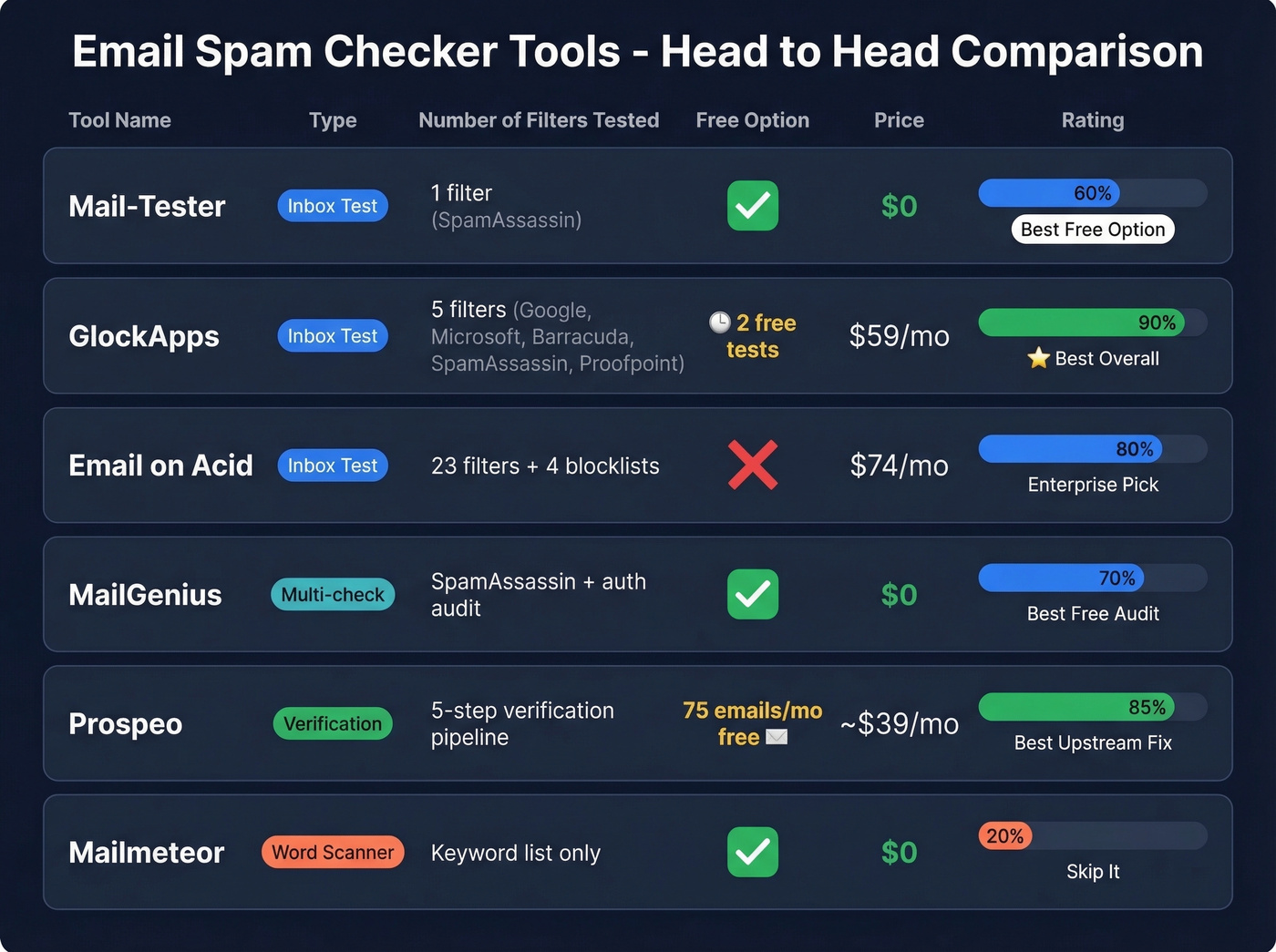
We reviewed ten popular tools and summarized what matters at a glance. Pay attention to the "Tests Against" column - that's where the real differentiation lives.
| Tool | Type | Tests Against | Free Tier | Paid From | Best For |
|---|---|---|---|---|---|
| Mail-Tester | Inbox test | SpamAssassin only | Yes (limited) | Free | Best free option, period |
| GlockApps | Inbox test | 5 filters (Google, Microsoft, Barracuda, SpamAssassin, Proofpoint) | 2 tests | $59/mo | Best paid tool for most teams |
| Email on Acid | Inbox test | 23 filters + 4 blocklists | No | $74/mo | Enterprise-scale testing |
| MailGenius | Multi-check | SpamAssassin + auth audit | Yes | Free | Best free infrastructure audit |
| MXToolbox | DNS/blacklist | DNS + 100+ blacklists | Yes | $129/mo | DNS diagnostics |
| Prospeo | Verification | 5-step verification pipeline | 75 emails/mo | ~$39/mo | Best upstream fix for reputation |
| Mailmeteor | Word scanner | Keyword list | Yes | Free | Skip unless you just want a copy check |
| Folderly | Word scanner | AI content model | 7-day trial | Not public | AI content analysis |
| Unspam | Deliverability | Proprietary model | Limited | Not public | Heatmap + basic testing |
| Litmus | Full platform | Multiple filters + rendering | No | $99/mo | Enterprise email QA |
Mail-Tester: Best Free Option
Mail-Tester is the tool everyone recommends first, and for good reason - it's fast and dead simple. Send an email to a generated address, click the link, get a score out of 10. It checks SpamAssassin scoring, authentication records, blacklists, and basic content analysis.
Use this if you need a quick gut check before launching a campaign. It takes 30 seconds and catches obvious problems - missing DKIM, broken SPF records, blacklisted IPs.
Skip this if you need ongoing monitoring or Gmail-specific insights. Mail-Tester runs a single test against SpamAssassin. It won't tell you why Gmail specifically is filtering you, and it can't track trends over time.
GlockApps: Best Paid Tool
GlockApps is the best paid option for teams that take deliverability seriously. It tests your email against five real spam filters - Google Spam Filter, Microsoft Exchange Online Protection, Barracuda, SpamAssassin, and Proofpoint - and reports inbox placement across providers including Gmail, Outlook, ProtonMail, Zoho, and Apple Mail.
Why it wins: Breadth of testing. Five spam filters plus placement tracking across providers gives you a real picture of where your emails land. The Essential plan at $59/mo includes 360 spam test credits and 600,000 DMARC checks, which is the sweet spot for most teams.
The seed list caveat: GlockApps uses a small seed list of roughly 100 mailboxes with no engagement history with your domain. Real deliverability is often higher than what seed tests show, because your actual recipients have opened your emails before and built positive engagement signals. Use results to identify issues and spot trends, not as a definitive verdict on your inbox rate.
Email on Acid
Email on Acid tests your message against 23 spam filters and checks your IP against 4 popular blocklist services. Plans start at $74/mo, and it's positioned as part of a broader pre-send workflow. For email marketing teams sending high-volume campaigns across a wide filter landscape, it earns its price. For most outbound sales teams, GlockApps covers enough at a lower cost.
MailGenius
MailGenius runs a surprisingly thorough free check: SPF, DKIM, DMARC, reverse DNS, domain age, blacklists (including links in your email body), broken links, short URLs, List-Unsubscribe headers, and HTML best practices like text-to-image ratio. It won't do inbox placement testing like GlockApps, but as a free authentication and infrastructure audit, it's excellent.
One caveat: all test results are hosted on public links. Don't test emails containing sensitive content.
MXToolbox
MXToolbox is the go-to for DNS diagnostics and blacklist checking. The free tier handles basic lookups; the Delivery Center runs $129/mo and the Plus plan hits $399/mo. It's a sysadmin tool more than a marketer's tool - useful when you suspect a DNS or blacklist issue, overkill for routine pre-send checks.
Quick Mentions
Mailmeteor offers a free spam word scanner - useful as a 10-second sanity check on subject lines, but don't mistake it for a deliverability tool. Folderly adds AI-powered content analysis with a 7-day free trial. Unspam combines deliverability testing with extras like accessibility checks, previews, and heatmaps. Litmus starts at $99/mo as a full email testing platform for enterprise marketing teams. Kickbox is an email verification provider with 100 free verification credits for new accounts. CleanTalk is a webmaster-focused anti-spam tool for forms and comments - not really a deliverability tool, despite showing up in search results.

Most spam problems start upstream - with bad data. Prospeo's 5-step verification pipeline catches invalid addresses, spam traps, and honeypots before they ever hit your sending list. 98% email accuracy. Bounce rates under 4%.
Stop diagnosing spam folder issues and eliminate the root cause.
Why Results Disagree Across Tools
Run the same email through Mail-Tester, GlockApps, and Email on Acid and you'll likely get three different answers. The consensus on r/Emailmarketing? Frustration. Users consistently report conflicting results - one tool says inbox, another says spam, a third says promotions.
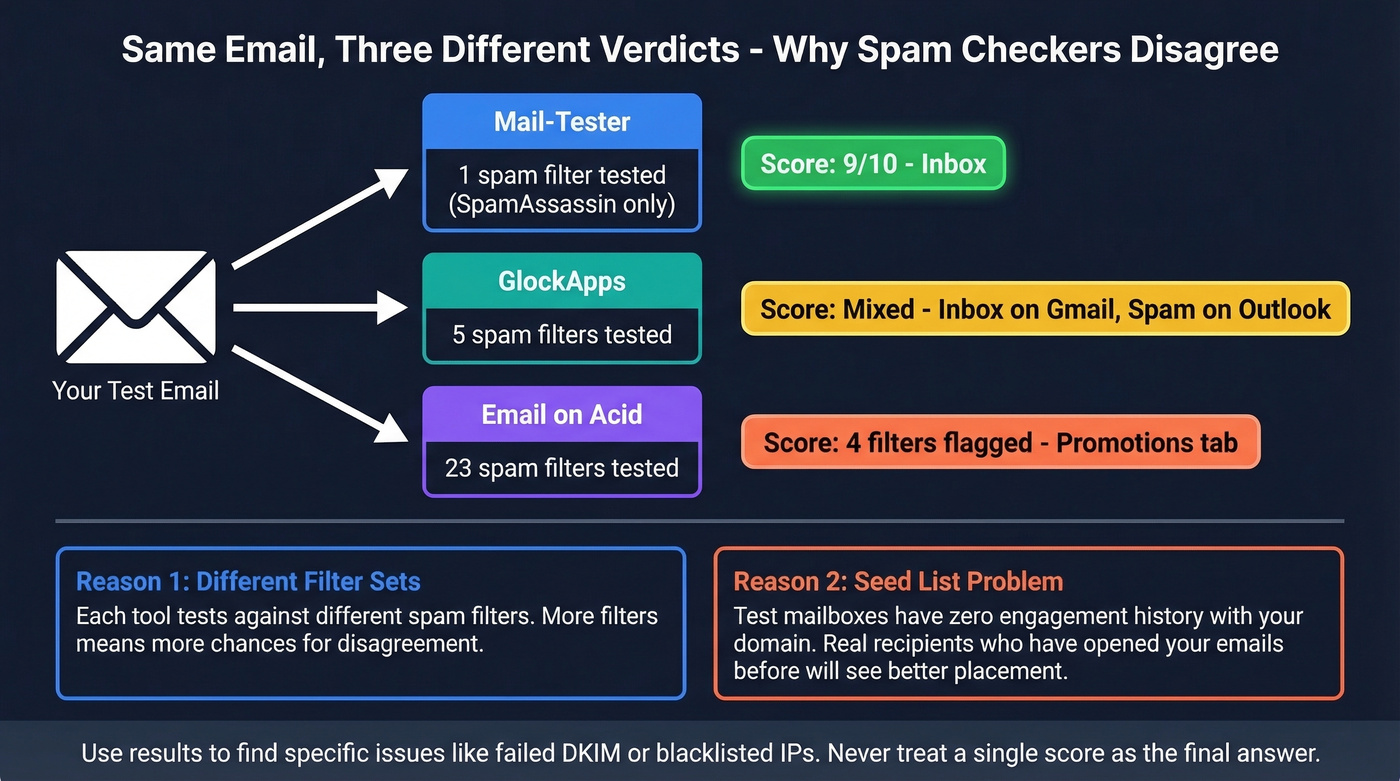
This isn't because the tools are broken. GlockApps runs against 5 spam filters. Email on Acid tests 23. Mail-Tester uses SpamAssassin only. Different filter sets produce different results.
The seed list problem compounds this. Every inbox placement tool sends your email to test mailboxes that have no engagement history with your domain. Real recipients who've opened your emails before will see different placement than a cold seed address. There's also a legitimate complaint that some tools feel like upsell funnels - vague results followed by a push toward warm-up services or premium plans. Use results to identify specific issues like failed DKIM, a blacklisted IP, or a missing unsubscribe header. Don't treat any single score as gospel.
Pre-Send Spam Checklist
Running a spam test is one step. 48% of senders say staying out of spam is their top challenge - and most are focused on the wrong part of the problem.
Authentication
Set up SPF, DKIM, and DMARC before you send a single email. DMARC adoption reached 54% as of late 2024 - up from 43% in 2023 - but 87% of domains still lack adequate DMARC protection. After Microsoft added bulk sender authentication requirements in May 2025, over 400,000 domains added DMARC records. If you haven't, you're behind.
At minimum, set DMARC to p=none and monitor. Then work toward p=quarantine or p=reject as you gain confidence in your authentication setup.
Reputation Monitoring
Google Postmaster Tools, Microsoft SNDS, and Yahoo Sender Hub are all free. 70% of senders don't use them. That's wild.
If you're not checking Google Postmaster Tools at least weekly, you're flying blind on the single most important factor in your deliverability. Sender Score gives your sender reputation a 0-100 rating. Anything above 80 is solid. Below 70 means you're at serious risk. Check it monthly.
List Hygiene
Here's the thing: running a deliverability test on a dirty list is like checking grammar on a letter mailed to the wrong address. 60% of senders say they do list hygiene, but most stop at removing obvious bounces. That's not enough. Spam traps, honeypots, and catch-all domains silently destroy your reputation without generating a single bounce notification.
Prospeo's 5-step verification catches all of these before they do damage. Upload a CSV, get results in minutes - valid, invalid, catch-all, and risky addresses broken out clearly. Free tier covers 75 verifications per month, enough to validate your most important sends. Teams like Snyk cut bounce rates from 35-40% to under 5% after switching their verification workflow.
Remove hard bounces immediately after every send. Suppress addresses that haven't engaged in 90+ days. Never buy lists - they're spam-trap minefields. (If you're tempted anyway, read Is It Illegal to Buy Email Lists?.)
Bulk Sender Requirements
Gmail and Yahoo enforce strict thresholds for high-volume senders. Keep spam complaints below 0.1% - a spike to 0.3% triggers aggressive filtering. Include a one-click unsubscribe header (RFC 8058). Authenticate every sending domain. These aren't suggestions; they're requirements that will get your emails blocked if you ignore them.
If you're scaling volume, it also helps to understand email velocity and how providers interpret "bulk" (see bulk sender thresholds).
Sender reputation is the #1 factor in inbox placement, and nothing destroys it faster than bounces from bad data. Teams using Prospeo cut bounce rates from 35%+ to under 4% - because every email is verified on a 7-day refresh cycle, not stale lists from weeks ago.
Clean data is the only spam checker that actually fixes deliverability.
Spam Trigger Words - Do They Matter?
Let's be honest: spam word scanners are the least useful category of deliverability tools. With 160 billion spam emails sent daily, filters have evolved far beyond keyword matching.
Gmail's RETVec system catches adversarial text manipulations - the misspellings, homoglyphs, and leetspeak that spammers use to evade keyword filters. If a machine learning model can detect "fr33 m0n3y" as spam, it's certainly not going to flag your legitimate email just because you used the word "free" in context.
Does that mean you should write subject lines in all caps with five exclamation marks? No. But the scenario where your emails hit spam isn't "you used a trigger word." It's "your DMARC is set to none, your SPF includes deprecated services, your domain is on two blacklists, and 8% of your list bounced last month." Fix those problems first. Then run your copy through Mailmeteor as a final sanity check. Just don't confuse the sanity check with a strategy.
I'll go further: if your list is under 5,000 contacts, you probably don't need a paid deliverability tool at all. Run Mail-Tester once, set up authentication, verify your list with a tool like Prospeo, and spend the $59/mo on something else. Paid testing earns its keep when you're sending at scale and need to track trends across providers over time.
If you want more options for monitoring and diagnostics, see our breakdown of email reputation tools.
How to Score Your Email Before Sending
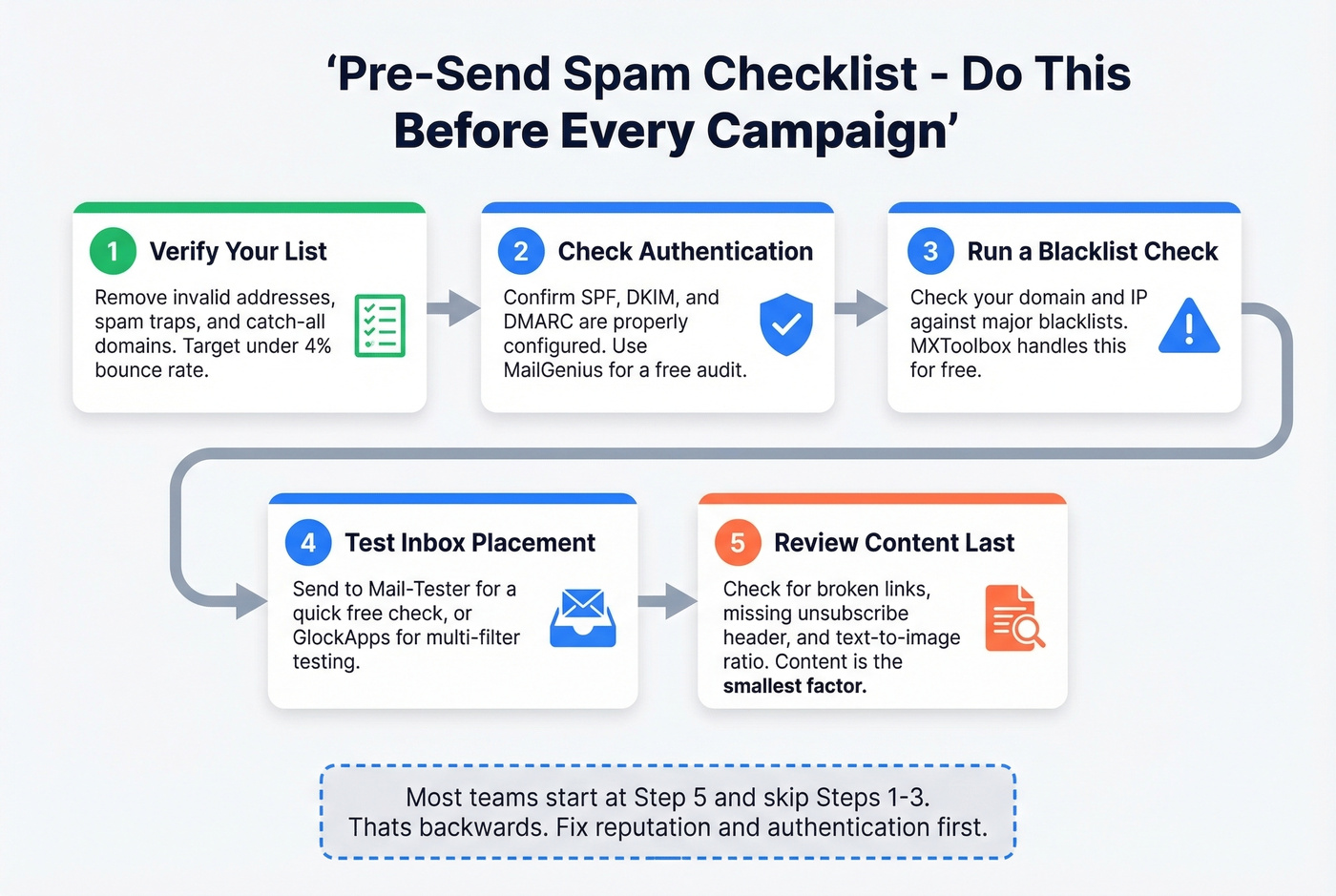
Before every major campaign, run through this sequence. The order matters - most teams start at step 5 and never get to steps 1 through 4, which is exactly backwards.
- Verify your list - run new addresses through a verification tool to catch invalids, spam traps, and risky domains.
- Check authentication - use MailGenius or MXToolbox to confirm SPF, DKIM, and DMARC are passing. (If DKIM is the culprit, use this guide on how to verify DKIM is working.)
- Run a placement test - send to Mail-Tester for a free result, or GlockApps if you need multi-provider data.
- Review your spam score - aim for 9/10 on Mail-Tester and above 80 on Sender Score.
- Scan your copy last - use Mailmeteor for a final word check, but only after the infrastructure boxes are ticked.
We've watched teams spend hours rewriting subject lines to dodge "trigger words" while their DKIM was misconfigured the entire time. Don't be that team. If you need help tightening copy without hurting deliverability, start with email copywriting and these email subject line examples.
FAQ
Is Mail-Tester accurate?
Mail-Tester is reliable for catching authentication failures and obvious content flags, but it only tests against SpamAssassin. Real inbox placement depends on sender reputation and recipient engagement - factors no single test captures. Aim for 9/10 or higher and investigate anything flagged, but don't treat the score as definitive.
What's a good email spam score?
On Mail-Tester, aim for 9/10 or above. For Sender Score, anything above 80 is solid; below 70 means you're at serious risk of landing in spam. Check both regularly - they measure different dimensions of deliverability.
Do spam checker tools affect sender reputation?
No. Running diagnostic tests sends a handful of emails to seed addresses, which doesn't meaningfully move your reputation. Domain reputation is determined by actual sends to real recipients - opens, clicks, bounces, and complaints over time.
Can verifying my email list improve deliverability?
Yes - it's the single highest-impact action most teams can take. Bounces from invalid addresses directly damage sender reputation, and reputation is the primary factor in spam filtering. A 5-step verification process that catches invalids, catch-alls, and honeypots prevents the damage before it starts.
How often should I test deliverability?
Before every major campaign and monthly for ongoing monitoring. Use GlockApps or a similar inbox placement tool for recurring tests. Check Google Postmaster Tools weekly - it's free and gives the most accurate picture of how Gmail views your domain.
The best email spam checker is the one that matches your actual problem. For most teams, that means fixing authentication and list quality first - then testing content as a final sanity check.