

The Best Email Warm Up Tools for B2B Campaigns in 2026
Your team spins up ten fresh Google Workspace accounts, connects a warmup tool, waits two weeks, and the dashboard turns green across the board. First real campaign goes out - and half the emails land in spam. The warmup tool did its job. The problem was somewhere else entirely.
That scenario plays out constantly, and it reveals the two-part problem most guides on email warm up tools for B2B campaigns ignore: getting your sender reputation ready is only half the equation. The other half is what you're actually sending to. Bad prospect data - bouncing addresses, spam traps, stale contacts - will torch your deliverability faster than any warmup tool can rebuild it.
Here's the tools that handle part one, and the step that makes all of it actually work.
Our Picks (TL;DR)
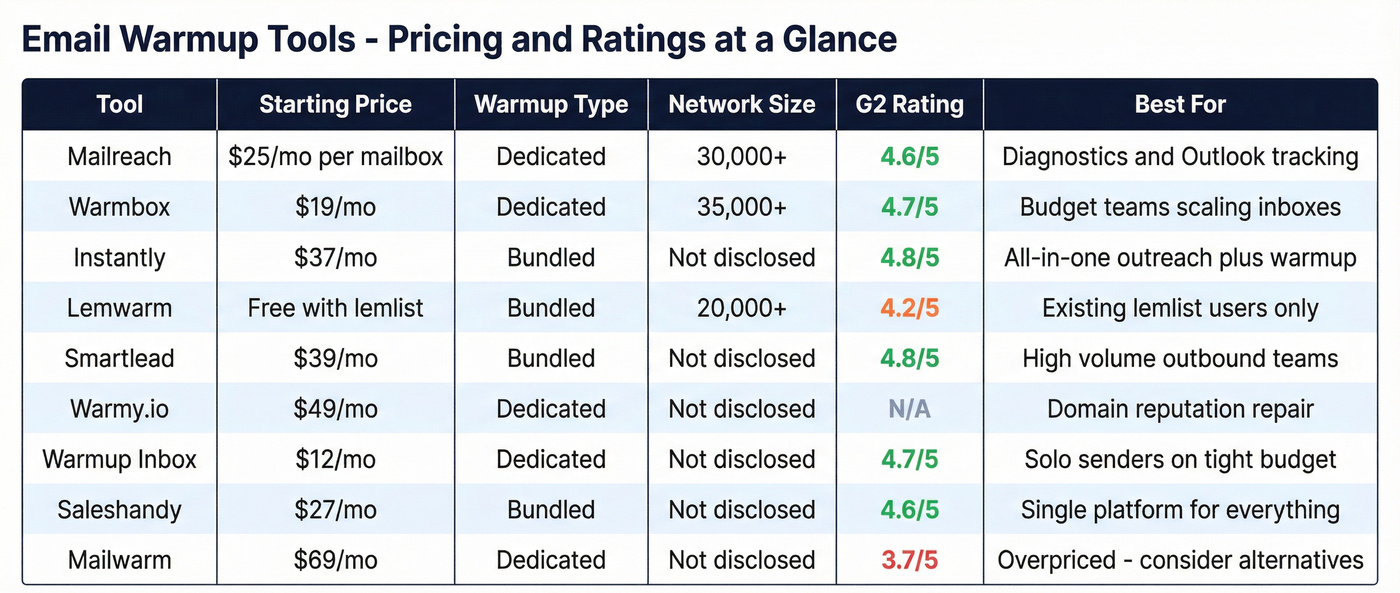
- Mailreach - Best analytics and spam placement diagnostics. $25/mo per mailbox. One of the few tools that shows you exactly where you're landing across Gmail and Outlook.
- Warmbox - Best value with a 35,000+ inbox network. Starts at $19/mo. Hard to beat for budget-conscious teams scaling multiple inboxes.
- Instantly - Best if you need warmup bundled with outreach. $37/mo. Unlimited warmup included - zero incremental cost if you're already on the platform.
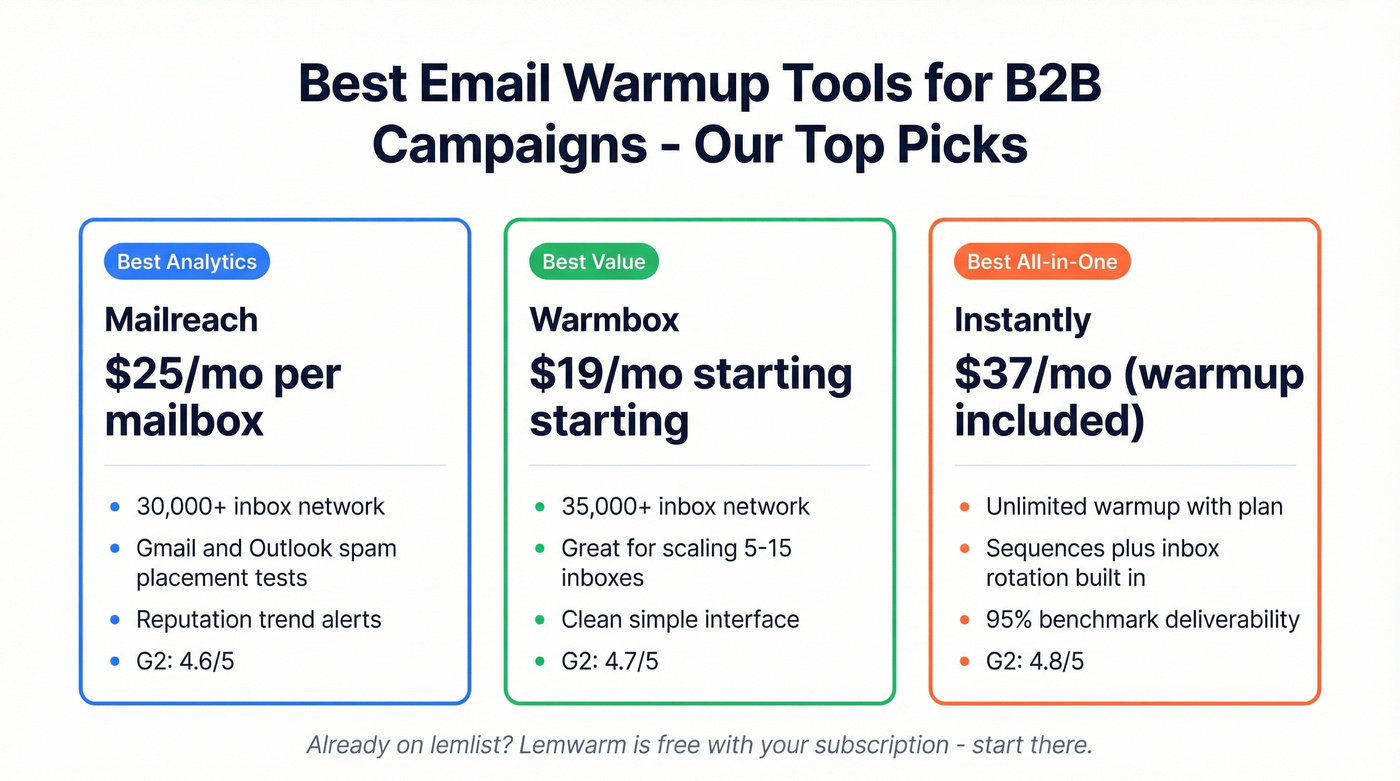
Already on lemlist? Lemwarm is free with your subscription. Start there before paying for anything else.
And the step most warmup guides skip entirely? Verifying your prospect list before you send a single email. More on that below - it's the difference between warmup that sticks and warmup that gets undone on day one.
Why Deliverability Got Harder in 2026
Deliverability has gotten meaningfully harder. Global inbox placement sits around 84% according to Validity's benchmarks - roughly one in six emails never reaches the inbox at all. For cold outbound from newer domains, it's worse.
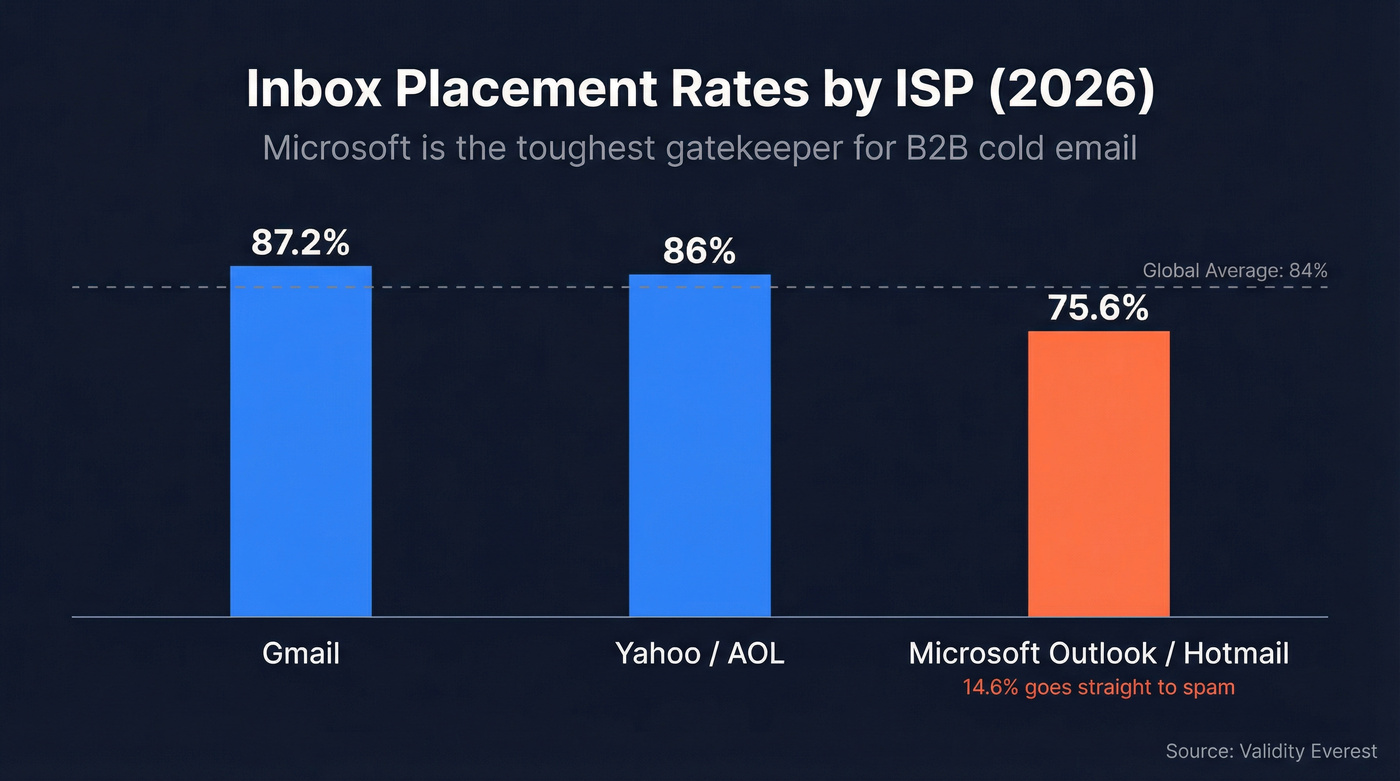
The ISP-level breakdown tells a sharper story. Gmail delivers to the inbox about 87.2% of the time. Yahoo/AOL runs 86%. But Microsoft Outlook and Hotmail? Just 75.6% inbox placement, with 14.6% going straight to spam.
That's the hidden problem for B2B teams - most of your prospects sit on Microsoft 365, and Microsoft is the toughest gatekeeper. It gets subtler than just inbox vs. spam, too. Microsoft's "Focused Inbox" feature acts as a soft-spam filter, redirecting low-engagement senders out of the primary view even when emails technically land in the inbox. Your email "delivered" but nobody sees it. Research from Skylead found that 45.6% of all emails worldwide were flagged as spam - a number that's only grown as ISPs tighten filters.
Warmup tools exist to solve this by simulating healthy engagement patterns before you start sending real campaigns. They work. But they don't work alone.
Do Warmup Tools Actually Work?
There's a vocal camp - Emailchaser being the loudest - arguing that warmup tools don't work at all. Their case: warmup pools are detectable because they're full of new accounts with non-representative engagement patterns, and automated inbox interactions violate Google's ToS.
They're not entirely wrong. Google shut down GMass's warmup feature in 2023, which sent a chill through the industry. And yes, automated inbox interactions violate Google's ToS. That's a real risk.
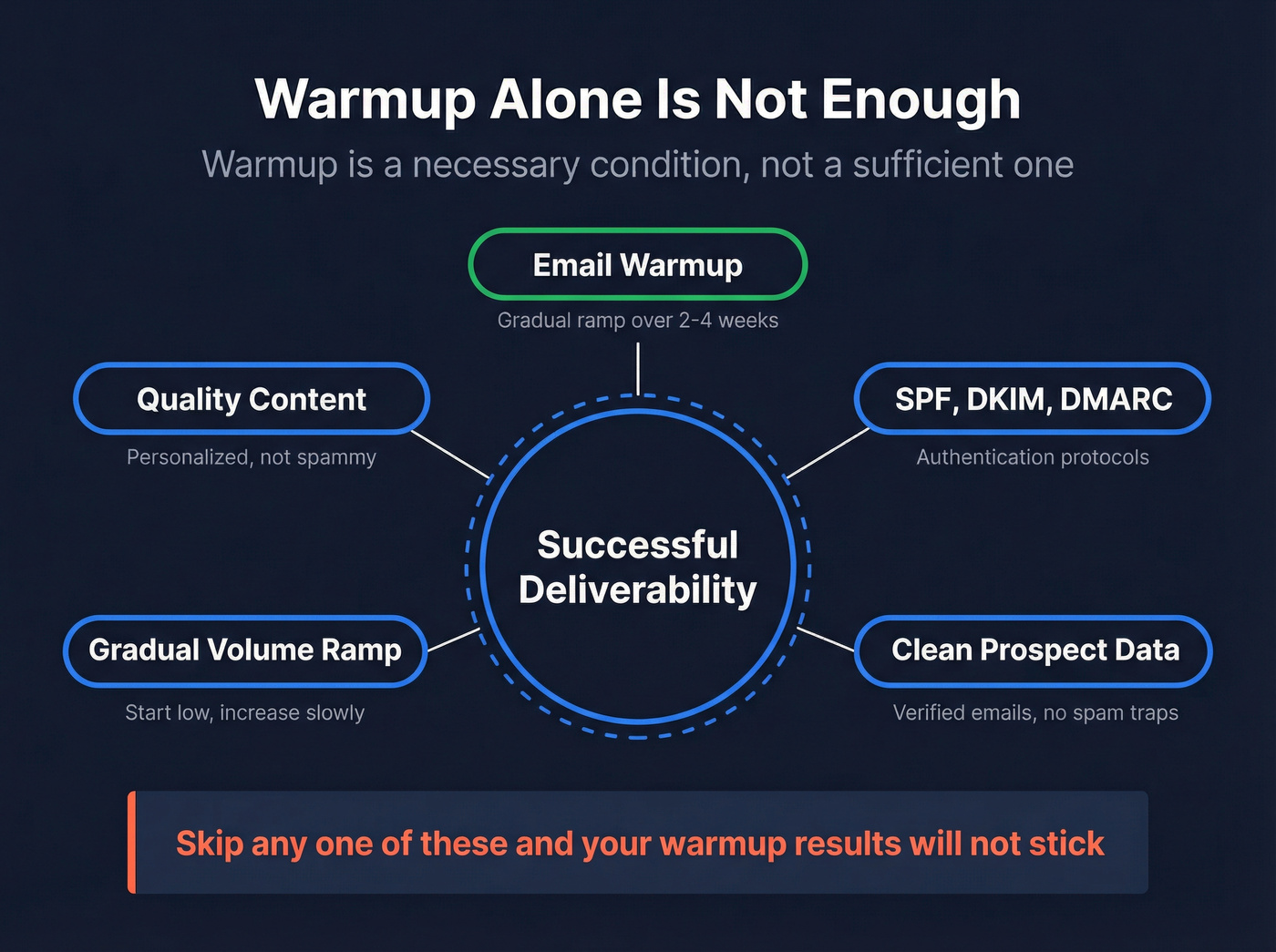
But the "warmup doesn't work" argument overstates the case. In practice, warmup tools operate without enforcement for the vast majority of users, and the tools that have survived are the ones with larger, more diverse inbox networks that look less like bot farms. The practitioner consensus - and what we've seen across dozens of client setups - is more nuanced: warmup works when combined with proper authentication, clean data, and a gradual ramp. It doesn't work as a band-aid for bad sending practices.
Warmup is a necessary condition, not a sufficient one. SPF, DKIM, DMARC, clean lists, and a disciplined ramp schedule matter just as much.
What the Benchmarks Show
Skylead ran one of the few controlled-ish tests comparing warmup tools head-to-head. They connected each tool to a new, low-activity email account, sent roughly 200 warmup emails per tool, and tracked inbox vs. spam placement.
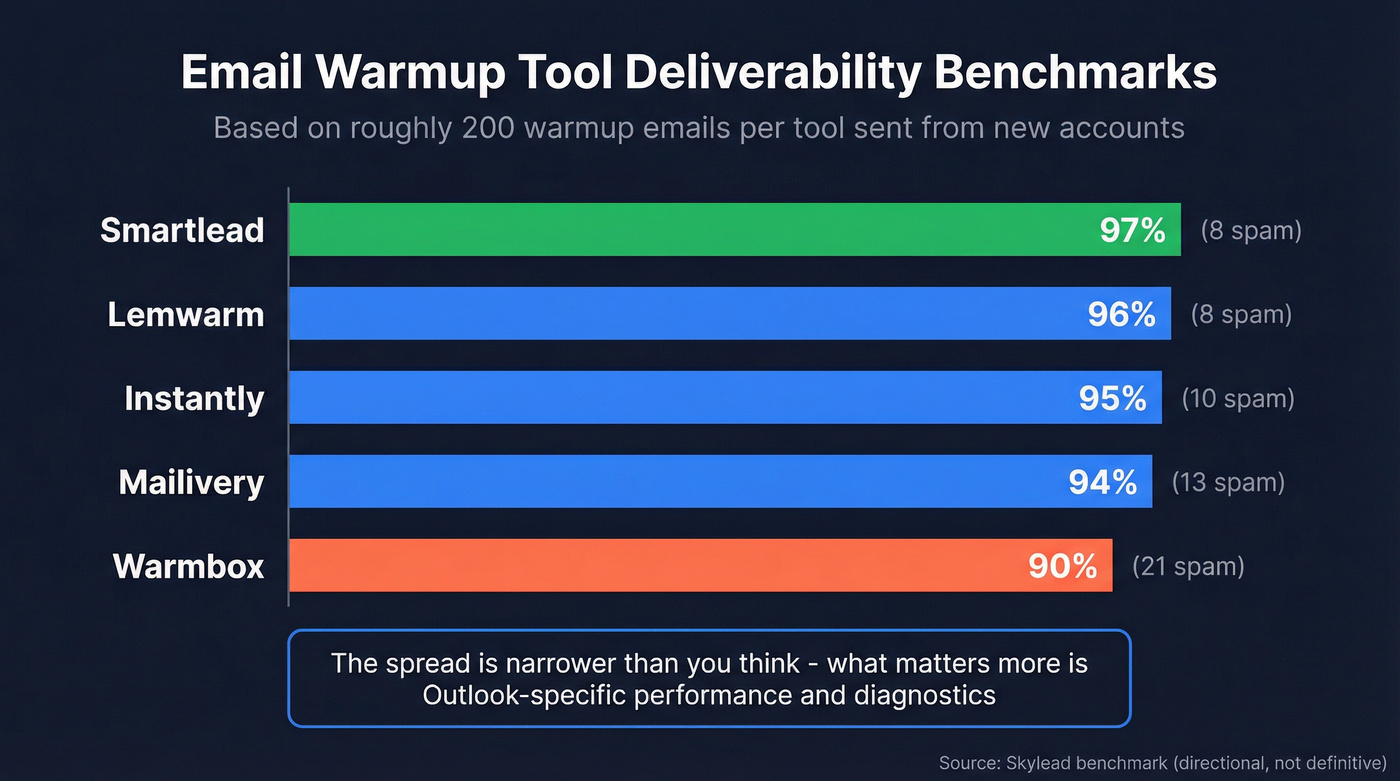
| Tool | Deliverability | Inbox | Spam |
|---|---|---|---|
| Smartlead | 97% | 229 | 8 |
| Lemwarm | 96% | 199 | 8 |
| Instantly | 95% | 190 | 10 |
| Mailivery | 94% | 200 | 13 |
| Warmbox | 90% | 200 | 21 |
A few caveats. This is a vendor-run test - Skylead sells its own warmup tool, InboxFlare, which conveniently scored 99%. The methodology is high-level with no mailbox-provider breakdown and no Outlook-specific results. Treat these numbers as directional, not definitive.
The real takeaway: the spread between tools is narrower than you'd expect. The difference between 90% and 97% matters over thousands of emails, but it's not the chasm that marketing pages suggest. What matters more is whether the tool's network includes enough Outlook/M365 inboxes - and whether you can actually diagnose problems when they appear.
What a proper benchmark would test differently: Outlook-specific placement rates, recovery time after a spam event, and provider-level breakdowns. Snov.io ran a separate 3-week experiment with fresh Gmail accounts and GlockApps measurement that included a deliberate "stress test" using misspellings to test recovery - that kind of methodology is more useful than a simple inbox-count comparison. Until someone publishes a test with those variables, take all benchmark numbers with a grain of salt.
GlockApps remains the industry-standard independent testing tool. Whatever warmup tool you pick, verify its results with an external test. Don't trust the warmup tool's own dashboard.
Best Warmup Tools for B2B Outbound
Mailreach
Use this if you need to diagnose exactly where your emails land - Primary, Promotions, or Spam - across both Gmail and Outlook. Mailreach is one of the few dedicated warmup tools that treats spam placement analytics as a first-class feature, not an afterthought.
At $25/mo per mailbox, you get warmup across a 30,000+ mostly Gmail and Outlook inbox network, plus 20 spam test credits for on-demand placement checks. G2 rating sits at 4.6/5 (39 reviews), Capterra at a perfect 5.0/5 (20 reviews). The analytics are genuinely useful - you can see reputation trends over time and get alerts when placement degrades. In our experience, Mailreach's diagnostics have saved us hours of guesswork when troubleshooting Outlook-specific spam issues for client campaigns.
Skip this if you're an agency running 20+ inboxes. Per-mailbox pricing adds up fast - $500/mo just for warmup before you've sent a single cold email. At that scale, look at Mailivery's unlimited-mailbox plans instead.
Warmbox
Warmbox runs a private network of 35,000+ inboxes, and pricing starts at just $19/mo (Solo). The Start-up plan at $79/mo and Growth at $159/mo cover increasing volume and features. For teams scaling 5-15 inboxes, the math is hard to argue with.
G2 rates it 4.7/5 (45 reviews), Capterra 4.5/5 (17 reviews), and users consistently praise the interface. In Skylead's benchmark, Warmbox hit 90% deliverability - the lowest of the tested tools, but still solid for the price point.
The tradeoff is visibility. If your audience is heavily Microsoft 365 and you're seeing Outlook-specific spam issues, that 90% benchmark number masks weaker Outlook performance. For Outlook-heavy audiences, pair Warmbox with GlockApps testing or consider Mailreach for better diagnostics.
Instantly
Instantly bundles unlimited warmup into its $37/mo Growth plan - zero incremental cost. Skylead's benchmark showed 95% deliverability, which is competitive with dedicated tools.
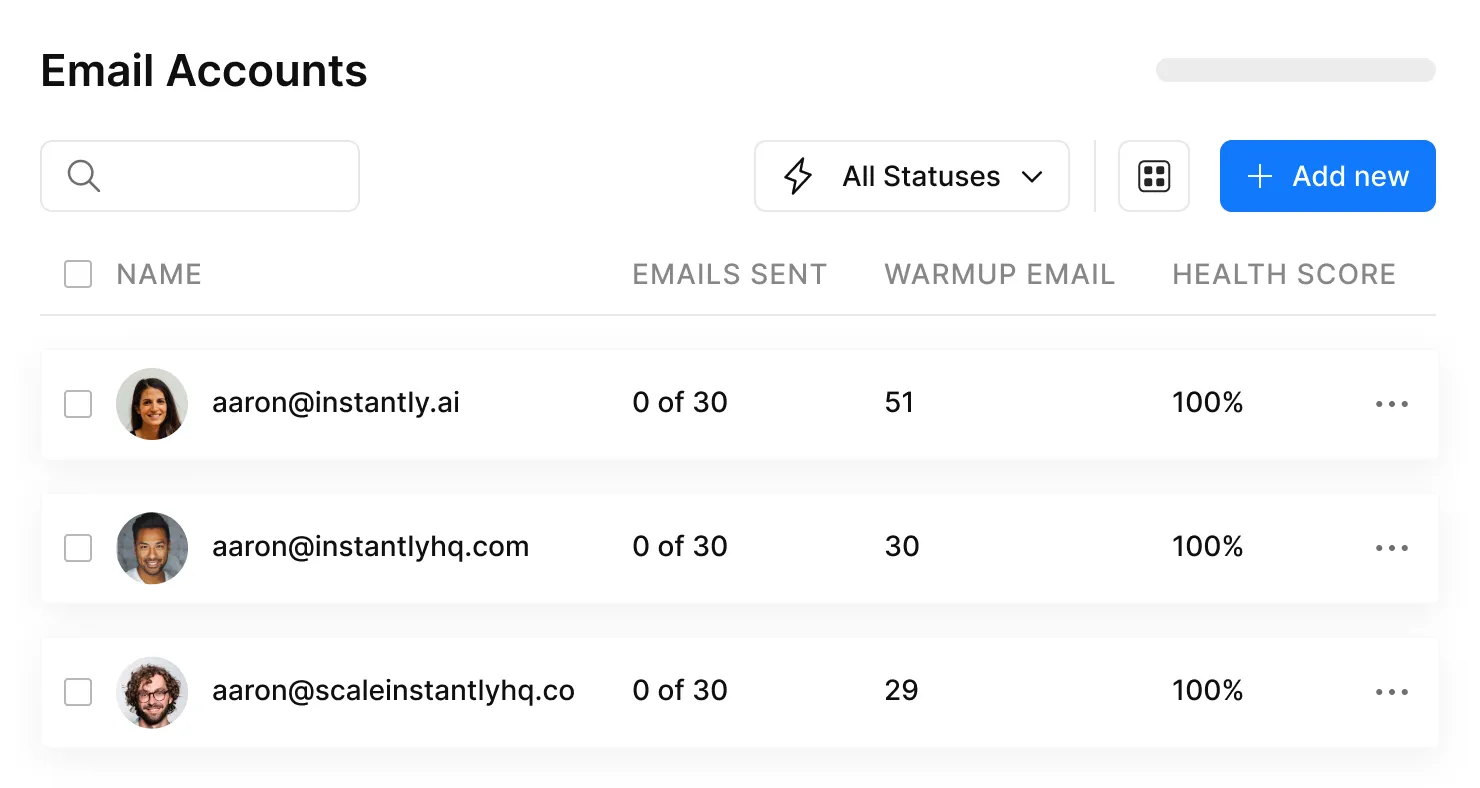
The convenience factor is real. One platform for warmup, sequences, and inbox rotation. For teams running fewer than 10 inboxes with a Gmail-heavy audience, Instantly's bundled warmup is genuinely good enough.
Skip this if you need spam placement tracking, Outlook-specific diagnostics, or visibility into network quality. Instantly treats warmup as a checkbox feature - it works until it doesn't, and when it doesn't, you have no diagnostic tools to figure out why.
Lemwarm
Lemwarm is the warmup tool we'd recommend to exactly one audience: teams already paying for lemlist. With an active lemlist subscription, Lemwarm is free. That's the entire value proposition.
The standalone product runs $29/mo (Essential) or $49/mo (Smart) per mailbox, which is steep for a single-function tool when Mailreach offers better diagnostics at $25/mo. The network covers 20,000+ healthy domains, and Skylead's benchmark showed 96% deliverability - strong numbers. G2 gives it 4.2/5 across 113 reviews; Capterra rates it 4.6/5 with 349 reviews, making it one of the most-reviewed warmup tools on the market.
On lemlist? Use it. Not on lemlist? The per-mailbox pricing doesn't justify itself against Mailreach or Warmbox.
Smartlead
Smartlead topped Skylead's benchmark at 97% deliverability, and warmup comes bundled with plans starting at $39/mo. For high-volume outbound teams already on the platform, there's no reason to add a separate warmup tool.
The limitations mirror Instantly's: no spam placement tracking, limited Outlook/M365 support, and no visibility into network composition. Mailreach's competitive analysis flags inconsistent Outlook performance as a recurring user complaint. If your prospects are mostly on Gmail, Smartlead's warmup is fine. If they're on Microsoft 365, you'll want a dedicated diagnostic layer.
Warmy.io
Warmy.io charges per mailbox with volume-based tiers: $49/mo (100 emails/day), $129/mo (300/day), $189/mo (1,000/day). A 7-day free trial lets you test before committing.
This is the tool for targeted reputation repair. If you've burned a specific domain and need to rehabilitate it with high daily warmup volume, Warmy handles that use case better than the bundled options. The pricing gets painful at scale, though - $189/mo for 1,000/day on one mailbox is steep when Mailivery offers 2,000/day at $199/mo with unlimited mailboxes. Warmy makes sense for fixing a specific problem, not for ongoing warmup across a fleet.
Warmup Inbox
The budget pick. Warmup Inbox starts at just $12/mo per inbox (Basic), with Pro at $39/mo and Max at $199/mo. G2 rates it 4.7/5 (22 reviews), Capterra 4.8/5 (6 reviews).
For solo senders or small teams running 1-3 inboxes on a tight budget, it's one of the cheapest dedicated warmup tools available. The small review sample means less proven reliability at scale, but as an entry point it's hard to beat on price.
Saleshandy
Saleshandy bundles warmup into its outreach platform at $27/mo (Basic), $79/mo (Pro), and $150/mo (Scale). With G2 at 4.6/5 across 442 reviews and Capterra at 4.5/5 (119 reviews), it's one of the most battle-tested platforms on this list. Best for teams wanting a single tool for sequences, tracking, and warmup. The tradeoff: warmup is a secondary feature, and diagnostics are limited compared to dedicated tools like Mailreach.
Quick Mentions
Mailwarm - $69/mo for 50 emails/day, $159/mo for 200/day, scaling to $479/mo for 500/day. G2 3.7/5 (14 reviews), Capterra 4.9/5 (8 reviews). Overpriced - Warmbox gives you more for less than a third of the cost.
Folderly - $120/mo per inbox. Enterprise-grade deliverability remediation that's overkill for most B2B teams.
Mailivery - $29/mo (100/day), $79/mo (600/day), $199/mo (2,000/day) with unlimited mailboxes. Best economics for agencies. The 50,000+ inbox network is one of the largest available.
Snov.io Warm-up - $39/mo (Starter) covers 3 mailboxes and 4,500 warmup emails/month. Decent if you're already in the Snov.io ecosystem; not worth switching for.
QuickMail Auto-Warmer - Free standalone tool. G2 4.6/5 (70 reviews). Worth trying if your budget is literally zero.
Woodpecker - $5/mo per mailbox add-on, powered by Mailivery's network. The cheapest warmup add-on if you're already running sequences through Woodpecker.

Warmup rebuilds your sender reputation. One campaign on a dirty list destroys it. Prospeo's 5-step email verification - with catch-all handling, spam-trap removal, and honeypot filtering - delivers 98% accuracy. That's why teams using Prospeo keep bounce rates under 4%.
Stop warming up domains just to burn them on bad data.
Comparison Table
| Tool | Starting Price | Benchmark | G2 | Best For |
|---|---|---|---|---|
| Mailreach | $25/mo/inbox | - | 4.6/5 | Outlook diagnostics |
| Warmbox | $19/mo | 90% | 4.7/5 | Budget + scale |
| Instantly | $37/mo (bundled) | 95% | - | Existing users |
| Lemwarm | Free w/ lemlist | 96% | 4.2/5 | lemlist users |
| Smartlead | $39/mo (bundled) | 97% | - | High-volume outbound |
| Warmy.io | $49/mo/inbox | - | - | Reputation repair |
| Warmup Inbox | $12/mo/inbox | - | 4.7/5 | Solo senders |
| Saleshandy | $27/mo (bundled) | - | 4.6/5 | All-in-one outreach |
| Mailivery | $29/mo (unlimited) | 94% | - | Agency economics |
| QuickMail | Free | - | 4.6/5 | Zero budget |
Benchmark data from Skylead's test; not available for all tools.
Bundled vs. Dedicated Warmup
The decision framework is simpler than most guides make it.
Bundled warmup is fine when you're already on Instantly or Smartlead, your audience is mostly on Gmail, you're running fewer than 10 inboxes, and deliverability isn't currently a problem. In that scenario, adding a separate warmup tool is unnecessary overhead.
Dedicated warmup is worth it when your prospects are heavily on Microsoft 365 (remember that 75.6% inbox placement rate), you need spam placement tracking to diagnose issues, you're running 10+ inboxes, or you're seeing deliverability problems you can't explain. 48% of senders cite spam-folder hits as their top deliverability concern - and bundled tools give you almost no visibility into why it's happening.
Here's the thing: most B2B teams overthink warmup tool selection and underthink data quality. The difference between a 90% and 97% warmup benchmark is roughly 7 emails per hundred. The difference between a verified list and an unverified one is the difference between keeping your domain and burning it. Spend 80% of your energy on what you're sending to, not which warmup tool you pick.
One detail that matters more than raw network size: network composition. A warmup network of 50,000 inboxes sounds impressive, but if 90% are Gmail accounts, it won't help your Outlook reputation. Look for tools that explicitly include Gmail and Outlook 365 inboxes in their network.
How to Warm Up the Right Way
Step 0: Verify Your List
Before you touch a warmup tool, verify your prospect list. Bad data undoes warmup - a list full of invalid addresses will spike your bounce rate and destroy the reputation you just spent weeks building. We use Prospeo for this: 98% email accuracy across 143M+ verified addresses, with spam-trap removal and catch-all handling. The free tier gives you 75 verified emails per month - enough to test the workflow before committing. (If you want to compare options, start with our guide to email ID validators.)
Step 1: Authentication
Non-negotiable. Set up SPF, DKIM, DMARC on every sending domain before you send a single email. While you're at it, verify your MX records, configure a custom tracking domain (shared tracking domains are a spam signal), and check that your SPF record doesn't exceed the 10-lookup limit - a common mistake when teams stack multiple sending tools. Skip authentication and no warmup tool will save you. (For the full setup, see our SPF DKIM DMARC setup guide.)
Step 2: Follow the Ramp
| Week | Daily Volume |
|---|---|
| 1-2 | 5-10 emails |
| 3-4 | 15-20 emails |
| 5-6 | 30-40 emails |
| 7+ | Max 50/day |
Never exceed 50 emails per day from a single inbox. The recommended split: 25 warmup + 25 cold. Rushing this ramp is the single most common mistake - ISPs flag sudden volume spikes immediately. (More benchmarks and guardrails in our cold email volume best practices guide.)
Step 3: Monitor Thresholds
Three numbers to watch:
Bounce rate should stay under 2%. Spam complaints need to stay under 0.1%. Reply rate should hit 5% or higher. If any of these slip, pause sending and diagnose before continuing. (If bounces are creeping up, start with our breakdown of hard bounce causes.)
Step 4: Test Independently
Don't trust the warmup tool's own dashboard. Use GlockApps or a similar independent testing tool to verify inbox placement across Gmail, Outlook, and Yahoo. The warmup tool has every incentive to show you green lights. An independent test doesn't.
One more thing: skip open-rate tracking pixels on cold email. They hurt deliverability more than the data is worth. Focus on replies and engagement instead. (If you want the why, see does open tracking hurt cold email.)
Warmup Can't Fix Bad Data
Let's be honest about a scenario we've seen play out dozens of times. You've been warming up for three weeks. Deliverability looks great - the dashboard is green, placement tests are clean. First real campaign goes out: 8% bounce rate. Spam complaints spike. Your sender reputation craters in 48 hours.
The warmup worked. Your list didn't.
Bad prospect data - bouncing addresses, spam traps, outdated contacts - destroys sender reputation faster than warmup can build it. This is the connection most warmup guides miss entirely. The consensus on r/coldemail echoes this constantly: people blame the warmup tool when the real culprit is a list they bought from a cheap provider and never verified. (If you're scaling, it's worth understanding B2B contact data decay and how fast lists go stale.)
Prospeo's 5-step verification process catches invalid addresses, spam traps, and honeypots before they ever hit your sending infrastructure. The 7-day data refresh cycle keeps contacts current - the industry average is six weeks, which means most databases are already stale by the time you send.
Stack Optimize built their agency from $0 to $1M ARR by pairing warmup with verified data. Their clients run 94%+ deliverability, under 3% bounce, zero domain flags. That's not because they found a magic warmup tool - it's because they verify every list before it touches a sending domain.
Warmup and data quality aren't separate problems. They're two sides of the same deliverability coin. (For a broader playbook, see our email deliverability checklist.)
The article's missing step? List quality. Prospeo refreshes 300M+ profiles every 7 days - not the 6-week industry average. At $0.01 per verified email, cleaning your list costs less than a single spam-flagged campaign costs you in domain reputation.
Protect every dollar you spend on warmup with data that actually connects.
Email Warmup Tools FAQ
How long does email warmup take?
Plan for 2-6 weeks minimum. Start at 5-10 emails per day and ramp to a max of 50/day per inbox by week seven. Rushing the ramp is the most common mistake - ISPs flag sudden volume spikes and the damage takes longer to repair than the warmup itself.
Is email warmup against Gmail's terms of service?
Yes - automated engagement technically violates Google's ToS. Google shut down GMass's warmup feature in 2023 as a clear enforcement signal. In practice, most warmup tools operate without enforcement action, but it's a risk worth acknowledging if you're running warmup on your primary business domain.
How many warmup emails should I send per day?
Cap at 50 total emails per inbox per day - warmup and cold combined. The recommended split is 25 warmup plus 25 cold. Exceeding 50/day from a single inbox is the fastest way to trigger spam filters, regardless of which tool you're using.
Do I need a dedicated warmup tool if I use Instantly or Smartlead?
Their bundled warmup is fine for Gmail-heavy audiences and small inbox counts. If your prospects are mostly on Microsoft 365 - where inbox placement runs just 75.6% - or you can't diagnose why you're landing in spam, upgrade to a dedicated tool like Mailreach for proper placement analytics.
Can warmup tools fix deliverability problems caused by bad data?
No. Warmup builds sender reputation; bouncing emails and spam traps destroy it. Verify your prospect list before warming up - otherwise you're building reputation with one hand and tearing it down with the other.