

Outlook Spam Trigger Words: What Actually Lands You in Junk (and What Doesn't)
Your SDR just pinged you: every email to Outlook addresses is landing in Junk. The team's first instinct is to scrub the copy - remove "free," soften the CTA, swap "guaranteed" for something gentler. That instinct is wrong. Outlook's filtering system cares about vocabulary far less than you think, and fixing your subject lines before fixing your authentication is like repainting a house with a cracked foundation.
The Short Version
Fix authentication first. SPF, DKIM, and DMARC aren't optional. Since May 5, 2025, Microsoft rejects non-compliant mail outright for high-volume senders to Outlook.com, Hotmail.com, and Live.com addresses.
Fix sender reputation second - check Microsoft SNDS, verify your list, monitor engagement. Fix trigger words third. They matter, but they're the least important factor in Outlook's filtering stack.
We'll give you the full trigger word list below. But if you skip straight to it without reading the sections above, you'll fix the wrong problem.
How Outlook's Spam Filter Actually Works
Outlook doesn't run a keyword blacklist. Exchange Online Protection (EOP) evaluates inbound mail through five filtering layers, and content analysis - where trigger words live - is just one of them.
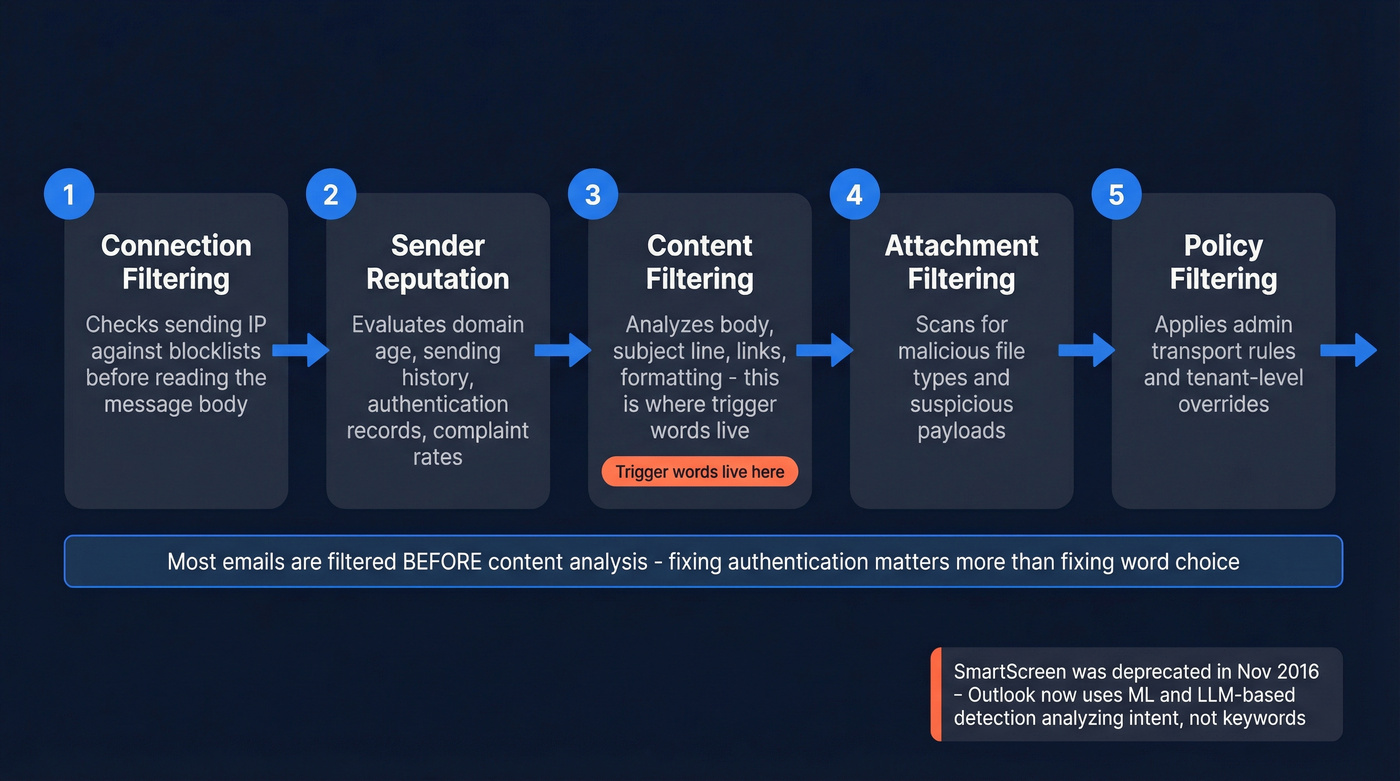
Connection filtering checks the sending IP against blocklists before the message body is even read. Sender reputation evaluates domain age, sending history, authentication records, and complaint rates. Content filtering analyzes body, subject line, links, and formatting using Bayesian and ML techniques - this is where trigger words come in. Attachment filtering scans for malicious file types. Policy filtering applies admin-configured transport rules and tenant-level overrides.
Here's something people constantly get wrong: Focused Inbox is not the same as Junk filtering. Focused Inbox sorts wanted mail into Focused vs. Other - landing in "Other" means Outlook deprioritized you, not that it flagged you as spam. Junk is a completely separate system. Outlook also lets users block entire top-level domains and character encodings at the client level, so your email can be filtered before EOP even evaluates it.
Microsoft deprecated SmartScreen - their old content-focused filter - back in November 2016. The replacement is ML-driven, evaluating patterns and context rather than individual words. In November 2024, Microsoft added LLM-based detection specifically targeting business email compromise, analyzing language intent rather than keyword matches. Your email passes through connection and reputation filtering before EOP looks at what you wrote. If those layers flag you, no amount of copy editing saves you.
SCL Score Explained
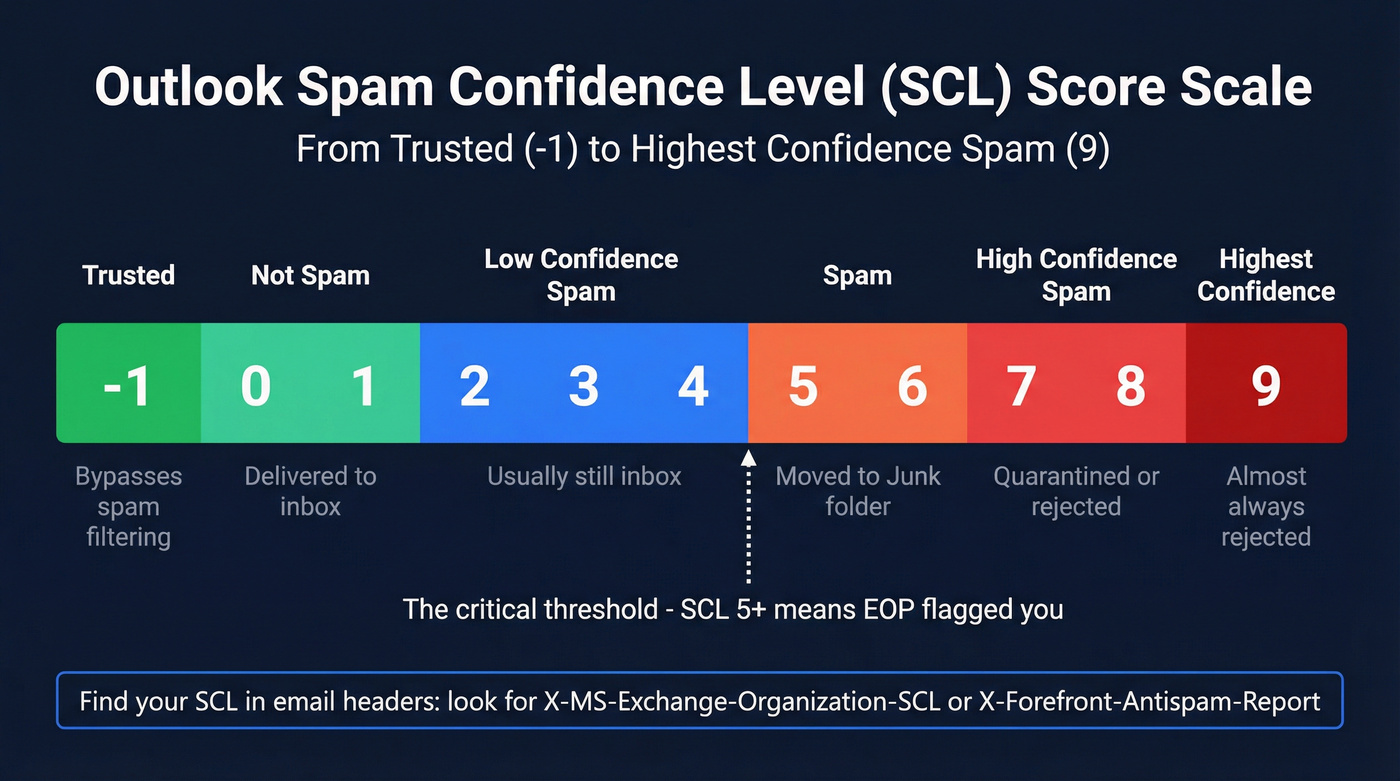
Every email that passes through EOP gets assigned a Spam Confidence Level (SCL) score from -1 to 9.
| SCL Score | Meaning | What Happens |
|---|---|---|
| -1 | Trusted / allow-listed | Bypasses spam filtering |
| 0-1 | Not spam | Delivered to inbox |
| 2-4 | Low confidence spam | Usually still inbox |
| 5-6 | Spam | Moved to Junk folder |
| 7-8 | High confidence spam | Quarantined or rejected |
| 9 | Highest confidence | Almost always rejected |
Find your SCL in email headers: look for X-MS-Exchange-Organization-SCL or dig into X-Forefront-Antispam-Report. A score of 5+ means EOP flagged you. Admins can configure anti-spam policies to adjust these thresholds, so the exact cutoff varies by organization.
Microsoft's Authentication Mandate
On May 5, 2025, Microsoft began enforcing mandatory authentication for any domain sending more than 5,000 emails per day to Outlook.com, Hotmail.com, and Live.com addresses. Non-compliant mail gets rejected with: [550 5.7.515 Access denied](https://support.microsoft.com/en-us/topic/fix-ndr-error-550-5-7-515-in-outlook-com-34cfe8f8-6fbf-457e-9e8b-9e8b-9e4dbaf4e0ef), sending domain does not meet the required authentication level.
That's not a soft landing in Junk. It's an outright rejection. Your email never arrives.
The requirements: valid SPF, DKIM signing, and a published DMARC record. Microsoft's TechCommunity announcement made clear that Safe Sender lists don't bypass this enforcement. Even if a recipient has manually added you to their safe list, authentication failures can still trigger rejection. Expect mailbox providers to push beyond DMARC p=none toward quarantine and reject policies as the new baseline.

Authentication gets your emails accepted. Clean data keeps them out of Junk. Prospeo's 5-step verification and 7-day data refresh cycle mean bounce rates under 4% - so Outlook's reputation scoring works for you, not against you.
Fix your sender reputation at the source - start with accurate data.
Words and Phrases That Trigger Outlook's Junk Filter in 2026
Let's be honest: spam trigger words are largely a myth from the SpamAssassin era. "Free" in a SaaS trial email won't kill you. "FREE!!!" in all caps with twelve exclamation marks will. The difference is pattern, not vocabulary.
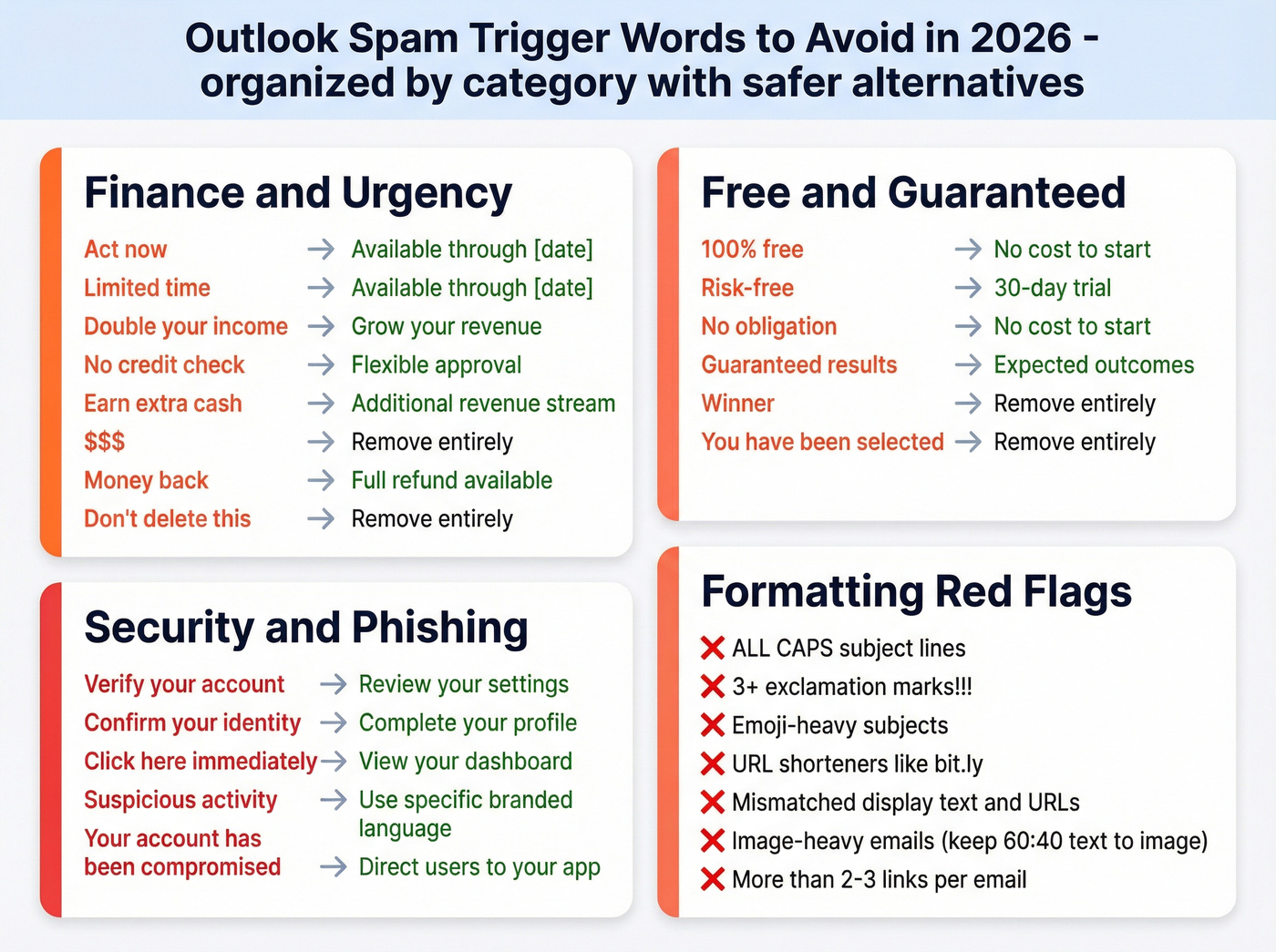
That said, stacking these phrases hurts when combined with weak authentication or low sender reputation.
Finance and Urgency
| Trigger Phrase | Why It's Flagged | Say This Instead |
|---|---|---|
| Act now / Limited time | Urgency + pressure pattern | "Available through [date]" |
| Double your income | Classic scam phrasing | "Grow your revenue" |
| No credit check | Financial fraud pattern | "Flexible approval" |
| Earn extra cash | MLM/scam association | "Additional revenue stream" |
| $$$ / Money back | Symbol spam + refund scam | "Full refund available" |
| Don't delete this | Manipulative framing | Remove entirely |
Free, Guaranteed, and Too-Good-to-Be-True
| Trigger Phrase | Why It's Flagged | Say This Instead |
|---|---|---|
| 100% free | Overcommitment pattern | "No cost to start" |
| Risk-free / No obligation | Guarantee stacking | "30-day trial" |
| Guaranteed results | Unverifiable promise | "Expected outcomes" |
| Winner / You've been selected | Lottery scam language | Remove entirely |
Security and Phishing
| Trigger Phrase | Why It's Flagged | Say This Instead |
|---|---|---|
| Verify your account | Top phishing template | "Review your settings" |
| Confirm your identity | Identity theft pattern | "Complete your profile" |
| Click here immediately | Urgency + vague CTA | "View your dashboard" |
| Suspicious activity | Fear-based phishing | Use specific, branded language |
| Your account has been compromised | Textbook phishing | Direct users to your app |
Regulated Content
Phrases like "lose weight fast," "miracle cure," "casino," and "online betting" fall into content verticals that spam filters treat as high-risk by default. If your business operates in these spaces, content wording is the least of your deliverability challenges - you need dedicated infrastructure and compliance-first sending practices. Skip the trigger word optimization and talk to a deliverability consultant instead.
Formatting Red Flags
These patterns often matter more than vocabulary:
- ALL CAPS subject lines
- Three or more exclamation marks
- Emoji-heavy subjects with multiple symbols stacked together
- URL shorteners like bit.ly or tinyurl in the body
- Mismatched display text and actual hyperlink URLs
- Image-heavy emails with minimal text - aim for at least a 60:40 text-to-image ratio
- More than 2-3 links in a single email body
- Subject lines over 50 characters with multiple trigger phrases
We've seen emails with zero trigger words land in Junk because the HTML was broken and the sending domain had no DMARC record. And we've seen emails with "free trial" in the subject hit the inbox perfectly because the sender had strong authentication and healthy engagement metrics. In our experience, fixing authentication can move Outlook placement dramatically before you touch a single word of copy.
What Actually Causes Junk Placement
You removed every spammy word and emails still land in Junk. Here's the thing: EOP evaluated five other signals before it ever looked at your word choice.
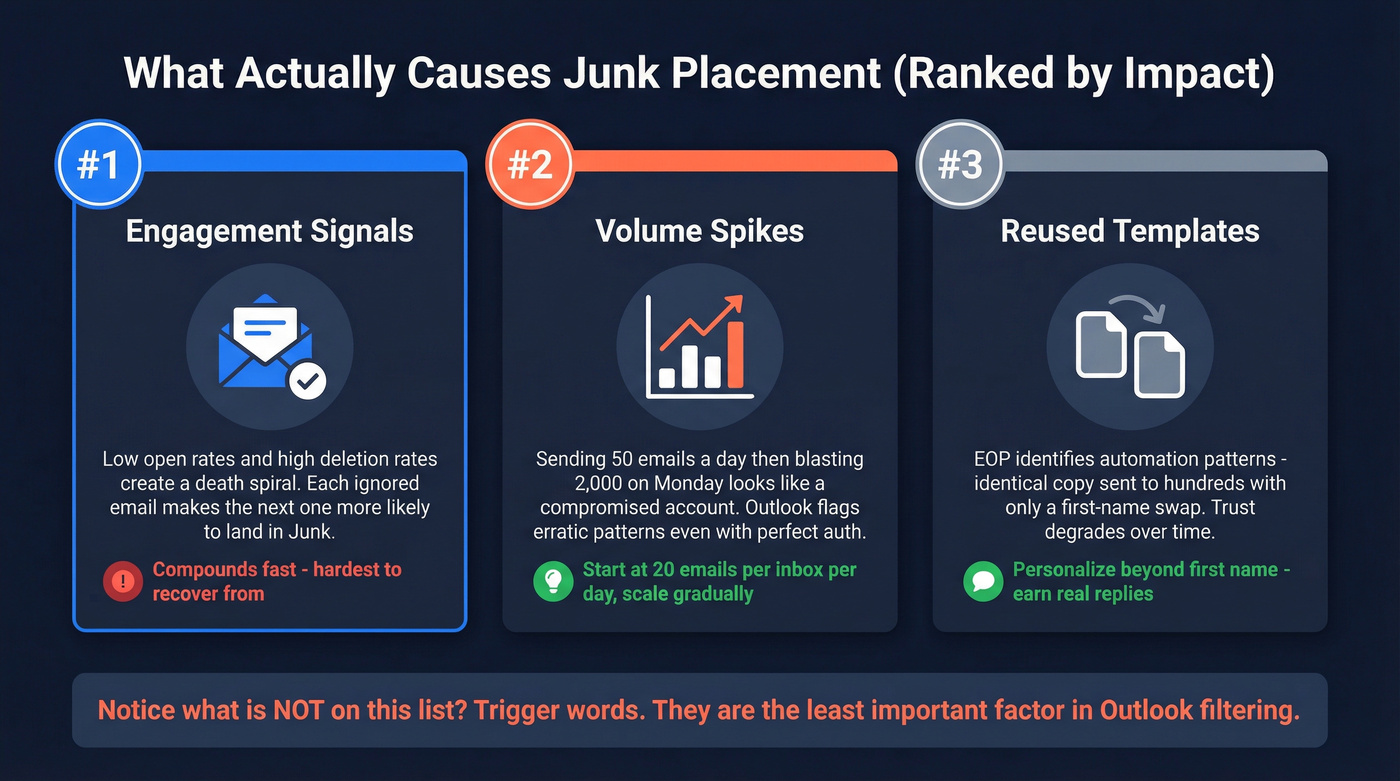
Engagement signals dominate. Outlook heavily weighs whether recipients open your emails, reply, click "Not Junk," or delete without reading. Low open rates and high deletion rates create a death spiral - each ignored email makes the next one more likely to land in Junk, which means even fewer opens, which makes the next batch worse. It compounds fast.
Volume spikes trigger scrutiny. Sending 50 emails a day for two weeks and then blasting 2,000 on a Monday looks like a compromised account. Outlook flags erratic sending patterns even with perfect authentication.
Reused templates get detected. EOP identifies automation patterns - identical copy sent to hundreds of recipients with only a first-name swap. This trust signal degrades over time, even when your domain reputation starts clean.
The infrastructure layer matters too. Broken HTML, missing unsubscribe links, and suspicious attachments all contribute to higher SCL scores. And despite what some deliverability vendors claim, the vast majority of third-party blacklists are ignored by major providers like Microsoft and Google - blacklist presence is a symptom, not the cause. The Word to the Wise blog has covered this extensively if you want the deep dive.
How to Fix Outlook Deliverability
Here's the checklist, in the order that actually matters.
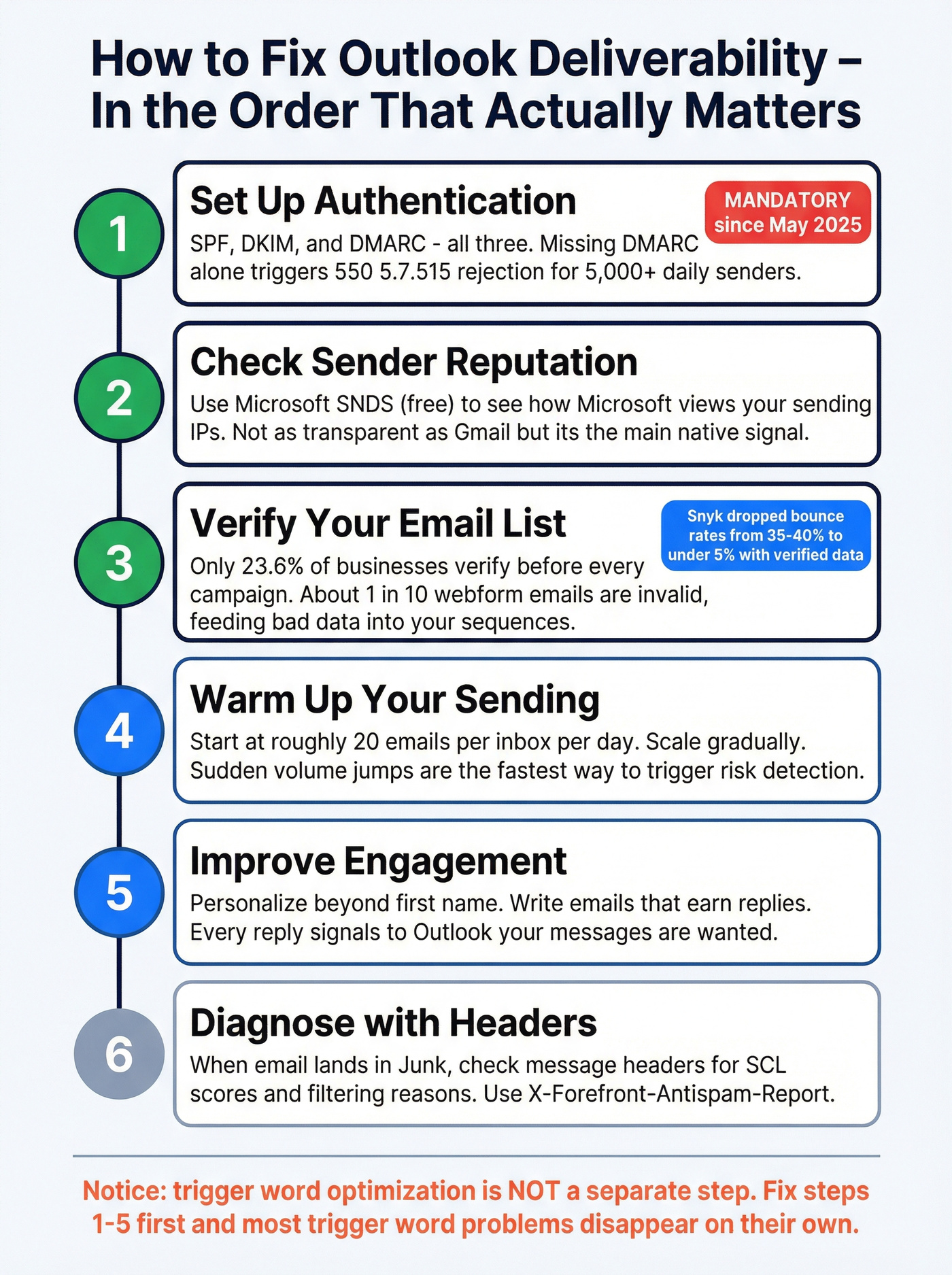
1. Set up authentication. SPF, DKIM, and DMARC - all three. If you're sending more than 5,000 emails/day to Microsoft consumer addresses, a missing DMARC record alone triggers the 550 5.7.515 rejection. Microsoft's documentation walks through the setup. If you want the step-by-step for outbound, see our SPF, DKIM, and DMARC breakdown.
2. Check sender reputation. Microsoft SNDS (Smart Network Data Services) is free and gives you visibility into how Microsoft views your sending IPs. It's not as transparent as Gmail's tooling, but it's the main Microsoft-native signal you can monitor. If you're troubleshooting broader issues, use this email deliverability checklist to avoid missing basics.
3. Verify your email list. Kickbox data shows only 23.6% of businesses verify their lists before every campaign, and roughly 9% of emails entered via webforms are invalid - that's one in ten leads feeding bad data into your sequences. Invalid addresses cause bounces, and bounces tell Microsoft you're an untrustworthy sender. If you’re comparing tools, start with our guide to the best email ID validators.
That cleanup has real impact. When Snyk's 50-person AE team switched to Prospeo-verified data, their bounce rate dropped from 35-40% to under 5%, and AE-sourced pipeline jumped 180%. That kind of list hygiene directly protects your Outlook sender reputation. If you’re seeing repeated failures, it’s often tied to invalid emails and hard bounce patterns.
4. Warm up your sending. Start at roughly 20 emails per inbox per day and scale gradually. Sudden volume jumps are one of the fastest ways to trigger Outlook's risk detection. For a deeper look at what works (and what’s outdated), see our guide to automated email warmup.
5. Improve engagement. Personalize beyond {{first_name}}. Write emails that earn replies. Every reply signals to Outlook that your messages are wanted - and that signal carries more weight than any individual word in your copy. If you need copy frameworks, use these outreach email templates and this guide to personalization in outbound sales.
6. Diagnose with headers. When an email lands in Junk, open message headers (File then Properties in Outlook desktop). Search for X-MS-Exchange-Organization-SCL. If it's 5+, EOP flagged you.
7. Test before sending. Mail-Tester is free and gives you a quick pre-send score. For ongoing inbox placement monitoring, GlockApps starts around $50+/month and tests across multiple providers including Outlook.
Every bounced email raises your SCL score and pushes future sends toward Junk. Prospeo delivers 98% email accuracy with catch-all handling, spam-trap removal, and honeypot filtering built in - at $0.01 per email.
Stop optimizing subject lines when your list is the real problem.
Outlook vs. Gmail Filtering
Gmail gives you Postmaster Tools - reputation dashboards, domain-level feedback, complaint rate graphs. Microsoft gives you SNDS and not much else. The lack of a Gmail Postmaster equivalent on the Microsoft side is genuinely frustrating for anyone managing deliverability at scale.
Outlook also weighs engagement aggressively. A campaign that performs fine in Gmail can tank in Outlook because Outlook's systems react fast to low open rates and deletions-without-reading. Volume sensitivity is tighter too - Outlook is quicker to scrutinize erratic sending patterns.
If your Outlook deliverability is suffering but Gmail is fine, the problem is almost certainly reputation or list quality, not your copy. Bad data causes bounces, bounces tank reputation, and reputation is what Outlook cares about most. If you want a broader playbook, start with our email deliverability guide.
FAQ
Does the word "free" automatically trigger Outlook's spam filter?
No. EOP evaluates context, sender reputation, and authentication alongside content. "FREE!!!" in all caps with excessive punctuation triggers filters - the word itself in normal formatting doesn't.
How do I check my email's SCL score?
Open email headers via File then Properties in Outlook desktop, then search for X-MS-Exchange-Organization-SCL. A score of 5+ means EOP classified the message as spam; 7+ typically results in quarantine or rejection.
Why do my emails land in Gmail's inbox but Outlook's Junk?
Outlook weighs sender reputation and engagement more aggressively and offers far less transparency than Gmail Postmaster Tools. Check SPF/DKIM/DMARC compliance and list quality first - those are the most common culprits for Outlook-specific issues.
How does list verification improve Outlook deliverability?
Invalid addresses cause bounces, and high bounce rates signal to Microsoft that you're untrustworthy. Removing invalid emails, catch-all risks, and spam traps before sending is the single highest-impact fix after authentication.
Did Microsoft stop using content-based spam filtering?
Not entirely. Microsoft deprecated SmartScreen in 2016 and shifted to ML-based filtering via EOP. Content - including Outlook spam trigger words - is still a factor in SCL scoring, but authentication, sender reputation, and engagement carry significantly more weight in 2026.