

Email Deliverability Tracking: Metrics, Tools, and What to Monitor in 2026
Your ESP says 99.4% delivered. Feels great. Then you run a seed test and discover 36% of those "delivered" emails are sitting in spam folders, invisible to every recipient on your list. That roughly 40-point gap between "delivered" and "inboxed" is the single most expensive blind spot in email operations, and most teams don't even know it exists.
Proper email deliverability tracking closes that gap.
Last year's data tells the story: across millions of seed tests, only 60% of emails reached a visible mailbox location. Another 36% landed in spam. The remaining 4% vanished - blocked or missing entirely. Gmail's inbox placement peaked at 87.5% in May and cratered to 63.5% by December, a 24-point swing in eight months. If you're not actively monitoring real deliverability - not your ESP's feel-good delivery rate - you're flying blind into a headwind that shifts by the quarter.
It's not complicated. ESPs just have every incentive to show you the number that looks best.
What You Need (Quick Version)
- Track inbox placement rate, not delivery rate. Your ESP's 99% means the server accepted the email. It says nothing about inbox vs. spam. The gap averages around 40 points.
- Start free. Google Postmaster Tools + Microsoft SNDS + Sender Score give you Gmail reputation signals, Microsoft reputation signals, and a quick IP reputation check for $0.
- Best affordable paid tool: GlockApps ($59-$99/mo). Seed testing, DMARC analysis, blacklist monitoring - most of what teams actually use day-to-day.
- Fix the root cause. Verify your list before every campaign. Prospeo's real-time email verification catches invalid addresses and spam traps before they damage your reputation.
What Deliverability Monitoring Actually Means
Most people conflate "delivery" with "deliverability." They're not the same thing, and the difference costs real money. If you need the full foundation, start with an email deliverability guide.
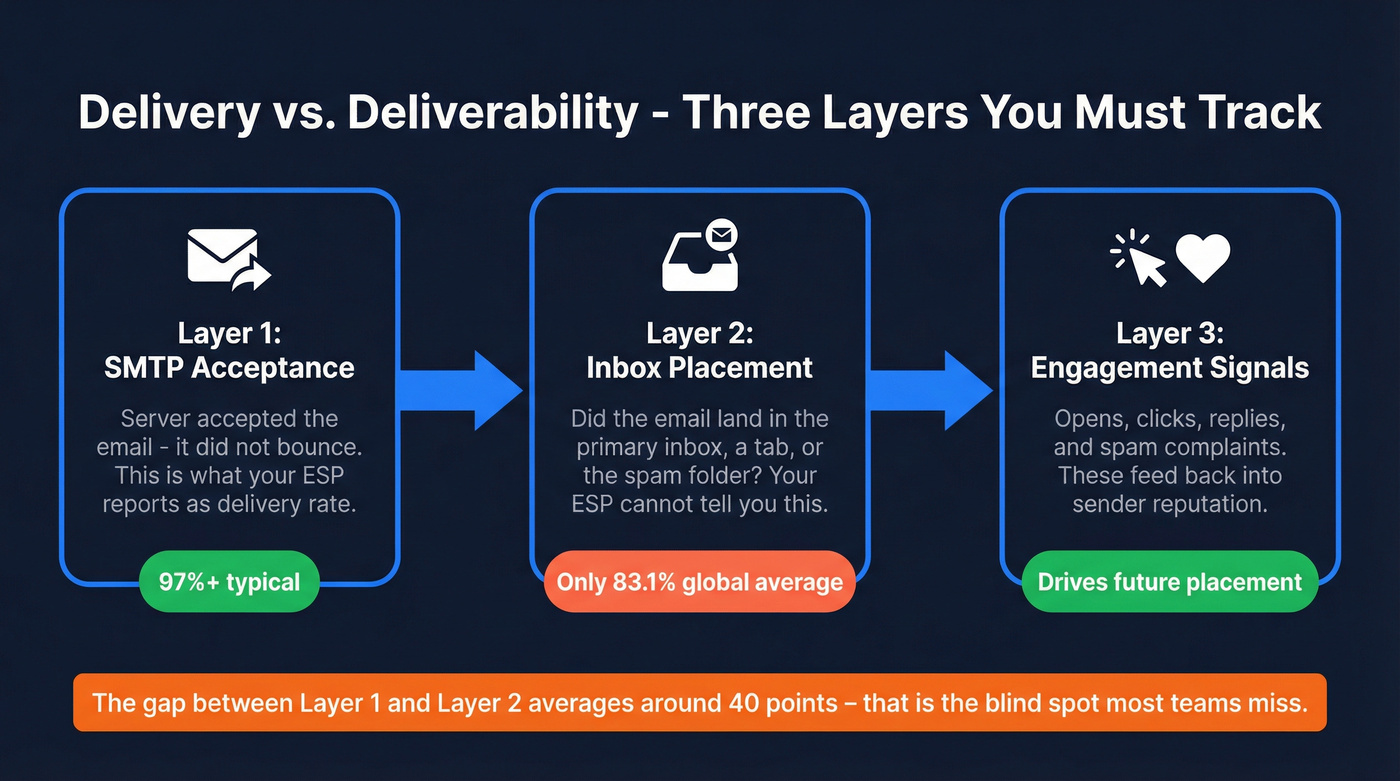
Delivery is binary: the receiving mail server accepted the message at the SMTP level. It didn't bounce. That's it. Your ESP reports this number, and it's often above 97%.
Deliverability is what happens next, and it has three layers:
- SMTP acceptance. The server took the email. This is the "delivery rate" your ESP shows you.
- Inbox placement. Did the email land in the primary inbox, a tab, or the spam folder? This is the metric that actually matters, and your ESP can't tell you.
- Engagement signals. Opens, clicks, replies, and - critically - spam complaints. These feed back into your sender reputation, which determines future inbox placement.
Globally, average inbox placement sits at about 83.1%, meaning 1 in 6 emails never reaches the inbox. Europe runs around 91%, while APAC drops to 78%. Monitoring all three layers - not just the first one - is what separates teams with strong placement from those bleeding engagement silently.
8 Metrics You Must Monitor
Email Delivery Rate
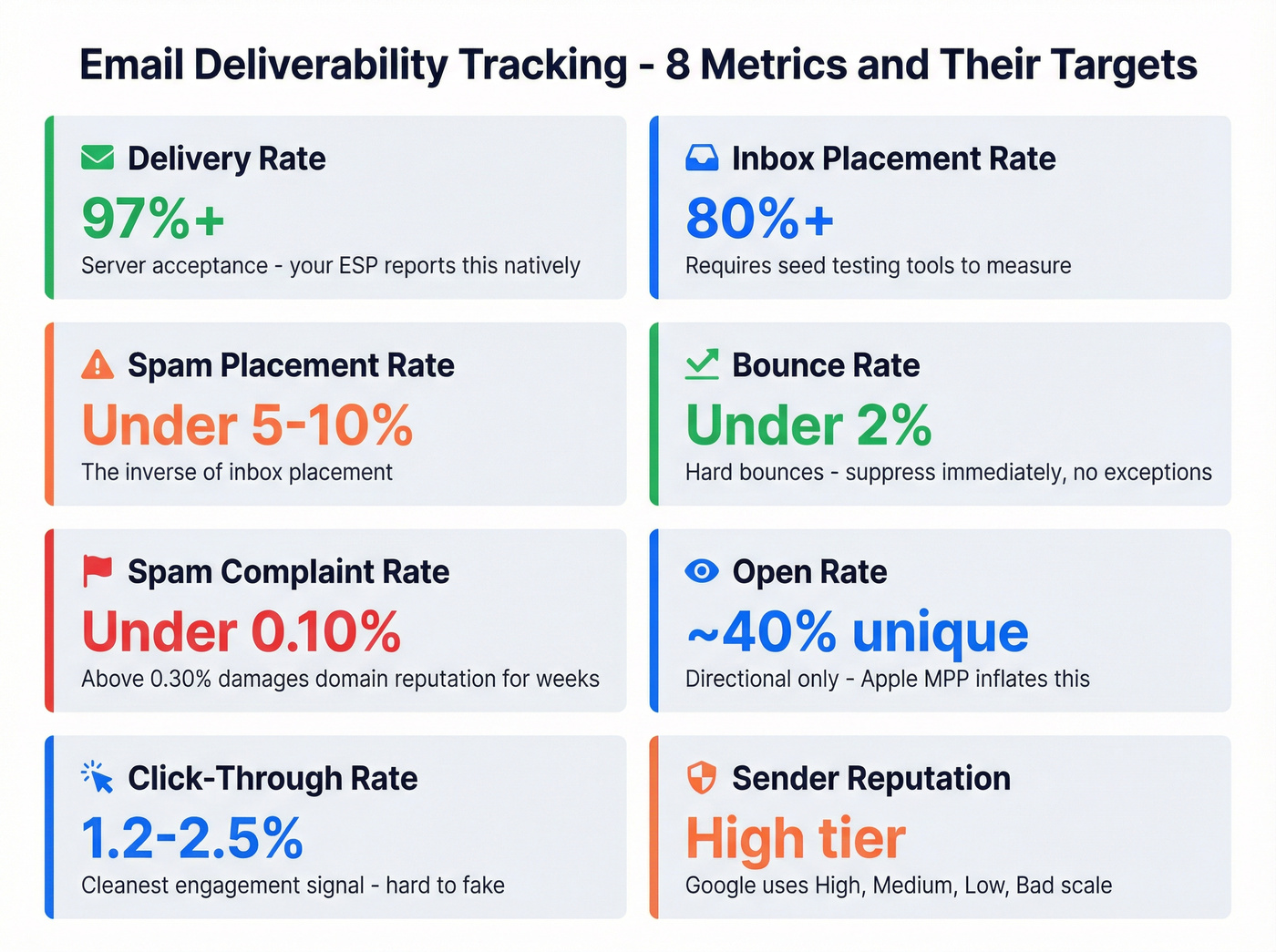
The percentage of emails accepted by the receiving server. Target: 97%+. Anything below that signals list hygiene problems or infrastructure issues. Email delivery rate tracking is the easiest metric to monitor because your ESP reports it natively, but it's also the most misleading when used alone.
Inbox Placement Rate
The percentage of delivered emails that actually land in the primary inbox. Target: 80%+, though industry benchmarks vary wildly - Travel averages 68%, Software/Tech 58%, Financial Services 57%. You need seed testing tools like GlockApps to measure this because your ESP can't. A typical seed test result shows 78.8% inbox, 14.4% spam, and 2% missing. Numbers your ESP will never surface.
Spam Placement Rate
The inverse of inbox placement. Target: under 5-10%. If more than that hits spam, your content, authentication, or sender reputation needs attention.
Bounce Rate
Hard bounces mean the address doesn't exist - suppress immediately, no exceptions. Soft bounces are temporary failures like full inboxes or downed servers. Cross-industry bounce benchmarks hover around 0.3%, and Dotdigital's Americas benchmark is 0.06%. If you're materially above that, something's wrong. ISPs start filtering more aggressively when bounce rates creep above 2-3%; above 5%, you risk being blocked outright. Target: total bounce rate under 2%. (If you want a deeper breakdown, see hard bounces.)
Spam Complaint Rate
The percentage of inbox recipients who manually click "Report Spam." In Google Postmaster Tools, the Spam Rate chart includes visual threshold lines at 0.10% (recommended) and 0.30% (policy violation). Even brief spikes above 0.30% can damage your domain reputation for weeks.
Open Rate
Americas benchmarks: 40% unique open rate, 59% total. Apple's Mail Privacy Protection inflates this number, so treat it as directional. A sudden drop in open rate often signals a deliverability problem before other metrics catch up. (Related: open rate vs click rate.)
Click-Through Rate
Target: 1.2-2.5% for marketing emails. CTR is the cleanest engagement signal because it's harder to fake than opens. A healthy CTR tells mailbox providers your content is wanted, which reinforces inbox placement.
Sender Reputation
Google Postmaster Tools uses a four-tier scale: High, Medium, Low, Bad. "Bad" means almost all your Gmail traffic gets rejected. There's no numeric score, just the tier. Check it daily. External IP reputation tools like Sender Score give you a complementary 0-100 score. If you're scaling volume, also review your email sending infrastructure.
2026 Inbox Placement Benchmarks
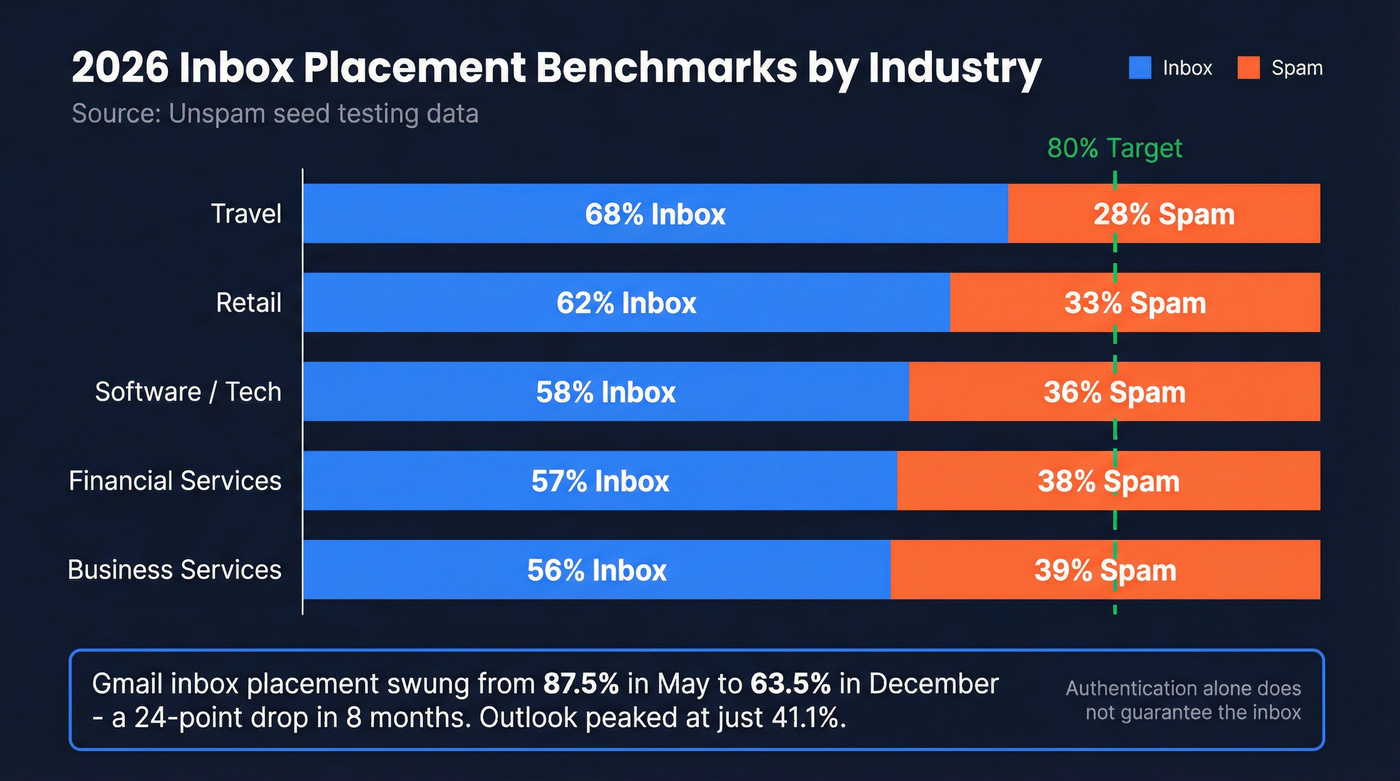
These benchmarks come from Unspam's most recent large-scale seed testing data:
| Industry | Inbox Rate | Spam Rate |
|---|---|---|
| Travel | 68% | ~28% |
| Retail | 62% | ~33% |
| Software/Tech | 58% | ~36% |
| Financial Services | 57% | ~38% |
| Business Services | 56% | ~39% |
The provider-level variation is even more dramatic. Gmail inbox placement swung from 87.5% in May to 63.5% in December. Outlook peaked at just 41.1%. ProtonMail ranged between 18% and 28.6%. If you're only checking one provider, you're missing the picture.
Authentication adoption is high - SPF at 92%, DKIM at 88%, DMARC at 69% - yet spam placement exceeded 30% in many cases. Authentication is table stakes. It gets you in the door, but it doesn't guarantee the inbox. For a step-by-step setup, see SPF, DKIM, DMARC explained.

Every invalid email you send chips away at your sender reputation - the metric that controls inbox placement. Prospeo's 5-step email verification catches bad addresses, spam traps, and honeypots before they hit your list. 98% accuracy. Bounce rates under 1%. At $0.01 per email, it costs less than a single spam complaint.
Fix deliverability at the source - verify every email before you send.
Your Free Monitoring Stack
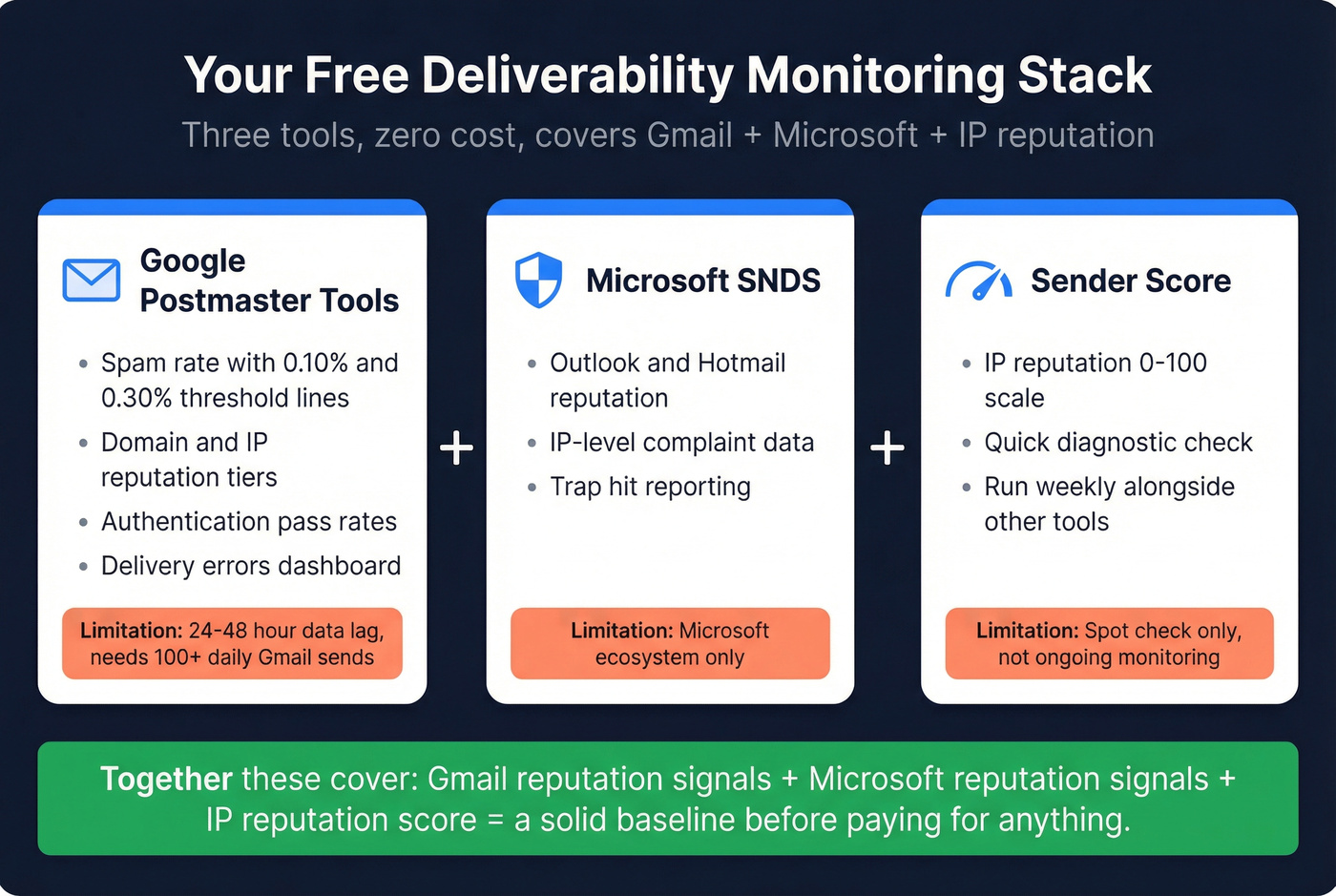
You don't need nine tools. You need three, and they're all free.
Google Postmaster Tools
The single most important free deliverability tool. It shows spam rate, domain reputation, IP reputation, authentication pass rates, encryption status, delivery errors, and a Compliance Status dashboard. The Spam Rate dashboard includes visual threshold lines at 0.10% and 0.30%, making it obvious when you're in danger.
Limitations: data lags 24-48 hours, doesn't include Google Workspace data, and you need roughly 100+ daily emails to Gmail before data appears. For free, though, it's essential.
Microsoft SNDS
Smart Network Data Services covers Outlook and Hotmail reputation monitoring. Pair it with Google Postmaster Tools and you've got Gmail + Microsoft covered. Free, straightforward setup.
Sender Score (Validity)
A free IP reputation check on a 0-100 scale. Think of it as a quick diagnostic - useful for spot-checking, not ongoing monitoring. Run it weekly alongside your other tools.
Best Paid Deliverability Tools
When free tools aren't enough - and for most teams sending at volume, they won't be - here's what's worth paying for. These tools map to different stages of the deliverability workflow: pre-send testing, ongoing monitoring, and infrastructure diagnostics. If you're evaluating outreach stacks specifically, compare options in our cold email marketing tools roundup.
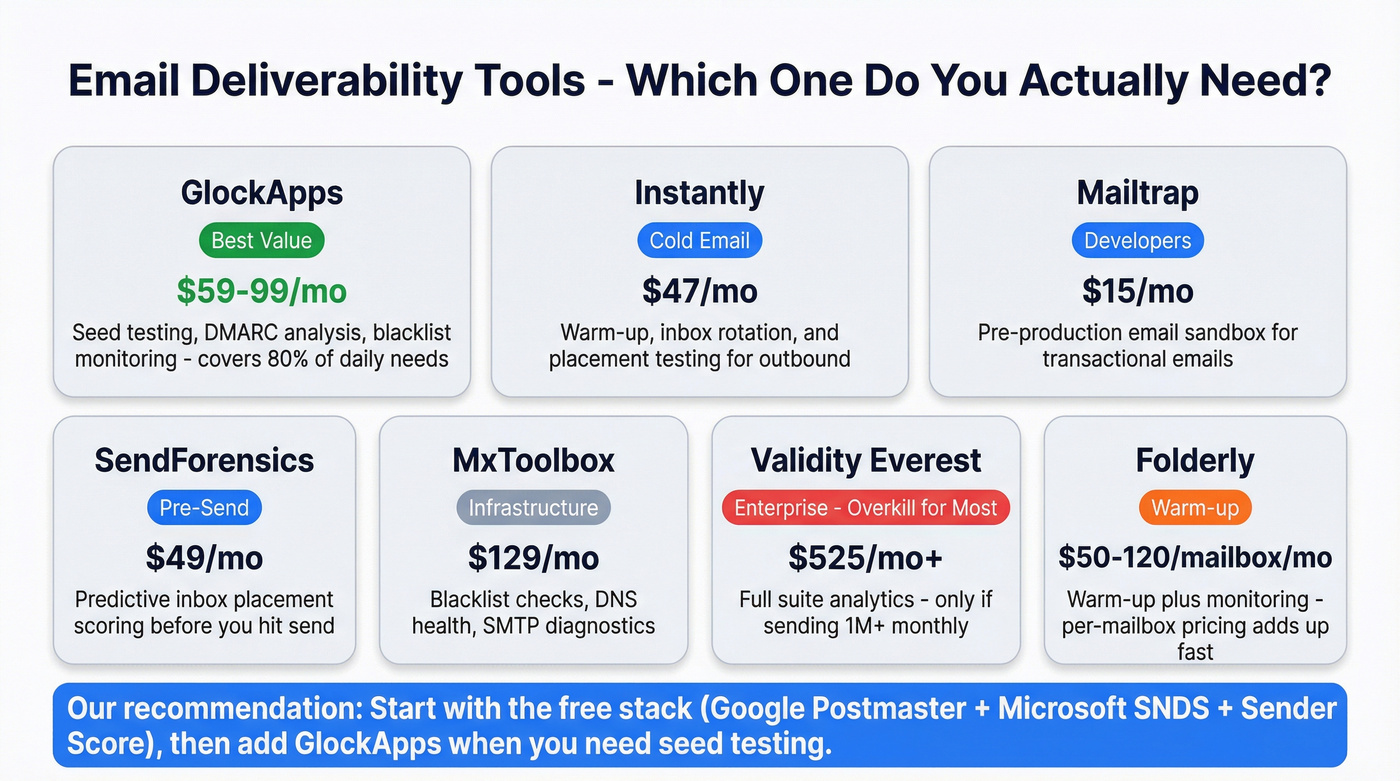
| Tool | Best For | Starting Price | Key Feature |
|---|---|---|---|
| GlockApps | Overall value | $59-$99/mo | Seed testing + blacklist monitoring across 50+ blocklists |
| Instantly | Cold email | $47/mo | Warm-up + inbox rotation built-in |
| Mailtrap | Developers | $15/mo | Pre-production email sandbox |
| SendForensics | Pre-send scoring | $49/mo | Predictive placement scoring |
| MxToolbox | Infrastructure | $129/mo | Blacklist + DNS monitoring |
| Validity Everest | Enterprise | $525/mo+ (Plus) | Full-suite analytics |
| Folderly | Warm-up | $50-$120/mailbox/mo | Warm-up + monitoring |
GlockApps - Best Value
GlockApps covers the core workflow: seed testing shows you where your emails land across major mailbox providers, DMARC analysis turns unreadable XML reports into something human, and blacklist monitoring helps you catch problems early. We've found it handles about 80% of what most teams actually need day-to-day. The free plan includes 2 spam test credits per month to try it out.
Instantly - For Cold Email Only
Instantly only makes sense for cold outreach. If that's you, it's excellent - warm-up, inbox rotation, and placement testing are built into the outreach workflow. It includes 2 free inbox placement tests even without a paid plan, with Growth at $47/mo and Hypergrowth at $97/mo after that. Running marketing campaigns or transactional email? Look elsewhere. (If you're warming up new domains, see automated email warmup.)
Mailtrap
Use this if you're a developer or product team sending transactional emails - password resets, order confirmations, onboarding sequences. Mailtrap's sandbox lets you test rendering and deliverability before anything hits production. Skip this if you're in marketing or sales. Free tier covers 1,000 emails/month; paid starts at $15/mo.
SendForensics
Pre-send scoring that predicts inbox placement before you hit send. Upload your email, get a placement probability score. Brand plan at $49/mo, Company at $79/mo, Agency at $199/mo.
MxToolbox
Infrastructure-focused: blacklist checks, DNS health, MX record validation, SMTP diagnostics. Less about inbox placement, more about making sure your sending infrastructure isn't broken. Delivery Center at $129/mo, Plus at $399/mo. If you need a playbook for incidents, use this blacklist alert guide.
Validity Everest - Probably Not Worth It
Elements Plus jumps to $525/mo. Enterprise contracts can run into six figures annually. Unless you're sending 1M+ emails monthly with a dedicated deliverability team, Everest is overkill. GlockApps gets you most of the day-to-day value for a fraction of the cost.
Folderly
Warm-up plus monitoring in one package. Pricing ranges from $50-$120 per mailbox per month depending on volume. The per-mailbox pricing adds up fast if you're running multiple sending domains.
Authentication Monitoring
SPF, DKIM, and DMARC are baseline requirements. But full authentication doesn't prevent 30%+ spam placement. Authentication gets your emails accepted - it doesn't guarantee the inbox.
The real work is in DMARC monitoring. Aggregate reports arrive as raw XML that's unreadable without a parser. Tools like DMARCeye, dmarcian, and EasyDMARC convert these into dashboards showing unauthorized senders, authentication failures, and your progress from p=none to p=reject. That journey takes 3-6 months if you're methodical. If you want the full technical walkthrough, see SMTP authentication.
Here's the thing: only 14% of emails include a compliant List-Unsubscribe header. That means 86% of senders are missing a basic compliance signal that Gmail and Yahoo now require from bulk senders. Adding it takes five minutes. Not having it is a deliverability tax you're paying for zero reason. If you do one thing after reading this article, add that header.
5 Mistakes That Tank Deliverability
Trusting Your ESP's Delivery Rate
Your ESP shows 99.4% delivered. Seed testing shows 58% inboxed. That's a 40-point gap, and it's common. Run seed tests at least weekly. Your ESP's delivery rate is a vanity metric.
Ignoring Blacklists
One blacklisting can tank deliverability overnight. It happens silently - you won't know until open rates crater. Daily monitoring via MxToolbox or GlockApps catches a blacklisting within 24 hours instead of two weeks. That's the difference between a minor hiccup and a reputation rebuild. For prevention, follow this guide on how to prevent email blacklisting.
Skipping HTML Structure Checks
Only 26% of emails pass best-practice HTML structure checks. Poor structure makes emails 18-25% more likely to land in spam. Run your templates through Litmus or Mailtrap before every major campaign.
Inconsistent Monitoring
Checking deliverability once a month misses sudden reputation drops. Gmail's reputation can shift from High to Low in days if a campaign triggers complaints. Daily Google Postmaster Tools checks, weekly seed tests, monthly full audits - that's the cadence.
Sending from a Dirty List
No amount of monitoring fixes this after the fact. Invalid emails, spam traps, and stale contacts poison sender reputation before you hit send. Bounce rates above 2-3% trigger more aggressive filtering, and spam traps can blacklist your domain fast. If you're building a process around this, use an email deliverability checklist.
Let's be honest - we've seen this pattern dozens of times. A team invests in monitoring tools, spots a deliverability problem, traces it back to bad data, and realizes they should've verified the list before sending. Prospeo's 5-step verification with catch-all handling, spam-trap removal, and honeypot filtering at 98% accuracy catches these problems upstream. Stack Optimize built to $1M ARR running client campaigns through verified lists, maintaining 94%+ deliverability and zero domain flags across all clients.
Deliverability tracking catches problems after they happen. Clean data prevents them.
You just read that bounce rates above 2-3% trigger aggressive ISP filtering. Prospeo's real-time verification eliminates hard bounces and flags catch-all domains so your list stays clean on every campaign. Data refreshes every 7 days - not the 6-week industry average - so contacts verified last week are still valid today.
Stop monitoring damage. Prevent it with data that's verified weekly.
Your Complete Tracking Checklist
Daily: Check Google Postmaster Tools dashboards for spam rate, domain reputation, and compliance status. Monitor engagement trends - open rate drops signal placement problems early. Checking email delivery status at this cadence ensures you catch reputation shifts before they snowball.
Weekly: Run blacklist checks via MxToolbox or GlockApps. Check Sender Score for IP reputation shifts. Review bounce categorization and suppress hard bounces. Run inbox placement seed tests.
Monthly: Full deliverability audit with benchmark comparisons. Review DMARC aggregate reports for unauthorized senders. Compare your metrics against industry benchmarks to spot gradual declines that daily checks miss. (If you want a structured process, use an email marketing audit.)
Pre-send: Verify your list to remove invalid addresses and spam traps. Test HTML structure and rendering across clients. Check content against spam trigger patterns.
One-time setup: Configure DMARC with aggregate reporting, starting at p=none and working toward p=reject. Add List-Unsubscribe header to all marketing emails. Set up custom return-path and verify PTR/rDNS records. Configure TLS/STARTTLS. Subscribe to mailbox provider feedback loops. Isolate sending infrastructure with separate subdomains for marketing vs. transactional email.
FAQ
What's the difference between delivery rate and inbox placement rate?
Delivery rate measures SMTP acceptance - the server took the email. Inbox placement measures how many accepted emails reached the inbox instead of spam. You need seed testing tools like GlockApps to measure placement, and the gap between the two commonly exceeds 40 points.
How often should I check deliverability metrics?
Check Google Postmaster Tools daily, blacklist monitoring and Sender Score weekly, and run seed tests weekly or before major campaigns. Review DMARC reports monthly. Consistency beats depth - a daily five-minute check catches more problems than a monthly deep dive.
Is Google Postmaster Tools enough on its own?
No. It covers Gmail only, has a 24-48 hour data lag, and tells you nothing about Outlook, Yahoo, or other providers. Pair it with Microsoft SNDS and a seed testing tool for complete delivery status monitoring across all major mailbox providers.
Can email verification improve deliverability?
Directly. Invalid addresses and spam traps increase bounce rates and damage sender reputation with every send. Verifying your list before each campaign keeps bounce rates low and protects your domain. In our experience, teams that verify consistently maintain deliverability above 90%, while those that skip it tend to see gradual reputation erosion they don't notice until it's already a problem.
What spam complaint rate triggers Gmail blocking?
Google Postmaster Tools marks 0.10% as the recommended ceiling and flags anything above 0.30% as a policy violation. Exceeding 0.30% - even from a single campaign - can damage your domain reputation for weeks and takes sustained low-complaint sending to recover from.