How to Run an Email Marketing Audit That Actually Fixes Things
Your sequences are underperforming, open rates are sliding, and leadership wants answers. You pull up your ESP dashboard and stare at metrics that don't explain why anything broke. That's exactly when you need an email marketing audit - and here's the uncomfortable starting point: roughly 40% of senders haven't properly configured SPF and DKIM. If authentication is broken, nothing else you optimize matters.
Fix These Three Things First
Three problems cause most email performance failures. Address them before you touch a subject line or swap a hero image:
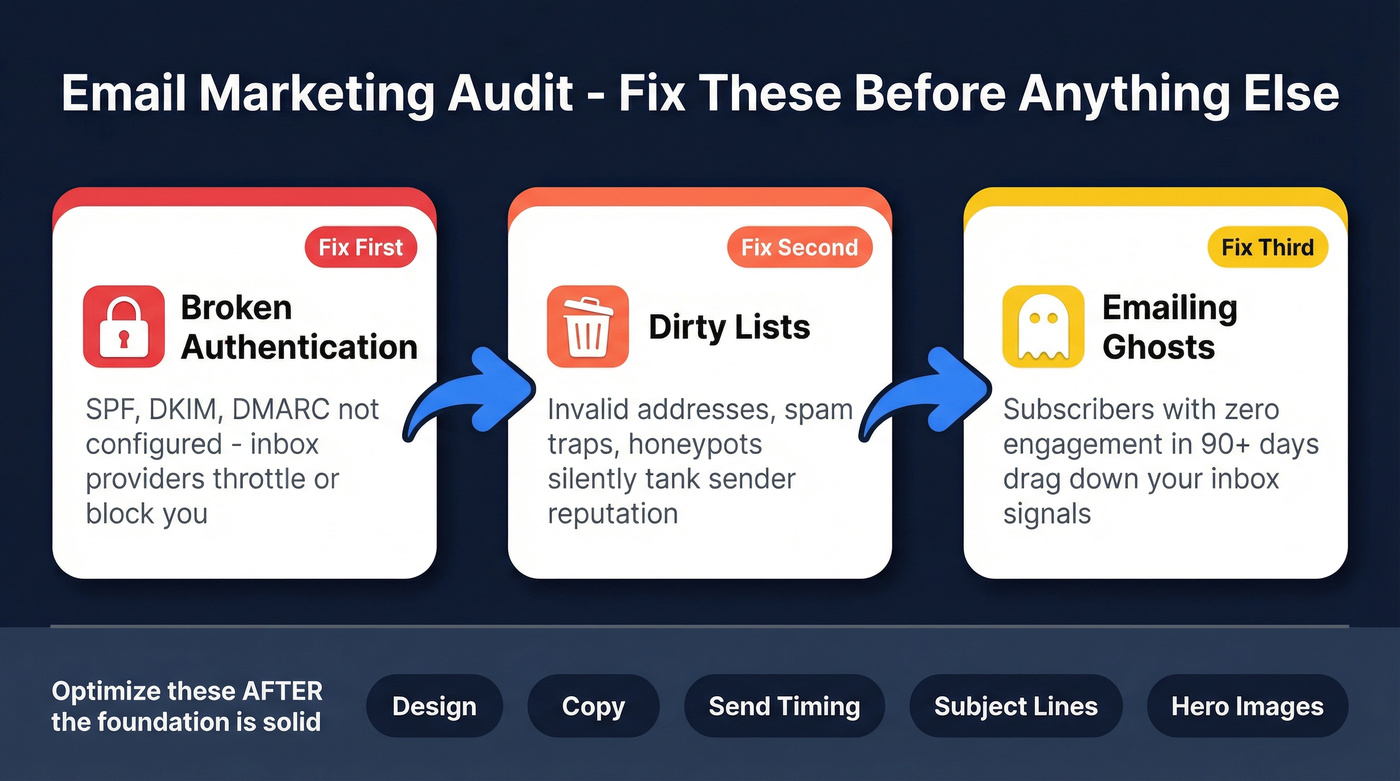
- Broken authentication. If SPF, DKIM, and DMARC aren't correctly configured, inbox providers throttle or block you. Jump to [Deliverability & Authentication](#deliverability - authentication).
- Dirty lists. Invalid addresses, spam traps, and honeypots tank sender reputation silently. See [List Health & Data Quality](#list-health - data-quality).
- Emailing ghosts. Subscribers who haven't opened in 90+ days drag down the engagement signals inbox providers use to decide whether you deserve the inbox.
Everything else - design, copy, send timing - is optimization on top of a working foundation.
What Is an Email Marketing Audit?
An email marketing audit is a systematic review of your entire email program across six dimensions: deliverability, list health, content and design, automation flows, campaign performance, and compliance. Most guides cover five. They skip data quality as a standalone dimension, lumping it into "list management." That's a mistake. Bad data is a root cause of deliverability problems, and it deserves its own audit lane - whether you're reviewing lifecycle campaigns or running a cold email audit for outbound sequences.
Why Audits Pay for Themselves
Say you send 100,000 emails per campaign at an 85% inbox placement rate. That's 15,000 emails that never reach a human. Improve placement to 90% - a realistic lift from fixing authentication and cleaning your list - and you recover 5,000 extra inbox landings per send. At $0.20 revenue per delivered email, that's $1,000 recovered every time you hit send. Scale across weekly sends and you're looking at $50K+ in recovered annual revenue from a single audit.

The commonly cited industry ROI for email marketing runs $32-$45 per $1 spent. An audit is how you actually capture that return instead of leaving it in spam folders.
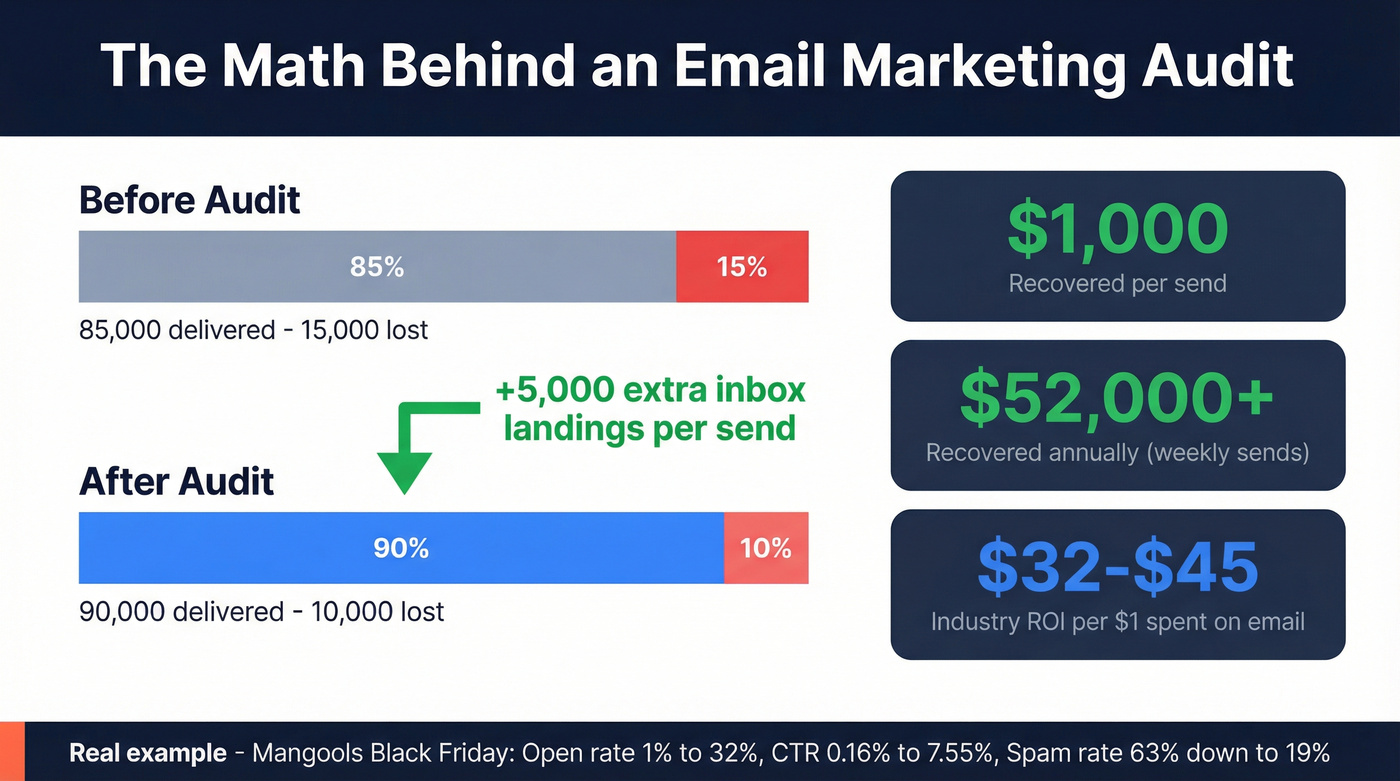
The Mangools case study makes this concrete. During their 2022 Black Friday push, they sent 3M+ emails. Nearly half landed in spam because of inadequate domain warmup. After restructuring with dedicated and shared IPs plus a systematic warmup protocol, open rates went from 1% to 32%, CTR climbed from 0.16% to 7.55%, and their spam rate dropped from 63% to 19%. That's not incremental improvement. That's the difference between a failed campaign and a profitable one.
The 60-Minute Quick-Start Audit
You don't need a full day to catch the biggest problems. Authentication checks surface issues fast. Start there:
- Authentication check. Send a test email to
check-auth@verifier.port25.com. The auto-reply tells you whether SPF, DKIM, and DMARC pass. If any fail, stop and fix them. - Bounce rate. Pull your last 30 days from your ESP. Total bounce rate above 2% means your list needs immediate cleaning.
- Spam complaint rate. Should be under 0.1%. Above that, inbox providers start throttling. Check Google Postmaster Tools if you aren't monitoring this.
- List growth rate. New subscribers minus unsubscribes, divided by starting subscribers, times 100. Negative growth means you're bleeding faster than you're building.
- Engagement snapshot. What percentage of your list has opened or clicked in the last 90 days? If a large portion is unengaged, it'll drag down sender reputation across the board.
If all five come back clean, move to the full audit. If any flag red, fix those first - they're actively costing you money.

A bounce rate above 2% means your list is actively damaging your sender reputation. Prospeo's 5-step email verification catches invalid addresses, spam traps, and honeypots before they hit your sending list - with 98% accuracy and a 7-day data refresh cycle that keeps your list clean between campaigns.
Stop auditing the same list problems every quarter. Eliminate them at the source.
The Complete Audit Framework
Deliverability & Authentication
This is the foundation. Google and Yahoo mandated SPF, DKIM, and DMARC for bulk senders (5,000+ emails/day) starting February 2024. Microsoft followed suit for Outlook. Non-compliance means throttling or blocking - no warnings.
Start with SPF. You need exactly one SPF record per domain, and it can't exceed 10 DNS lookups. If you use multiple sending services, each include: counts toward that limit. Run your record through MxToolbox to verify.
For DKIM, use RSA 2048-bit keys minimum. Rotate every 12 months. Your DKIM record lives at selector._domainkey.yourdomain.com - check that it resolves correctly. If you need a deeper walkthrough, use this SPF, DKIM, DMARC setup guide.
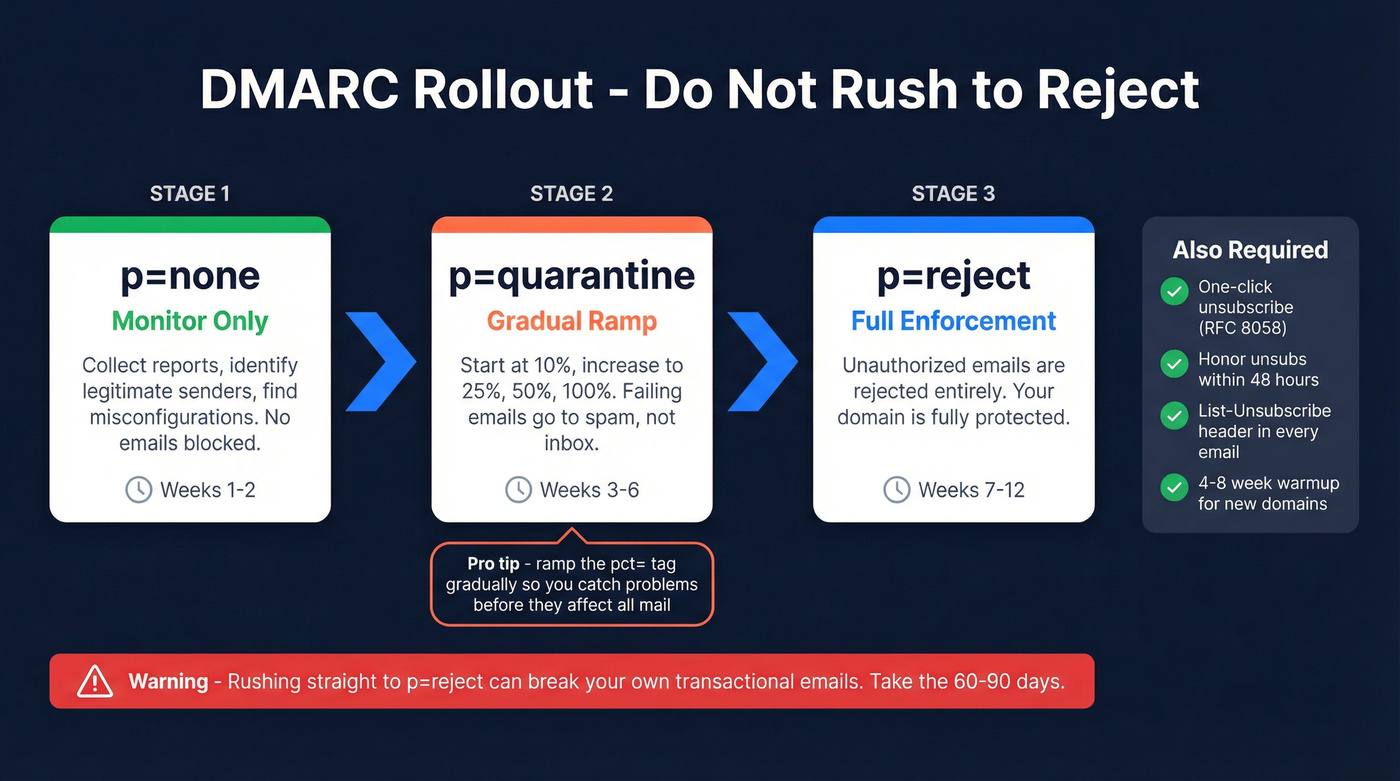
DMARC is where most teams stall. Don't jump straight to p=reject. Roll it out in stages: p=none to monitor, then p=quarantine with a percentage ramp, then p=reject over 60-90 days. We've seen teams rush to p=reject and break their own transactional emails in the process. Take the 60 days.
Two requirements that catch people off guard: one-click unsubscribe per RFC 8058 has been required since June 2024, and you must honor unsubscribe requests within 48 hours. If your emails aren't sending a proper List-Unsubscribe header, fix that immediately. For new domains or subdomains, budget 4-8 weeks for warmup (or use an automated email warmup plan). Skipping this is exactly what burned Mangools.
List Health & Data Quality
You can nail authentication, write perfect subject lines, and still watch deliverability crater - because you're emailing addresses that don't exist.
Here's the thing: we've seen teams lose months of sender reputation from a single batch of unverified imports. One bad CSV upload can undo weeks of careful warmup.
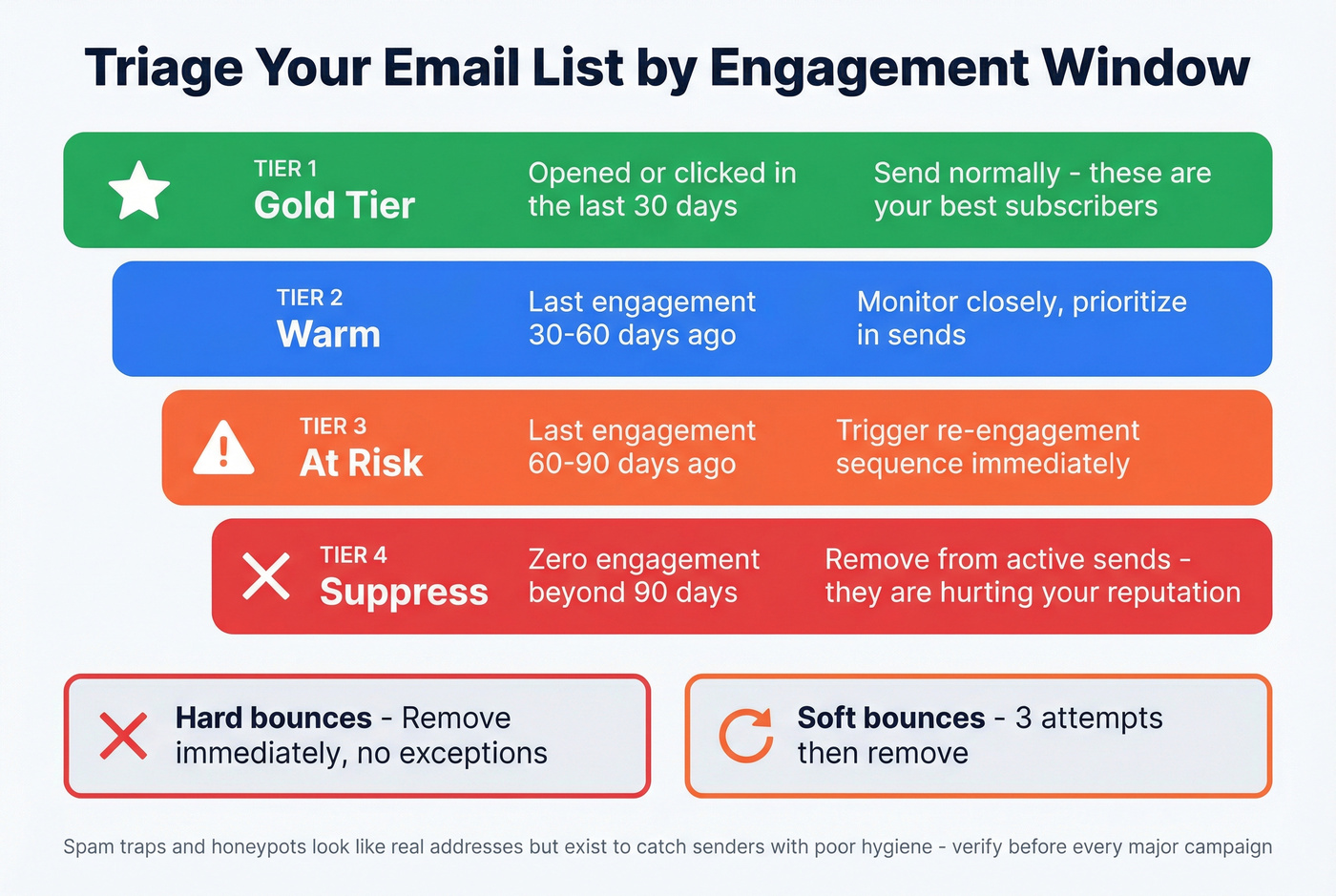
Use engagement windows to triage your list. Subscribers who've opened or clicked in the last 30 days are gold tier. The 30-60 day window is warm. The 60-90 day window needs a re-engagement sequence (use these re-engagement email subject lines if you're stuck). Beyond 90 days with zero engagement, suppress them. Remove hard bounces immediately - no exceptions. Soft bounces get three chances, then they're gone.
Skip manual cleanup once your list is in the thousands. The real killers are spam traps and honeypots - addresses that look legitimate but exist solely to catch senders with poor hygiene. Hit enough of them and your domain reputation tanks. Before you optimize anything else, make sure you're emailing real people. Prospeo's email verification runs a 5-step process that catches invalid addresses, spam traps, and honeypots before they enter your sending list, with a 98% accuracy rate and 7-day refresh cycle that keeps data clean between campaigns. If you're comparing vendors, start with these email ID validators.
Build verification into your workflow before every major campaign. Data quality is maintenance, not a one-time project (and it should align with your broader data quality standards).
Content & Design
Half of recipients delete emails that aren't optimized for mobile. That's your list cut in half before anyone reads a word.
Pull your last 10 campaigns and check: alt text on every image (screen readers need it, and it shows when images are blocked), color contrast passing WCAG AA standards for text over images, and a text-to-image ratio of at least 60% text. Heavy image emails load slowly and trigger spam filters.
Then look at patterns. Pull your top 5 and bottom 5 subject line performers - what separates them? Length, personalization, urgency? If you suspect deliverability issues, also audit for words to avoid in email subject lines. For CTAs, check whether they're above the fold on mobile and whether each email asks for one clear action rather than three. If you're asking for a click, a reply, and a share in the same email, you're asking for nothing.
Automation & Flows
Four flows should exist in every email program: Welcome, Abandoned Cart (or the equivalent nurture for non-ecommerce), Post-Purchase, and Re-engagement/Sunset. Every flow needs at least two emails - a single-touch automation is a missed opportunity.
The best way to audit: sample the last 10 entrants in each sequence and experience the journey yourself. Check timing, content relevance at each stage, and where drop-off happens. If 80% of entrants open email one but only 15% open email three, something's broken in the middle.
Your sunset flow matters more than your welcome flow. I know that sounds backwards. But subscribers who haven't engaged in 60-90 days should get a clear "do you still want to hear from us?" sequence, and those who don't respond get suppressed. This protects sender reputation more than any technical fix. Double opt-in is non-negotiable for B2B lists - the slight friction is worth the deliverability protection.
Auditing Campaign Performance
If you haven't run an A/B test in the last quarter, you're optimizing blind. Pull these metrics for every campaign from the last 90 days: sent, delivered, open rate, click-to-open rate (CTOR), CTR, conversion rate, unsubscribe rate, and revenue attributed.
One critical caveat. Apple Mail Privacy Protection inflates open rates by pre-loading tracking pixels. If a significant portion of your list uses Apple Mail, open rates are unreliable. Lean on CTOR and conversion rate as your primary engagement signals instead. Mailchimp's benchmark data acknowledges this directly - compare your numbers against the industry benchmarks below. If you need a refresher on what to prioritize, use this open rate vs click rate breakdown.
Compliance
Run through this fast - compliance failures carry real financial risk:
- GDPR consent records exist for EU subscribers (documented, timestamped)
- CAN-SPAM requirements met: physical address, clear sender identity, functioning unsubscribe
- One-click unsubscribe implemented and honored within 48 hours
- Privacy policy linked in every email footer
- Preference center available with frequency and content type options
- Double opt-in enabled for new subscribers (required in some jurisdictions)
If you're unsure about any of these, don't guess. Get legal involved. A single GDPR complaint costs more than a compliance review.
Email Benchmarks by Industry
Use these as directional guides, not absolute targets. Your benchmarks should come from your own historical data - but these help you spot whether you're dramatically over or underperforming.
| Industry | Open Rate | Click Rate | Unsub Rate |
|---|---|---|---|
| E-Commerce | 29.81% | 1.74% | 0.19% |
| Business & Finance | 31.35% | 2.78% | 0.15% |
| All Industries | 35.63% | 2.62% | 0.22% |
| Education | 35.64% | 3.02% | 0.18% |
| Nonprofit | 40.04% | 3.27% | 0.18% |
Source: Mailchimp benchmarks, Dec 2023 - the most recent large-scale dataset available, covering billions of emails from campaigns with 1,000+ subscribers.
The DMA UK Email Benchmarking Report adds broader context: delivery rates hit 98% in 2024 (B2C at 99.2%), with a 35.9% open rate and 2.3% unique click rate across seven major ESPs. If your open rates look suspiciously high, they probably are. CTOR is the metric that tells the truth.
Best Tools for Your Audit
You don't need ten tools. You need one per audit dimension, maybe two.
| Category | Tool | Key Feature | Price |
|---|---|---|---|
| List Verification | Prospeo | 98% accuracy, 5-step verification, 7-day refresh | Free tier; ~$0.01/email |
| List Verification | ZeroBounce | Bulk cleaning + scoring | ~$0.006-$0.008/email |
| List Verification | NeverBounce | High-volume cleaning | ~$0.003-$0.008/email |
| Deliverability | Google Postmaster Tools | Domain reputation + spam rate | Free |
| Deliverability | GlockApps | Inbox placement testing | From ~$59/mo |
| Deliverability | Folderly | AI-driven deliverability fixes | ~$120-$200/mo |
| Design Testing | Litmus | Cross-client previews | ~$99-$199/mo |
| Design Testing | Email on Acid | Pre-send QA + analytics | ~$74-$134/mo |
| Reputation | Sender Score | IP reputation scoring | Free |
GlockApps is a strong inbox placement tester for teams spending under $100/month. Skip Folderly unless you need AI-driven deliverability fixes and have the budget for it.
How Often Should You Audit?
Quarterly for teams sending 50K+ emails per month. Annual minimum for everyone else.
If you're sending under 10K emails a month, quarterly reviews are overkill - do it annually and save the time. But trigger an immediate audit for deliverability drops, ESP migrations, major campaign launches, or DNS changes. A 48-hour delay in catching a DMARC misconfiguration can cost weeks of sender reputation recovery. For outbound teams, running a cold email audit after every major list import or domain change is equally critical (especially if you're trying to scale outbound campaigns without wrecking deliverability).
Let's be honest: a thorough email marketing audit isn't glamorous work. But it's the recurring discipline that separates teams capturing email's full ROI from those watching revenue leak into spam folders.
Every unverified email in your list is revenue left in a spam folder. Teams using Prospeo cut bounce rates from 35%+ to under 4% and tripled their pipeline. At $0.01 per verified email, list cleaning pays for itself on the first send.
Run the audit once. Feed it clean data forever.
FAQ
Email Audit vs. Deliverability Audit?
A deliverability audit focuses narrowly on inbox placement - authentication records, sender reputation, IP health, and bounce rates. A full email marketing audit includes deliverability as one of six dimensions, alongside list health, content, automation, campaign performance, and compliance.
How Long Does a Full Audit Take?
The quick-start version takes about 60 minutes and catches the highest-impact issues. A full audit across all six dimensions typically runs 4-8 hours, depending on list size, number of active automations, and campaign volume.
When Does Your List Need Cleaning?
Clean immediately if your bounce rate exceeds 2% or spam complaints exceed 0.1%. Other warning signs: declining open rates over three consecutive sends, sudden deliverability drops, or a list that hasn't been verified in 6+ months.
What's the Most Common Audit Mistake?
Skipping authentication checks and jumping straight to subject line testing. SPF, DKIM, and DMARC misconfigurations silently block 15-30% of your emails from reaching inboxes - no amount of copy optimization compensates for messages that never arrive.