How to Scale Cold Email Without Spam
You just scaled to 2,000 emails a day. Reply rates cratered. Two domains got flagged. The sequences that worked at 200/day are now feeding the spam folder at 2,000. Here's the thing: the infrastructure wasn't the first problem. The data was.
Average email deliverability sits at 83.1% globally. That means roughly 1 in 6 emails never reaches an inbox. When you're scaling cold outbound, those numbers compound fast - a 5% bounce rate at 200 emails/day is annoying, but at 2,000/day it's a domain killer that'll have you registering new domains every other week.
Data quality is the upstream problem. Fix it first, then build infrastructure around it. Most teams do it backwards - they buy domains, set up warm-up, launch sequences, and then wonder why everything's on fire.
What You Need (Quick Version)
- Start with verified data (98% accuracy). Bad emails cause bounces that kill your domains faster than any infrastructure can save them. Verify every address before it enters a sequence.
- Build multi-domain infrastructure with proper SPF/DKIM/DMARC. Warm up for 4-8 weeks before scaling. No shortcuts.
- Cap at 50 emails/day per inbox. Scale by adding inboxes and domains, not by cranking volume on existing ones. Monitor via Google Postmaster Tools and Microsoft SNDS.
If your bounce rate is above 2-3%, your data source is the problem. Full stop.
Why the Old Playbook Is Dead
The old playbook - blast 500 emails from a single inbox, track opens with pixels, hope for the best - started dying after the Oct 2023 announcements and was buried the following year.
In February 2024, Google and Yahoo began enforcing bulk sender requirements targeting authentication, spam rates, and unsubscribe mechanisms. Google defines a bulk sender as anyone pushing 5,000+ messages per day to Gmail addresses. By April 2024, outright rejections started rolling in.
The spam complaint thresholds are tight: keep your reported spam rate below 0.10% and never hit 0.30%. Those numbers come from Google Postmaster Tools, measured at the domain level - meaning your marketing emails and sales outbound share the same reputation.
Microsoft followed suit. As of May 5, 2025, Outlook, Hotmail, and Live domains reject non-compliant high-volume mail outright. SPF, DKIM, and DMARC aren't optional anymore. They're mandatory across every major inbox provider for high-volume sending, and that's not changing.
Five Phases to Scale Without Hitting Spam
Every phase builds on the last. Skip one and the whole stack breaks. The sequence: Verify -> Build -> Warm Up -> Scale -> Monitor.
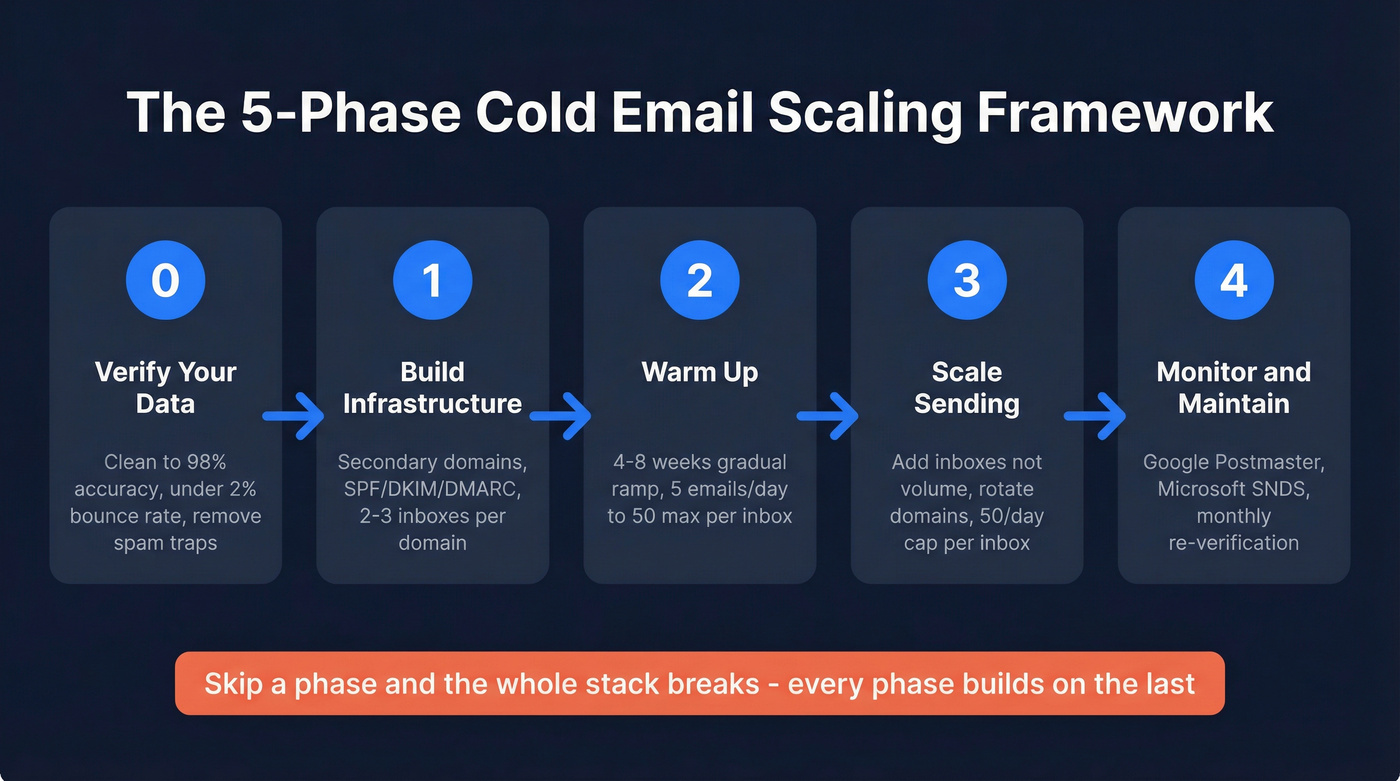
Phase 0 - Verify Your Data First
This is where most scaling attempts fail before they start. If your bounce rate exceeds 5%, your emails are probably going straight to spam. Every hard bounce signals to inbox providers that you're sending to addresses that don't exist - which is exactly what spammers do.
The smarter approach is to find and verify in one step rather than sourcing emails from one vendor and cleaning them with another. Prospeo handles this with a 5-step verification process - syntax check, DNS validation, SMTP mailbox check, catch-all handling, and spam-trap removal. With 143M+ verified emails, a 7-day data refresh cycle, and 98% email accuracy, it's built for teams running high-volume outbound. Stack Optimize built from $0 to $1M ARR using this approach, maintaining 94%+ deliverability and zero domain flags across all clients. Meritt dropped their bounce rate from 35% to under 4% after switching.
| Tool | Accuracy | Cost per 1,000 | Best For |
|---|---|---|---|
| Prospeo | 98% | $10 | Find + verify in one step |
| Bouncer | 99.5% | $7 | Standalone verification |
| ZeroBounce | 96-98% | $7.50 | Spam-trap detection |
| NeverBounce | 93-99.9% | $8 | High-volume bulk cleaning |
| Kickbox | 99% | $10 | API-first workflows |
Bouncer and Kickbox score well on accuracy, but they're verification-only tools. You still need a separate source for the emails themselves, and data degrades in the gap between export and send.
If you want a deeper breakdown of tools and workflows, start with an email checker tool comparison.
Phase 1 - Build Your Infrastructure
Never send cold email from your primary domain. One spam flag on your main domain tanks deliverability for everything - marketing, transactional, support emails, all of it.
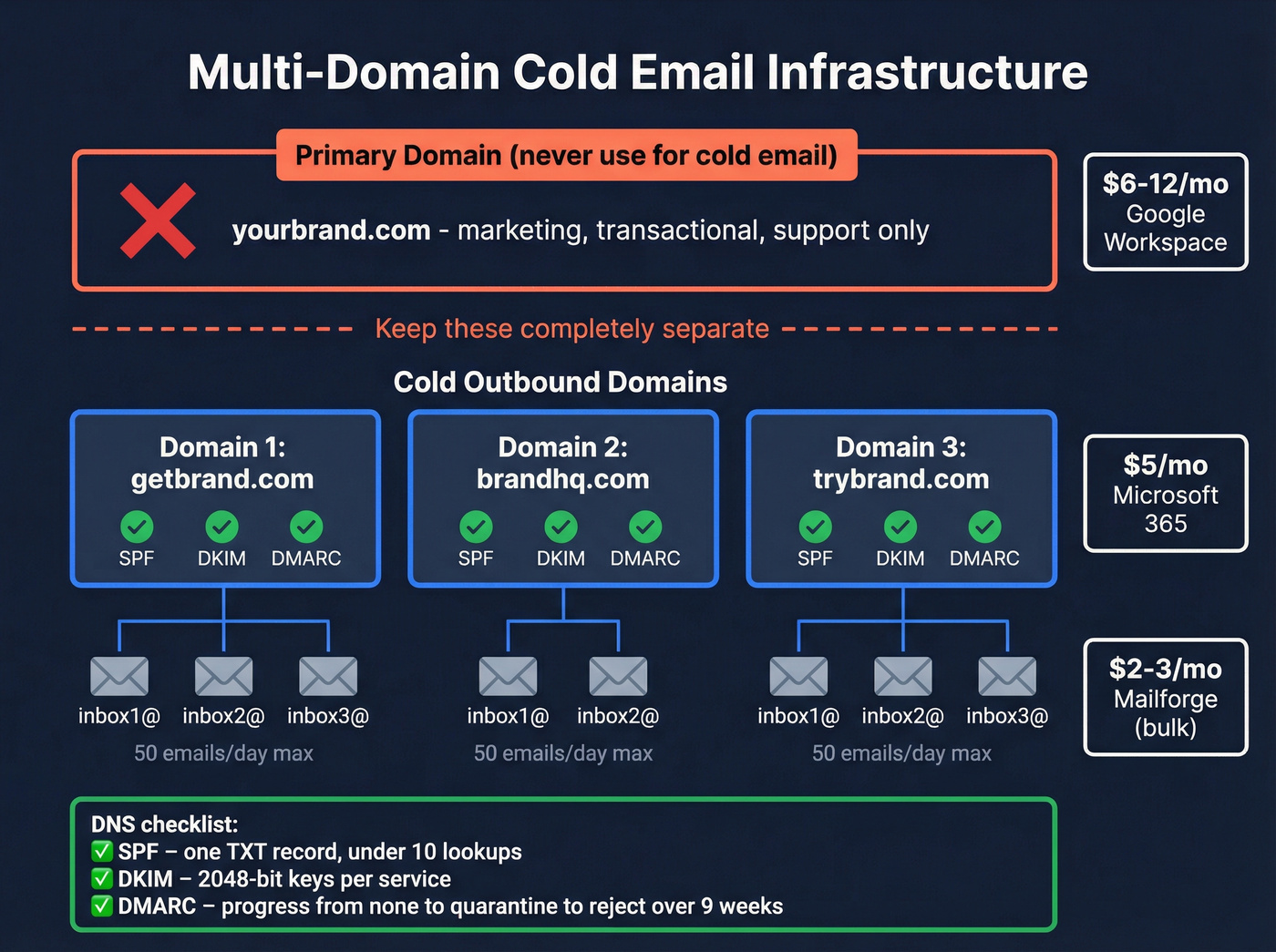
The setup: 2-3 inboxes per domain, with domains that are close variations of your primary (getacme.com, acmehq.com). Google Workspace runs $6-12/mo per inbox, Microsoft 365 about $5/mo, and Mailforge offers bulk mailboxes at $2-3/mo with auto-configured SPF/DKIM/DMARC.
DNS authentication is non-negotiable:
- SPF: One TXT record per domain. Include your sending services and stay under the 10 DNS lookup limit - exceeding it silently breaks SPF evaluation. Never create multiple SPF records; merge all
include:statements into a single record. - DKIM: Use 2048-bit keys. Set up DKIM for each sending service separately, not just your inbox provider.
- DMARC: Roll out progressively. Weeks 1-4:
p=none(monitor). Weeks 5-8:p=quarantine(suspicious mail goes to spam). Week 9+:p=reject(non-aligned mail gets blocked).
If you need a step-by-step walkthrough, follow our SPF/DKIM/DMARC setup guide.
Here's the competitive edge most teams miss: only 33.4% of the top 1M domains have valid DMARC records, and 85.7% don't enforce it. If you actually progress through to p=reject, you're ahead of nearly every sender your prospects receive mail from. Most teams leave DMARC at p=none forever. That's leaving deliverability on the table.
DMARC alignment requires at least one of SPF or DKIM to pass and align with the visible From domain. Test by sending an email to Gmail and clicking "Show original" - you should see DKIM: PASS and SPF: PASS.
Phase 2 - Warm Up Properly
New domains have zero reputation. Warm-up builds trust gradually by simulating real email activity - opens, replies, and conversations.
| Week | Emails/Day per Inbox | Notes |
|---|---|---|
| 1-2 | 5-10 | Warm-up tool only, no campaigns |
| 3-4 | 15-20 | Start light campaigns alongside warm-up |
| 5-6 | 30-40 | Scale campaigns, keep warm-up running |
| 7+ | 50 max | Full volume, never exceed 50/inbox |
Keep warm-up running alongside your campaigns permanently. The engagement signals from warm-up conversations help maintain your sender reputation even at full volume.
If you're evaluating providers, see our list of email warm up tools.
Monitor three numbers during ramp: reply rate above 5%, bounce rate under 2%, spam complaints under 0.1%. If any of these slip, pause campaigns and diagnose before pushing more volume. We've seen teams ignore early warning signs and burn through three domains in a month - don't be that team.
Phase 3 - Scale Sending Volume
Scaling isn't about sending more from each inbox. It's about adding more inboxes and rotating intelligently. Need 1,000 emails/day? That's 20 inboxes at 50/day each across 7-10 domains.
Domain and inbox rotation is where your sending platform earns its money. Tools like Instantly and Smartlead rotate automatically, distributing volume so no single inbox gets overloaded. Proper email sending delays between messages also help - most platforms let you set randomized intervals of 3-5 minutes between sends, which mimics human behavior and reduces the chance of hitting rate limits.
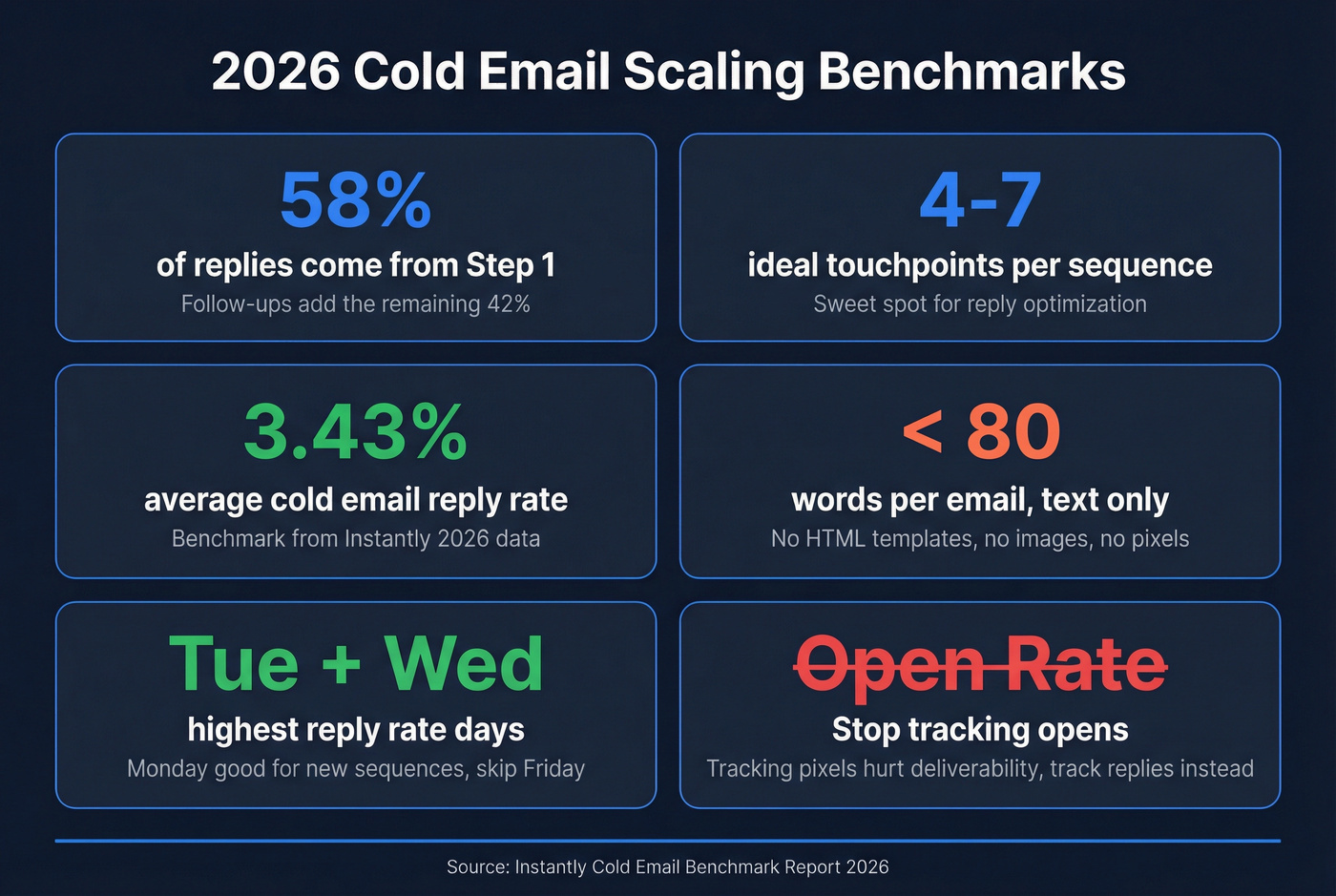
Sequence design matters more than volume. Instantly's 2026 benchmark data shows 58% of replies come from step 1, with follow-ups contributing 42%. The sweet spot is 4-7 touchpoints. Keep emails under 80 words, text-only, no HTML templates, no images. A/B test subject lines and opening lines weekly - the top-performing campaigns in that dataset do this consistently.
For more on what to test, use these outreach email templates as a baseline.
Don't track open rates. Tracking pixels are invisible images that inbox providers detect, and they hurt deliverability. If your average deal is under $10K, you especially don't need pixel-level tracking - you need replies. Reply rate is the metric that actually correlates with meetings booked. (More detail: does open tracking hurt cold email.)
Tuesday and Wednesday consistently show the highest reply rates. Monday works well for launching new sequences. Skip Friday - it's an auto-reply graveyard.
Phase 4 - Monitor and Maintain
Scaling without monitoring is like driving without a dashboard.
Weekly:
- Google Postmaster Tools: Track spam rate, domain reputation, and IP reputation. If your domain reputation drops from High to Medium, pause and investigate immediately. A drop to Low is the point of no return - retire that domain.
- Microsoft SNDS: Register at sendersupport.olc.protection.outlook.com with your sending IPs for Outlook/Hotmail delivery monitoring.
If you want a full list of what to watch, use this email deliverability checklist.
Monthly:
- Re-verify your email lists. People change jobs, inboxes get deactivated, catch-all domains flip their settings. A list that was 98% valid last month could be 90% valid today.
- Review bounce rate trends. A sudden spike means your data source degraded or a domain got flagged.
If bounces are creeping up, start with the basics on hard bounces and invalid emails.
Quarterly:
- Rotate aging domains. Expect a few months of productive sending before retirement.
- Audit full infrastructure. Check reply rates by domain - when one drops below your baseline, it's time to retire it.

Your bounce rate is a data problem, not an infrastructure problem. Prospeo's 5-step verification - syntax, DNS, SMTP, catch-all, and spam-trap removal - delivers 98% email accuracy on 143M+ verified addresses refreshed every 7 days. Stack Optimize hit $1M ARR with zero domain flags. Meritt dropped bounces from 35% to under 4%.
Fix the data first. Everything else follows.
What Scaling Actually Costs
Let's break this down with two scenarios, then work backwards from your goals.
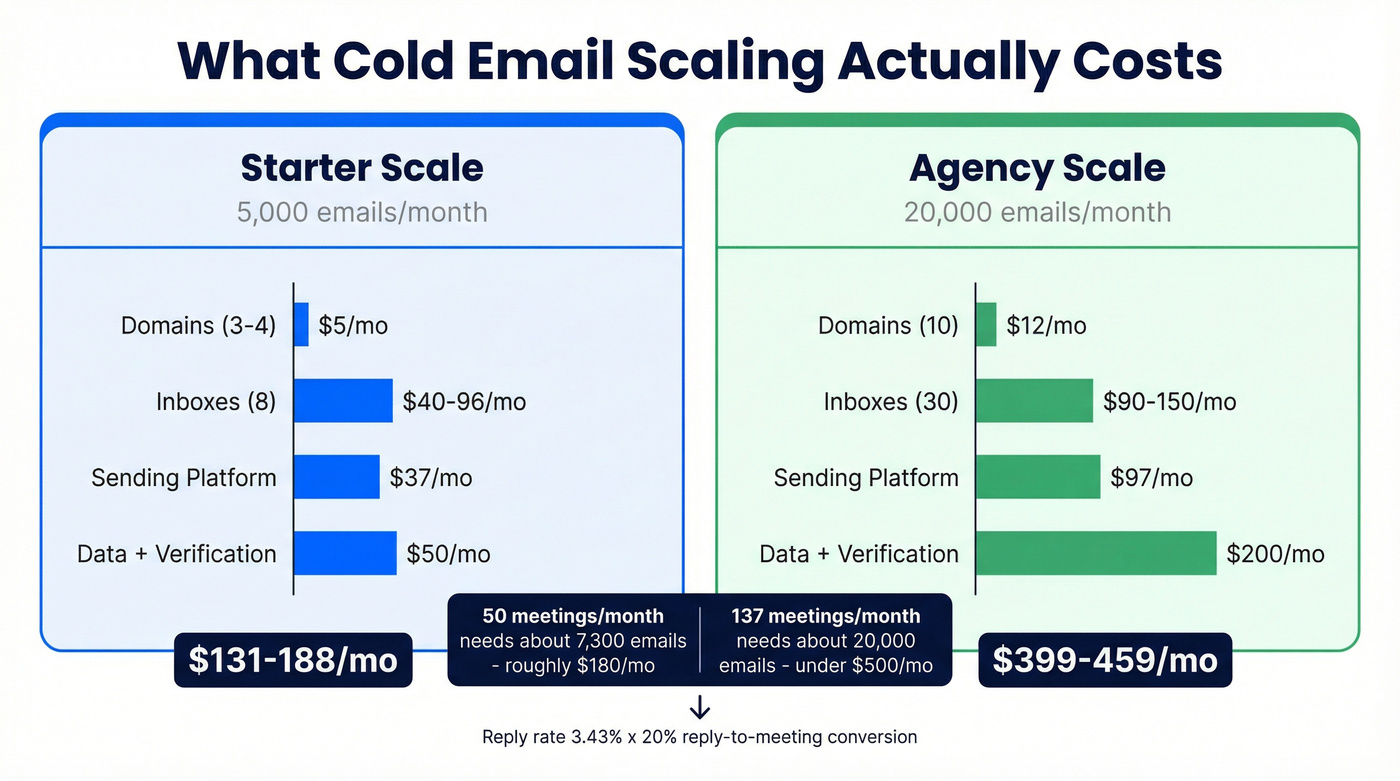
Scenario A: 5,000 emails/month (starter scale)
| Line Item | Monthly Cost |
|---|---|
| 3-4 domains (~$14/yr each) | ~$4-5 |
| 8 inboxes ($5-12/mo each) | $40-96 |
| Sending platform (Instantly) | $37 |
| Data + verification | $50 (at ~$0.01/email for ~5,000 leads) |
| Total | ~$131-188/mo |
Scenario B: 20,000 emails/month (agency scale)
| Line Item | Monthly Cost |
|---|---|
| 10 domains (~$14/yr each) | ~$12 |
| 30 inboxes ($3-5/mo via Mailforge) | $90-150 |
| Sending platform (Instantly Growth) | $97 |
| Data + verification | ~$200 |
| Total | ~$399-459/mo |

Reverse-funnel math. Need 50 meetings/month? At a 3.43% average reply rate and 20% reply-to-meeting conversion, you need roughly 7,300 emails/month. That's about 7 inboxes at 50/day each on a ~22-day month, spread across 3 domains, and roughly ~$180/mo in total infrastructure. Need 137 meetings? That's the 20,000-email scenario above - under $500/mo.
To tighten the math further, map your reply-to-meeting conversion and work backward from pipeline targets.
In our experience, the starter stack pays for itself within the first two weeks if your average deal size is above $5K. Even at $3/meeting, cold email is absurdly efficient compared to paid channels.
Scaling to 2,000 emails/day means every bad address compounds into domain damage. At $0.01 per verified email, Prospeo lets you find and verify in one step - no separate cleaning tool, no data decay between export and send. Teams using Prospeo book 35% more meetings than Apollo users.
Send 2,000/day without a single domain flag.
Cold Email Benchmarks for 2026
Here's what good looks like based on Instantly's 2026 benchmark report:
| Metric | Average | Top Quartile | Top 10% |
|---|---|---|---|
| Reply rate | 3.43% | 5.5%+ | 10.7%+ |
Provider deliverability varies significantly. Gmail delivers about 95% of email to the inbox, while Outlook sits at 75.6%. Regional variation matters too - European inbox placement averages 91% vs. 78% in APAC. If your ICP skews heavily toward Microsoft-hosted companies or APAC markets, plan your volume accordingly.
Email ROI outperforms other channels by a wide margin. The commonly cited benchmark is $36-40 return per $1 spent, though that blends inbound and outbound. For cold email specifically, the math depends on your deal size and close rate - but the infrastructure costs are low enough that even modest conversion rates produce strong unit economics.
The Cold Email Tool Stack
Your stack has three layers: data, infrastructure, and sending.
| Platform | Starting Price | Best For |
|---|---|---|
| Instantly | $37/mo | Agencies, high-volume |
| Smartlead | $39/mo | Granular inbox rotation |
| Woodpecker | $29/mo | Solo founders, simplicity |
| Reply.io | $59/mo | In-house sales teams |
| Saleshandy | $36/mo | Budget-conscious teams |
Instantly is the common default for scaling operations - built-in warm-up and a large user community sharing playbooks. Smartlead edges it on inbox rotation granularity and sub-campaign controls. Woodpecker is the no-frills option for founders who want to send 500 emails/week without learning a complex platform. Other solid options include Quickmail ($49/mo) and Mailshake ($29/mo).
If you're comparing platforms, see our roundup of cold email marketing tools.
For infrastructure, Mailforge handles bulk domain and mailbox provisioning at $2-3 per mailbox/month with auto-configured SPF/DKIM/DMARC. Keep warm-up tools running alongside your sending platform to maintain engagement signals.
FAQ
How many emails can I send per day without hitting spam?
Cap at 30-50 per inbox per day. Scale by adding inboxes and domains - 20 inboxes at 50/day gives you 1,000 daily sends with clean distribution across 7-10 domains.
How long does warm-up take for a new domain?
Four to eight weeks minimum. Start at 5-10 emails/day and ramp to 50. Rushing warm-up is the #1 mistake - teams launch campaigns in week two and get flagged by week four.
Do I need DMARC for cold email?
Yes. Google requires it for bulk senders since February 2024, and Microsoft enforces it since May 2025. Start at p=none, progress to p=reject over 8-9 weeks for maximum deliverability.
What bounce rate is too high for cold outreach?
Anything above 5% actively damages your sender reputation. Target under 2-3% by verifying every email before sending. If you're consistently above that threshold, your data source needs replacing.
How do I verify emails before sending cold campaigns?
Use a dedicated verification tool before any email enters a sequence. A proper verification process - syntax, DNS, SMTP, catch-all, and spam-trap checks - catches invalid addresses that simpler tools miss. Always verify the full list; one batch of bad addresses can flag an entire domain.