CRM Data Management: The Practitioner's Playbook for 2026
Your VP of Sales just pulled you into a room because pipeline forecasts are off by 30%. The deals aren't the problem - the CRM data underneath them is. Contacts have changed jobs, emails are bouncing, phone numbers ring out to someone who left six months ago. This isn't a fringe issue: 76% of CRM users say only half their organization's data is accurate. Poor data quality costs U.S. businesses $3.1 trillion annually, and your CRM is contributing its share.
CRM data management isn't a spring cleaning project. It's an ongoing operational discipline, and most teams don't have one. RevOps practitioners consistently report spending 30-40% of their time just searching for data and another 20-30% cleaning it. That's over half your week lost to a problem that compounds every month you ignore it.
Here's the playbook.
TL;DR: Your CRM data decays at roughly 2% per month - 200 contacts going stale every month in a 10K database. Fix it with a 5-step loop: validate on entry, deduplicate, enrich, govern, re-enrich on a cadence.
What Is CRM Data Management?
CRM data management is the continuous process of keeping four data types accurate and usable: contact data (names, emails, phones, titles), interaction data (calls, emails, meetings), purchase data (deals, revenue, products), and behavioral data (page visits, content engagement, intent signals).
This isn't generic "customer data management." It's the operational layer your sales and marketing teams touch every day - the records driving sequences, forecasts, and territory assignments. When those records rot, everything downstream breaks. For B2B marketers in particular, disciplined database hygiene determines whether campaigns reach the right buyers or waste budget on outdated contacts.
The AI Readiness Gap
Every CRM vendor in 2026 is selling AI features - lead scoring, predictive forecasting, agentic workflows. Here's what they don't tell you: 67% of companies can't scale AI because their underlying data is a mess. And 45% of executives don't feel their CRM data is prepared for AI.
Stop buying more CRM features. Fix the data first.
AI needs continuous governance, not a one-time cleanup before your annual SKO. If your enrichment data is six weeks old - a common refresh cycle in B2B data - your AI models are training on stale inputs. Garbage in, confidently wrong predictions out.

Your CRM data is training AI models on stale inputs because most providers refresh every 6 weeks. Prospeo refreshes every 7 days - 6x faster - with 98% email accuracy and 92% API match rate. Plug it into Salesforce or HubSpot and enrichment runs automatically, returning 50+ data points per contact.
Stop feeding your AI garbage. Start with data that's actually current.
Data Decay - The Math Your Team Ignores
A study of 1,000 B2B contacts found that 70.8% had at least one field change within 12 months. The breakdown: 65.8% saw job title changes, 42.9% had phone number changes, 37.3% had email changes.
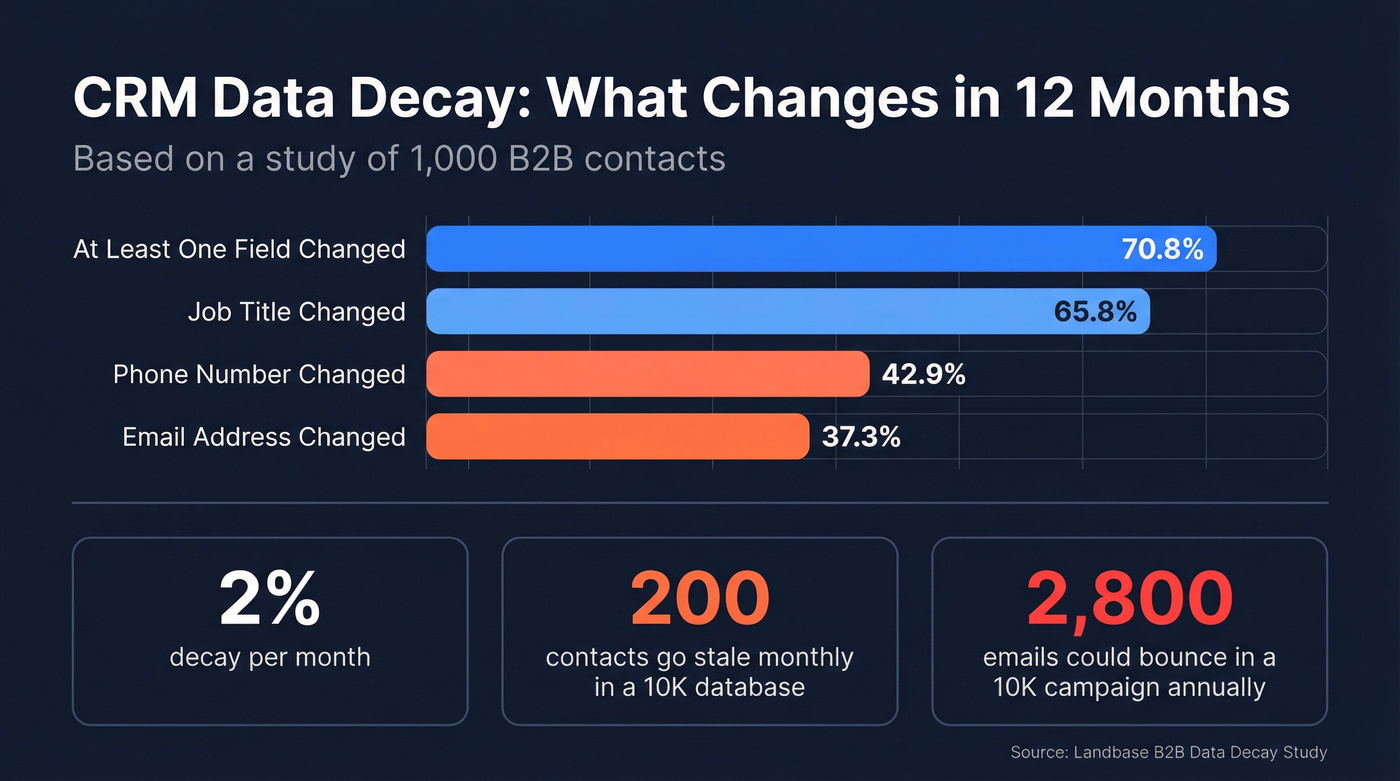
Using BLS median tenure data (~4.1 years), the implied annual job-change rate is roughly 24%. With 10,000 contacts in your CRM, that's 2,400 going stale per year - 200 per month, about 50 per week.
Now picture your marketing team sending a 10,000-contact email campaign. With 28% annual email decay, up to 2,800 of those addresses could bounce. Your domain reputation tanks, and suddenly even your good emails land in spam. We've seen teams lose deliverability fast when they skip refreshes and keep hammering old lists - one agency we spoke with went from 94% inbox placement to under 60% in a single quarter because nobody was re-verifying contacts.
Hot take: Most teams don't have a data quality problem. They have a data freshness problem. A CRM that was perfect six months ago is already 12% wrong. The teams that win aren't the ones with the cleanest initial import - they're the ones with the shortest refresh cycle.
The 5-Step Framework
Step 1: Validate at Entry
Every form, import, and manual entry should hit validation rules before it touches your CRM. Enforce required fields, use dropdowns instead of free text for standardized fields like country, industry, and lead source, run real-time email validation on web forms, and standardize phone formats.
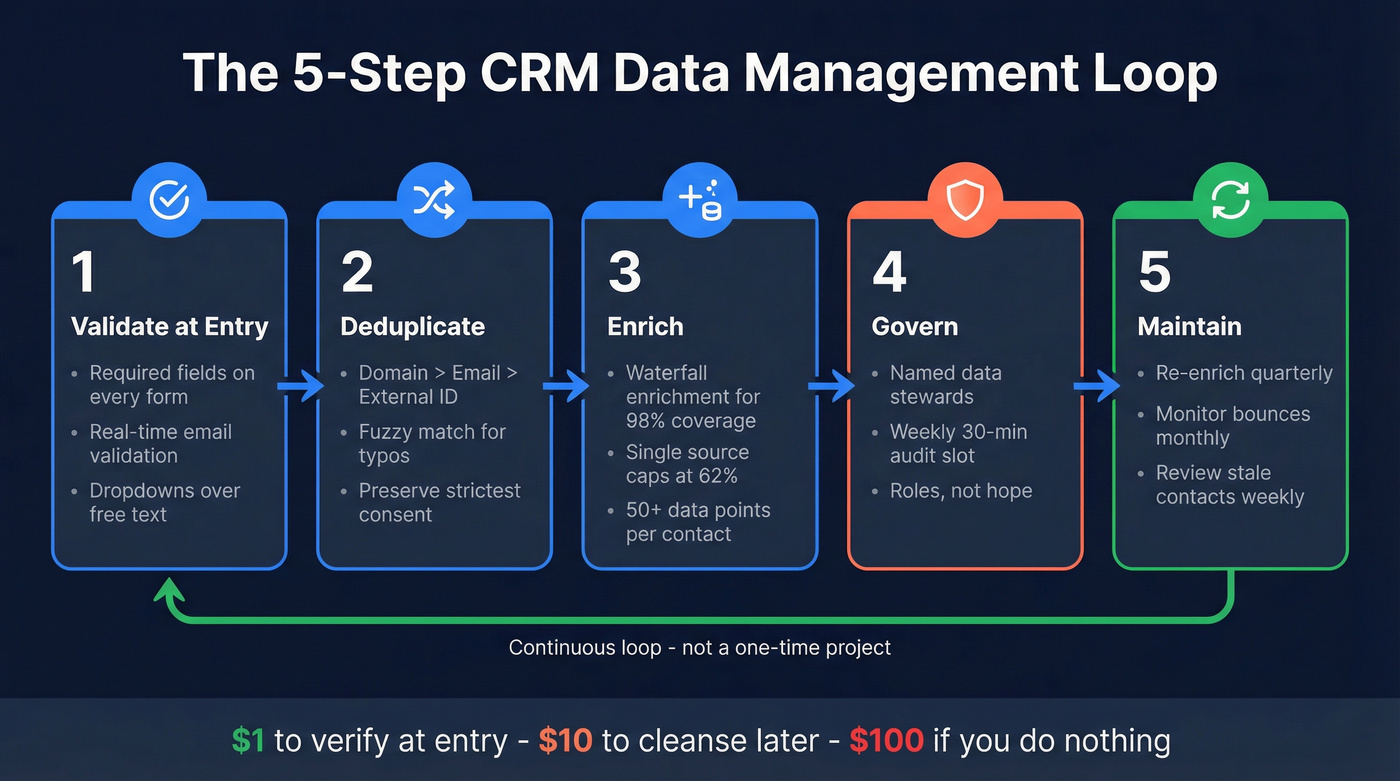
The cost heuristic is real: $1 to verify on entry, $10 to cleanse later, $100 if you do nothing.
Step 2: Deduplicate with Matching Logic
Duplicates inflate pipeline, split activity history, and make reporting unreliable. Use exact matching on high-confidence identifiers - company domain, email address, external IDs - then layer in fuzzy matching for typos, nickname variants (Bill vs. William), and formatting differences.
The unique identifier hierarchy: domain > email > external ID. And here's a compliance trap most teams miss - merging duplicates can overwrite opt-out preferences. The surviving record must preserve the most restrictive consent status, or you've got GDPR/CCPA exposure. If you're under 1,000 records, skip fuzzy matching entirely; manual review is faster and safer at that scale.
Step 3: Enrich Beyond Your CRM
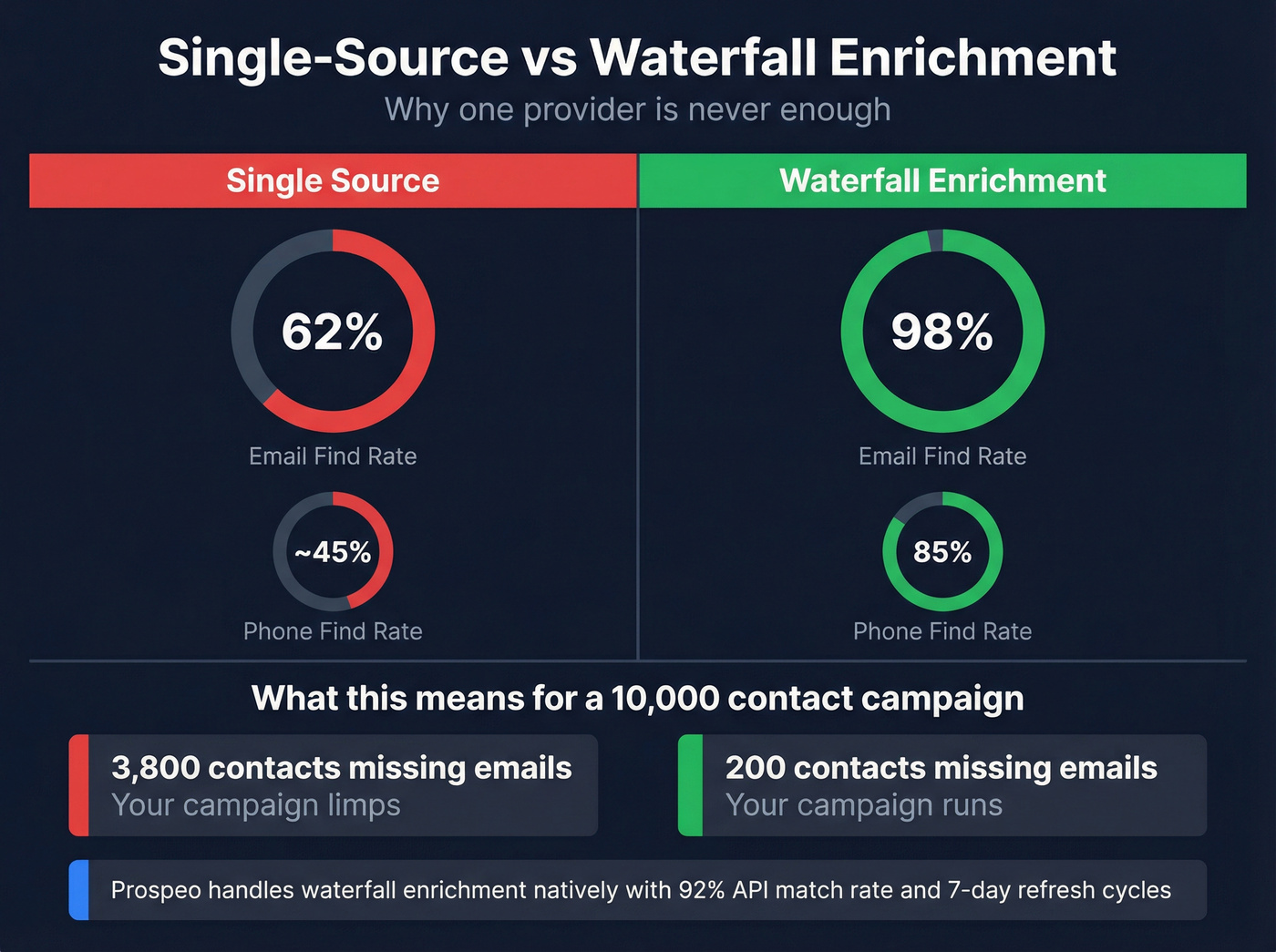
Your CRM only knows what your team puts into it. In benchmark tests, single-source enrichment found emails for 62% of records. Waterfall enrichment - cascading through multiple providers - performs dramatically better, reaching 98% email find rate and 85% phone find rate in the same benchmark. At 62% coverage, your campaign limps. At 98%, it runs.

We've tested single-source tools against waterfall setups extensively, and the coverage gap is real. Prospeo handles waterfall enrichment natively with a 92% API match rate, returning 50+ data points per contact on a 7-day refresh cycle and integrating directly with Salesforce and HubSpot so enrichment runs automatically.
| Tool | Starting Price | Best For |
|---|---|---|
| Prospeo | Free; ~$0.01/email | Verified emails + auto enrichment |
| Apollo | Free; paid from $49/mo | Free-tier database access |
| Lusha | Free; paid from ~$22/mo | Quick contact lookups |
| Clay | $149/mo + API costs | Complex waterfall workflows |
| ZoomInfo | ~$15K-$50K+/yr | Enterprise with budget |
Step 4: Govern with Roles, Not Hope
80% of data governance initiatives will fail by 2027 because "everyone owns data quality" means nobody does. Assign clear roles: a governance council sets policy, data owners at the department level are accountable for accuracy, data stewards in RevOps enforce quality daily, and admins handle technical implementation.
Let's be honest - most governance programs die because they're built as documents, not habits. In our experience, teams that assign a named data steward and give them a weekly 30-minute audit slot see measurable improvement within one quarter, typically 5-15% revenue growth and 15-30% fewer data-related inefficiencies. The ones that write a governance doc and file it in Confluence? Nothing changes.
Step 5: Maintain on a Cadence
Enrichment without maintenance is a sugar rush. Run a full re-enrichment pass quarterly, monitor bounces monthly and write them back to your CRM, and review contacts older than six months with no recent activity on a weekly basis.
The goal is a system that degrades gracefully, not one that's perfect on day one and rotten by day ninety.
Single-source enrichment caps out at 62% coverage. Prospeo's waterfall enrichment hits 92% match rates natively - no Clay workflows, no stacking API costs. At $0.01 per email with a 7-day refresh cycle, you're fixing 200 stale contacts per month before they tank your deliverability.
Kill data decay at the source for a penny per contact.
Compliance Tips for CRM Data
GDPR fines have surpassed EUR 2.5 billion total, with penalties up to EUR 20M or 4% of global turnover. This isn't theoretical risk - it's operational reality.
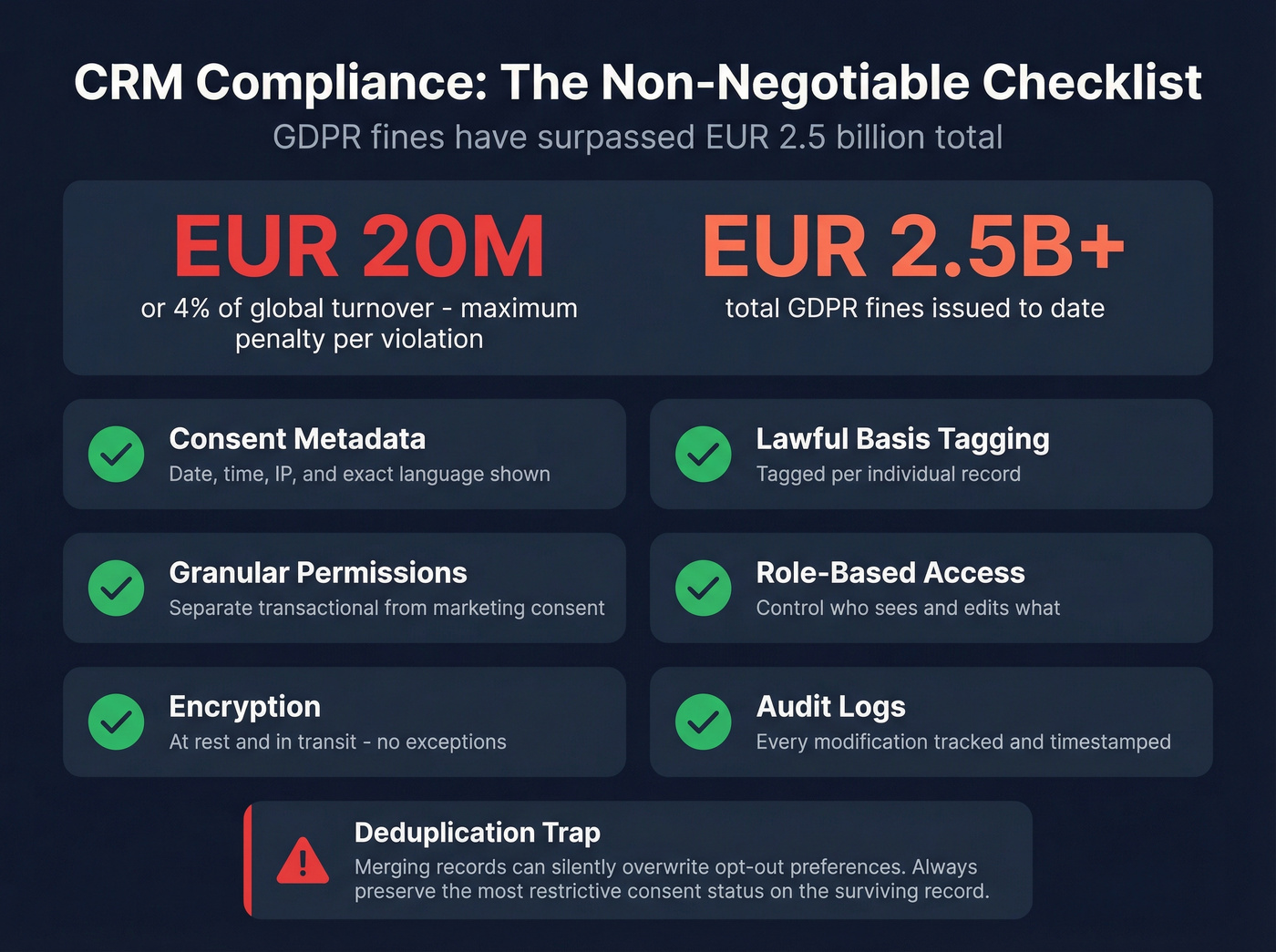
Every record needs consent metadata including date, time, IP, and exact language shown. You'll also need lawful basis tagging per record, granular permission separation between transactional and marketing consent, role-based access controls, encryption at rest and in transit, and audit logs for every modification. And remember the deduplication trap from Step 2: merging records can silently overwrite opt-out preferences. Build merge rules that always preserve the most restrictive consent status.
If your team doesn't have a documented process for this, you're one audit away from a very expensive lesson.
FAQ
How often should you clean CRM data?
Quarterly minimum for 3-6 month sales cycles; monthly for high-velocity teams. The gold standard is automated enrichment on a 7-day refresh cycle, which keeps decay from compounding between scheduled cleanups.
What's the biggest CRM data management mistake?
Treating it as a one-time project. Data decays at ~2% per month, so a CRM cleaned last quarter is already ~5% worse. Build recurring cadences with assigned data stewards, not annual cleanup sprints.
Can you manage CRM data without buying tools?
Yes, but only under roughly 1,000 contacts. Manual deduplication and spreadsheet cleanup work at that scale. Beyond it, even a free tier from a tool like Prospeo or Apollo beats manual effort - the time savings alone justify the switch.
How does clean CRM data help reps close more deals?
When reps trust their contact details, job titles, and activity histories, they spend time selling instead of researching. Clean records also mean routing and territory assignments actually work - leads reach the right rep with the right context instead of bouncing between queues because of duplicates or outdated information. One team we work with cut rep ramp time from 8-10 weeks down to 4 simply by ensuring every account in their CRM had verified contacts and accurate org charts before reps started outreach.