How to Prevent Email Blacklisting in 2026
It's 9:14 AM and your SDR pings you on Slack: "None of my emails are going through." You check the domain. Bounce rate is at 12% - someone loaded an unverified list into the sequencer last Friday. Your sending domain is now flagged on two blacklists, and every email from your org is landing in spam.
Learning how to prevent email blacklisting is a lot easier than recovering from it.
Three Things That Keep You Off Blacklists
- Authenticate your domain - SPF + DKIM + DMARC, all passing, all aligned.
- Keep bounces under 3% and complaints under 0.1% by verifying every address before you send with an email ID validator.
- Warm up new domains over 4+ weeks, starting at 10-20 emails/day and ramping slowly (see automated email warmup).
Common Blacklisting Triggers
Five triggers account for nearly every blacklisting we've seen.
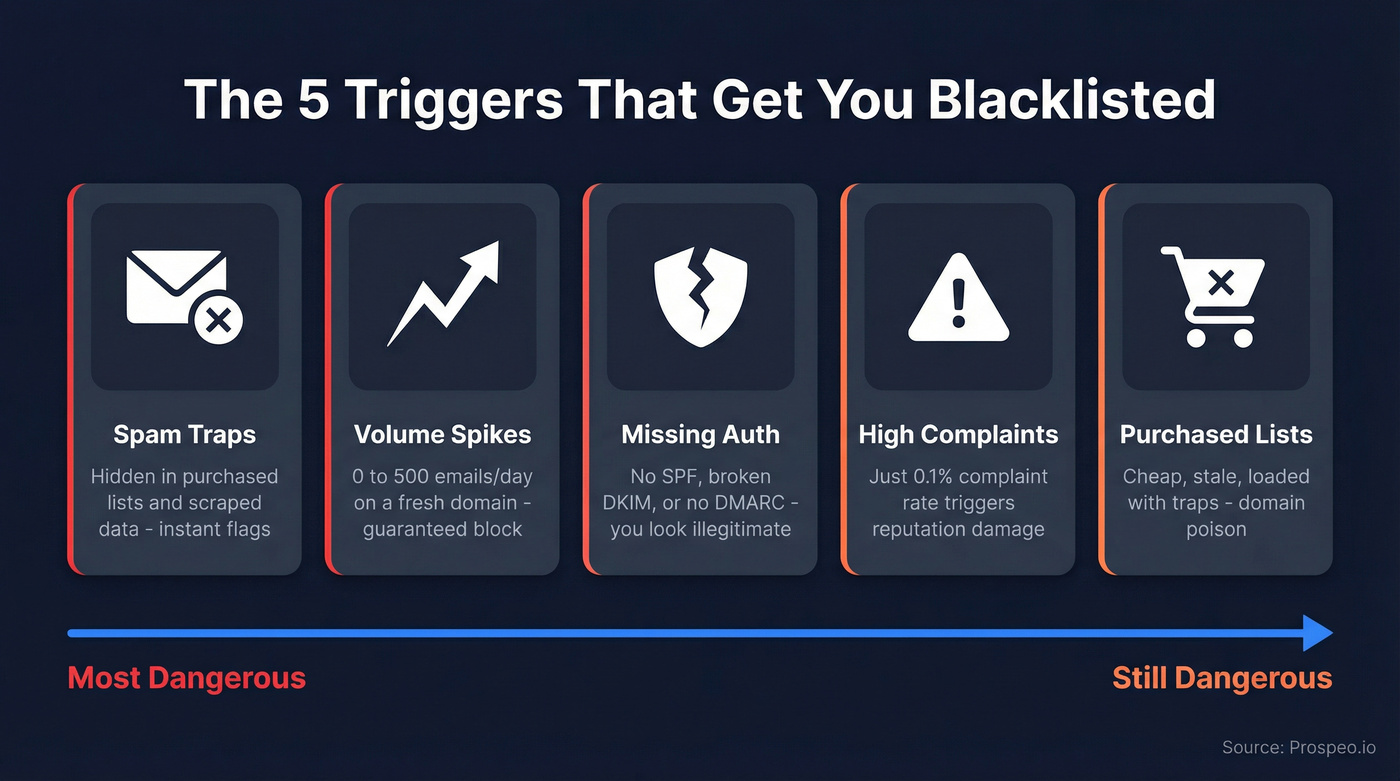
Spam traps and bad data. Spam traps show up in purchased lists and scraped data. Hit enough and you get flagged fast. Volume spikes without warm-up. Going from 0 to 500 emails/day on a fresh domain is the fastest way to get blocked. Missing authentication. No SPF, broken DKIM, or no DMARC tells receiving servers you haven't bothered to prove you're legitimate.
High complaint rates. One complaint per 1,000 emails - a 0.1% rate - triggers reputation damage. That threshold is shockingly low. And then there are purchased lists. They're cheap, stale, and loaded with traps. Domain poison (more on cold email vs spam).

2026 Compliance Requirements
Google, Yahoo, and Microsoft now enforce bulk sender rules more aggressively than ever:
- SPF + DKIM + DMARC with domain alignment
- RFC 8058 one-click unsubscribe via List-Unsubscribe and List-Unsubscribe-Post headers
- Spam complaints under 0.3% (Gmail Postmaster threshold)
- Microsoft began enforcement on May 5, 2025
- Yahoo requires unsubscribes honored within 2 days
ISP algorithms weigh engagement signals - especially opens and replies - heavily. AI-driven filtering has also gotten more aggressive across 2025-2026, which means even technically compliant senders with low engagement get punished. Compliance alone isn't enough. You need genuine recipient engagement to stay off blocklists long-term (use an email deliverability checklist).
Set Up Authentication Correctly
SPF: One record per domain - multiple records cause silent failure. There's a hard 10 DNS-lookup limit; exceed it and SPF fails even if the record looks correct. Start with ~all (soft fail) and move to -all (hard fail) once you're confident everything's aligned (full SPF, DKIM, DMARC breakdown).
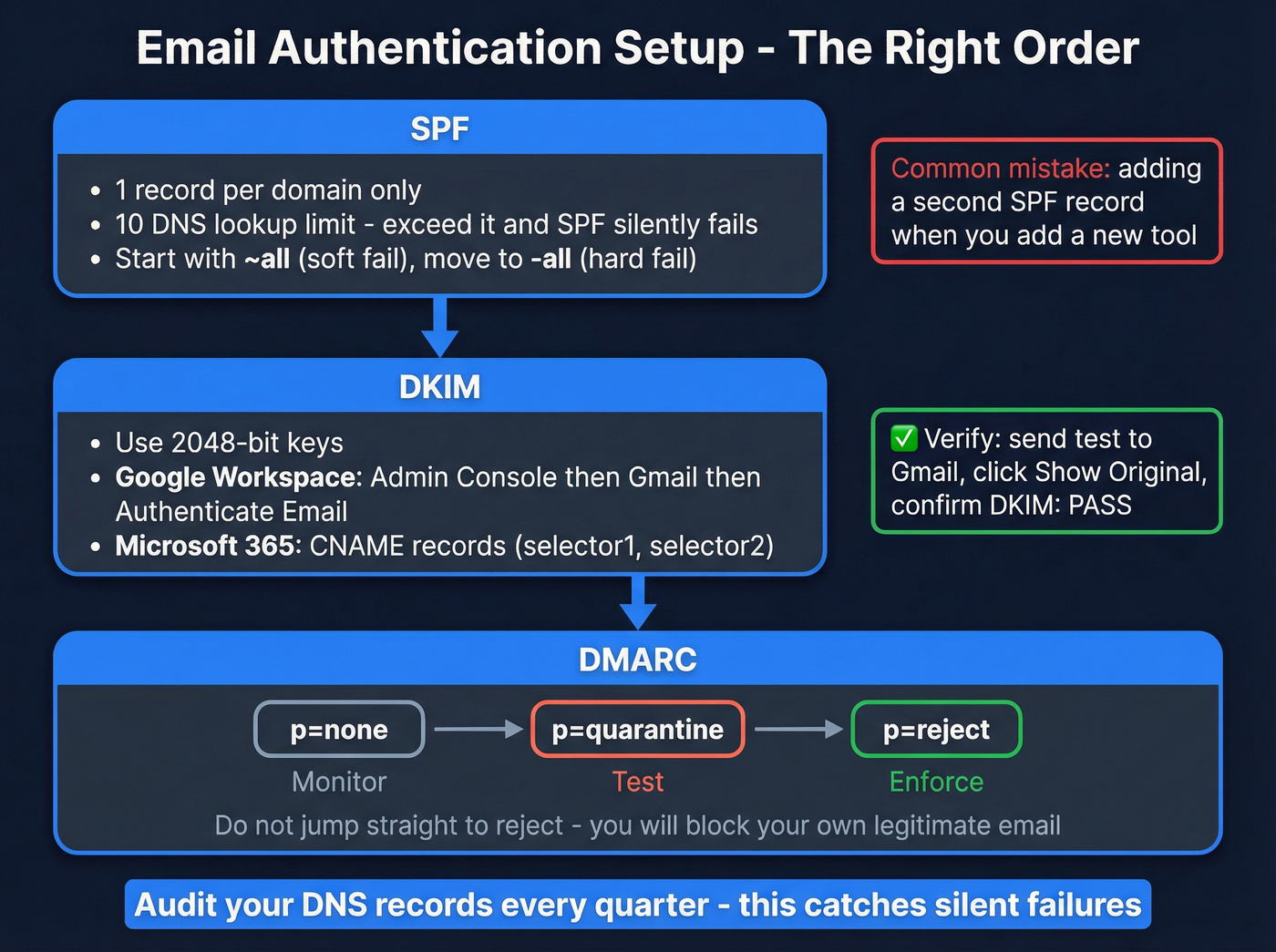
DKIM: Use 2048-bit keys. Google Workspace generates these through Admin Console > Gmail > Authenticate Email. Microsoft 365 uses CNAME records (selector1 and selector2). Verify by sending a test email to Gmail and clicking "Show original" to confirm SPF: PASS and DKIM: PASS.
DMARC: Start with p=none to monitor. Once your reports are clean, move to p=quarantine, then p=reject. Jumping straight to reject blocks your own legitimate email - we've seen teams spend a week wondering why customers aren't getting invoices.
Here's the thing most people miss: you set up SPF six months ago, added a new email tool, and it created a second SPF record. SPF has been silently failing ever since. Audit your DNS records quarterly. It's one of the simplest ways to avoid deliverability disasters, and almost nobody does it (see SMTP authentication).

Bad data is the #1 cause of blacklisting - and it's 100% preventable. Prospeo's 5-step verification catches spam traps, honeypots, and catch-all domains before they torch your sender reputation. 98% email accuracy, refreshed every 7 days.
Stop guessing which addresses are safe. Verify before you send.
Sending Limits and Warm-Up
The technical limit and the safe limit are completely different numbers. Hitting the technical ceiling on a cold domain is a guaranteed blacklist.
| ESP | Technical Limit | Safe Cold Limit |
|---|---|---|
| Google Workspace | 2,000/day | 100-150/day |
| Microsoft 365 | 10,000/day | 100-150/day |
| GoDaddy | 250/day | 50-75/day |
| Free Gmail | 500/day | Don't use it |
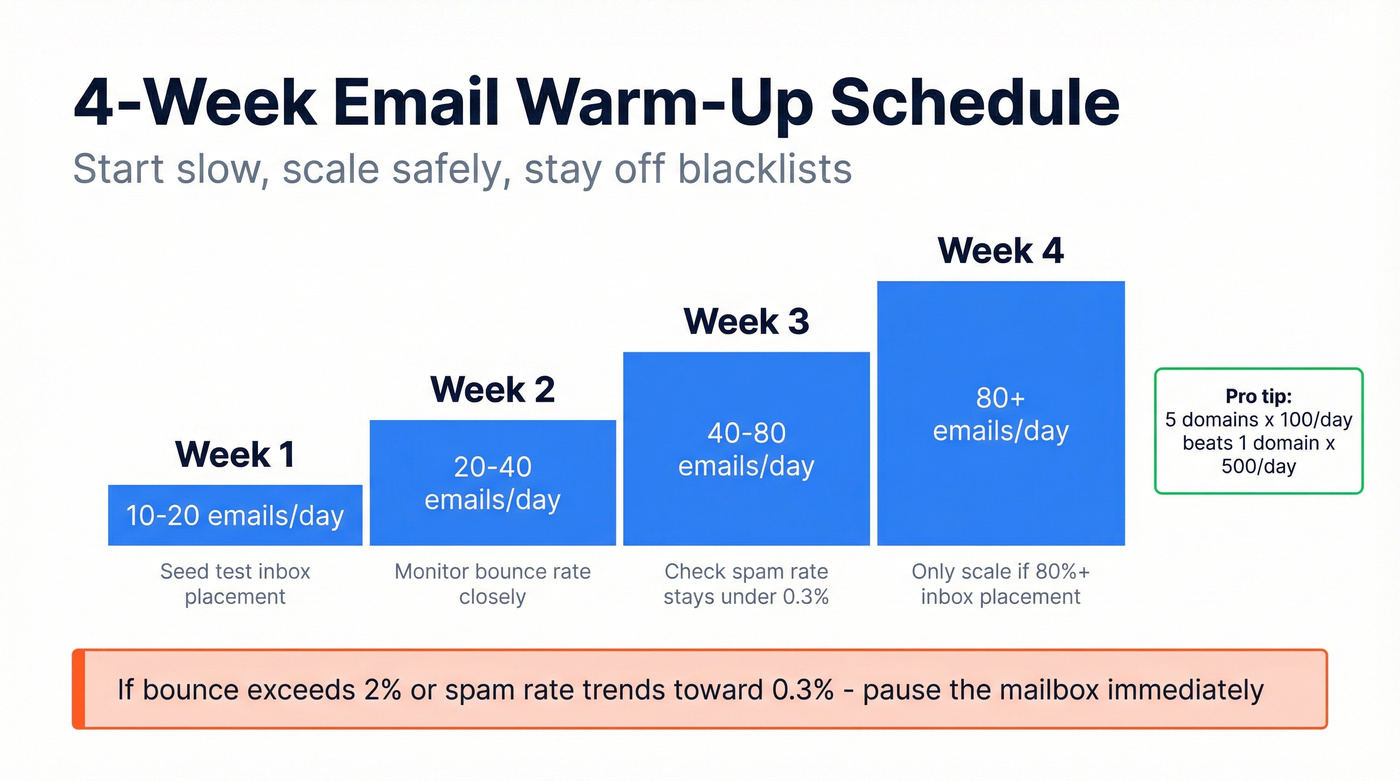
Warm up over 4 weeks minimum: 10-20/day in week one, doubling each week, capping around 80/day by week four. Don't scale past warm-up volumes until seed tests show 80%+ inbox placement. If bounce exceeds 2% or spam rate trends toward 0.3%, pause the mailbox immediately.
Most teams obsess over warm-up tools when the real problem is data quality. You can't out-warm-up a list full of dead addresses and spam traps (see B2B contact data decay).
For scale, use a multi-domain strategy: 5 domains x 100 emails/day beats 1 domain x 500/day. Turn off open and link tracking on immature domains - tracking pixels increase spam signals early on. Distributing volume across domains reduces concentrated risk far more than any single warm-up tool ever will (more in how to scale outbound campaigns).
Clean Data Prevents Blacklisting
Bad data is the #1 preventable cause of blacklisting. Spam traps look like real addresses but exist solely to catch senders with poor list hygiene. Hit a few and your IP gets flagged. Hit several and you're on Spamhaus before lunch. Every major blocklist database - Spamhaus, Barracuda, SURBL - uses trap hits as a primary signal.
The fix is verification before every send. Prospeo's email verification includes catch-all handling, spam-trap removal, and honeypot filtering - exactly the stuff that gets you blacklisted when it slips through. With 98% email accuracy and a 7-day data refresh cycle, bounce rates stay well under the 3% danger zone.
Stack Optimize built their agency to $1M ARR on this approach: 94%+ deliverability, under 3% bounce, zero domain flags across all clients. Their playbook is a case study in blacklist prevention done right - verify everything, send conservatively, monitor constantly.
Monitor Your Blacklist Status
| Tool | Price | What It Does |
|---|---|---|
| Google Postmaster | Free | Domain reputation, spam rate |
| Microsoft SNDS | Free | IP reputation monitoring |
| Sender Score | Free | IP reputation scoring |
| MXToolbox Delivery Center | $129/mo | Checks 100+ DNSBLs |
| GlockApps | From $85/mo | Inbox placement testing |
Start with Google Postmaster Tools and Microsoft SNDS - both free, both essential. Add MXToolbox if you need automated alerting across 100+ blacklists. Catching a reputation dip early gives you time to course-correct before you end up on a blocklist. We run weekly checks across all our sending domains; it takes five minutes and has saved us more than once (see blacklist alert).
Already Blacklisted?
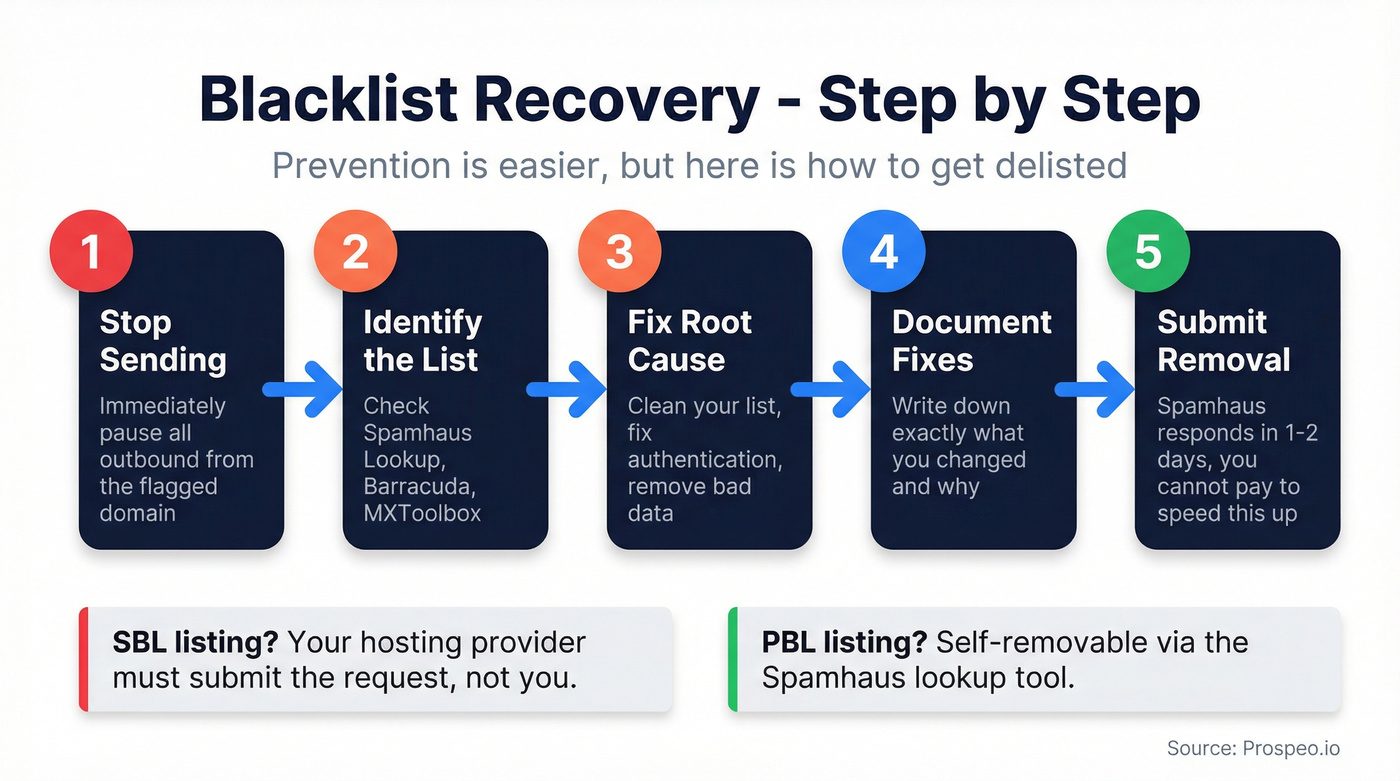
Stop sending immediately. Check Spamhaus Lookup, identify which list you're on, fix the root cause, document your fixes, then submit removal. Spamhaus typically responds within a day or two. You can't pay to speed this up.
| List | Trigger | Who Requests Removal |
|---|---|---|
| SBL | Manually maintained | ISP/network owner |
| XBL | Compromised/hijacked IP | Fix exploit; delists after resolution |
| CSS | Automated poor reputation | Fix root cause (list quality, unsolicited mail) |
| PBL | IP not meant to send | Self-removable via lookup tool |
| DBL | Domain reputation | Domain owner directly |
Let's be honest: if you're on the SBL, you need your hosting provider involved. End-users can't submit SBL removal requests directly. Getting delisted is painful, which is exactly why prevention matters more than remediation. Skip the "I'll clean up later" mindset - it doesn't work at scale.
Stack Optimize hit $1M ARR with under 3% bounce and zero domain flags - all built on Prospeo-verified data. When every address passes catch-all handling and spam-trap removal at $0.01/email, blacklists become someone else's problem.
Clean data at scale costs less than one blacklist recovery.
Prevention Checklist
- Set up SPF + DKIM + DMARC (audit quarterly)
- Verify every email address before sending
- Stay under safe ESP limits, not technical limits
- Warm up new domains for 4+ weeks minimum
- Monitor reputation with free tools (Postmaster, SNDS)
- Keep bounce rate under 3%, complaints under 0.1%
- Use a multi-domain strategy for volume
- Honor unsubscribes within 2 days
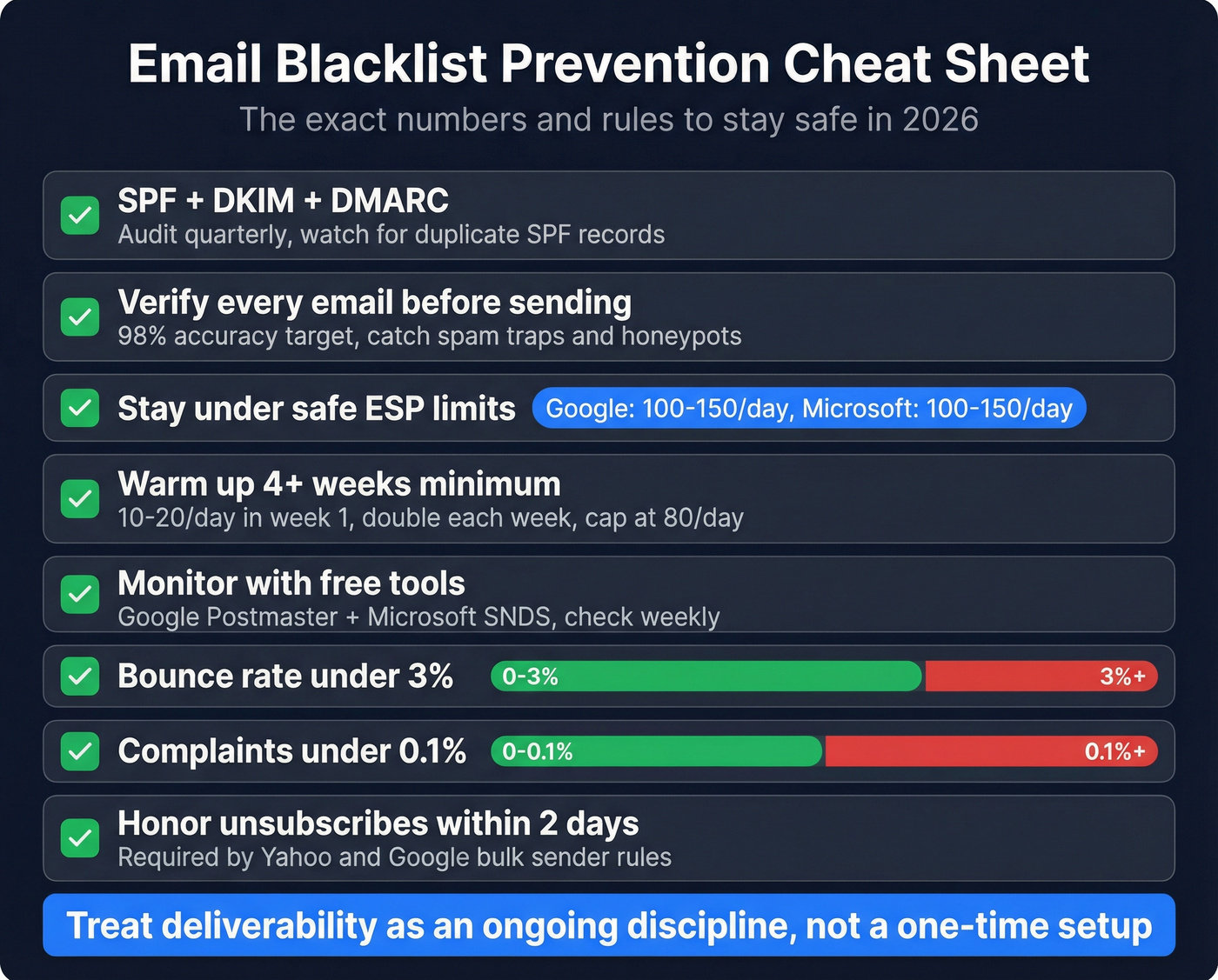
Follow these steps consistently and you'll prevent email blacklisting before it ever becomes a crisis. The teams that treat deliverability as an ongoing discipline - not a one-time setup - are the ones that never end up on a blocklist.