SMTP Authentication: The Complete Guide for 2026
It's Monday morning. The office copier - the one that's been faithfully scanning invoices to the accounting inbox for three years - just stopped sending email. No error on the display, no paper jam. Just silence. You check the Exchange admin center and there it is: Basic Auth rejected. Microsoft's rollout finally reached your tenant, and every device still using a username and password to authenticate SMTP went dark.
That scenario is becoming common as organizations move off password-based SMTP authentication. Here's everything you need to know about how SMTP AUTH works, the 2026 Basic Auth deprecation, and what to do about it.
What You Need (Quick Version)
- SMTP AUTH proves your identity before a mail server lets you send. Use port 587 with STARTTLS.
- Microsoft is deprecating Basic Auth for SMTP AUTH in Exchange Online. Gradual rejections begin March 1, 2026, with full enforcement by April 30, 2026. If you haven't audited your tenant, do it today.
- Authentication gets your message accepted - it doesn't guarantee delivery. If the addresses you're sending to are invalid, you're burning sender reputation for nothing. Verify your list before you send.
What Is SMTP Authentication?
SMTP authentication is an extension to the Extended Simple Mail Transfer Protocol (ESMTP) that requires a sender to prove their identity before the mail server accepts messages for delivery. It's defined in RFC 4954 and built on the Simple Authentication and Security Layer framework (SASL).
The core problem it solves is open relay prevention. Without authentication, any server accepting connections on port 25 could be used by anyone - spammers included - to relay mail to any destination. The AUTH extension closes that door by requiring credentials before the server agrees to send on your behalf.
Think of it as the bouncer at the door. Your email client walks up, presents credentials, and either gets in or gets turned away. Everything that happens after - SPF checks, DKIM signing, inbox placement - is downstream. SMTP AUTH is step one.
How SMTP Authentication Works
The authentication handshake follows a predictable sequence.
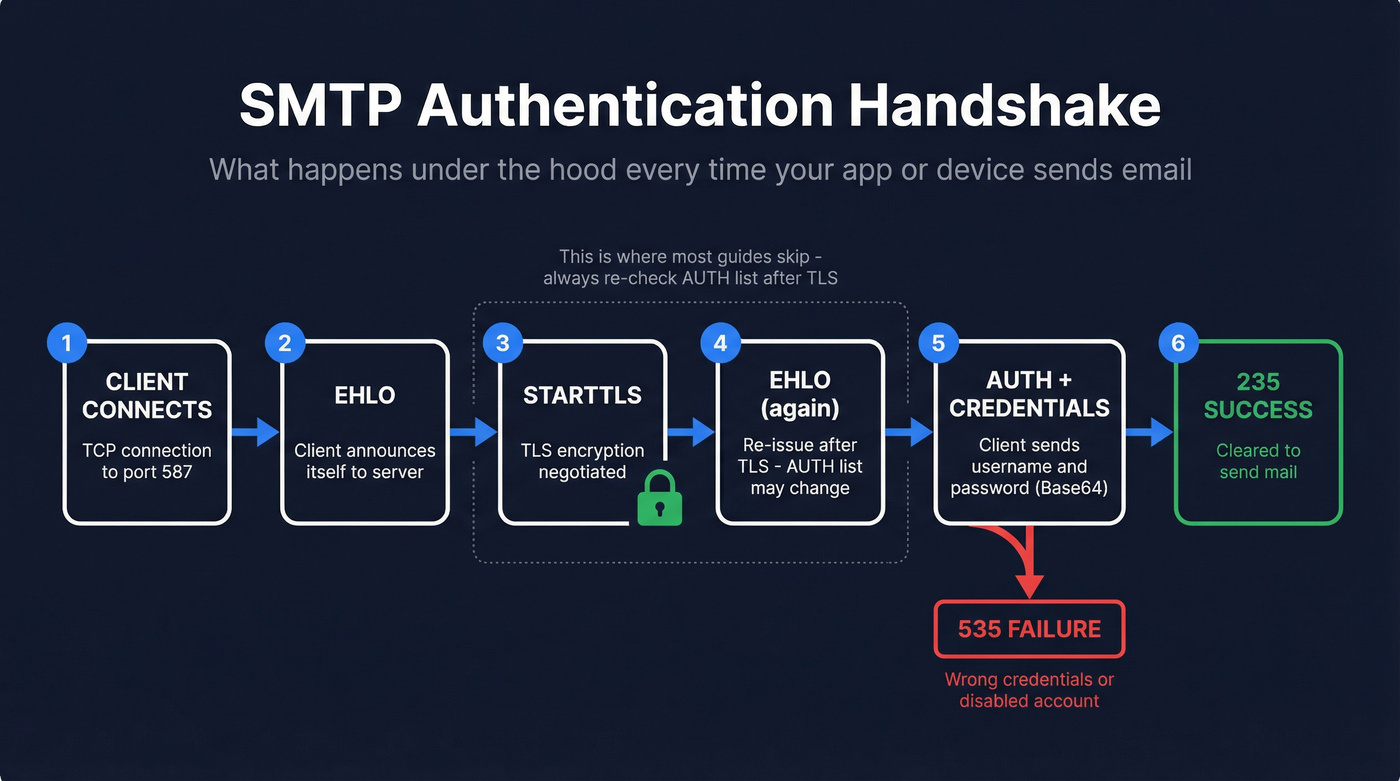
The EHLO Handshake
When your email client, device, or application connects to the mail server, it sends an EHLO command announcing itself. The server responds with a list of extensions it supports. If AUTH is available, you'll see a line like:
250-AUTH PLAIN LOGIN XOAUTH2
That tells the client which SASL mechanisms the server accepts. One detail most guides miss: the list of available mechanisms can change after a successful STARTTLS command. The server might advertise only PLAIN before TLS, then add XOAUTH2 once the connection is encrypted. Always negotiate TLS first, then check the AUTH list.
If the server's sole role is receiving inbound mail as an MX endpoint, it won't advertise AUTH at all. That's normal - it doesn't need to authenticate senders because it isn't relaying outbound mail.
Credential Exchange
Here's a real AUTH LOGIN session, annotated. This is what happens under the hood when your copier sends a scan-to-email:
C: EHLO client.example.com

S: 250-mail.example.com Hello

S: 250-AUTH LOGIN PLAIN

S: 250 STARTTLS

C: STARTTLS

S: 220 Ready to start TLS
   [TLS negotiation happens here]

C: EHLO client.example.com        ← Must re-issue EHLO after STARTTLS

S: 250-AUTH LOGIN PLAIN XOAUTH2   ← AUTH list may now include more mechanisms

C: AUTH LOGIN

S: 334 VXNlcm5hbWU6            ← Base64 for "Username:"

C: dXNlckBleGFtcGxlLmNvbQ==    ← Base64-encoded username

S: 334 UGFzc3dvcmQ6            ← Base64 for "Password:"

C: cGFzc3dvcmQxMjM=            ← Base64-encoded password

S: 235 2.7.0 Authentication successful
The 334 responses are server challenges - their text content is strictly Base64-encoded challenge data per RFC 4954. The client can cancel the exchange at any point by sending a single *, which triggers a 501 rejection.
Success and Failure Codes
Two codes matter most. 235 means authentication succeeded - you're cleared to send. 535 5.7.8 means authentication failed - wrong credentials, disabled account, or expired token.
One rule that trips up developers: after a successful AUTH, the server rejects any further AUTH attempts in the same session with 503. You authenticate once per connection. If you need to re-authenticate, start a new session.
Authentication Mechanisms Compared
| Mechanism | How It Works | Security | TLS Required? | Provider Support (2026) |
|---|---|---|---|---|
| PLAIN | Credentials in one Base64 string | Low without TLS | Yes (mandatory) | Universal |
| LOGIN | Credentials in two Base64 steps | Low without TLS | Yes (mandatory) | Universal |
| CRAM-MD5 | Challenge-response hash | Medium | Recommended | Declining |
| XOAUTH2 | OAuth 2.0 bearer token | High | Yes | Growing fast |
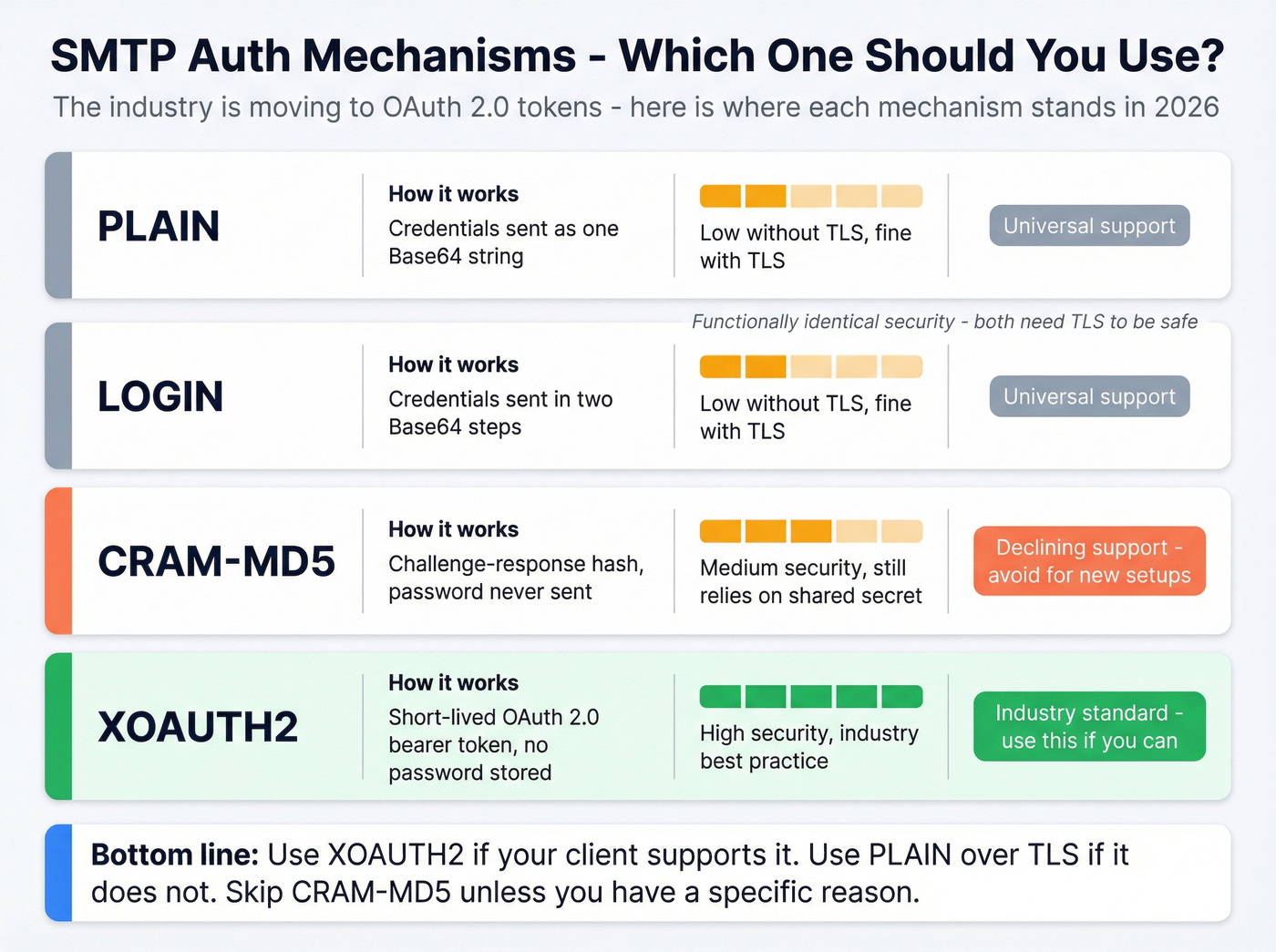
PLAIN and LOGIN are functionally identical in security terms - both send credentials encoded, not encrypted, in Base64. Here's the thing: that's fine, as long as you're using TLS. The transport layer provides the encryption, not the mechanism. Wrapping PLAIN in a TLS connection is perfectly secure. The mechanism just needs to get credentials from point A to point B; TLS makes sure nobody's listening.
CRAM-MD5 avoids sending the password at all by using a challenge-response hash, but it's declining in support and has its own implementation headaches - some servers need to store passwords in a reversible format to support it.
XOAUTH2 is where the industry is heading. Instead of a password, the client presents a short-lived OAuth 2.0 token. Gmail heavily pushes OAuth 2.0 for programmatic SMTP access, and many modern setups use it as the default mechanism. SendGrid moved to API keys (using apikey as the username) rather than account passwords - a clear signal that password-based auth is dying industry-wide.
Don't overthink mechanism selection. Use XOAUTH2 if your client supports it. Use PLAIN over TLS if it doesn't. Skip CRAM-MD5 unless you have a specific reason.
SMTP Ports: 25 vs 587 vs 465 vs 2525
| Port | Role | Encryption | AUTH Behavior | When to Use |
|---|---|---|---|---|
| 25 | Server-to-server relay | Optional STARTTLS | Often no AUTH | Avoid for clients |
| 587 | Client submission | STARTTLS | AUTH required | Default choice |
| 465 | Implicit TLS submission | Implicit TLS | AUTH required | When 587 unavailable |
| 2525 | Unofficial fallback | STARTTLS | AUTH required | ISP blocks 587 |
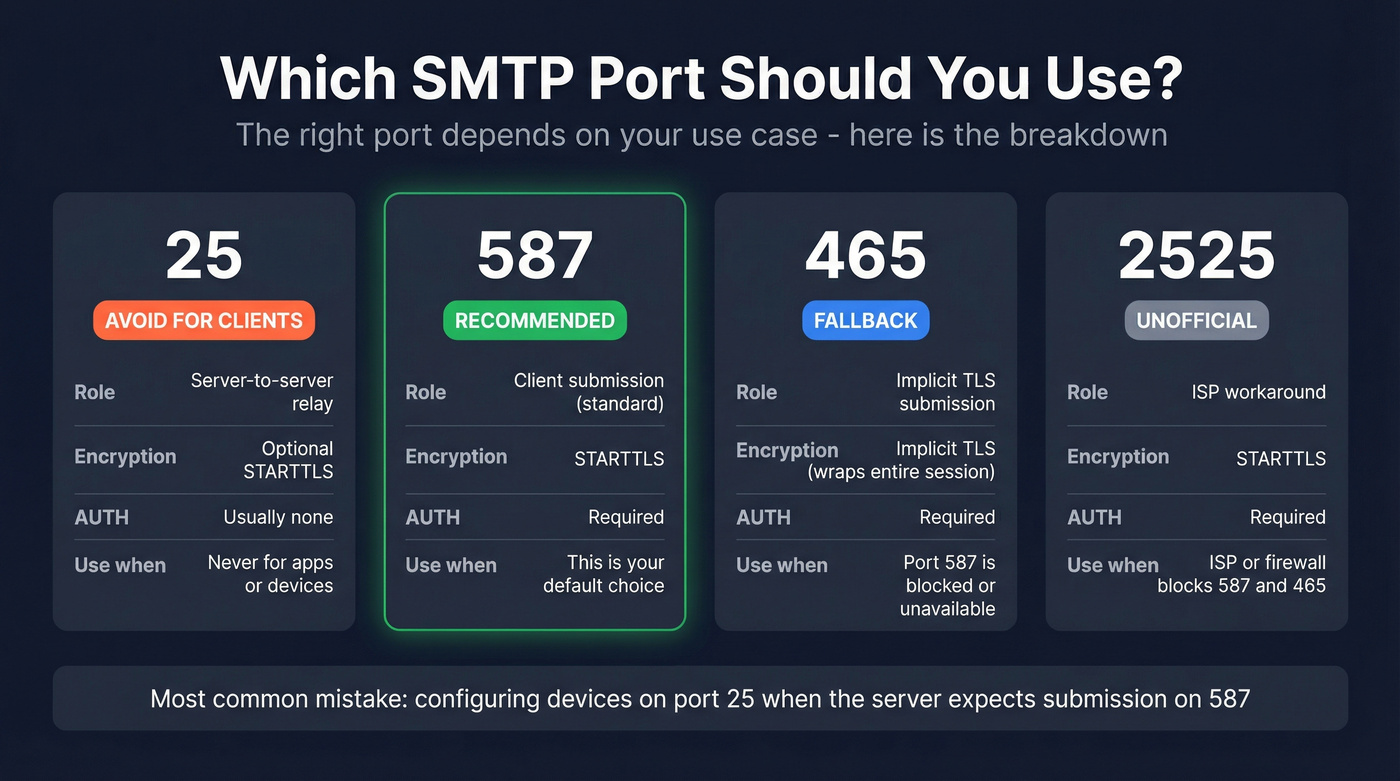
Use 587. It's the current standard for message submission, supports STARTTLS, and every major provider expects it. Twilio SendGrid accepts connections on 25, 587, and 2525 for TLS, plus 465 for implicit SSL - but they recommend 587 as the default, and so does everyone else.
Port 25 is for server-to-server relay. Your MUA, your copier, your application - they shouldn't use port 25 for submission. Many ISPs block it outbound anyway. Port 465 had a complicated history (deprecated, then restored in RFC 8314 for implicit TLS), but it's the fallback when 587 doesn't work. Port 2525 exists because some ISPs and corporate firewalls block standard ports; it's unofficial but widely supported by ESPs.
Choosing the wrong port is one of the most common causes of failures we've seen. If your device is configured for port 25 and the server expects submission on 587, you'll get mysterious rejections that have nothing to do with your credentials.

Authentication gets your message accepted - but it doesn't fix a bad list. If 20% of your addresses bounce, your sender reputation tanks regardless of how clean your SMTP setup is. Prospeo's 5-step email verification delivers 98% accuracy with catch-all handling, spam-trap removal, and honeypot filtering built in.
Stop burning sender reputation on dead addresses. Verify before you send.
When SMTP AUTH Isn't Required
Not every SMTP connection needs authentication. Three scenarios where AUTH is skipped:
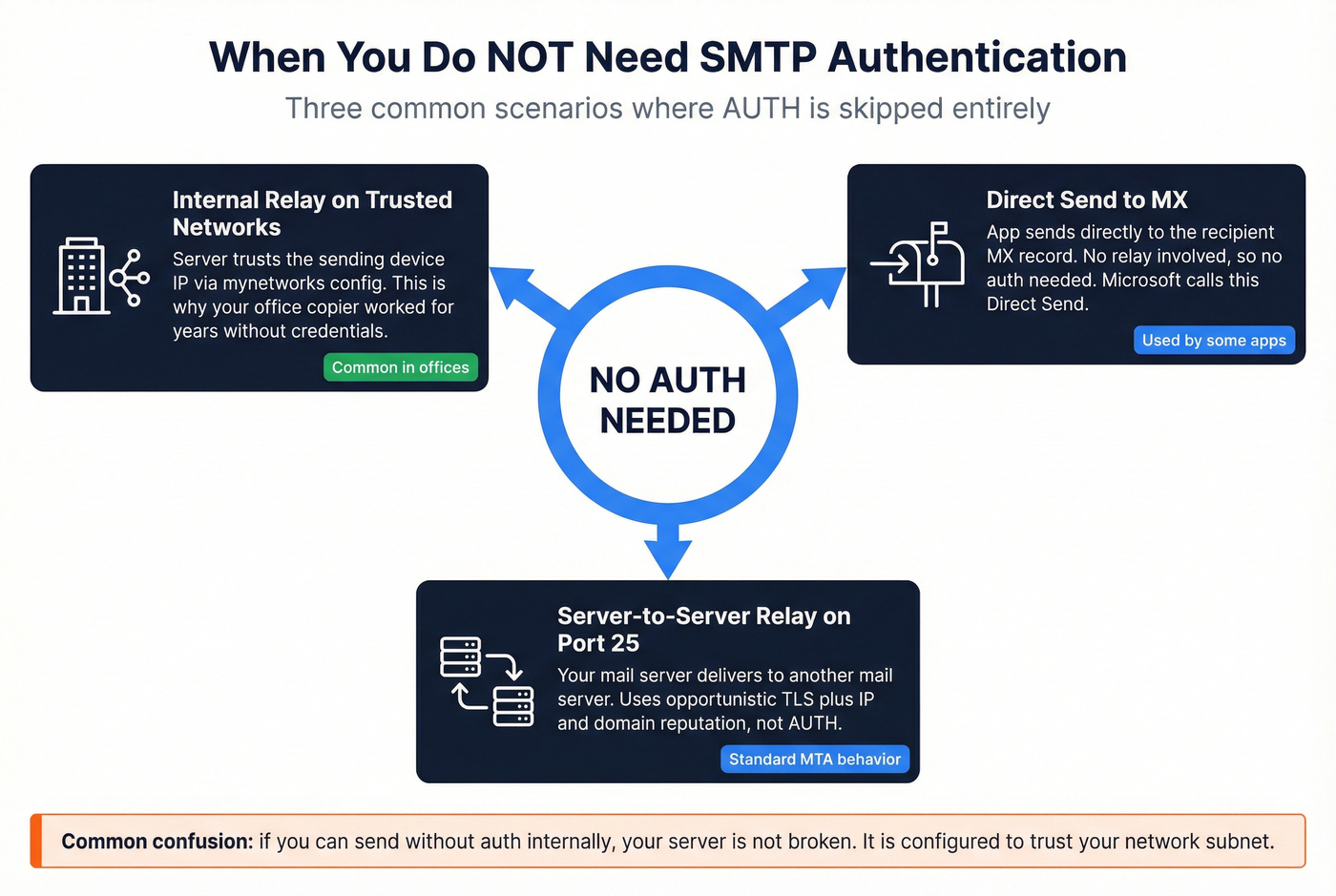
Internal relay on trusted networks. If your server's mynetworks configuration includes the sending device's IP, the server trusts it implicitly. This is why your copier might have worked for years without credentials - it was on the same network segment as the mail server, and the server was configured to relay for local IPs without AUTH.
Direct Send to MX. Some applications send directly to the recipient's MX record rather than relaying through your server. No authentication needed because there's no relay - you're delivering straight to the destination. Microsoft calls this "Direct Send" in their Exchange Online documentation.
Server-to-server relay on port 25. When your mail server talks to another mail server to deliver a message, that's relay traffic on port 25. Server-to-server delivery typically relies on opportunistic TLS plus IP/domain reputation and filtering - not AUTH.
The common confusion on Server Fault - "why can I send without auth internally?" - almost always comes down to trusted network configuration. The server isn't broken; it's just configured to trust your subnet.
The 2026 Basic Auth Deprecation
This is the section that matters most right now.
Microsoft is deprecating Basic Authentication for SMTP AUTH in Exchange Online, and the timeline is aggressive.
What's Changing and When
March 1, 2026: Microsoft begins rejecting Basic Auth for SMTP AUTH across a small percentage of tenants. Rejections ramp gradually.
April 30, 2026: 100% enforcement. Every tenant. No exceptions.
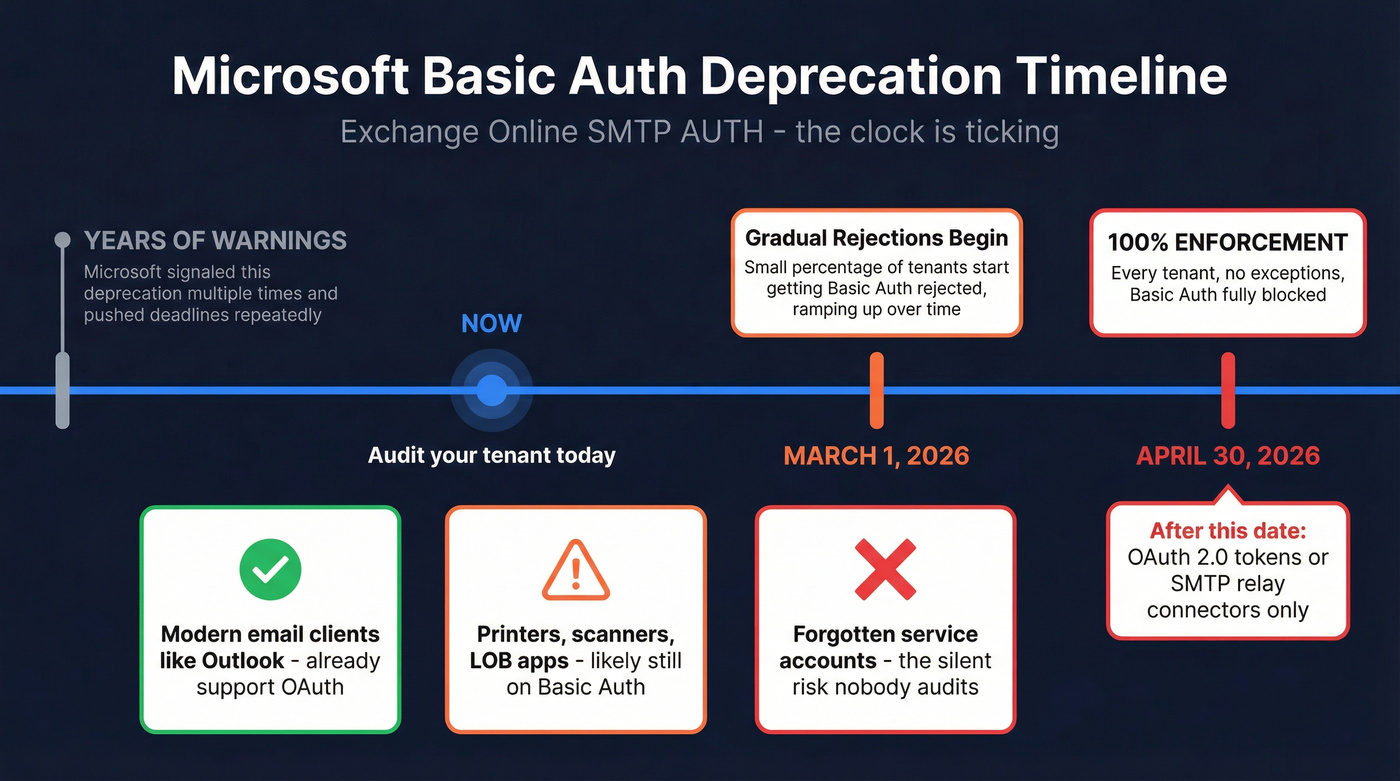
Microsoft has signaled this deprecation for years, pushed the deadline multiple times, and has now committed to a hard cutoff. The official timeline is published on the Exchange team blog. If you're reading this and haven't started planning, you're already behind.
Basic Auth means username-and-password credentials sent via PLAIN or LOGIN mechanisms. After April 30, the only way to authenticate SMTP submissions to Exchange Online will be OAuth 2.0 tokens - or you'll need to bypass client-level auth entirely using SMTP relay connectors. Google Workspace has followed a similar trajectory, requiring OAuth 2.0 for programmatic access and phasing out less secure app passwords.
Who Gets Hit
The biggest casualties aren't email clients. Outlook and most modern mail apps already support OAuth. The pain falls on multifunction printers, scanners, line-of-business applications, and monitoring systems that have been happily sending email with a service account password for years.
The hardest part usually isn't the OAuth configuration itself - it's discovering how many forgotten devices are still using Basic Auth. We've talked to teams who found 40+ devices they didn't even know were sending email through Exchange.
Here's a practical compatibility snapshot based on field guidance summarized by MarcoNet:
| Manufacturer | OAuth Support | Firmware Required | Status |
|---|---|---|---|
| HP | Yes | FutureSmart 5.7+ | Ready since Aug 2023 |
| Canon | Yes | uFP v3.18+ | Ready |
| Lexmark | Yes | FW24+ | Ready |
| Sharp | Partial | Latest models only | Older models won't get it |
| Konica Minolta | Testing | GP4-Q6 | Late summer 2026 |
| Xerox | No | N/A | Doesn't support OAuth |
| Ricoh | Limited | Varies | Partial support |
If your printer vendor doesn't support OAuth by now, that's a vendor problem - but it becomes your problem on April 30. Some admins with unsupported devices have worked around the issue by routing scan-to-email through a third-party relay service that still accepts password-based credentials, buying time while hardware gets replaced.
How to Audit Your Usage
Before you can migrate, you need to know what's still using Basic Auth. In the Exchange admin center:
- Navigate to Reports > Mail flow > SMTP AUTH Clients Submission Report
- Check the Authentication method column - it'll show Basic or OAuth for each sending client
- Export the report and sort by authentication method
- Cross-reference with your device inventory to identify every Basic Auth sender
The SMTP AUTH clients report in the new EAC is the fastest way to get an inventory without guessing.
Four Migration Paths
1. OAuth 2.0 (per-device/per-app) Register an Azure AD app, configure client credentials or authorization code flow, update each device. The "correct" solution but requires per-device configuration and firmware that supports it. For a fleet of 200 MFPs, this is a project.
2. SMTP Relay via Office 365 Connector (best for scale) Configure an inbound connector in Exchange Online that accepts mail from your organization's static IPs over TLS - no per-device authentication needed. The server trusts the connection based on IP and certificate. If you manage more than a handful of MFPs, this is the pragmatic choice: it solves the problem once instead of per-device.
3. Microsoft High Volume Email (HVE) A newer Microsoft service in preview that supports Basic Auth until September 2028. Designed for high-volume transactional email.
4. Third-party relay (SendGrid, Mailgun, Amazon SES) Route your device email through an external SMTP relay. SendGrid starts around $20/mo for low volume. Mailgun offers a free tier for up to 1,000 emails/month. Amazon SES charges roughly $0.10 per 1,000 emails. This decouples your device email from Microsoft's auth requirements entirely, at the cost of another vendor to manage.
Let's be honest about the pragmatic choice here: if your organization has more than 20 devices sending email through Exchange Online, skip OAuth-per-device entirely and go straight to the SMTP relay connector. The per-device OAuth approach sounds correct on paper, but in practice it creates a maintenance nightmare - token refresh failures, firmware update dependencies, and a configuration matrix that grows with every new printer. The relay connector is boring. Boring is good.
After Authentication: Deliverability
Let's say you've done everything right. OAuth 2.0 configured, port 587, TLS negotiated, 235 Authentication successful. You send 500 emails. And 180 bounce.
That's not an authentication problem. That's a data quality problem.
SMTP authentication proves your identity to the sending server. It says nothing about whether the recipient address actually exists. A 36% bounce rate will crater your sender reputation faster than any misconfigured SMTP setting, and in our experience, this is where most teams stumble after getting their auth sorted out - they assume the hard part is over when really they've just opened the door to a new category of problems.
You just spent an hour configuring OAuth 2.0. Don't waste it sending to dead addresses. Prospeo's 5-step verification process - catch-all domain handling, spam-trap removal, honeypot filtering - delivers 98% accuracy on verified addresses. The verification step takes five minutes. Recovering from a blacklisted sending domain takes weeks.
You just spent hours migrating off Basic Auth, configuring OAuth tokens, and locking down port 587. Don't waste that work sending to unverified contacts. Prospeo refreshes 300M+ profiles every 7 days - not the 6-week industry average - so your list stays current at $0.01 per email.
Your SMTP config is dialed in. Now make sure your contact data matches.
Troubleshooting SMTP AUTH Errors
When authentication fails, the SMTP response code tells you exactly what went wrong - if you know how to read it.
| Code | Meaning | Fix |
|---|---|---|
| 235 | Auth successful | No fix needed - you're in |
| 334 | Server challenge | Normal mid-auth; respond with Base64 credentials |
| 421 | Service unavailable | Server overloaded or TLS negotiation failed; retry |
| 501 | Cancelled/malformed | Client sent * or bad Base64; check encoding |
| 503 | Bad sequence | Duplicate AUTH or AUTH mid-transaction; new session |
| 504 | Mechanism not supported | Server doesn't support your chosen mechanism |
| 530 | Authentication required | You tried to send without authenticating first |
| 535 5.7.8 | Auth failed | Wrong credentials, disabled account, or expired token |
The most common issues in practice: wrong port (25 instead of 587), missing STARTTLS before AUTH, AUTH disabled at the mailbox or tenant level, and MFA/app-password mismatches where conditional access policies block Basic Auth before the SMTP server even sees the credentials.
Enhanced status codes give you more specificity. The 5.7.8 suffix means "authentication credentials invalid." 5.7.3 means "security layer required" - you're trying to authenticate without TLS. Mailgun's SMTP error code guide covers the broader taxonomy if you're debugging beyond AUTH-specific issues.
Look, if you're getting 535 errors after the Microsoft deprecation date, the fix isn't "try the password again." The fix is migrating to OAuth 2.0 or an SMTP relay connector. Basic Auth is dead. The error code is just confirming it.
SMTP AUTH vs SPF, DKIM, and DMARC
The word "authentication" appears in both contexts, which is where the confusion starts. They solve completely different problems at different points in the email journey.
SMTP AUTH proves your identity to the sending server. It's the handshake that happens before your message is accepted for delivery. It answers one question: "Are you allowed to use this server to send mail?"
SPF, DKIM, and DMARC work on the other end. They prove your domain's legitimacy to the receiving server. SPF checks the sending IP against authorized senders. DKIM verifies a cryptographic signature on the message. DMARC ties them together with a policy. Together, they answer: "Is this message really from who it says it's from?"
You need both layers. Authenticated SMTP gets the message out the door; domain authentication gets it past the receiving server's filters. And between those two steps, email verification ensures you're not wasting authenticated, signed messages on addresses that don't exist. For a deeper dive on the domain authentication side, our guide to email deliverability covers SPF, DKIM, and DMARC setup in detail.
If you want the full setup walkthrough for domain-level controls, see our SPF, DKIM, and DMARC guide.
FAQ
Is SMTP AUTH the same as email authentication?
No. SMTP AUTH proves your identity to the sending server so it accepts your message for relay. SPF, DKIM, and DMARC prove your domain's legitimacy to the receiving server. Both are necessary for reliable delivery, but they operate at different points in the email journey and solve fundamentally different problems.
What port should I use for SMTP authentication?
Port 587 with STARTTLS - it's the standard submission port and universally supported. If your ISP blocks 587, use 2525 as a fallback. Use 465 for implicit TLS only when 587 isn't available. Avoid port 25 for client submission; it's meant for server-to-server relay.
Will SMTP AUTH stop working in 2026?
Basic Auth for SMTP AUTH in Exchange Online will. Microsoft begins rejecting password-based credentials on March 1, 2026, reaching full enforcement by April 30, 2026. OAuth 2.0 and SMTP relay connectors remain supported. The protocol itself isn't going away - just the password-based method.
Why do emails bounce after authentication succeeds?
Authentication only means the server accepted your message for sending - it says nothing about whether the recipient exists. Invalid addresses bounce and damage sender reputation. Verifying addresses before sending prevents this, and tools like Prospeo deliver 98% accuracy with catch-all handling and spam-trap removal.
Is PLAIN authentication insecure?
Not when wrapped in TLS. PLAIN sends credentials in Base64 encoding, which isn't encryption. But when the session runs over STARTTLS on port 587 or implicit TLS on port 465, the transport layer encrypts everything. The mechanism doesn't need to be secure on its own - the encrypted tunnel handles it.