Follow Up Email Sequence Strategy That Works in 2026 (Without Burning Deliverability)
Most follow-ups are the same email resent with "bumping this" stapled on top. That isn't persistence - it's spam cosplay. In 2026, inboxes punish repetition fast: fewer real replies, more unsubscribes, and a quiet slide in domain reputation that shows up weeks later when your best prospects stop seeing you.
Here's the angle: treat your sequence like an operating system, not a stack of reminders.
And yes, you can be persistent without being annoying.
What you need (quick version)
Use this as your minimum viable sequence plan:
- One-screen rule: keep each email under ~80 words.
- One ask per email: one CTA, preferably a soft one ("Worth a quick look?") - see the reply-first framework in CTA.
- Touch budget: set a hard cap per prospect before you write copy.
- Rotation: every step has a job (value -> proof -> objection/reroute -> close).
- Segment caps: SMB can take more; enterprise gets fewer emails and faster stops.
- Timing: follow-up #1 goes out within 1 day, then you widen gaps.
- Stop rules: stop on "no," unsubscribe, bounce, "wrong person," or a timing request.
- Never branch on opens: opens are noise; branch on replies, bounces, OOO, and (optionally) clicks.
Why most follow-up sequences fail in 2026
Most sequences fail because they repeat the same ask.
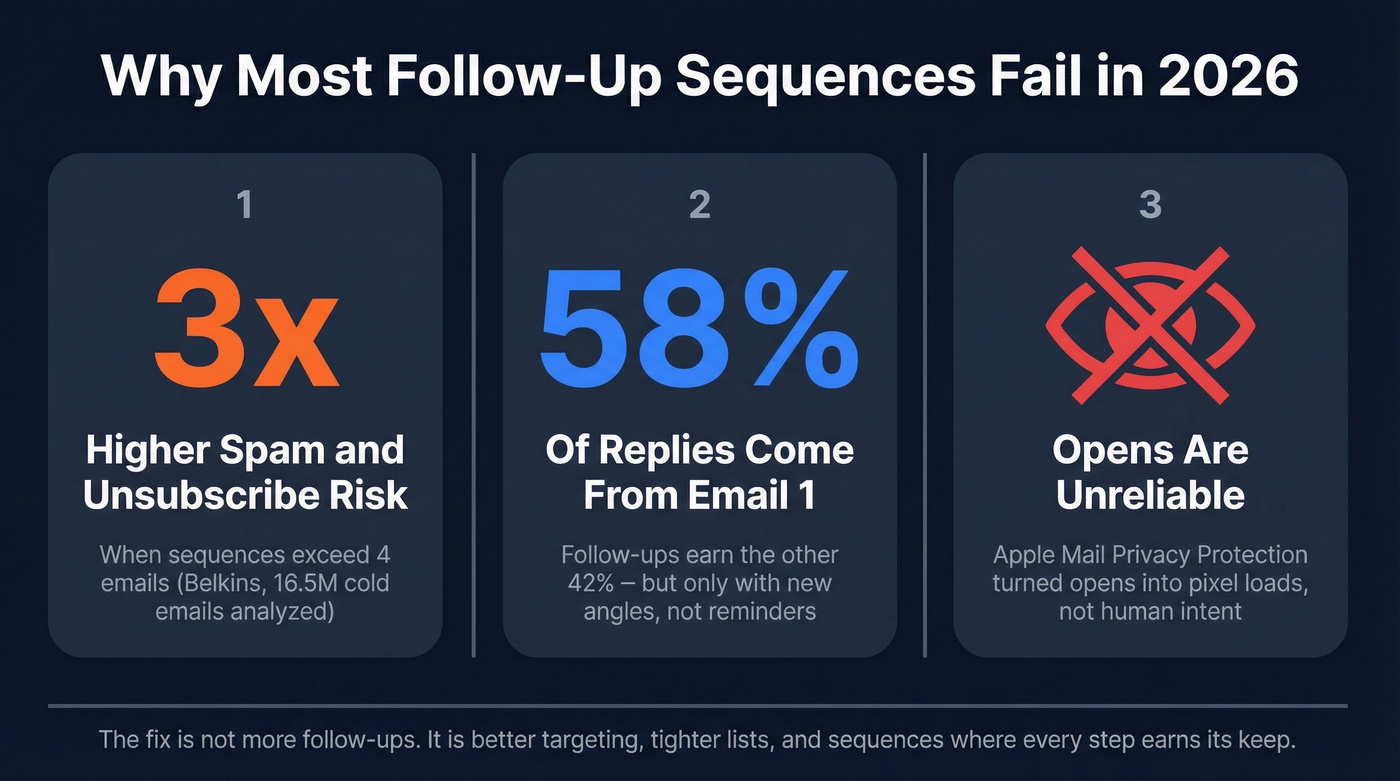
You're not "following up." You're re-sending a pitch to someone who already decided it wasn't worth their attention. The result's predictable: lower reply quality, higher unsubscribes, and a slow bleed in domain reputation that's hard to diagnose until it's too late.
The other 2026 reality: open tracking isn't reliable. Apple MPP and modern inbox behavior turned opens into "pixel loads," not human intent. If your sequence logic is "if opened but didn't reply, send follow-up #3," you're branching on a noisy signal and training your system to annoy people who never actually read you.
Look, if you're selling a lower-ticket offer and you're sending 7-10 emails to get a meeting, your offer packaging is the real problem, not your cadence. Fix the promise, tighten the list, and your sequence "improves" overnight.
Last month I watched a team do the opposite: they kept adding steps because "follow-ups work," while their targeting was basically "anyone with a VP title." By week two, unsubscribes spiked on step 4, replies got snarky, and the domain started landing in spam for people who'd previously replied positively. Nothing was wrong with their mail merge. The list was the issue.
Myth vs reality
Myth: "More follow-ups = more replies." Reality: Follow-up #1 helps. After that, returns drop fast - and risk climbs faster.
Myth: "Personalization means first-name tokens and random compliments." Reality: Context personalization (role + company situation + why now) earns replies.
Myth: "Opens tell you what's working." Reality: Opens tell you images loaded.
Follow up email sequence strategy: the 2026 operating system (one-page blueprint)
A follow-up sequence isn't "7 emails." It's an operating system: goal -> segment -> touch budget -> spacing -> message rotation -> stop rules -> branching -> measurement. If you need a broader system view, map it against sales sequence best practices.

Follow-ups matter, just not the way most teams run them. A reply-contribution benchmark that's been widely shared: 58% of replies come from email #1, and 42% come from follow-ups. Treat that as directional, not sacred - the point's simple: you can't be lazy about follow-ups, but you also can't use them as a crutch for a weak first email. (If your first email needs work, start with Email 1.)
Segment caps table (use this as your default)
To keep this usable on mobile, the table stays tight and the stop rules live right below it.
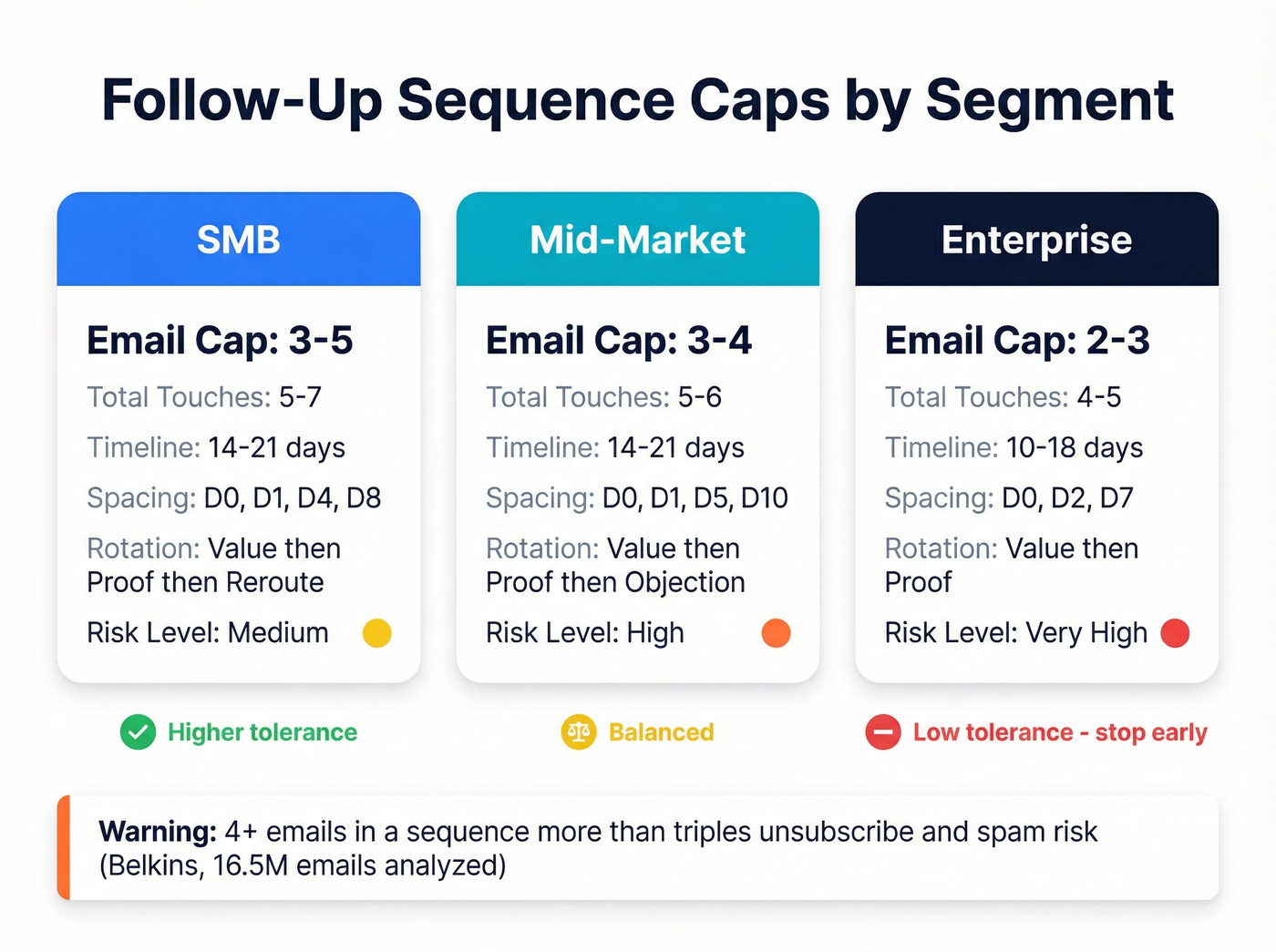
| Segment | Email cap | Total touches cap | Spacing (default) | Rotation (short) | Anchors |
|---|---|---|---|---|---|
| SMB | 3-5 | 5-7 | D0, D1, D4, D8 | Val->Proof->Reroute | FU1 <=1d |
| Mid-market | 3-4 | 5-6 | D0, D1, D5, D10 | Val->Proof->Obj | Avoid 4+ |
| Enterprise | 2-3 | 4-5 | D0, D2, D7 | Val->Proof | Extend if last-step >3% |
Stop rules (hard stops):
- Unsubscribe
- Hard bounce
- "Not interested" / "remove me" (use a consistent playbook for not interested)
- "Wrong person" (unless they forward you)
- "Reach out in Q3" (stop and set a task)
Why these anchors matter:
- Belkins analyzed 16.5M cold emails and found that 4+ emails in a sequence more than triples unsubscribe/spam risk.
- BuzzStream analyzed 8M outreach emails and found the best-performing follow-up timing is within 1 day.
- Outreach popularized a practical ops heuristic: if your last-step reply rate stays above ~3%, you're probably stopping too early.
Define the goal (reply vs meeting vs next step)
Pick one primary outcome per sequence:
- Reply goal: start a conversation. Soft CTAs and low-friction questions win.
- Meeting goal: ask for time. Works best when you already have strong relevance signals.
- Next-step goal: ask for a micro-commitment (forward to owner, confirm toolstack, sanity-check fit).
Soft CTAs win because they're psychologically easy to answer. "Worth a quick look?" gets more replies than "Can you do 30 minutes Tuesday?" because it doesn't force a calendar decision from a cold start.
Segment risk (SMB vs mid-market vs enterprise)
Your segment determines your tolerance for persistence.
- SMB: faster cycles, more tolerance for a short sequence, and more "shoot me the details" replies.
- Mid-market: the sweet spot for rotation (value -> proof -> objection), but also where you'll get the most "not now."
- Enterprise: over-following-up turns into brand damage. More filters, more gatekeeping, less patience for automation vibes. If you're selling here, align your cadence with how enterprise sales actually works.
We've tested this across enough campaigns to say it plainly: enterprise sequences should feel like a human tried twice, then stopped. Anything else reads like a machine.
Touch budget + spacing rules
Set your touch budget before you write copy.
A practical default:
- SMB: 5-7 total touches over 14-21 days
- Mid-market: 5-6 total touches over 14-21 days
- Enterprise: 4-5 total touches over 10-18 days
Spacing rule of thumb:
- Early: fast (Day 0 -> Day 1/2)
- Late: widen gaps (3-5 days, then 5-7 days)
- Never do daily bumps after the first follow-up. That's how you train people to unsubscribe.
Message rotation (each step has a job)
If you can't name the job of a step, delete it.

Common step jobs:
- Step 1: relevance + reason + single ask
- Step 2: new value (not a reminder)
- Step 3: proof (specific result, not logos)
- Step 4: objection handling or "wrong person?"
- Step 5: alternative CTA (low-friction)
- Final: breakup / close the loop
Here's the thing: the "best copywriter" often loses because they write seven clever versions of the same meeting ask. The best sequences win because each step changes the angle, and because the sender has the discipline to stop before the prospect hits "Report spam."

Your sequence strategy means nothing if 35% of emails bounce. Bad data kills deliverability faster than any cadence mistake. Prospeo's 98% email accuracy and 7-day refresh cycle mean every follow-up hits a real inbox - not a dead address that tanks your domain reputation.
Fix your list before you fix your sequence. Start with 100 free credits.
How many follow-ups should you send? (hard caps by segment)
Belkins' data is the clearest warning label you'll find: once you send 4+ emails in a sequence, unsubscribe and spam complaint rates more than triple. That doesn't mean you can never go past 4. It means every extra step has to earn its keep, and most teams can't justify it because they aren't adding new information, they're just adding more noise.
Use this decision rule:
- Use more emails when your list is tight (real ICP), your message is short, and your offer is low-friction.
- Use fewer emails when your list is broad, your value prop is generic, or you're selling into enterprise.
Also: don't confuse "follow-ups" with "touches." If you want more persistence, add a call or voicemail instead of email #5. It's safer. (If you need a full cadence example, start with a B2B cold email sequence and then layer in calls.)
SMB (higher tolerance, still cap it)
Use this if: you're selling to founders, small teams, or owner-operators who live in their inbox.
- Recommended cap: 3-5 total emails (including the first email)
- Why: SMB can handle a bit more persistence, but they punish templated outreach fast.
Skip this if: your SMB list is unverified or it's basically "anyone with a VP title." You'll burn your domain before you learn anything.
Mid-market (balanced cap)
Use this if: you're targeting managers/directors with a real pain and a clear trigger (tool change, hiring, growth).
- Recommended cap: 3-4 total emails
- Why: enough room for rotation (value -> proof -> objection), without drifting into nagging.
Enterprise (aggressive cap)
Use this if: you have a short, specific message and a credible reason you picked them.
- Recommended cap: 2-3 total emails
- Add call/voicemail instead of email #4 or #5.
Enterprise is where "just one more follow-up" becomes "we're blocking your domain."
The "last-step rule"
Outreach has a useful heuristic: if your last step reply rate is still >3%, your sequence is likely too short.
That doesn't mean "add two more emails." It means add one more step with a different job, or replace the last email with a call/voicemail touch.
Open-less branching logic (what to do instead of "if opened...")
Adaptive sequences are real. The mistake is adapting to the wrong signal.

Here's a clean, open-less decision model you can run in any sequencer or CRM. It's simple enough to operationalize and strict enough to protect deliverability.
Branching decision tree (practical version):
If they reply (any reply):
- Stop the sequence immediately.
- Route: positive -> book next step; neutral -> clarify; negative -> suppress.
If hard bounce:
- Suppress the address + domain (at least temporarily).
- Re-verify before retrying.
- If bounce rate crosses your threshold (see guardrails below), pause the whole campaign.
If OOO / "back on DATE":
- Pause until the return date + 1 business day.
- Resume with a fresh angle, not "circling back."
If "wrong person":
- Ask for the owner (one sentence) - use these scripts.
- Update CRM owner field.
- Restart at Step 1 for the new contact (don't dump them into Step 4).
If they click (optional signal): Clicks aren't perfect, but they're closer to intent than opens. If they click and don't reply, switch the next email to proof or objection handling (not another "want to meet?").
If no signal by Step 3: Switch channel: call + voicemail, or a single reroute email. Don't keep emailing into silence.
Hard stance: never branch on opens. If your sequencer forces an "opened" branch, turn it off or ignore it.
Timing rules that actually move replies (and reduce annoyance)
Timing is about two things: catching attention early, and not becoming a daily irritant.
BuzzStream's 8M-email study found the best-performing follow-up timing is within 1 day of the original message. After that, marginal value drops hard; they saw subsequent follow-up replies drop 66%.
Gong's benchmarks add a practical layer: email replies skew better later in the day, and calls connect best mid-week mornings. Treat this as a scheduling edge, not a religion.
The "fast follow-up" rule (Day 1 -> Day 2)
Send follow-up #1 fast.
- If Email 1 goes out Day 0, send Follow-up 1 on Day 1 (Day 2 at latest).
- Keep it short and change the angle. No "just checking in."
Widen gaps, don't bump
After the first follow-up, widen gaps.
A simple pattern:
- Day 0: Email 1
- Day 1: Follow-up 1
- Day 4-5: Follow-up 2
- Day 8-10: Follow-up 3
- Day 14-18: final touch / breakup
When to send & when to call
Practical rule:
- Email: afternoons in the prospect's time zone
- Call: Tue/Wed mornings
- Voicemail: right after a missed call (it sets context for the next email)
Multi-channel sequencing (email + call + voicemail) without adding more emails
If you want more replies, don't add email #6. Add a call and a voicemail. For the full calling side, keep a B2B cold calling guide in the same playbook.
Gong Labs quantified why: sequences that include cold calling see higher email reply rates - 3.44% vs 1.81%. And leaving a voicemail lifts email reply rate from 2.73% to 5.87%.
That's not because voicemails are magical. It's because they create recognition and context, and because your next email isn't from a stranger anymore; it's from the person who tried to reach you, left a short message, and then got out of the way.
Where the call fits (replace late follow-ups)
Replace late follow-ups with a call touch.
- Email steps are highest leverage early.
- Calls are highest leverage once email created a little familiarity.
- Late-sequence emails are where annoyance spikes.
A clean swap:
- Instead of Email 4 and Email 5, do Call + voicemail, then a final breakup email.
Voicemail script rules (10-20 seconds)
Keep it 10-20 seconds. Anything longer feels like a monologue.
Structure:
- Context: who you are + why you called
- Permission: "Not sure if this is relevant..."
- Next step: "If it is, reply to my email or call me back at X."
Example: "Hey {{First}}, it's {{Name}}. I emailed about {{context}}. Not sure it's relevant for {{Company}} - if it is, just reply 'yes' and I'll send details. If not, no worries."
A ready-to-run 14-21 day schedule
Day 0 (afternoon): Email 1 Day 1 (afternoon): Follow-up 1 (new value) Day 4 (afternoon): Follow-up 2 (proof) Day 6 (Tue/Wed 9-12): Call + voicemail Day 9 (afternoon): Follow-up 3 (objection / wrong person) Day 14-18: Breakup email (close the loop)
Tooling note: Outreach supports multi-touch sequencing; Instantly and Smartlead are common for running email-only sequences; MixMax is a lightweight option. The strategy matters more than the platform.
Deliverability & compliance guardrails (non-negotiable in 2026)
Deliverability is the tax you pay for scale. Ignore it and your "sequence strategy" becomes a slow-motion outage.
Non-negotiables:
- Spam complaint rate: Yahoo requires <0.3%.
- Unsubscribe: one-click unsubscribe, honored within 2 days.
- Authentication: SPF + DKIM + DMARC aligned (use this SPF/DKIM/DMARC setup guide).
- High volume: Microsoft enforces stricter rules for Outlook.com consumer domains when you send >5,000/day, and will reject mail with 550 5.7.515 if you don't meet authentication requirements (related error triage: 550 recipient rejected).
- Bounce target: keep it <2%.
- Warmup: 4-6 weeks, starting at 5-10 sends/day, then ramp.
Two hard stances that save teams every week:
- Never push through bad metrics. If bounce is high, you pause.
- If bounce >2% for 2 days, stop the sequence and fix the list. Don't negotiate with your sender reputation.
Provider requirements checklist (Yahoo + Microsoft + Gmail baseline)
Baseline checklist:
- SPF: configured and passing
- DKIM: configured and passing
- DMARC: published (at least p=none) and aligned
- List-Unsubscribe header: present (supports one-click per RFC 8058 "POST")
- Visible unsubscribe link: in the email body
- Unsubscribe honored: within 2 days
- Reply-capable From/Reply-To: no dead inboxes
- No deceptive subjects/headers: don't get cute
Primary docs: Yahoo's sender best practices and Microsoft's high-volume sender requirements.
Monitoring stack (how you actually catch problems early)
Most teams don't fail on strategy - they fail on instrumentation. Here's the monitoring stack that keeps you out of deliverability jail:
- Google Postmaster Tools: track domain reputation, spam rate, and delivery errors for Gmail.
- Microsoft SNDS: monitor complaint signals and IP/domain health for Outlook/Hotmail ecosystems.
- Inbox placement tests: run periodic seed tests to see inbox vs promotions vs spam (especially after copy changes).
- Suppression lists: global suppressions for unsubscribes, complainers, hard bounces, and "do not contact."
- Step-level review: check unsub/complaint spikes by step. If one email causes the spike, that email's the problem.
Operational rule: review deliverability metrics daily during a new campaign's first week. That's when issues surface.
List quality beats copy (how to keep bounce under 2%)
If you want bounce under 2%, you need list hygiene before step 1. That's not optional anymore. If you want a repeatable process, run a formal email verification list SOP.
In our experience, this is where teams lose the most money: they spend weeks rewriting copy, then send it to a list that was never safe to mail in the first place, and the domain takes the hit. Fix the data first, then argue about subject lines.
Prospeo - "The B2B data platform built for accuracy" - fits here because it's the best option for email accuracy, data freshness, and self-serve B2B data. It gives you 98% email accuracy, a 7-day refresh cycle (industry average: 6 weeks), and 5-step verification that includes catch-all handling plus spam-trap and honeypot removal.
Practical workflow:
- Build your target list (ICP filters, intent, technographics).
- Verify emails in bulk.
- Export only valid addresses into your sequencer.
- Launch with throttles.
What to do in the UI (so this actually changes outcomes):
- Filter to "Valid" -> Export CSV (or push via integration) into your sequencer.
- Suppress "Invalid" immediately - don't "try anyway."
- Review "Catch-all" as a risky bucket: either exclude it for new domains or run it in a separate, lower-volume campaign.
Sequence QA checklist (run this before you launch)
This is the part teams skip - and it's why they end up testing a broken sequence for three weeks.
Offer + targeting QA
- Can you explain the offer in one sentence without buzzwords?
- Is your list tight enough that you'd be comfortable sending the email from your personal inbox?
- Does each persona have a different "why you, why now" angle (not just different tokens)?
Copy QA
- Every email is one screen and has one ask.
- Every follow-up has a different job (value, proof, objection, reroute, close).
- Subject lines are boring on purpose. Curiosity bait increases complaints.
Logic QA
- Stop rules are implemented (unsub, bounce, negative reply, wrong person).
- Branching doesn't use opens.
- OOO handling is set to pause/resume.
Deliverability QA
- SPF/DKIM/DMARC pass.
- One-click unsubscribe works.
- Throttles are set per mailbox.
- Bounce/complaint thresholds are defined with a "pause campaign" rule.
If you can't pass this checklist, don't A/B test your way out. Fix the fundamentals first.
What to measure and optimize (open-less reality)
Opens are pixel loads. If you optimize on opens, you'll write clickbaity subject lines and send more follow-ups to people who never actually engaged.
Measure what moves pipeline and what protects deliverability.
Gong's benchmarks also show a real-world truth: manual emails reply at 2.1% vs 1.1% for automated. Automation scales; manual wins when stakes are high. (If you're building this into an ops dashboard, use sales sequence metrics as your baseline.)
The only metrics that matter
Track these at minimum:
- Reply rate (all replies / delivered)
- Positive reply rate (interested / delivered)
- Meeting rate (meetings booked / delivered)
- Bounce rate (keep <2%)
- Complaint rate (keep under provider thresholds)
- Unsubscribe rate (step-level, not just sequence-level)
Manual vs automated: when each wins
Use manual when:
- it's a named account list
- deal size is meaningful
- you have a real trigger (job change, funding, tool switch)
- you can reference something specific without being creepy
Use automated when:
- you've validated ICP + offer
- your list quality is verified
- you have QA on copy and suppression rules
A clean hybrid that works: automate steps 1-2, then go manual for any account that shows intent (reply, meaningful click, or direct ask).
Step-level optimization order
Use the reply contribution split (Email 1 does most of the work; follow-ups do the rest) as your prioritization:
- Email 1 (hook + relevance + CTA)
- Follow-up 1 (new value within 1 day)
- Proof step (specific result)
- Objection/reroute step
- Breakup
If Email 1 is weak, no amount of follow-up wizardry saves you.
Templates mapped to the blueprint (8-step email pack + breakup - use 3-5 steps by segment)
Important: this is a pack, not a mandate. Map each step to a single job (value, proof, objection, reroute, close) and delete any step that can't justify its existence.
- SMB: use steps 1-5 + breakup
- Mid-market: use steps 1-4 + breakup
- Enterprise: use steps 1-3 + breakup (then call/voicemail instead of more emails)
These are intentionally short. One screen wins, and every email has one job.
Personalization note: context beats tokens. "Noticed you're hiring 3 SDRs" is context. "Loved your recent post" is fake familiarity and it backfires.
Email 1 (the only email that must work)
Subject: Quick question about {{trigger}}
Hi {{First}} - saw {{Company}} is {{context trigger}}.
Teams in {{industry}} usually run into {{pain}} when {{situation}}. We help fix that by {{one-line outcome}}.
Worth a quick look? If yes, I'll send a 2-minute overview tailored to {{Company}}.
-- {{Name}}
Use when: Day 0, always. Why it works: one screen, one outcome, soft CTA.
Follow-up 1 (new value, not a bump)
Send within 1 day.
Subject: Re: {{trigger}} (idea)
Quick add: if you're already using {{tool/category}}, the fastest win is usually {{specific tactic}}.
If I'm off-base, who owns {{problem area}} on your side?
-- {{Name}}
Use when: no reply after 24 hours. Why it works: new angle + reroute question.
Follow-up 2 (social proof / specific result)
Subject: Example from {{peer company type}}
One data point: we helped a {{peer type}} team reduce {{bad metric}} from {{before}} to {{after}} in ~{{timeframe}} by {{mechanism}}.
If you tell me your current {{metric/process}}, I'll reply with the 2-3 levers that matter most.
Open to that?
-- {{Name}}
Use when: 3-5 days after FU1. Why it works: specific proof + low-effort diagnostic.
Follow-up 3 (objection handling / "wrong person?")
Subject: Should I talk to someone else?
Two quick checks so I don't spam you:
- Is {{problem}} on your roadmap this quarter?
- If yes, are you the right person for it?
If not, who should I reach out to?
-- {{Name}}
Use when: you've sent value + proof and still have silence. Why it works: respectful, easy "no," creates forward motion.
Follow-up 4 (alternative CTA / low-friction next step)
Subject: Want the short version?
I can send either:
A) a 3-bullet summary of how teams handle {{problem}}, or B) a 30-second screen recording specific to {{Company}}.
Which is more useful?
-- {{Name}}
Use when: mid-sequence to earn a reply without asking for time. Why it works: A/B choice prompts fast responses.
Follow-up 5 (single-digit micro-survey)
Subject: Quick check?
Quick one - reply with 1 / 2 / 3:
- Not a priority
- Revisit later
- Open to a quick chat this week
-- {{Name}}
Use when: you need a low-friction intent signal (especially SMB/mid-market). Why it works: tiny effort, clear routing.
Follow-up 6 (the "one insight" email)
Subject: One thing I'd change at {{Company}}
If I were in your seat, I'd look at {{specific lever}} because {{reason}}.
If you want, I'll send a quick checklist we use to spot {{problem}} in under 10 minutes.
Worth sending?
-- {{Name}}
Use when: you have a real point of view (don't fake this). Why it works: perspective beats persistence.
Follow-up 7 (final value attempt)
Subject: Last try - then I'll stop
Last note from me.
If {{Company}} ever needs {{outcome}}, the two most common pitfalls are:
- {{pitfall 1}}
- {{pitfall 2}}
Want me to share what "good" looks like for {{their segment}}?
-- {{Name}}
Use when: SMB only, and only if earlier steps were tight and relevant. Why it works: clear boundary + value.
Call/voicemail companion note
After you call + leave a voicemail, your next email should reference it lightly:
Subject: Left you a quick voicemail
Hey {{First}} - I left a 15-second voicemail so you had context for my note.
If it's easier, just reply with "yes" and I'll send the short overview. If it's a no, tell me and I'll stop.
-- {{Name}}
Use when: immediately after voicemail. Why it works: recognition + permission + easy reply.
Breakup email (permission to close the loop)
Subject options:
- Closing the loop?
- Should I close this out?
- Can I stop reaching out?
Email: Hi {{First}} - I haven't heard back, so I'm assuming this isn't a priority right now.
Should I close this out, or is there someone else I should speak with?
Either way, I'll stop after this message.
-- {{Name}}
Use when: final step for every segment. Why it works: invites a definitive response without guilt-tripping.
The article says it plainly: targeting 'anyone with a VP title' destroys sequences. Prospeo's 30+ filters - buyer intent, job changes, technographics, headcount growth - let you build lists so tight that 3 emails outperform a competitor's 10. At $0.01 per verified email, tight targeting is finally cheap.
Send fewer follow-ups to better prospects. Build your first list now.
FAQ
How many follow-up emails should I send before stopping?
Default caps: SMB 3-5, mid-market 3-4, enterprise 2-3 total emails (including the first). If you want more persistence, add 1 call + 1 voicemail instead of piling on extra emails, especially after step 3.
What should I write in follow-up #2 and #3 if they don't reply?
Follow-up #2 should add proof (a specific result with before/after and timeframe). Follow-up #3 should reduce friction with a yes/no roadmap check or a wrong person reroute. If either email repeats the same meeting ask, it's not a follow-up - it's a resend.
What's the best time gap between follow-ups?
Send follow-up #1 within 24 hours, then widen gaps to 3-5 days and 5-7 days later. A simple schedule is D0, D1, D4/5, D8/10, then a final touch on D14-18; daily bumps after the first follow-up spike unsubscribes.
What's a good free tool to keep bounce rate under 2%?
Verify before you send and suppress invalid addresses. Prospeo's free tier includes 75 verified emails/month plus 100 Chrome extension credits, with 98% email accuracy and a 7-day refresh cycle. If your bounce rate exceeds 2% for two days, pause the campaign and fix the list.
Summary: the follow up email sequence strategy to run in 2026
A follow up email sequence strategy that works in 2026 is simple on purpose: set segment-based caps, send the first follow-up within a day, rotate the job of each step (value -> proof -> objection/reroute -> close), and enforce stop rules that protect deliverability.
If you need more persistence, add calls and voicemails, not more emails.