Email Reputation Management: What Actually Matters in 2026
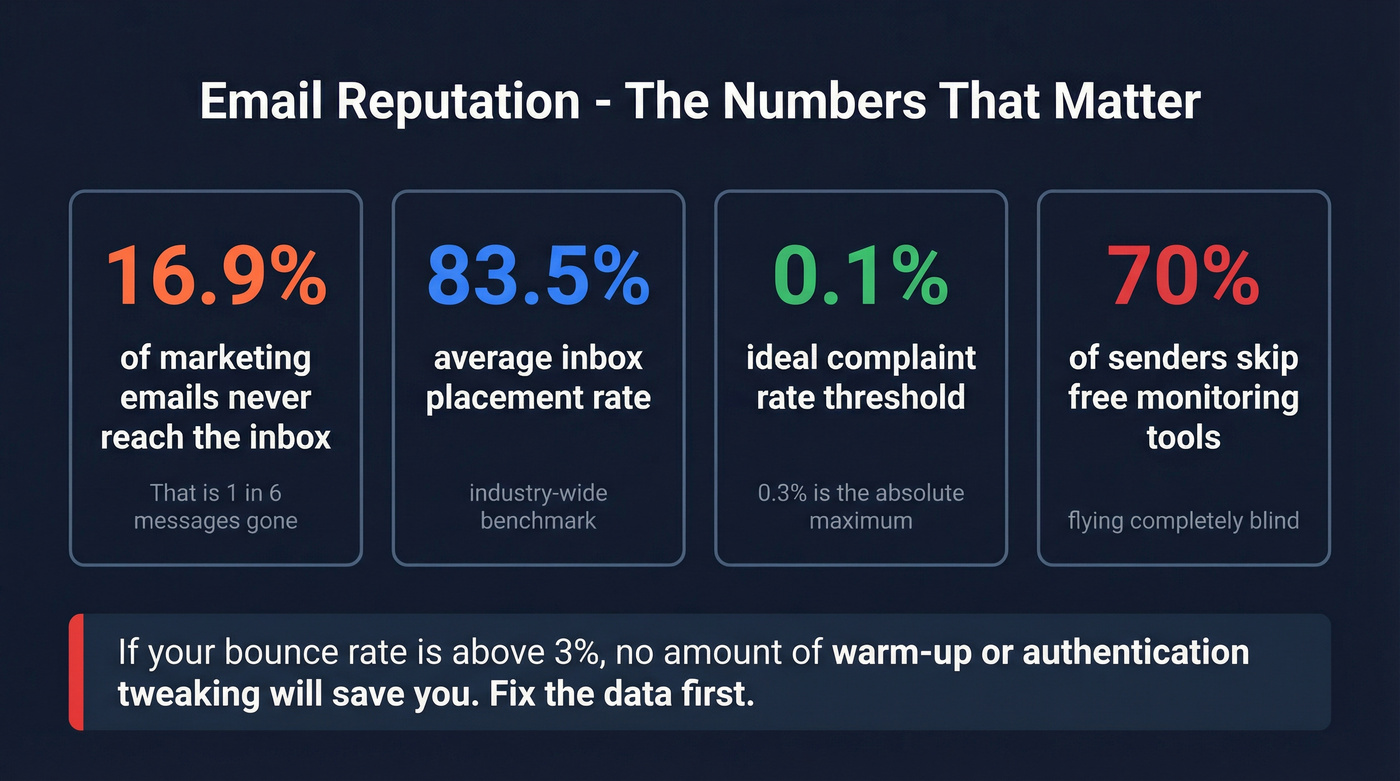
16.9% of marketing emails never reach the inbox. That's roughly one in six messages vanishing before anyone sees them - and 70% of senders don't use the free monitoring tools that would tell them it's happening. Without active email reputation management, you're flying blind. Your reputation is probably worse than you think.
What You Need (Quick Version)
If you do nothing else today, do these three things:
- Set up free monitoring. Google Postmaster Tools, Microsoft SNDS, and Sender Score. All free. Takes 20 minutes total.
- Authenticate everything. Since February 2024, mailbox providers have enforced stricter rules: all senders need SPF or DKIM, and bulk senders (5,000+/day) need SPF + DKIM + DMARC with alignment. If you haven't done this, you're already getting filtered. (If you need a step-by-step, see SPF, DKIM, DMARC.)
- Fix your data upstream. Bad addresses and hard bounces are one of the fastest ways to tank your reputation. Clean your lists before you send, not after. (More on this in B2B contact data decay.)
What Mailbox Providers Actually Measure
Mailbox providers don't care about your intentions. They care about signals.
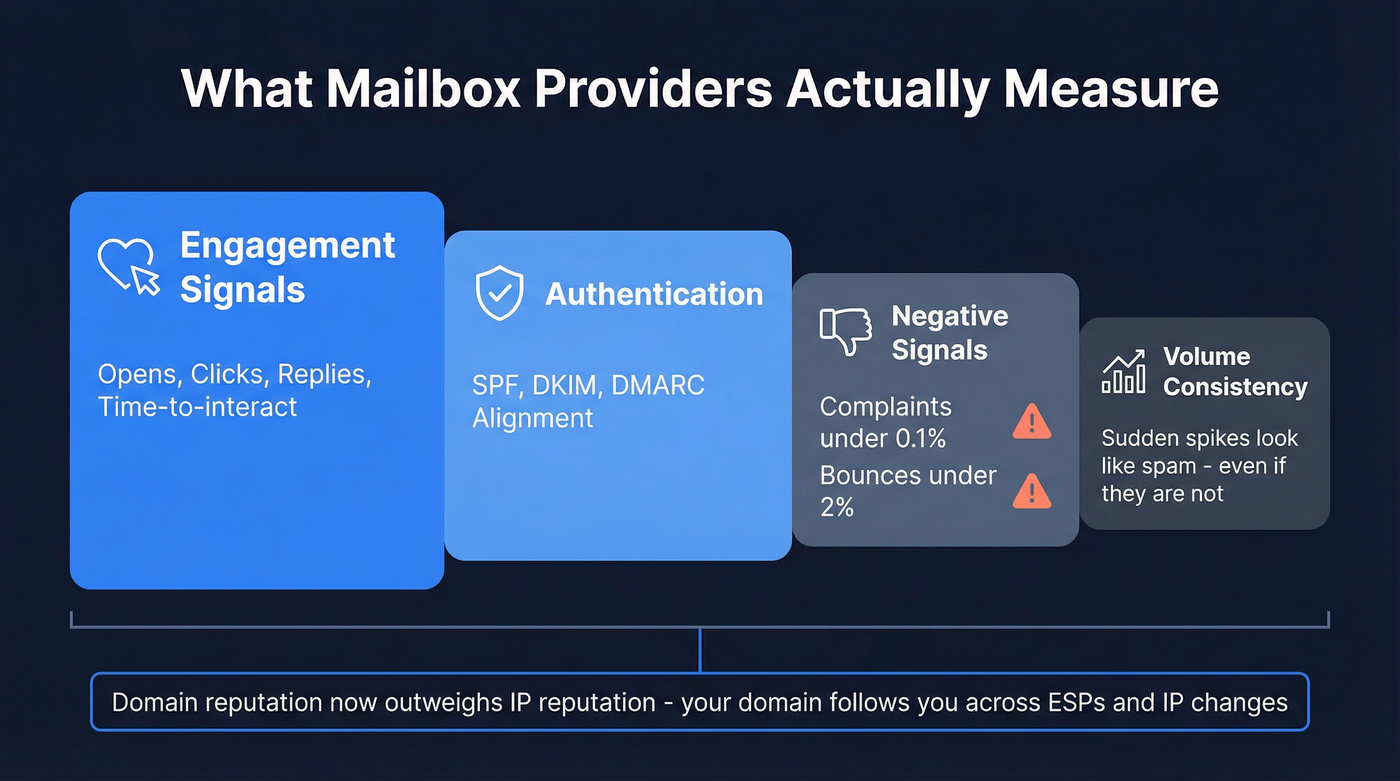
Engagement is the biggest lever - opens, clicks, replies, and how quickly recipients interact all feed into reputation scoring. Authentication checks come next: SPF, DKIM, and DMARC alignment tell providers you're who you say you are. Then there's the negative signals. Complaint rates need to stay under 0.3%, ideally below 0.1%. Bounce rates should stay under 2%. And volume consistency matters more than most people realize: a sudden spike from 200 to 10,000 emails/day looks like spam, even if it isn't. (If you're scaling, follow cold email volume best practices.)

Domain reputation now outweighs IP reputation, especially on shared infrastructure. Your domain is the persistent identity that follows you across ESPs and IP changes. Switching domains when your reputation tanks is the email equivalent of moving cities because you owe people money - providers recognize evasive patterns and will flag a new domain just as fast if the fingerprint matches. Isolate your mail streams with subdomains instead: transactional vs. marketing vs. outbound, so one stream's problems don't contaminate the others. (Related: dedicated IP vs shared IP cold outreach.)
The Authentication Compliance Checklist
Google and Yahoo rolled out enforcement starting February 2024, with one-click unsubscribe deadlines hitting June 2024 and enforcement tightening through 2025 so non-compliant emails now face temporary or permanent rejections. Only 54% of senders have DMARC in place - and that number drops further among smaller senders.
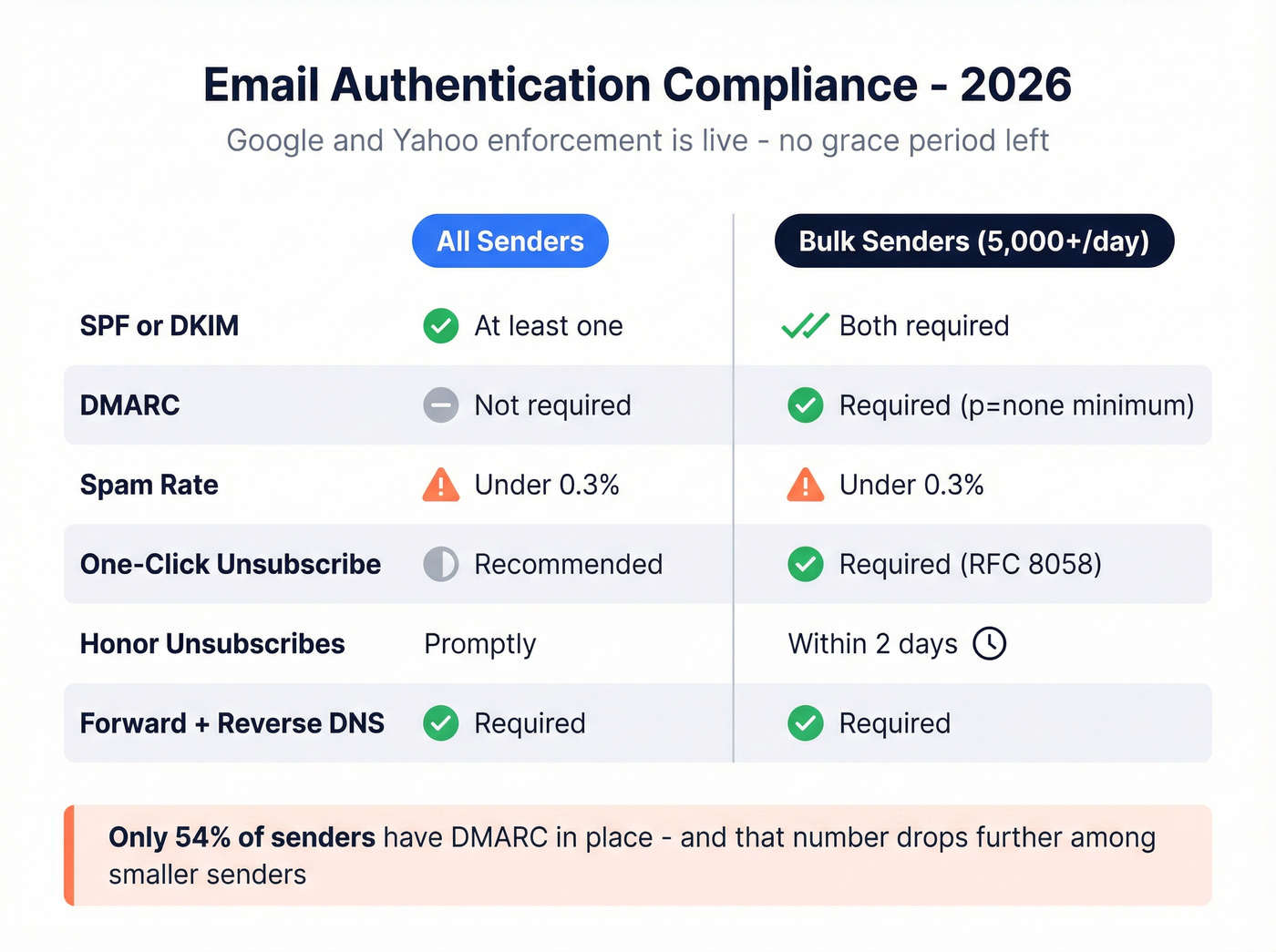
Here's what's required now:
| Requirement | All Senders | Bulk (5,000+/day) |
|---|---|---|
| SPF / DKIM | At least one | Both required |
| DMARC | Not required | Publish DMARC (p=none minimum), must pass |
| Spam rate | Under 0.3% | Under 0.3% |
| One-click unsub | Recommended | Required (RFC 8058) |
| Honor unsubs | Promptly | Within 2 days |
| Forward + reverse DNS (PTR) | Required | Required |
If you're sending more than 5,000 emails per day, your From: domain needs to align with your SPF or DKIM domain. There's no grace period left. Yahoo's sender best practices page spells it out plainly. (For cold outreach-specific setup, use SPF DKIM DMARC setup for cold email.)

Authentication won't save you if your data is dirty. Prospeo's 5-step verification catches spam traps, honeypots, and catch-all domains before they hit your sending queue - at $0.01/email with a 7-day refresh cycle.
Stop bounces before they wreck your sender score.
Sender Reputation Monitoring Tools
| Tool | What It Covers | Price |
|---|---|---|
| Google Postmaster | Gmail spam rate, reputation | Free |
| Microsoft SNDS | Outlook/Hotmail signals | Free |
| Yahoo Sender Hub | Yahoo performance | Free |
| Sender Score | IP reputation score | Free |
| Verification / Prevention | ||
| Prospeo | Email verification (98% accuracy), spam-trap and honeypot removal | ~$0.01/email, 75 free/mo |
| GlockApps | Inbox placement testing | From $59/mo |
| MxToolbox | Domain/IP monitoring | $129/mo |
| Validity Everest | Deliverability analytics | From ~$29/mo |
Set up Google Postmaster Tools, Microsoft SNDS, Yahoo Sender Hub, and Sender Score today. All free. That gives you visibility into Gmail, Outlook, Yahoo, and your IP score - covering the vast majority of B2B inboxes. (For a broader stack view, see email deliverability tracking.)
For verification, we've found that catching bad addresses before they enter your sending queue matters more than any post-send monitoring. Prospeo's 5-step process handles catch-all domains, spam traps, and honeypots, and its 7-day data refresh cycle keeps contact data current - which directly reduces the stale-address bounces that erode sender scores over time. (If you're comparing options, start with email ID validators.)
Mistakes That Destroy Reputation
Most reputation problems are data problems in disguise.
We've seen it over and over: a team buys a list or exports contacts from a stale CRM, sends a campaign, and watches their bounce rate spike past 5%. That single send can take weeks to recover from. It's not because mailbox providers "hate" you - it's because bounces, spam traps, and low engagement are exactly what spam filters are designed to catch. (If your CRM is the source of the mess, fix it with CRM hygiene.)

The other killers are volume spikes without warm-up, ignoring unsubscribes, and domain-hopping. That last one deserves emphasis: providers use fingerprinting - same content, same sending patterns, same recipient lists - and they'll flag a new domain just as fast.
Average inbox placement sits at 83.5% across the industry. If your data is dirty, you're losing far more. Stack Optimize maintains 94%+ deliverability, under 3% bounce rate, and zero domain flags across their clients by building on verified contact data. Snyk saw similar results: bounce rates dropped from 35-40% to under 5% after switching to verified data, which directly protected their sending domains.
Here's the thing: if your bounce rate is above 3%, no amount of warm-up strategy or authentication tweaking will save you. Fix the data first. Everything else is rearranging deck chairs. (If you're already in trouble, start with check if an email address is blacklisted.)
Warm-Up and Recovery
Whether you're warming a new domain or recovering a damaged one, the principle is the same: start small, prove engagement, scale gradually. (For the full playbook, see automated email warmup.)
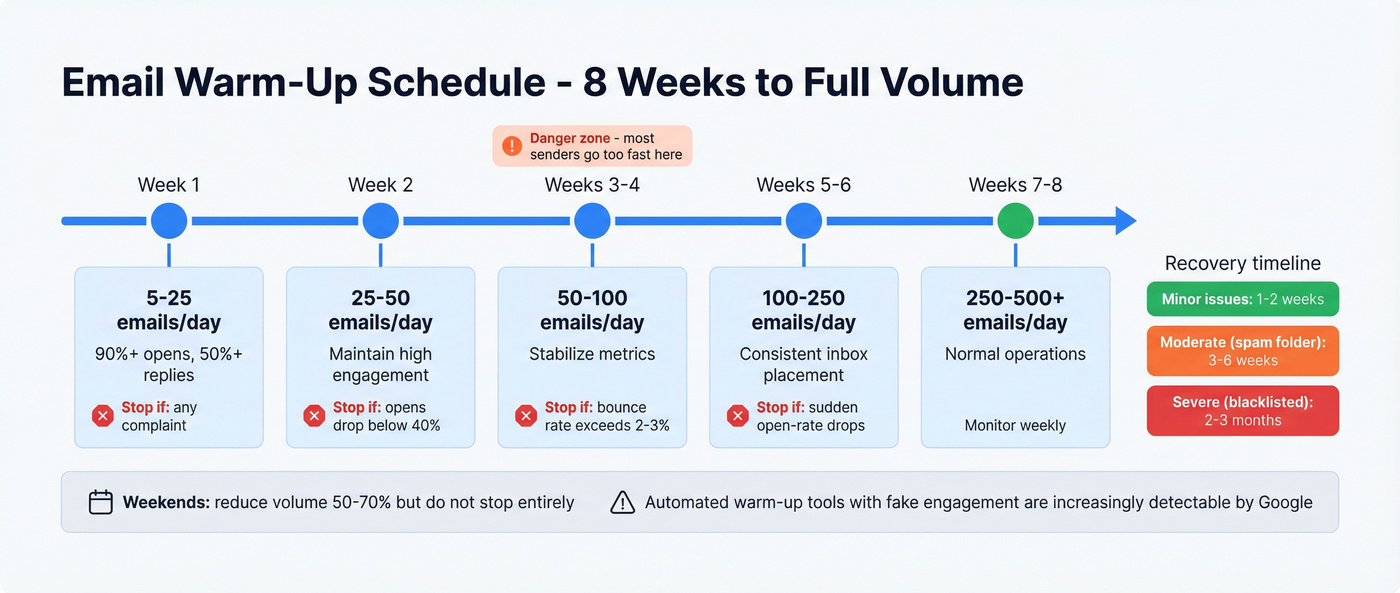
| Week | Daily Volume | Engagement Target | Stop If |
|---|---|---|---|
| 1 | 5-25 | 90%+ opens, 50%+ replies | Any complaint |
| 2 | 25-50 | Maintain high engagement | Opens drop below 40% |
| 3-4 | 50-100 | Stabilize | Bounce rate exceeds 2-3% |
| 5-6 | 100-250 | Consistent inbox placement | Sudden open-rate drops |
| 7-8 | 250-500+ | Normal operations | Monitor weekly |
The biggest warm-up mistake is going too fast in week 3. That's when most senders get impatient and blow their progress. On weekends, reduce volume by 50-70% but don't stop entirely - gaps in sending can reset your warm-up progress.
Recovery timelines depend on severity. Minor issues resolve in 1-2 weeks of clean sending. Moderate problems like consistent spam-folder placement at Gmail take 3-6 weeks. Severe damage - blacklisting, high complaints across multiple providers - takes 2-3 months. There are no shortcuts here, and anyone selling you one is lying.
Let's be honest about something the warm-up tool vendors won't tell you: automated warm-up services that send fake engagement signals are increasingly detectable. Google's anti-spam team has explicitly called out artificial engagement inflation. The only warm-up that sticks long-term is real engagement from real recipients who actually want your emails. Start with your most engaged contacts and expand outward.
Snyk cut bounce rates from 35-40% to under 5%. Stack Optimize holds 94%+ deliverability with zero domain flags. Both built on Prospeo's 98% accurate, verified contact data refreshed every 7 days - not the 6-week industry average.
Fix the data first. Everything else follows.
FAQ
How do I check my email sender reputation?
Start with Google Postmaster Tools for Gmail, Microsoft SNDS for Outlook, and Sender Score by Validity - all free. Together they cover spam rates, IP and domain reputation, and key deliverability signals across the two largest B2B inbox providers. GlockApps offers 2 free spam-test credits per month for inbox placement checks.
How long does it take to fix a damaged sender reputation?
Minor inbox-placement dips recover in 1-2 weeks of clean, engaged sending. Consistent spam-folder delivery at one provider takes 3-6 weeks. Severe damage from blacklisting or high complaints across multiple providers requires 2-3 months of disciplined warm-up with gradually increasing volume. Skip this timeline if someone promises a faster fix - it doesn't exist.
Can bad contact data hurt my domain reputation?
Yes, and it's one of the fastest ways to damage it. Hard bounces and spam-trap hits from unverified addresses signal to mailbox providers that you don't maintain your list. Verification tools that include catch-all handling and spam-trap removal - like Prospeo, NeverBounce, or ZeroBounce - catch bad addresses before they enter your sending queue. In our experience, teams that verify before every send keep bounce rates under 2% consistently.
What's the difference between IP and domain reputation?
Domain reputation is tied to your sending domain and follows you across ESPs and IP changes - it's the more persistent signal in 2026. IP reputation matters mainly on dedicated IPs. For teams on shared infrastructure, focus on domain-level hygiene: authentication, low bounce rates, and consistent engagement. The consensus on r/sales and r/coldemail is that domain reputation is what actually makes or breaks your deliverability now, and we agree.