

How to Check If an Email Address Is Blacklisted - And What to Do About It
You just found your IP on UCEPROTECT and you're panicking. Stop. That listing rarely matters for deliverability - and your email address isn't even what gets blacklisted. Your sending IP and domain are. That distinction trips up most people and sends them down the wrong troubleshooting path entirely.
Here's what to do right now:
- Check - Run your sending IP and domain through MXToolbox. It's free and covers 100+ blacklists.
- Triage - Spamhaus is the most urgent. Barracuda is also high-impact for many B2B stacks. Most other blacklists are lower priority.
- Prevent - Fix authentication (SPF/DKIM/DMARC) and stop sending to unverified emails.
That's the 30-second version. The rest of this guide covers the nuance that actually keeps you out of trouble.
What Actually Gets Blacklisted
Two things get listed on blocklists: IP addresses and domains. They work differently, and you need to check both. You'll also see these called "blocklists" or "denylists" in newer documentation - same thing, updated terminology.
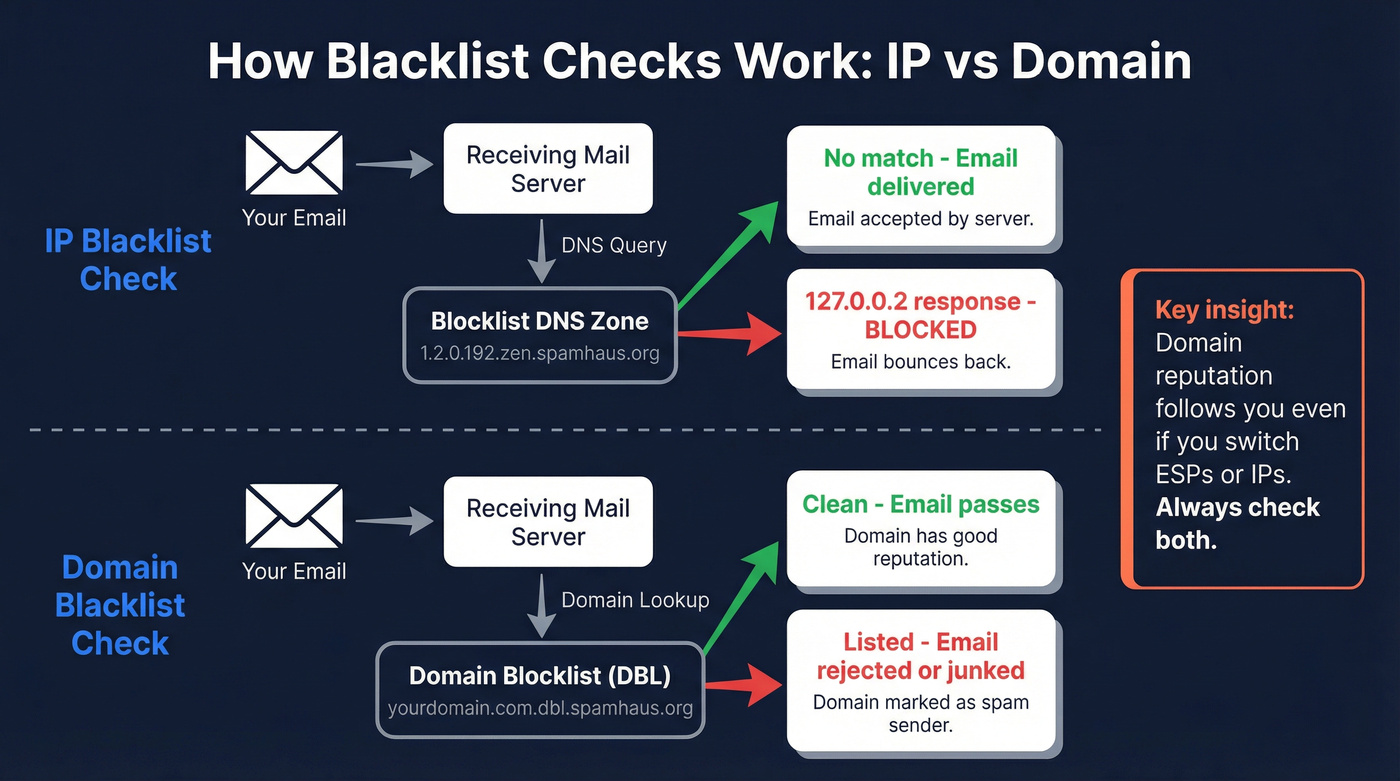
IP blocklists track the sending server's IP address. If your mail server or ESP sends from a flagged IP, everything leaving that server gets affected - your marketing campaigns, your transactional emails, your cold outreach. Doesn't matter how clean your content is.
Domain blocklists track the domain names used in spam, both sending domains and domains in links. This is the sneaky one. Domain reputation travels with you even if you switch sending infrastructure. Move to a new ESP but keep the same domain, and the listing follows.
Under the hood, these blocklists use DNS-based queries. When a receiving mail server wants to check your IP, it reverses the octets and queries the blocklist's DNS zone - so 192.0.2.1 becomes 1.2.0.192.zen.spamhaus.org. A response like 127.0.0.2 means you're listed. This happens in milliseconds, on every inbound email, before the recipient ever sees a thing.
Either listing type can independently tank your deliverability. Gmail and Microsoft also run their own internal filtering on top of public blacklists, so even if you're clean on every public list, their algorithms might still throttle you. Check both IP and domain. Always.
Why Email Blacklisting Matters
Global inbox placement averages about 84% - roughly one in six emails never reaches the inbox even under normal conditions. Gmail sits at 87.2% inbox placement; Microsoft is lower at 75.6%. Those are baseline numbers for senders in good standing.
Now add a blacklist hit. A Spamhaus listing alone can push your bounce rate above 50%, according to Adobe's deliverability team. A major blocklist listing can cut deliverability by up to 90% within hours. That's not a gradual decline - it's a cliff.
For B2B senders running outbound sequences, this means your pipeline dries up overnight. Reps keep sending, bounces pile up, and the problem compounds. We've seen teams that don't catch a listing quickly spend weeks digging out of the reputation hole. If you've watched reply rates crater and wondered whether you're blacklisted, this is likely what's happening.
How to Run an Email Blacklist Check
Don't rely on a single tool. Different checkers cover different lists, and no single service monitors everything. Run your sending IP and domain through at least two of these:
| Tool | Best For | Coverage | Cost |
|---|---|---|---|
| MXToolbox | Broadest first check | 100+ blacklists | Free (manual) |
| Spamhaus Lookup | Authoritative check | Spamhaus lists | Free |
| HetrixTools | Automated monitoring | Dozens of blacklists | Free tier |
| DNS Checker | Quick multi-check | Multiple lists | Free |
| ZeroBounce | Deep coverage | Multiple lists | Free check |
| CleanTalk | Spam activity context | Spam activity DB | Free |

To find your sending IP, check your email headers. Most ESPs show this in settings, but you can also send a test email to Gmail, open it, click "Show Original," and look for the originating IP. Enter that IP into MXToolbox, then enter your domain separately. Run both checks.
Here's the thing: a sudden open-rate drop - say, 30% down to 5% - is often the first sign of a deliverability hit. If you see that pattern, run a blocklist lookup before you start rewriting subject lines or blaming your sequencer. If you want a broader framework, use an email deliverability checklist to rule out the usual culprits.

Most blacklist hits trace back to one thing: sending to unverified emails. Prospeo's 5-step verification and 98% email accuracy keep bounce rates below the thresholds that trigger blocklists in the first place.
Stop fixing blacklist damage. Start preventing it with verified data.
Which Blacklists Actually Matter
There are thousands of blacklists. Most are irrelevant. Here's how to prioritize:
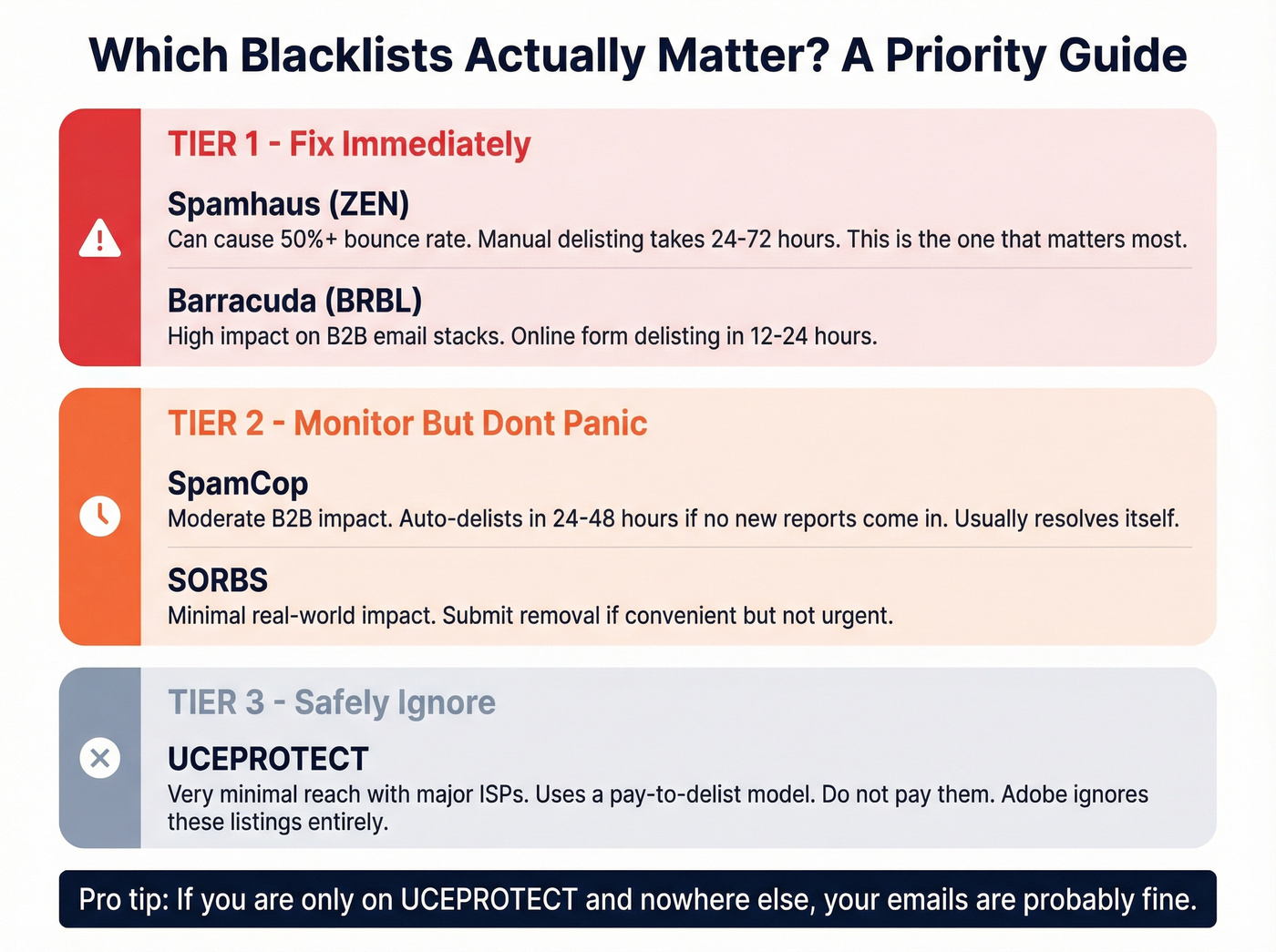
| Tier | Blacklist | Impact | Delisting | Action |
|---|---|---|---|---|
| Tier 1 | Spamhaus (ZEN) | Severe - 50%+ bounces | Manual, 24-72h | Fix cause, submit removal |
| Tier 1 | Barracuda (BRBL) | High - B2B filters | Online form, 12-24h | Submit removal request |
| Tier 2 | SpamCop | Moderate - B2B impact | Auto-delists 24-48h | Stop triggers; auto-resolves |
| Tier 3 | SORBS | Minimal | Can take weeks | Submit if convenient |
| Ignore | UCEPROTECT | Very minimal | Pay-to-delist | Do nothing |
A note on Spamhaus: ZEN is an aggregate that combines SBL, XBL, PBL, and CSS into a single lookup. If a tool reports a "ZEN" listing, dig into which sub-list flagged you. SBL means your IP was directly reported, while XBL usually means a compromised machine on your network.
Let's be direct about UCEPROTECT. It has limited reach with major ISPs, and Adobe's deliverability team ignores UCEPROTECT listings entirely. It also operates a pay-to-delist model - they charge you money to remove a listing that often isn't affecting your email delivery at all. If you're listed on UCEPROTECT and nowhere else, your emails are usually fine. Don't pay them a cent.
If you're closing deals under $10k and running cold outbound, a Spamhaus listing is the main one worth losing sleep over. Everything else either auto-resolves or doesn't move the needle much. If you need a faster response plan, follow a dedicated blacklist alert triage flow.
When you're diagnosing, check your bounce logs for SMTP error codes. Messages like 554 IP blacklisted or 550 Rejected due to sender reputation are direct signals that a blocklist or reputation issue is at play. These codes tell you more than any open-rate dashboard. If bounces are spiking, it helps to understand what a hard bounce actually means operationally.
How to Get Delisted
Here's the remediation sequence that actually works:
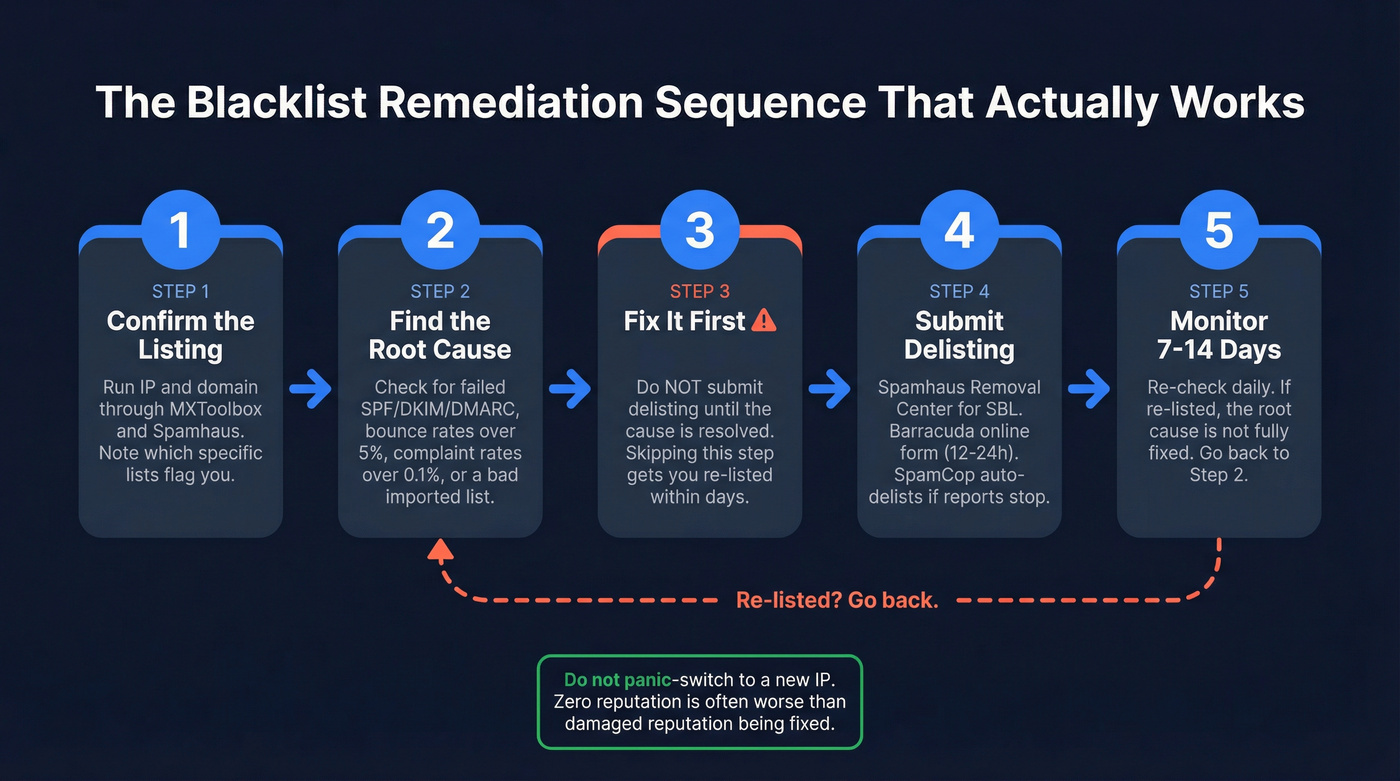
1. Confirm the listing. Run checks on both IP and domain. Note which specific blacklists flag you - the fix differs for each.
2. Identify the root cause. Look for failed SPF/DKIM/DMARC authentication, bounce rates above 5%, spam complaint rates above 0.1%, a compromised sending account, or a purchased/scraped email list you recently imported.
3. Fix the root cause first. This is where most people get it wrong. They rush to submit a delisting request without fixing the underlying problem. We've watched teams get re-listed three times in two weeks because they skipped this step. Every single time.
4. Submit delisting requests. Spamhaus has a Blocklist Removal Center - follow their process carefully. Barracuda offers an online form and often processes within 12-24 hours. SpamCop auto-delists within 24-48 hours if no new reports come in, so you may not need to do anything there.
5. Monitor for 7-14 days. Re-check daily. If you're re-listed, the root cause isn't fully resolved.
Don't panic-switch to a new IP or domain. A fresh IP has zero reputation, which is often worse than a damaged one that's being rehabilitated. Fix the problem where you are. If you're debating infrastructure changes, read up on dedicated IP vs shared IP before you move anything.
And if your checks come back clean but emails still land in spam? The problem is likely authentication, content filtering, or list quality - not a blacklist. Gmail and Microsoft's internal algorithms are doing the blocking, and no public delisting request will fix that. In that case, start with a full email deliverability guide to isolate the real bottleneck.
How to Prevent Getting Blacklisted
Prevention comes down to two things: authentication and data quality. Get both right and you'll almost never see a blacklist hit. For a deeper prevention playbook, see how to prevent email blacklisting.
Authentication
SPF - Publish a TXT record that authorizes your sending servers. Example:
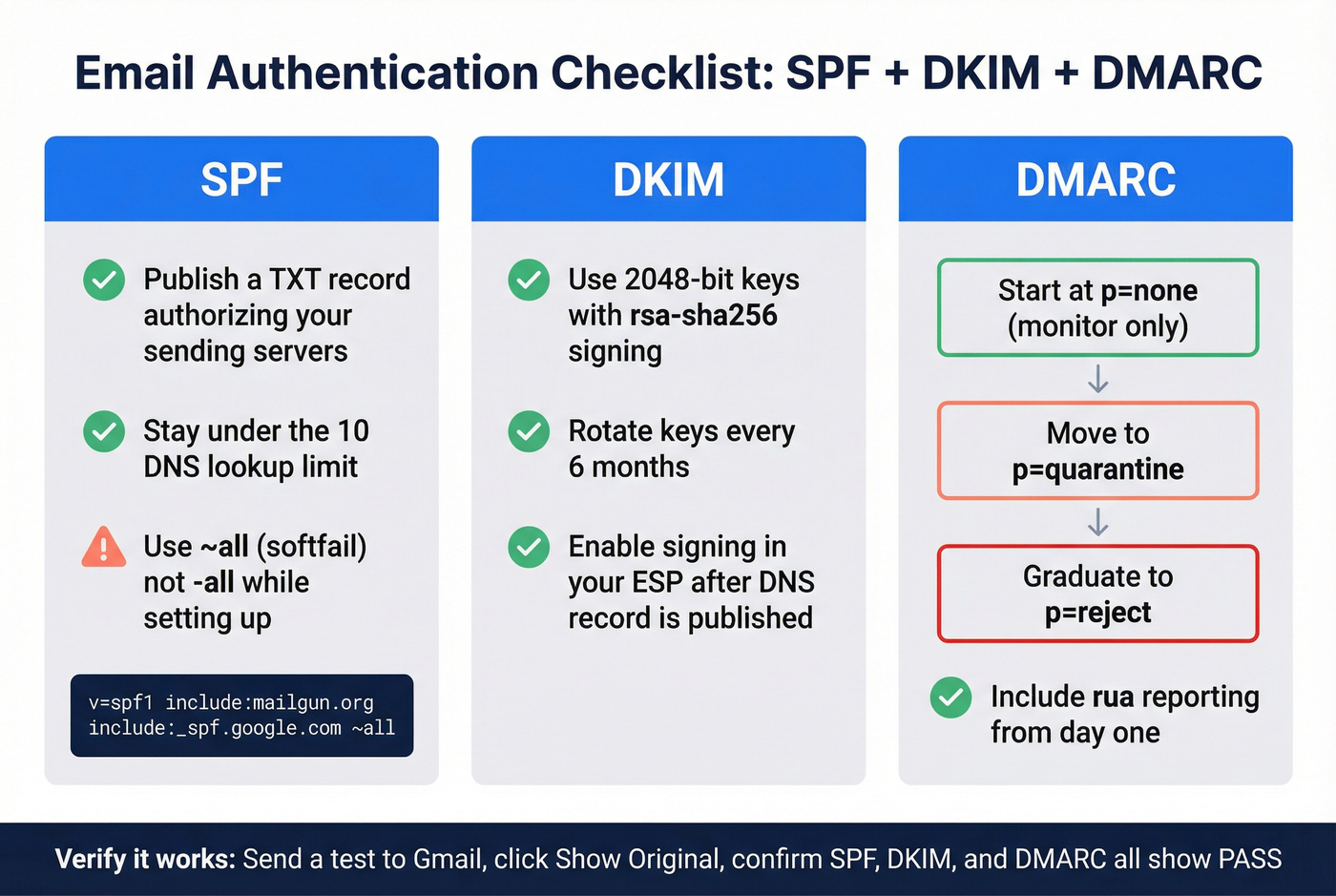
v=spf1 include:mailgun.org include:_spf.google.com ~all
Stay under the 10 DNS lookup limit. This example uses ~all (softfail) rather than -all (hardfail) - a hard fail can cause receiving servers to reject at SMTP time before DKIM and DMARC even get evaluated. Softfail gives you a safety net while you're getting alignment right.
DKIM - Use 2048-bit keys with rsa-sha256 signing. Rotate keys every six months. Enable signing in your ESP after publishing the DNS record.
DMARC - Start at p=none to monitor alignment without blocking anything. Progress to quarantine, then reject once you're confident everything's aligned. Include rua reporting from day one so you can see what's failing. If you want the full setup walkthrough, use our SPF, DKIM, DMARC guide.
Verify it works - Send a test email to Gmail, click "Show Original," and confirm SPF, DKIM, and DMARC all show PASS. If any show FAIL, fix it before you send another campaign.
Data Quality
Authentication stops impersonation. But the number-one preventable cause of blacklisting for B2B senders is simpler: sending to bad email addresses.

The pipeline looks like this: unverified list, high bounce rate, spam trap hits, blacklist listing. We've seen this pattern destroy sender reputations in days, not weeks. A purchased list doesn't just bounce - it can hit spam traps and honeypots that blacklist operators specifically plant to catch senders who don't verify. The consensus on r/coldoutreach and r/sales is pretty clear: if you're buying lists without verification, it's a matter of when you get blacklisted, not if. If you're building a verification workflow, start with an email validity check and compare options in our email ID validators roundup.
Prospeo's 5-step verification process eliminates this root cause before you hit send. Catch-all handling, spam-trap removal, and honeypot filtering are built into every record. 98% email accuracy with a 7-day data refresh cycle means the data doesn't go stale between when you pull it and when you send. One of our customers, Stack Optimize, maintains 94%+ deliverability and under 3% bounce rates across all their clients - with zero domain flags. If bad data got you blacklisted, fix the source, not just the symptom.
Bad data compounds fast - bounces spike, complaints rise, and suddenly you're on Spamhaus. Prospeo refreshes 300M+ profiles every 7 days, so you never send to stale addresses that wreck your sender reputation.
Clean data at $0.01/email is cheaper than digging out of a blacklist.
FAQ
Is my email address blacklisted, or is it something else?
Blacklists target sending IP addresses and domains, not individual addresses like john@company.com. Run your server's IP and domain through MXToolbox to confirm whether you're on a blocklist or dealing with a separate reputation issue like poor engagement signals.
How do I check if I'm on an email blacklist?
Use at least two lookup tools. Start with MXToolbox for broad coverage across 100+ lists, then run a dedicated check at Spamhaus for the highest-impact blocklist. Enter both your sending IP and your domain - a clean IP doesn't guarantee your domain is clear. HetrixTools offers free automated monitoring for ongoing alerts.
How long does blacklist removal take?
Barracuda often delists within 12-24 hours after you submit their online form. Spamhaus typically clears in 24-72 hours once you've submitted a removal request and fixed the root cause. SpamCop auto-delists within 24-48 hours if no new spam reports come in - no action required on your end.
Can emails land in spam even without a public blacklist hit?
Yes. Gmail and Microsoft maintain internal reputation systems independent of public blocklists. If every public list comes back clean but messages still hit spam, focus on SPF/DKIM/DMARC alignment, engagement signals, and list hygiene. Spam traps are one of the most common internal-filter triggers, and they're invisible in your bounce logs.
How do I stop getting blacklisted again?
Set up SPF, DKIM, and DMARC authentication and keep your spam complaint rate below 0.1%. Verify every email address before sending - filtering out spam traps and honeypots eliminates the most common blacklisting trigger for B2B senders. Use automated monitoring tools like HetrixTools to catch new listings early, and re-verify any list that's more than 30 days old.