How to Build a Prospecting Email Sequence That Gets Replies in 2026
Your team sent 5,000 emails last month and booked three meetings. Three. The prospecting email sequence that worked eighteen months ago - the seven-step drip with the clever subject lines and the Calendly link in email four - is dead. Reply rates have dropped from 8.5% to under 5% since 2019, and the decline is accelerating.
Here's what actually works now: tighter targeting, cleaner infrastructure, and fewer, sharper touches.
What You Need (Quick Version)
If you're short on time, these three principles will get you 80% of the way:
- Shorter sequences win. Three emails capture 90%+ of your replies. Every email after that spikes spam complaints and drags down domain reputation. The era of the eight-step drip is over.
- Deliverability is the new copywriting. SPF, DKIM, DMARC, verified emails, and proper warmup matter more than your subject line. A perfectly written email that lands in spam is worth exactly nothing.
- Multi-channel is non-negotiable. Email plus phone plus social produces 2-3X the reply rate of email alone. If your "sequence" is just emails, you don't have a sequence - you have a newsletter nobody signed up for.
One more rule I'll die on: verify every email before it enters your sequence. One dirty list can torch a domain you spent weeks warming up.
Why Your Sequences Stopped Working
The numbers tell a brutal story. Backlinko's outreach data pegged the average cold email response rate at 8.5% in 2019. By 2023, it had dropped to 7%. In 2025, it fell to 5%. And Belkins, analyzing 16.5M emails sent through campaigns in 2024, saw a 15% year-over-year decline - from 6.8% to 5.8%.

That's not a blip. That's the new baseline.
Three things happened at once:
- Google and Yahoo started enforcing bulk-sender rules in 2024, with Microsoft following in May 2025. If you don't have SPF, DKIM, DMARC, and one-click unsubscribe, you get filtered or blocked.
- Every SDR team started using AI at the same time, flooding inboxes with emails that all sound like the same intern wrote them.
- Buyers got numb. They can smell a template from the subject line.
Practically: 5,000 cold emails at a 5% reply rate is 250 replies. But only 30-50% of positive replies convert to meetings. And that's assuming you're landing in the inbox. If you're not, cut that in half.
Platform-wide data from Outreach tells the same story: 27.2% open rate, 2.9% reply rate, 2.8% bounce rate. Those are averages across thousands of teams - including the ones doing everything right.
The teams still booking meetings aren't "better writers." They run better infrastructure, target fewer prospects more precisely, and treat deliverability like oxygen.
2026 Cold Email Benchmarks You Should Actually Trust
Most benchmark posts throw numbers around without context. A "good" reply rate depends on what you're sending, who you're sending to, and whether your emails reach the inbox.
Reply Rate, Open Rate, and Bounce Rate by Sequence Type
The 16.5M-email analysis is the best benchmark set we have for cold outbound at scale. Its 2024 numbers: 5.8% average reply rate, and the best opens came from emails in the 6-8 sentence range.
Instantly's B2B benchmarks put a healthy range at 5-10%, with top performers hitting 15%+ on tightly targeted campaigns. Below 1% is a deliverability or targeting problem, not a "rewrite the template" problem.
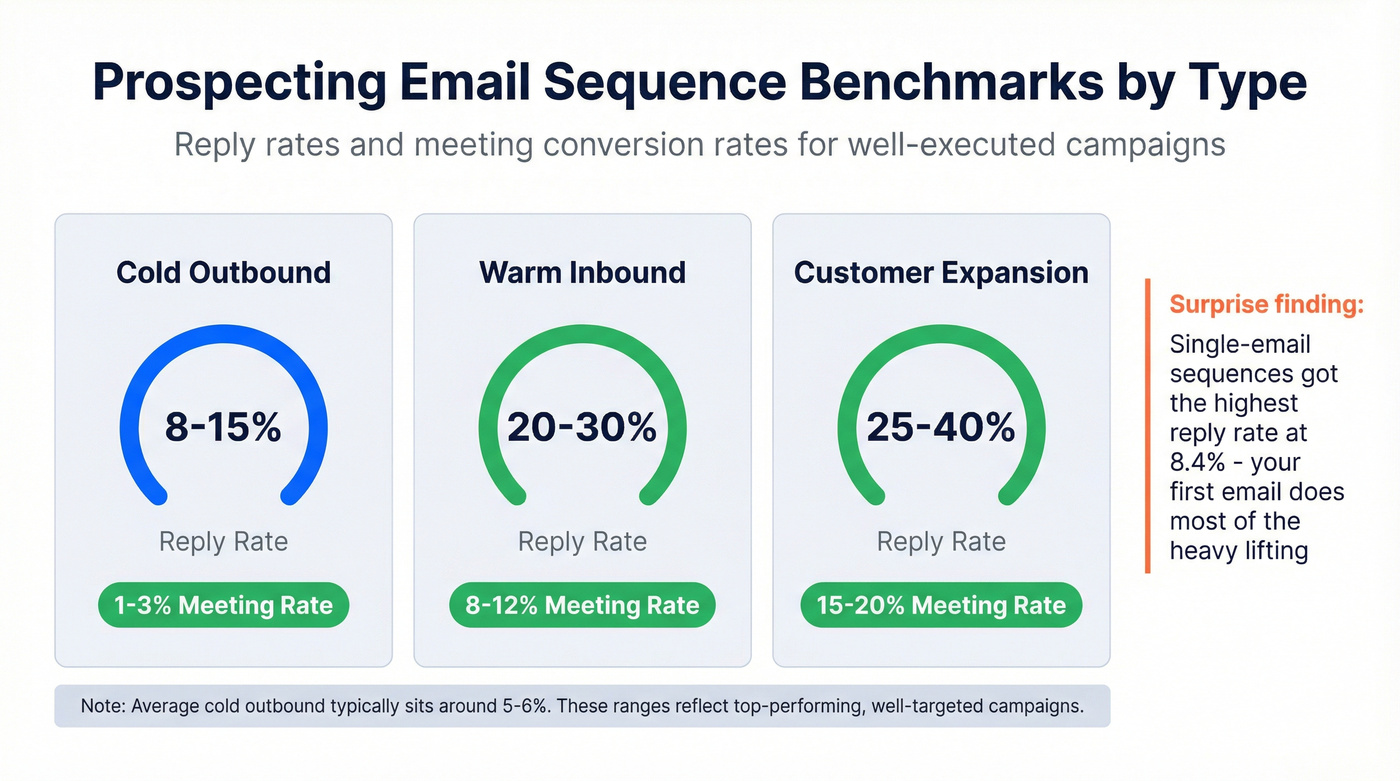
Here's how benchmarks break down by sequence type:
| Sequence Type | Reply Rate | Meeting Rate |
|---|---|---|
| Cold outbound | 8-15% | 1-3% |
| Warm inbound | 20-30% | 8-12% |
| Customer expansion | 25-40% | 15-20% |
These ranges reflect well-executed campaigns. Average cold outbound reply rates typically sit around 5-6%.
One data point that surprised me: one-touch sequences (a single email, no follow-ups) got the highest reply rate at 8.4%. That doesn't mean "never follow up." It means the first email does most of the work - and every extra step has to earn its keep.
Benchmarks by Industry and Geography
Industry and geography swing results hard:
| Segment | Reply Rate |
|---|---|
| Technology | 7.8% |
| Healthcare | 5.2% |
| North America | 4.1% |
| Europe | 3.1% |
Europe's lower rate is cultural as much as regulatory. If you're prospecting into EMEA, stop expecting North America numbers and lean harder into warm intros and social touches.

This article proves it: bounce rates above 5% torch your domain. Meritt cut theirs from 35% to under 4% with Prospeo's 98% verified emails - and tripled pipeline to $300K/week. Every email in your sequence deserves data refreshed every 7 days, not the 6-week-old lists other providers sell you.
Stop warming up domains just to burn them with bad data.
Pre-Sequence Setup - The Step Every Guide Skips
Most guides on building a prospecting email sequence jump straight to templates. That's like tuning a guitar you haven't plugged in.
Domain and Authentication Setup
Never send cold email from your main corporate domain. Full stop. If your company is acme.com, cold outreach should come from something like getacme.com or tryacme.com. One bad campaign can drag your primary domain's reputation down for months.

For every sending domain, configure these before a single email goes out:
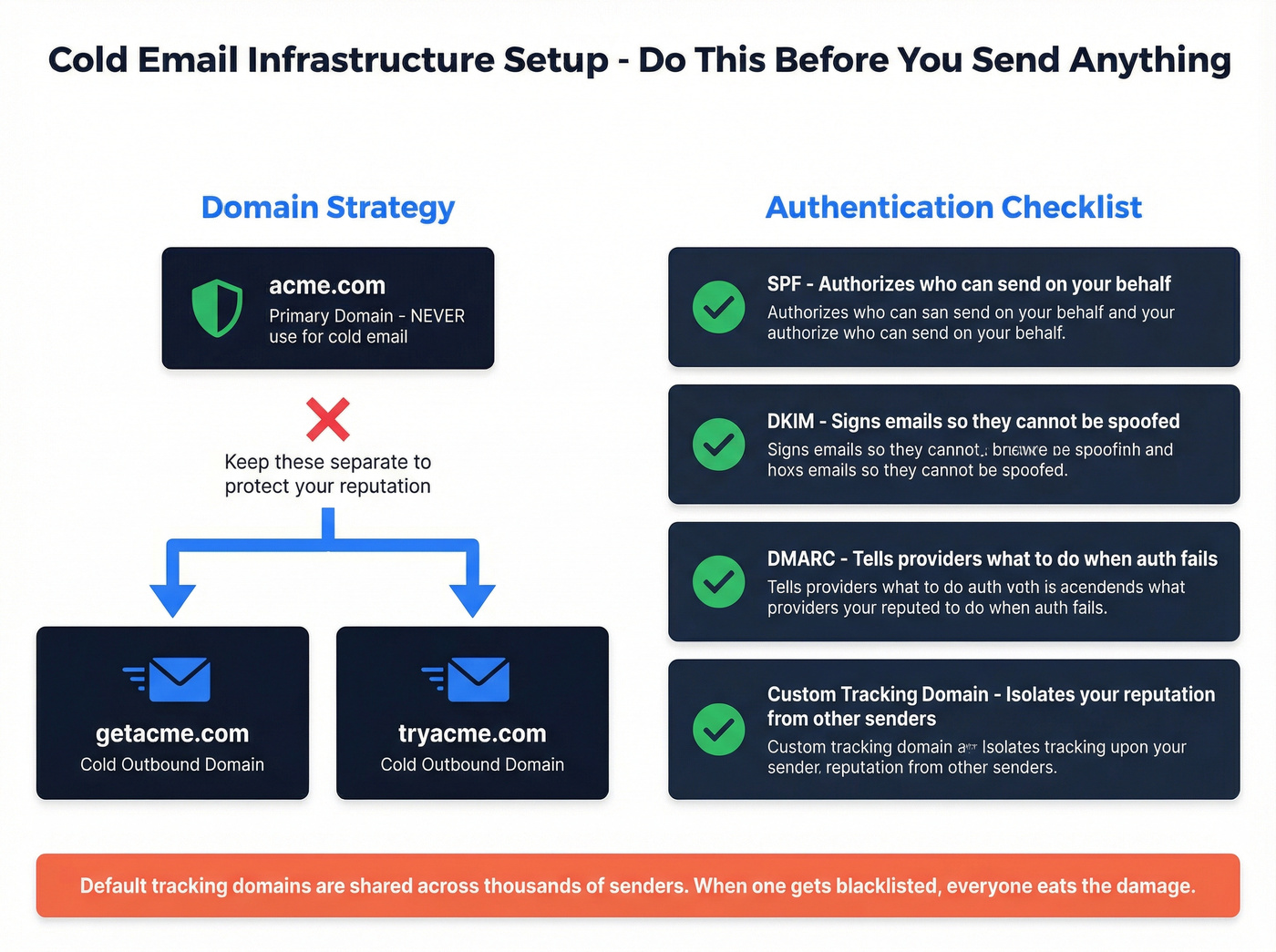
- SPF - authorizes who can send on your behalf
- DKIM - signs your emails so they can't be spoofed
- DMARC - tells inbox providers what to do when SPF/DKIM fail
Also: set up a custom tracking domain. Default tracking domains from cold email tools are shared across thousands of senders. When one sender gets blacklisted, everyone eats the damage. Your own tracking domain isolates your reputation.
Warmup Schedule and Sending Limits
New domains need to earn trust before they can send at volume. Use this ramp:
| Week | Daily Volume | Notes |
|---|---|---|
| Week 1 | 10-20/day | Mix of warmup + a few real sends |
| Week 2 | 20-40/day | Watch bounce + spam complaint signals |
| Week 3 | 40-60/day | Check blacklists + inbox placement |
| Week 4 | 60-80/day | Steady state for most teams |
Safe sending limits for mature domains: 100-150 emails/day on Google Workspace or Microsoft 365. Yes, the technical caps are higher, but pushing anywhere near them gets you flagged.
If you need serious volume, spread it across multiple domains and inboxes. A lot of practitioners are also moving to private sending infrastructure (Maildoso and similar) to avoid shared-IP problems from centralized resellers.
Skipping warmup is the cardinal sin of cold email. I've watched teams buy a fresh domain on Monday, blast 500 emails on Tuesday, and get blacklisted by Thursday. Don't be that team.
Verify Your List Before You Send a Single Email
This is where most sequences quietly die. You build a list, write good copy, warm up your domain - and then 8% of your emails bounce because the data is stale.
Google's spam complaint threshold is 0.1%. Their hard ceiling is 0.3%. A bounce rate above 5% risks serious domain damage.
Email lists decay constantly as people change jobs and inboxes get abandoned. If you haven't verified a list in the last 90 days, assume 20-30% of it has gone bad.
The proof is in the results: Meritt cut bounce rate from 35% to under 4% and tripled pipeline from $100K to $300K per week after implementing verification. Stack Optimize built an agency from $0 to $1M ARR by maintaining 94%+ deliverability and zero domain flags across clients. The common thread is boring and unbeatable: verify before every send.

Target a hard bounce rate under 0.5%. That's the line where domain reputation stays healthy and inbox placement stays high. Anything above 2% and you're actively damaging your sending infrastructure.
You just read that reply rates dropped to 5%. The fix isn't more emails - it's reaching the right people at verified addresses. Prospeo gives you 300M+ profiles with 30+ filters like buyer intent and job changes, so your 3-email sequence lands with prospects who actually care.
Send fewer emails. Book more meetings. Start with better data.
How to Structure Your Sales Prospecting Sequence (Day-by-Day Templates)
Sequence structure beats clever copy. Cadence and channel mix decide whether you get replies - or spam complaints.
The 3-Step Cold Email Sequence (SMB and Mid-Market)
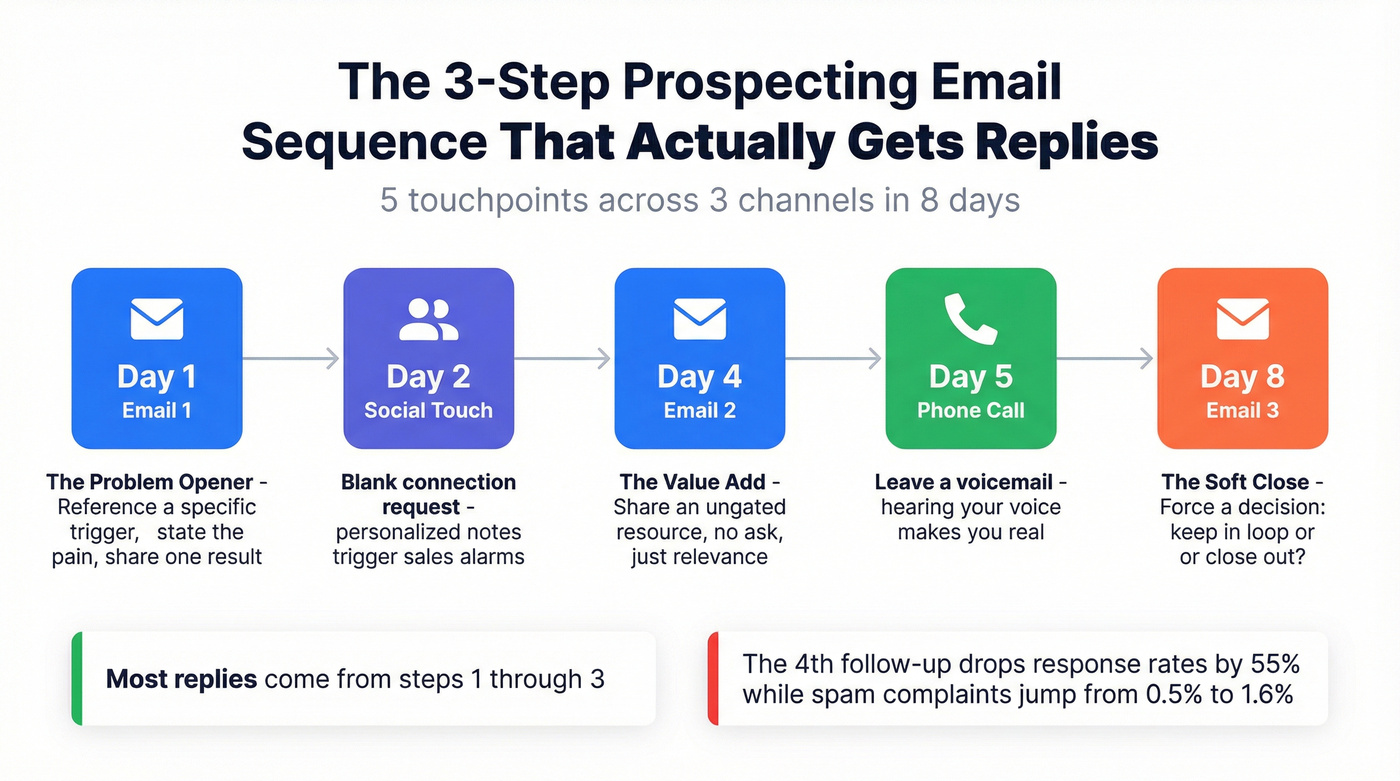
Three steps is the sweet spot for SMB and mid-market in 2026. Most replies come from steps one through three, and the drop-off after that is steep. In the 16.5M-email dataset, the fourth follow-up dropped response rates by 55% while spam complaints climbed from 0.5% on the first email to 1.6% by the fourth.
Here's the template:
Day 1 - Email 1: The Problem Opener
Subject: [Their company]'s [specific challenge]
Hi [First Name],
[One sentence referencing a specific trigger - new hire, funding round, tech stack change]. Most [their role] at [company size] companies are dealing with [specific problem you solve].
We helped [comparable company] [specific result with numbers] in [timeframe].
Worth a quick look?
[Your name]
Day 2 - Social Touch: Connect on their professional profile. Send a blank connection request. Personalized ones often trigger sales alarms.
Day 4 - Email 2: The Value Add
Subject: Re: [same thread]
[First Name] - sharing this because it's relevant to what [their company] is doing.
[Link to ungated resource - case study, benchmark, or article about their vertical]
No strings. Thought you'd find it useful.
Day 5 - Phone Call: Leave a voicemail if no answer. Hearing your voice makes you real.
Day 8 - Email 3: The Soft Close
Subject: Re: [same thread]
Hey [First Name] - quick check: is [problem from email 1] still on your radar?
If timing's off, no worries. If it's worth a 10-minute conversation, I'm easy to reach.
Either way - should I keep you in the loop or close this out?
That last email works because it forces a decision.
The Enterprise Sequence (10-18 Touches Over 30-60 Days)
Enterprise deals need patience and more channels. Plan for 10-18 touchpoints over 30-60 days, with 5-9 emails max. The difference from SMB: you sell one problem at a time in "theme blocks," and you rotate channels so you don't burn any single one out.

Theme Block 1 (Days 1-10): Primary Problem
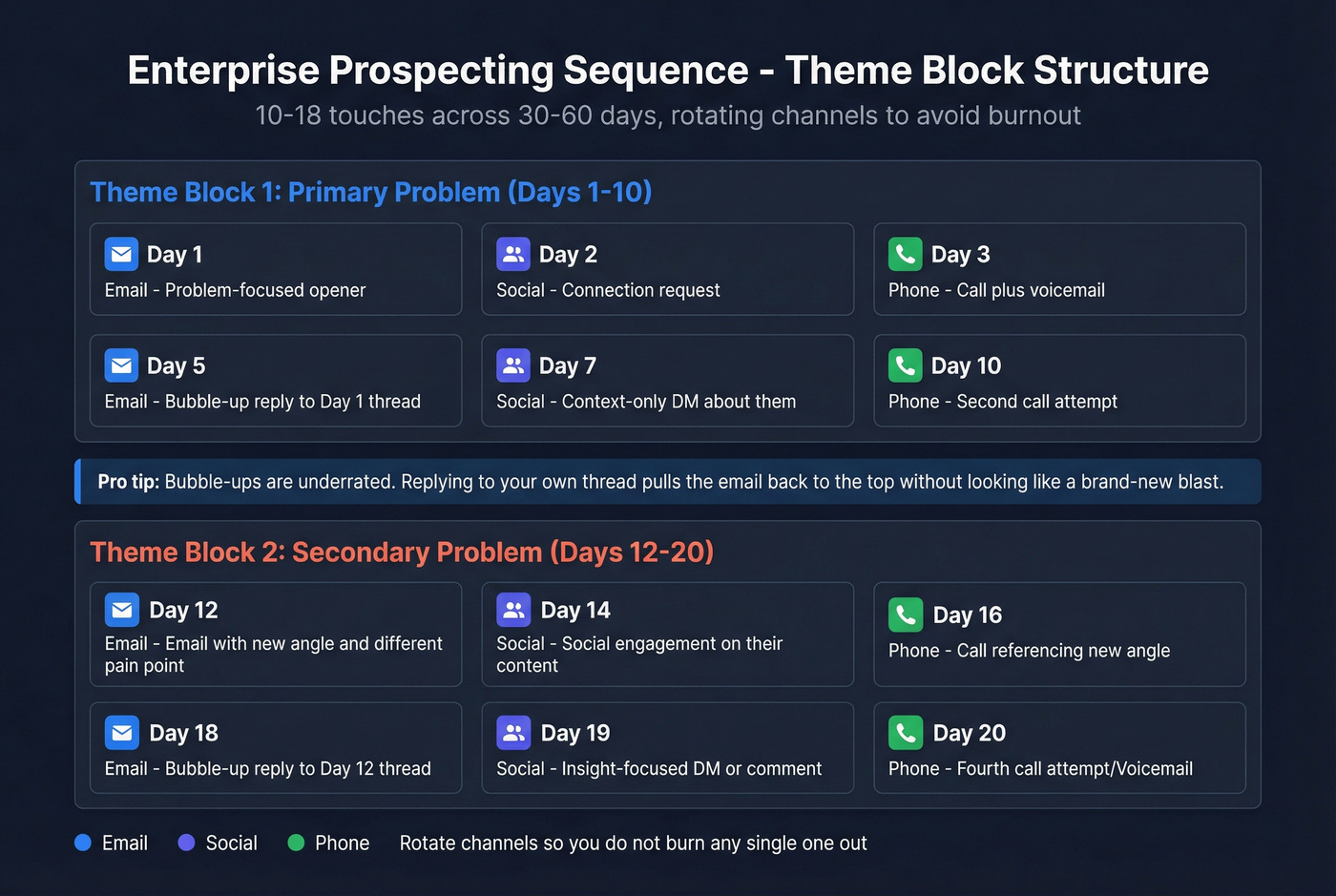
| Day | Channel | Action |
|---|---|---|
| 1 | Problem-focused opener | |
| 2 | Social | Connection request |
| 3 | Phone | Call + voicemail |
| 5 | "Bubble-up" reply to Day 1 thread ("Any thoughts?") | |
| 7 | Social | Context-only DM about them |
| 10 | Phone | Second call attempt |
Bubble-ups are underrated. Replying to your own thread pulls the email back to the top without looking like a brand-new blast.
Theme Block 2 (Days 12-20): Secondary Problem (New Subject Line)
| Day | Channel | Action |
|---|---|---|
| 12 | New angle (different pain, different proof) | |
| 14 | Phone | Call attempt |
| 16 | Value add (benchmark, teardown, short Loom) | |
| 18 | Social | Light touch (comment/like, no pitch) |
| 20 | Phone | Final call in this block |
Theme Block 3 (Days 22-30): The Close
- Day 22: Email with a tight case study (3-5 sentences, numbers only)
- Day 25: Bubble-up ("Should I send details or close this out?")
- Day 30: Break-up email ("I'll pause and circle back in 30 days - unless this is worth a quick conversation.")
Here's the thing: most "enterprise sequences" fail because they try to sell the whole platform in email one. Pick one painful, measurable problem and win that conversation first.
When to Add More Steps (and When to Stop)
Diminishing returns are real. Roughly 60% of replies come after the first follow-up. After that, returns drop fast while complaints rise.
Use the 3% rule:
- If the reply rate on your last step is over 3%, your sequence is too short - add another step.
- If it's under 3%, stop. You're buying marginal replies with deliverability damage.
For most teams, that lands at three emails for SMB, five to seven for mid-market, and up to nine for enterprise - always supported by phone and social.
Writing Emails That Get Replies
Once your infrastructure is solid and your structure is set, copy matters. But it's not the first domino.
Subject Lines That Get Opened
64% of people decide to open an email based on the subject line alone.
What consistently works:
- Subject lines with both first and last name: 33% open rate. Last name only: 17%. First name only: 9%.
- Numbers in subject lines: 45% higher open rates.
- Question format: 10% higher open rates.
- Optimal word count: 3, 7, or 8 words (all hit 33% open rates).
- Uppercase subject lines: 35% open rate vs 24% for sentence case.
The biggest gap is generic vs specific. "Quick question" and "Following up" pull 21-28% open rates. Problem-focused subject lines like "The $400K retention gap" hit 38-52%.
Turn off open tracking. An analysis across 44M emails showed reply rates more than doubled with tracking off (2.36% vs 1.08%). The pixel isn't worth it. Kill it.
Email Body - The 3x3 Structure
The cleanest cold email structure I've used is the 3x3:
- Personalization tied to a problem (one sentence)
- One-sentence solution (what you do + outcome)
- Interest-based CTA (a question, not a demand)
That's it.
Length matters too. Emails under 200 words beat longer ones. The sweet spot is 50-125 words, and 6-8 sentence emails performed best in the 16.5M-email dataset.
Before (generic):
Hi Sarah, I'm reaching out because we help companies like yours improve their marketing ROI. We've worked with many businesses in your industry. Would you be open to a quick call to discuss how we can help?
After (specific):
Hi Sarah - noticed [Company] just expanded into the DACH market. When Brex made a similar move, CAC spiked 40% before they localized demand gen. We helped them cut it back to baseline in 11 weeks. Worth comparing notes?
One more, different use case (ops/finance):
Before (feature dump):
Hi Tom, we offer an automated invoicing platform with approvals, reminders, and reporting. Can I show you a demo this week?
After (pain + proof):
Tom - saw you're hiring for AR and adding new entities. That's usually when "invoicing" turns into "chasing money." We helped a 200-person services firm cut DSO by 12 days in one quarter. Is reducing DSO a priority this quarter?
CTAs That Actually Convert
Single-CTA emails generate 371% more clicks than emails with multiple CTAs. One email, one ask.
Question CTAs beat statement CTAs because they feel like a conversation:
- "Worth a quick look?"
- "Should I send details?"
- "Is this on your radar, or bad timing?"
- "Open to a 10-minute conversation about [specific problem]?"
Skip the Calendly link in the first email. It screams "commit 30 minutes to a stranger." Earn the reply first, then schedule.
Personalization at Scale
Personalization is the biggest lever for reply rates - and the easiest way to waste your team's time if you do it wrong.
The Signals That Actually Matter
Hyper-personalized emails tied to real business challenges can jump from low single-digit replies to high teens fast. Some teams running tightly targeted campaigns with deep personalization report 40-60% reply rates. That's aggressive, but the direction is absolutely right: relevance beats cleverness every time.
Also: who you target changes everything. Directors respond far more than C-suite. Stop emailing CEOs. Target the people who feel the pain daily and can champion a solution.
A Practical Personalization Workflow
This works best for teams sending 100-500 emails per week who want personalization without hiring a research team.
- Create custom fields in your CRM:
prospect_postandcustom_message - Pull recent activity (posts, company news, job changes, tech stack signals)
- Run each prospect through GPT-4o mini to generate a one-sentence hook tied to a business challenge
- Export as CSV with the
{{custom_message}}variable - Parse into your sequencing tool
Bad personalization (worse than none):
"Saw you liked a post about AI - love that you're staying current!"
Good personalization:
"Noticed [Company] is hiring a data engineer and migrating to Snowflake. When [comparable company] did that, analytics stalled for a quarter. We compressed the migration to 6 weeks so reporting didn't go dark."
One strong signal per email is enough. Overdoing it reads creepy and doesn't scale.
Multi-Channel Integration
If your "sequence" is just emails, you don't have a sequence. You have a drip campaign.
Multi-channel outreach - email plus phone plus social - produces 2-3X the reply rate of email alone. And even with all the noise, 61% of B2B decision-makers still prefer email as their primary outreach channel. Preference doesn't mean exclusivity. It means email is your anchor, not your entire plan.
How each channel actually performs:
- Email is awareness + context. It gives them something to search for when you call.
- Phone is the conversion engine. It's uncomfortable, which is exactly why it works.
- Social increases familiarity. It rarely books meetings by itself, but it makes your name feel less random when your email lands.
Optimizing and Testing Your Sequence
Building a sequence is step one. Keeping it effective is the real job.
What to Test and How
Test one variable at a time. I've watched teams A/B test subject lines and CTAs simultaneously, then argue for a week about what "worked."
Minimum sample size: 200 prospects per variant. Anything less is noise.
Test in this order:
- Subject lines
- CTAs
- Send times
- Email body
- Sequence length
Time zones matter. "Tuesday 10 AM" isn't one test if half your list is three hours behind.
Maintenance and Refresh Cadence
Overhaul sequences every six months. Messaging fatigue is real, and your competitors are using the same frameworks you are. What worked in Q1 will underperform by Q3 if you don't refresh copy, re-verify lists, and re-test cadences.
Audit lists every 3-6 months. Lists decay faster than you think, and stale data quietly wrecks deliverability over time.
Two campaign design rules that consistently win:
- Smaller campaigns under 100 recipients outperform big blasts.
- Reaching 1-2 contacts per company beats blasting 10+ people at the same org.
Common Mistakes That Kill Your Prospecting Email Sequence
1. Fully automating every step. Including all prior emails in each follow-up reads arrogant and robotic. Reply manually when someone engages - fast.
2. Email-only sequences. If you refuse to call, accept mediocre results.
3. Too few phone calls. Most teams under-dial by 3-5X. The phone works because your competitors avoid it.
4. No value-add touch. If every email asks for time, you sound like everyone else. Add one no-ask resource touch.
5. Calendly link spam. Earn the reply first.
6. Skipping warmup. Two to four weeks minimum. Anything else is gambling with your domain.
7. Generic AI emails. If it reads like it could've been sent to anyone, it'll be treated like it was sent to everyone.
8. Blasting 10+ contacts at the same company. You look desperate, and internal "who is this?" threads kill you.
9. Sending identical copy at scale. Use spintax to create real variations of each email. Identical emails sent at volume are a spam-filter red flag.
Tools for Running Your Sequence
You need two categories of tools: something to send the sequence, and something to keep the data going into it clean.
Sequencing Tools
| Tool | Best For | Price |
|---|---|---|
| Instantly | SMB/agencies | ~$30-37/mo |
| Smartlead | Multi-inbox scale | ~$39/mo |
| Saleshandy | Simple scaling | ~$25-36/mo |
| Apollo | All-in-one + data | Free to ~$149/user/mo |
| Outreach | Mid-market/enterprise | ~$100-150/user/mo |
| Salesloft | Mid-market/enterprise | ~$100-150/user/mo |
| Lemlist | Personalization focus | ~$59-99/user/mo |
| GMass | Solopreneurs | ~$25-55/mo |
Instantly, Smartlead, and Saleshandy are the workhorses for SMB teams and agencies running volume. Outreach and Salesloft are enterprise standards - powerful, expensive, and slow to implement. If you're under 20 reps, you don't need them yet.
Verification and Data Tools
| Tool | Accuracy | Price |
|---|---|---|
| Prospeo | 98% | ~$0.01/email; free tier |
| ZeroBounce | 99% | ~$10/2K verifications |
| NeverBounce | 97-99% | ~$8/1K verifications |
| DeBounce | 97%+ | ~$1.50-2/1K |
| MillionVerifier | 99%+ | ~$3.70/1K |
For personalization workflows, Clay is the automation layer that ties everything together - enrichment, signal pulling, and message generation. Pricing typically starts around ~$149/mo.
If you're evaluating options, start with an email verifier website comparison and a clear email verification list SOP.
FAQ
How many emails should be in a prospecting email sequence?
Three emails for SMB and mid-market, five to nine for enterprise. The fourth follow-up is where returns fall off a cliff and complaints rise. Start with three, and only add steps if your reply rate on the last email exceeds 3%.
What's a good reply rate for a cold email sequence in 2026?
A 5-10% reply rate is solid for cold outbound in 2026. Top performers hit 15%+ on tightly targeted campaigns. If you're below 1%, the problem is deliverability or targeting - not your messaging.
How long should I wait between follow-up emails?
Wait 2-3 days between emails one and two, then extend to 4-7 days for later touches. Enterprise sequences can stretch to 10-14 day gaps in later stages. Short gaps feel aggressive; long gaps lose momentum.
Should I use open tracking in my sequences?
No. Tracking pixels hurt deliverability. One large analysis across 44M emails showed reply rates more than doubled with tracking off. Measure replies and meetings, not opens.
What's the best free tool for verifying emails before a sequence?
Prospeo's free tier includes 75 email verifications per month at 98% accuracy with spam-trap removal - enough for small teams testing sequences. ZeroBounce and NeverBounce also offer limited free credits but cap enrichment features.