Cold Email Time Zones: How to Actually Send at the Right Time
You just blasted a cold email to 500 prospects at 10 AM Eastern. Felt productive. But your West Coast targets got it at 7 AM - before coffee, before they even opened their laptop. Your London prospects? It landed at 3 PM, buried under a full day's inbox. And your Sydney list? 1 AM. Deleted before sunrise.
23% of all email opens happen in the first hour after delivery. After 24 hours, the probability of that email ever getting opened drops below 1%. Your subject line could be perfect. Your offer could be exactly right. But if you're ignoring the cold email time zone problem - hitting inboxes at the wrong local hour - none of that matters.
Mastering timezone management isn't complicated. It's just overlooked.
The Quick Version
- Timing matters, but it's the third lever. List quality drives 200%+ improvement. Subject lines drive 40-60%. Send time optimization drives 10-20%. Don't obsess over timing while sending to the wrong people.
- Consensus window: Tuesday through Thursday, 9-11 AM in the recipient's local time zone. Not your time zone. Theirs.
- The real problem isn't when to send - it's figuring out which time zone your prospect is actually in. Stale or missing location data makes your entire strategy worthless.
- Tools that handle timezone sending well: SmartReach.io (~$29/mo), Smartlead ($39/mo), Woodpecker ($29/mo). All schedule based on the prospect's local time.
Now let's look at what 20 million emails actually tell us.
What 20 Million Cold Emails Say About Timing
The biggest dataset on cold email timing comes from a WarmySender analysis of 20.3 million cold emails across 3,400 B2B campaigns. That's not a survey - that's actual send-and-measure data. Combined with three other studies (Siege Media's 85K personalized emails, MailerLite's 2.1M campaigns, and Salesmate's 95K cold outreaches), we've got a clear picture of when people actually open and reply.

The Day-of-Week Breakdown
| Day | 20.3M B2B Cold (Open) | 85K PR Pitches (Open) | 2.1M Newsletters (Open) | 95K Cold Sales (Open) |
|---|---|---|---|---|
| Mon | 38% | 20%+ | 49.44% | 16% |
| Tue | 42% | Good | - | 27.5% |
| Wed | 41% | 2.6% reply | - | 18% |
| Thu | 40% | Declining | - | 26% |
| Fri | 35% | Declining | 49.72% | 13% |
| Sat | 24% | Low | Low volume | Low |
| Sun | 22% | Low | Low volume | Low |
The newsletter dataset showed highest volume on Thursdays but open rate data was only available for Monday and Friday. The PR pitch dataset reported reply rates for Wednesday (2.6%) alongside open rates.
Tuesday through Thursday is the sweet spot for cold B2B email.
The contrarian data points are worth understanding, though. The PR pitch study found Monday outperforming everything - 20%+ open rate, 4.3% click rate, 2.8% reply rate. But those were highly personalized pitches to journalists and bloggers. That's a different animal than a cold sales email to a VP of Engineering.
The newsletter Friday result (49.72% open rate) is even more misleading. Newsletter subscribers chose to receive those emails. Cold prospects didn't. CoSchedule's research found marketing emails sent at 6 AM had the highest open rates - again, opted-in audiences behave differently from cold ones.
The lesson: the study that matches your use case matters more than the one with the biggest number.
The Hour-by-Hour Window
This is where the data gets actionable for scheduling across time zones. From the 20.3M-email dataset:

| Time Window (Local) | Open Rate | Reply Rate |
|---|---|---|
| 8-9 AM | 39% | 3.2% |
| 9-10 AM | 43% | 3.7% |
| 10-11 AM | 44% | 3.9% |
| 11 AM-12 PM | ~41% | ~3.5% |
The 10-11 AM window in the recipient's local time zone is the peak - 44% open rate, 3.9% reply rate. Going from 8 AM to 10 AM local time is a 5-point open rate swing. That's not marginal.
The 95K cold sales dataset throws a curveball: 4-8 AM PST (which translates to 7-11 AM Eastern) delivered a 42.7% open rate. That "early bird" window works because emails land at the very top of the inbox before the workday flood. Same principle - be there when they first look.
One stat that changes how you think about this: 49% of emails are now read on mobile devices, and over 70% of professionals check email on their phone before sitting down at a desk. That early-morning mobile check is a real window - your email just needs to be sitting at the top when they swipe.
Why the Studies Disagree (And What That Means for You)
Four studies, four slightly different answers. That's not a bug - it's one of the most useful insights here.
Different audiences behave differently. A CFO at a Series C startup doesn't check email the same way a tech journalist does. A manufacturing VP in Ohio has a different morning routine than a marketing director in San Francisco. The consensus window (Tuesday-Thursday, 9-11 AM local) is your starting point, but the only data that truly matters is your data, from your audience.
Intercom proved this when they implemented time zone segmentation and saw a 31% increase in global engagement - not because they found a magic hour, but because they stopped treating their entire audience as one timezone.
How to Figure Out Your Prospect's Time Zone
Every guide on cold email outreach says "send in the recipient's time zone." Almost none tell you how to actually find that time zone.

This is the gap that kills most timezone strategies before they start.
If you don't have reliable location data for your prospects, your timezone sending is just guessing with extra steps. Here's the practical checklist:
- Company HQ location from your CRM. State, Country, and Zip fields can auto-calculate time zones - Act-On's setup uses exactly this method, mapping State/Country/Zip to IANA timezone values like "America/New_York."
- Phone area code. A 312 number is Chicago. A 415 number is San Francisco. People move, but it's a strong signal. If you also need direct dials, see this phone area code workflow.
- Domain TLD. A .co.uk domain is almost certainly UK-based. A .de domain is Germany. For generic .com domains, this won't help - but for country-specific TLDs, it's reliable.
- Professional profile location. Most profiles list a city. That's your timezone.
- IP-based detection. HubSpot uses an "IP time zone" property that auto-detects based on web activity. Useful if you're already on HubSpot Marketing Pro.
- Manual CSV enrichment. For smaller lists, manually add a timezone column based on the signals above.
The problem with all of these methods? They're only as good as the underlying data. If your prospect's company moved from Austin to Denver six months ago and your CRM still says Austin, you're sending at the wrong local time. This is where B2B contact data decay becomes a timing issue - if your prospect's location is wrong, your timezone logic is wrong.
For most teams, the best approach is a combination: enrich your list with current location data, map locations to IANA timezone values, and let your sending tool handle the scheduling.


Sending at 10 AM local time only works if you actually know where your prospect is. Stale location data kills timezone strategies. Prospeo's 7-day refresh cycle keeps company and contact locations current - so your sends actually land in the right inbox at the right hour.
Stop guessing time zones with six-month-old CRM data.
Time Zone Strategy by Region and Role
The "9-11 AM local" rule is a solid default. But once you're sending cold emails across different regions and targeting different seniority levels, you need more nuance.
Regional Timing Windows
| Region | Best Days | Best Hours (Local) | Key Caveat |
|---|---|---|---|
| North America | Tue-Thu | 9-11 AM | Avoid Mon AM inbox chaos |
| Europe | Tue-Thu | 9-11 AM | Respect lunch; mind DST gap |
| APAC | Thu peak | 3 PM (23% higher open rate) | Test by country; huge variation |
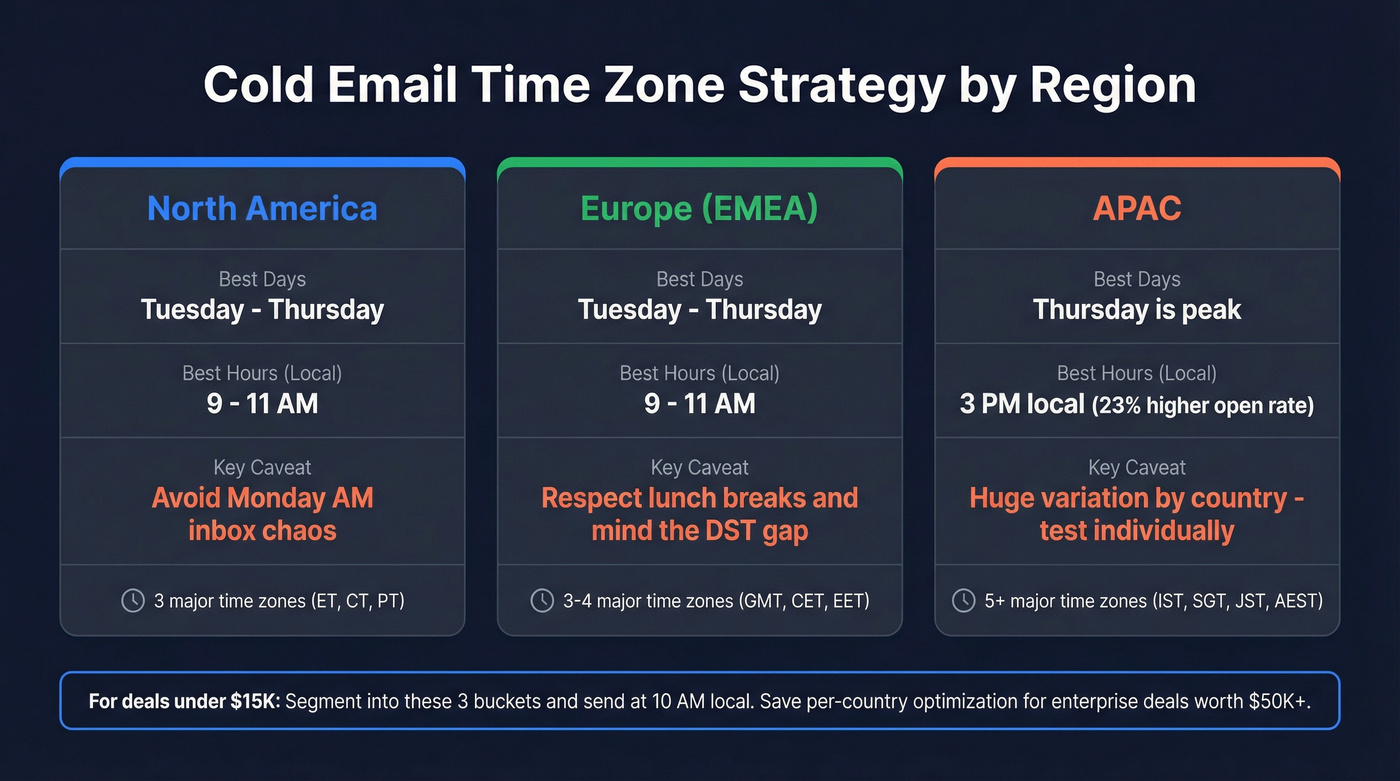
APAC is the wildcard. Thursdays outperform other days, and engagement peaks around 3 PM local - a 23% higher open rate compared to Monday sends. But "APAC" covers everything from Tokyo to Sydney to Mumbai. The variation within the region is massive. Test by country if your volume supports it.
For Europe, the Tuesday-Thursday window holds, but work-life boundaries are stricter. Sending at 7 PM to a German prospect doesn't signal urgency - it signals you don't respect their time.
If your deals average under $15K, you probably don't need separate campaigns for every timezone. Segment into three buckets - Americas, EMEA, APAC - and send at 10 AM local for each. That gets you 80% of the benefit with 20% of the complexity. Save the per-country optimization for enterprise deals where one meeting is worth $50K+.
Role-Based Timing
Not everyone checks email at the same time:
| Role | Best Day | Best Window | Why It Works |
|---|---|---|---|
| CEO/Founder | Monday | 8-10 AM | Clearing inbox before the week's meetings |
| Manager/Director | Tuesday | 9-11 AM | Monday fires processed, now in planning mode |
| Junior/Intern | Wednesday | 11 AM-1 PM | Later risers, less structured mornings |
| Remote Teams | Thursday | 6-9 AM | Earlier starts, flexible schedules |
| Marketing/Sales | Friday | 1-3 PM | Winding down, more open to new ideas |
Company size matters here too. Smaller companies (under 50 people) tend to have less structured schedules - your timing window is wider. Enterprise prospects have more predictable patterns, which means hitting the right hour matters more.
If you're building these segments systematically, it helps to start from an ideal customer definition (and then map role + region to timing windows).
Industry-Specific Adjustments
- SaaS: Tuesday-Wednesday, 10 AM-12 PM. Avoid Monday - sprint planning and standups dominate the morning.
- Financial Services: Tuesday-Thursday, 8-10 AM. Avoid month-end and quarter-end.
- Healthcare: Wednesday-Thursday, 7-9 AM. Early mornings before patient hours.
- Manufacturing: Tuesday-Wednesday, 7-9 AM. Plant managers are at their desks early.
Seasonal Considerations and Holidays
Don't forget the calendar. Holiday periods (late December, August in Europe) tank engagement across the board. Major industry events pull attention away from inboxes. And fiscal year-end - whether that's December, March, or June depending on the company - creates either urgency (budget to spend) or lockdown (no new vendors).
One often-missed tactic: skip US holidays in sales sequences. If your sequence fires on Thanksgiving, the Fourth of July, or Memorial Day, that email is dead on arrival. Most tools let you define a holiday calendar that pauses sends on those dates and resumes on the next business day. Set it once and forget it.
The Response Time Dilemma Nobody Talks About
Here's a scenario that almost nobody discusses.

You're an SDR in New York. You send a perfectly timed email at 9 AM PDT to a prospect in Los Angeles. Great - it lands right in their morning window. But 9 AM PDT is noon Eastern. If your prospect replies at 10 AM their time, it's 1 PM your time. You're in a meeting. You respond at 3 PM Eastern - that's 6 hours later. The moment is gone.
Now make it worse. You're targeting prospects in Sydney. Their 9 AM is your 5 PM (or 6 PM, depending on DST). If they reply at 10 AM Sydney time, you're asleep. Your response comes 14 hours later.
That's not a conversation - that's email tag.
The framework: find the overlap between the prospect's optimal receive window and your ability to respond quickly. If you can't respond within an hour during their business hours, consider:
- Shifting your send time to overlap with your working hours (even if it's not the statistical peak)
- Having a team member in a closer time zone handle responses
- Setting up mobile notifications for replies from high-priority prospects
A slightly suboptimal send time with a 30-minute response beats a perfect send time with a 12-hour response. Every time.
If you want to quantify the impact, compare your internal reply SLA to the industry benchmarks for average lead response time.
The DST Trap That Breaks Campaigns Twice a Year
Daylight Saving Time is the silent campaign killer. It breaks your timezone logic twice a year, and most teams don't catch it until open rates tank.
The specific problem: US DST starts the second Sunday in March. EU DST starts the last Sunday in March. That creates a 2-3 week gap where your US and EU timezone offsets are out of sync. If your system thinks London is 5 hours ahead of New York (the standard offset), but DST has shifted the US and not yet shifted the UK, the actual offset is 4 hours. Your "9 AM London" email arrives at 8 AM. Not catastrophic - but your "7 AM London" email arrives at 6 AM.
Trust can be broken with one bad 3 AM send to an EU audience expecting a 7 AM message.
Open rates drop roughly 15% for emails sent between 6-9 AM on Monday through Wednesday in the week following a DST transition.
The twice-yearly DST audit checklist:
- Review all campaign send times against current UTC offsets
- Check scheduled automations - especially those targeting multiple regions
- Confirm CRM handoff times haven't shifted
- Avoid hardcoded UTC offsets (use IANA timezone names like "America/New_York" which auto-adjust)
- Test a small batch before resuming full volume after the transition
- Mark both US and EU DST dates in your calendar - they're not the same week
Put this in your calendar for March and November. It takes 20 minutes and saves you a week of degraded performance.
How to Set Up Time Zone Sending (Step-by-Step)
The theory is simple: send at 10 AM in the prospect's local time. The implementation has a few gotchas depending on your tool.
Smartlead Setup
Smartlead has the most straightforward timezone implementation I've seen.
- Add a
timezonecolumn to your leads CSV file - Use exact IANA timezone format (case-sensitive):
America/New_York,Europe/London,Asia/Tokyo,Australia/Sydney - Upload the CSV and map the
timezonecolumn as a custom variable - Smartlead schedules each email to send at your specified time in that lead's local timezone
Smartlead enforces a minimum 2-day gap between first email and follow-up. Best practice is 3-5 business days.
Pro tip: enable ESP matching while you're in there. Smartlead can analyze your leads' email providers and route accordingly - Outlook leads receive from Outlook accounts, Gmail from Gmail. It's a small deliverability edge that compounds. SalesUP, a B2B agency, reported a 20% boost in engagement after implementing Smartlead's time zone feature across their client campaigns.
For leads without a timezone value, Smartlead falls back to your campaign's default timezone. Set this to your largest audience segment (usually US Eastern or US Pacific).
HubSpot Setup
HubSpot uses an "IP time zone" property that auto-detects based on the contact's web activity. Elegant when it works.
The catch: it requires Marketing Hub Professional ($800/mo minimum). And it comes with limitations - you can't combine timezone sending with A/B tested emails, contacts added after scheduling won't receive the email, and the "send to more" feature isn't available.
For enterprise teams already on HubSpot, it's a nice built-in feature. For everyone else, $800/mo is a steep price for timezone scheduling when Smartlead does it for $39/mo.
The Generic CSV Approach (Works with Any Tool)
If your sending tool supports custom fields, you can implement timezone sending manually:
- Export your prospect list with location data (city, state, country)
- Add a
timezonecolumn - Map locations to IANA timezone values (a simple spreadsheet formula or script handles this)
- Use
America/New_Yorkformat - not "EST" or "UTC-5" (these don't auto-adjust for DST) - Set a fallback value for contacts missing location data
- Upload and map the timezone field in your sending tool's campaign settings
The IANA format is critical. "EST" doesn't account for Daylight Saving Time. "America/New_York" does. This one detail prevents the DST trap from breaking your campaigns.
Sending Infrastructure Guardrails
Timezone sending doesn't change the fundamental rules of cold email deliverability:
- Safe range: 20-25 emails per inbox per day once fully warmed up (see email pacing and sending limits)
- Volume math: 4 domains x 3 inboxes x 25 emails = 300 emails/day. Need more? Add domains.
- Warmup: Start at 10 emails/day, increase by 10% every few days. Minimum 2 weeks before real sends (3-4 weeks is better). Keep warmup running even after campaigns start. Use a proven email warmup process.
- Staggered sending: Spread sends across a 1-2 hour window (e.g., 9:30-11:30 AM) with random delays between each email. Blasting 25 emails at exactly 10:00:00 AM looks robotic.
- Follow-up timing: Send follow-ups at a different hour than your initial email. If your first touch was 10 AM, try 2 PM for the follow-up. This catches prospects at a different point in their day.
Most replies come from emails 2 and 3, not the first send. Space follow-ups at 2 days, then 4 days, then 6-7 days. Roughly 30% of booked calls come from reviving dead conversations - don't abandon sequences too early. If you need a structure, use a B2B cold email sequence framework.
Tools That Handle Cold Email Time Zones Well
Not every cold email platform handles timezone sending equally. Here's what we've seen across the tools that matter:
| Tool | Price | TZ Sending | Key Strength | Note |
|---|---|---|---|---|
| Prospeo | ~$0.01/email | Data layer | 98% email accuracy, 7-day refresh | Feeds accurate location data to any sender |
| SmartReach.io | ~$29/mo | Yes, native | Multichannel + domains | Multi-region mixing can be tricky |
| Smartlead | $39/mo | Yes, CSV-based | ESP matching, scale | CRM costs extra |
| Woodpecker | $29/mo | Yes, per-campaign | Response-time focus | Smaller scale |
| Instantly | ~$37/mo | Yes | Warmup built in | CRM is add-on |
| Lemlist | ~$55-79/mo | Yes | Personalization | Pricier entry |
| Apollo | ~$59+/mo | Partial | Lead database | TZ sending isn't clean |
| Saleshandy | $36/mo | Yes | Affordable | Deliverability basic |
| Reply.io | $59/mo | Yes | Multichannel | Complex setup |
| HubSpot | ~$800/mo | Yes (IP-based) | Enterprise CRM | No A/B + TZ combo |
The standout for pure timezone sending is SmartReach.io. Users on Reddit consistently praise it for "hitting inboxes during local business hours" and report it's been "great for deliverability." One gotcha: when you mix prospects from very different regions (US + Australia) in the same campaign, SmartReach sometimes struggles to optimize daily send limits. Segment by region and you'll avoid this entirely.
Skip Apollo for timezone precision. It's got the best built-in lead database of any sending tool, but timezone sending isn't as clean as dedicated outreach platforms. If you're already in Apollo's ecosystem, it works. If timezone accuracy is a priority, pair Apollo's data with a dedicated sender.
The budget pick is Woodpecker at $29/mo - especially if you're a smaller team that values fast response times over massive scale. Their documentation on the response-time dilemma is the best in the industry, and the tool is built around that philosophy.
The sending tool matters - but it's only as smart as the data feeding it. If your prospect's location is wrong, your timezone logic sends at the wrong hour regardless of which platform you're using. We've seen teams spend weeks fine-tuning send windows only to discover half their location data was six months stale. Prospeo's 7-day refresh cycle and native integrations with Smartlead, Instantly, and Lemlist mean enriched location data flows directly into your sending workflow without manual CSV gymnastics. If you're comparing platforms, start with this roundup of cold email outreach tools.
You just read that a 2-hour send window can swing open rates by 5 points. But that swing is worthless if 35% of your emails bounce because your contact data decayed. Prospeo delivers 98% email accuracy with location data refreshed weekly - not every 6 weeks like the industry average.
Fix your data before you optimize your send times.
How to A/B Test Your Cold Email Send Times
The studies give you a starting point. Testing gives you the answer.
Test one variable at a time. If you're testing send time, keep the subject line, body, and audience segment identical. Changing two variables at once tells you nothing.
Wait 48-72 hours before reading results. Cold email replies trickle in. Judging a send time test after 12 hours will mislead you - some prospects don't open until the next business day.
Minimum 1,000 recipients per variation. Anything less and your results are noise, not signal. If you're sending 300 emails a day, each test variation needs about 3-4 days of sends.
Use A/B/C testing with a control group. Test your current send time (control) against two new windows. This tells you not just which new time is better, but whether either beats what you're already doing. For a tighter methodology, follow an A/B testing framework.
Stagger your test sends. Don't blast all 1,000 emails in variation A at exactly 9:00 AM. Spread them across a 30-60 minute window with random delays. This mimics natural sending patterns and avoids deliverability flags.
Test follow-up timing separately. Your optimal first-touch time and your optimal follow-up time are probably different - if your first touch was 10 AM, try 2 PM for the follow-up.
I've seen teams spend weeks debating whether 9 AM or 10 AM is better when their real problem was a 35% bounce rate on the list itself. Fix data quality first. Then optimize timing. The order matters.
FAQ
Does sending in the recipient's time zone actually improve open rates?
Yes - time zone segmentation improves open rates by up to 14%. Nearly a quarter of all opens happen in the first hour after delivery, so sending at 10 AM local instead of 10 AM your time is the difference between top-of-inbox and buried under 50 other emails. After 24 hours, open probability drops below 1%.
What's the best day and time to send cold emails across time zones?
Tuesday through Thursday, 9-11 AM in the recipient's local time zone. That's the consensus across 20+ million emails, with Tuesday hitting 42% open rates and the 10-11 AM window peaking at 44%. Test for your audience - some verticals see Monday or early morning outperform.
How do I find a prospect's time zone if I only have their email address?
Check their company HQ location, phone area code, or domain TLD (.co.uk = UK, .de = Germany). Data enrichment tools like Prospeo add current location data - refreshed every 7 days - that you can map to IANA timezone values automatically. HubSpot's IP time zone property also auto-detects from web activity, but requires their $800/mo Marketing Pro tier.
Do I need separate campaigns for different time zones?
Yes, if you're targeting multiple regions like US and APAC. Mixing regions in one campaign causes most tools to struggle with daily send limits. Segment by region, then let your tool handle timezone scheduling within each segment to keep deliverability high.
How does Daylight Saving Time affect cold email campaigns?
US and EU DST transitions are 2-3 weeks apart (second Sunday in March vs. last Sunday), which breaks your timezone offsets during the gap. Open rates drop roughly 15% for early-morning sends in the week after DST changes. Run a DST audit on all campaigns twice a year - March and October/November - checking scheduled automations and UTC offsets.