How to Send Personalized Mass Emails (Without Getting Blocked)
If you're searching for how to send personalized mass emails, here's the uncomfortable truth: $15 "mail merge" software won't save you from a dirty list, missing authentication, or blasting 1,500 emails from a brand-new mailbox.
That's how you get throttled, spam-foldered, or blocked.
Personalized mass email works in 2026, but only if you match the method to your volume and treat deliverability like a system, not a button. The goal isn't just to hit "merge"--it's to send personalized emails at scale without wrecking your domain reputation.
What you need (quick version)
Use this as your "don't embarrass myself" checklist before you touch Send. Every bullet below maps to a real failure mode (blocks, throttles, spam placement, or angry replies).
Pick your method by volume (this determines your risk)
- 50-200/day: Gmail native mail merge or Word + Outlook mail merge Why: low volume means fewer reputation shocks and less need for heavy compliance tooling.
- 200-1,500/day: Gmail-based tools (like GMass) or Google Sheets add-ons (Mailmeteor, YAMM, MergeMail) Why: you need throttling controls, scheduling, and a clean way to stop/continue sends.
- 5,000+/day (especially to Gmail/Yahoo recipients): stop forcing mail merge - use an ESP or CRM workflows Why: at this scale, providers expect bulk-sender plumbing (headers, one-click unsubscribe, monitoring).
Prep your list before sending (this protects your domain)
- Verify addresses (bounces are reputation poison) - see a full email verification list SOP
- Suppress role accounts (info@, sales@) unless they're truly relevant
- Add a working unsubscribe/opt-out (yes, even for "cold-ish" sends)
- Authenticate your domain (SPF/DKIM/DMARC) - use this SPF DKIM & DMARC setup guide
Send in batches and watch the signals (this prevents lockouts)
- Ramp up new mailboxes slowly (new accounts get throttled hard) - follow an email pacing and sending limits playbook
- Track bounces, replies, and complaints
- If bounce rate jumps or inbox placement drops, pause immediately and fix the root cause
Hot take: BCC is a trap. It's not mass email personalization, it's messy for compliance, and it screams "spray and pray" to both recipients and filters.

What "personalized mass email" means (and what it's not)
A personalized mass email is one email per recipient, generated from a template, where fields get filled in from a data source (usually a spreadsheet or CRM). That's mail merge: same core message, individualized details - personalized emails in bulk, not a single blast.
What it's not:
- A newsletter blast (one HTML campaign to a subscribed list). That's ESP territory.
- Cold outreach sequences (multi-step follow-ups, reply detection, inbox rotation). That's a sales engagement workflow - if that’s your use case, start with cold email outreach tools
- A customer update (transactional-ish messaging to existing users). That's usually best from your product/CRM with tight segmentation.
Mailbox providers don't care that you used merge tags. They care about:
- Recipient behavior (complaints, deletes, no engagement)
- List quality (bounces)
- Authentication (SPF/DKIM/DMARC alignment)
Personalization helps engagement. It doesn't override bad sending hygiene.

Step 0 is where most personalized mass emails fail - and it's always the list. Prospeo's 5-step verification with catch-all handling, spam-trap removal, and honeypot filtering keeps your bounce rate under 2% before you ever hit send.
Stop getting throttled by bad data. Start with 98% accurate emails.
How to send personalized mass emails: choose your method (decision tree)
This is the decision tree I use when someone asks, "Should we do this in Gmail, Outlook, or a tool?" It's also the simplest way to personalize emails at scale without accidentally turning a mailbox into a bulk-sender problem.
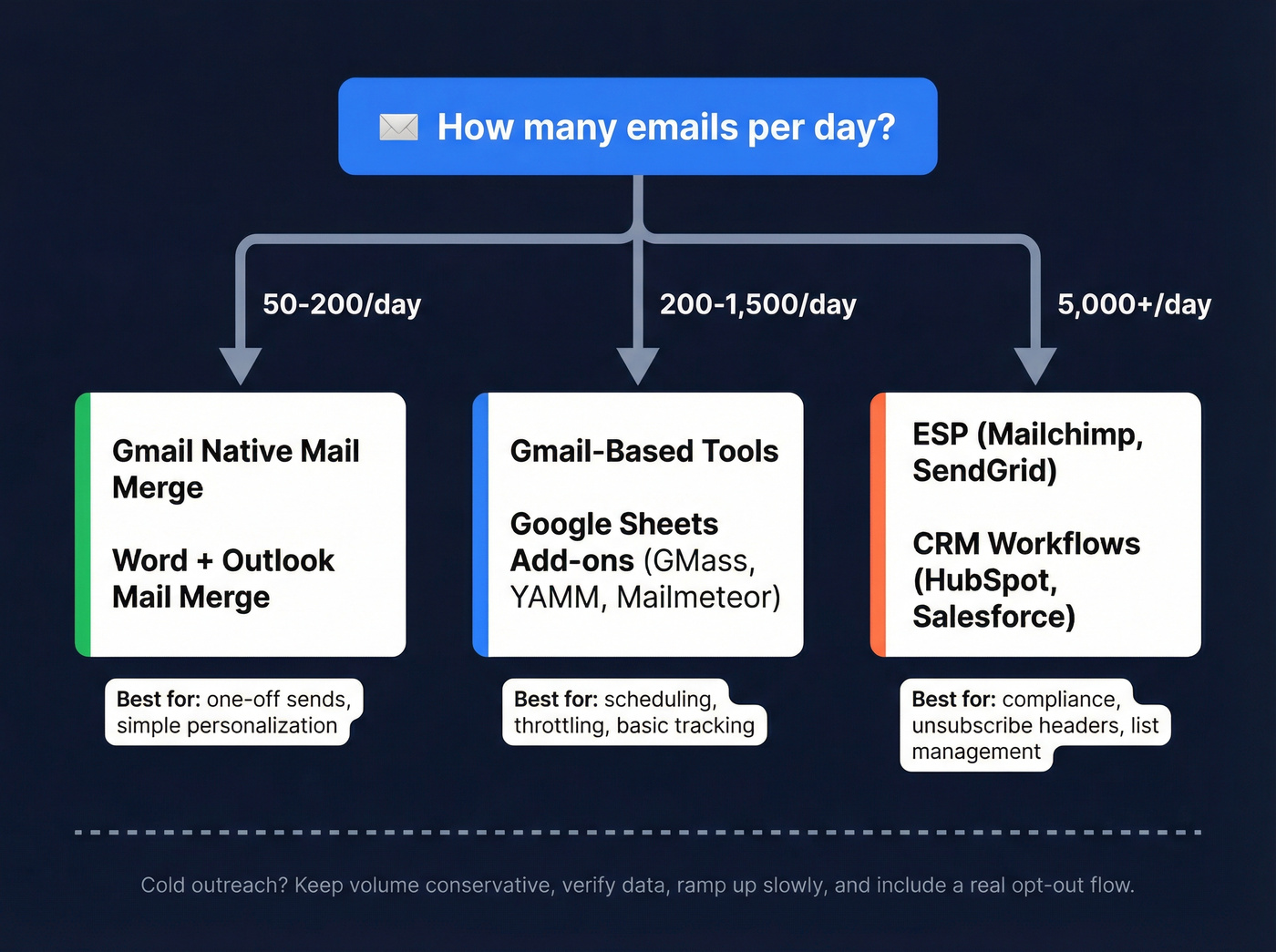
If you're sending 50-200/day and it's a one-off
- Use Gmail native mail merge
- Or Word + Outlook mail merge (especially in conservative IT environments)
If you're sending 200-1,500/day and you need scheduling + tracking
- Use a Gmail-based tool or a Google Sheets add-on
- Choose based on: throttling controls, daily caps, and whether you need follow-ups - use a proven email outreach strategy
If you're sending 5,000+/day or you need strict unsubscribe + compliance
- Use an ESP for opted-in lists
- Or CRM workflows for lifecycle/customer messaging
If you're doing cold-ish outreach
- You can still send from mailboxes, but you must keep volume conservative, verify data, ramp up, and include a real opt-out flow
My blunt recommendation: if you need [List-Unsubscribe headers] and one-click unsubscribe, stop trying to "mail merge your way" into bulk sending. Use an ESP/CRM workflow.
The key distinction:
- Mail merge = 1:1 messages generated at scale from your mailbox
- ESP = bulk infrastructure + compliance tooling + list management
- CRM workflows = segmentation + automation tied to contact properties and events
Step 0 - Prepare your list (this is where most sends fail)
Most "my Gmail/Outlook blocked me" stories have the same root cause: the list was bad. Too many invalid emails, too many stale contacts, or too many people who never wanted your message.
Here's the thing: you can write a great email and still get crushed by bounces.
List prep checklist (do this)
- Verify every email address
- High bounce rates get you throttled fast.
- Catch-all domains are the sneaky killer: they look deliverable until they aren't. (If you need vendors, start with these email verifier websites.)
Use verification to detect and suppress likely spam traps/honeypots
- You won't reliably spot these by eye.
- Treat this as a tooling step, not a "manual cleanup" step.
Deduplicate
- Duplicate sends drive complaints ("stop emailing me") and kill trust.
Segment by recency + relevance
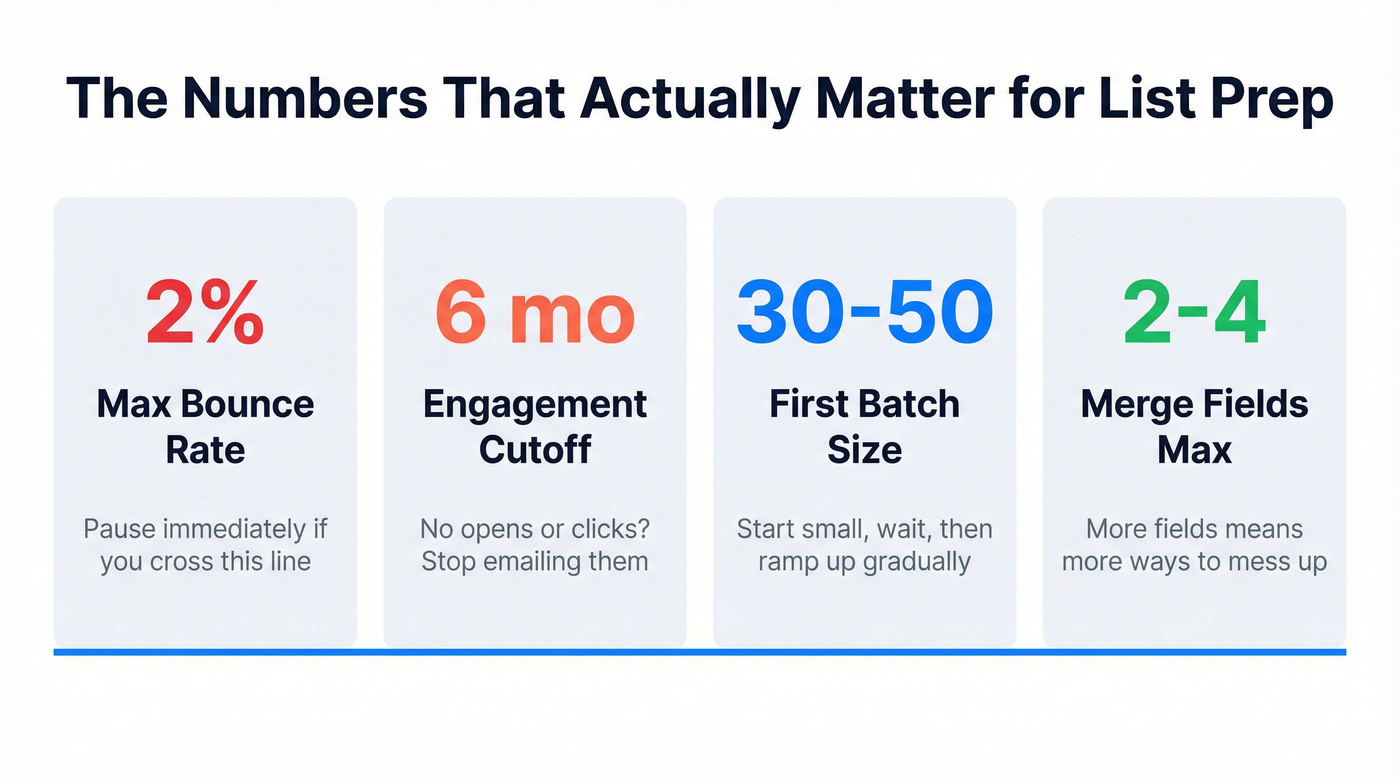
- If someone hasn't opened or clicked in 6 months, stop emailing them like nothing happened - here’s a full guide on how to segment your email list
Build suppression into your sheet
- Add a column like
unsubscribed = TRUE/FALSE(and actually respect it). - Add
do_not_email = TRUE/FALSEfor "asked me to stop" replies.
- Add a column like
Hard rule: if your bounce rate goes over 2%, pause. Don't "power through." Fix the list first.
Spreadsheet gotchas (tiny mistakes, big consequences)
These are boring. They also save you from sending "Hi ," to 400 people.
- Format ZIP/postal codes and IDs as text (Excel loves eating leading zeros).
- Trim whitespace in
EmailandFirst namecolumns (hidden spaces cause mismatches). - Normalize name casing (e.g., "jESSICA" -> "Jessica") before you merge.
- Create fallbacks for missing fields (blank first names look sloppy).
A real scenario we see all the time
A founder exports 2,000 "leads" from a directory, runs a mail merge from a fresh Google Workspace inbox, and uses three links plus a calendar link in the first email. By email ~120, Gmail starts slowing sends; by ~300, replies turn into "stop spamming me"; by the next morning, half the follow-ups land in spam because the bounce rate quietly crept past 3% and the account got put in a penalty box.
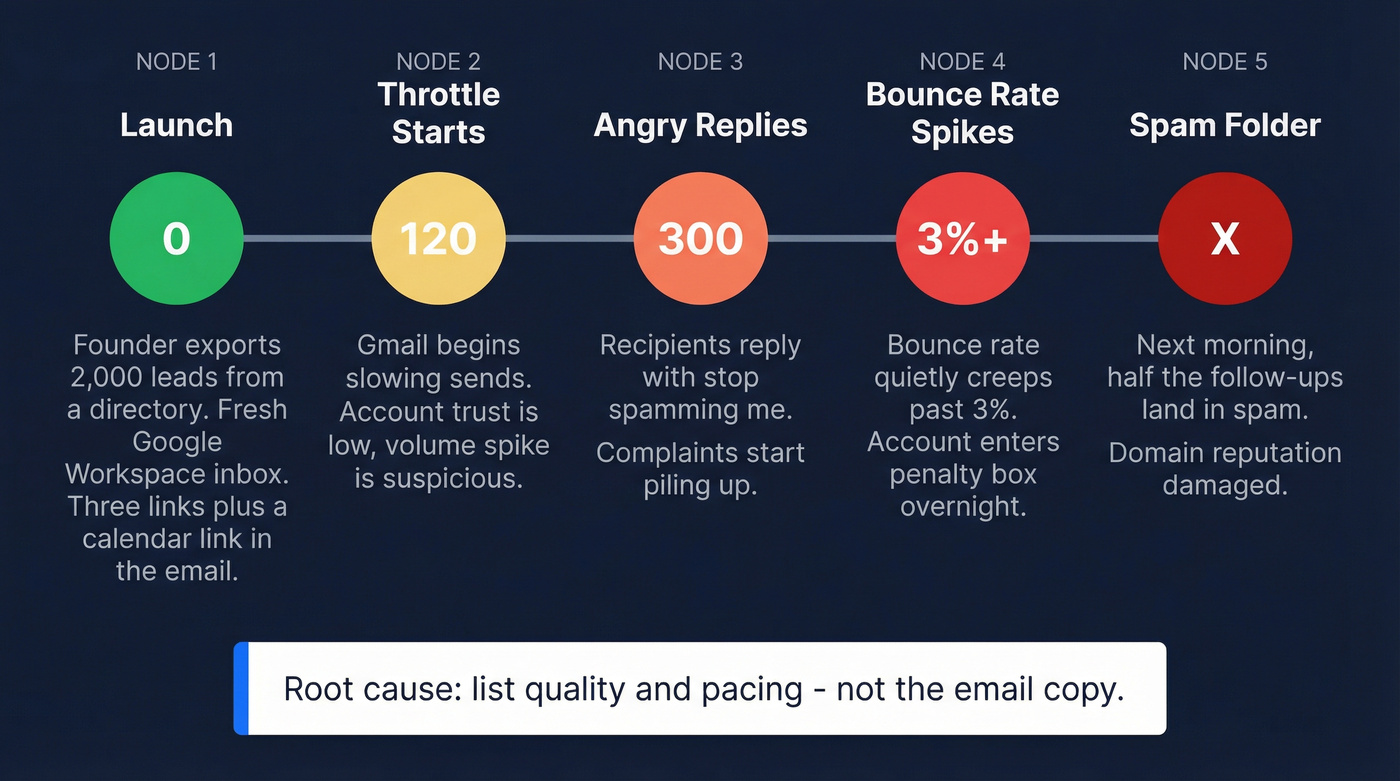
None of that was a copy problem. It was list quality + pacing.
Prospeo (the cleanest "Step 0" I've seen)
In our experience, the fastest way to make personalized mass email "safe" is to treat verification as part of the workflow, not a last-minute patch. Prospeo is the B2B data platform built for accuracy, and it's the cleanest Step 0 layer we've used for keeping bounce rates under control before you ever open Gmail or Outlook.
- 98% email accuracy with a 5-step verification process (including catch-all handling and spam-trap/honeypot filtering)
- 300M+ professional profiles, 143M+ verified emails, and 125M+ verified mobile numbers
- 7-day data refresh cycle (industry average: 6 weeks)
- Used by 15,000+ companies and 40,000+ Chrome extension users
- Transparent, self-serve pricing at about $0.01/email on https://prospeo.io/pricing
Workflow: upload CSV -> verify -> export only deliverable rows into your mail merge sheet.
Method walkthroughs (Gmail + Sheets tools + Word/Outlook)
Gmail native mail merge (best for small batches)
Gmail's native mail merge is the quickest path to "personalized, one-to-one emails" without buying anything.
Operating limits to respect (how it behaves in 2026):
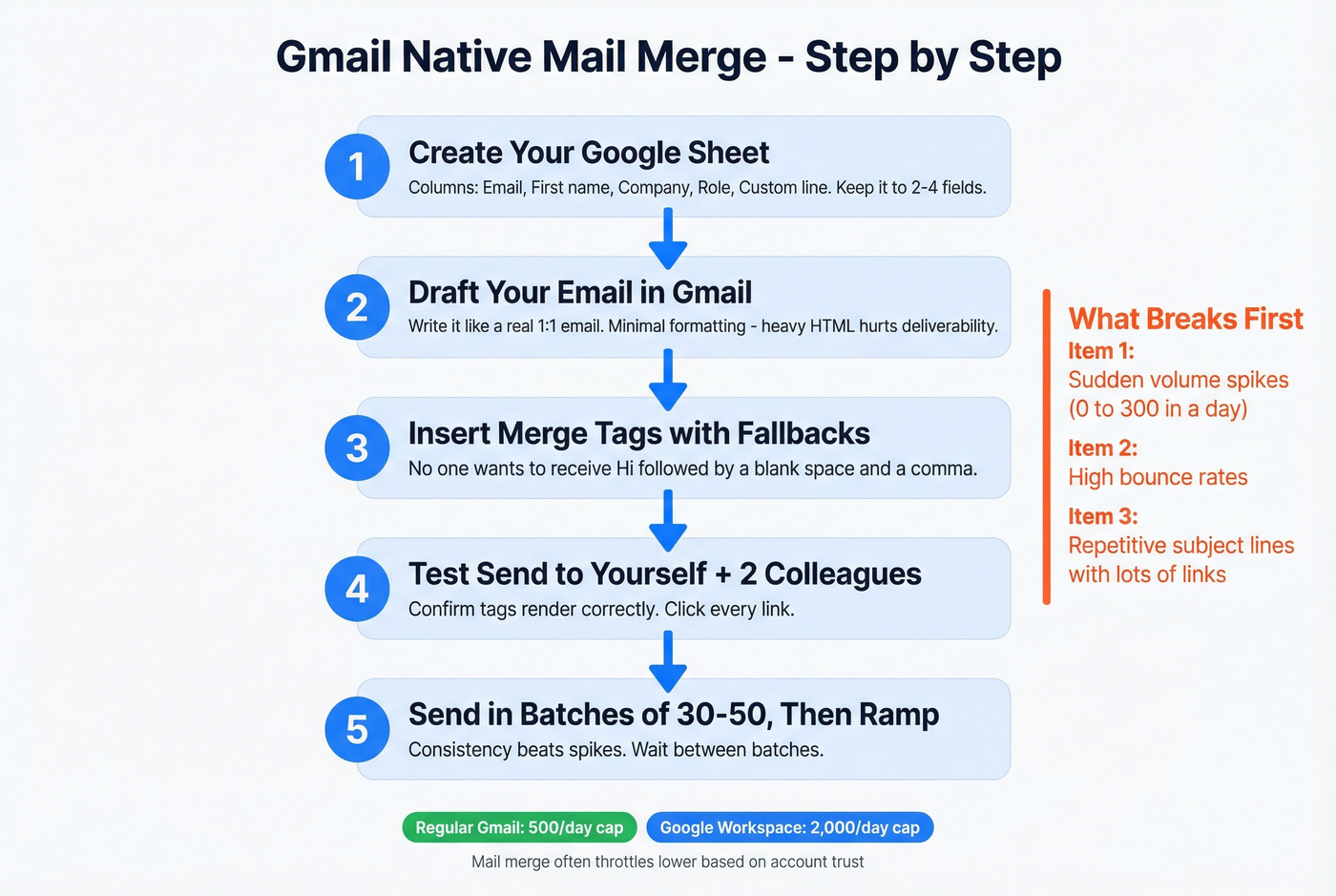
- Published caps are 500 recipients/day (regular Gmail) and 2,000/day (Google Workspace), but mail merge often throttles lower based on account trust and sending history.
- New accounts get throttled to single digits or tens per day until trust builds.
Steps
Create your Google Sheet
- Columns like:
Email,First name,Company,Role,Custom line - Keep personalization tight. 2-4 fields is plenty.
- Columns like:
Draft your email in Gmail
- Write it like a real 1:1 email.
- Keep formatting minimal. Heavy HTML is a deliverability tax.
Insert merge tags
- Add fallbacks for missing data (no one wants "Hi ,").
Test send to yourself + 2 colleagues
- Confirm merge tags render correctly.
- Click every link.
Send in batches
- Start with 30-50, wait, then continue.
- If you're ramping a mailbox, consistency beats spikes - use a real automated email warmup plan
What breaks first
- Sudden volume spikes (0 -> 300 in a day)
- High bounces
- Repetitive subject/body patterns with lots of links
Google Sheets mail merge add-ons (best for scheduling + control)
Add-ons are the sweet spot for 200-1,500/day when you want scheduling, throttling, and basic tracking. They're also where teams usually start trying to customize bulk emails beyond first name/company - just remember that more fields means more ways to mess up.
Steps
Start with a clean Sheet
- Add columns like:
Status,Sent at,Replied,Unsubscribed
- Add columns like:
Connect the add-on
- Authorize it to send from your Gmail/Workspace mailbox.
- Map columns to merge fields.
Set throttling
- This is the whole game.
- Use slow, steady sending (and stagger by hour) instead of dumping everything at once, because the providers don't care that your spreadsheet says "personalized"--they only see a sudden spike of similar messages leaving one account.
Track outcomes
- Opens are noisy in 2026. Replies, bounces, and complaints are the signals that matter.
- If bounces spike, stop and fix the list.
Run follow-ups carefully
- Follow-ups multiply volume fast.
- 800 initial emails + 2 follow-ups = 2,400 sends.
Before you install any add-on (privacy/security check) Look, this is the #1 objection smart teams have, and they're right to ask.
- Read the OAuth permission screen. If it asks to "read, compose, send, and permanently delete all your email," that's not a casual install.
- Check whether it stores your email content (templates, recipient lists, tracking data) and where.
- Prefer tools with clear admin controls (team offboarding, shared templates, audit trails).
- If your company has compliance requirements, route it through IT/security instead of letting reps install random extensions.
Word + Outlook mail merge (best for internal or low-volume ops)
Word + Outlook mail merge is old-school, but it's reliable for internal comms or low-volume operational messages.
Microsoft Support's limitations (verbatim):
- You must have a MAPI-compatible email program installed, such as Outlook (MAPI-compatible).
- Word sends one message per recipient.
- You can't CC or BCC recipients.
- You can't add attachments to the email messages.
My take: the "no attachments" rule is the one that surprises people every week. Host the file and link it, or use a system designed for attachments.
Also, mail merge is still mailbox-based 1:1 sending, so if you try to push thousands, you'll hit throttling halfway through.
Deliverability rules you can't ignore in 2026 (Gmail/Yahoo + compliance)
If you send 5,000+ messages/day to Gmail/Yahoo recipients, you're in bulk-sender territory. Even if you personalize every email, providers treat you like a bulk operation.
Provider expectations (non-optional at scale)
- Authentication: SPF or DKIM + DMARC
- Complaint rate: max 0.3%
- Target <0.10% if you want breathing room
- Unsubscribe: List-Unsubscribe header + RFC 8058 one-click unsubscribe
- Opt-out processing: within 2 days
- List hygiene: sunset inactive contacts after 6 months
These rules have been in effect since 2024 and they're enforced in 2026: Gmail/Yahoo bulk-sender rules
"One-click unsubscribe" (what it means operationally)
This isn't "put an unsubscribe link somewhere in the footer." Providers want:
- A List-Unsubscribe header (so mail clients can show an unsubscribe UI)
- A one-click mechanism (RFC 8058) that processes the opt-out without forcing a login or extra steps
- A backend that suppresses the address quickly (within 48 hours)
If you're sending from a mailbox via mail merge, you usually don't get this header automatically. That's why ESPs and CRM marketing tools exist.
If you send cold-ish mail merge, still add an opt-out link
Cold-ish outreach is where people get cute and skip opt-outs. Don't.
Add a simple line like:
- "If this isn't relevant, reply 'no' and I'll stop," and
- a lightweight opt-out link that writes to your suppression list (even if it's just a form that flips
unsubscribed = TRUE)
You're not doing this to be polite. You're doing it to keep complaint rates tiny and protect your domain.
Before you send 5,000+/day: do this checklist
If you do nothing else, do this:
Verify SPF/DKIM alignment
- SPF should authorize your sending service.
- DKIM should sign with your domain.
Publish DMARC
- Start with
p=noneto monitor. - Move to
quarantineorrejectonce you're confident - see DMARC monitoring
- Start with
Add List-Unsubscribe + one-click
- Use an ESP/CRM marketing tool if you need this done correctly without custom engineering.
Prove opt-out processing works in <48 hours
- Test it yourself before every big send.
Monitor the right metrics
- Complaint rate, bounce rate, reply rate, and inbox placement.
Litmus explains the difference between delivery (accepted by the server) and deliverability (inbox vs spam). If inbox placement drops below 90%, investigate immediately. It also reports that 70% of emails have at least one spam-related issue, which is why "we set up SPF once" isn't a strategy: https://www.litmus.com/blog/why-email-deliverability-matters
Compliance (CAN-SPAM) quick checklist
If you're emailing prospects about your product/service, assume CAN-SPAM applies, even in B2B.
Minimum viable checklist (FTC guidance): https://www.ftc.gov/business-guidance/resources/can-spam-act-compliance-guide-business
- Accurate From/To/Reply-To info (no spoofing)
- No deceptive subject lines
- Identify the message as an ad when required
- Include a valid physical postal address
- Include a clear opt-out mechanism
- Honor opt-outs within 10 business days
- Keep opt-out working for 30 days after sending
- You're responsible for vendors sending on your behalf
Provider expectations are stricter than the law in one key way: Gmail/Yahoo expect opt-outs processed within 2 days. Build to the stricter rule.
Limits and throttling: Gmail vs Microsoft 365 vs Outlook.com (and why you got blocked)
This is the part nobody tells you until you're staring at an error code mid-send.
Quick reality table (what matters operationally)
| Platform | What you'll hit | What it looks like |
|---|---|---|
| Gmail | Daily caps + throttles | "You've reached a limit" |
| Microsoft 365 | TERRL + rate limits | NDR 550 5.7.232/233 |
| Outlook.com | Opaque limits | Random lockouts |
Microsoft 365: TERRL is the big one
Microsoft's Tenant External Recipient Rate Limit (TERRL) caps external recipients in a 24-hour sliding window. External means domains not accepted in your tenant.
- Trial tenants: 5,000 external recipients/day
- Non-trial formula:
500*(licenses^0.7)+9500 - Example: 1 license = 10,000 external recipients/day
When you exceed it, you'll see:
- 550 5.7.232 (trial tenants)
- 550 5.7.233 (non-trial tenants)
Microsoft canceled the mailbox-level external recipient rate limit indefinitely in Jan 2026, but Recipient Rate Limit + TERRL remain. You can still get blocked, you'll just get blocked differently. (If you’re troubleshooting, see 550 Recipient Rejected.)
What to do when you hit TERRL (fast triage)
- Stop the send immediately.
- Wait out the 24-hour sliding window.
- Split future sends across time (and, if needed, across mailboxes).
- Fix list quality - high bounces make throttling harsher.
Practical throughput numbers (what works in production)
Even when you're "under the limit," service protection throttling is real. Numbers that keep teams out of trouble:
- ~30 messages/minute
- ~10,000 recipients/day per mailbox
Mail merge sends one message per person, so you hit message-rate limits quickly. That's why a 2,000-recipient mail merge can fail halfway through even if your math looked fine.
Outlook.com: the worst kind of limit
Outlook.com limits are opaque. There's no clean admin view, and newer accounts get lower limits. The Outlook client isn't the limiter - the service is.
If you're doing anything business-critical, don't run it from Outlook.com.
Tool options and pricing (when native mail merge isn't enough)
Native mail merge is fine until you need throttling controls, tracking, or higher daily caps. Then you're in tool land.
One opinion before the list: if you're sending "cold-ish" and your list isn't verified, buying a sending tool first is backwards. Fix the data, then pick the sender.
Comparison table (pricing + daily limits)
| Tool | Best for | Daily cap signal | Pricing signal |
|---|---|---|---|
| Prospeo | List verification/enrichment | Prep-only | ~$0.01/email |
| GMass | Power sending from Gmail | Mailbox-based | $29.95-$59.95/mo |
| Mailmeteor | Simple, low-cost merges | Mailbox-based | $4.99-$24.99/mo |
| YAMM | Easy campaigns + follow-ups | Mailbox-based | ~$50-$150/user/year |
| MergeMail | Team mail merge + guardrails | Mailbox-based | $16-$65/mo (+ team plans) |
| HubSpot Workflows | Lifecycle automation | Plan-based | ~$890-$3,600+/mo |
| Mailchimp (ESP) | Newsletters/opt-in | ESP-scale | ~$13-$350+/mo |
| Constant Contact | SMB newsletters/opt-in | ESP-scale | ~$12-$300+/mo |
GMass (choose it when you want "Gmail, but controlled")
Best for: higher-volume Gmail sending with sequencing and stronger controls than lightweight add-ons.
Pricing: $29.95 / $39.95 / $59.95 per user/month (Standard/Premium/Professional). If you're serious about sending from Gmail, this is the workhorse.
Skip it if what you really need is bulk-sender infrastructure (List-Unsubscribe one-click, complaint monitoring, list management) for 5,000+/day. That's an ESP/CRM marketing tool job.
Mailmeteor (the "no-drama" option)
Mailmeteor is what I recommend when a team wants mail merge to feel boring - in a good way.
- Setup time: minutes
- Risk: low (as long as you respect mailbox limits)
- Pricing: Free 50/day (500/month), then $4.99 (250/day), $12.99 (500/day), $24.99 (1,500/day) per user/month
This is also the simplest path if you're trying to send personalized mass emails free at very low volume while you validate your copy and list quality.
YAMM (simple campaigns, but respect the ramp)
What breaks first: quota and account trust if you ramp too fast.
- Limits are straightforward: Free 20/day, then up to 400/day (Gmail) or 1,500/day (Workspace) depending on account type.
- If your Workspace account is recent, YAMM warns your limit can be temporarily reduced to 400/day, and very recent accounts should start at no more than 100/day.
- Pricing signal: ~$50-$150 per user/year, annual billing, varies by tier.
If you're training a team that's new to outreach, YAMM's simplicity is a plus. Just don't let anyone go from 0 to 1,000 sends overnight.
MergeMail (team-friendly guardrails)
Best for: teams that want shared workflows and fewer "oops I emailed everyone twice" moments.
- Pricing: $16/mo (200/day), $65/mo (1,500/day), plus team plans (often ~$24/user/mo depending on configuration).
- Still mailbox-based, so deliverability depends on your domain, list quality, and throttling discipline.
HubSpot Workflows (when "mass email" is really lifecycle messaging)
If your emails are triggered by lifecycle events (lead handoff, onboarding, renewal reminders), workflows beat mail merge.
- Winner use case: segmentation + automation tied to CRM properties and events
- Tradeoff: cost and plan requirements
- Pricing signal: most teams land around ~$890-$3,600+/mo once they're on Professional/Enterprise tiers plus contacts
ESPs (Mailchimp, Constant Contact) for opted-in lists
If you're sending to opted-in lists, ESPs are the right tool. You get unsubscribe handling, list management, and bulk infrastructure.
- Mailchimp: ~$13-$350+/mo depending on contacts/features
- Constant Contact: ~$12-$300+/mo
They're not built for cold outreach. They're built for newsletters and customer comms, and they do that job well.
FAQ
Is BCC okay for sending a mass email?
BCC is fine for tiny internal updates (think 5-20 people). For personalized mass email, it's the wrong tool because it isn't true 1:1 sending, it makes opt-outs messy, and it tends to spike spam complaints, especially once you're over a few dozen recipients.
Why did Gmail stop me after sending only a small batch?
Gmail throttles based on trust signals, not just the published daily cap. If your account is new, your list has bounces, or you jump from 0 to 200+ sends in a day, Gmail slows you down. Start with 30-50, verify the list, and ramp steadily over 1-2 weeks.
Why did Microsoft 365 block my mail merge with 550 5.7.232/233?
Those NDRs usually mean you exceeded Microsoft's tenant-level external recipient limits (TERRL) in a 24-hour sliding window. Stop the send, wait out the window, then throttle future batches and spread volume across time; most teams also reduce bounces to avoid harsher service protection.
Can I send attachments with mail merge?
Word + Outlook mail merge can't add attachments, so you'll need to host the file and include a link instead. If attachments are non-negotiable, use a CRM or ESP workflow designed for that use case so you can track delivery, manage opt-outs, and avoid mailbox throttling.
Should I verify emails before a mail merge (and with what)?
Yes. Verification is the fastest way to cut bounces and protect domain reputation, and you should pause any campaign that risks going over a 2% bounce rate. If you want a clean workflow for this, Prospeo verifies in real time with 98% email accuracy, catch-all handling, and spam-trap/honeypot filtering.
Exporting 2,000 leads from a directory and praying they're valid? That's how domains end up in penalty boxes. Prospeo refreshes 300M+ contacts every 7 days - so your mail merge list is clean before Gmail ever judges you.
Build verified lists at $0.01/email and protect your sender reputation.
Summary: send at scale without burning your domain
If you're figuring out how to send personalized mass emails in 2026, the winning formula is boring: pick the right sending method for your volume, verify and segment your list, authenticate your domain, and throttle like you actually care about your reputation.
Do that, and "personalized at scale" stops being a deliverability gamble and becomes a repeatable system.