Email verification list: the 2026 SOP for clean, compliant sending
If your "verified" list bounces 6% on a send of 5,000 emails, that's 300 failures in one day. Mailbox providers notice. Your next campaigns pay for it.
The fix isn't copy tweaks. It's a repeatable email verification list workflow: verify -> suppress -> segment catch-all -> send with guardrails -> re-verify on schedule.
You don't need a fancy system. You need a strict one.
What you need (quick version)
Minimum viable SOP - tight, boring, effective:

- Set targets (before you touch the list)
- Total bounce rate: <2% safe, >5% stop and clean
- Yahoo spam complaint rate: <0.3%
- Yahoo bulk-sender requirement: one-click unsubscribe** (List-Unsubscribe / RFC 8058) + honor within 2 days
- Standardize statuses (one verifier, one taxonomy)
- Valid, Invalid, Risky, Catch-all, Unknown, Blocked, Disposable, Role
- Suppress by default
- Remove Invalid immediately
- Suppress Disposable and most Role accounts by default
- Suppress repeat soft bounces after 3-5 campaigns
- Segment risk
- Keep Catch-all / Unknown / Blocked out of your main sends
- Re-verify on a cadence
- Verify before first outreach
- Re-verify before re-engaging
- Benchmark decay: ~2% monthly (~22.5% annually) from common deliverability studies (see data decays)

Why list hygiene matters more in 2026
In 2026, bulk-sender rules aren't "new." They're the baseline. Gmail and Yahoo's bulk-sender enforcement changes are now standard operating conditions: if you send volume, you're expected to behave like a real sender - clean lists, low complaints, and fast unsubscribes.
Here's the uncomfortable truth: most teams treat verification as a bounce problem. In 2026, it's a trust problem. Yahoo's guidance is blunt: keep spam complaints under 0.3%, support one-click unsubscribe, honor unsubscribes fast, and remove invalid recipients.
And yes, authentication still trips teams up. I've seen perfectly decent programs crater because SPF/DKIM were "mostly fine" until they weren't, and the sender kept blasting a half-rotten list on top of it. The winning combo stays the same: authentication + list hygiene, done consistently, with no heroics (see deliverability).
I've watched teams obsess over subject lines while sending to a list that's 15-20% risky/unknown. That's backwards. You can't A/B test your way out of bad data (use a real A/B testing plan after hygiene is stable).
Hot take: if your average deal size is modest and you're sending cold outbound at scale, you don't need more leads. You need fewer, cleaner sends (see how to scale outbound sales).
Definitions you'll see (validation vs verification vs cleaning)
People use these terms interchangeably, and it causes dumb decisions.
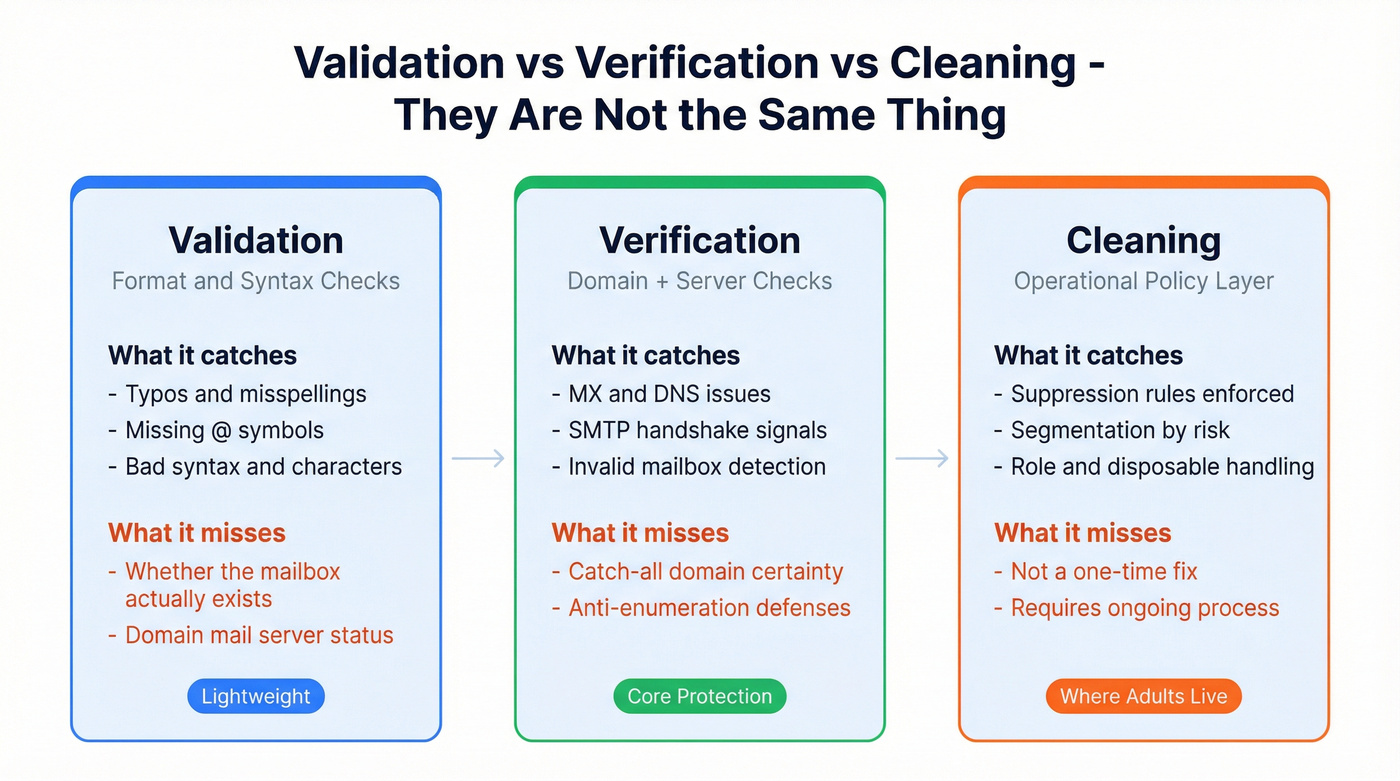
| Term | What it is | What it catches | What it doesn't |
|---|---|---|---|
| Validation | Format/RFC checks | Typos, bad syntax | Real mailbox existence |
| Verification | Domain + server checks | MX/DNS issues, SMTP signals | Certainty on catch-all domains |
| Cleaning | Operational policy | Suppression + segmentation | Not a one-time check |
Validation is the lightweight stuff: "does this look like an email address?" It's syntax and structure. Useful, but it won't stop hard bounces if the mailbox doesn't exist.
Verification checks the domain's mail setup (MX records) and often attempts an SMTP handshake to predict whether the mailbox will accept mail. That's where you get statuses like valid/invalid/catch-all/unknown/blocked.
Cleaning is where adults live. It's the operational layer: what you suppress, what you segment, how you treat role accounts, how you handle catch-all, and how you keep your CRM/ESP from re-contaminating itself next week (see keep CRM data clean).
3 myths that wreck your workflow
Myth #1: "Verify once and you're done." Email data decays continuously. Verify once, keep importing new leads without real-time checks, and your list rots in the background until a big send makes it obvious.
Myth #2: "Verification is only for cold outbound." Newsletters, product updates, event blasts - anything that touches your domain reputation benefits. One dirty import can drag down every program (see domain reputation).
Myth #3: "All verifiers are basically the same." They all run similar steps, but they differ massively in retry logic, how they treat catch-all/unknown, and whether they charge you for ambiguity. In practice, those differences decide whether you stay under 2% bounces (if you're vendor-shopping, compare against our email verifier websites rubric).

Your SOP says verify before every send. Prospeo's 5-step verification delivers 98% email accuracy with catch-all handling, spam-trap removal, and honeypot filtering built in - refreshed every 7 days, not 6 weeks.
Skip the cleanup. Start with data that's already clean.
The 2026 deliverability targets to design around (and how to monitor them)
Design your workflow around these targets, then monitor them like you monitor pipeline.
Targets (the ones that actually bite)
- Bounce rate
- <2% total bounces = safe
- >5% = stop sending and clean immediately
- SMTP reality (what logs mean)
- 4xx = soft bounce (temporary, retryable)
- 5xx = hard bounce (permanent, remove)
- Yahoo bulk sender requirements
- Spam complaint rate <0.3%
- One-click unsubscribe (List-Unsubscribe header, RFC 8058)
- Unsubscribes honored within 2 days
- Authentication passing (SPF, DKIM, DMARC at least p=none)
- Remove invalid recipients and monitor inactive recipients
Directional industry bounce benchmarks can help you sanity-check your numbers (these are ranges, not standards). CleverTap's benchmark table puts typical bounce rates around ~0.9% (software), ~0.5% (business/finance), ~0.3% (retail). If you're sitting at 3-4%, you're not "a little high." You're burning reputation.
How to measure (weekly, not "when something breaks")
- ESP dashboards + event logs: bounce rate by campaign and by segment (Valid vs Catch-all vs Unknown test).
- Google Postmaster Tools: domain reputation trends, spam rate signals, and authentication alignment visibility.
- Yahoo sender tools / complaint feedback loops (where available): complaint rate and unsubscribe behavior.
- Sequence tools (Smartlead/Instantly/Salesloft/Outreach/lemlist): bounce + reply + complaint proxies by sending account and domain (see email outreach analytics).
Escalation: what to do when you miss the target
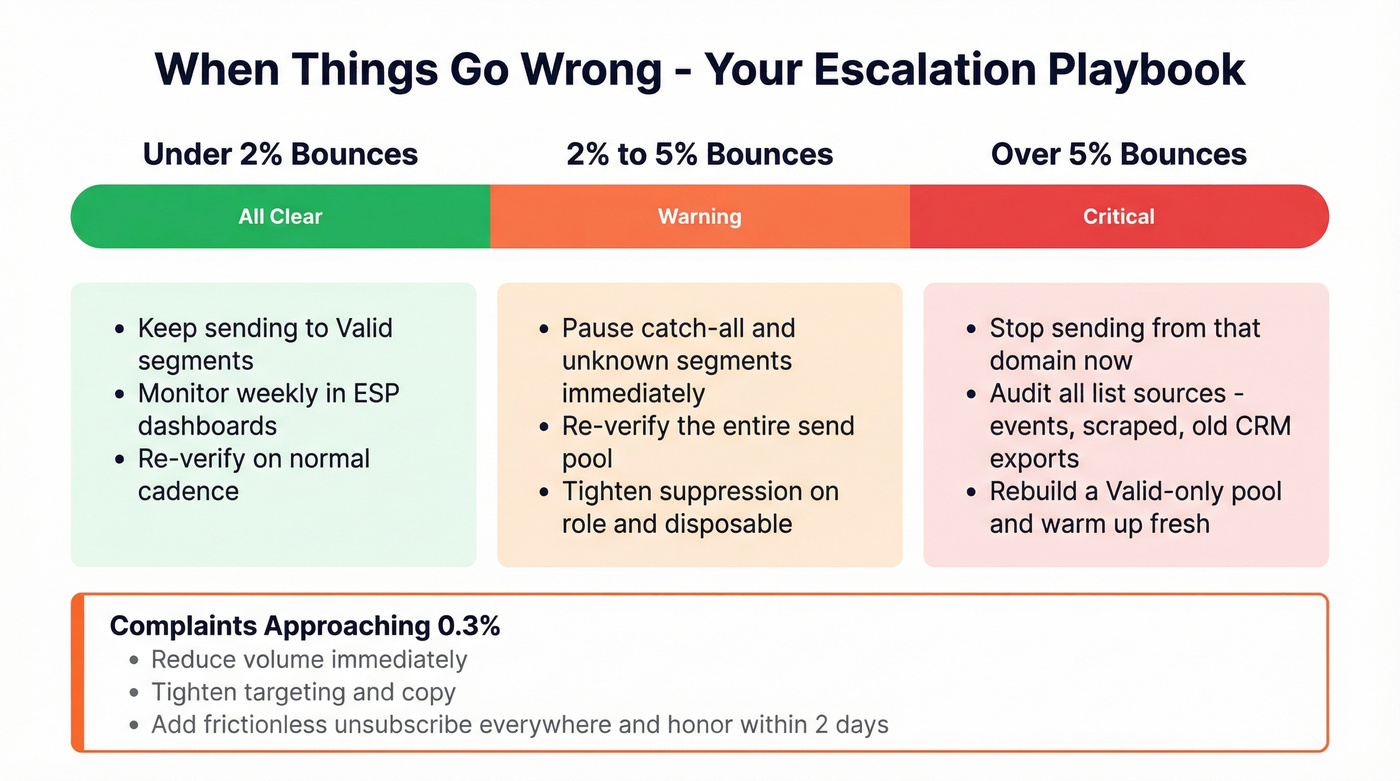
- Bounces >2% (but <5%)
- Pause risky segments (catch-all/unknown/blocked)
- Re-verify the entire send pool
- Tighten suppression rules (role + disposable)
- Bounces >5%
- Stop sending from that domain
- Audit list sources (events, scraped, old CRM exports)
- Warm up again only after you've rebuilt a clean "Valid-only" pool (see email warmup)
- Complaints approaching 0.3%
- Reduce volume immediately
- Tighten targeting and copy (less spray-and-pray)
- Add frictionless unsubscribe everywhere and honor it fast
Look, the frustrating part is that many teams only react after a campaign goes sideways. Your SOP should prevent the bad send, not explain it afterward.

How email list verification works (what tools actually check)
Most verifiers run the same core pipeline. The differences are in retry logic, catch-all handling, and how they bill "unknown." In practice, an email list verifier is doing a mix of validation, verification, and risk labeling - not magic.

Also: many mail servers intentionally return ambiguous responses (anti-enumeration, greylisting, tarpits). That's why unknown/blocked/catch-all exist. Verification is risk scoring, not proof, and anyone telling you otherwise is selling you a fantasy.
Typical flow:
Syntax check Catches obvious garbage: missing @, invalid characters, broken domains.
Domain + MX + DNS checks Confirms the domain exists and can receive mail (MX records). Some tools also check DNS signals that correlate with deliverability risk.
SMTP connection / handshake The verifier connects to the mail server and asks, in effect, "would you accept mail for this address?" This is where you'll see temporary failures (greylisting) and anti-enumeration defenses.
Accept-all (catch-all) detection Some domains accept mail for any address during the handshake. Tools try to detect this by probing behavior patterns.
"Blocked" outcomes Sometimes the tool can't complete checks: rate limits, firewalls, tarpits, or the server refuses verification traffic. That's not "valid." It's "we couldn't verify."
How to build an email list verification SOP (CSV workflow you can reuse)
This is the workflow I'd standardize for outbound, newsletters, partner sends - anything that touches your domain reputation. It's boring on purpose.

1) Prep the CSV (so the verifier doesn't do your data cleanup)
- Export a CSV with at least: email, first name, last name, company, domain, source, last activity date.
- Normalize obvious junk:
- Trim spaces, lowercase emails
- Remove commas/quotes that break parsers
- Split by source if you can (event list vs inbound vs purchased vs scraped). Source quality predicts risk.
2) Dedupe (before you pay for credits)
- Dedupe on email first.
- Then dedupe on (first + last + domain) to catch "same person, different alias."
- If you're syncing back to a CRM, decide your "golden record" rules now (or you'll create duplicates on import).
3) Run the verifier (bulk upload)
- Upload the CSV to your verifier.
- Output fields you'll need downstream: status, sub-status, reason codes, and timestamps.
Here's a scenario I've seen more than once: a team verifies a list, exports the "valid" file, runs a few good campaigns, then a month later someone imports a fresh event CSV straight into the CRM and pushes it into sequences without verification because "we already cleaned the list." Two weeks later, bounce rate spikes, the domain gets throttled, and everyone blames the copy. The real failure was process: verification wasn't tied to import (see import leads).
4) Interpret statuses (fast, consistent rules)
- Valid: sendable.
- Invalid: suppress immediately.
- Disposable / Role / Risky: suppress or isolate.
- Catch-all / Unknown / Blocked: segment and test carefully.
5) Suppress + segment (this is where deliverability is won)
- Create suppression lists:
- Invalid
- Disposable
- Repeat soft bounces
- Prior complainers/unsubscribers
- Create segments:
- Valid (core)
- Catch-all (controlled send)
- Unknown/Blocked (small test only)
6) Sync back to your ESP/CRM (so the list stays clean)
Write back fields and lock the workflow so your database doesn't re-contaminate itself. In our experience, the #1 failure is not writing verification status back to the CRM - teams verify once, then keep sending from the dirty source of truth.
Suggested fields to write back:
verification_status(Valid / Invalid / Catch-all / Unknown / Blocked / Disposable / Role / Risky)verification_substatus(tool-specific reason code)verification_date(ISO timestamp)verifier(tool name)verification_confidence(optional: High/Med/Low)suppression_reason(Hard bounce / Disposable / Complaint / Unsubscribed)
Real talk: verify before first outreach. Waiting for bounces is the slowest, most expensive way to learn your list's bad.
On the results screen, you should see (1) a status summary (Valid/Invalid/Catch-all/Unknown), (2) per-email status and reason codes, and (3) an export action. Export two files every time: a "Valid-to-send" list and a suppression list you can import into your ESP/sequence tool in one pass. If you're comparing vendors, treat this as your email checker list: does it give you the fields and exports you need to run the SOP without manual cleanup?
Pre-send QA checklist (the 10-minute save-your-domain routine)
Before any campaign goes out:
- Segment check: confirm you're sending Valid-only (or you intentionally included a controlled Catch-all test segment).
- Suppression check: hard bounces, unsubscribes, complainers, disposables are suppressed.
- Authentication check: SPF/DKIM passing; DMARC present (even p=none beats missing).
- Header check: List-Unsubscribe present (one-click where required).
- Volume check: ramp if the domain's new or recently paused.
- Monitoring check: you can see bounce + complaint rate by segment within 24 hours.
What to do with each verification result (operational decision table)
This is the "don't argue in Slack" table. Pick rules and stick to them.
| Status | What it means | Default action | Notes |
|---|---|---|---|
| Valid | Mailbox likely exists | Send | Still monitor bounces |
| Invalid | Hard bounce likely | Remove now | Remove hard bounces immediately |
| Risky | Uncertain/high risk | Segment | Use small batches |
| Disposable | Temp inbox | Suppress | High complaint risk |
| Role | info@, sales@, etc. | Suppress/segment | Keep only if needed |
| Catch-all | Domain accepts all | Segment | Treat as risky |
| Unknown | Couldn't verify | Segment/test | Don't bulk send |
| Blocked | Server blocked checks | Segment/test | Often rate limits |
Operational rules that keep you out of trouble:
- Hard bounces: remove immediately. No exceptions.
- Soft bounces: retry naturally, but suppress after 3-5 campaigns of repeated soft bounces.
- Role accounts: I suppress them by default. If you truly need them (partnerships, vendor onboarding), keep them in a separate segment with lower volume and safer messaging.
- Unknown/Blocked: treat them as unverified until a controlled test proves otherwise.
Common failure modes (and how to fix them)
These are the patterns that keep showing up in real sending programs:
Failure mode: "We verified, but bounces are still high." Fix: you mixed Catch-all/Unknown into the main send, or you didn't re-verify after list decay. Split segments, re-verify, and send Valid-only until metrics stabilize.
Failure mode: "Unknown exploded overnight." Fix: you hit rate limits or a provider tightened anti-enumeration. Switch to a verifier with stronger retry logic, slow down verification throughput, and treat Unknown as a test segment (not sendable by default).
Failure mode: "Blocked results are ignored and sent anyway." Fix: Blocked means "no signal." Keep it out of production sends. If you must test, do it at tiny volume with stop-loss thresholds.
Catch-all and "unknown" playbook (so they don't blow up your metrics)
Catch-all is where most verification SOPs fall apart.
Typical catch-all prevalence is 8.6%-15.25% of a list. In B2B, it can run up to 30% because corporate domains love aggressive filtering. And catch-all addresses are 27x more likely to bounce than standard verified addresses.
Why tools struggle here:
- Greylisting: server temporarily rejects verification attempts (4xx behavior).
- Late bounces: server accepts during SMTP, then bounces after delivery attempt.
- Silent drops: server accepts and then discards mail (no bounce, no delivery).
- Anti-enumeration: servers intentionally make mailbox existence hard to detect.
- Rate limiting: high-volume verification traffic gets blocked.
Default policy (the one that keeps you safe)
- Valid goes to your main send pool.
- Catch-all is a separate program with slower ramp.
- Unknown/Blocked is test-only until proven safe.
Skip catch-all entirely if you're already fighting reputation issues or you're sending from a brand-new domain. Get stable first, then add risk back in on purpose.
Catch-all test plan template (copy/paste)
This is the artifact most teams never write down - and it's why they keep re-learning the same lesson.
Goal: find a safe send rate for catch-all without poisoning your domain.
- Build the test segment
- Only include catch-all contacts with:
- real first/last names
- recent source date (newer is better)
- high-intent filters (ICP fit, recent activity, inbound, etc.) (see ideal customer)
- Batch + ramp schedule
- Day 1: 50 emails
- Day 2: 100 emails
- Day 3: 200 emails
- Day 4+: increase by 25-50% only if metrics stay clean
- Stop-loss thresholds (hard rules)
- If bounce rate >2% on the catch-all segment: pause and tighten the segment.
- If bounce rate >5%: stop catch-all sending entirely and re-verify/rebuild.
- If complaints trend toward 0.3%: stop immediately and reduce volume across the board.
- Reporting
- Track metrics by segment (Valid vs Catch-all test vs Unknown test). If you can't break it out, you're flying blind.
If you ignore this and dump catch-all into your main send, you'll "mysteriously" drift over the <2% bounce target even after paying for verification. I've seen that movie too many times.

How often to re-verify (cadence by list type + decay math)
Email data decays fast. Plan for it instead of being surprised by it.
Benchmarks from deliverability studies commonly cite ~2% decay per month and ~22.5% annual decay. That means a list you verified once and ignored will quietly rot, and when you wake it up for a big campaign, you'll pay the deliverability price all at once.
Use this cadence table as your default:
| List type | Risk level | Quick clean | Deep clean |
|---|---|---|---|
| New leads (weekly) | Medium | Monthly | 6-12 mo |
| Cold outbound pool | High | Monthly | 6 mo |
| Newsletter (engaged) | Low | Quarterly | 12 mo |
| Event list | High | Before send | 6 mo |
| "Re-engage" list | Highest | Before send | N/A |
Rules that keep this sane:
- Re-verify before re-engaging any dormant segment.
- If you're a frequent sender, inactivity windows tighten (daily senders treat 30 days no engagement as inactive; monthly senders can tolerate 6-12 months).
- Don't pay to re-verify emails you already suppressed. Keep suppression lists clean and permanent.
Tools for an email verification list (pricing + credit rules in 2026)
Most "best email verifier" posts are affiliate tables. The stuff that matters in production is: (1) accuracy on B2B domains, (2) how they treat unknown/catch-all, and (3) whether the credit system quietly taxes you (for more options, see email verification free).
Credit-system gotchas to watch:
- Unknowns free vs paid: best case is free/refunded. Paying full price for "we couldn't verify" is a tax.
- Expiry vs never-expire: expiring credits punish lumpy volume.
- Minimum buys: fine for scale, annoying for small teams.
- Retries/quality levels: better certainty often means more retries (and higher cost).
A benchmark reality check (useful context, not gospel): Hunter ran a transparent test on 3,000 emails across 15 tools. When unknown counts against accuracy, the top performers landed in the high 60s to ~70%. Example scores from that benchmark: Hunter 70.00, Clearout 68.37, Kickbox 67.53. That's not "tools are bad." It's that modern mail servers are hostile to verification, so you're buying risk reduction, not certainty.
Pricing comparison table (2026 reality)
| Tool | Min buy / plan | Unknown policy | Cost signal |
|---|---|---|---|
| Prospeo | Free tier + credits | Clear risk buckets | ~$0.01/email |
| ZeroBounce | Min 2,000 | Unknowns free | $0.01-$0.00275 |
| Verifalia | Free 25/day | Depends on outcome + quality level | ~$0.004-$0.02* |
| Kickbox | PAYG | Unknown refunded | 10k=$80 |
| NeverBounce | PAYG + sub | Paid per verification; manage expiry | $8/1k; $49/mo |
| Hunter | Monthly plans | Unified credits (verification is 0.5 credit) | ~$0.006-$0.012/verify** |
| EmailListVerify | PAYG | Not public | ~$0.002-$0.008 |
* Verifalia pricing is credit + quality-level based; Extreme can cost ~4x Standard, so your effective per-email cost moves with certainty level and pack size. ** Hunter verification is 0.5 credit; at $49/mo for 2,000 credits, that's ~4,000 verifications (~$0.01225). Higher tiers reduce effective cost.
External links worth keeping handy:
- Yahoo bulk sender best practices
- ZeroBounce pricing rules
- Kickbox pricing
- NeverBounce pricing
- Hunter pricing

Prospeo - best for accuracy + freshest B2B data
Prospeo ("The B2B data platform built for accuracy") is the pick when verification isn't a one-off cleanup, but part of an ongoing go-to-market system where new records hit your CRM every day and you can't afford to "clean later."
We've tested a lot of verification workflows over the years, and the practical difference isn't the UI. It's whether the tool stays reliable as volume grows, keeps data fresh, and gives you outputs you can actually operationalize (statuses you trust, timestamps you can enforce, and exports that map cleanly back into your CRM and sequence tools).
Why it wins
- 98% email accuracy with a 7-day refresh cycle (industry average: 6 weeks).
- Real-time verification plus a 5-step verification flow with catch-all handling, spam-trap removal, and honeypot filtering.
- Scale and coverage you can build workflows on: 300M+ professional profiles, 143M+ verified emails, 125M+ verified mobile numbers, used by 15,000+ companies and 40,000+ Chrome extension users.
- If you want to go beyond "email checker" into clean enrichment: 92% API match rate and 83% enrichment match rate, returning 50+ data points per contact.
Best fit
- B2B teams that verify continuously (outbound + enrichment + CRM hygiene), outbound agencies that can't risk client domains, and RevOps teams that want verification tied to import rules instead of spreadsheets.
Pricing signal: ~$0.01/email. Free tier includes 75 emails + 100 extension credits/month. Details: https://prospeo.io/pricing
ZeroBounce - strong pay-as-you-go economics at scale
What I like
- Transparent volume pricing: $0.01/credit at 2k, $0.008 at 10k, down to $0.00275 at 1M.
- Unknowns are free, duplicates are free, and credits never expire - great for spiky verification volume.
Watch-outs
- Minimum buy is 2,000 credits, which is fine for steady senders and annoying for tiny lists.
Verifalia - best diagnostics + "quality level" control
What I like
- Quality levels (Standard/High/Extreme) are genuinely useful when you're debugging greylisting and unknown spikes. Extreme waits longer and retries more.
- Free plan includes 25 credits/day, perfect for ops teams testing workflows.
Pricing signal
- Expect an effective cost in the low cents per email, depending on credit pack size and quality level. Extreme can cost ~4x Standard, so don't run Extreme on everything unless you're solving a specific problem.
Kickbox - simplest for marketing teams (and it refunds unknown)
What I like
- Clean PAYG pricing: 10k=$80, 100k=$800, 1M=$4,000.
- Unknown results are refunded, which is exactly how billing should work.
Best use case
- Lifecycle/newsletter teams that want a reliable "clean list" workflow without a lot of ops overhead.
NeverBounce - flexible plans (but manage expiry)
What I like
- PAYG is simple: $8/1,000 verifications.
- Subscription option works for steady volume: $49/mo up to 10k on Growth.
Watch-outs
- Credits expire after 12 months. If your volume's seasonal, that expiry becomes a quiet budget leak.
Hunter - convenient if you already live in its workflow
What I like
- If you already use Hunter for finding emails, verification's a natural add-on.
- Verification costs 0.5 credit; Starter at $49/mo with 2,000 credits nets ~4,000 verifications.
Watch-outs
- Unified credits can hide true costs when you mix finding + verifying. Track effective cost per verified email.
EmailListVerify - cheap PAYG for one-off cleanups
EmailListVerify is popular because it's straightforward and inexpensive.
Pricing signal
- Pay-as-you-go starts from $5, credits never expire, and typical effective pricing lands around $0.002-$0.008 depending on volume.
Best use case
- Quick, tool-first cleanups when you don't need deeper deliverability ops features.
You just read that email data decays ~2% per month. Most providers refresh every 6 weeks. Prospeo refreshes every 7 days across 300M+ profiles - so your list stays under that 2% bounce threshold without constant re-verification cycles.
Weekly-refreshed data at $0.01 per email. No contracts.
Final checklist (print this)
- Verify before you send (and before you re-engage).
- Suppress Invalid, Disposable, repeat soft bounces, unsubscribes, complainers.
- Keep Catch-all/Unknown/Blocked out of your main sends.
- Run a catch-all test plan with ramp + stop-loss thresholds.
- Write verification fields back to your CRM/ESP and automate it with integrations.
- Monitor weekly: bounces (<2%), complaints (<0.3% Yahoo), and authentication health.
Done right, an email verification list isn't a one-time cleanup. It's a system that keeps bounces under control, protects reputation, and makes every send cheaper.
FAQ
What's the difference between email validation and email verification?
Email validation checks syntax and formatting (RFC-style rules), while email verification checks the domain's mail setup (MX/DNS) and often performs an SMTP handshake to predict deliverability. For most teams, validation catches obvious typos, and verification reduces hard bounces by classifying Valid/Invalid/Catch-all/Unknown. Cleaning is the ongoing suppression and segmentation policy.
What bounce rate is "too high" after verifying a list?
A total bounce rate under 2% is the safe target, while anything over 5% should trigger immediate cleanup before you send again. If you're above 2% after running a verifier, your risky segments (catch-all/unknown/blocked) leaked into the main send, or the list decayed since the last check.
What should I do with catch-all (accept-all) results?
Treat catch-all as a risk segment, not a green light: send smaller batches, ramp slowly, and keep it separate from your Valid pool. A practical ramp is 50 -> 100 -> 200 over three days, then increase 25-50% only if bounces stay under 2% and complaints stay well below 0.3%.
What's a good free option for verifying emails?
For small batches, start with tools that offer free daily credits like Verifalia (25/day), or use Prospeo's free tier (75 emails + 100 extension credits/month) if you also want real-time verification and fresher B2B data. Once you're verifying thousands at a time, prioritize tools that refund or don't charge for Unknown results.
Can I automate list hygiene inside my CRM?
Yes: verify on import (real-time or daily batch), write back verification_status + verification_date, and enforce rules so only Valid enters sequences by default. Most teams can automate this with native connectors or Zapier/Make in 1-2 hours, and it prevents the "we cleaned it once" problem from coming back next month.