Email Verification Free: How It Works, Why "Unknown" Happens, and the Best Free Tools (2026)
"Free" email verification in 2026 usually means one lookup, a tiny monthly quota, or a form that exists to collect your data.
The trick is knowing what the tool actually checks (MX-only vs SMTP-level) and whether its results are usable in the real world, where catch-all domains and anti-enumeration settings are everywhere.
If you're sending cold email, pick a standard and stick to it: keep total bounces under 2% and hard bounces under 1%. The old "5% is fine" advice is how you end up stuck warming domains and wondering why replies dried up.
Also, the two results that matter most - Unknown and Catch-all - are exactly where free tools get fuzzy.
What you need (quick version)
Deliverability targets (non-negotiable)
- Total bounces <2%
- Hard bounces <1%
Quick checklist (5 rules)
- Verify right before you send.
- Keep Catch-all separate from Valid.
- Don't mail Unknown at scale.
- Filter role accounts (info@, sales@) unless you want them.
- Remove disposable emails for outbound.
Micro decision tree
- 1-20 emails -> free single checker
- 100-10,000 -> bulk verifier with clear statuses + retries
- Weekly outbound -> verification workflow (not one-off checks)
Here's the thing: if you're doing weekly outbound, spot-checking in a browser is busywork, not a process.
We've tested this across outbound teams, and the fastest path to bounce spikes is always the same: someone treats catch-all as valid, exports too early (while "Pending" still exists), then ramps volume.

Does email verification send an email? (and what gets stored)
A proper verifier doesn't send an email to the recipient. It checks the mailbox indirectly using DNS/MX lookups and an SMTP "conversation," then stops before any message is delivered.
On storage: treat verification like you're uploading customer data - because you are. Use vendors with clear retention policies, encryption, and a DPA if you're running this through a team workflow. (If you're formalizing this, use an email verification list SOP so ops can run it consistently.)
Email verification free: what "free" actually means
"Free" usually means one of three things:

- Single-email checker that's free forever (fine for spot checks).
- Free tier with monthly credits (useful until you hit the ceiling).
- Lead form pretending to be a tool.
The biggest gotcha: many "free forever" checkers only do syntax + MX checks. That confirms the address is formatted correctly and the domain has mail servers - but it doesn't confirm the mailbox exists.
Real talk: MX-only tools won't reliably reduce bounces for cold outbound. They mainly catch typos and dead domains, which is still useful, just not enough.
Use free MX-level checks if you're validating a single address someone typed into a form, or you're sanity-checking a prospect before a 1:1 email.
Skip MX-only checks if you're cleaning a list for cold outbound, you have a lot of catch-all domains (most B2B lists do), or you need repeatable hygiene instead of a one-time verdict.
And if a tool won't show the free limit up front, it's a lead form. I hate that this is still common in 2026, but it is.
What "good" looks like (so you know if verification is working)
Verification isn't "did the tool say Valid." It's "did my sending metrics stay healthy." (If you need the bigger picture, start with email deliverability fundamentals.)
KPI checklist (targets)
- Total bounces <2% (hard + soft)
- Hard bounces <1%
- Spam complaints: keep them near zero
- Reply rate: if bounces are low but replies are dead, your list is "valid" but off-ICP
Operational loop that works: Verify -> send a 100-200 email pilot -> track bounces by domain/provider (Google, Microsoft, custom) -> tighten rules for Catch-all and Unknown -> re-verify and scale.
One detailed note that saves a lot of pain: track bounces by domain, not just overall, because a single catch-all-heavy domain (or one provider that's throttling you) can push you over your bounce targets even when the rest of your list is clean.
If you can't hit <2% total bounces consistently, don't scale volume. Fix the list, segment catch-all, and verify closer to send time. (If you’re scaling, follow a how to scale outbound sales checklist so deliverability doesn’t collapse.)

You just read 2,000 words on how to avoid bounces. Prospeo's 5-step verification - catch-all handling, spam-trap removal, honeypot filtering - is built into every email we return. 98% accuracy. Under 2% bounce rate out of the box. No post-export cleanup needed.
Stop verifying emails after the fact. Start with clean data.
How email verification works (without sending an email)
Most real verifiers don't "send an email." They do a controlled SMTP conversation to see how the receiving server responds.
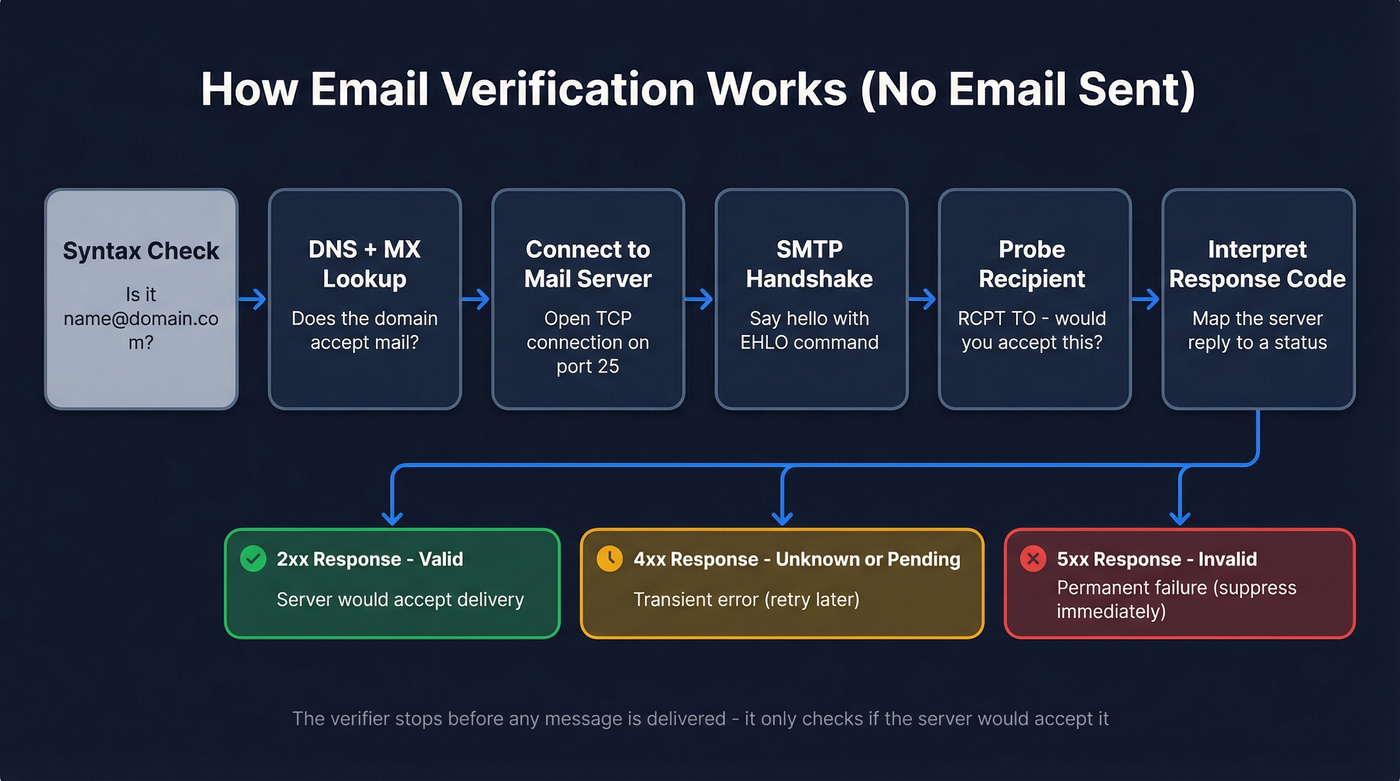
The typical flow (human version)
- Syntax check: does it look like
name@domain.com? - DNS + MX lookup: does the domain accept mail? Which servers handle it?
- Connect to the mail server: open a TCP connection to the SMTP port.
- SMTP handshake: identify the verifier to the server (
[EHLO](https://www.rfc-editor.org/rfc/rfc5321.html)). - Probe recipient: ask "would you accept mail for this recipient?" (
RCPT TO). - Interpret response codes: map server responses to Valid/Invalid/Catch-all/Unknown.
Mini diagram:
DNS/MX -> Connect -> EHLO -> MAIL FROM -> RCPT TO -> Code -> Status
Cheat sheet:
- 2xx (e.g., 250): server accepts recipient -> Valid
- 4xx (e.g., 421/450): temporary failure -> Unknown/Pending (retry)
- 5xx (e.g., 550): recipient rejected -> Invalid
Why this matters: most "Unknown" is "try again later," not "bad email." Retries, throttling, and sane timeouts are what separate a serious verifier from a toy. (For the most common hard bounce, see 550 recipient rejected.)
MAIL FROM vs From (envelope vs header)
SMTP uses envelope commands and message headers:
- MAIL FROM (envelope sender; RFC 5321)
- From: header (what humans see; RFC 5322)
Bounces and many authentication flows tie back to the envelope sender, which is why verifiers operate at the SMTP command layer.
How to interpret results (and what to do next)
Most tools use the same labels. The difference is whether they give you rules you can run in production - especially for Catch-all and Unknown.

| Status | What it means | What to do (rules that work) |
|---|---|---|
| Valid | Server indicates the mailbox is deliverable | Send, but throttle new domains (start small, then scale). Keep a "first-send" cap per domain so one bad source can't spike bounces. |
| Invalid | Server rejects the recipient (5xx) | Suppress immediately. Log the source (form, scraper, vendor, list) so you can stop the leak upstream. |
| Catch-all | Domain accepts all recipients (can't confirm mailbox) | Separate sequence + lower daily cap. Start with your highest-signal accounts, watch bounce rate by domain, and pause any domain that spikes. |
| Unknown | Server won't confirm (greylisting, rate limits, anti-enumeration) | Retry in a window (30-120 minutes, then next day). For cold outbound: suppress Unknown by default unless the lead is high-signal. If Unknown >10% on one domain, throttle and retry - don't blast it. |
| Pending | Check isn't finished yet | In bulk verification, don't export until Pending clears. Pending is where the riskiest addresses hide, and some tools note checks can take over 5 seconds per email, so plan batch time. |
In our experience, the ugliest bounce spikes come from one mistake: teams treat catch-all as valid and then scale volume before they've watched domain-level bounces.
Why free verifiers return "Unknown" (and why it's normal)
Unknown is the internet defending itself. Mail servers increasingly block mailbox probing because it looks like enumeration.
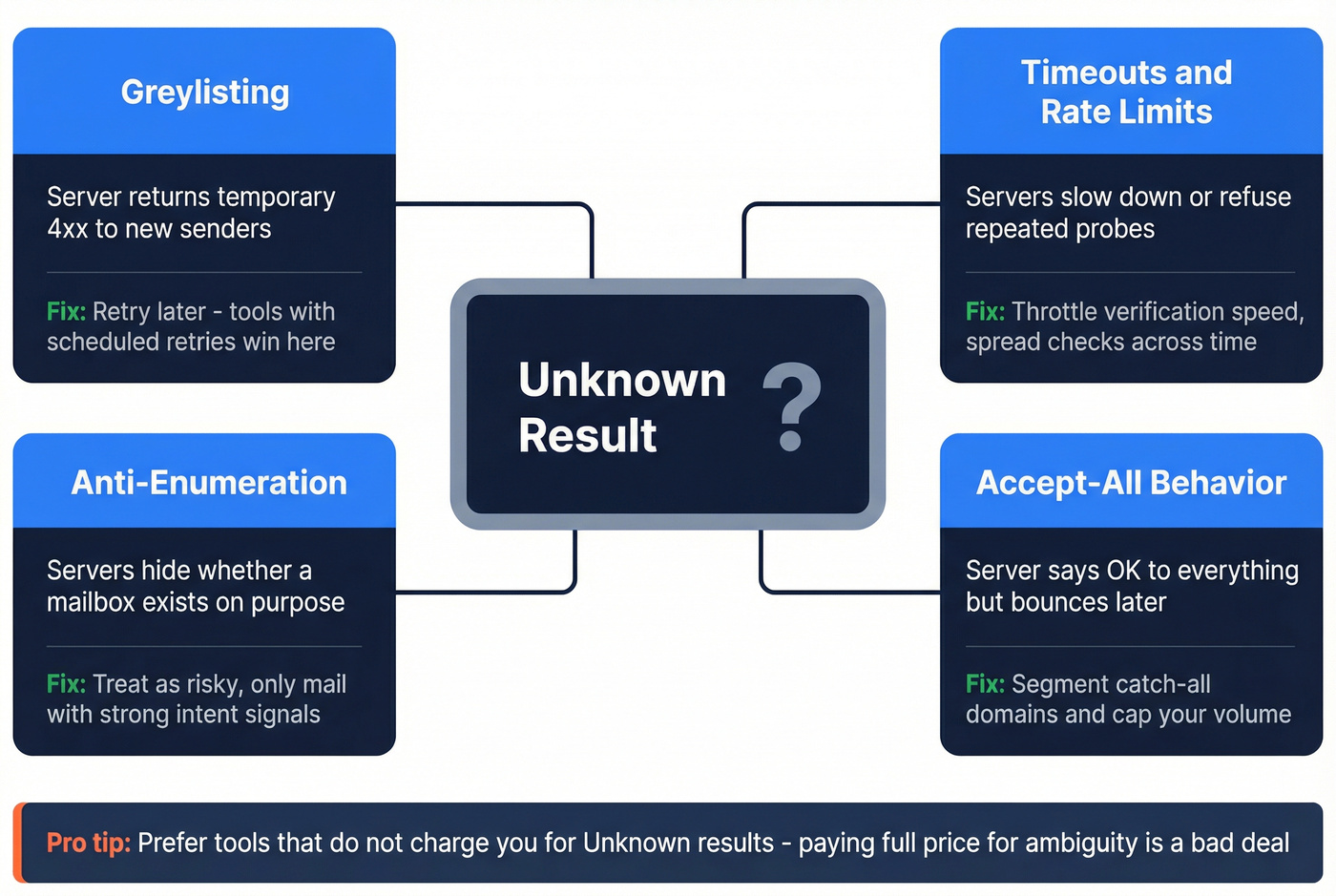
Cause -> symptom -> fix:
Greylisting: the server returns a temporary 4xx to new senders. Looks like: lots of 4xx/Unknown on first pass. Do this: retry later; tools with scheduled retries win here.
Timeouts / rate limits: servers slow down or refuse repeated probes. Looks like: Unknown spikes when you verify fast. Do this: throttle verification speed and spread checks across time.
Anti-enumeration configs: servers hide whether a mailbox exists. Looks like: "Unknown" even for real addresses, especially on large providers. Do this: treat Unknown as risky; only mail it if you have strong intent/fit signals.
Accept-all behavior: the server says "OK" to everything. Looks like: catch-all domains that still bounce later. Do this: segment catch-all and cap volume.
Pricing rule I recommend: prefer tools that don't charge for Unknown. Paying full price for ambiguity is a bad deal.
Catch-all emails: what they mean + a practical playbook
Catch-all (accept-all) means the domain's mail server accepts mail for any address - real or fake. It's the biggest practical gap in B2B outbound because "accepted" doesn't mean "exists." (If you want a deeper breakdown of verifiers that handle this well, see email verifier websites.)
One scenario I've seen too many times: a team verifies a list, sees 70% "Valid" and 20% "Catch-all," merges them, then sends 5,000 emails on day one. The dashboard looks fine for an hour, then bounces start rolling in by domain, and the sender reputation hit lasts longer than the campaign.
Catch-all playbook (what works)
- Segment catch-all into its own bucket. Never mix it with Valid.
- Lower daily caps for catch-all domains; scale only after clean results.
- Prioritize high-signal leads first (intent, right role, right account).
- Monitor bounces by domain; one domain can wreck your week.
- Set a suppression rule: if a domain bounces repeatedly, pause it for a cooling-off period.
- Re-verify before the next wave; catch-all behavior can change.
Hot take: most teams should treat catch-all as "no" unless the account is worth the risk. "Maybe" at scale is how you end up rebuilding sender reputation.
How often should you re-verify? (cadence that matches list decay)
Email data decays faster than teams want to admit. A commonly cited benchmark is ~28% annual decay, and some datasets show meaningful decay even month to month. (More benchmarks: B2B contact data decay.)

Cadence that holds up:
- Newsletter / opt-in list: verify at capture + re-verify quarterly.
- Product signups (fraud prevention): verify in real time + block disposables.
- Cold outbound lists: verify right before launch, then re-verify monthly at minimum.
- CRM enrichment workflows: weekly or continuous, because records change constantly.
Freshness beats "verified once," every time.
Best email verification tools you can use for free (limits + accuracy)
Free tools are great for spot checks. Paid plans earn their keep when they make Unknown and Catch-all operational, not just labeled.
Free verifier scorecard (pick fast)
- MX-only vs SMTP-level: SMTP-level wins for bounce reduction.
- Retries for 4xx/greylisting: must-have if you verify at scale.
- Charges for Unknown?: don't pay for ambiguity.
- Cache freshness: shorter caches reduce stale verdicts.
- Catch-all handling: needs segmentation support, not a shrug.
- Sheets/Zapier workflows: if you live in Google Sheets, avoid copy/paste tools.
Quick comparison table (mobile-safe)
| Tool | Free | Bulk | API | Best for | Paid start (standardized) |
|---|---|---|---|---|---|
| Prospeo | 75/mo + 100 ext | Y | Y | Outbound hygiene + fresh data | Starts at ~$39/mo |
| ZeroBounce | 100/mo | Y | Y | Compliance + controls | $20 / 2k (PAYG) |
| Hunter | 50 credits/mo (≈100 verifications) | Y | Y | Simple team workflows | $49/mo |
| Emailable | 250 once | Y | Y | Retry-heavy lists | PAYG (5k min purchase) |
| QuickEmailVerification | 100/day | Y | Y | One-day cleanup sprints | $4 / 500 (PAYG) |
| Verifalia | 25/day | Y | Y | Adjustable rigor levels | Paid plans available |
| Skrapp | 100/mo | Y | Y | Prospecting + verify | $30/mo |
| Snov.io | 50/mo | Y | Y | All-in-one lite suite | $29.25/mo (annual) |
| Email Hippo | Up to 100/day (free tools quota) | Y | Y | Form validation | PAYG (from $10 min) |
| VerifyEmailAddress.org | Single free | N | N | MX-only spot checks | Paid tokens for bulk (pricing varies) |
| Mailmeteor | Free checker + 50/mo (Sheets add-on) | N | N | Sheets-first checks | Paid plans available |
One line I'll repeat because it saves people money: data platforms aren't email verifiers. Start with verification, then worry about databases. (If you’re comparing finders vs verifiers, see email lookup tools.)
Prospeo (Tier 1)
Prospeo is the best self-serve option when you want accuracy and freshness without the usual "talk to sales" nonsense. It's "The B2B data platform built for accuracy," and it delivers 98% verified email accuracy with catch-all handling, plus a 7-day data refresh cycle (the industry average is 6 weeks), which matters a lot if you're verifying today and sending next week.
What I like in practice is that Prospeo isn't just stamping "Valid/Invalid" on a CSV. You can run verification as part of a broader workflow: find and verify emails, enrich CRM records, and keep lists fresh on a schedule, so you're not re-uploading the same file and hoping nothing changed. The platform includes 300M+ professional profiles, 143M+ verified emails, and 125M+ verified mobile numbers, and it's used by 15,000+ companies and 40,000+ Chrome extension users, which shows up in the product polish and the number of integrations teams actually use.
If you're building outbound lists, the detail that tends to move the needle is the verification process itself: Prospeo uses proprietary email-finding infrastructure (no third-party email providers) and a 5-step verification process that includes spam-trap and honeypot filtering, so you're not paying to "verify" landmines. (Related: B2B email lookup tool.)
Links: Pricing, Email Finder, Data Enrichment.
ZeroBounce (Tier 1)
ZeroBounce is a safe pick when you want strong hygiene features plus enterprise-grade controls. The free tier is straightforward: 100 validations/month, and pay-as-you-go starts at $20 for 2,000 credits.
Try it here: ZeroBounce free email verifier.

Hunter (Tier 1)
Hunter is the verifier I recommend when you want something your whole team will use without training. The UI is fast, the verdicts are easy to understand, and it fits nicely into lightweight workflows.
Free is 50 credits/month, and verification costs 0.5 credit, so you get about 100 verifications/month if that's all you do. Paid starts at $49/month.
Single checker: Hunter email verifier.
Emailable (Tier 2)
Emailable gives you 250 free credits as a one-time starter, which is genuinely useful for a first cleanup. The big differentiator is pricing fairness: Unknown results are free, so you don't pay for the least actionable outcome.
Pay-as-you-go requires a minimum 5,000-credit purchase, which is the real starting point once you move beyond the free credits.
QuickEmailVerification (Tier 2)
QuickEmailVerification is the "clean a list today" option. The free tier is 100/day (with signup), which beats most monthly freebies when you're doing a short sprint.
Paid starts at $4 for 500 credits pay-as-you-go, making it a cheap bridge from free checks to real bulk verification.
Verifalia (Tier 2)
Verifalia's free plan is 25 daily credits, and it's best when you want to choose verification intensity. It offers multiple quality levels with different credit costs, which is great for control and annoying for forecasting.
Skrapp (Tier 3)
Skrapp's free plan includes 100 credits/month, and paid starts at $30/month. It's also well-liked, with strong review volume on major software marketplaces.
Snov.io (Tier 3)
Snov.io gives 50 credits/month free and bundles verification into a broader outbound toolkit. Paid starts at $29.25/month (annual), and it's best if you want one lightweight suite rather than a dedicated verifier.
Email Hippo (Tier 3)
Email Hippo is strong for form validation and basic checks, with free tools that allow up to 100 daily email verifications and paid plans that start from a $10 minimum pay-as-you-go purchase.
VerifyEmailAddress.org (Tier 3)
VerifyEmailAddress.org is a classic free spot checker that focuses on syntax + MX rather than deep SMTP-level validation. If all you need is to verify an email address online for free for a one-off typo check, it can work.
Don't use it to "clean" a cold outbound list. You'll feel good for five minutes, then your bounce report will ruin your afternoon.
Mailmeteor (Tier 3)
Mailmeteor is a Sheets-first sending workflow with a lightweight free checker, so it's handy when your list lives in a spreadsheet. Its Google Sheets add-on includes 50 email verifications per month for free.
When to stop using free tools (and what to do instead)
Free is for spot checks. The moment you're making send/no-send decisions for hundreds of addresses, you're gambling with sender reputation.
Use this as your line in the sand:
- <25 emails (1:1 outreach): free single checker is fine.
- 100-2,000 emails (cold outbound): bulk verify, segment catch-all, suppress Unknown.
- 2,000+ emails/month: you need a workflow (bulk + API + re-verification cadence).
- Weekly outbound: treat verification like a weekly job, not a quarterly cleanup. (If you need a stack to run that, start with cold email outreach tools.)
We've seen teams "mysteriously" lose deliverability after doing everything "right," and it usually comes down to one boring detail: they verified once, then sent the same list weeks later.
Next steps (do this now)
If you're here to check one email: use a free single checker and move on.
If you're cleaning a CSV: run bulk verification, export only after Pending clears, and split your output into Valid / Catch-all / Unknown / Invalid so your sending tool can treat them differently.
If you're doing cold outbound weekly: set rules (suppress Unknown, cap Catch-all), run a 100-200 email pilot, and scale only when bounces stay under 2% total and 1% hard.
If you're running verification inside ops workflows: pick a tool with an API, clear retention/DPA posture, and a pricing model that doesn't punish you for Unknown.
Is email verification legal? (GDPR/privacy checklist)
Yes, email verification can be legal under GDPR, but emails are personal data and you need to handle them accordingly. (For outbound-specific guidance, see GDPR for Sales and Marketing.)
GDPR checklist (what to align on)
- Lawful processing: have a lawful basis to process personal data.
- Minimization: verify only what you need.
- Accuracy: verification supports this principle - keep records correct.
- Storage limitation: don't keep raw logs forever.
- Integrity & confidentiality: encryption in transit/at rest, access controls, audit trails.
Controller vs processor
- You're usually the controller (deciding why/how).
- The verifier is the processor (processing on your behalf).
What to demand from vendors
- A DPA
- Clear retention policy
- Encryption and security controls
- A way to handle data subject rights (deletion, access)
Free verification tools cap out at MX checks and tiny quotas. Prospeo gives you 100 free credits/month with full SMTP-level verification, catch-all detection, and 143M+ pre-verified emails - at $0.01 per email when you scale.
Get emails that are already verified instead of cleaning bad ones.
FAQ
Can I verify an email address for free without sending an email?
Yes. Most tools validate syntax and MX records, then run an SMTP handshake (EHLO/MAIL FROM/RCPT TO) and stop before any message is delivered. For better bounce protection, pick an SMTP-level verifier and retry 4xx results at least once within 30-120 minutes.
What does "Unknown" mean in email verification - can I still send?
Unknown means the server wouldn't confirm the mailbox (greylisting, timeouts, rate limits, or anti-enumeration), so it's a risk segment, not a green light. For cold outbound, suppress Unknown by default and only send 1:1; if Unknown exceeds 10% on a domain, throttle and recheck later.
How should I handle catch-all (accept-all) domains in B2B lists?
Treat catch-all as "maybe" and isolate it from Valid so one domain can't spike your bounce rate. Start with a low daily cap, prioritize high-signal accounts, and pause any domain that pushes total bounces above 2% in your pilot batch of 100-200 emails.
What's a good free alternative for verifying emails at small volume?
For small volumes, use a free tier that includes clear statuses and doesn't hide limits. Prospeo includes 75 email credits/month plus 100 Chrome extension credits, while Hunter offers about 100 verifications/month on its free plan. For a one-time cleanup, Emailable's 250 one-time credits are a solid starter.
Summary: when "email verification free" is enough (and when it isn't)
Email verification free is perfect for 1-20 spot checks and quick typo/domain sanity checks, but it stops being "free" the moment you need bulk decisions, retries, and operational rules for Unknown and catch-all. If you're sending cold outbound, verify right before launch, keep bounces under 2% total (1% hard), and graduate to a workflow tool like Prospeo when volume becomes weekly.