


Missive alternatives in 2026 (by workflow + pricing)
Missive's great right up until it isn't.
The first cracks usually look the same: nobody's sure who owns a thread, two people reply at once, and "reporting" turns into a Slack argument. Missive still nails the "talk around the email" experience, but plenty of teams bounce because setup feels fiddly and mobile triage can be a chore.
Here's the decision that actually matters: where does the truth live - Gmail/365 or the shared inbox tool? Pick that first, because if you don't, you'll migrate twice.
What teams praise (and complain about) in this category
Patterns show up fast once you've watched a few teams roll these tools out:
- Missive: loved for internal chat/comments and collaboration; criticized for setup complexity and mobile UX friction.
- Front: loved for routing and team workflows; criticized for cost at scale and add-on sprawl (AI, WhatsApp, API limits).
- Gmail-native overlays (Drag/Hiver): loved for fast adoption; criticized once teams want deeper analytics, longer retention, or true omnichannel.
- Help desks (Help Scout/Zendesk/Freshdesk): loved for reporting + SLAs; criticized when teams just want "email, but shared" and don't want ticket semantics.
Our picks (TL;DR): 3 tools to trial first
If you only have time to pilot three, start here.
Prospeo - best when the real problem isn't the inbox UI; it's deliverability and routing (verified emails + mobiles so the right person actually replies). Best for: fewer bounces, cleaner handoffs, faster routing with verified mobiles. Pricing: credit-based; free tier; typically ~ $0.01 per verified email.
Drag - best if you want to stay inside Gmail and keep the "email is the system" mindset. Best for: lightweight shared inbox + Kanban workflow without retraining the team. Pricing: $12-$24/user/mo (annual).
Help Scout - best for email-first support when you need real ticketing + reporting without Zendesk-level weight. Best for: SLAs, workflows, reporting that holds up in a QBR. Pricing: $25-$75/user/mo + AI Answers $0.75/resolution.
If you need SLA/CSAT/WhatsApp inside Gmail, swap Drag for Hiver.

Missive alternatives: pick the right category first (decision tree)
This is the blunt decision tree we've used with teams that were about to buy the wrong thing. It saves you from paying for a "pretty inbox" that collapses the moment volume shows up.
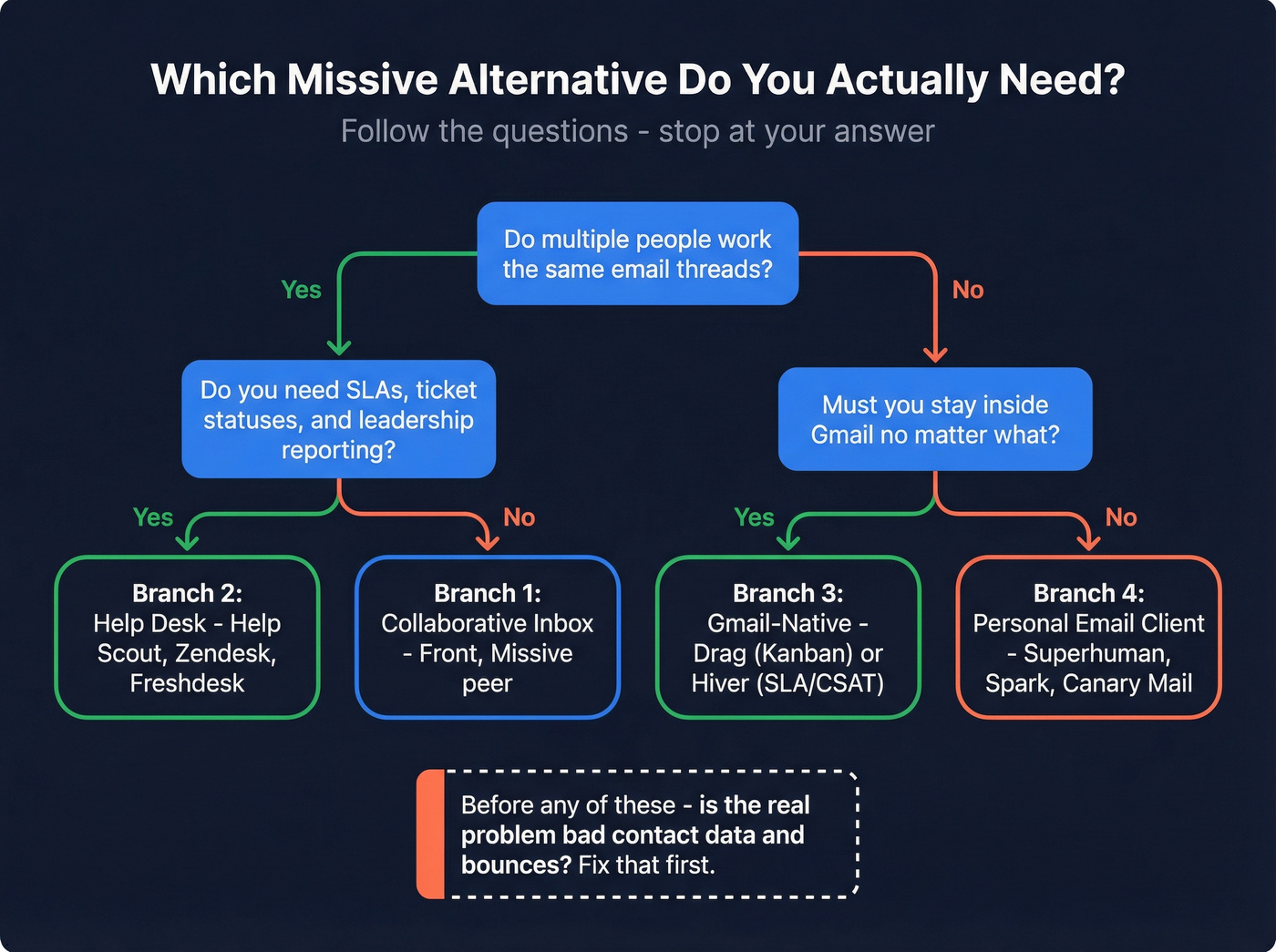
Branch 1: You need a collaborative inbox (ownership + collision-proof replies)
Pick this if multiple people work the same threads and you need assignments, watchers, internal notes, and a clear audit trail of who replied.
- Pick: Front (closest peer) when you want the inbox tool to become the workspace.
- Skip: personal email clients (Superhuman/Spark) if you need queue management, SLAs, and team-level reporting.
Hot take: these tools aren't bought for "collaboration." They're bought for collision control.
If two people double-reply to the same partner thread even once a week, you don't have a productivity problem - you've got a credibility problem.
Branch 2: You need a help desk (ticket lifecycle + SLAs + reporting maturity)
Pick this if you need statuses, SLAs, business hours, escalation, and reporting that survives leadership questions.
- Pick: Help Scout for email-first support; Zendesk/Freshdesk for omnichannel + heavier workflows + heavier workflows.
- Skip: Gmail-native overlays if you need multi-stage ticket lifecycle and long-term analytics.
Teams that "kind of" need a help desk always rebuild one with tags and rules inside a shared inbox. It's slower, messier, and harder to report on than just buying the help desk.
Branch 3: You must stay Gmail-native (compliance, habit, or "Gmail is truth")
Pick this if Gmail labels, search, and native behaviors are non-negotiable.
- Pick: Drag (Kanban workflow) or Hiver (SLA/CSAT ops inside Gmail).
- Skip: tools that import history and then become the primary UI if your team still lives in Gmail day-to-day.
Branch 4: You want a personal email client (speed, focus, AI writing)
Pick this if you're optimizing individual productivity more than team operations.
- Pick: Superhuman, Spark, Canary Mail, Mailbird.
- Skip: expecting them to replace Missive's assignment model, audit trail, or shared inbox governance.
One contrarian rule that prevents chaos: decide whether Gmail/365 is the system of record, or the shared inbox tool is the system of record. Pick one.
And if your goal is simply "more replies," don't start with an inbox migration. Fix your contact layer first.

Before you migrate shared inboxes, fix what's actually killing your reply rates. Bounced emails and wrong numbers create more chaos than any inbox UI. Prospeo delivers 98% email accuracy and 125M+ verified mobiles - so the right person actually gets your message.
Stop rearranging the inbox. Fix the contacts flowing into it.
The sync gotcha that decides the purchase (Gmail/365 fidelity)
Most teams discover sync limitations after they've migrated, trained everyone, and built workflows. That's backwards. Sync fidelity is a week-one test.
There are two common models:
- Gmail-native overlay: work happens inside Gmail; the tool adds shared workflow on top.
- Connected channel + imported history: the tool becomes the main workspace; Gmail/365 becomes plumbing.
Front is the cleanest example of why this matters. Front supports Gmail channels with two-way sync for emails and calendar events, plus a one-time history import (up to 50K most recent messages). After that initial import, Front doesn't sync a set of Gmail metadata actions (Front documents this in its Gmail channel help docs: https://help.front.com/en/articles/205312).
That's not "Front is bad." It's "choose where work happens."
If your team insists on living in Gmail and expects Gmail labels/archives/snoozes to remain authoritative, you'll feel friction fast. If your team is willing to treat Front as the primary workspace, it runs well.
Also worth knowing: Missive is built around full two-way sync, including Gmail labels/tags, archive, snooze, and read/unread. If you're switching away from Missive, validate whether you're giving up that metadata fidelity.
Week-one sync test plan (do this before you commit)
Run these actions in both Gmail and the tool, then verify what actually reflects back:
- Read/unread state
- Archive/unarchive
- Labels/tags changes
- Trash actions
- Snooze actions
- Search behavior (Gmail search vs tool search)
- Mobile behavior (triage speed + assignment)
Mini sync-model matrix (what to expect, what to test)
This isn't a spec sheet. It's the distinction that decides whether your team fights the tool.

| Tool | Sync model (plain English) | Best fit if "truth" lives in... | What to test first |
|---|---|---|---|
| Missive | Connected mailbox + app workspace (full two-way sync) | Missive | Gmail label/archive/snooze expectations |
| Front | Connected channels + history import | Front | Gmail metadata behaviors + search |
| Help Scout | Help desk ingesting email into tickets | Help Scout | ticket lifecycle + reporting retention |
| Drag | Gmail-native overlay | Gmail | multi-user collision + reporting window |
| Hiver | Gmail-native overlay (ops features) | Gmail | SLA/CSAT + assignment rules |
| Zendesk | Help desk ingesting channels | Zendesk | omnichannel routing + roles |
| Freshdesk | Help desk ingesting channels | Freshdesk | automation depth + SLA setup |
| Zoho TeamInbox | Shared inbox workspace | Zoho | rules + channel limits |
If you're on Microsoft 365, run the same test plan. The exact behaviors differ; the principle doesn't.
Pricing: seat caps, add-ons, and gotchas (what changes at 10/25/50 seats)
Most "alternatives" posts dodge the only question procurement cares about: what happens at 10, 25, and 50 seats after add-ons. Below are practical monthly totals (annual billing where published) and the gotcha that usually shows up after rollout.
Table A - monthly totals at 10/25/50 seats (approx.)
| Tool | Best for | 10 seats | 25 seats | 50 seats | Gotcha |
|---|---|---|---|---|---|
| Front | Collab inbox workspace | $250 | $1,625 | $3,250 | 10 seats assumes Starter; 25/50 assumes Professional + add-ons |
| Help Scout | Email-first support | $250 | $625 | $1,250 | AI is usage-priced |
| Drag | Gmail Kanban overlay | $120 | $300 | $600 | Reports capped by tier |
| Hiver | Gmail ops (SLA/CSAT) | $250 | $625 | $1,250 | Pro needed for ops |
| Zoho TeamInbox | Budget shared inbox | $50-$100 | $125-$250 | $250-$500 | Estimator pricing varies |
| Zendesk | Omnichannel suite | $450-$990 | $1,125-$2,475 | $2,250-$4,950 | Admin overhead + add-ons |
| Freshdesk | SMB help desk | $150-$790 | $375-$1,975 | $750-$3,950 | Omnichannel costs more |
| Spark for Teams | Team email client | $200 | $500 | $1,000 | Shared inbox on Pro |
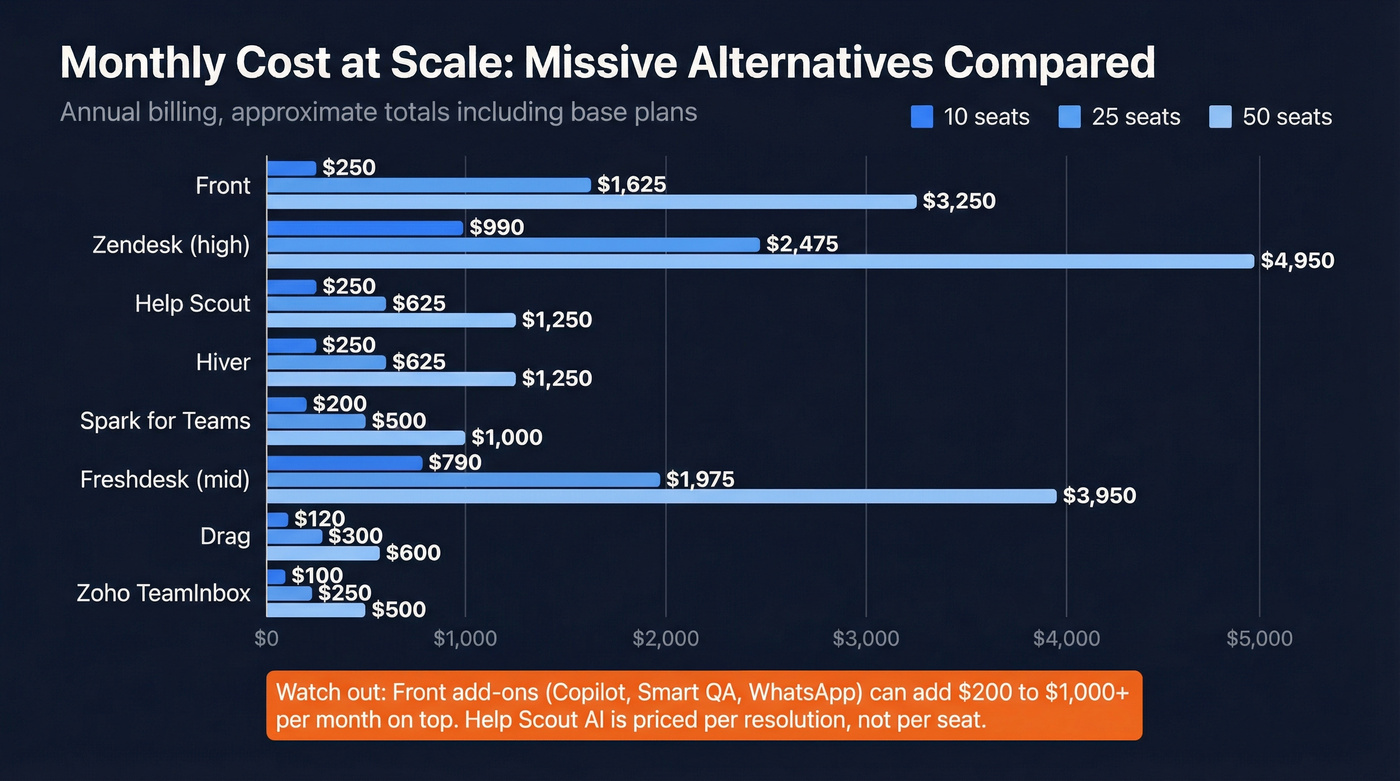
Table B - common add-ons that change the bill
| Tool | Add-on / limit | What it does to cost |
|---|---|---|
| Front | Copilot ($20/seat) | Adds $200-$1,000+/mo |
| Front | Smart QA ($20/seat) | Adds $200-$1,000+/mo |
| Front | Smart CSAT ($10/seat) | Adds $100-$500+/mo |
| Front | WhatsApp (+20% admin fee) | Meta fees + admin fee |
| Front | API limit increase ($200/100 rpm) | Pay to scale integrations |
| Help Scout | AI Answers ($0.75/resolution) | Usage can spike fast |
| Help Scout | Extra inboxes ($10/mo) | Multi-brand adds up |
| Help Scout | Extra Docs sites ($20/mo) | KB per brand costs extra |
| Drag | Reporting window (3/6/12 mo) | Forces tier upgrades |
| Hiver | Pro tier for SLA/CSAT/WA | Ops features cost more |

A simple budgeting rule: if you're buying Front, assume you'll pay for at least one add-on within 90 days. If you're buying Help Scout, forecast AI by resolutions, not headcount.
The best options (by category)
Prospeo - the "alternative" that fixes reply rates without changing your inbox
Look, a lot of "Missive alternatives" content pretends the inbox is the bottleneck. Half the time it isn't.
In our experience, the real time sink is bad contact data: bounces, dead aliases, and threads that land in the wrong place because the record's stale. Prospeo ("The B2B data platform built for accuracy") fixes that layer so whatever inbox you use stays calmer, your domain reputation stays clean, and routing gets simpler because you're not constantly cleaning up after invalid addresses.
Prospeo includes 300M+ professional profiles, 143M+ verified emails, and 125M+ verified mobile numbers with 98% verified email accuracy and a 7-day refresh cycle (industry average: 6 weeks). It's used by 15,000+ companies and 40,000+ Chrome extension users. For targeting, you get 30+ filters plus intent data across 15,000 topics (powered by Bombora). For ops, you can enrich CRM/CSVs with 50+ data points per contact, with a 92% API match rate and 83% enrichment match rate.
A scenario we've seen more than once: a partnerships inbox gets "busy," so the team buys a shared inbox tool, then spends the next month arguing about assignments while half the inbound is actually bounce-back noise from old lists and forwarded aliases. Clean the data first, and suddenly the same tool feels 2x better because you're working real conversations, not garbage.
Pricing is credit-based with a free tier (75 emails + 100 extension credits/month). Expect ~ $0.01 per verified email.
Links: https://prospeo.io/pricing and https://prospeo.io/email-finder.
Drag - Gmail-native shared inbox for "don't change my habits"
Verdict: Drag's the fastest way to get Missive-like coordination while keeping Gmail as the truth.
What it does well:
- Turns Gmail into a shared workflow with a Kanban board, assignments, and automation rules.
- Onboarding's painless because nobody has to learn a new inbox.
Watch out for: reporting retention is tier-capped (3/6/12 months). If leadership expects year-over-year trends, you'll upgrade.
Pricing (published): $12 / $18 / $24 per user/month billed annually (or $16 / $22 / $30 monthly). WhatsApp is Pro-only.
Help Scout - the cleanest step up from "shared inbox" to support ops
Help Scout's the tool I'd pick when a team says, "We're doing support in a shared inbox and it's getting messy."
Best for
- SLAs, workflows, and reporting that doesn't fall apart when someone asks for trends by tag, channel, or teammate.
- Email-first support teams that want ticketing without the enterprise heaviness.
Watch out for
- AI Answers is $0.75 per resolution, so usage can surprise you at scale.
- If you run multiple brands, budget add-ons: additional inboxes ($10/mo) and additional Docs sites ($20/mo) on annual billing.
Pricing (published): Free, then $25 / $45 / $75 per user/month.
Hiver - Gmail-native, but with real ops controls (SLA/CSAT/WhatsApp)
If your team refuses to leave Gmail but you still need operational discipline, Hiver's the Gmail-native pick that behaves like a support layer.
Who should choose it (3 quick personas)
- Ops lead who needs SLA + business hours without migrating off Gmail
- Support manager who wants CSAT inside the same place agents already work
- Team with WhatsApp needs but no appetite for a full help desk
Watch out for: the features people actually want - SLA & business hours, CSAT, WhatsApp, API - sit on Pro.
Pricing (published): Growth $25/user/mo annually (or $35 monthly); Pro $65/user/mo annually.
Front - closest Missive peer, and the one that punishes seat creep
Front's the closest "collaborative inbox workspace" peer to Missive. It's also where teams get blindsided: seat caps, add-ons, and sync expectations collide.
Pricing (published, annual) + seat caps
- Starter $25/seat/mo (up to 10 seats)
- Professional $65/seat/mo (up to 50 seats)
- Enterprise $105/seat/mo
The gotchas that matter
- Add-ons stack quickly: Copilot $20/seat/mo, Smart QA $20/seat/mo, Smart CSAT $10/seat/mo; WhatsApp billed by Meta plus a 20% admin fee; API rate limit increases $200 per 100 API requests/min/month.
- Gmail sync fidelity: after initial import, key Gmail metadata actions don't sync (documented here: https://help.front.com/en/articles/205312). If your team's Gmail-purist, you'll feel it.
My opinion: Front's still the best "all-in" collaborative inbox workspace - if you'll actually use it as the workspace. If half your team keeps working in Gmail, you'll pay Front prices for Gmail behavior.
Zoho TeamInbox - the budget shared inbox that covers the basics
Zoho TeamInbox is the "we need shared inbox basics, but we're not paying Front money" option. It's good at routing and rules, and it fits SMB budgets.
Best for: small teams that want shared inboxes, rules, and simple governance. Watch out for: channel/rule limits by tier; you'll feel them as you add brands or inboxes.
WhatsApp note: WhatsApp Business Accounts include 1,000 free service conversations/month, then you pay beyond that; Zoho bills WhatsApp using conversation-based credits depending on setup.
Pricing: ~ $5-$10/user/mo (estimate; Zoho pricing is estimator-driven and varies by region/bundle).
Zendesk - when you need omnichannel + governance and you can staff it
Zendesk is what you buy when support's mission-critical and you need a real omnichannel machine: roles, auditability, routing, SLAs, and a huge ecosystem.
Best for: larger support orgs with admin capacity and strict process needs. Watch out for: it's heavier than Missive in setup and ongoing administration; you pay in time even before you pay in add-ons.
Pricing: suite plans commonly land around $45-$99/agent/mo (estimate) depending on package and add-ons.
Freshdesk - help desk structure without the enterprise tax
Freshdesk's the practical middle ground: SLAs, ticket lifecycle, and automation without Zendesk-level overhead.
Best for: SMB support teams graduating from shared inbox tools. Watch out for: omnichannel and advanced automation push you into higher tiers quickly.
Pricing: typically ~ $15-$79/agent/mo (estimate) depending on tier and whether you bundle omnichannel.
Spark for Teams - a team email client (not a queue-management tool)
Spark's a strong team email client with collaboration features, but it isn't a Missive/Front-style operations platform.
Best for: teams that want a modern client experience and light collaboration. Watch out for: Shared Inboxes require Pro, and you won't get help-desk-grade SLAs or queue governance.
Pricing (published): Plus $10/user/mo and Pro $20/user/mo (Enterprise is typically higher/custom).
Desk365 - Microsoft-first help desk that's worth piloting
Desk365 fits Microsoft 365-centric environments well and is a sensible option for internal support, IT, or customer support teams that already live in the Microsoft ecosystem.
Best for: Microsoft-first teams that want ticketing without Zendesk pricing. Watch out for: validate external-customer volume, automation depth, and reporting needs in a pilot before rolling it out broadly.
Pricing: starts at $12/agent/month, and typically lands ~ $12-$25/agent/mo (estimate) depending on tier and volume.
Helprace - help desk + knowledge base/community emphasis
Helprace leans harder into knowledge base and community workflows than most shared inbox tools.
Best for: support teams that want a stronger portal/KB experience alongside ticketing. Watch out for: UI and workflow depth can feel less modern than newer help desks; confirm integrations early.
Pricing: typically ~ $20-$60/agent/mo (estimate) depending on package.
Email client alternatives: what you gain (and lose) vs Missive
Email clients are tempting because they feel fast. They are fast. They also remove the governance that makes Missive work for teams.
Three concrete tradeoffs:
- Speed & focus: clients like Superhuman and Spark feel snappier for individual triage than most shared inbox tools.
- Search & offline: clients can be excellent for personal search and offline access, but team-wide reporting and audit trails are thin.
- Governance: assignments, collision-proof replies, and "who owns this thread" discipline are weaker than Missive/Front/help desks.
If you're a solo operator or a tiny team, an email client can be the right move. If you're running queues, it's the wrong tool.
Superhuman
Superhuman's the premium personal email experience: fast triage, shortcuts, and a polished UI. Pricing is $30/month (Starter) or $40/month (Business). It's worth it for individual speed, but it won't replace shared-inbox governance for real queue management.
Canary Mail
Canary Mail is a privacy/security-forward email client with low pricing. Expect ~ $3-$10/user/mo (estimate) depending on plan. It's a client choice, not a shared-inbox operations replacement.
Mailbird + classic clients (Outlook/Apple Mail/Thunderbird)
Mailbird and classic clients are personal productivity tools, not shared inbox platforms. Expect low-cost per-user licensing (often under ~ $10/user/mo equivalent, depending on plan/licensing model), but don't expect assignments, internal threads, or an audit trail.
What to pick based on your workflow (support vs sales vs ops vs agency)
If you're still torn, decide based on four realities: collision-proof ownership, reporting maturity, omnichannel needs, and whether Gmail-native is mandatory.
| Workflow | Pick | Avoid | Winner (why) |
|---|---|---|---|
| Support team (email-first) | Help Scout | Spark/Superhuman | Help Scout (SLAs + reports) |
| Omnichannel support | Zendesk | Drag | Zendesk (channels + governance) |
| Gmail-native ops | Hiver | Front (if Gmail-purist) | Hiver (Gmail truth) |
| Gmail-native sales inbox | Drag | Zendesk | Drag (fast adoption) |
| Sales/partnerships shared inbox | Front + verified data layer | Help desk suites | Front (ownership) |
| Agency shared inbox | Front or Drag | Heavy suites | Front (if multi-channel) / Drag (if Gmail-only) |
Hot take (and I'll stand by it): if your average deal size is small and you're not running true omnichannel support, you don't need a heavyweight platform. You need clean ownership rules, a tool your team will actually use, and data that doesn't torch deliverability.
Migration playbook (switch without losing history or breaking sync)
Migrations fail for boring reasons: history, permissions, and "we assumed sync worked like Gmail." Don't wing it.
I've watched teams do a "Friday cutover" and spend the next two weeks in inbox purgatory, because the first time someone snoozed a thread in Gmail it didn't match what the new tool showed, and suddenly nobody trusted anything.
Migration checklist (the version that actually works)
Run parallel inboxes for 2-4 weeks. Keep Missive live while the new tool runs in parallel. You're hunting edge cases: reassignment, collision alerts, mobile behavior, and how templates/macros behave under pressure.
Decide your system of record (and write it down). If Gmail/365 is the record, pick a Gmail-native overlay or accept that the shared inbox tool becomes the workspace.
Import history intentionally. Front's Gmail import is up to 50K messages. Help Scout's reporting history depends on tier (30 days -> 2 years -> all-time). Define what "enough history" means for audits and reporting.
Map rules, templates, and tags before you migrate. Rebuild routing in a spreadsheet first: trigger -> condition -> action -> owner. Then implement. This prevents rule spaghetti.
Test metadata sync behaviors in week one. Specifically test: archive, snooze, labels/tags, read/unread, and trash. If those don't sync, train the team to work in the new tool - not half in Gmail.
Validate reporting windows and retention. Drag's reporting is capped by tier (3/6/12 months). If leadership expects longer trendlines, upgrade early or pick a tool built for analytics.
Train ownership hygiene. Define: when to assign, when to watch, when to close, and what "done" means. This is the difference between a calm queue and a permanent fire drill.
Collision control and SLA workflows mean nothing if 35% of your outbound bounces. Teams using Prospeo cut bounce rates under 4% and triple connect rates - at roughly $0.01 per verified email. No contracts, no sales calls.
Clean data in, fewer double-replies out. Start with 100 free credits.
FAQ
What's the closest true replacement for Missive?
Front's the closest peer if you want a dedicated collaborative inbox workspace with strong routing and omnichannel options. Drag and Hiver are closer replacements if you must stay inside Gmail. Help Scout's the closest replacement when "shared inbox" is really "support ticketing."
Is Front a better Missive alternative for Gmail teams?
Front's better if you're willing to treat Front as the primary workspace. If your team expects Gmail metadata behaviors (labels/archive/snooze) to remain authoritative, test sync early - Front documents Gmail channel limitations in its help center (https://help.front.com/en/articles/205312), and history import is capped at 50K messages.
When should I choose a help desk (Help Scout/Zendesk) instead of a shared inbox?
Choose a help desk when you need ticket lifecycle, SLAs, business hours, escalation, and reporting you can trust over quarters. Shared inbox tools are great for collaboration, but they get brittle when you're managing queues, compliance, and multi-stage resolution workflows.
What's the best Gmail-native Missive alternative?
Drag's best for a lightweight Gmail-native shared inbox with clear pricing ($12-$24/user/mo annual) and fast adoption. Hiver's best when you need SLA/CSAT and WhatsApp inside Gmail, but those features are gated to Pro ($65/user/mo annual).
Final recommendation
Pick category first: collaborative inbox workspace (Front), Gmail-native overlay (Drag/Hiver), or help desk (Help Scout/Zendesk/Freshdesk). Then run the sync test in week one - metadata fidelity and reporting retention decide whether the tool feels seamless or constantly annoying. If you want a tight shortlist, start with Drag + Help Scout + Front and choose based on where your team insists the truth lives.