

The B2B Sales Presentation Playbook (2026): A Deck That Sells Without You
Most sales decks don't lose because they're ugly. They lose because they're built for one person (the champion) and judged by a committee.
Your b2b sales presentation isn't for the meeting. It's for the 5-16 people who weren't in the meeting, who'll skim it later, and who'll argue about it without you.
If your deck needs an agenda slide to make sense, it's too long.
What you need (quick version)
Use this checklist when you're building (or fixing) a b2b sales presentation fast.
- Hook in 30 seconds. Salesforce's rule is blunt: you have 30 seconds to earn attention. That's slide 1-2, max.
- Assume skimming. DocSend analyzed 34M interactions and found buyers spend under 3 minutes on sales content on average. Your deck must land half-read.
- Write for a committee, not a champion. Your champion cares about features. Finance, IT, and Legal care about risk, math, and process.
- Use a 10-12 slide spine. Problem -> Cost -> Solution -> Proof -> ROI -> Plan -> MAP -> Next step.
- Make MAP non-negotiable. A Mutual Action Plan with owners + dates is how deals stop slipping.
- Keep the spine tight; add stakeholder modules. Add 2-4 targeted slides (CFO, IT/Security, Legal/Procurement, end users).
- Design for forwarding. Every slide stands alone; headline = conclusion (not a topic).
- Send a follow-up package. PDF deck + MAP + security one-pager + ROI snapshot. If it's not easy to share internally, it won't get shared.
The "CDP Framework": what your b2b sales presentation must do in 2026
Most decks try to persuade. Committee-ready decks do something more useful: they create alignment.

I've used a simple framework for years to keep decks honest:
- C = Consensus. Give the group shared language and a shared definition of success.
- D = De-risking. Answer security, implementation, and procurement questions before they turn into blockers.
- P = Process. Turn next steps into a timeline with owners, dates, and exit criteria.
Gartner (632 B2B buyers; Aug-Sep 2026) found 74% of buying groups experience unhealthy conflict during the decision. When buying groups do reach consensus, they're 2.5x more likely to report a high-quality deal. That's the whole game: your deck is a consensus tool, not a persuasion tool.
Gartner also puts buying groups at 5-16 people across up to four functions. So if your deck only speaks to the day-to-day user, you're basically writing a love letter to 1/10th of the decision.
Here's the counterintuitive part: tailoring to buying-group relevance improves consensus by 20%, while tailoring to individual relevance has a 59% negative impact on consensus. Over-personalized decks don't feel thoughtful to the committee - they feel biased.
Concrete example of committee conflict (you've seen this): the champion wants speed, IT wants control, Finance wants predictability. If your deck only screams "speed," IT hears "shadow IT," Finance hears "hidden costs," and the deal slows down anyway.
Hot take: "personalized decks" are often just champion-biased decks. They win the meeting and lose the decision.
A winning deck does three jobs (CDP):
- Consensus: creates shared language and measurable stakes
- De-risking: preempts security + implementation + procurement stalls
- Process: drives a timeline the buyer can run without you
I've watched teams rebuild their entire deck when the real issue was simpler: they didn't have a slide that helped Finance and IT agree on what success even meant.
Attention math: how long buyers actually give your deck
Let's stop pretending buyers read decks.
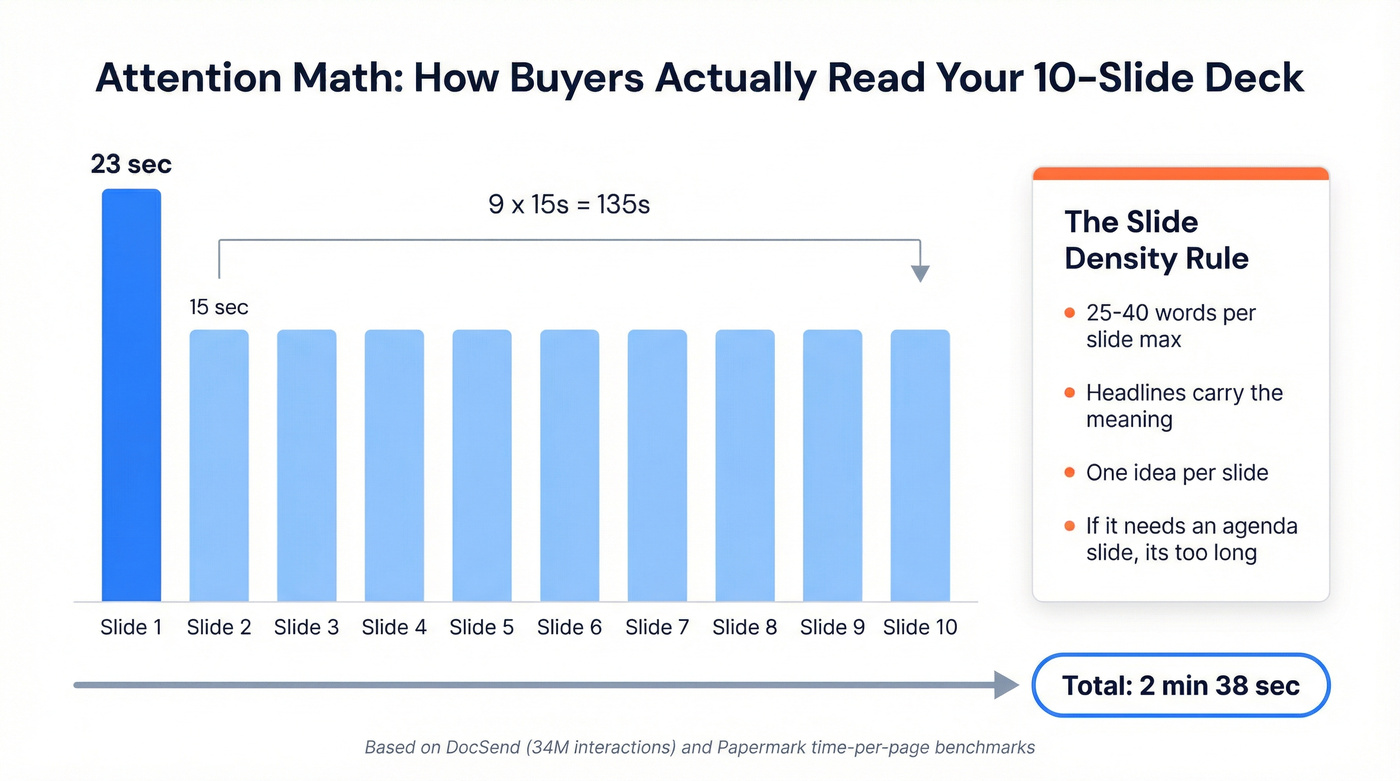
DocSend's benchmark is based on 34 million content interactions (it's an older benchmark, but the behavior pattern still matches what most teams see): prospects spend under 3 minutes on sales content on average, and 80%+ of views happen on desktop. Your deck's getting skimmed in a browser tab, between meetings, with Slack popping off.
Papermark is pitch-deck data, but the skim pattern's a useful proxy: about 23 seconds on the first page, then about 15 seconds per page after that. The 9-16 pages range is the most common.
Do the math for a 10-page deck:
- 1st page: 23s
- Next 9 pages: 9 x 15s = 135s
- Total: 158s = 2:38
That lines up eerily well with DocSend's under-3-minutes benchmark.
Now make it actionable with one rule that fixes most decks:
Slide density rule: aim for about 25-40 words per slide (including labels). If you exceed that, move the detail to an appendix or a one-page doc. Dense slides don't look smart - they look like work.
So your rules are:
- Slide 1 must work as a standalone artifact. If someone only sees one slide, it'll be that one.
- Headlines must carry the meaning. "Challenges" is a topic. "Delays are costing $X per quarter" is a conclusion.
- One idea per slide. If you need paragraphs, you're writing a doc, not a deck.
- If it needs an agenda slide, it's too long. The buyer's attention span is your agenda.
Helpful references if you want to sanity-check the benchmarks: DocSend's sales content benchmarks and Papermark's time-per-page metrics.

Your deck targets 5-16 stakeholders. But you need verified contact data for every one of them - the CFO, the IT lead, the procurement gatekeeper. Prospeo gives you 98% accurate emails and 125M+ verified mobiles across the entire buying committee, not just your champion.
Stop presenting to one person. Reach the whole committee.
B2B sales presentation deck structure: the committee-ready spine (10-12 slides)
This spine is the one I default to because it maps to how committees decide: Problem -> Cost -> Solution -> Proof -> ROI -> Next step. It's not a product tour. It's a decision narrative.

Use/skip notes (so you don't force the wrong deck):
- Net-new deal (most common): use the full spine.
- Renewal / expansion: skip slides 3-5 and start at ROI -> Implementation -> Risks -> MAP. Nobody needs a "problem" slide when they already pay you.
- Security-stalled deal: move Risks/Trust Pack up right after Proof (don't wait until slide 9).
- Competitive bake-off: add the two displacement slides (status quo cost + migration plan) and keep everything else the same.
Below are copy/paste templates for each slide. Each one includes: goal, what to show, sample talk track, and the most common mistake.
Slide 1-2 Hook + stakes (first 30 seconds) - Consensus
Goal: Earn attention and frame the meeting around a business outcome, not your product.
What to show: Option A (stat hook) or Option B (question hook). Then a one-line stakes statement.
Copy/paste (Option A: stat hook)
- Headline: "Your team is losing pipeline to invisible friction."
- Bullets:
- "Deals stall between first meeting and committee alignment."
- "We'll show a 90-day path to faster decisions + lower risk."
Copy/paste (Option B: question hook)
- Headline: "What breaks when this decision gets delayed by 90 days?"
- Bullets:
- "Revenue impact: ____"
- "Risk impact: ____"
- "Time impact: ____"
Sample talk track: "Salesforce's rule is you've got about 30 seconds to hook people. So I'll be direct: the goal today is to align on the problem, quantify the cost of waiting, and leave you with a plan your team can run internally."
Common mistake: Starting with "About us" or a feature list.
Slide 3 Problem + cost of inaction - Consensus
Goal: Make the problem committee-proof. Everyone should agree it's real, measurable, and worth fixing.
What to show: A simple current state with 2-3 symptoms, then cost of inaction across three categories.
Copy/paste
- Headline: "The current process creates revenue drag, risk, and wasted time."
- Bullets (Revenue): "Missed conversion: ____% -> ____% target"
- Bullets (Risk): "Compliance / security / churn risk: ____"
- Bullets (Time): "Hours per week per team: ____ (about $____/quarter)"
Sample talk track: "This isn't just annoying. It's expensive in three ways: revenue you don't capture, risk you carry, and time your team burns. If we can't agree on those three, you shouldn't buy anything."
Common mistake: Vague pain. "It's hard" doesn't survive procurement.
Slide 4-5 Solution overview + why now - Consensus -> Process
Goal: Explain the approach without turning it into a product demo.
What to show: 3 outcomes, 3 capabilities (at most), and a why-now trigger tied to their reality.
Copy/paste (Slide 4: outcomes)
- Headline: "The outcome: faster decisions + fewer surprises."
- Bullets:
- "Shorten time-to-decision by removing committee blockers early"
- "Standardize proof + security answers"
- "Create a mutual plan with owners and dates"
Copy/paste (Slide 5: why now)
- Headline: "Why now: the cost of waiting compounds."
- Bullets:
- "Upcoming deadline: ____"
- "New initiative / headcount / tooling change: ____"
- "Risk window: ____"
Sample talk track: "I'm not going to walk you through features yet. First we align on outcomes and timing. Features only matter if they're the shortest path to those outcomes."
Common mistake: "Here are 27 things we do."
Slide 6 Proof hierarchy - De-risking
Goal: Build belief in layers, so skeptics can't dismiss it as marketing.
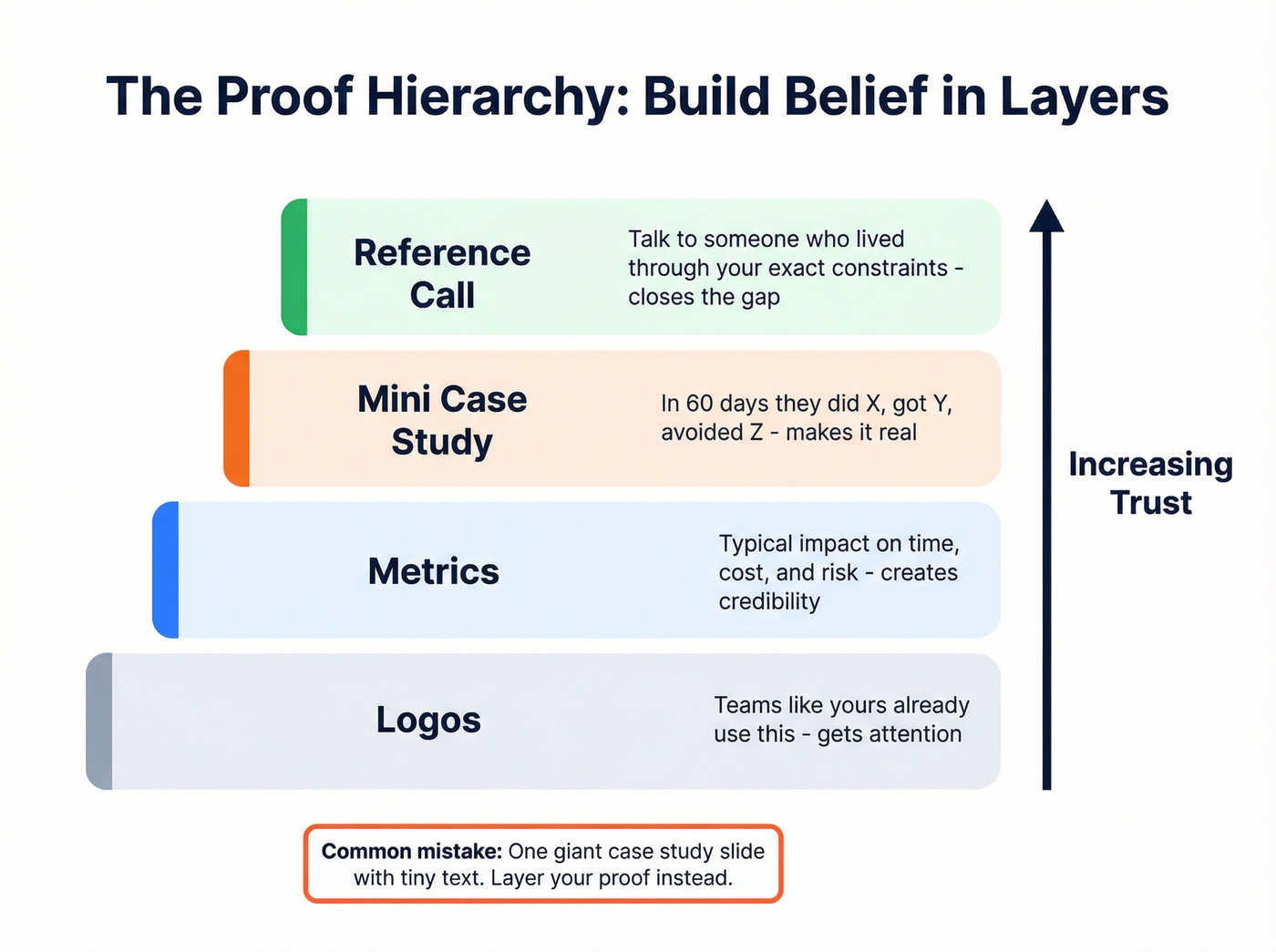
What to show: Proof in this order: logos -> metrics -> mini case study -> reference offer.
Copy/paste
- Headline: "Proof this works in environments like yours."
- Bullets (Logos): "Teams like ____ / ____ / ____"
- Bullets (Metrics): "Typical impact: ____ (time), ____ (cost), ____ (risk)"
- Bullets (Mini case): "In 60 days: did X -> got Y -> avoided Z"
- Bullets (Reference): "Happy to connect you with a reference in ____ industry."
Sample talk track: "Logos get attention, metrics create credibility, and a short story makes it real. If you want, we'll line up a reference call with someone who's lived through the same constraints."
Common mistake: One giant case study slide with tiny text.
Slide 7 ROI/business case - De-risking
Goal: Give Finance something they can defend internally.
What to show: A simple ROI model with inputs, assumptions, payback.
Copy/paste (ROI template)
- Headline: "Business case (simple, auditable math)."
- Bullets:
- "Volume: ____ users / ____ deals / ____ hours"
- "Value driver: ____ (e.g., time saved, conversion lift, risk avoided)"
- "Assumptions: ____ (conservative)"
- "Payback: ____ months; Year-1 ROI: ____%"
Sample talk track: "This isn't a spreadsheet war. It's a sanity check. If these assumptions don't hold, we'll adjust them live. The goal is a model your CFO won't laugh out of the room."
Common mistake: ROI as a magic number with no inputs.
Slide 8 Implementation plan - De-risking -> Process
Goal: Remove the "this will be a nightmare" fear.
What to show: 30/60/90-day plan with roles (buyer + seller) and success checkpoints.
Copy/paste
- Headline: "30/60/90 days to value (with clear owners)."
- Bullets:
- "Day 0-30: Setup + baseline (Owner: ____ )"
- "Day 31-60: Rollout + training (Owner: ____ )"
- "Day 61-90: Adoption + reporting (Owner: ____ )"
- "Success metrics: ____ / ____ / ____"
Sample talk track: "Committees don't just buy products. They buy the implementation risk. This is the plan we'll run together, and these are the checkpoints where you'll know it's working."
Common mistake: "Implementation is easy." That's not reassuring. It's suspicious.
Slide 9 Risks + trust pack (security/compliance) - De-risking
Goal: Preempt the security and compliance stall.
What to show: A checklist slide that mirrors what IT/security actually asks for. Keep it high-level, but concrete.
Copy/paste (trust pack checklist)
- Headline: "Trust pack: security + compliance essentials."
- Bullets:
- "SOC 2 / ISO status: ____"
- "Pen test summary: ____ (date, scope)"
- "Sub-processors list + DPAs: ____"
- "Data residency options: ____"
- "SSO/SAML + RBAC: ____"
- "Encryption (in transit/at rest): ____"
- "Retention + deletion policy: ____"
- "Audit logs: ____"
Sample talk track: "Real talk: deals slip because security questions show up late. This slide is here so your IT team can say 'yes' or 'no' quickly, and we can get the right docs in their hands."
Common mistake: Hiding security behind "we're secure, trust us."
Slide 10 Decision process + paper process - Process
Goal: Make the path to signature explicit, including the annoying parts.
What to show: Decision Criteria + Decision Process + Paper Process.
Copy/paste
- Headline: "Decision path (including the paper process)."
- Bullets:
- "Decision criteria: technical / commercial / legal"
- "Decision process: who evaluates what, in what order"
- "Paper process: security review -> legal redlines -> procurement -> signature"
- "Target date: ____; risks to timeline: ____"
Sample talk track: "Most deals don't die on product. They die in the paper process. Let's map it now so we're not surprised in week six."
Common mistake: Pretending procurement doesn't exist until it's too late.
Slide 11 Mutual Action Plan (MAP) slide - Process
Goal: Turn next steps into a shared plan with momentum.
A MAP is a shared roadmap with actions, milestones, owners, and dates. It's mutual, but the seller should do most of the work.
What to show: A simple table: milestone, owner, date, exit criteria.
Copy/paste (MAP skeleton)
- Headline: "Mutual Action Plan (owners + dates)."
- Bullets/table rows:
- "Security review kickoff - Owner: ____ - Date: ____ - Exit: questionnaire complete"
- "ROI model sign-off - Owner: ____ - Date: ____ - Exit: assumptions approved"
- "Pilot / validation - Owner: ____ - Date: ____ - Exit: success metrics hit"
- "Legal redlines - Owner: ____ - Date: ____ - Exit: final terms agreed"
- "Signature + kickoff - Owner: ____ - Date: ____ - Exit: kickoff scheduled"
Sample talk track: "You can't create fake urgency. The only real urgency is your deadlines and requirements. This MAP is how we keep everyone aligned when the deal moves behind closed doors."
Common mistake: A MAP that's just seller tasks ("send quote," "follow up").
Slide 12 Clear next step - Process
Goal: End with a single, calendarable action and the artifacts you'll send.
What to show: One meeting, one outcome, and a list of what they'll receive.
Copy/paste
- Headline: "Next step: align the committee in 30 minutes."
- Bullets:
- "Schedule: ____ (date/time) - Attendees: Finance + IT + Ops"
- "Outcome: confirm ROI assumptions + security path + MAP dates"
- "We'll send: PDF deck, MAP, security one-pager, ROI model"
Sample talk track: "If we leave today with one thing, it's a scheduled committee alignment call. Everything else is noise."
Common mistake: Ending with "Any questions?" and letting the meeting drift into random objections.
Two micro-examples (so this doesn't stay theoretical)
Most deck advice fails because it never shows what good looks like in the wild.
So here's what I've actually seen get forwarded internally, survive Finance, and come back with real edits instead of vague "we'll circle back" energy.
Example A: a 6-slide exec micro-deck that gets forwarded This is what I use when an exec sponsor joins late or only gives you 12 minutes:
- Decision headline: "Approve X to reduce Y risk by Z date."
- Cost of delay: one number for revenue, one for risk, one for time.
- Options: Status quo vs Option A (you) vs do nothing, with one tradeoff each.
- ROI headline: payback + the 2-3 inputs that drive it.
- Risk posture: security/compliance status + implementation timeline at a glance.
- MAP snapshot: three milestones, owners, dates.
Why it works: it's not "here's our company." It's "here's the decision, the math, the risk, and the plan." Execs forward decisions, not demos.
Example B: a procurement credibility slide that prevents week-six surprises One slide, no fluff:
- Contract term options (12/24/36 months)
- Renewal summary (plain language)
- DPA availability + sub-processors link
- Security artifacts list (SOC 2, pen test date, SSO/RBAC, audit logs)
- Implementation support model (who does what)
- Timeline estimate for security + legal (so nobody invents one)
Why it works: procurement doesn't want persuasion. Procurement wants predictability.
Stakeholder add-on slides (pick 2-4 based on who's in the room)
Your spine stays tight. Stakeholder slides are modular.
Traction Complete summarizes common buying-committee research from Gartner/Forrester (secondhand) and the taxonomy is genuinely useful: Project Sponsor, Champion, Executive Sponsor, Financial Approver, Technical Buyer, Ops/Process Owner, Business User, Legal Reviewer, Influencer, Final Authority.
Those summaries also highlight three realities you should design for:
- About 89% of purchases involve cross-department decisions
- Buyers spend only about 17% of their purchasing time meeting vendors
- About 41% of buyers have a preferred vendor before they evaluate options
Deck implication: you're often not winning the meeting. You're competing against a default choice in a process you barely get invited into. Your advantage is being the easiest vendor to evaluate and the easiest story to share internally.
What to remove (this is where decks bloat):
- Remove "About us" slides unless you're unknown and enterprise trust is the blocker.
- Remove feature grids. Put features in appendix or demo. (If this is a recurring issue, see feature grids.)
- Remove multi-paragraph case studies. Replace with one metric + one sentence.
- Remove agenda slides. Your spine is the agenda.
Here's a practical mapping table you can use.
| Stakeholder | Cares about | Add slide(s) | Proof needed | Common objection |
|---|---|---|---|---|
| CFO/Finance | ROI, payback | ROI detail | Assumptions | "Not budgeted" |
| IT/Security | Risk, access | Trust pack | SOC 2/SSO | "Security review" |
| Legal/Proc | Terms, DPA | Terms path | DPA/subproc | "Redlines" |
| Ops owner | Workflow | 30/60/90 | Roles/plan | "Adoption risk" |
| End users | Ease, time | Workflow | UX proof | "Too complex" |
| Exec sponsor | Strategy | Exec brief | Outcomes | "Priority?" |
| Champion | Internal sell | One-pager | Soundbites | "Need ammo" |
| Influencer | Fit | FAQ slide | Use cases | "Edge cases" |
| Final authority | Decision | MAP | Timeline | "Why now?" |
| Sponsor | Success | Success plan | KPIs | "Who owns?" |
CFO/Finance (Financial Approver)
Add a slide that makes your ROI auditable.
Include assumptions, sensitivity (best/base/worst), and what happens if adoption is 50% instead of 90%. Finance doesn't hate ROI - they hate ROI they can't defend, and they'll punish you for it by slowing everything down.
My opinion: if your ROI slide doesn't show inputs, it's worse than having no ROI slide. It trains Finance to distrust everything else.
IT/Security (Technical Buyer)
Add a one-slide architecture + the trust pack checklist.
Don't bury the lead. If you support SSO/SAML, RBAC, audit logs, and have a SOC 2 report, put it in plain language. IT doesn't want a pitch; they want fewer tickets and fewer unknowns, and they want to know exactly what data touches what system, under what controls, and with what offboarding path if the project gets killed.
Legal/Procurement (Legal Reviewer)
Add a commercial + legal path slide.
Include contract term options, renewal language summary, DPA availability, sub-processors link, and a realistic timeline for redlines. Procurement hates surprises more than they hate price.
Skip the legal slide if you're selling a low-ACV self-serve product with click-through terms and no security review. Otherwise, include it and save yourself the week-six panic.
End users/Ops (Business User + Ops Owner)
Add a day-in-the-life workflow slide.
Show before/after, who does what, and how you'll drive adoption (training, enablement, support). Ops is thinking: "Will this create more work for my team?"
Meeting-type templates for your b2b sales presentation (choose based on the call)
Decks fail when they're used in the wrong moment.
Kolide's POV that the "perfect" B2B SaaS sales deck is 14 slides is directionally right: keep it tight, cut the emotional filler, and optimize for what happens behind closed doors.
But prospects often want to skip slides and go straight to the demo. If you force a full deck when the buyer wants proof, you'll feel scripted and slow.
So pick the deck based on the call type - because effective sales presentations in B2B are mostly about matching the narrative to the moment. If you want a broader view of the mechanics behind committee decisions, see B2B decision making.
Discovery-to-demo (6 slides + demo)
Slide count: 6 + live demo Goal: Align on priorities, then prove it in product. Who it's for: First real meeting after discovery.
Mini-outline:
- Hook + stakes
- Problem recap (their words)
- What you'll show in the demo (3 bullets)
- Demo
- Recap outcomes
- Next step + MAP starter
Avoid when:
- Security/compliance is already the loudest blocker (lead with trust pack instead)
- The buyer's still unclear on the problem (you need discovery, not a deck)
Executive briefing (5 slides)
Slide count: 5 Goal: Strategic alignment, not product education. Who it's for: Exec sponsor, final authority, busy committee members - especially when you're presenting to big customers where the paper process is as important as the product.
Mini-outline:
- Strategic problem
- Market reality / why now
- Recommended approach
- Expected impact (ROI headline)
- Decision + next step
Avoid when:
- The user team hasn't validated workflow fit (execs will ask "will people use it?")
- You can't quantify stakes yet (exec decks without numbers feel like vibes)
ROI-first CFO deck (8 slides)
Slide count: 8 Goal: Win the financial narrative early. Who it's for: Finance-led deals, budget scrutiny, renewals/displacements.
Mini-outline:
- ROI headline
- Cost of inaction
- ROI model inputs
- Assumptions + sensitivity
- Proof metrics
- Implementation plan
- Risk mitigation
- Decision path + MAP
Avoid when:
- You don't know the value drivers yet (you'll end up inventing math)
- The deal's user-led and early (you'll spook the room with procurement energy)
Competitive displacement variant
Slide count: Add 2 slides to the spine Goal: Make switching feel safe and inevitable. Who it's for: Replacing an incumbent or "we already have something."
Add these slides:
- Status quo cost (what the incumbent makes worse)
- Migration plan (timeline, data move, training, rollback plan)
Avoid when:
- The buyer hasn't admitted there's a problem (you'll sound combative)
- You can't prove migration safety (don't pick a fight you can't finish)
Look, if the buyer explicitly asks for a demo, don't fight them. Use a 2-slide opener, then demo, then end with the MAP slide so the meeting still produces a process.
Design for rep-free sharing: make your deck forwardable
Gartner found 61% of B2B buyers prefer a rep-free buying experience. And 69% see inconsistencies between website info and what sellers say. If your deck contradicts your site, you create internal doubt you'll never hear about.
Also: 73% of buyers avoid suppliers who send irrelevant outreach. A forwarded deck feels like outreach. If it's generic, it gets ignored.
Use this rep-free checklist:
- Every slide stands alone. Headline = conclusion, not topic.
- No presenter-only references. Remove "as I mentioned" language.
- Define acronyms once. Committees hate feeling dumb.
- One proof point per claim. A metric, a logo, or a short case.
- Match your website. Align pricing model, security posture, integrations, and product terminology.
- Make forwarding easy. PDF export, clean filenames, and a one-slide summary they can paste into an internal doc.
Consistency audit (fast): pick 5 statements from your deck and verify they match your website word-for-word. If they don't, fix the deck. Not the other way around.
My opinion: this is where "good presenters" get exposed. If your deck only works when you narrate it, it's not a sales deck - it's a crutch.
Delivery system: run it like discovery, not a monologue
The best decks still lose when reps turn them into a lecture.
Gong's benchmark (shared via SuperOffice) is the simplest coaching metric I use: top reps talk 43% of the time, while average performers talk 65%. If you're presenting for 30 minutes straight, you're not being clear. You're preventing the buyer from co-creating the decision.
Do this instead:
Do
- Ask a question every 1-2 slides: "Which of these is most painful today?"
- Use confirm-and-continue: "Is that accurate? If yes, here's the impact."
- Pause on the ROI slide and let Finance challenge assumptions.
Don't
- Read the slides. They can read.
- Lead with features. Outcomes first, always.
- Argue with objections. Turn them into a slide request: "Good - let's add a security checkpoint to the MAP."
Two interaction points that work in committee calls:
- Micro-poll: "Quick show of hands: is the bigger risk time-to-value or security review?"
- Choose-your-path slide: "Pick one: ROI deep dive, implementation plan, or security trust pack first."
Hot take: if you can't run a deck interactively, you don't have a deck problem - you've got a qualification problem. Committees that won't engage won't decide. (If you want a tighter system for this part of the call, use a sales call checklist.)
Prep workflow (account -> committee -> deck -> follow-up)
Enterprise buying groups run 5-16 people. If you only prep for the two people on the call, you're choosing to lose later.
1) Build the buying committee list (roles first, names second)
Start with roles:
- Financial Approver (CFO/VP Finance)
- Technical Buyer (IT/Security)
- Legal Reviewer / Procurement
- Ops/Process Owner
- Business Users
- Executive Sponsor / Final Authority
- Champion / Influencers
Then map: who's likely to block, who's likely to sponsor, and who needs proof vs who needs a narrative. If you need a simple way to formalize those roles, start with a buying center definition.
2) Pre-wire the three questions before you finalize slides
Before you lock the deck, get answers to:
- What is the decision date? (Not "this quarter." A date.)
- What is the non-negotiable requirement? (Security, integration, budget cap, timeline.)
- Who owns the paper process? (Name + function.)
If you can't answer those, your MAP slide's fiction - and fiction doesn't close deals.
3) Find + verify the right stakeholders fast (tooling)
Once you've got roles, you need names and working contact data so the deck reaches the full committee.
Here's a scenario I've seen too many times: the champion says they'll "loop in Finance," you send the deck, and two weeks later you learn it never reached the CFO because the email bounced and nobody told you. Now you're re-selling from scratch, except you've lost urgency and you look disorganized.
Tools like Prospeo (tagline: "The B2B data platform built for accuracy") are built for this exact execution step: build a committee list by role, verify emails in real time, and add direct dials so you can actually get the right people into the next meeting. Prospeo includes 300M+ professional profiles, 143M+ verified emails at 98% accuracy, and 125M+ verified mobile numbers, refreshed every 7 days. (If you're building your stack around this workflow, start with a modern B2B sales stack.)
4) Follow-up package (send this every time)
Send a package that matches how committees buy:
- PDF deck (rep-free, forwardable)
- MAP (owners + dates)
- Security one-pager (trust pack checklist + links to docs)
- ROI model (inputs + assumptions)
If you implement only one change: ship the MAP in the same email as the PDF deck.
It forces the internal conversation to be about timeline and ownership, not opinions. If you want a repeatable cadence for the post-call sequence, use a prospect follow up system.
A committee-ready deck is useless if it lands in the wrong inbox. Prospeo's 300M+ profiles with 30+ filters - job title, department, seniority - let you identify and reach every decision-maker before you even open PowerPoint. At $0.01 per email, the cost of missing a stakeholder is zero.
Find every stakeholder's verified email before your next presentation.
FAQ: B2B sales presentations
How long should a B2B sales presentation be in 2026?
A strong deck is typically 10-12 slides, because buyers spend under 3 minutes with sales content and skim fast (about 23 seconds on page one and about 15 seconds on later pages). If you need an agenda slide to explain the flow, you've probably built a doc disguised as slides.
What slides matter most for enterprise buying committees?
The slides that win committees are the ones that create consensus and reduce risk: cost of inaction, proof, ROI math with inputs, 30/60/90 implementation, a security trust pack, and a Mutual Action Plan with owners and dates. If you can't defend the math and the timeline, procurement will slow you down.
When should you skip the deck and go straight to a demo?
Skip the full deck when the buyer explicitly asks for a demo or you're still learning the problem in early discovery. Use a 2-slide opener (stakes + problem recap), run the demo, then close with ROI + MAP so the call ends with a decision path, not a vibe.
How do you find the right stakeholders to send the deck to?
Start with roles (Finance, IT/Security, Legal/Procurement, Ops, users, exec sponsor), then fill in names and verified contact data so the file actually reaches the committee. If you're missing direct dials and verified emails, you're guessing - and the committee will move on without you.
Summary: the point of a b2b sales presentation in 2026
The goal isn't to present well. It's to ship a committee-ready artifact that creates consensus, de-risks the decision, and drives a process the buyer can run without you.
Keep the spine to 10-12 slides, make every headline a conclusion, and treat the MAP slide as the real close.
If your b2b sales presentation can't be forwarded and understood without narration, it's not helping the deal. It's just helping the meeting.