How to Send Personalized Follow-Up Emails at Scale (Without Sounding Fake)
When your follow-ups sound fake, you do not just lose replies - you burn domains.
Personalized follow up emails at scale only works when three things are true: your data is clean, your cadence is disciplined, and your "personalization" is anchored to real context (not vibes). You'll leave with a cadence, a field schema, AI QA rules, and four follow-up templates you can paste into your sequencer today.
What you need (quick version)
- Verified + refreshed list (non-negotiable): stale data turns "personalization" into bounces and spam complaints. (If you need a process, use an email verification list SOP.)
- If you only fix three things this week:
- Verify + refresh your list.
- Run Day 1 / Day 3 / Day 7 / Day 10 (stop freestyling timing).
- Standardize three follow-up angles: Pain, Proof, Timeline.
- Context rule: personalize the reason you're following up (1-2 anchors), keep the rest templated.
- Field schema: store the same few fields for every lead so touches #2-#5 do not require re-research.
- AI guardrails: "no snippet = no personalization," and no numbers unless they're in the snippet.
- Deliverability basics: SPF + DKIM + DMARC, ramp volume, and cap sends per mailbox.
- One QA gate: a daily spot-check catches broken variables and made-up "facts."

Why follow-ups are where replies actually happen
Most teams obsess over the first email because it's the easiest to overthink. Follow-ups are where conversations actually start, especially once you're doing email follow-up at scale.
A common outbound heuristic is that most replies land after email #3 or #4. That's not magic copywriting. It's timing: people are in meetings, traveling, heads-down, or they saw your first note and forgot.
Three myths worth killing:
Myth: "If they didn't reply, they're not interested." Reality: Interest isn't the bottleneck - attention is.
Myth: "Every follow-up should be a polite bump." Reality: A bump is lazy. Every touch needs a new reason to respond.
Myth: "Personalization means rewriting the whole email." Reality: Personalize the reason for the follow-up, not every line.
Here's my hot take: if your average deal is small, deep personalization is usually a waste of time. You win by targeting + deliverability + a clean angle progression, not by writing mini-essays to strangers.
Choose your personalization depth (light vs deep) with an ROI rule
There's a real operator split: send 40-60 word emails at volume, or send 120-200 word audit-style emails with company-specific bullets.

Both work when the economics match the effort, and both can support scaling follow-ups if you're disciplined about inputs.
Personalization depth ROI table (pick one on purpose)
| Depth | Time per lead | Best-fit segment | What to personalize |
|---|---|---|---|
| Light | 30-90 sec | SMB / mid-market, big lists (500-20k/mo) | 1-2 context anchors (role + company situation) + pain hypothesis |
| Trigger-based | 2-5 min (only on triggers) | Teams that want scale and relevance | Trigger + why-now + one specific recommendation |
| Deep (audit-style) | 6-10 min | Enterprise / regulated / high ACV | 2-3 bullets tied to their site, org changes, tech stack + tailored next step |
The ROI rule (simple threshold)
Deep personalization earns its keep when you can keep it to 6-10 minutes per lead and the segment can realistically produce $15k+ in annual value per closed deal (or strategic logos you genuinely care about). Miss either condition and you're better off with light or trigger-based.
What "good" looks like (so you don't overdo it)
- Light: one context line -> one pain hypothesis -> one CTA.
- Trigger-based: one trigger line -> one consequence -> one CTA.
- Deep: 2-3 bullets -> one recommendation -> one small CTA (not "book a demo").
The follow-up cadence that scales (Day 1/3/7/10 + optional touch 5)
Cadence is where teams accidentally sabotage themselves. They send touch #1, then "follow up" whenever they remember, then blame the market.

Use this baseline:
- Day 1: Email #1 (initial outreach)
- Day 3: Email #2 (new angle)
- Day 7: Email #3 (proof)
- Day 10: Email #4 (timeline / priority)
- Optional Day 14-18: Email #5 (true breakup + permission to close the loop)
A benchmark write-up from DigitalBloom argues a cadence like this captures 93% of replies by Day 10. Use that as a forcing function: by Day 10 you either have a conversation, or you change your angle/targeting.
Cadence table (copy/paste)
| Day | Touch | Angle | Length | Primary CTA |
|---|---|---|---|---|
| 1 | #1 | Pain + relevance | Short | 15-min fit check |
| 3 | #2 | New angle | Short | Yes/no or redirect |
| 7 | #3 | Proof | Short | "Worth a look?" |
| 10 | #4 | Timeline | Short | "This quarter?" |
| 14-18 | #5 | Breakup | Very short | Close loop |
If you can add one non-email touch, add it here
Email-only works. Email + one non-email touch works better.
Add one of these between Day 4-6 (not all of them):
- Call: 20-40 seconds, one question, one voicemail max. (If you want scripts/benchmarks, see our B2B cold calling guide.)
- Social touch: view profile + send a short connection note only if you can be specific. (Relevant benchmarks: social selling statistics.)
- Forward-to-a-colleague ask: a one-liner email asking for the right owner. (Use these how to ask for the right contact person scripts.)
This isn't "multi-channel strategy." It's a simple pattern: one extra touch to break the inbox-only loop.

Your follow-up cadence is only as good as your data. Stale emails turn personalization into bounces and domain damage. Prospeo refreshes 300M+ profiles every 7 days - not every 6 weeks - so your Day 1/3/7/10 sequence actually lands.
Stop personalizing emails that bounce. Start with 98% accurate data.
A follow-up CTA map (what each touch is trying to achieve)
Follow-ups fail when every email asks for the same thing in the same way.
Your job is to create a new reason to respond each touch: sharper pain, stronger proof, tighter timing, or a smaller ask.
| Touch | Goal | CTA examples | What to reference |
|---|---|---|---|
| #2 | Reframe relevance | "Wrong person?" | Role + pain hypothesis |
| #3 | Build belief | "Want the 1-pager?" | Case study / metric |
| #4 | Create timing | "This quarter or later?" | Quarter/event deadline |
| #5 | Close loop | "Close the file?" | One-line recap |
Opinion from running this in the real world: the biggest lift comes from banning "checking in." Replace it with "here's the specific thing that breaks for teams like yours right now" and your reply curve changes fast.
Personalization sources that scale (without creepy "I saw..." lines)
If your personalization starts with "I saw you...", it reads like surveillance even when it's public.

The scalable alternative is context personalization: role, company situation, and industry reality. It's also the backbone of personalized marketing messages at scale: you're using repeatable context patterns, not one-off "clever" lines. (If you need a definition + examples, start with contextual data.)
Context sources that actually scale
- Firmographics: industry, headcount band, region, growth stage, funding (more: firmographic data for leads)
- Technographics: CRM, marketing automation, data warehouse, security stack
- Intent: topic-level interest (for example: "sales engagement," "deliverability," "RevOps automation") (framework: intent signals)
- Trigger events: hiring spikes, leadership changes, new launches, expansion, policy changes
- Prior touch context: what you already sent, what they clicked, what they ignored
Do / don't (so it doesn't feel fake)
Do
- Reference company-level facts more than personal facts.
- Use one concrete detail, then move on.
- Tie the detail to a business consequence.
Don't
- Quote personal posts back at them.
- Mention exact browsing behavior.
- Invent "facts" because an AI model filled in blanks.
Workflow blueprint for personalized follow up emails at scale (data -> fields -> AI draft -> QA -> send)
Most advice collapses because people start with AI copy. That's backwards. The system that holds up is boring on purpose:
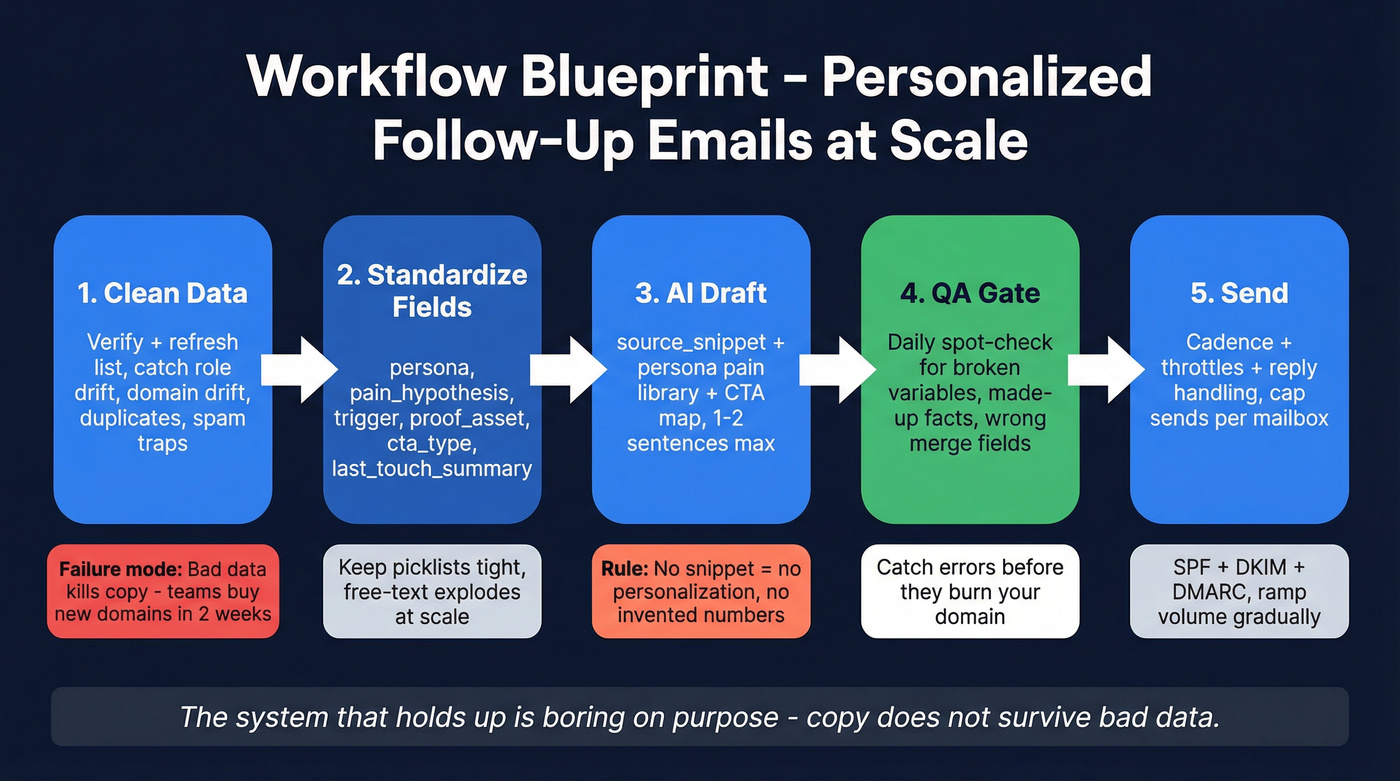
- Clean data (verified + refreshed)
- Standardize fields (so personalization is reusable)
- Generate drafts (from inputs, not guesses)
- QA (made-up facts + broken variables)
- Send (cadence + throttles + reply handling)
I've run bake-offs where the "best copy" lost because the list hard-bounced and inbox placement cratered. Copy doesn't survive bad data.
Step 1: Clean data (and the failure modes that kill scale)
Goal: keep your list accurate enough that personalization stays true and deliverability stays stable.
Common failure modes:
- Role drift: your "VP Marketing" is now "Head of Partnerships," and your pain hypothesis is wrong.
- Domain drift: company changed domains; you're emailing dead addresses.
- Catch-alls: you "deliver" but never reach a real inbox; you keep hammering a black hole.
- Spam traps/honeypots: one bad list source can poison a whole domain reputation.
- Duplicates: you accidentally double-tap the same person across sequences and spike complaints.
Operator rule: treat list hygiene like CI/CD. It's not a cleanup project - it's a loop. (More on the underlying problem: B2B contact data decay.)
One more thing people hate hearing: if your list source is sketchy, stop. I've watched a team try to "copy their way out" of a bad dataset, and two weeks later they were buying new domains because their old ones were toast.
Step 2: The minimum field schema for scalable follow-ups
Store fields that help you write Touch #2-#5 without re-researching.

| Field | Type | How to populate | Reused in |
|---|---|---|---|
| persona | picklist | ICP mapping | All touches |
| pain_hypothesis | text | persona->pain library | #1-#4 |
| trigger | text | hiring/funding/intent | #2-#4 |
| proof_asset | text/URL | case study by segment | #3 |
| cta_type | picklist | ask type (yes/no, intro) | #2-#5 |
| last_touch_summary | text | auto-log per send | #2-#5 |
| personalization_snippet_source | text | "site", "job post", etc. | QA |
| compliance_flags | picklist | region, opt-out, DNC | All touches |
Two rules that prevent chaos:
- Keep picklists tight. Free-text fields explode at scale.
last_touch_summaryis the secret weapon. It stops accidental repetition and makes follow-ups feel like a real thread.
Step 3: Generate drafts (LLM drafts that don't embarrass you)
Create two fields:
source_snippet(the only facts allowed)custom_message(1-2 sentences max)
Workflow:
- Rep/research step drops a defensible snippet (job post line, press release excerpt, product page copy).
- LLM generates
custom_messageusing only:source_snippet+ persona pain library + CTA map. - If
source_snippetis empty,custom_messagestays empty. No guessing.
This is how you get speed without made-up details, and it's the practical core of conditional logic email personalization: if the snippet exists, you allow a custom line; if it doesn't, the system automatically falls back to a safe template. (Related: conditional sequences.)
Step 4: QA (make it fast, not precious)
QA doesn't need to be heavy. It needs to be consistent.
- Spot-check 10-20 messages per batch (or per rep per day).
- Hard-fail rules:
- numbers/dates must appear in the snippet
- no invented customer names/logos
- no "congrats" unless explicitly supported
- variables must render correctly (
{{first_name}}etc.)
If QA fails, do not "fix the prompt for two hours." Fall back to context-only personalization and keep sending.
Step 5: Send (sequencer variables + reply handling)
Keep the body mostly static. Variables should be inserts, not the whole email.
Recommended variable set:
{{custom_message}}{{pain_hypothesis}}{{proof_asset}}{{trigger}}{{last_touch_summary}}
Reply handling rules (simple, effective):
- Positive reply: stop sequence, route to owner, book next step.
- Neutral ("not now"): tag reason + set a task for a future trigger.
- Negative: stop sequence immediately; add to suppression list if requested.
- OOO: pause and resume after return date.
Where Prospeo fits (the unsexy part that makes everything else work)
Prospeo is "The B2B data platform built for accuracy", and this is exactly where it earns its keep: before you send anything.
If you're trying to scale follow-ups, you need a list that stays true across touches #2-#5, not a spreadsheet that slowly rots while your sequence keeps firing. Prospeo gives you 98% verified email accuracy, handles catch-alls, filters spam traps/honeypots, and refreshes records every 7 days (while the industry average sits around 6 weeks). It also returns 50+ data points per contact with an 83% enrichment match rate, so your follow-up fields don't go blank halfway through the cadence.
Real talk: I'd rather ship a "boring" follow-up to a clean list than a beautifully personalized email to a list that bounces.

On this screen, you upload a CSV (or paste in a set of contacts), then you get a clear breakdown of valid, invalid, and catch-all results so you can remove landmines before they hit your sending domain. You'll also see enrichment fields populate (company details and contact attributes) so your CRM/sequencer variables have something real to pull from. Export a "send-ready" file where the columns map cleanly to your sequencer: email, first name, company, plus your custom fields like pain_hypothesis and trigger. Then push the cleaned list into your sending tool and keep the same fields powering touches #2-#5, instead of re-researching every follow-up.
Tooling (only what supports the workflow)
Pricing varies by seats and volume; ranges below are typical market bands for budgeting.
Tier 2 (you'll actually use these)
- Workflow automation (Clay): best when you want repeatable enrichment -> AI generation pipelines. Budget ~$150-$500/mo for small teams; more as volume grows.
- Sequencing (Instantly / Smartlead / Lemlist): practical SMB senders with warm-up, rotation, and deliverability controls. Budget ~$30-$200/user/month depending on plan and volume. (If you're comparing stacks, start with cold email outreach tools.)
- CRM (HubSpot / Salesforce): where your schema should live long-term. Budget ~$50-$200+/user/month for HubSpot (varies by hub/tier) and ~$75-$250+/user/month for Salesforce plus admin overhead.
Tier 3 (add only if you have a specific gap)
- Glue (Zapier / Make): move fields between tools. ~$20-$200/mo depending on tasks/ops.
- Company context (Clearbit / Crunchbase): firmographic enrichment for better context anchors. ~$100-$1,000+/mo depending on plan.
- Enterprise orchestration (Outreach / Salesloft): heavy-duty engagement + governance. Expect enterprise contracts; budget low four figures/month and up depending on seats and modules.
- Light mail merge (Mailmeteor): tiny volumes and simple merges. ~$10-$30/user/month.
- Email production ops (Stensul): marketing-style modular content at scale. ~$1,000+/mo.
- Meeting follow-up/coaching (Spiky): post-meeting summaries and coaching workflows. ~$50-$150/user/month.
Skip the fancy stack if you haven't nailed list hygiene and a sane cadence. You'll just automate the mess faster.
AI guardrails for follow-up personalization (anti-made-up-facts rules)
AI makes it easy to produce plausible nonsense at scale. That's how teams end up emailing a CFO about "congrats on the Series B" that never happened.
A Conference Board analysis summarized in Ragan found 72% of S&P 500 companies disclosed AI as a material risk in 2025, and reputation damage is a common risk category. In 2026, that risk is even more relevant for outbound because your mistakes land directly in someone's inbox, in writing, with your domain attached.
Treat AI like a junior assistant: fast, useful, and not allowed to publish without checks. (Common pitfalls: AI cold email personalization mistakes.)
Policy-style checklist (copy into your SOP)
- Input-only rule: the model can only reference facts present in
source_snippet. - No-snippet = no-personalization: blank snippet means blank
custom_message. - No numbers unless provided: dates, percentages, headcount, funding amounts must be in the snippet.
- Ban surveillance openers: no "I saw you..." phrasing.
- No personal attributes: don't infer age, gender, ethnicity, politics, health, etc.
- One sentence max: two only if sentence one is pure context and sentence two is the tie-in.
- Human QA sampling: review at least 10 messages per 100 leads (more after prompt changes).
- Fallback template: if QA fails, ship context-only personalization (role + industry pain).
Banned claims list (hard stop)
- "Congrats on your funding/launch/hiring" (unless snippet includes it)
- "I noticed you're using {tool}" (unless snippet includes it)
- Any invented customer names, logos, or metrics
- Any statement implying you tracked their behavior
If you do nothing else: require verifiable inputs. AI without inputs is improv.
Deliverability for personalized follow up emails at scale (hygiene + auth + throttles)
Deliverability isn't "did the email send." It's "did it land in the inbox." (Full playbook: email deliverability.)
Litmus draws the clean distinction: delivery is server acceptance; deliverability is inbox placement. Their guidance is also blunt: when inbox placement drops below ~90%, investigate immediately, because the slide usually continues if you ignore it.
Non-negotiables (pro/con view)
List hygiene (pro: fast wins / con: boring work)
- Pro: fewer bounces, fewer spam complaints, better reputation.
- Con: requires a loop, not a one-time cleanup.
Authentication (pro: required / con: easy to misconfigure)
- Pro: SPF/DKIM/DMARC alignment is table stakes in 2026.
- Con: one DNS mistake can crater a whole domain's performance.
Cadence + volume control (pro: protects reputation / con: slower ramp)
- Pro: gradual ramp keeps providers from flagging you.
- Con: impatient teams over-send and pay for it later. (More on limits: email pacing and sending limits.)
Operational deliverability controls (the stuff that actually saves domains)
This is where most teams lose. They focus on copy and ignore mechanics.
1) Send caps per mailbox (simple guardrails)
- New mailbox: 10-20 sends/day for the first few days.
- Warm mailbox: 30-50 sends/day is a safe working range for many teams.
- If you're pushing 80-150/day per mailbox, expect volatility unless your reputation is excellent and your list hygiene is ruthless.
2) Ramp schedule (don't spike)
- Increase daily volume 10-20% per day, not 2-3x overnight.
- If you change domains, treat it like starting over.
3) Mailbox pools + rotation
- Use multiple mailboxes per domain and rotate sends so no single mailbox looks like a cannon.
- Keep sequences consistent across the pool; don't blast identical copy from 20 inboxes at the same minute.
4) Bounce + complaint targets (operator thresholds)
- Hard bounce: keep <2%. If it hits 2%+, pause and fix your list.
- Spam complaints: keep <0.1%. If it rises, your targeting or volume is off.
- Unsubscribes: not always bad, but spikes signal mismatch or over-sending.
5) Reply handling affects deliverability
- Providers watch engagement. If you ignore replies (especially negative ones) and keep sending, you train the system that your mail is unwanted.
- Stop sequences immediately on negative signals and honor opt-outs fast.
Microsoft bulk sender rule (and the exact error you'll see)
Microsoft tightened enforcement for high-volume senders to Outlook.com consumer domains. If your domain sends >5,000 emails/day, you need SPF pass, DKIM pass, and DMARC (at least p=none) with alignment.
If you don't meet it, you'll see rejections like:
"550; 5.7.515 Access denied, sending domain [SendingDomain] does not meet the required authentication level."
Two references worth bookmarking:
Troubleshooting sidebar: if you see 550 5.7.515
- Confirm SPF includes your sending provider and passes.
- Confirm DKIM is enabled in your sending provider and the DNS keys match.
- Confirm DMARC exists and aligns with SPF or DKIM (ideally both).
- Check you're not sending from a subdomain with missing records.
- If DNS looks right but errors persist, rotate through provider settings - signing mismatches happen.
Quick operational tie-in: use verification results to enforce guardrails. If hard bounces exceed 2% on a batch, stop the sequence, re-verify, and only resume once the list is clean. (Related: 550 recipient rejected.)
Compliance-first follow-ups (US + UK/EU) you can operationalize
Compliance is where teams get sloppy because "everyone does cold email." That logic fails the moment you scale.
US: CAN-SPAM checklist (B2B included)
CAN-SPAM applies to commercial messages, including B2B. Penalties run up to $53,088 per violating email.
Operational checklist:
- No misleading From, To, Reply-To, or routing info
- No deceptive subject lines
- Don't pretend it's a personal thread if it's not
- Include a valid physical postal address
- Include a clear opt-out mechanism (unsubscribe link or reply-to opt-out)
- Honor opt-outs within 10 business days
- Keep opt-out working for 30 days after sending
- You're responsible even if a vendor sends for you
Reference: FTC's CAN-SPAM compliance guide
UK/EU: PECR + UK GDPR (the nuance people miss)
In the UK, PECR's email marketing rule doesn't apply to corporate subscribers (companies, LLPs, etc.). It does apply to individual subscribers like sole traders and some partnerships.
UK GDPR still applies when you process personal data. For B2B outreach, legitimate interests is the common basis, but only if your targeting is tight and your outreach is reasonably expected. (More detail: GDPR for sales and marketing.)
Make it operational (so it survives scale)
Add these to your process, not your "legal doc folder":
- Privacy notice mechanics: link your privacy policy in the footer or signature (especially for UK/EU outreach). Keep it one click away.
- Suppression list: maintain a single suppression list across tools (CRM + sequencer + enrichment). Don't rely on "unsubscribe in one platform."
- Objection handling: if someone objects (not just unsubscribes), tag it and stop processing for outreach immediately.
- UK list hygiene: tag records that look like individual subscribers (sole traders/partnerships) so you can apply stricter rules or exclude them.
- Data minimization: store only what you need for targeting and follow-ups; don't hoard personal details "just in case."
In 2026, the practical standard is simple: be relevant, be transparent, and make opting out painless.
Templates: personalized follow-ups you can reuse (touches #2-#5)
Templates aren't here to "sound unique." They're here to standardize the parts that matter (angle + CTA) so personalization is a small insert, not a rewrite.
One-screen rule: if it scrolls, it dies.
Touch #2 - New angle (reframe relevance)
Subject: Re: {{topic}} (quick check)
Hi {{first_name}} - quick follow-up.
Optional continuity line: last time I sent {{last_touch_summary}}. Different angle:
{{custom_message}}
Teams like {{company}} usually run into {{pain_hypothesis}} when {{trigger_or_context}}.
Open to a 10-15 min fit check this week, or is this better aimed at someone else?
-- {{sender_name}}
Fill-in fields: last_touch_summary, custom_message, pain_hypothesis, trigger_or_context
CTA options: "wrong person?", "worth a quick check?", "who owns this?"
Touch #3 - Proof (build belief)
Subject: Example for {{company}}
Hi {{first_name}} - quick follow-up with proof.
Optional continuity line: last time I sent {{last_touch_summary}}. Here's the proof point:
We helped {{peer_company_or_segment}} reduce {{metric_or_outcome}} by focusing on {{mechanism}}.
Want the 1-page breakdown of what we changed (and what we didn't)?
-- {{sender_name}}
Fill-in fields: last_touch_summary, peer_company_or_segment, metric_or_outcome, mechanism
CTA options: "want the 1-pager?", "should I send the teardown?"
Touch #4 - Timeline / priority (why now)
Subject: Timing question
Hi {{first_name}} - quick follow-up on timing.
Optional continuity line: last time I sent {{last_touch_summary}}. The timing question is:
Given {{trigger_or_timing}}, are you prioritizing {{initiative}} this quarter, or is it more of a "later" project?
If it's on the roadmap, I can suggest the smallest first step that doesn't create a big implementation lift.
-- {{sender_name}}
Fill-in fields: last_touch_summary, trigger_or_timing, initiative
CTA options: "this quarter or later?", "worth revisiting in {{month}}?"
Touch #5 - Breakup (close the loop, keep the door open)
Subject: Close the loop?
Hi {{first_name}} - I'm going to close the loop on this.
Optional continuity line: I sent {{last_touch_summary}} over the last couple of weeks.
If {{pain_hypothesis}} becomes a priority later, I'm happy to share what's worked for similar teams. Otherwise, I'll stop reaching out.
-- {{sender_name}}
Fill-in fields: last_touch_summary, pain_hypothesis
CTA options: "close the file?", "circle back in Q{{next_q}}?"
Measurement & testing loop (what "good" looks like + pause conditions)
If you're not testing, you're just collecting opinions.
Use a clean test unit: 100-300 leads in one tight segment (same persona + similar company size + similar region). Run one change at a time for a full cadence cycle.
Follow-up scorecard (track weekly)
| Metric | What "good" looks like | Pause / fix condition |
|---|---|---|
| Hard bounce % | <2% | >=2%: stop, re-verify, audit list source |
| Spam complaint % | <0.1% | >=0.1%: reduce volume, tighten targeting, rewrite angle |
| Unsubscribe % | stable/low | sudden spike: mismatch or over-sending |
| Inbox placement % | 90%+ | <90%: investigate immediately (auth, volume, list) |
| Reply rate % | trend up over iterations | flat: angle progression is stale |
| Positive reply % | rising share of replies | low: targeting/offer mismatch |
| Meeting booked % | consistent per segment | low: CTA too big or proof too weak |
Two operator notes:
- Replies-by-touch matters more than total replies. If touch #3 is dead, your proof is weak or irrelevant.
- Protect deliverability before chasing copy wins. A 1% improvement in inbox placement often beats a 1% improvement in wording.
Experiment checklist (keep it clean)
- Keep the same list source and verification standard
- Keep the same sending domain/mailbox pool
- Change only one variable per test
- Track replies by touch number (#1-#5), not just total replies
What to test (high leverage)
| Variable | Option A | Option B |
|---|---|---|
| Angle | pain-first | timeline-first |
| CTA | yes/no | 15-min call |
| Timing | Day 3/7/10 | Day 2/6/9 |
| Proof | logo | metric |
| Subject | same thread | new subject |
One useful data point from Belkins: AI improved first-message reply rates, but follow-up messages performed slightly better without AI (non-AI 3.91% vs AI 3.48%). The practical takeaway is simple: keep follow-ups plain, direct, and human.
Scaling follow-ups means storing role, firmographics, and tech stack for every lead - without re-researching. Prospeo enriches contacts with 50+ data points at a 92% match rate, giving you the context anchors this playbook demands.
Enrich once, personalize every touch - at $0.01 per email.
FAQ
How many follow-ups should I send in a cold sequence?
Run 4 touches over ~10 days, with an optional 5th breakup touch around Day 14-18. That's enough to capture most replies without dragging the sequence out for weeks. If you're still sending "just checking in" after that, your targeting or angle progression needs work.
What's the best follow-up cadence for B2B outreach?
Use Day 1 / Day 3 / Day 7 / Day 10, then an optional breakup touch on Day 14-18. This cadence scales cleanly, keeps pressure consistent, and forces you to bring a new reason to respond each time instead of repeating the same ask.
How do I personalize follow-ups without sounding creepy or fake?
Use context personalization (role, company situation, industry reality) and keep it to 1-2 concrete anchors, then move to a pain hypothesis and a specific CTA. Avoid "I saw you..." openers and never reference personal details or browsing behavior - those lines spike distrust and replies drop.
Should I verify emails before sending follow-ups at scale (and with what)?
Summary: the system for personalized follow up emails at scale
Personalized follow up emails at scale isn't about clever lines. It's a repeatable system: verified data, a fixed Day 1/3/7/10 cadence, a small set of reusable fields, AI that's constrained to real snippets, and lightweight QA that prevents embarrassing mistakes.
Get those basics right and your follow-ups start sounding like a normal human wrote them, because a normal human did: you, with a system behind you.