How to Ask for the Right Contact Person (Without Sounding Lazy)
You send a clean email. The reply comes back: "Not my area."
Now you've got a choice: write a reroute ask that takes them one line... or write something that feels like homework and gets ignored.
This is how to ask for the right contact person so people actually help you.
What you need (quick version)
Use this checklist when you're asking for the right contact person. It keeps you brief, specific, and easy to help.
Checklist (copy this into your notes):
- 1 sentence of context: what you're trying to solve + for whom
- 1 sentence of relevance: why you picked them (role/team/company)
- A micro-ask that's a one-line reply
- A "permission line" so they don't feel exposed
- A thank-you that closes the loop (no guilt, no pressure)
The fastest reroute asks for two things: owner's name + best way to reach them. That's it. Not a forward request. Not a "who should I talk to about anything related to revenue." Name + channel.
3 core patterns that win replies:
- The "two-field form": "Who owns X + what's the best way to reach them?"
- The "either/or": "Is it you, or is it [role]?"
- The "permission + exit": "Can I mention you pointed me there? If not, no worries."
Why people ignore "wrong person" messages
Most "wrong person" replies aren't personal. They're triage.

When someone sees your reroute request, they're deciding whether helping you will be:
- Lazy: "You didn't do basic homework."
- Entitled: "You're assigning me tasks I didn't agree to."
- Template spam: "I've seen this exact line 500 times."
Here's the thing: they don't know you, so they don't owe you internal navigation. They're also protecting their time and their org's attention, and if your ask feels like "forward this to whoever," they'll opt out.
Your goal isn't to "get forwarded." Your goal is to make replying a one-line answer.
How to ask for the right contact person (the 10-second reroute formula)
A reroute message should read like a tiny form with three fields.
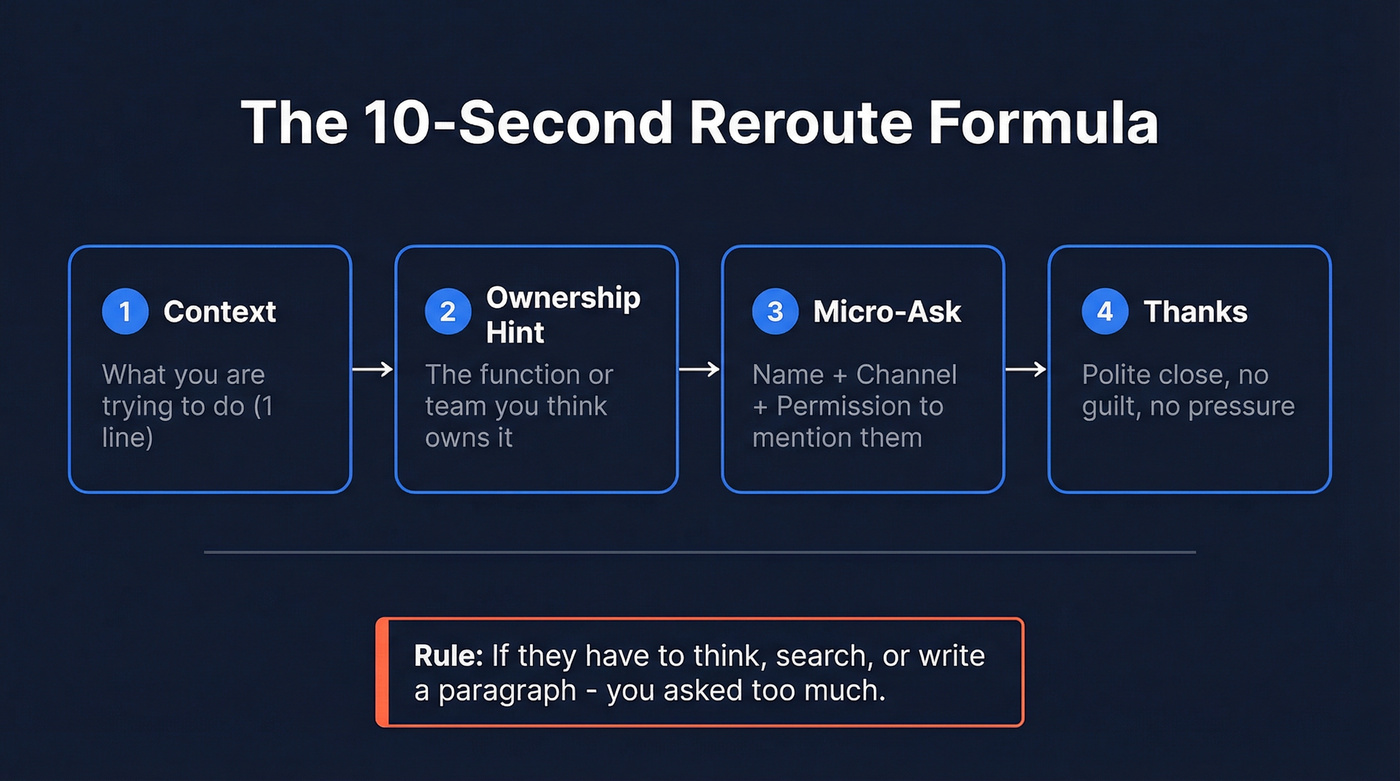
The micro-ask = request name + best channel + permission to mention them. That's the whole formula.
The framework
- Context (1 line): what you're trying to do
- Ownership hint (1 line): the function/team you think owns it
- Micro-ask (1 line): name + channel + permission
- Thanks (1 line): polite close
Rule: your question should require no org-chart explanation. If they have to think, search, or write a paragraph, you asked too much.
Mini examples
Example A (vendor/outbound): "Quick one - who owns security tooling evaluations on your side?" "Is that your team, or someone in IT/IT/SecOps?" "If it's not you, what's the right person's name and best email to reach them - and can I mention you pointed me there?"
Example B (partnership): "I'm trying to reach whoever owns co-marketing partnerships." "If that's not you, who's the owner + what's the best channel to contact them? Happy to keep it brief."
Example C (internal request): "I'm trying to confirm who approves budget for [category]." "If I've got the wrong person, who should I speak with, and is email or chat better?"
Subject lines that get rerouted (and the ones to stop using)
Subject lines matter more here than in a normal cold email because your goal isn't "sell." It's "get a human to route you."
Do: make it easy to categorize
Good subject lines are:
- Specific enough to route
- Neutral (not salesy)
- Short

Subject line bank (safe, reroute-friendly):
- "Quick question on {topic}"
- "Who owns {topic} at {Company}?"
- "Point me to the right person?"
- "{Topic} owner?"
- "Routing question: {topic}"
- "Best contact for {topic}"
- "{Department} decision owner?"
- "Where should I direct this?"
- "{Topic} - right person?"
- "Who handles {topic}?"
Don't: use the delete-on-sight classics (and why)
Real talk: "Appropriate Person?" doesn't work in most cases. I've watched a CEO brag about an inbox rule that deletes anything with "appropriate person" in the subject, and honestly, I get it.
It's not that the phrase is rude. It's that it's a dead giveaway you copied a template, and people pattern-match it as "cold email I don't want to deal with." Even if deliverability's fine, humans still delete stuff that looks like it came from a swipe file from a decade ago.
Banned subject lines (stop using these):
- "Appropriate Person?"
- "To whom it may concern"
- "Forward this to the right person"
Hot take: if your subject line sounds like a 2014 sales template, you're not "being polite" - you're volunteering to be ignored.

Every reroute email is a signal you started with the wrong person. Prospeo's 300M+ profile database with 30+ filters - job title, department, seniority - lets you skip the guesswork and land in the right inbox on the first send. 98% email accuracy means no bounces, no awkward "not my area" replies.
Stop asking strangers for directions. Find the decision-maker yourself.
Choose-your-situation scripts (copy/paste)
Before the scripts, use the table to pick the right pattern fast.
Best line to use by scenario
| Scenario | Goal | Best one-liner | What to include | What to avoid |
|---|---|---|---|---|
| Cold email | Get routed | "Who owns X + best email?" | name + channel + OK to mention | "Appropriate Person?" |
| Large org | Fast reply | "Who handles {dept}?" | dept + channel | long context |
| Shared inbox | Find owner | "Who owns this topic?" | owner or right alias | "please forward" |
| Warm connector | Easy route | "Forward to {{target}}? CC me" | only if they know target | "forward to whoever" |
| Gatekeeper call | Get name | "Who's best for X?" | role + ext/email | pushy tone |
| Follow-up | Nudge reroute | "Land right? I can resend" | 1 new routing detail | "just checking in" |
| AP/payment | Reach AP | "Who in AP owns invoice #?" | invoice + due date | threats early |

Decision tree: pick your script in 20 seconds
- Step 1 - What channel are you using?
- Email -> use the micro-ask templates below.
- Phone -> use the gatekeeper script (fastest for same-day routing).
- DM -> use the 1-sentence context + micro-ask version.
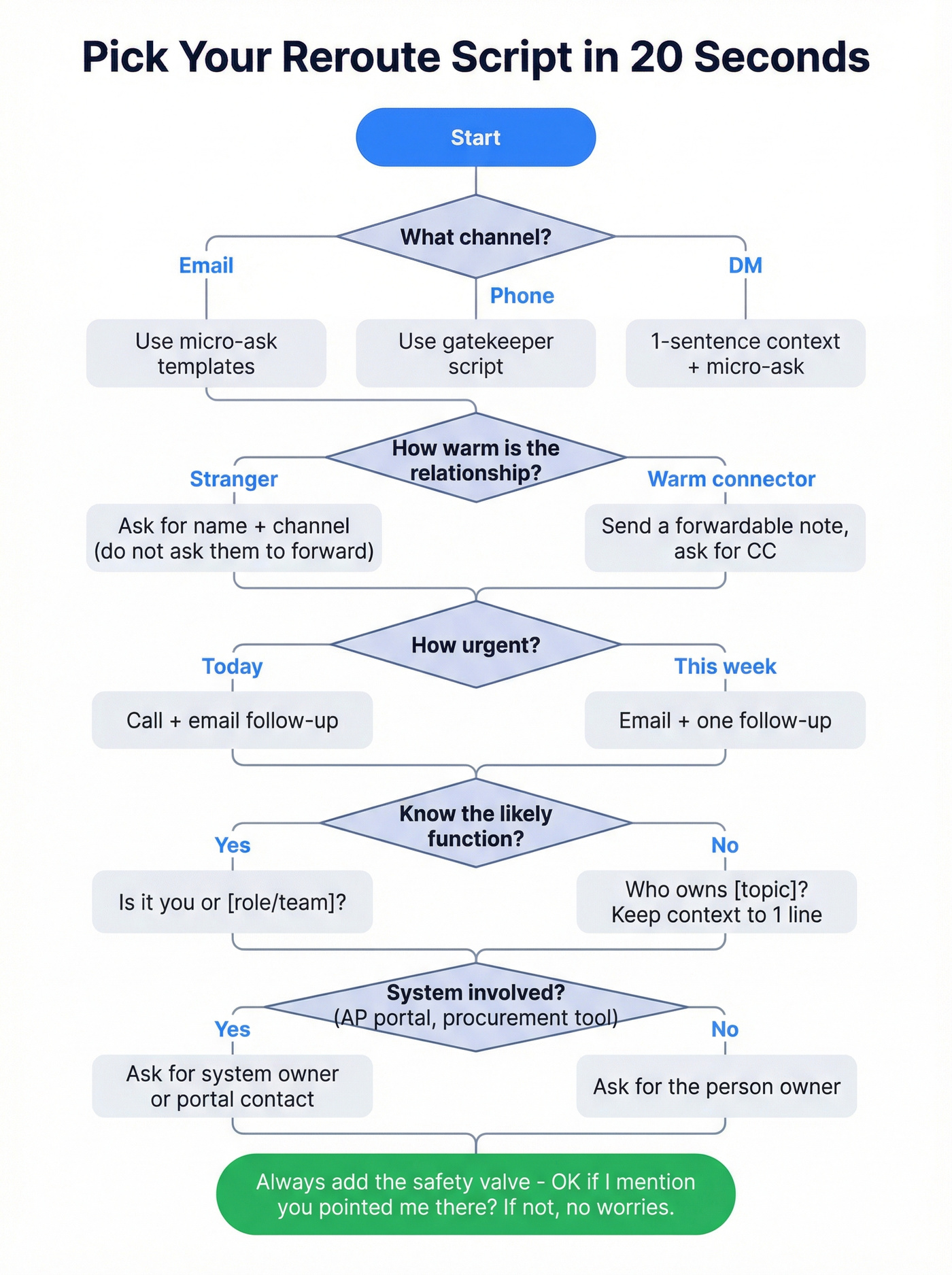
Step 2 - How "warm" is the relationship?
- Stranger/bystander -> ask for name + channel (don't ask them to forward).
- Warm connector (they know the target) -> send a forwardable note and ask for CC.
Step 3 - How urgent is it?
- Today -> call + email follow-up.
- This week -> email + one follow-up.
Step 4 - Do you know the likely function?
- Yes -> "Is it you or [role/team]?"
- No -> "Who owns {topic}?" (keep context to one line)
Step 5 - Is there a system involved? (AP portal, procurement tool, support desk)
- Yes -> ask for the system owner/portal contact (not just a person).
- No -> ask for the person owner.
Step 6 - Always include the safety valve
- "OK if I mention you pointed me there? If not, no worries."
Email scripts: ask for the right person without creating work
Cold email to a bystander (simple reroute ask)
Skip this if you're emailing a friend or someone who actually knows the owner. In that case, jump to the forwardable section and make it easy for them to help you.
Template (baseline):
Subject: Point me towards the right person
Body: Hi {{first_name}}, I'm trying to figure out who is in charge of {{topic}} at {{company}}. Would you mind pointing me towards the right person, and the best way I might get in touch with them? Thanks, {{your_name}}
Template (improved with the micro-ask):
Subject: Who owns {{topic}} at {{company}}?
Body: Hi {{first_name}} - quick one. I'm trying to reach the person who owns {{topic}} ({{1-line context}}). If that's not you, what's the owner's name + best email to reach them? And is it OK if I mention you pointed me their way? Thanks - {{your_name}}
Large org / unclear department (ultra-short routing email)
When you're emailing into a big company, short wins because it's easy to route.
Template (ultra-short routing line):
Subject: {{department}} owner?
Body: Hi {{first_name}} - could you tell me who handles decisions in {{department}} and how can I connect with them? Thanks, {{your_name}}
Template (slightly warmer, still short):
Subject: Best contact for {{topic}}
Body: Hi {{first_name}}, I'm trying to reach whoever owns {{topic}} at {{company}}. Who's the right person, and is email the best way to reach them? -- {{your_name}}
Why I like the second one: "is email best?" is answerable even if they don't know the exact address, and it nudges them to give you the alias if that's how their org works.
Shared inbox or generic alias (support@ / info@ / billing@)
Generic inboxes are tricky because "who owns this?" can sound like blame. Make it about routing, not fault.
Template (owner + best alias + two options):
Subject: Routing question: {{topic}}
Body: Hi - quick routing question. Who owns {{topic}} internally, and what's the best email/alias to reach them?
Option A: reply with their name + best address.
Option B: tell me the right alias and I'll resend there. Thanks, {{your_name}}
Template (permission line, no forwarding ask):
Subject: Who should I direct this to?
Body: Hi - I think this belongs with {{department}}. Who's the right owner, and can I mention you directed me? Thanks, {{your_name}}
Customer support routing (when you need the ticket owner, not "someone")
This is the version I've used when I'm stuck in support loops. It's firm, but it's not rude.
Template (ticket owner + escalation path):
Subject: Routing: {{issue}} (ticket {{#}})
Body: Hi {{first_name}} - quick routing question. Who owns ticket {{#}} / {{issue}} on your side? If it's not you, what's the owner's name + best email to reach them? If there's an on-call/escalations alias, that works too. Thanks - {{your_name}}
Procurement / vendor onboarding (routing to the "paperwork owner")
Sales gets blocked here all the time because "procurement" isn't one person - it's a process, and half the time the real owner is a portal.
Template (procurement owner + system):
Subject: Vendor onboarding owner?
Body: Hi {{first_name}} - I'm trying to route a vendor onboarding request ({{1-line context}}). Who owns onboarding/procurement intake, and what's the best channel - procurement email, portal, or a specific person? Thanks - {{your_name}}
Internal/academia/formal request (non-sales tone)
Sometimes you're not selling. You're asking a formal question and you genuinely don't know the owner. Use language that sounds professional, not "growth hacker."
Template (formal, micro-ask):
Subject: Request for the correct contact - {{topic}}
Body: Hello {{name}}, If you're not the right contact for {{topic}}, could you please share the name of the person who is, and the best way to reach them? Thank you, {{your_name}}
Multi-threading without spamming (emailing 2-3 plausible owners)
If you don't know the owner, emailing 2-3 potential contacts is often faster than waiting a week for a reroute that never comes. I've seen teams waste weeks "politely" emailing one person at a time while the org chart stayed ambiguous, the project moved, and the original ask quietly died in someone's inbox.
The key is to acknowledge the overlap so nobody feels like you're blasting the company.
Template (multi-thread, respectful):
Subject: {{topic}} owner at {{company}}? Hi {{first_name}} - I'm reaching out to a couple folks who looked closest to {{topic}}. You may already be looped in - no need to forward anything. If you're not the right owner, who is (name + best email), and can I mention you pointed me there? Thanks, {{your_name}}
Template (either/or with role):
Subject: Quick routing question Hi {{first_name}}, is {{topic}} owned by you, or by someone in {{team/role}}? If it's someone else, what's their name + best channel to reach them? -- {{your_name}}
When you have a connector: use a forwardable email (warm connector only)
A forwardable email is different from asking for an intro.
- Intro email: keeps you in the loop automatically.
- Forwardable email: you send a ready-to-forward note; the connector forwards it when they feel good about it.
Forwardables win when your connector's busy and you want to reduce their effort.
One quick warning: don't send a forwardable to someone who barely knows you and doesn't know the target. That's the fastest way to make your request feel like an obligation.
Step-by-step
- Write it so it can be forwarded as-is (no inside jokes, no "as discussed")
- Keep it skimmable: 4-8 lines
- Make the ask explicit: "Could you forward this to X?"
- Ask for visibility: "Please CC me so I can follow up directly."
Template 1 (classic forwardable)
Subject: Quick favor - forward to {{target_name}}? Hi {{connector_name}}, Could you forward the note below to {{target_name}}? It's about {{1-line value}}. If you can CC me, I'll take it from there.
-- Forwardable note -- Hi {{target_name}}, I'm {{your_name}} from {{company}}.
Reason I'm reaching out: {{1 line problem/value}}. If it's relevant, open to a 10-minute chat next week? Thanks, {{your_name}}
Template 2 (more direct, less "salesy")
Subject: Can you route this to {{target_name}}? Hi {{connector_name}} - quick one. Could you forward this to {{target_name}} (they own {{topic}})? If you CC me, I'll follow up directly and keep it brief.
Phone + voicemail scripts for gatekeepers (fast routing)
Email reroutes are great. Phone reroutes are faster when you need an answer today.
Smarte recommends calling in the windows 8-9am or 4-5pm.
In our experience, gatekeepers respond best when you sound like a normal person with a specific routing question, not a pitch and not a performance.
Gatekeeper script (treat them as an ally)
Opener (say this exactly): "Hi - could you help me for a second? I'm trying to reach the person who owns {{topic}}."
Then: "What's the best name for that - and is it better to reach them by direct line or email?"
If they ask "what's this about?": "Totally fair - it's about {{7-word context}}. I'm just trying to make sure I'm not bothering the wrong team."
Timing tip: pause after the first sentence. Silence is your friend.
Voicemail variant (15 seconds)
"Hi {{name}}, this is {{your_name}}. Quick routing question - who's the right person for {{topic}}? If it's not you, could you text or email me the owner's name and best contact? {{phone/email}}. Thanks."
How to ask for the right contact person by DM (scripts)
DMs are where people over-explain. Don't. Write like you're trying to fit on one screen and make it easy to answer.
Constraints that matter:
- 1 sentence of context
- 1 micro-ask
- 1 polite close
DM script pack (copy/paste)
Peer (same level): "Quick routing Q: who owns {{topic}} at {{company}}? If it's not you, what's the owner's name + best email? OK to mention you sent me? Thanks."
Exec assistant: "Hi {{name}} - can you point me to the right owner for {{topic}}? I just need the name + best way to reach them (email vs phone). Appreciate it."
Recruiter/admin (not the buyer): "Hey {{name}} - I'm trying to reach whoever owns {{topic}}. Who's the right person, and what's the best channel to contact them? Thanks."
Shared inbox operator: "Quick one: who owns {{topic}} requests? Reply with the owner's name + best alias and I'll resend there. Appreciate it."
Follow-ups that get rerouted (without "just checking in")
"Just checking in" is a self-own. It adds zero value and it reminds them you're waiting.
Use follow-ups that reduce friction ("I can resend"), add a tiny new detail (so it's not pure nagging), and keep the reroute micro-ask intact.
Use / skip
Use: "Did my note last week land in the right place? If not, I can resend."
Skip: "Bumping this." "Any updates?" "Following up on the below."
Mini swipe file (4 follow-up subject lines that aren't "Follow-up")
- "Did this land with the right team?"
- "Routing check on {{topic}}"
- "Worth a quick redirect?"
- "Wrong inbox?"
Follow-up template (value-add + reroute)
Subject: Did this land with the right team? Hi {{first_name}} - quick check: did my note last week land in the the right place? If not, I can resend.
Context: {{1 new detail that helps routing - product category, department, region}}. If you can share the owner's name + best email, I'll take it from there. Thanks, {{your_name}}
Common mistakes (and the exact rewrite)
These are the lines that kill replies. Fix them once and your response rate jumps.
Mistake: "Can you forward this to the right person?" Rewrite: "If it's not you, what's the owner's name + best email? I'll reach out directly."
Mistake: "Who should I talk to about revenue?" (too broad) Rewrite: "Who owns {{specific thing}} ({{1-line context}})? Name + best email is perfect."
Mistake: "Are you the right person?" (sounds like a competence test) Rewrite: "Is {{topic}} owned by you, or by someone in {{team/role}}?"
Mistake: "Just checking in..." Rewrite: "Did this land with the right team? If not, I can resend to the right owner."
Mistake: No permission line Rewrite: "OK if I mention you pointed me there? If not, no worries."
One more that drives me nuts: writing three paragraphs of context and then ending with "Who should I talk to?" If you can't say what you want in one line, you don't know what you want yet.
If this is about payment: ask for Accounts Payable the right way
Payment emails are where "wrong person" gets expensive. You don't want to sound like a debt collector on day 1, but you also can't be vague.
Checklist (include these identifiers)
Include:
- Invoice number + invoice date
- Due date
- Amount due + currency
- Payment details (link, bank info, portal)
- Account info (customer name, PO if relevant)
- Any other outstanding invoices (if applicable)
If they use a third-party AP processor or payment portal, don't ask "who pays this?" Ask for the portal owner or remittance contact: the person who can actually route it inside the system.
Template (context -> amount/due date -> ask -> options)
Subject: Payment reminder: Invoice {{#}} due {{due_date}} Hi {{name}}, quick routing question - who in Accounts Payable handles invoice {{#}} for {{company}}? The outstanding balance is {{amount}}, due {{due_date}}. If you can share the right AP contact (name + email), I'll send the payment link and details directly. If it helps, we can do pay-in-full or a short payment plan. Thanks, {{your_name}} | {{phone}}
Escalation ladder subject lines
- "Payment reminder: Invoice {{invoice#}} due {{due_date}}"
- "Payment reminder: invoice is now 14 days overdue"
- "Payment reminder: invoice is now 30 days overdue"
- "Final escalation notice - payment overdue for {{invoice#}}"
Escalation tip: at 14/30 days overdue, route to AP leadership and loop your internal account owner. Keep the email factual, not emotional.
Prevent this next time: stop guessing with fresher contact data
Wrong-person outreach usually isn't a copy problem. It's a data problem: stale org charts, job changes, and generic titles that hide ownership.
A simple workflow:
- Filter likely owners by role/department and company signals in the B2B leads database.
- Use the Chrome Extension to pull verified contact data from web sources or internal tools in one click.
Pricing's self-serve: free tier (75 emails + 100 extension credits/month), about $0.01/email, 10 credits per mobile, no contracts.

You don't need a reroute script when you already have the right contact's verified email and direct dial. Prospeo's Chrome extension - used by 40,000+ salespeople - pulls verified emails and phone numbers from any company page or LinkedIn profile in one click, for about $0.01 per email.
Replace reroute emails with direct conversations. Find any contact in seconds.
FAQ
How do you ask "are you the right person?" without sounding rude?
Ask a routing question, not a competence question: give one line of context, then ask for the owner's name and best channel. Add a permission line ("OK to mention you?") and a graceful exit ("If not, no worries"). It reads respectful, not accusatory.
What should you include in a reroute request to get a fast reply?
Include a 1-line context, the function you think owns it, and a micro-ask for three things: the owner's name, the best channel (email/phone/alias), and permission to mention the helper. The best reroute asks are a single lookup and a one-line reply.
Is it OK to ask someone to forward your email internally?
Yes, but only when it's a warm connector who knows the target. With a bystander, "please forward this" triggers the "not my job" reaction. If you do ask, make it forwardable: short, self-contained, and request they CC you so you can follow up directly.
How many times should you follow up if you might have the wrong contact?
Follow up 1-2 times over 5-10 business days, each time making the reroute easier and adding one new routing detail (department, region, product line). Use "Did this land in the right place? If not, I can resend," instead of "just checking in."
How can you avoid emailing the wrong person in the first place?
Build a shortlist of likely owners from fresh data, then verify emails and mobiles before outreach. Prospeo refreshes records every 7 days, verifies emails at 98% accuracy, and includes 125M+ verified mobile numbers, so you target current owners instead of last quarter's org chart.
Sources (the ones worth your time)
- Woodpecker: https://woodpecker.co/blog/why-your-follow-up-is-getting-ignored/
- Hunter template: https://hunter.io/templates/networking/referral/point-me-towards-the-right-person
- Commsor forwardable email guide: https://www.commsor.com/post/forwardable-email
Quick close: the simplest way to get rerouted
Pick one pattern: two-field form, either/or, or permission + exit.
Keep the ask to name + best channel (not "please forward").
Follow up once with a new routing detail and "I can resend."